Insurance Company Professional Website Template
Shield is a single-column, click-through pet insurance landing page built for analytically minded pet owners. It pairs a bold flush-left headline with monospaced actuarial data, an animated claims cost chart, a three-tier plan comparison grid, and a breed-specific risk lookup. The design follows a Corporate Precision theme with a Monochrome Steel palette.
by Rocket studio
Quick summary
Shield is a precision-built pet insurance landing page for data-driven pet owners. It opens with an oversized flush-left headline and a cold monospaced cost callout. From there, the scroll moves through an animated claims chart, a clean plan comparison grid, and a breed risk lookup tool. Every section narrows the reader from industry data down to their own animal.
Who this template is for
This template is built for pet insurance providers whose buyers do their homework. It speaks directly to households that compare deductibles, read policy fine print, and treat vet costs as a financial planning line item.
- Pet insurance brands targeting dual-income, analytically minded households
- InsurTech providers who want their landing page to feel as credible as a financial instrument
- Operators who need a high-interactivity, click-through page that routes visitors to a separate quote engine
What problem this template solves
Most pet insurance pages lead with emotional photography and generic bullet points. Shield is built for buyers who find that approach unconvincing. These are visitors who already know a single emergency vet visit can cost thousands of dollars and want proof that a policy is worth the premium.
- Generic insurance pages fail buyers who need data, not lifestyle imagery
- Visitors who compare deductibles in spreadsheets abandon pages that lack plan-level specificity
- Without breed-level risk context, abstract coverage tiers feel irrelevant and easy to dismiss
What you get with this template
Shield delivers a fully structured, single-column landing page flow designed around progressive data disclosure. The page builds trust incrementally, starting with macro cost statistics and ending with the visitor's own breed profile.
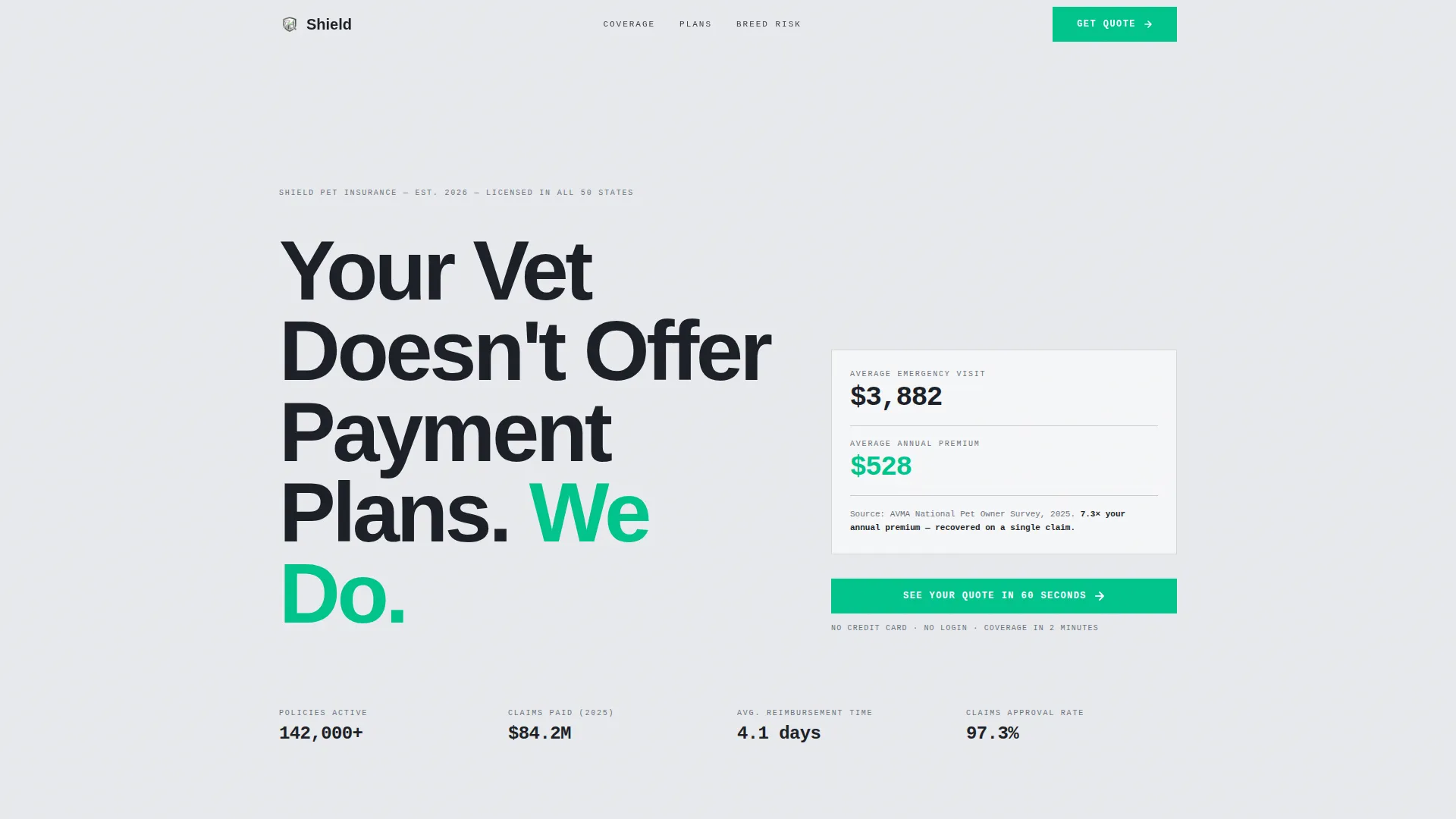
- A hero section with a giant flush-left headline, monospaced data callout, and a single frictionless call-to-action button
- An animated bar chart section, a three-tier plan comparison grid, and a searchable breed risk index
- A persistent fixed call-to-action bar that appears after the first scroll, keeping the quote entry point always visible
Feature list
This template includes purpose-built interactive and visual components. Each one is designed to move a skeptical, detail-oriented visitor closer to clicking through to the quote engine.
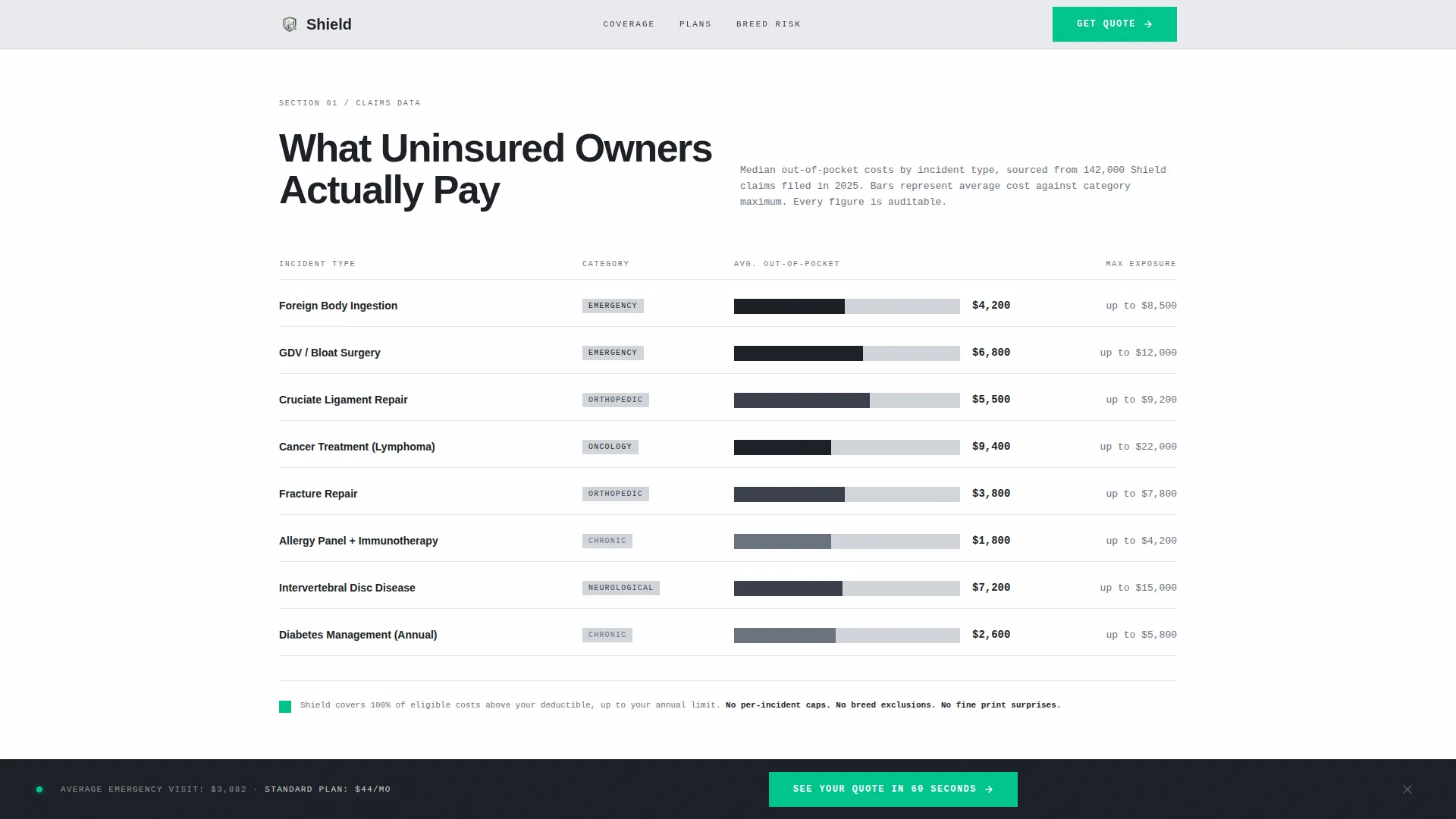
Animated Claims Cost Chart
A scroll-triggered bar chart reveals out-of-pocket vet costs by incident type. Each bar animates into view as the visitor scrolls, displaying its dollar figure on reveal. Incident types include foreign body removal, cancer treatment, and fracture repair.
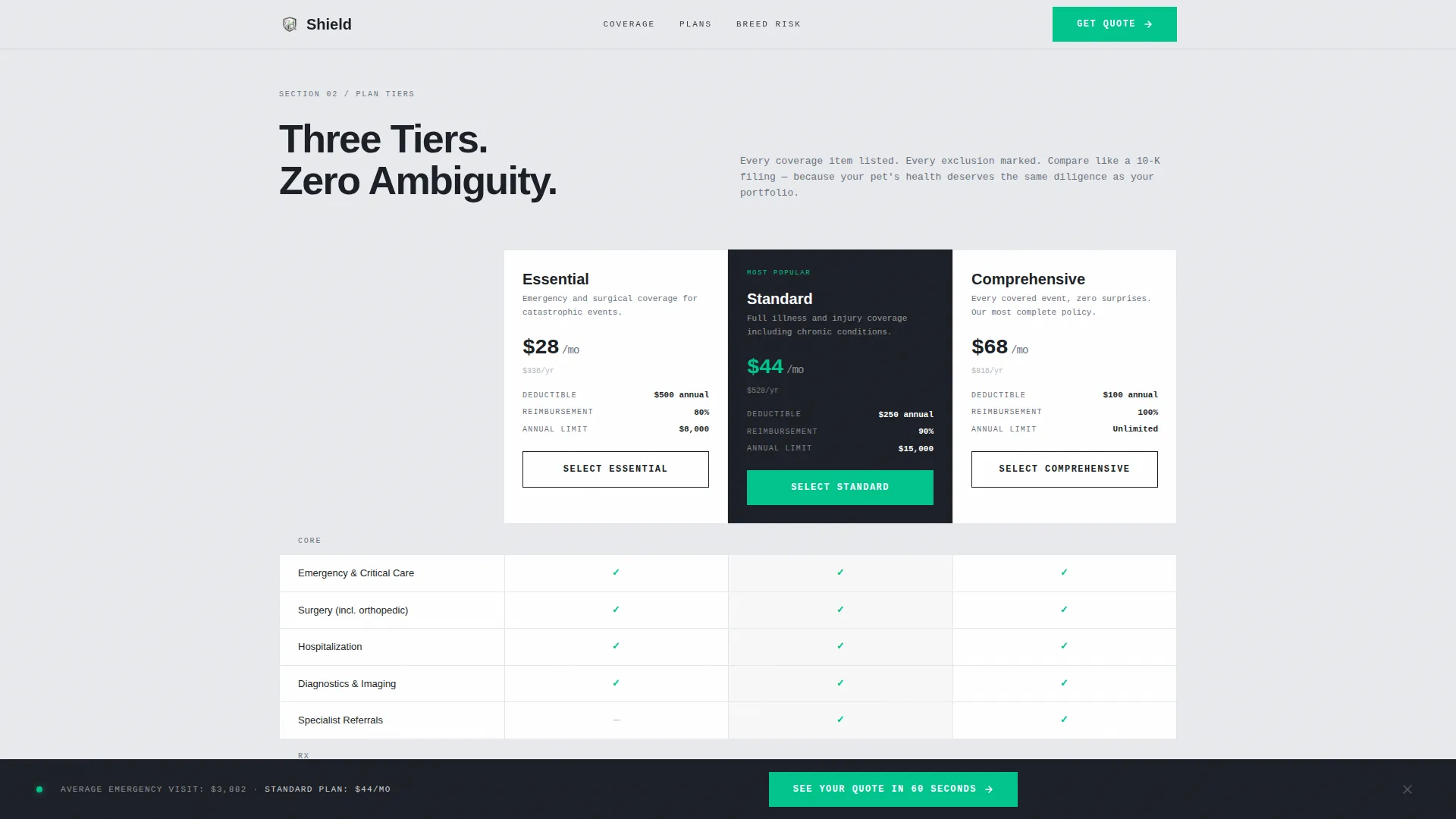
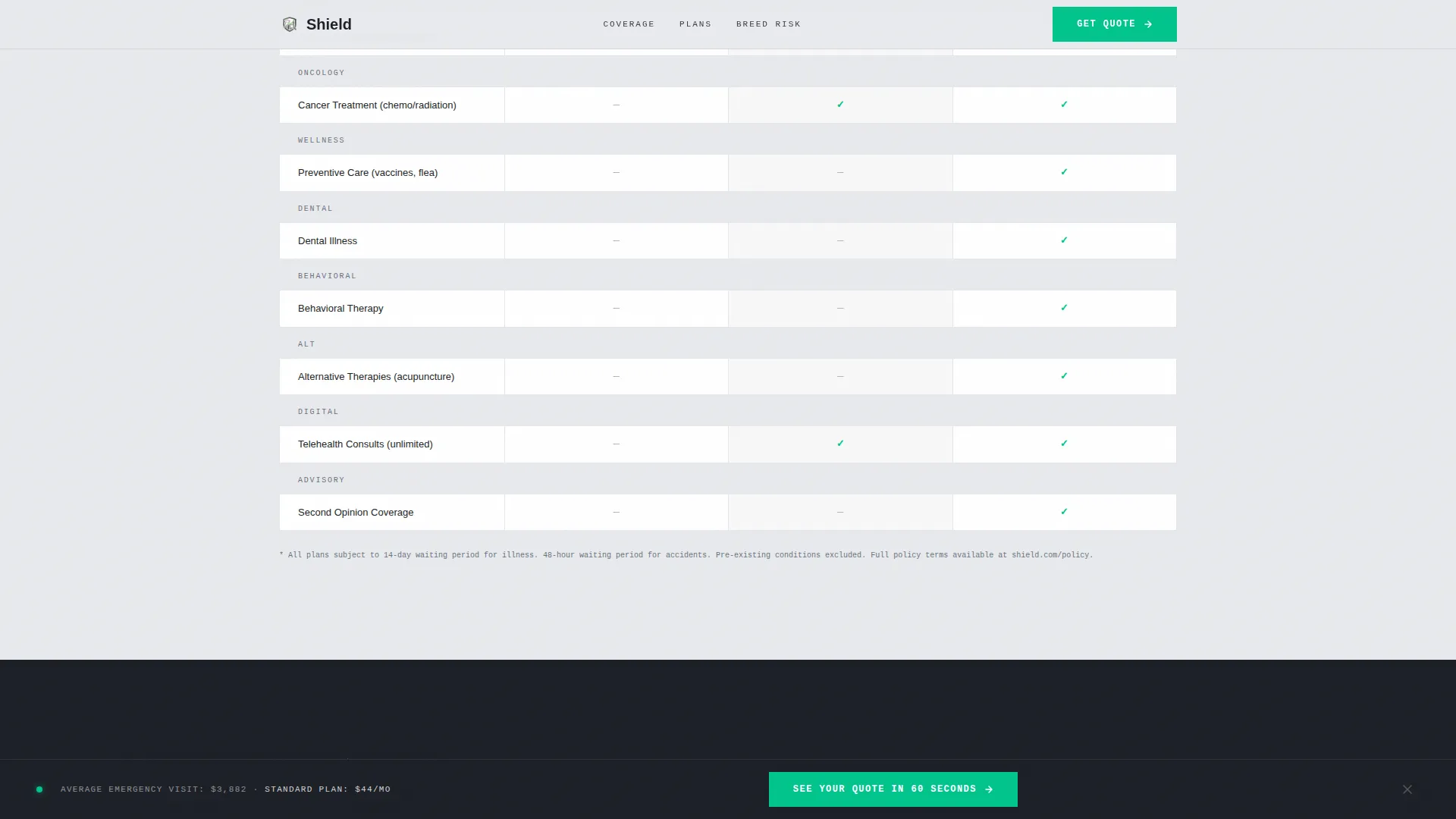
Three-Tier Plan Comparison Grid
Three coverage tiers are laid out in a clean, structured grid. Included items are marked with audit-green checkmarks. Exclusions appear in muted gray strikethrough text, giving the comparison a 10-K filing level of clarity.
Breed Risk Index Lookup
A searchable input field lets visitors type their dog or cat breed. The tool surfaces the three most common insurance claims for that breed. This turns abstract policy language into a personally relevant actuarial snapshot.
Persistent Call-to-Action Bar
After the visitor scrolls past the hero section, a fixed bottom bar appears. It carries the primary call-to-action at all times. The bar stays visible through the entire scroll, so the quote entry point is never more than one click away.
Giant Headline Hero Section
The header uses an oversized, tightly kerned sans-serif headline flush-left on a silver background. A small monospaced data callout sits to the right, contrasting the emotional headline with hard cost figures. No hero image or illustration is used.
Page sections overview
| Section | Purpose |
|---|---|
| Hero Headline | Pairs an emotional flush-left headline with a monospaced cost callout and primary call-to-action |
| Claims Cost Chart | Animated bar chart reveals out-of-pocket vet costs by incident type on scroll |
| Plan Comparison Grid | Three-tier coverage table with audit-green checkmarks and gray exclusion strikethroughs |
| Breed Risk Index | Searchable lookup surfaces the top three claims for any breed entered |
| Persistent call to action Bar | Fixed bottom bar keeps the quote call-to-action visible after the first scroll |
| Footer | Linear single-row footer with essential links |
Design & branding system
Shield uses a Monochrome Steel color palette built around corporate finance aesthetics. Typography is split between a tight sans-serif for headlines and a monospaced face for all data points, reinforcing the industry-report tone.
- Colors: cold-rolled silver (#D1D5DB) backgrounds, foundational charcoal (#1C1F26) for body text and dividers, brushed gunmetal (#3A3F4B) for secondary containers, and audit-green (#00C48C) reserved exclusively for calls-to-action and positive data values
- Typography: Manrope for tightly kerned headlines and Jebrains Mono for all numerical data points and callouts
- White space is used structurally throughout, not decoratively, keeping every element purposeful and dense
Mobile & speed optimization
Shield is built desktop-first, reflecting the spreadsheet-native behavior of its core audience. Full mobile support is included so the page performs cleanly on any screen size.
- Desktop-first layout designed for large-screen, detail-oriented users who read full plan comparisons
- Full mobile-responsive support ensures the breed lookup, plan grid, and persistent call-to-action bar all function on smaller viewports
- Interactive components use intersection observer-based triggers and client-side rendering to keep static sections lean
How this template helps you convert
Shield is structured as a data-driven funnel that earns the click rather than demanding it. Each section adds a layer of evidence before the visitor ever sees the call-to-action again.
- The hero section creates immediate tension between an emotional gut-punch headline and cold actuarial math, establishing credibility before the visitor scrolls
- The scroll deepens commitment by moving from industry-wide cost data to plan-specific comparison to the visitor's own breed risk profile, so the quote click feels like a logical next step rather than a sales prompt
- The persistent call-to-action bar ensures the quote entry point is always one click away without interrupting the reading experience
Other information about this template
Shield is categorized under Finance and Insurance, specifically the pet insurance niche. It is designed as a click-through landing page that routes to a separate quote engine, keeping the landing page itself free of form fields.
- Template style: Single Column Flow with a Corporate Precision theme
- Creative direction: Industry Report, the scroll reads like a white paper with escalating data density
- Animation level: Medium, using scroll-triggered reveals, staggered text, and animated counters
- Interactivity level: High, featuring the breed search lookup, animated bar chart, and persistent fixed call-to-action bar
- Localization: United States market, USD currency, American veterinary cost figures used throughout
- The header concept is Giant Headline Left, a format that reserves the dominant visual weight for the headline rather than imagery
- This template suits pet insurance providers who want to differentiate on analytical credibility rather than emotional branding
Theme
Corporate Precision
Creative direction
Industry Report
Color system
Monochrome Steel
Style
Single Column Flow
Direction
Click-Through
Page Sections
Animated Claims Cost Chart
Three-tier Plan Comparison Grid
Breed Risk Index Lookup
Persistent Call-to-action Bar
Giant Headline Hero Section
Related questions
Does this landing page include a quote form?
Can I customize the plan tiers in the comparison grid?
How does the breed risk index work?
Is this template suitable for cat insurance as well as dog insurance?
What typography does this template use?



