Real Estate Agency Privacy Policy & Data Terms Website Template
Shield is a single-page real estate privacy policy landing page built on a Data Command theme. It uses a Carbon Fiber color system, a Feature Tab Switcher header, and a structured comparison grid to turn a legal requirement into a transparent, trust-building experience for homebuyers, listing agents, and compliance officers alike.
by Rocket studio
Quick summary
Shield transforms a real estate agency's privacy policy into a security dashboard. The landing page uses a dark Carbon Fiber palette, tabbed data grids, and a side-by-side comparison grid to make every data practice visible and verifiable. Visitors leave the page feeling in control, not confused.
Who this template is for
Shield is built for real estate professionals and organizations that need to communicate data practices clearly and credibly. It serves teams who treat compliance as a trust signal, not just a legal checkbox.
- Real estate agencies that handle mortgage pre-qualification forms, saved searches, and MLS data
- Compliance officers at partner brokerages running vendor audits before integration
- Listing agents who need transparent answers about CRM data and commission-split handling
What problem this template solves
Most privacy policy pages are walls of legal text. Visitors abandon them immediately. For a real estate agency, that abandonment creates real risk: homebuyers lose trust, compliance reviewers find no usable structure, and the agency misses a chance to differentiate itself.
- Homebuyers mid-search get browser notifications about data sharing and have no clear place to find answers
- Compliance officers need structured, auditable layouts, not plain paragraphs
- Agents and partners need verifiable protocol details, not vague assurances
What you get with this template
You get a fully structured, single-page privacy dashboard designed specifically for real estate data transparency. Every section is purposeful, every visual element reinforces precision and control.
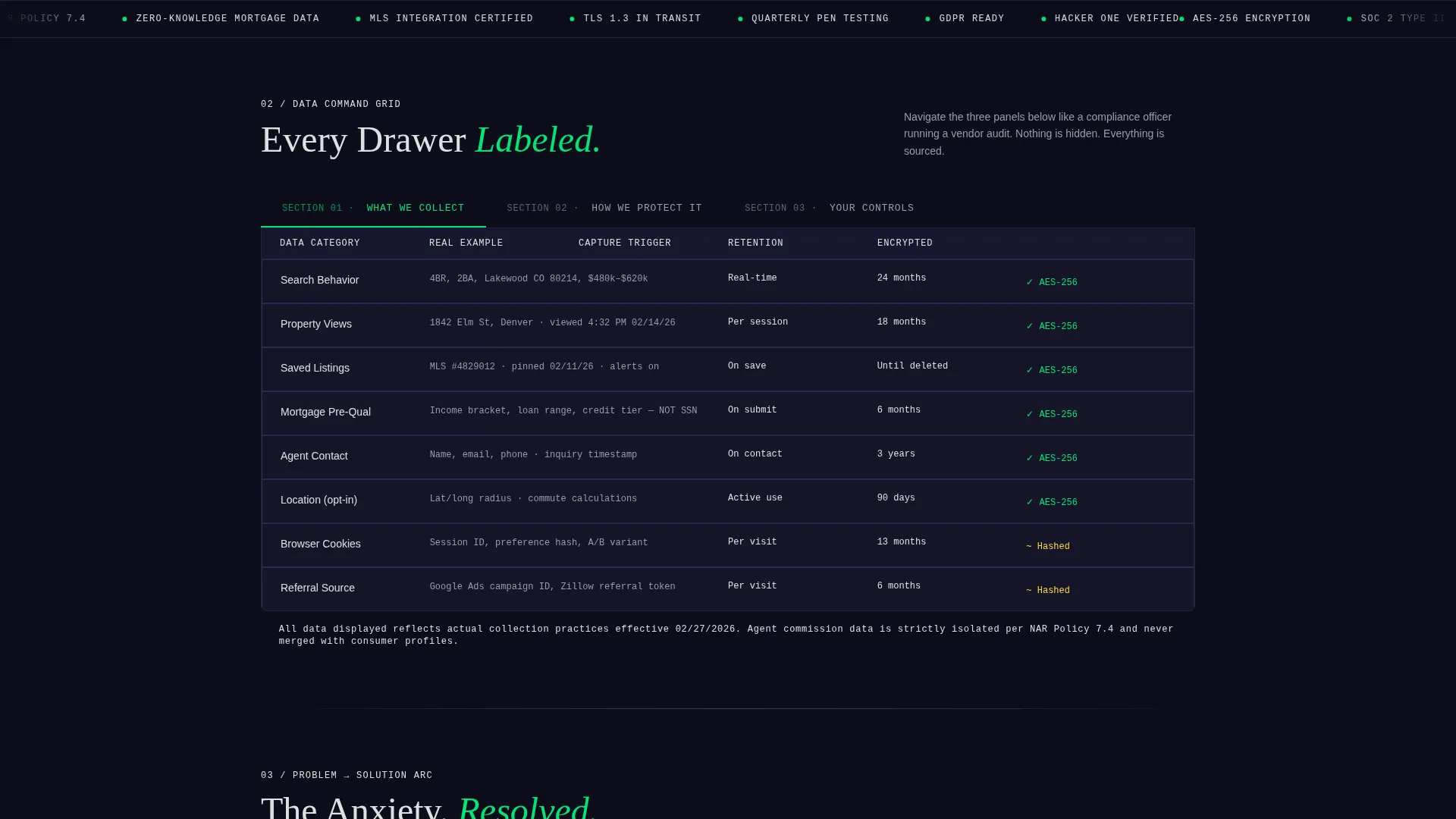
- A three-tab header switcher that instantly renders data grids for collection, protection, and user controls
- A Problem-to-Solution scroll arc that opens with data-volume anxiety and resolves into an empowering consent dashboard
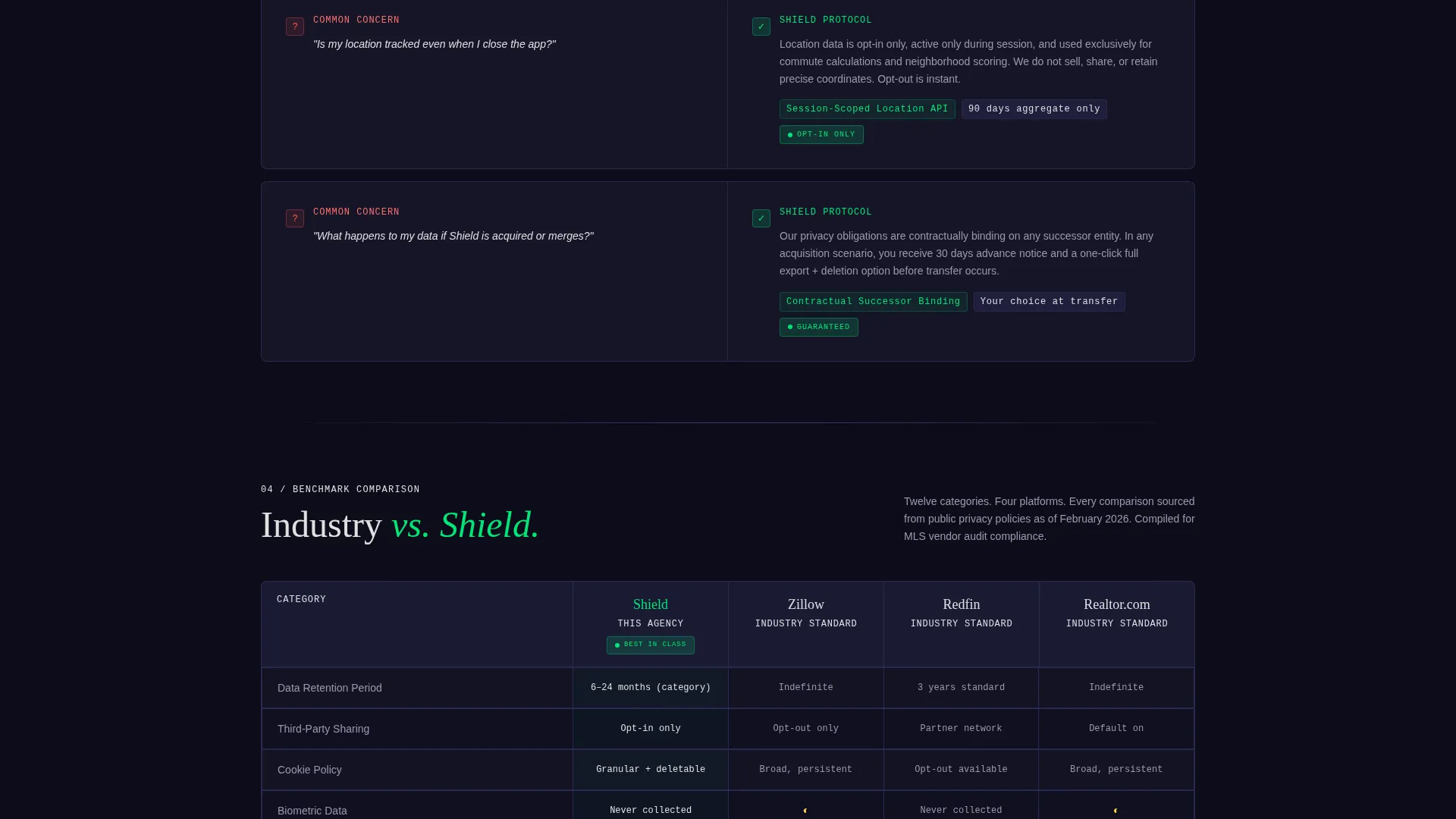
- A twelve-category comparison grid benchmarking the agency's practices against industry-standard platforms
Feature list
This template includes a set of purposefully designed components. Each one serves the specific trust-building and transparency goals of a real estate privacy policy page.
Three-Tab Data Grid Header
The header opens with a Feature Tab Switcher containing three labeled tabs: "What We Collect," "How We Protect It," and "Your Controls." Each tab instantly renders a different data grid populated with real examples such as saved property addresses, browsing timestamps, and lender referral partners. The active tab glows in status-green while inactive tabs recede into titanium.
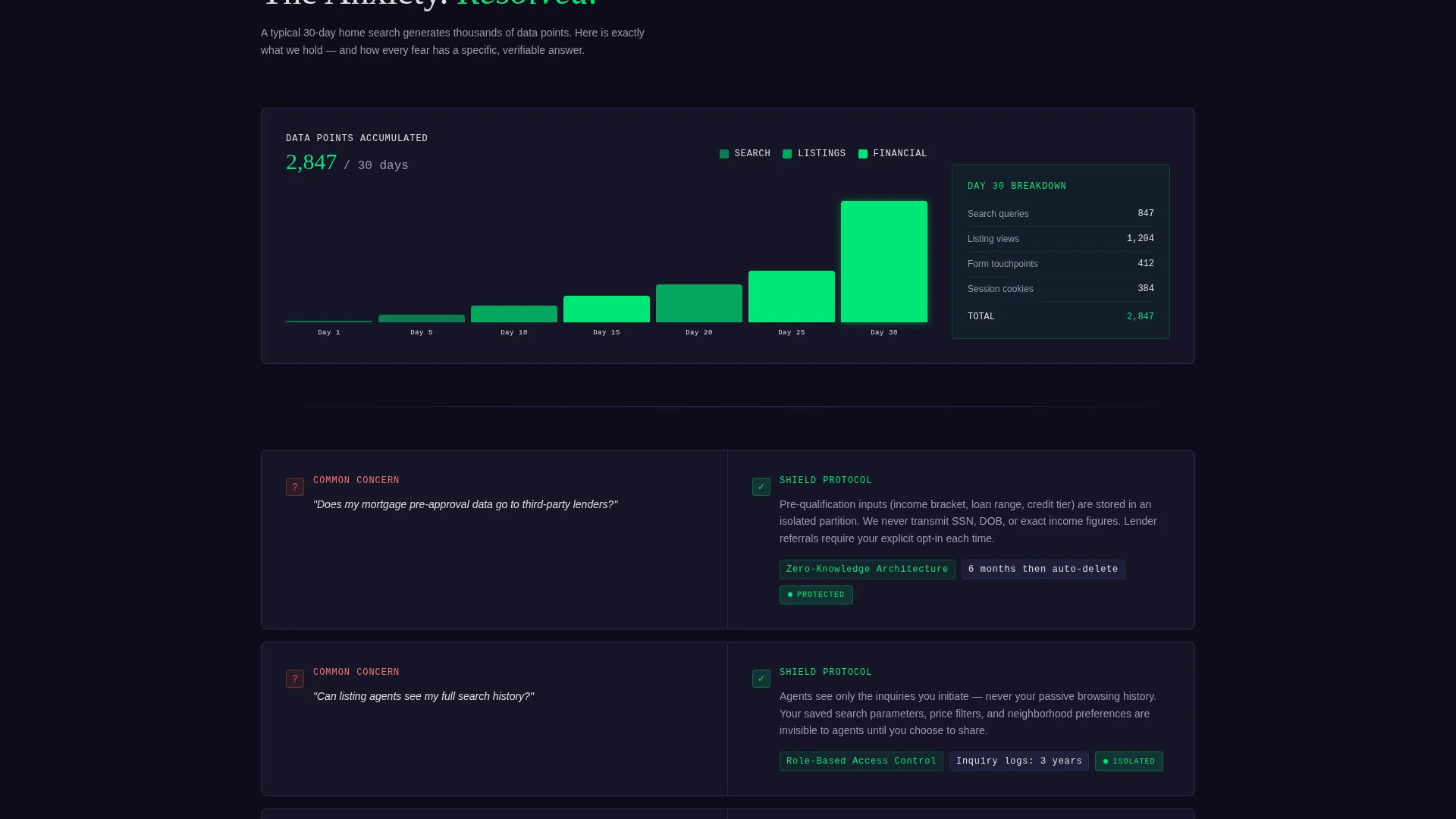
Problem-to-Solution Scroll Arc
The page opens with a bar chart visualization of how much data a typical home search generates in 30 days. The scroll then systematically addresses each common concern. Each section pairs a visitor worry on the left panel with the agency's specific protocol on the right, including encryption standards, retention timelines, and one-click opt-out toggles.
Twelve-Category Comparison Grid
A persistent comparison grid benchmarks the agency's data practices against industry-standard real estate platforms. It covers twelve categories including data retention periods, third-party sharing, cookie policies, biometric data, and location tracking. Every column is labeled and every row is sourced, making the grid usable in a vendor audit.
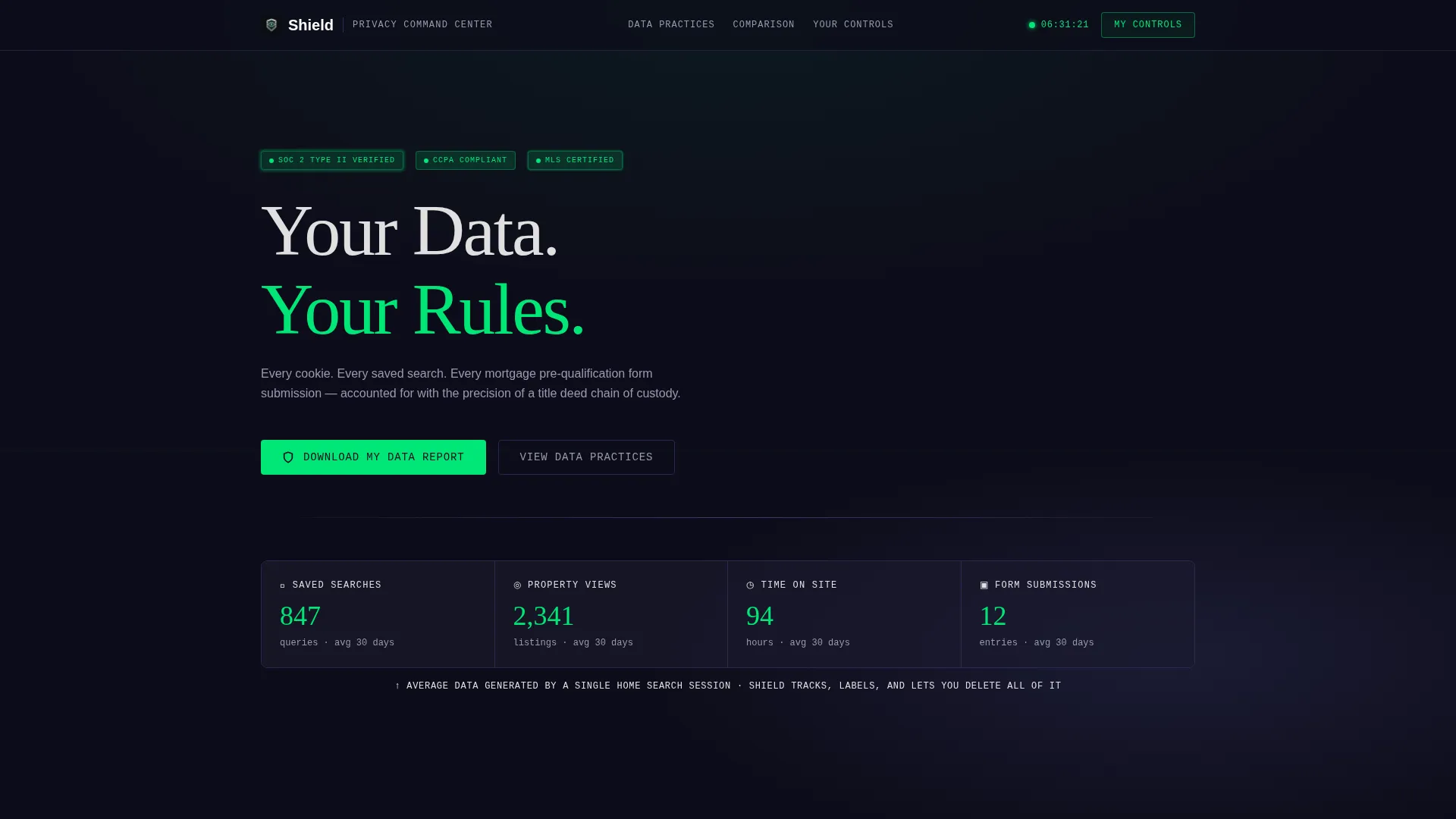
Downloadable Data Report call to action
The primary call to action reads "Download My Data Report." A single email field generates a portable document format (PDF) of exactly what the agency holds on that visitor. This single interaction replaces long support threads and builds immediate credibility.
Granular Consent Dashboard
A secondary call to action labeled "Adjust My Preferences" links directly to the granular consent dashboard. Every permission is visible and individually adjustable. The layout feels like a command console: dark, labeled, and fully in the visitor's hands.
Financial Data Tension and Resolution
The scroll arc builds to a peak at financial data handling, where anxiety around pre-approval data and lender referral partners is highest. The template resolves this tension with a calm, structured controls section. Visitors arrive at the bottom of the page feeling empowered rather than exposed.
Page sections overview
| Section | Purpose |
|---|---|
| Tab Switcher Header | Gives visitors instant access to collection, protection, and controls data grids |
| Data Volume Chart | Visualizes 30-day home-search data generation to open the problem arc |
| Worry-Protocol Panels | Pairs each common visitor concern with the agency's documented response |
| Financial Data Section | Addresses pre-approval and lender data at peak anxiety in the scroll arc |
| Comparison Grid | Benchmarks agency practices across twelve categories against industry platforms |
| Download Report call to action | Single email field generates a personal PDF data report for the visitor |
| Consent Dashboard | Displays all active permissions with individual toggle controls |
Design & branding system
Shield uses a Carbon Fiber color system built to read like the interior of a luxury instrument cluster at night. Every color choice communicates precision, authority, and calm control.
- Deep graphite weave (#1A1A2E) as the full-bleed background, titanium panel gray (#30305A) for section cards, and brushed aluminum (#E0E0E0) for body text
- Status-green (#00E676) reserved for verified compliance badges, active tab indicators, and interactive confirmation states
- Thin titanium lines as section dividers, with each data category living inside its own card, styled like a widget on a command console
Mobile & speed optimization
The template's layout is structured for clarity at any viewport size. The card-based grid system and tab switcher adapt naturally to narrower screens without losing the dashboard feel.
- Each data category card stacks vertically on smaller screens, preserving the labeled, drawer-like organization
- The comparison grid is designed to scroll horizontally on mobile, keeping all twelve categories accessible without truncation
How this template helps you convert
Shield earns trust before it asks for anything. Every section resolves a specific anxiety, so visitors arrive at the call to action already convinced the agency handles data responsibly.
- The tab switcher gives visitors control from the first second, reducing the impulse to leave and increasing time on page
- The "Download My Data Report" call to action offers immediate, tangible proof of transparency, lowering the barrier to sharing an email address
Other information about this template
Shield fits naturally into a broader real estate agency website as a dedicated privacy policy page or a standalone compliance resource shared with partner brokerages. Its structured layout is practical for teams building or updating their data governance documentation.
- The template is categorized under Real Estate Agency Website Templates in the Technology category, making it easy to find for agencies building compliance-first digital presences
- The Data Command theme and Carbon Fiber palette are consistent with modern proptech and legal-tech visual standards, giving the page credibility beyond its content
- The dashboard layout supports real estate agency privacy policy page requirements by organizing data practices into auditable, card-based sections rather than undifferentiated blocks of text
Theme
Data Command
Creative direction
Problem→Solution Arc
Color system
Carbon Fiber
Style
Dashboard/Data Grid
Direction
Comparison/Versus
Page Sections
Three-tab Data Grid Header
Problem-to-solution Scroll Arc
Twelve-category Comparison Grid
Downloadable Data Report Call to Action
Granular Consent Dashboard
Related questions
Who is this landing page template designed for?
Can the comparison grid be customized with our own data categories?
Does the template include functional consent toggle behavior?
What is the Download My Data Report feature exactly?
Is Shield suitable as a standalone page or part of a larger site?



