Mid-Career Insurance FAQ Website Template
Shield is a sidebar companion landing page built for mid-career auto insurance services. It uses an FAQ-driven layout to address the real frustrations experienced drivers face, pairing each question with a persistent sidebar quote form and contextual calls to action. The result is a lead generation page that feels authoritative, calm, and built to convert qualified prospects.
by Rocket studio
Quick summary
Shield is a single-page, FAQ-driven landing page template for mid-career auto insurance. It pairs a dark atmospheric hero with a fixed sidebar quote form, accordion FAQ sections, and a full-width comparison close. Every section is designed to validate driver frustration and guide experienced commuters toward requesting a custom quote.
Who this template is for
This template is built for auto insurance providers and InsurTech brands targeting experienced drivers who feel undervalued by their current carrier. It speaks directly to people who have earned a clean record and want a policy that reflects it.
- Providers serving 35-to-50-year-old commuters with two-car households and long clean driving histories
- Agents working with parents who need to add a teen driver to an existing policy
- Insurance brands targeting remote workers whose annual mileage has dropped but whose premiums have not
What problem this template solves
Most insurance landing pages ignore the frustration that experienced drivers carry. They show smiling families and vague promises, while real questions go unanswered. Shield solves this by meeting visitors with the exact questions they are already typing into search bars.
- Drivers with clean records do not understand why their premiums keep rising, and generic pages never explain it
- Parents adding teen drivers feel anxious about cost spikes and want specific, honest guidance before they commit
- Remote workers who drive far less than they used to need a page that acknowledges their reduced mileage and shows what it could mean for their rate
What you get with this template
Shield delivers a fully structured, conversion-focused landing page with a clear visual identity and high-interactivity components. Every element has a defined role in moving a visitor from frustration to form submission.
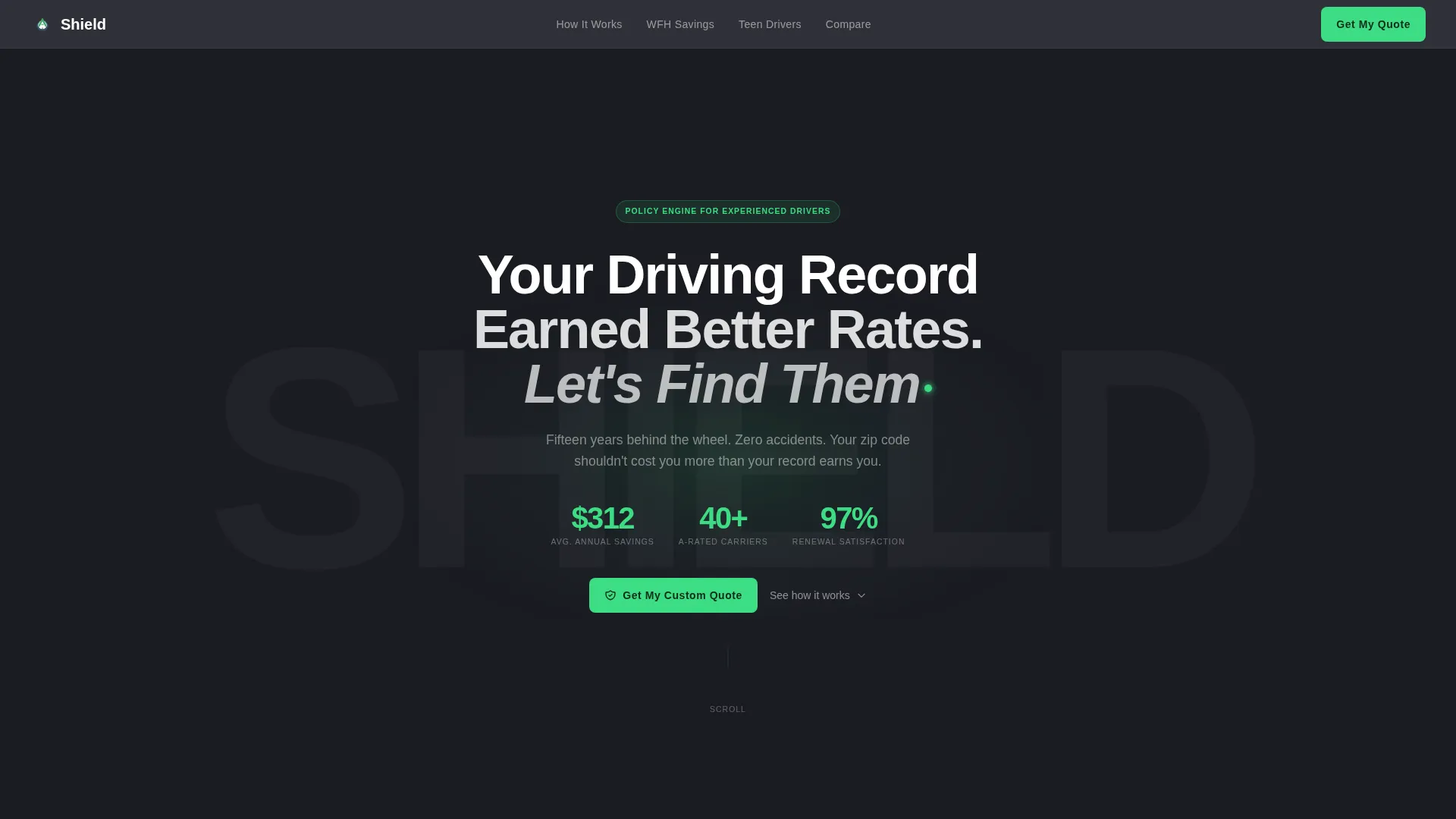
- A dark full-bleed hero section with a radial glow headline and a fixed sidebar carrying a three-field progressive quote form
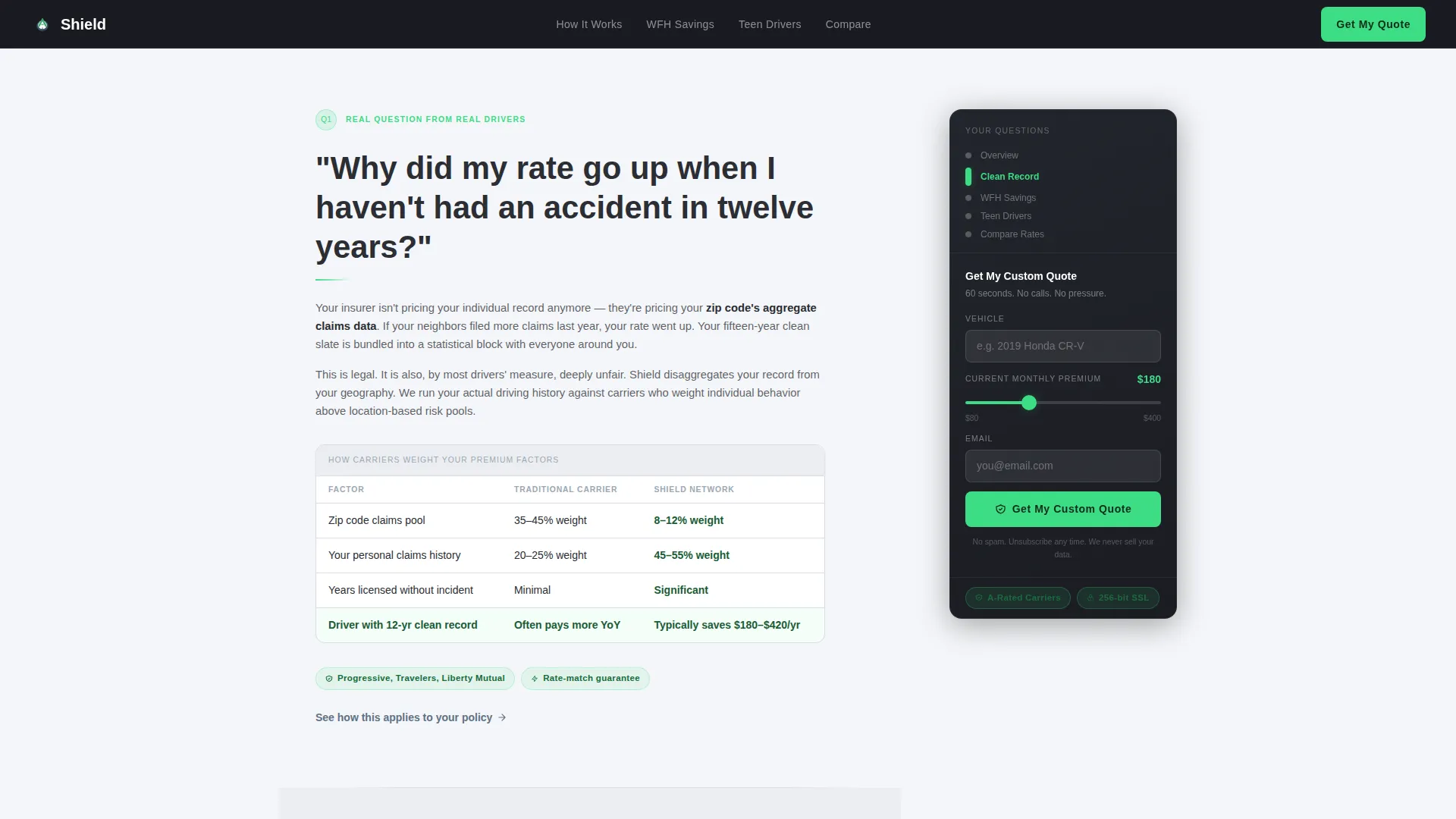
- Three FAQ content sections with accordion behavior, carrier comparison micro-tables, inline trust badges, and contextual text link calls to action beneath each answer
- A full-width comparison close section with an expanded qualification form that collects zip code and household driver count to complete the qualified lead
Feature list
This template ships with a focused set of purpose-built components. Each one is designed to serve the lead generation goal without adding visual noise.
Persistent Sidebar Quote Form
The sidebar stays fixed as visitors scroll through FAQ sections. It carries a smart vehicle search input, a premium slider ranging from $80 to $400 per month, and an email field. Visitors never have to type an uncomfortable number, which removes a common drop-off point.
FAQ-Driven Accordion Sections
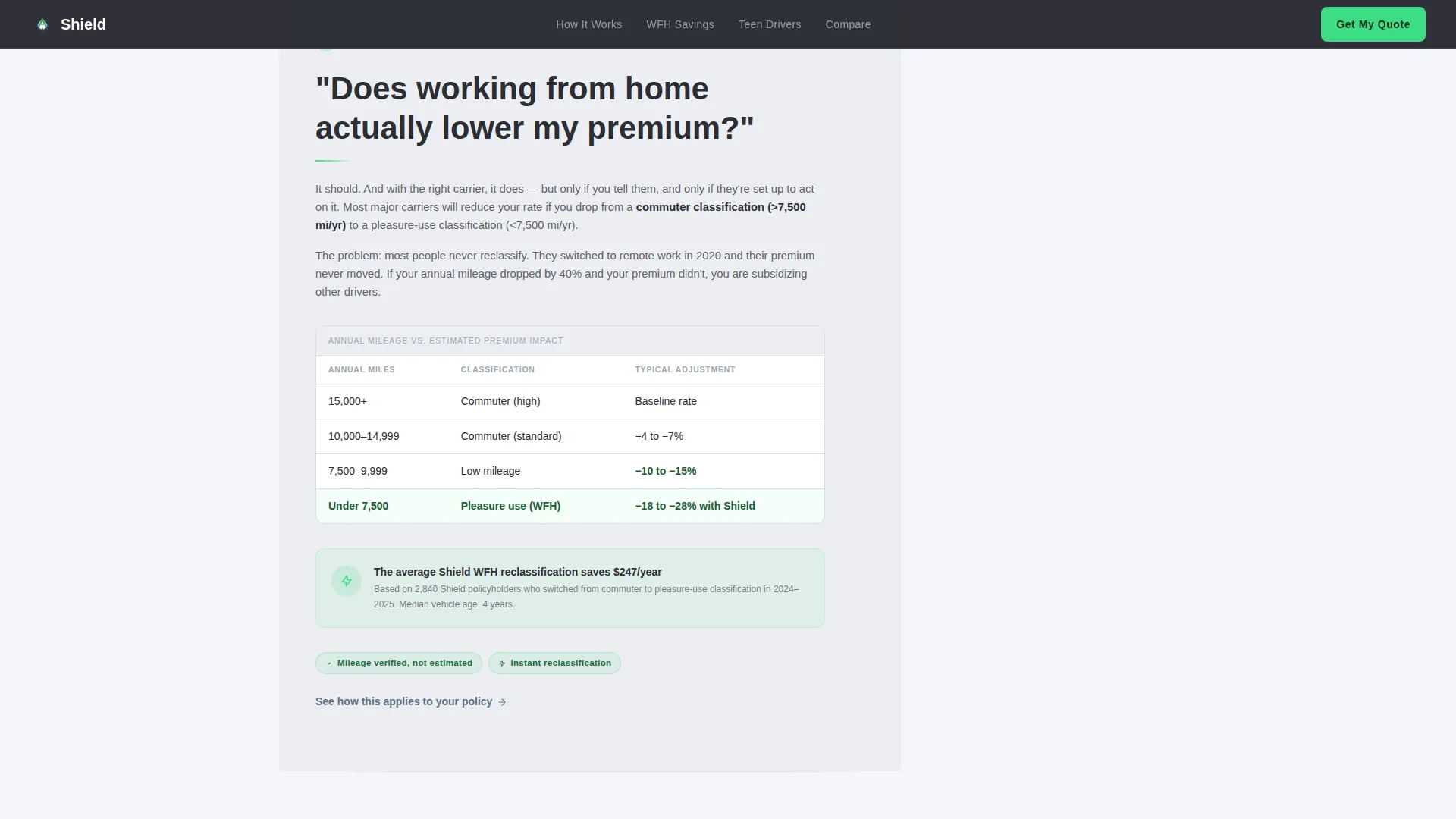
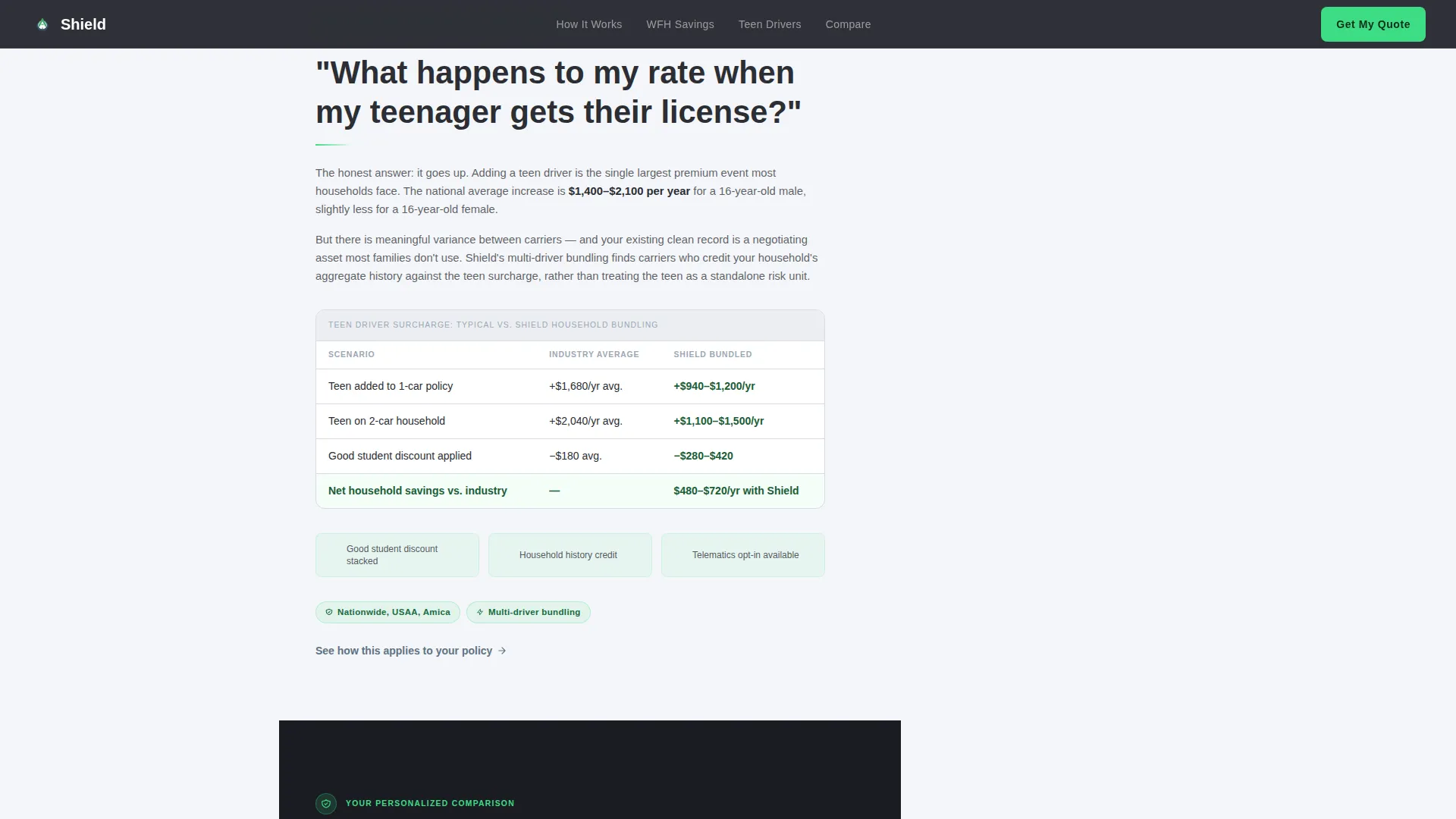
Three FAQ sections open with real questions mid-career drivers search for. Each accordion answer includes short paragraphs and a carrier comparison micro-table. The rhythm moves from tension to relief, validating frustration before delivering clear expertise.
Sidebar Progress Tracker
The fixed sidebar doubles as a table of contents. It tracks the visitor's scroll position through each FAQ section and lets them jump directly to the question that matches their specific concern. This keeps high-intent visitors engaged instead of bouncing.
Dark Full-Bleed Hero with Radial Glow
The hero fills the viewport edge to edge in deep charcoal. A subtle radial glow emanates from behind the headline, evoking approaching headlights through fog. The phosphor-green accent pulses faintly behind the headline period like a dashboard confirmation signal.
Contextual Inline Calls to Action
A secondary conversion path sits beneath each FAQ answer as a text link. Each link scrolls the visitor to the final comparison section, where the call to action expands to include zip code and household driver count, completing the qualified lead profile.
Full-Width Comparison Close
The final section presents a rate comparison table alongside an expanded qualification form. This is where the page completes its lead generation goal, collecting the remaining data points needed to produce a meaningful, personalized quote.
Page sections overview
| Section | Purpose |
|---|---|
| Dark Hero | Atmospheric entry point with radial glow headline and fixed sidebar quote form |
| FAQ: Clean Record | Addresses why rates rise despite a spotless driving history; includes carrier comparison micro-table |
| FAQ: Remote Work | Covers how reduced annual mileage can affect premium calculations; includes savings breakdown |
| FAQ: Teen Driver | Explains rate impact when adding a young driver; reinforced with inline trust badges |
| Full Comparison Close | Rate comparison table and expanded qualification form to complete the lead |
| Footer | Linear single-row footer pattern |
Design & branding system
The visual identity follows a Cloud Canvas color system. The palette is designed to feel like a freshly paved highway under an overcast sky, calm and dependable, with a single accent color that stands out like a green traffic light in gray weather.
- Background sections use soft overcast white (#F4F6F9), body text and structural elements use charcoal asphalt (#2B2D33), and the persistent sidebar uses muted steel-blue (#7B8FA1)
- The phosphor-green accent (#3DDC84) is reserved exclusively for calls to action and trust indicators, keeping it visually unmissable
- Typography uses Manrope in bold for headings and DM Sans for body text, delivering a legal authority feel balanced with calm readability
Mobile & speed optimization
The template is built desktop-first, since the fixed sidebar companion layout requires a wide viewport to function as intended. A mobile stack fallback is included so the experience remains usable on smaller screens.
- On mobile, the sidebar collapses into a stacked layout, keeping the quote form accessible without overlapping content
- Static sections use server-rendered components, while the sidebar form, premium slider, and accordion FAQ use client-side rendering for responsive interactivity
- Scroll reveal animations use cubic-bezier easing and SVG animated lines at medium intensity, keeping motion purposeful without impacting perceived load speed
How this template helps you convert
Shield is structured around the lead generation goal from the first scroll to the final form submission. Every design decision supports conversion without feeling pushy.
- The persistent sidebar form collects vehicle details, current premium range, and email address progressively, so visitors engage at their own pace without committing to a long form upfront
- Each FAQ answer ends with a contextual text link that pulls the visitor toward the comparison section, creating a natural conversion path that matches their specific concern
- The full-width comparison close expands the form to include zip code and household driver count, completing the qualified lead profile at the moment of highest intent
Other information about this template
Shield sits at the intersection of legal authority visual design and InsurTech lead generation. It is built for a specific audience segment and avoids the generic visuals common to most insurance pages.
- The template style is classified as a Sidebar Companion, optimized for desktop-first viewing with a mobile stack fallback
- Creative direction is FAQ-Driven, structured around real search queries that mid-career drivers type when frustrated with their current policy
- The header concept is Dark Full-Bleed with Glow, using the #1A1C22 background and phosphor-green pulsing accent to establish authority on arrival
- Social proof is delivered inline through carrier trust badges and driver profile testimonials positioned within FAQ sections and beneath comparison tables
- The localization setting is English (United States), with United States Dollar currency and MM/YYYY date formatting throughout
Theme
Legal Shield
Creative direction
FAQ-Driven
Color system
Cloud Canvas
Style
Sidebar Companion
Direction
Lead Generation
Page Sections
Persistent Sidebar Quote Form
Faq-driven Accordion Layout
Sidebar Progress Tracker
Dark Full-bleed Hero with Glow
Contextual Inline Calls to Action
Full-width Comparison Close
Related questions
What type of insurance business is this landing page built for?
Can I use this template for clients adding teen drivers to an existing policy?
How does the persistent sidebar quote form work?
Is this template a good fit for remote workers with reduced annual mileage?
Can the color scheme and fonts be customized to match my brand?



