Kids Online Safety & Tech Professional Website Template
Shield is a cyberbullying prevention landing page template built for child safety platforms. It features a parallax photo grid hero, a live positivity counter, an interactive AI phrase demo, hover-reveal scenario cards, and a five-question Digital Safety Score quiz. The warm Soft Mist palette and Family First theme turn parental anxiety into calm, confident action.
by Rocket studio
Quick summary
Shield is a hero-dominant landing page template for a cyberbullying prevention platform. It pairs a warm, fog-white-to-lavender visual identity with high-interactivity components: a parallax mosaic hero, a real-time phrase classifier, flippable scenario cards, and a five-step quiz that delivers a personalized Digital Safety Score. Every section is designed to replace dread with agency.
Who this template is for
This template is built for teams and founders launching child safety or online wellness platforms. It speaks clearly to three distinct audiences without cluttering a single parent's journey.
- Parents of children aged roughly 8 to 16 who are worried about what happens in group chats and gaming lobbies
- School counselors managing hundreds of students with outdated or paper-based reporting tools
- Pediatricians and child wellness professionals who want a structured way to assess a child's digital emotional environment
What problem this template solves
Parents often discover a problem only after their child is already hurting. There is no early warning, no visibility, and no easy way to ask for help. This template gives a cyberbullying prevention platform the right emotional framing to reach those families before a crisis lands.
- It removes the gap between "something feels wrong" and "I know what to do about it"
- It gives school administrators a clear secondary intake path without disrupting the parent-focused main flow
- It shifts the emotional tone from fear-based alarm to quiet, reassuring agency
What you get with this template
You get a complete, single-page layout structured around a quiz-led conversion funnel. Every section is sequenced to move a first-time visitor from curiosity to confident sign-up.
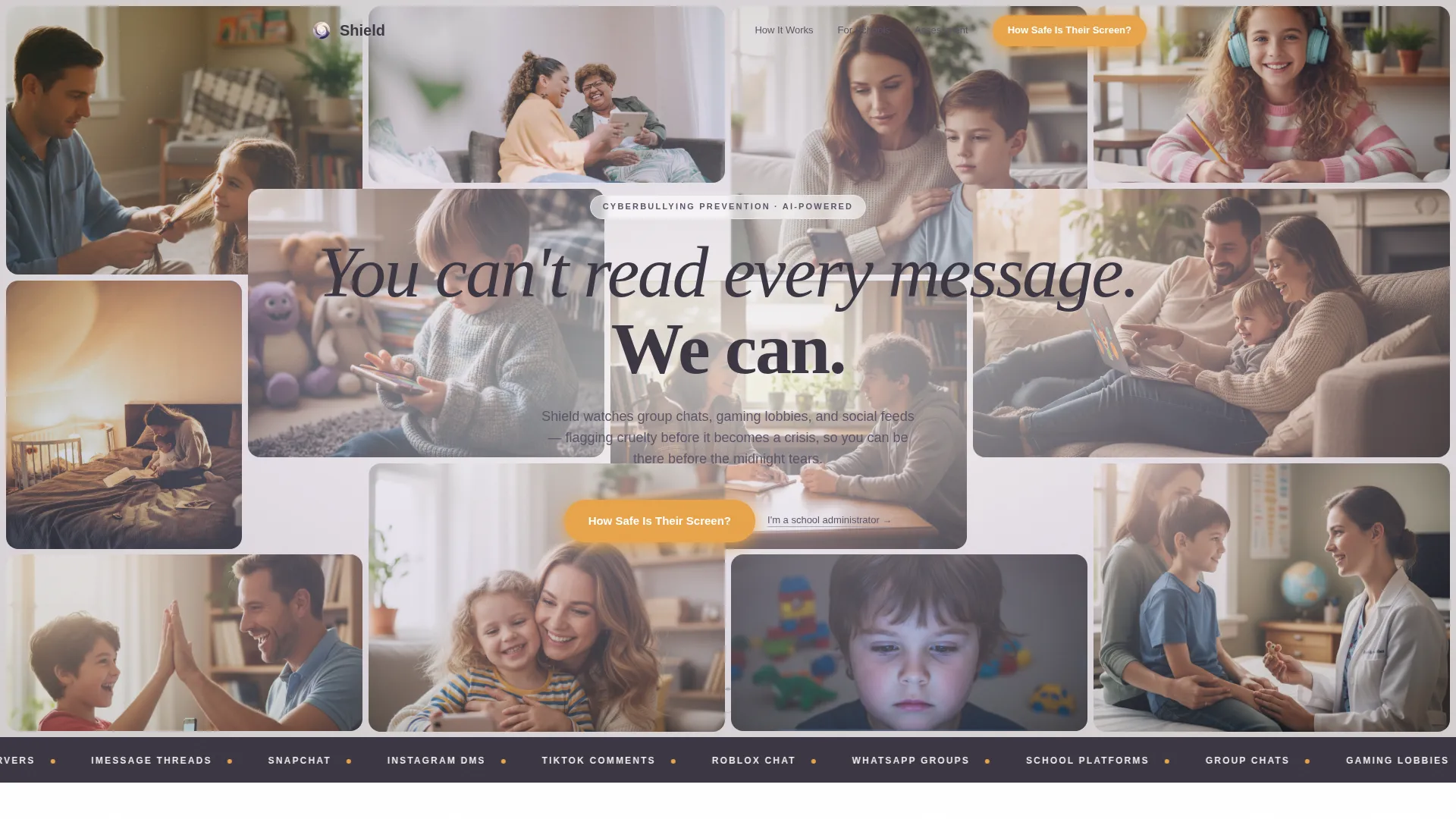
- A parallax Photo Grid Mosaic hero with a centered headline and amber call-to-action buttons
- A live positivity counter, an interactive AI phrase classifier, hover-reveal scenario flip cards, and a five-question Digital Safety Score quiz
- A secondary intake path routed to a separate school administrator form, keeping institutional leads cleanly separated
Feature list
This template includes the following built-in components and design features.
Parallax Photo Grid Mosaic Hero
The hero fills ninety percent of the viewport with softly rounded photo tiles of varying sizes. Tiles drift subtly with cursor movement using a parallax effect. A warm charcoal headline floats centered over the grid, and amber call-to-action buttons sit directly below it.
Live Positivity Counter
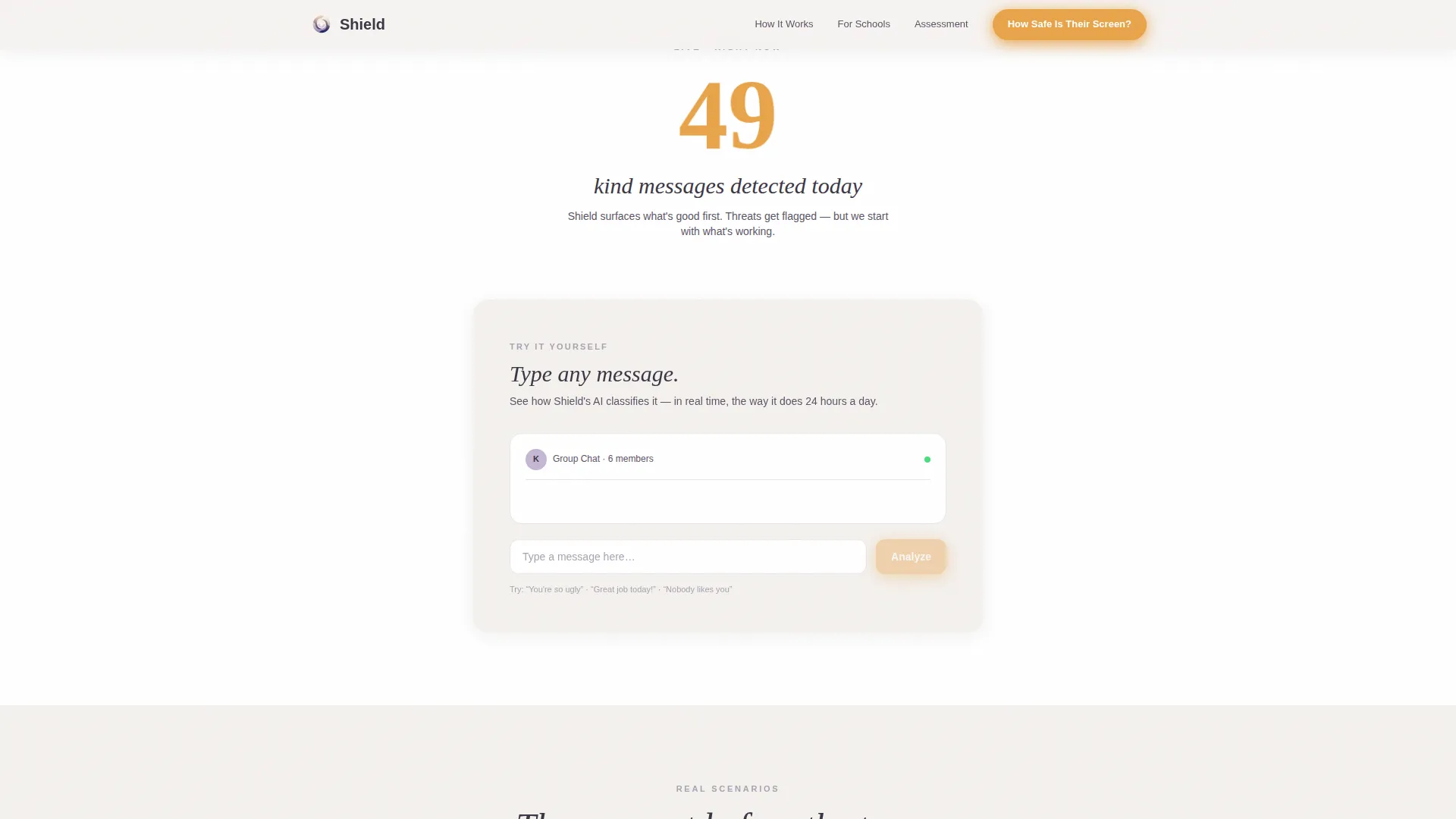
A live-updating counter displays a positive detection stat, such as kind messages flagged that day, rather than threat counts. This positivity-first framing sets an emotionally reassuring tone immediately after the hero scroll.
Interactive AI Phrase Classifier
Visitors type a sample phrase into a mock chat bubble and watch the platform's detection logic classify it in real time. The response animates gently rather than delivering a clinical report, making the technology feel approachable rather than intimidating.
Hover-Reveal Scenario Flip Cards
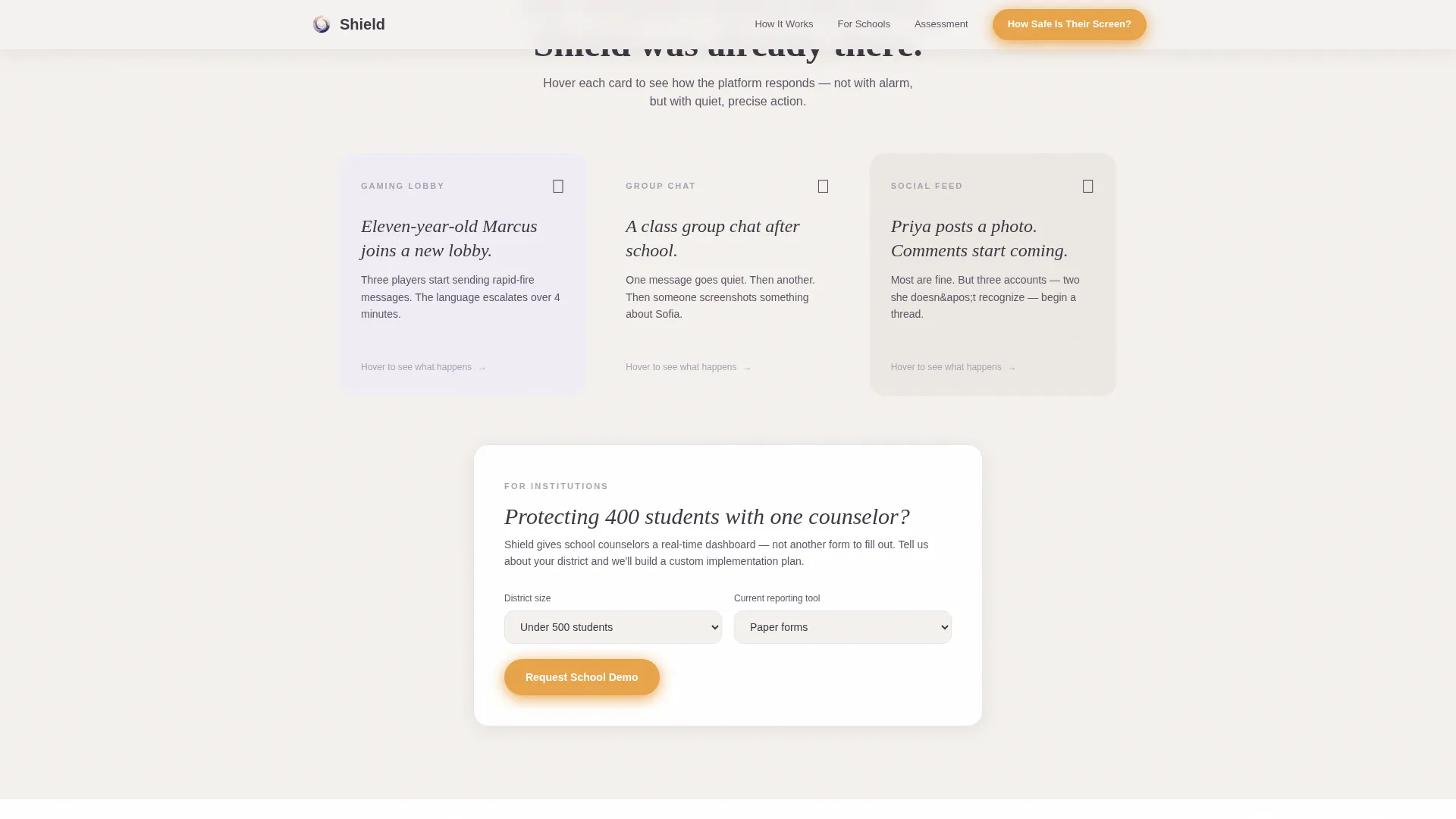
Illustrated scenario cards show a real digital moment on the front face. On hover, the card flips to reveal how the platform would have intervened. Each flip delivers a moment of delight alongside a moment of genuine reassurance.
Five-Step Digital Safety Score Quiz
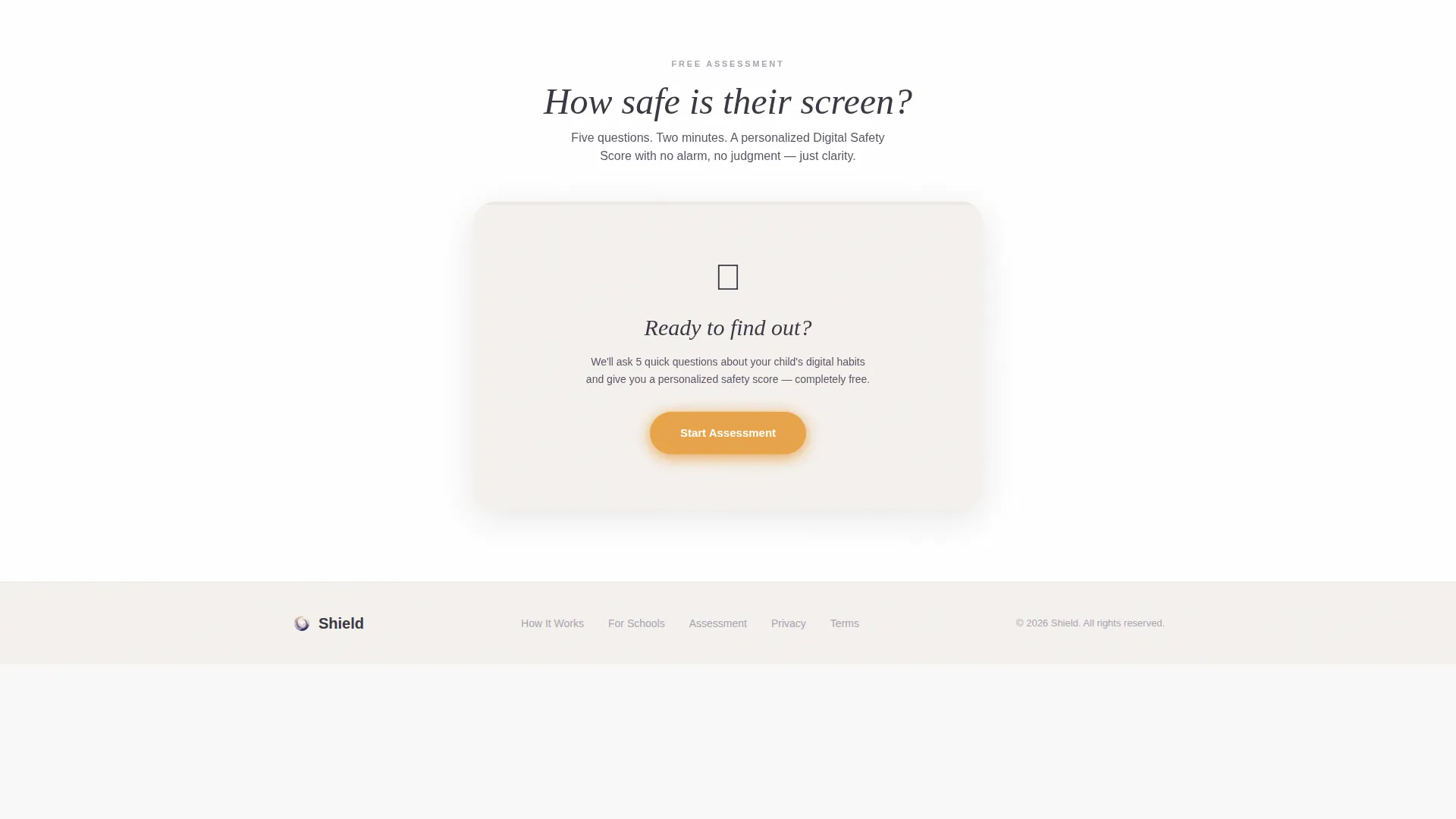
A five-question assessment asks about the child's age range, primary devices, most-used platforms, prior incidents, and the parent's comfort level with monitoring. Questions appear one at a time on individual cards. An amber progress bar advances across the top of each card. At completion, the visitor receives a personalized Digital Safety Score summary and a prompt to unlock the full report by entering their email address.
Dual Conversion Paths
The primary path guides parents through the quiz funnel. A secondary text link beneath the hero reads "I am a school administrator" and routes institutional visitors to a separate intake form covering district size and current reporting tools. Both paths coexist without visual clutter.
Page sections overview
| Section | Purpose |
|---|---|
| Hero Mosaic Grid | Establish emotional trust and present the primary call to action |
| Live Counter Demo | Show positivity-first proof and let visitors test the AI classifier |
| Scenario Flip Cards | Demonstrate real intervention moments through interactive hover reveals |
| Digital Safety Quiz | Capture leads through a personalized five-step assessment funnel |
| Footer Row | Provide a clean single-row closing with supporting links |
Design & branding system
The visual identity follows a Family First theme built on the Soft Mist color system. Every color choice reinforces warmth and calm rather than alarm.
- Background tones run from morning fog white (#F4F1EE) through lavender calm (#C4B7D4) and heather gray (#A8A3B3), with deep charcoal (#3B3644) for body text
- Warm amber (#E8A44A) appears exclusively on interactive elements: buttons, the quiz progress bar, and slider thumbs
- Typography pairs Fraunces serif headlines with DM Sans body text, giving the page a soft authority that feels human rather than clinical
Mobile & speed optimization
This template is built with a mobile-first priority, recognizing that parents most often reach this page on a phone late at night. The technical choices support smooth performance on smaller screens.
- Animations rely on CSS transforms only, keeping motion smooth without heavy scripting
- Images use lazy loading so the page feels responsive even on slower mobile connections
- Scroll reveals are driven by IntersectionObserver, triggering only when a section enters the viewport
How this template helps you convert
The page is designed as a sequential emotional journey, not a feature list. Each section earns the next scroll and moves the visitor closer to submitting their email.
- The parallax hero grabs attention and names the exact problem a worried parent feels, then offers a single clear action with the amber "How Safe Is Their Screen?" button
- The live counter and AI demo replace abstract claims with tangible proof, so visitors trust the platform before they reach the quiz
- The five-step quiz delivers a personalized Digital Safety Score, giving visitors a concrete reason to share their email and return for the full report
Other information about this template
This template is designed for a child safety software-as-a-service product targeting both direct-to-consumer parents and institutional buyers such as schools and pediatric practices.
- The template uses English (US) copy conventions and implies US school system references throughout
- The Footer follows a linear single-row pattern, keeping the closing section uncluttered
- The hero photo mosaic is intentionally unpolished, using slightly imperfect framing and natural light to avoid stock-photo stiffness
- The template style is Hero-Dominant at a 90/10 ratio, meaning the hero section occupies the vast majority of above-the-fold visual real estate
- The Surprise and Delight creative direction means each scroll rewards the visitor with something reassuring rather than alarming
Theme
Family First
Creative direction
Surprise & Delight
Color system
Soft Mist
Style
Hero-Dominant (90/10)
Direction
Quiz/Assessment
Page Sections
Parallax Photo Grid Mosaic Hero
Live Positivity Counter
Interactive AI Phrase Demo
Hover-reveal Scenario Flip Cards
Five-step Digital Safety Score Quiz
Dual Audience Conversion Paths
Related questions
Who is the primary audience for this landing page template?
What does the Digital Safety Score quiz do?
Can school administrators use this template alongside parents?
Is the AI phrase classifier a live integration or a front-end demo?
What makes this template emotionally different from other safety or wellness pages?



