Small Business Owner Insurance Professional Website Template
Shield is a comparison table landing page built for freelancers and sole proprietors who carry pet insurance as a real business expense. A three-step quiz qualifies visitors by pet type, age, and monthly revenue, then renders a personalized side-by-side plan comparison. The fintech-inspired design turns coverage decisions into clear, actionable data.
by Rocket studio
Quick summary
Shield is a single-page pet insurance template designed for independent workers who treat their pets like business partners. A multi-step quiz opens the experience, collecting pet type, age, and revenue bracket before surfacing a three-column plan comparison. The monochrome steel design system keeps every screen focused on decision-ready information.
Who this template is for
Shield is built for small business owners and one-person operations where a surprise vet bill is also a cash flow event. If your quarterly budget and your dog's health are connected, this template speaks your language.
- Etsy sellers, independent contractors, and mobile groomers who file Schedule C
- One-person consultancies and gig workers looking for coverage that fits irregular income
- Pet insurance providers targeting the freelancer and sole-proprietor market
What problem this template solves
Freelancers shopping for pet insurance face a wall of generic plan language built for salaried households. Nothing maps coverage limits to business revenue, and no standard comparison tool isolates the specific anxieties of a sole proprietor facing a sudden surgical bill.
- Visitors cannot connect plan tiers to their actual cash flow risk
- Side-by-side plan comparisons are usually static and fail to reflect the visitor's pet profile
- Generic insurance pages lead with emotion rather than the arithmetic that actually closes decisions
What you get with this template
This template delivers a fully interactive, quiz-driven landing page with a structured comparison journey from first question to plan match. Every section has a defined job, and the visual hierarchy keeps decision-critical data front and center.
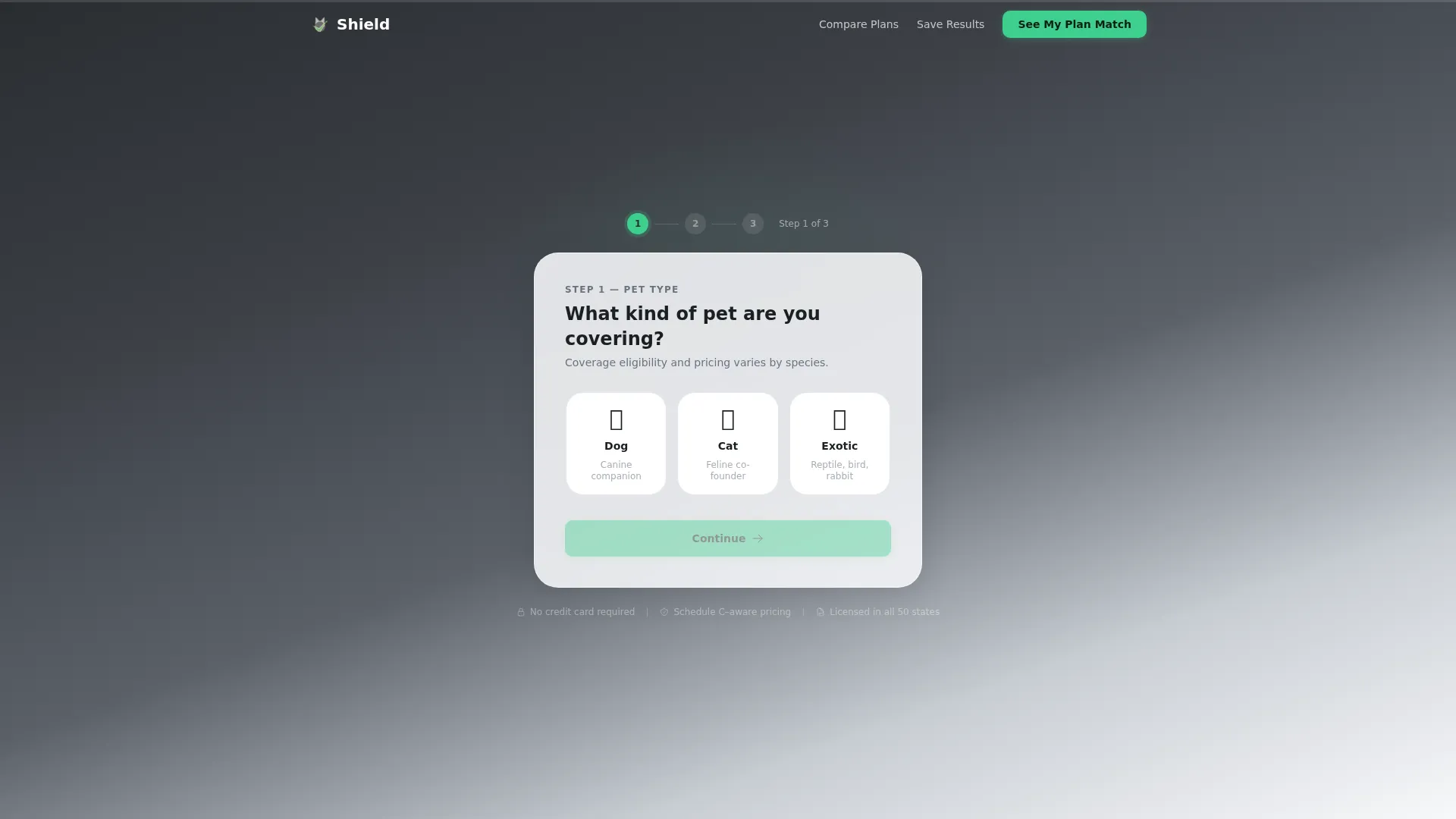
- A three-step multi-step form hero that qualifies pet type, age, and monthly revenue bracket
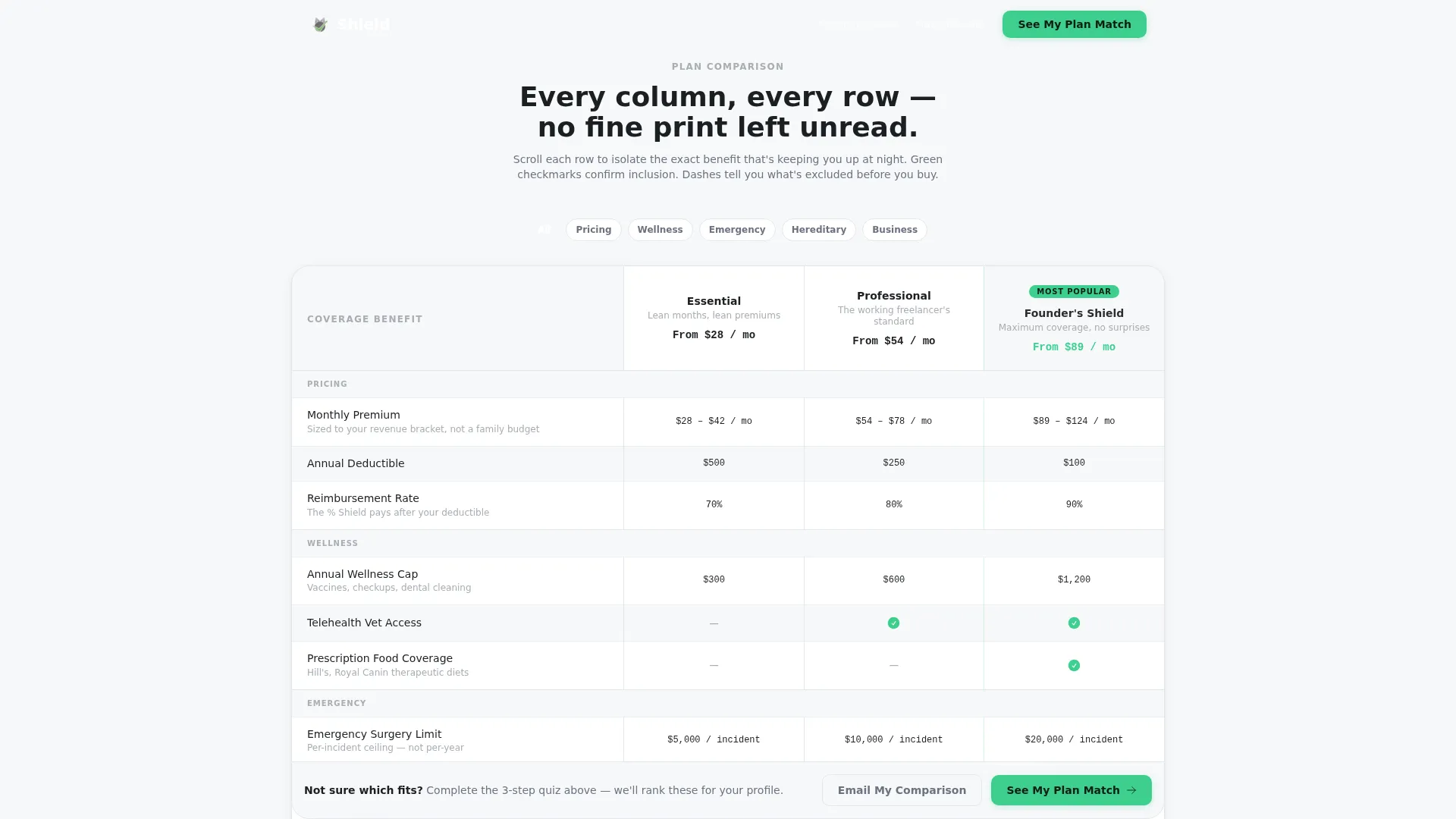
- A three-column plan comparison table covering Essential, Professional, and Founder's Shield tiers
- A real-scenario breakout section, a testimonials block, and an email capture call to action
Feature list
This template includes interactive and visual components specifically assembled for a high-intent insurance comparison experience.
Three-Step Quiz Hero
The header opens as a multi-step form rather than a static headline. Step one asks for pet type using illustrated icon buttons. Step two uses a minimal age slider. Step three presents monthly revenue brackets. A signal-green progress bar tracks completion across the top of the form card, which sits on a gunmetal-to-white gradient background.
Personalized Plan Comparison Table
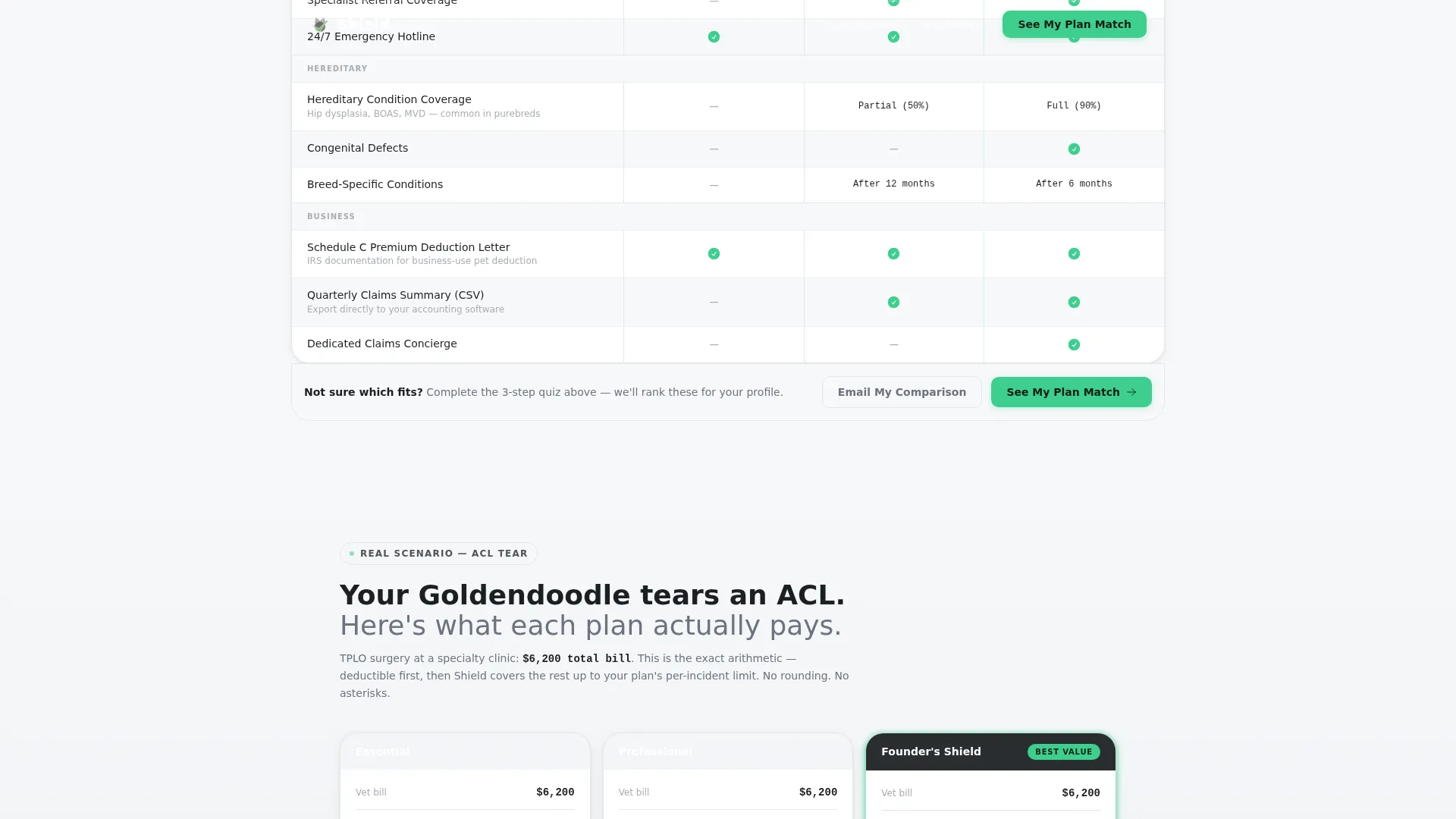
Quiz results generate a three-column comparison table showing Essential, Professional, and Founder's Shield plans side by side. Each row isolates one coverage variable: annual wellness caps, emergency surgery limits, hereditary condition coverage, prescription food, and telehealth vet access. Columns reveal left to right with a cascade animation on scroll.
Real Scenario Breakout Section
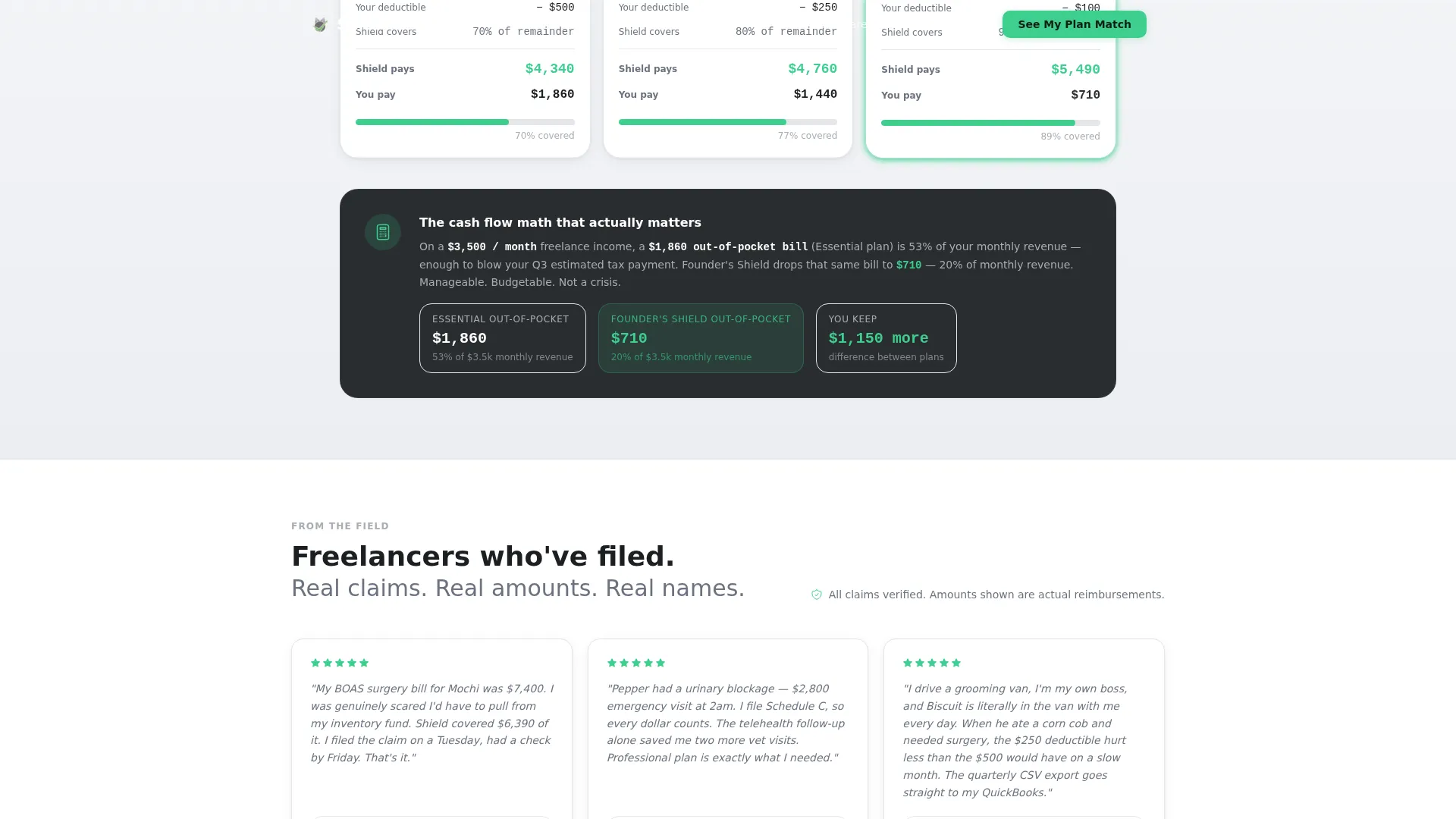
A dedicated mid-page section drops a concrete claim example, walking through what each plan pays when a dog tears an anterior cruciate ligament (ACL). Dollar figures replace abstract benefit language, letting arithmetic do the persuasion work.
Pinned and Contextual calls to action
The primary call to action, "See My Plan Match," appears at quiz completion and again pinned to the bottom of the comparison table. A secondary call to action, "Email My Comparison," asks only for a business email address, framed as saving research rather than joining a mailing list.
Freelancer Testimonial Block
Three named freelancer profiles appear with their business type and a specific claim outcome. Social proof stays grounded in real-world sole-proprietor context rather than generic five-star reviews.
Single-Row Footer
A clean linear single-row footer keeps the bottom of the page as uncluttered as the rest of the design, consistent with the fintech dashboard aesthetic.
Page sections overview
| Section | Purpose |
|---|---|
| Multi-Step Quiz Hero | Qualify pet type, age, and revenue bracket |
| Plan Comparison Table | Compare Essential, Professional, Founder's Shield tiers |
| Real Scenario Breakout | Show ACL claim dollar breakdown by plan |
| Freelancer Testimonials | Build trust with specific claim outcomes |
| Email Capture call to action | Collect business email to send comparison |
| Linear Single-Row Footer | Close page without visual noise |
Design & branding system
The visual identity follows a fintech dashboard aesthetic, sometimes called a Dashboard Pro theme, using a Monochrome Steel color system. The palette feels like an admin panel you actually trust: information hierarchy is the only decoration.
- Gunmetal base (#3B3F45), brushed aluminum (#A8ADB3) for secondary text, and bright white panels (#F7F8FA) for content cards
- Signal green (#3ECF8E) used exclusively for calls to action, progress indicators, and positive checkmarks
- DM Sans for headings and body text; JetBrains Mono for all numerical and data-heavy cells
Mobile & speed optimization
The template is designed desktop-first because the comparison table is data-dense and benefits from a wide viewport. On smaller screens, the layout shifts to a responsive stacked format so the information remains readable without horizontal scrolling.
- Comparison table columns stack vertically on mobile, preserving row-by-row readability
- Static sections use server-side rendering while the quiz and table use client-side components for interactive state management
- Medium animation intensity keeps transitions purposeful without slowing the scroll experience
How this template helps you convert
Shield uses a quiz-first structure that qualifies intent before making any pitch. By the time a visitor reaches the plan comparison, the page already knows their pet profile and revenue bracket, making the match feel earned rather than pushed.
- The multi-step form collects pet type, age, and revenue bracket upfront, so the plan comparison renders as a personalized result rather than a generic table.
- The real-scenario breakout section replaces vague benefit language with specific dollar figures, giving hesitant visitors the concrete numbers they need to act.
- The "Email My Comparison" secondary call to action reduces commitment friction by framing the email exchange as saving research, not signing up for a sales sequence.
Other information about this template
Shield is categorized under Finance and Insurance, specifically the Small Business Owner Insurance subcategory with a focus on the Small Business Owner Pet Insurance niche. It is built for the United States market with USD pricing, MM/DD/YYYY date formatting, and English-language copy throughout. The intersection match score of 13 reflects a tightly defined audience overlap between freelance business identity and pet ownership as a financial variable.
- Template style is Comparison Table; creative direction is Comparison Journey; header concept is Multi-Step Form; landing page direction is Quiz/Assessment
- Animation intensity is set to medium, with a left-to-right cascade on table columns and spring reveal effects on scroll
- Interactivity level is high, covering multi-step form state management, a pet age slider, quiz result rendering, and table row hover states
Theme
Dashboard Pro
Creative direction
Comparison Journey
Color system
Monochrome Steel
Style
Comparison Table
Direction
Quiz/Assessment
Page Sections
Three-step Quiz Hero Form
Personalized Plan Comparison Table
Real-scenario Dollar Breakdown
Pinned Primary and Secondary Ctas
Freelancer-specific Social Proof
Related questions
Who is the Shield template designed for?
What are the three plan tiers included in the comparison table?
How does the quiz affect the plan comparison results?
Can I use this template without offering all three plan tiers?
What does the "Email My Comparison" call to action do?



