New Parent Renters Insurance Landing Page Template
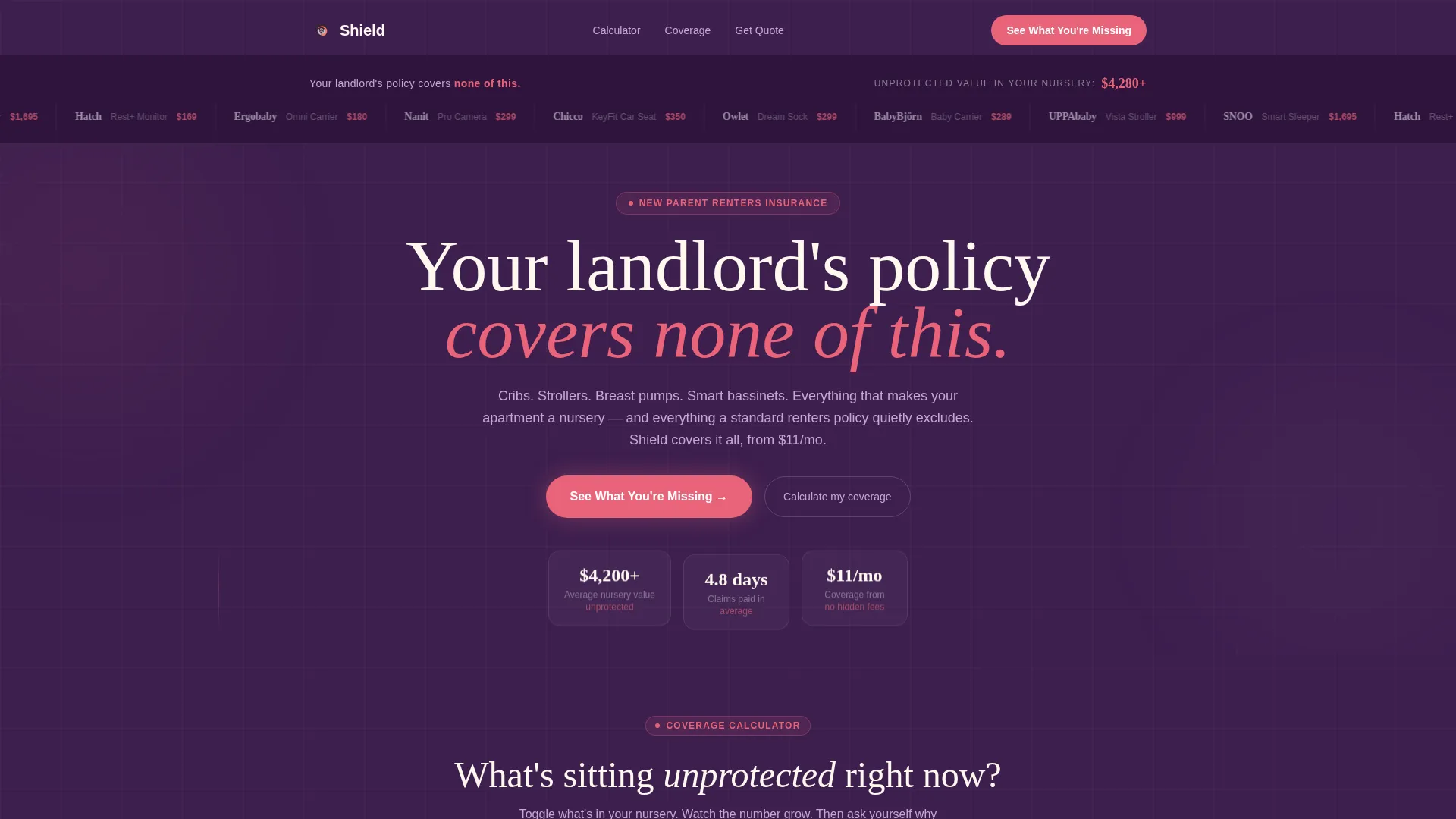
Shield is a renters insurance landing page template built for new parents in apartments. It opens with a logo evidence ribbon and an animated dollar counter, then drops into an interactive coverage calculator, a three-column comparison table, and a five-question quiz flow. The result is a focused, conversion-ready page that makes uninsured nursery value impossible to ignore.
by Rocket studio
Quick summary
Shield is a single-page renters insurance template designed for new parents renting apartments. It leads with a coverage calculator and a visual evidence bar before walking visitors through a comparison table and a personalized risk quiz. Every section is built to surface the dollar gap between what a landlord's policy covers and what a nursery actually costs to replace.
Who this template is for
This template is a strong fit for InsurTech and consumer finance brands targeting apartment-dwelling parents. It works especially well when your offer is priced accessibly and positioned against generic renters insurance or landlord policies.
- New parent renters insurance products starting at a low monthly price point
- Insurance brands targeting first-time parents, expectant couples, or single parents in small apartments
- Finance and InsurTech teams who need a high-interactivity, calculator-first landing page fast
What problem this template solves
Most renters in apartments assume their landlord's policy offers some protection. It does not cover personal belongings. Generic renters insurance often excludes or undervalues nursery gear. New parents carrying a crib, stroller, breast pump, and infant electronics rarely know how much unprotected value is sitting in their apartment until something goes wrong.
- Parents cannot easily see the dollar gap between what they own and what their current policy covers
- Comparison shopping is confusing without a side-by-side view of real parent-specific scenarios
- Prospective buyers need a low-friction way to assess their risk before committing to a policy
What you get with this template
You get a fully structured, single-page layout built around three conversion mechanisms: an interactive calculator, a comparison table, and a quiz assessment. Every section is sequenced to build trust and urgency without feeling pushy.
- A logo evidence ribbon, animated dollar counter, coverage calculator, comparison table, risk scenario cards, quiz flow, social proof section, and a linear single-row footer
- A warm-dark visual identity using deep plum, coral-pink, lavender mist, and warm ivory, with Fraunces display serif and DM Sans body type
- High-interactivity components including toggle micro-interactions, scroll reveals, spotlight card animations, and a counter animation
Feature list
This template ships with purpose-built components that work together to make coverage gaps visible and conversion easy.
Interactive Coverage Calculator
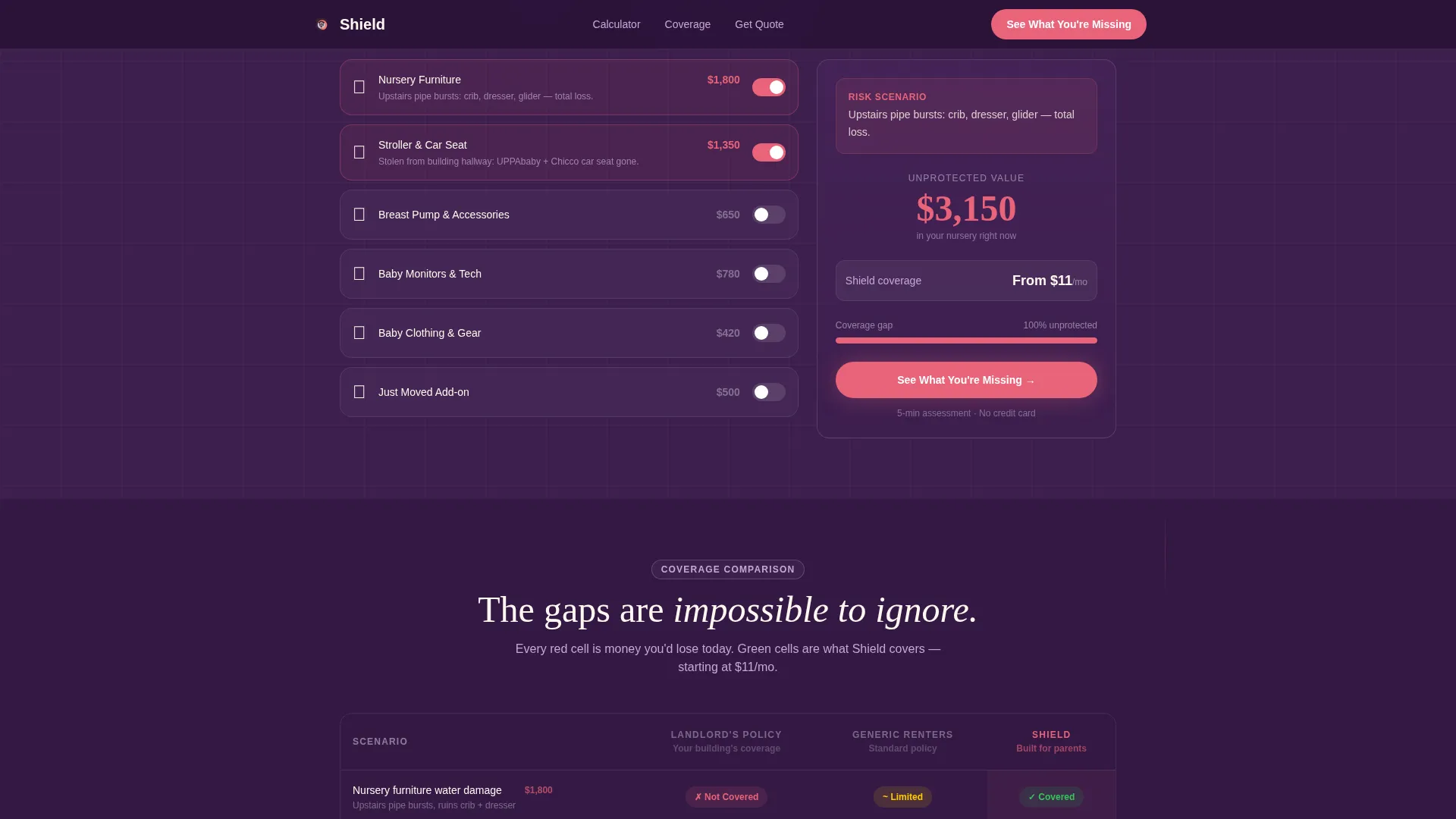
A toggle-based calculator lets visitors switch nursery categories on and off. Each toggle animates a dollar amount and displays a real risk scenario, such as a kitchen fire wiping out baby gear. The running total makes uninsured value concrete before any pitch copy appears.
Three-Column Comparison Table
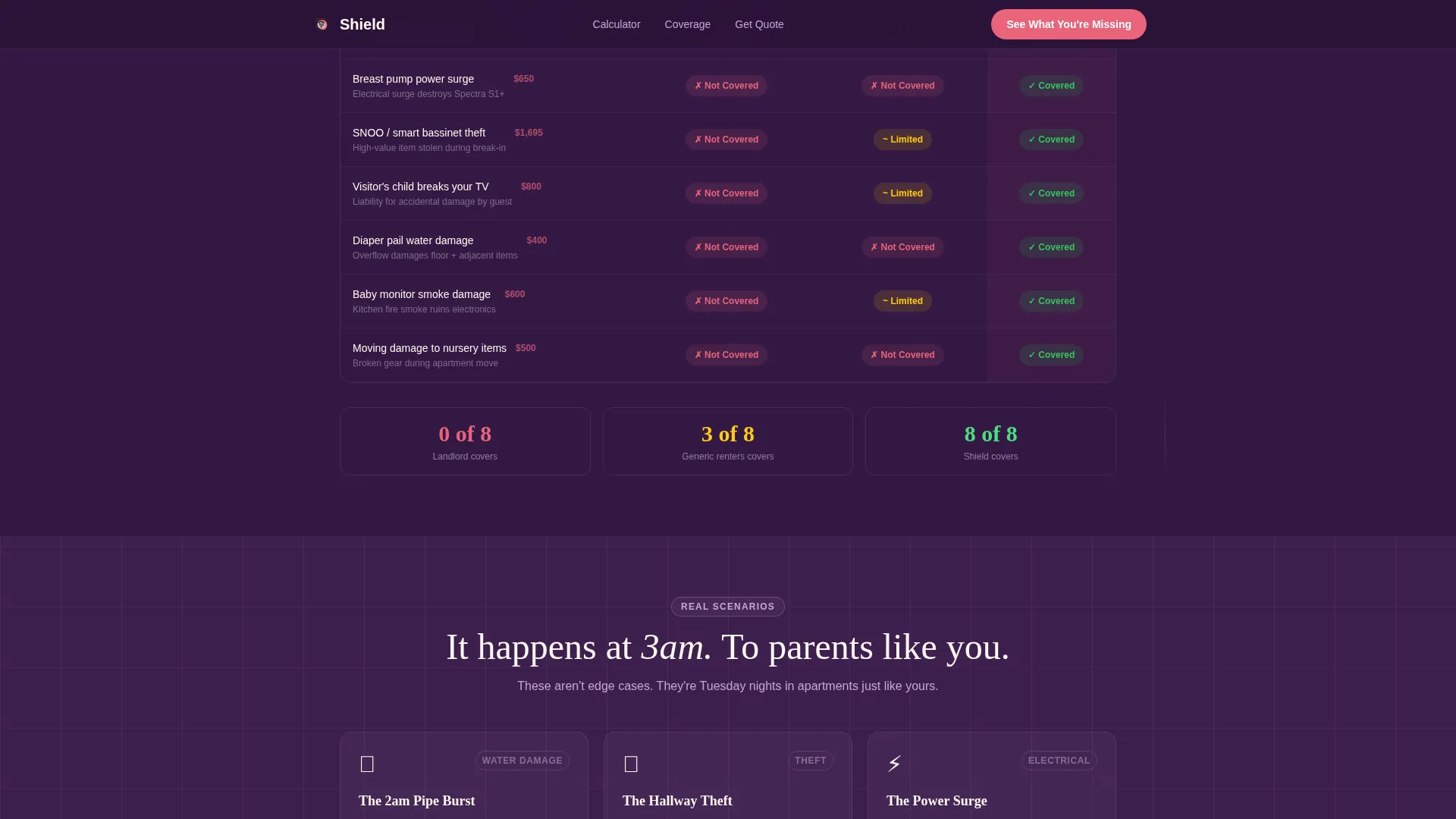
A structured table contrasts a landlord's policy, generic renters insurance, and this product across parent-specific scenarios. Red and green cell shading makes coverage gaps impossible to miss. Rows cover situations like diaper pail water damage, a stolen stroller from a building hallway, and a visitor's child breaking a television.
Five-Question Quiz Assessment Flow
The primary call to action launches a short assessment covering apartment size, the baby's age, estimated nursery value, building type, and current policy status. The result is a personalized risk score showing an uninsured dollar amount, followed by a single conversion button.
Logo Evidence Ribbon
A clean horizontal bar displays recognizable parent-world product brands above a single line of copy that reminds visitors their landlord's policy covers none of it. Below the bar, a running dollar counter silently totals the replacement cost of the gear shown.
Risk Scenario Claim Cards
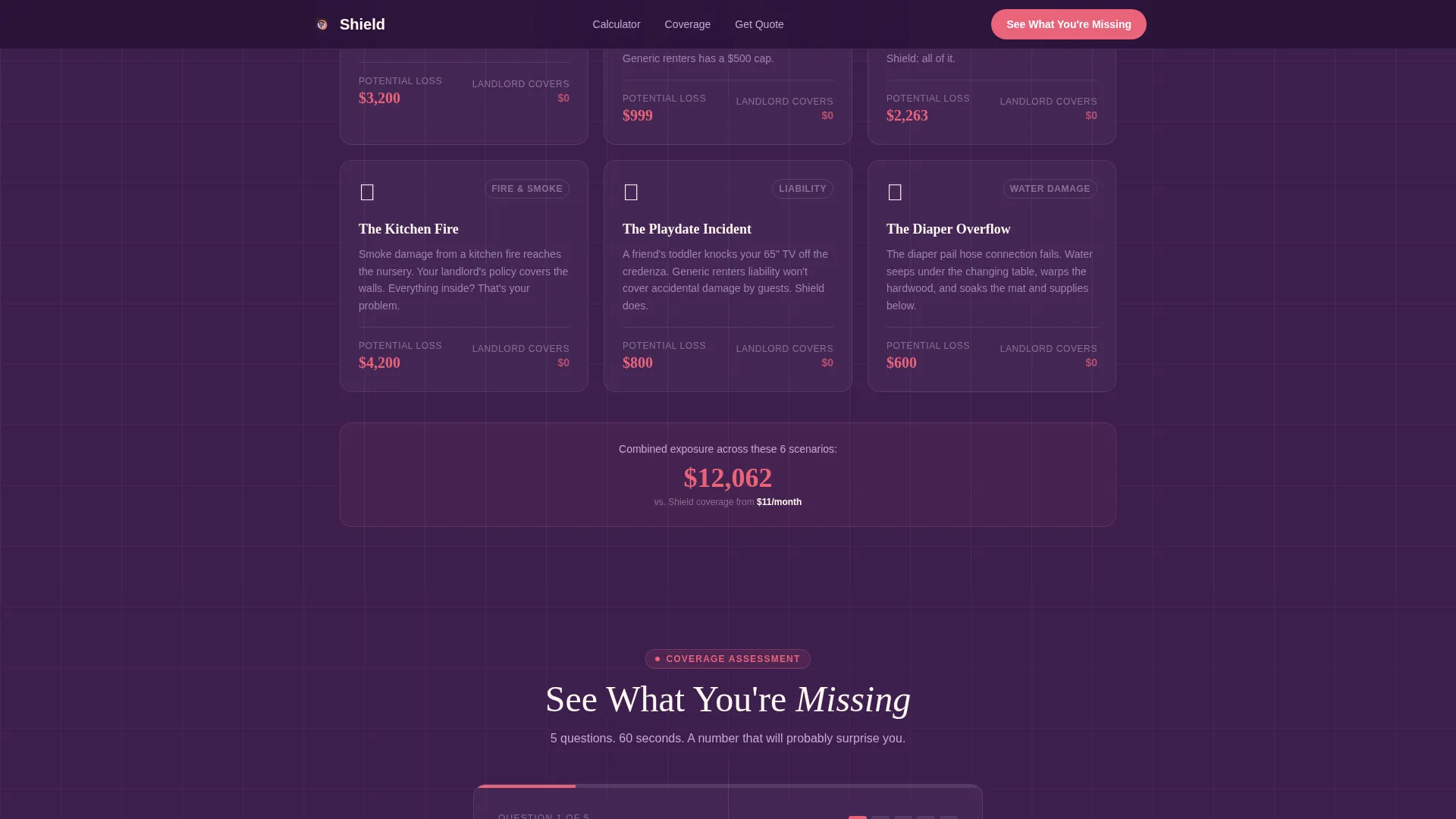
Below the comparison table, individual claim cards highlight parent-specific scenarios with realistic replacement costs. Each card reinforces the stakes in a format that is fast to read on a phone at any hour.
Secondary Lead Capture Path
Visitors who are not ready to convert can download a New Parent Renters Checklist PDF gated behind an email field. This gives the template a second conversion path that captures leads earlier in the decision process.
Page sections overview
| Section | Purpose |
|---|---|
| Logo Evidence Ribbon | Show unprotected gear value visually |
| Animated Dollar Counter | Make replacement cost feel immediate |
| Coverage Calculator | Let visitors build their own risk total |
| Comparison Table | Expose gaps across three policy types |
| Risk Scenario Cards | Ground coverage gaps in real claim stories |
| Quiz Assessment Flow | Return a personalized uninsured dollar amount |
| Social Proof Section | Build trust with parent testimonials and claim stats |
| Secondary Lead Capture | Collect emails via checklist PDF download |
| Final Call to Action | Drive policy sign-ups with a single button |
| Linear Footer | Close cleanly with minimal distraction |
Design & branding system
The visual identity follows a Startup Velocity theme with a warm-dark premium feel that blends nursery softness with fintech confidence. Every color and type choice is intentional and consistent across all interactive states.
- Color palette: deep nightshade plum (#3D1F4E) as the primary background, lavender mist (#E8DFF0) for card surfaces, warm ivory (#FFF8F0) for text breathing room, and coral-pink (#E8637A) on every call to action and interactive element
- Typography: Fraunces display serif for headlines and DM Sans for body copy, pairing editorial warmth with clean readability
- Animation system: spotlight card reveals, counter animations, toggle micro-interactions, and scroll-triggered section reveals using CSS transitions and Intersection Observer
Mobile & speed optimization
New parents browse on phones, often late at night. The template is built mobile-first to ensure the calculator, comparison table, and quiz flow all work cleanly on small screens without losing context or usability.
- Mobile-first layout prioritizes the calculator and quiz flow for thumb-friendly interaction
- Scroll reveals and toggle animations use CSS transitions and Intersection Observer to keep motion lightweight and responsive
- The comparison table and risk scenario cards reflow for portrait screen widths without losing the red and green shading logic
How this template helps you convert
The page is engineered around a single insight: parents convert when they see their specific uninsured dollar amount, not a generic pitch. Every section moves the visitor one step closer to that number.
- The logo ribbon and dollar counter create immediate, visceral awareness of unprotected nursery value before the visitor reads a single word of sales copy.
- The comparison table and risk scenario cards compound the stakes by showing exactly which real-life parent scenarios go uncovered by a landlord's policy or a generic plan.
- The quiz assessment personalizes the risk score, displays it in coral-pink, and resolves the page with one clear action: lock in coverage from $11 per month.
Other information about this template
This template sits inside the Finance and Insurance category under the New Parent Insurance subcategory, with a niche focus on new parent renters insurance. It was designed with an Intersection Match Score of 13, indicating a highly specific audience-to-product alignment.
- Template style: Comparison Table, supported by a Calculator-First creative direction and a Quiz/Assessment landing-page flow
- Theme: Startup Velocity, color system: Plum Executive
- Header concept: Logo Bar used as evidence, not partnership
- The secondary lead capture path supports list-building for leads who need more time before purchasing a policy
- Footer pattern: Linear Single-Row, keeping the close clean and distraction-free
- The $11 per month price point is stated in the brief and appears in the final call-to-action button copy
Theme
Startup Velocity
Creative direction
Calculator/Tool First
Color system
Plum Executive
Style
Comparison Table
Direction
Quiz/Assessment
Page Sections
Interactive Coverage Calculator
Three-column Comparison Table
Five-question Quiz Assessment
Logo Evidence Ribbon with Dollar Counter
Risk Scenario Claim Cards
Secondary Email Lead Capture
Related questions
What sections are included in this landing page template?
Who is the target audience for this template?
Can I use this template to capture leads who are not ready to buy?
How does the quiz assessment work in this template?
What design style and color system does this template use?



