Immersive Proptech Landing Page Template
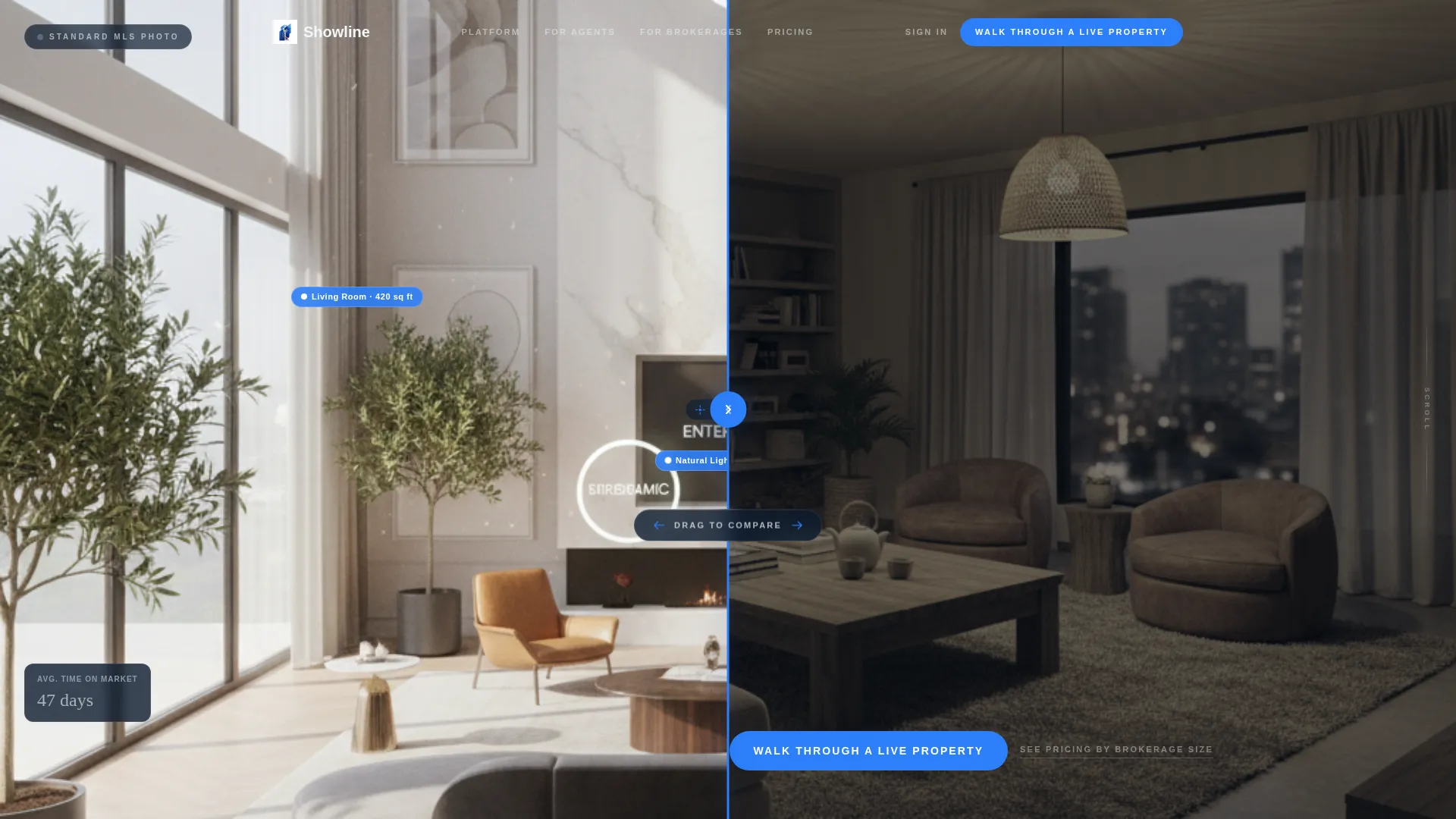
Showline is an asymmetric 60/40 grid landing page template built for virtual property showing platforms. It opens with a draggable Before/After Slider that reveals the gap between flat MLS photos and immersive 3D walkthroughs. Every section builds a visual case for the platform, funneling listing agents, brokerage managers, and commercial leasing teams toward a single live demo click.
by Rocket studio
Quick summary
Showline is a single-page, click-through landing page template designed for proptech and virtual showing platforms. It uses an asymmetric 60/40 grid to contrast old real estate workflows against an immersive 3D alternative. The layout guides visitors from a cinematic header slider to a live demo call to action, making the value gap impossible to ignore.
Who this template is for
This template is built for teams who need buyers to feel a property before a showing is ever booked. The layout speaks directly to the people managing high-volume real estate operations.
- Listing agents handling large portfolios of active properties at once
- Brokerage operations managers dealing with scheduling conflicts and coordination overhead
- Commercial leasing teams presenting Class A office space to out-of-state or remote prospective tenants
What problem this template solves
Real estate professionals lose time and deals when buyers cannot experience a property before committing to an in-person visit. Flat listing photos, phone-tag scheduling, and vacant rooms that are hard to read all erode buyer confidence and slow the sales cycle.
- Buyers cannot engage meaningfully with static MLS photos or basic floor plans
- Scheduling live showings for remote or time-constrained buyers is slow and unreliable
- Vacant properties are difficult to visualize without staging context or spatial depth
What you get with this template
You get a complete, ready-to-customize landing page that makes the case for virtual showing technology through visual evidence rather than written argument. Every section is structured to move the visitor closer to clicking the demo link.
- A draggable Before/After Slider header that splits the viewport between a flat MLS photo and an immersive 3D capture of the same property
- Stacked scroll sections that pair legacy real estate workflows against the platform experience, with the platform side always rendered in full color
- A sticky bottom call-to-action bar and a primary button that direct every visitor to a single free interactive demo destination
Feature list
This template delivers a focused set of design and interaction components drawn directly from the source brief.
Draggable Before/After Header Slider
The header splits the viewport along the 60/40 grid. The left panel holds a static, flat-lit MLS listing photo. The right panel shows the same property rendered in immersive 3D with natural light simulation, interactive room tags, and a visible cursor mid-rotation. A draggable handle sits at the seam. The headline only appears after the visitor moves the slider, then types itself out: "This is what your buyers actually see."
Asymmetric 60/40 Grid Layout
Every section of the page uses a consistent two-column grid. The 60-column always holds the live platform experience, full color and interactive-feeling. The 40-column holds the legacy equivalent, deliberately muted in grayscale gunmetal. This visual contrast builds the argument section by section without requiring a single line of explanatory text.
Stacked Before/After Scroll Sections
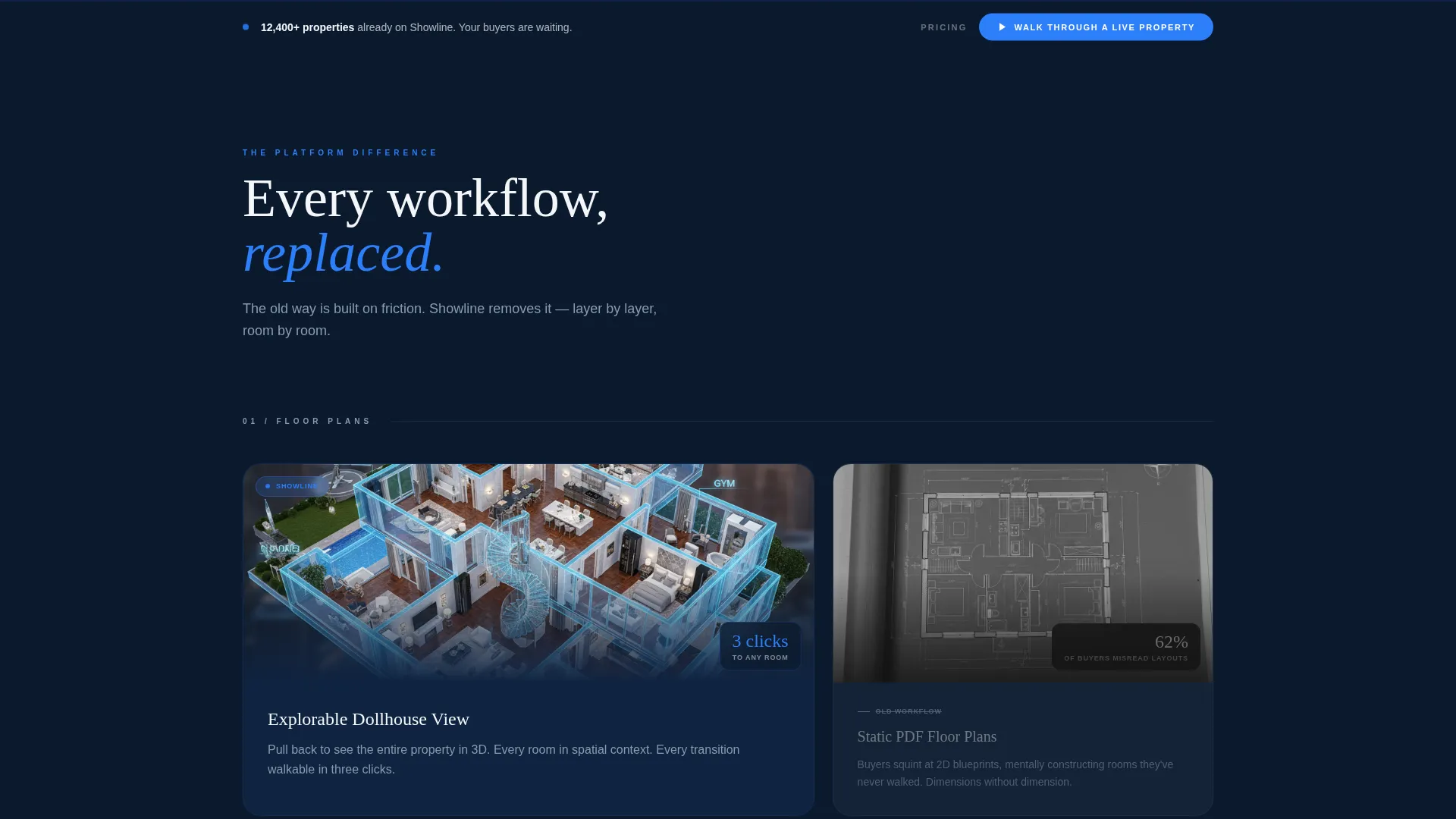
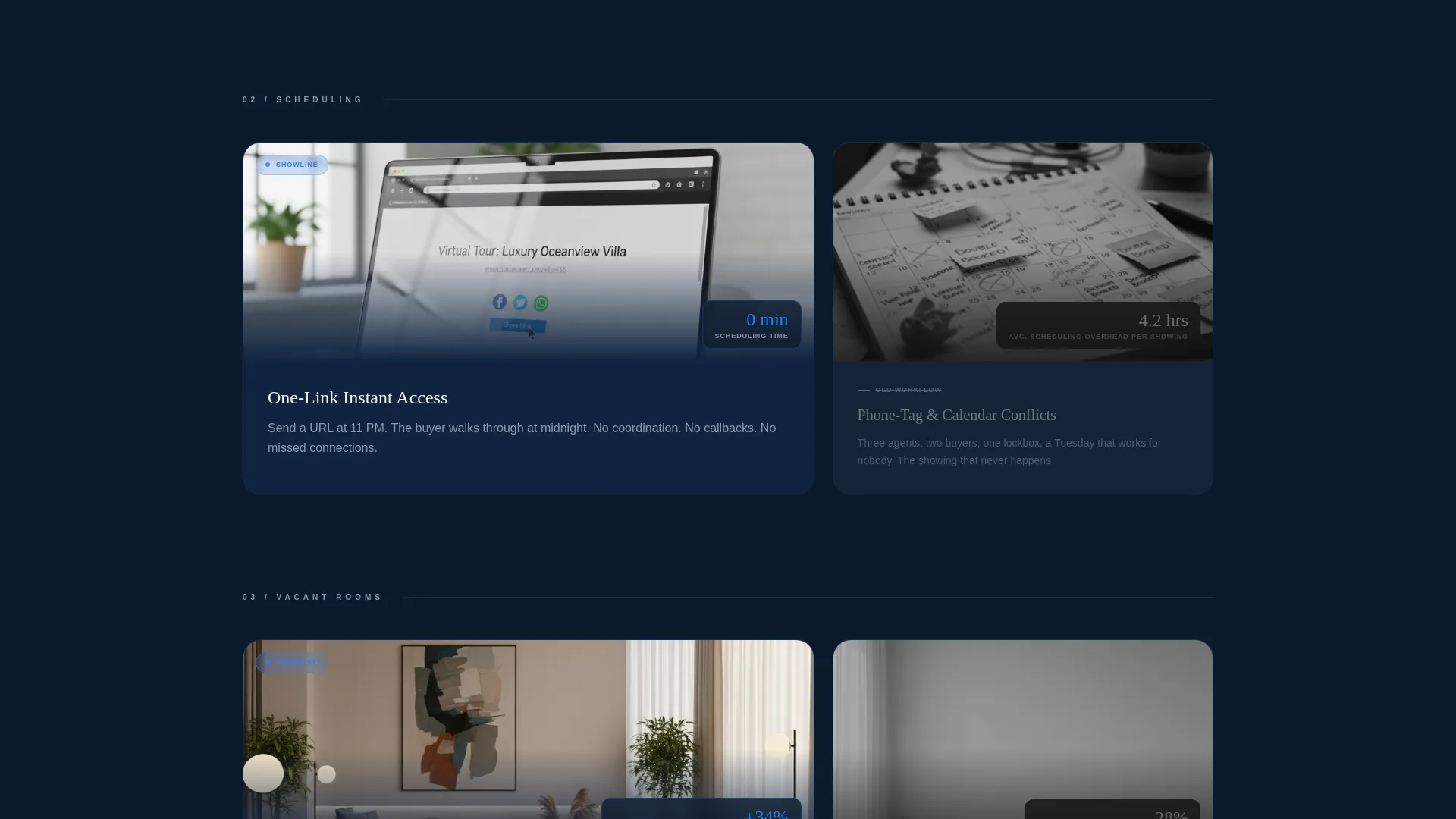
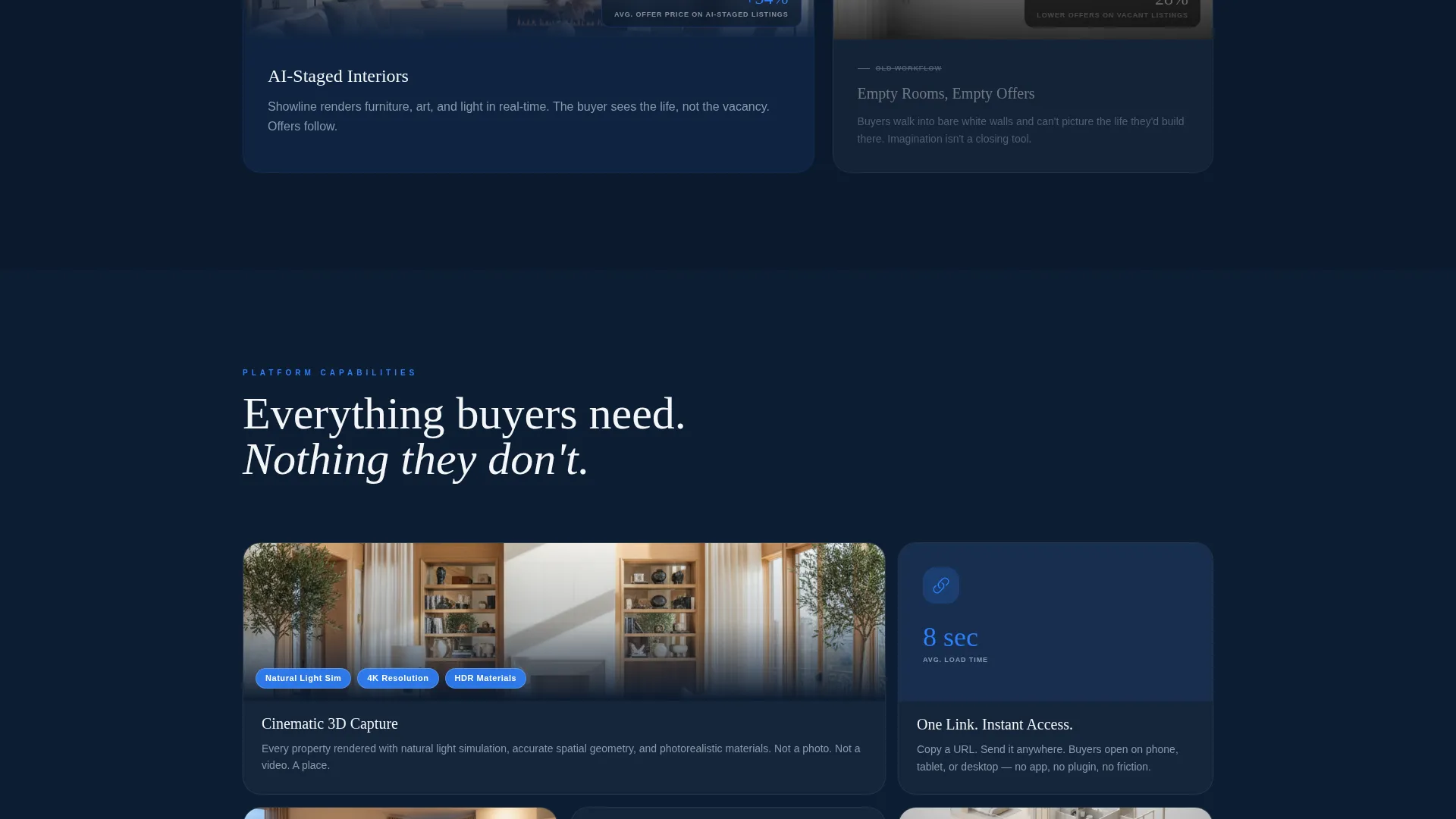
As the visitor scrolls, each section pairs one old workflow against the platform replacement. Static floor plans are placed beside explorable dollhouse views. Phone-tag scheduling is placed beside one-link access. Vacant-room guesswork is placed beside AI-staged interior previews. The contrast sharpens with every section, stacking visual evidence until the conclusion feels obvious.
Single-Destination Click-Through Funnel
The page is built around one conversion goal: the free interactive demo. The primary call to action, "Walk Through a Live Property," appears first beneath the header slider, then reappears anchored in a sticky bottom bar after the second scroll section. There are no forms or input fields. The click lands the visitor inside an actual virtual showing of a staged luxury listing.
Secondary Pricing Link
A text link reading "See Pricing by Brokerage Size" is placed alongside the primary call to action. It is designed for operations buyers and brokerage managers who need cost context before they commit to the demo experience. It sits quietly without competing with the primary button.
Corporate Precision Color System
The Midnight Blue palette applies navy to backgrounds and section dividers, gunmetal to body text and secondary containers, and broker-white to property display panels. Electric sapphire is reserved exclusively for interactive hotspots, buttons, and hover states. Color does the heavy lifting in communicating which elements are clickable and which are structural.
Page sections overview
| Section | Purpose |
|---|---|
| Header Before/After Slider | Introduces the platform by contrasting flat MLS photos with immersive 3D captures via a draggable handle |
| Floor Plan Comparison | Pairs static floor plan images with explorable dollhouse views to demonstrate spatial depth |
| Scheduling Workflow Contrast | Shows phone-tag scheduling beside one-link virtual access to illustrate time savings |
| AI Staging Preview | Compares vacant-room ambiguity with AI-staged interior previews for buyer clarity |
| Primary Demo call to action | Delivers the "Walk Through a Live Property" button and secondary pricing link |
| Sticky Bottom Bar | Keeps the primary call to action visible after the second scroll section |
Design & branding system
The template uses a Corporate Precision visual identity built on the Midnight Blue color system. Every color has an assigned role and the palette holds together tightly across every section.
- Deep command-center navy (#0B1A2E) dominates backgrounds and section dividers, anchoring the executive-floor atmosphere
- Polished gunmetal (#3A4A5C) handles body text and secondary containers; broker-white (#F4F6F8) opens up property display panels for visual breathing room
- Electric sapphire (#2D7FF9) fires only on interactive hotspots, buttons, and hover states, making every clickable element immediately distinct
Mobile & speed optimization
The layout is designed to translate cleanly from desktop to smaller screens without losing its visual logic. The asymmetric grid and Before/After Slider are core to the experience and are built with responsive behavior in mind.
- The 60/40 grid reflows gracefully so the platform-experience column remains visually dominant on narrower viewports
- The sticky bottom call-to-action bar is especially effective on mobile, keeping the demo link accessible without requiring the visitor to scroll back up
- Section contrast between the color-active platform panel and the grayscale legacy panel is preserved at all breakpoints
How this template helps you convert
The entire layout is engineered as a click-through funnel. There is no friction between arriving on the page and reaching the demo.
- The draggable header slider creates immediate curiosity and personal investment before any headline appears, making the visitor an active participant from the first second
- Each stacked scroll section removes one more objection by showing the old workflow next to its replacement, building a visual case that is stronger than any written testimonial
- The sticky bottom bar ensures the "Walk Through a Live Property" call to action is never more than one tap away, regardless of how deep the visitor has scrolled
Other information about this template
This template is suited for proptech companies, virtual tour software providers, and real estate technology platforms looking to communicate the value of immersive property experiences to a professional audience. It works well as a campaign landing page for product launches, brokerage outreach, or conference follow-up traffic.
- The template is designed as a single-page click-through, not a multi-section website with navigation menus
- The demo destination is intended to be a live virtual showing of a staged luxury listing, letting the product experience do the selling
- The layout supports the niche context of lease management and commercial real estate platforms alongside residential listing use cases
- This template is compatible with modern no-code and low-code page builder environments where asymmetric grid and slider components are supported
Theme
Atelier Studio
Creative direction
Stats-First Impact
Color system
Dark Emerald
Style
Card Grid (Modular)
Direction
Click-Through
Page Sections
Draggable Before/after Header Slider
Asymmetric 60/40 Grid Layout
Stacked Before/after Scroll Sections
Single-destination Click-through Funnel
Corporate Precision Color System
Related questions
Who is the primary audience for this landing page template?
Does this template include a lead capture form?
Can I customize the color palette and section content?
Is this template suitable for commercial real estate use cases?
What makes the Before/After Slider different from a standard hero section?



