Kids Photography Gear Store Landing Page Template
Shutter is a scroll-reveal landing page template built for kids photography equipment and gear stores. It opens with a playful photographer-type quiz, flows into a community gallery wall of real kid-shot photos, and leads parents naturally toward booking a gear fitting. The warm Sunset Gradient palette and tilted photo cards make every scroll feel personal, not promotional.
by Rocket studio
Quick summary
Shutter is a single-page, scroll-reveal template for a kids photography gear store. It guides parents through a four-tile quiz, surfaces a living gallery of real child photographers, and converts that community feeling into booked gear fitting appointments. The design is warm and gallery-quality without ever feeling childish or corporate.
Who this template is for
This template speaks directly to specialty retailers who sell cameras, tripods, and accessories sized for young photographers. It is built for store owners who want appointments, not just browsing sessions.
- Parents of children aged 6 to 12 searching for a first real camera
- Homeschool families building photography into their curriculum
- Summer camp directors outfitting groups of kids with durable gear
What problem this template solves
Most gear store pages throw products at visitors without context. Parents arrive unsure which camera survives a drop, and they leave without buying. This template solves that by making personalization the first interaction, so every visitor feels like the page was built for their child.
- No clear path from "browsing" to "buying" on generic store pages
- Parents cannot tell if gear is truly durable or age-appropriate without guidance
- Product discovery feels cold and catalog-like rather than personal and trustworthy
What you get with this template
You get a fully structured, single-page scroll-reveal layout with five major content sections and a mobile-sticky booking bar. Every section is designed to build trust before asking for any commitment.
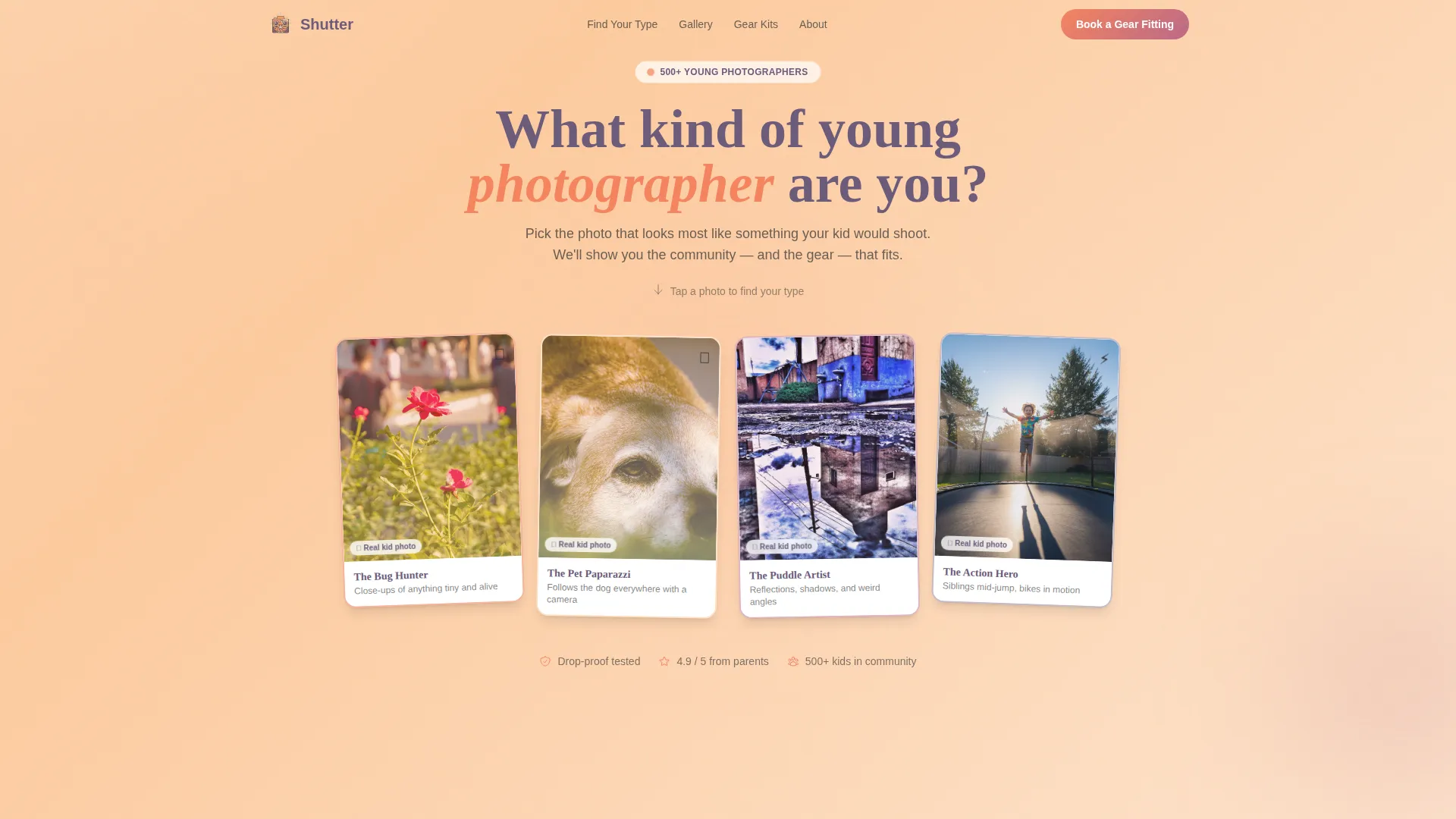
- A hero section with a four-tile photographer-type quiz and illustrated kid-photo tiles
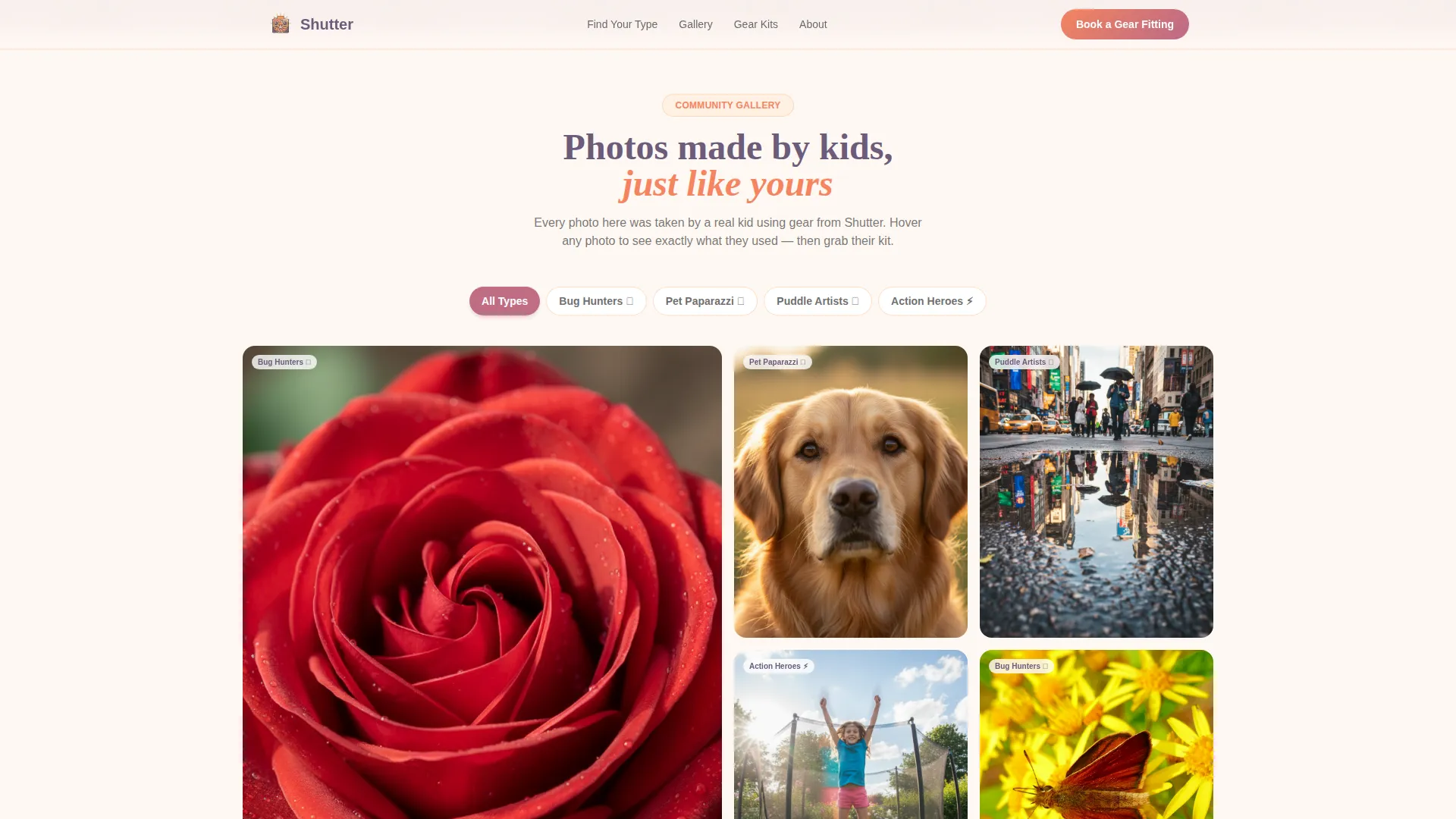
- A community gallery wall with hover-expand photo cards showing the child's name, age, and gear
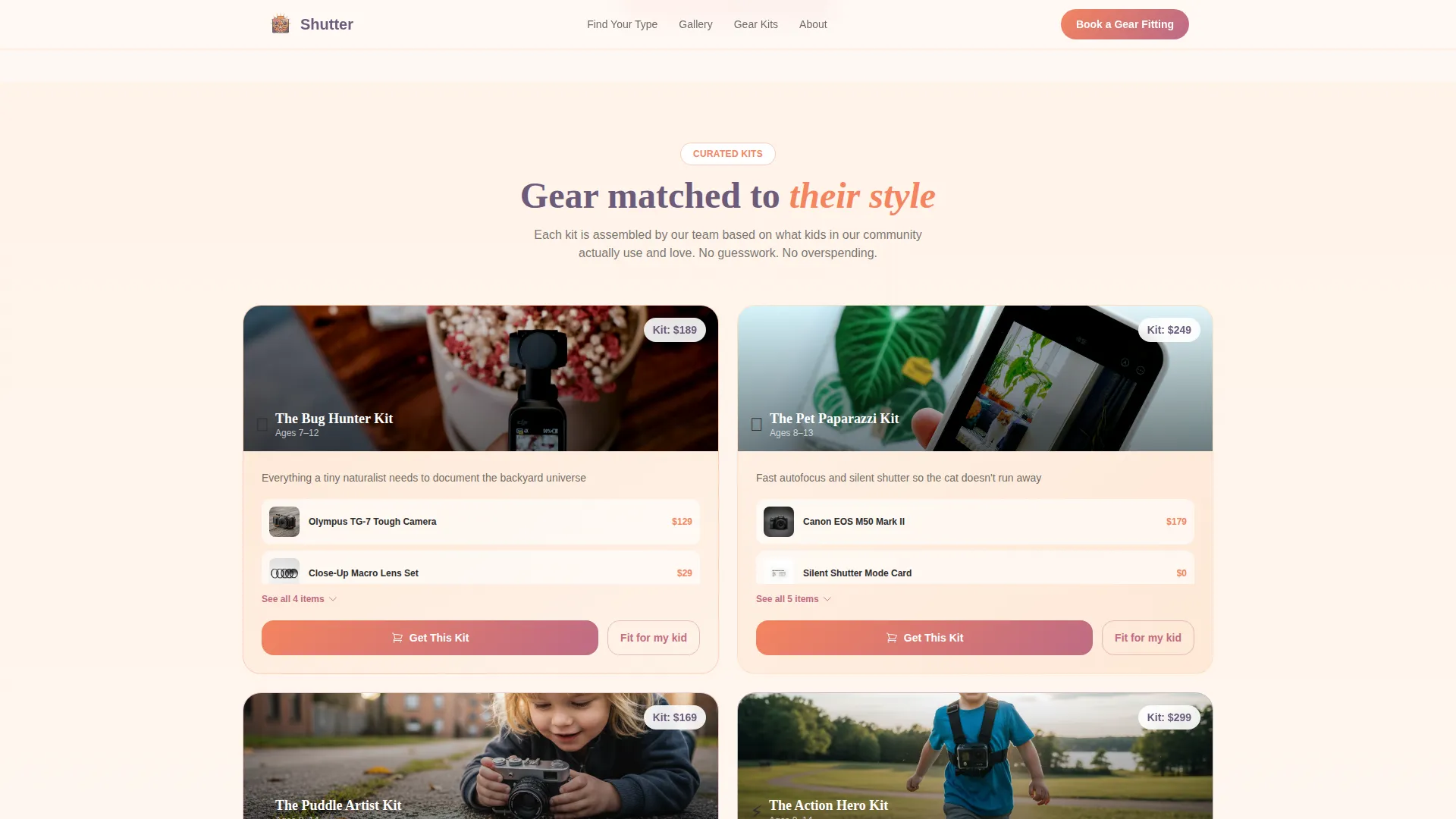
- Scroll-triggered gear kit cards matched to each photographer type, a booking form section, and a testimonials block
Feature list
This template includes purpose-built components that work together to move a parent from curious visitor to confirmed appointment.
Photographer-Type Quiz Starter
The hero opens with four clickable photo tiles, each showing a real photo taken by a child. Tiles are slightly tilted like prints scattered on a table. Selecting a tile, such as a bug macro, pet portrait, puddle reflection, or sibling action shot, sorts the visitor into a photographer type that shapes everything they see next.
Community Gallery Wall
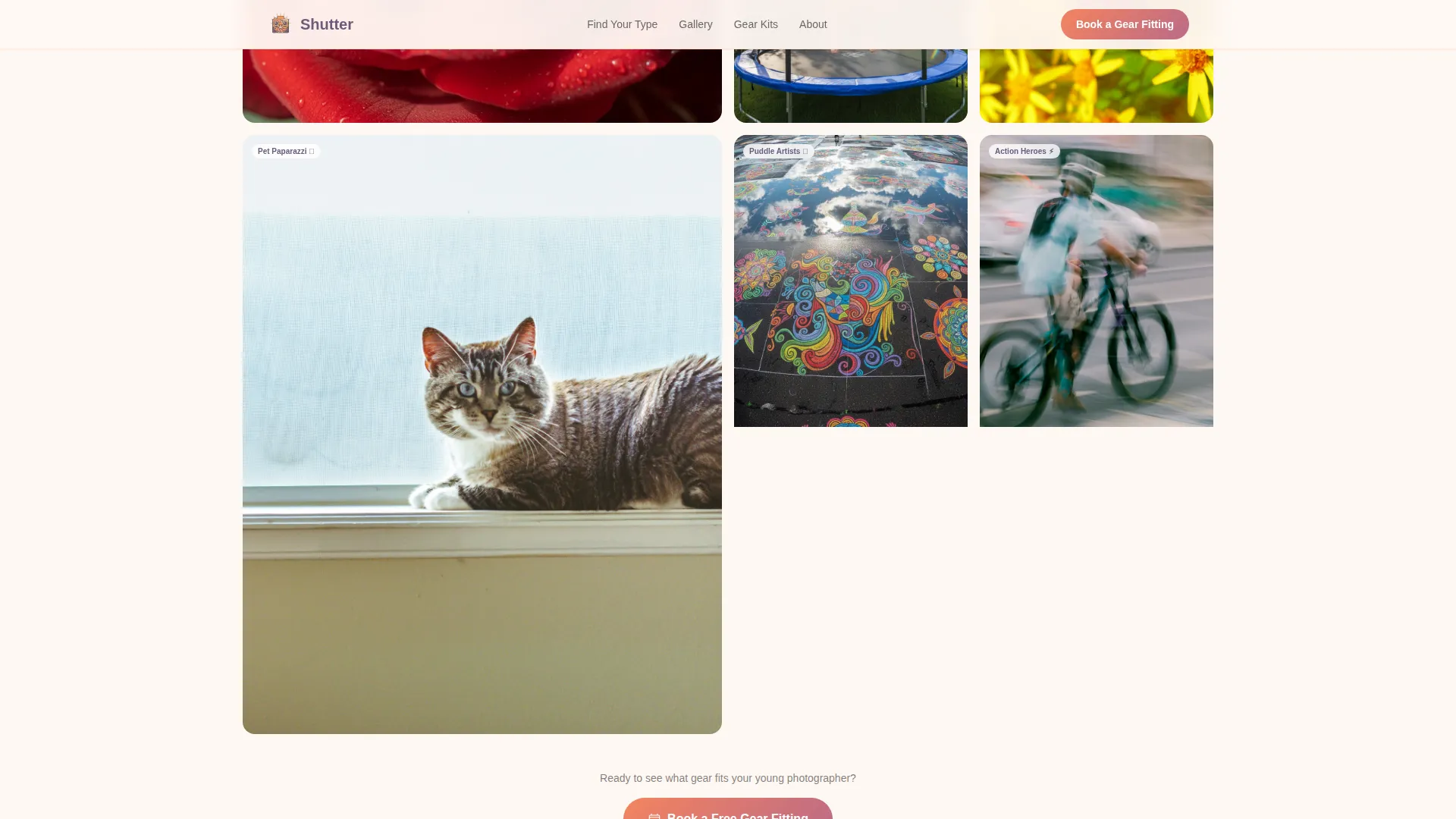
After the quiz, a living wall of kid-submitted photos appears, organized by photographer type. Each thumbnail expands on hover to reveal the child's first name, age, and the exact gear they used. This turns social proof into product discovery in a single interaction.
Scroll-Triggered Gear Kit Cards
Between gallery clusters, cards progressively reveal curated kit bundles matched to each photographer type. The reveal animation is scroll-triggered, so product recommendations feel earned rather than pushed.
Book a Gear Fitting Form
The primary call to action is a booking form that collects the child's age, their quiz-result photographer type, and a preferred date for an in-store or video fitting session. This structured form makes the next step feel obvious, not salesy.
Sticky Mobile Booking Bar
On mobile, a persistent bottom bar keeps the "Book a Gear Fitting" call to action visible throughout the entire scroll. Parents browsing on their phones never lose the path to booking.
Shoppable Kit Browser
Every gallery photo includes a "Browse Their Kit" tap target that jumps the visitor directly to that child's gear list as a shoppable bundle. This secondary path captures visitors who prefer to shop before booking.
Page sections overview
| Section | Purpose |
|---|---|
| Hero + Quiz | Engage visitors with a four-tile photographer-type quiz |
| Community Gallery Wall | Display kid-submitted photos organized by photographer type |
| Gear Kit Cards | Reveal curated kit bundles matched to each photographer type |
| Book a Fitting | Present the booking form with child age and preferred date |
| Testimonials + Social Proof | Show parent quotes alongside child photo thumbnails |
| Footer | Provide logo, tagline, and navigation links in a split layout |
Design & branding system
The visual identity follows a Community Hearth theme rendered through a Sunset Gradient color system. Display headings use Fraunces, a warm serif that feels handcrafted and editorial. Body copy uses DM Sans for clean legibility across all screen sizes.
- Soft peach (#FDCB9E) and warm amber (#F4845F) wash across section backgrounds as gentle gradients
- Dusky rose (#C06C84) highlights buttons and interactive states; deep plum (#6C5B7B) anchors headings
- Charcoal (#2D2D2D) keeps body copy readable against the warm, glowing palette
Mobile & speed optimization
The template is built mobile-first, reflecting how parents actually browse. Touch targets are sized for thumbs, and the sticky booking bar keeps the primary call to action reachable without scrolling back to the top.
- Intersection Observer powers scroll-triggered reveals so animations activate only when sections enter the viewport
- CSS transforms handle the tilted card hover and gallery expand effects without heavy scripting
- The sticky bottom bar on mobile keeps "Book a Gear Fitting" persistently visible throughout the full page scroll
How this template helps you convert
The conversion path is built around personal investment, not pressure. By the time a parent reaches the booking form, they have already seen what a child like theirs created with this store's gear.
- The quiz creates a personalized photographer type, making every subsequent section feel curated and relevant to that specific family.
- The community gallery builds trust by showing hundreds of real child photographers alongside the exact gear they used, turning proof into discovery.
- The "Book a Gear Fitting" call to action appears at the natural moment of peak interest, right after the gallery, and stays accessible via the sticky mobile bar throughout the rest of the scroll.
Other information about this template
This template is designed for single-location specialty retailers and online stores in the kids photography equipment and gear niche. It also works well for pop-up shop campaigns or seasonal gear launch pages tied to summer programs.
- The footer follows an Arc Browser Split pattern with the store logo and tagline on the left and navigation links on the right
- The template references a "500+ young photographers" social proof metric to anchor community scale
- Animation intensity is high throughout, including scroll reveals, tilted card hovers, gallery expand states, and the sticky mobile bar
- The booking form supports both in-store and video fitting session options to accommodate remote families
- Localization is set for the United States market, using USD pricing, MM/DD/YYYY date format, and imperial measurements
Theme
Community Hearth
Creative direction
Community Gallery
Color system
Sunset Gradient
Style
Scroll Reveal (Progressive)
Direction
Booking/Scheduling
Page Sections
Photographer-type Quiz with Tilted Tiles
Community Gallery Wall with Hover Reveal
Scroll-triggered Gear Kit Cards
Book a Gear Fitting Form
Sticky Mobile Booking Bar
Shoppable Kit Browser Via Gallery
Related questions
Who is the Shutter template designed for?
Can I replace the quiz photos and gallery images with my own?
Does the template offer a path for shoppers who prefer to browse before booking?
Is the Shutter template built for mobile users?
What sections are included in this landing page template?



