Photographers Co-Working Community Landing Page
Shutter is an editorial landing page template built for photographers co-working communities where parents and creatives share the same space. It blends a warm magazine aesthetic with a clear event-registration flow, letting real member stories carry visitors toward an Open Studio Day sign-up. The design feels personal, lived-in, and genuinely community-built.
by Rocket studio
Quick summary
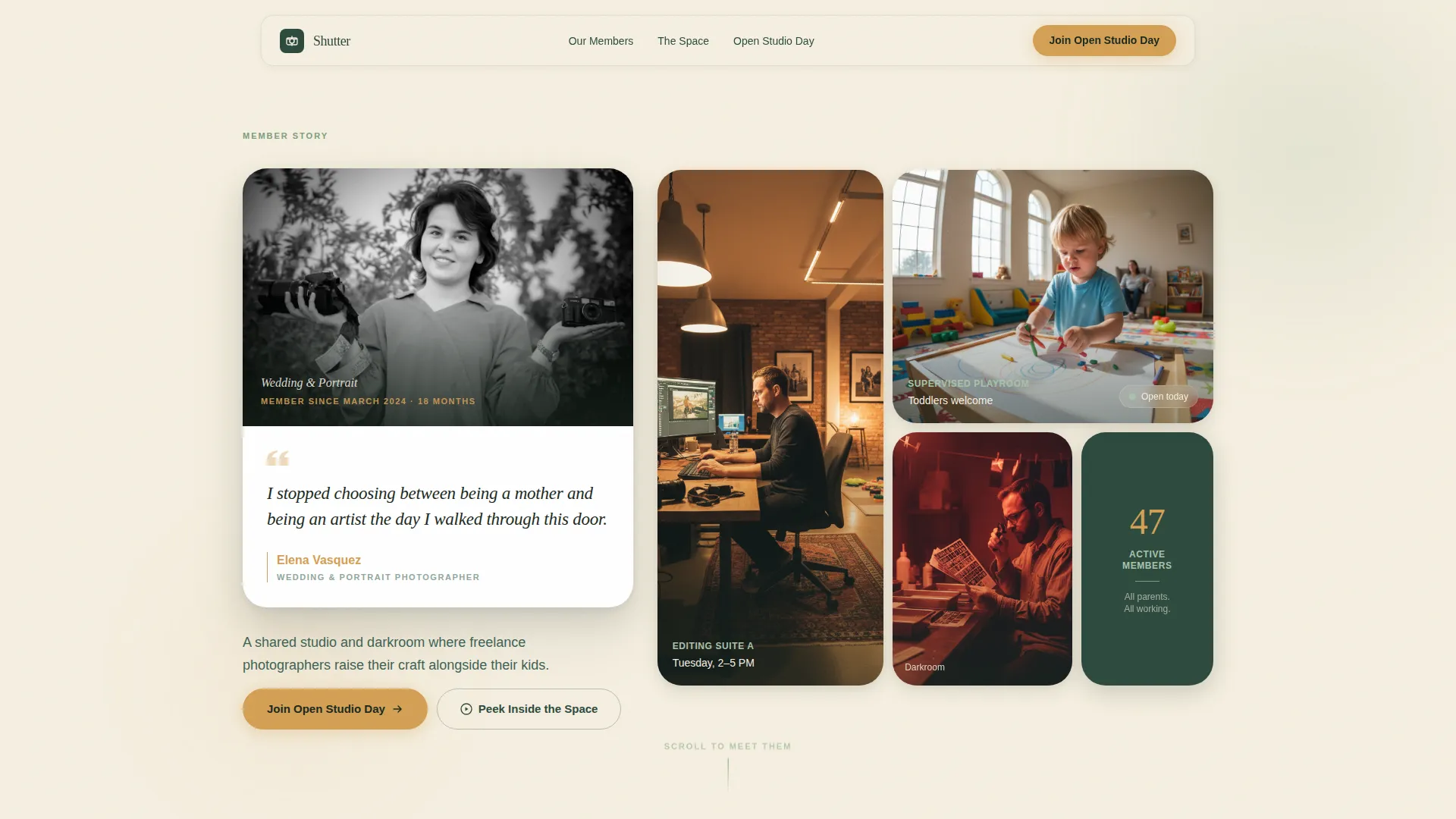
Shutter is a single-page editorial template for a photographers co-working community. It leads with a powerful member testimonial card, moves through a scrolling community gallery of real member profiles, and closes with a focused Open Studio Day registration form. The tone is warm zine meets editorial magazine, built to earn trust before asking for a click.
Who this template is for
This template is made for organizers running a shared photography studio where creative work and family life overlap. It speaks directly to the people managing a co-working space that serves freelance photographers who are also parents.
- Photographers co-working space founders who want an emotional, story-led landing page
- Community managers in photography niches such as wedding, newborn, and documentary work
- Photography-adjacent creatives considering career re-entry after time away with children
What problem this template solves
Most studio or co-working landing pages feel corporate and transactional. They list amenities and prices but skip the part that actually converts a hesitant visitor: the human proof that the space works for people like them.
- Freelance photographers who are parents rarely see their full life reflected in studio marketing
- Generic templates cannot hold the emotional weight needed to move a parent-photographer toward a commitment
- Visitors need to meet real members and feel the community before they fill in a registration form
What you get with this template
You get a fully structured editorial landing page with every section already planned and sequenced for maximum emotional impact. The layout alternates full-bleed member portfolios with intimate editorial asides, building cumulative trust as visitors scroll.
- A testimonial-card hero featuring a black-and-white member portrait with a handwritten-style pull quote and magazine-style contributor credit
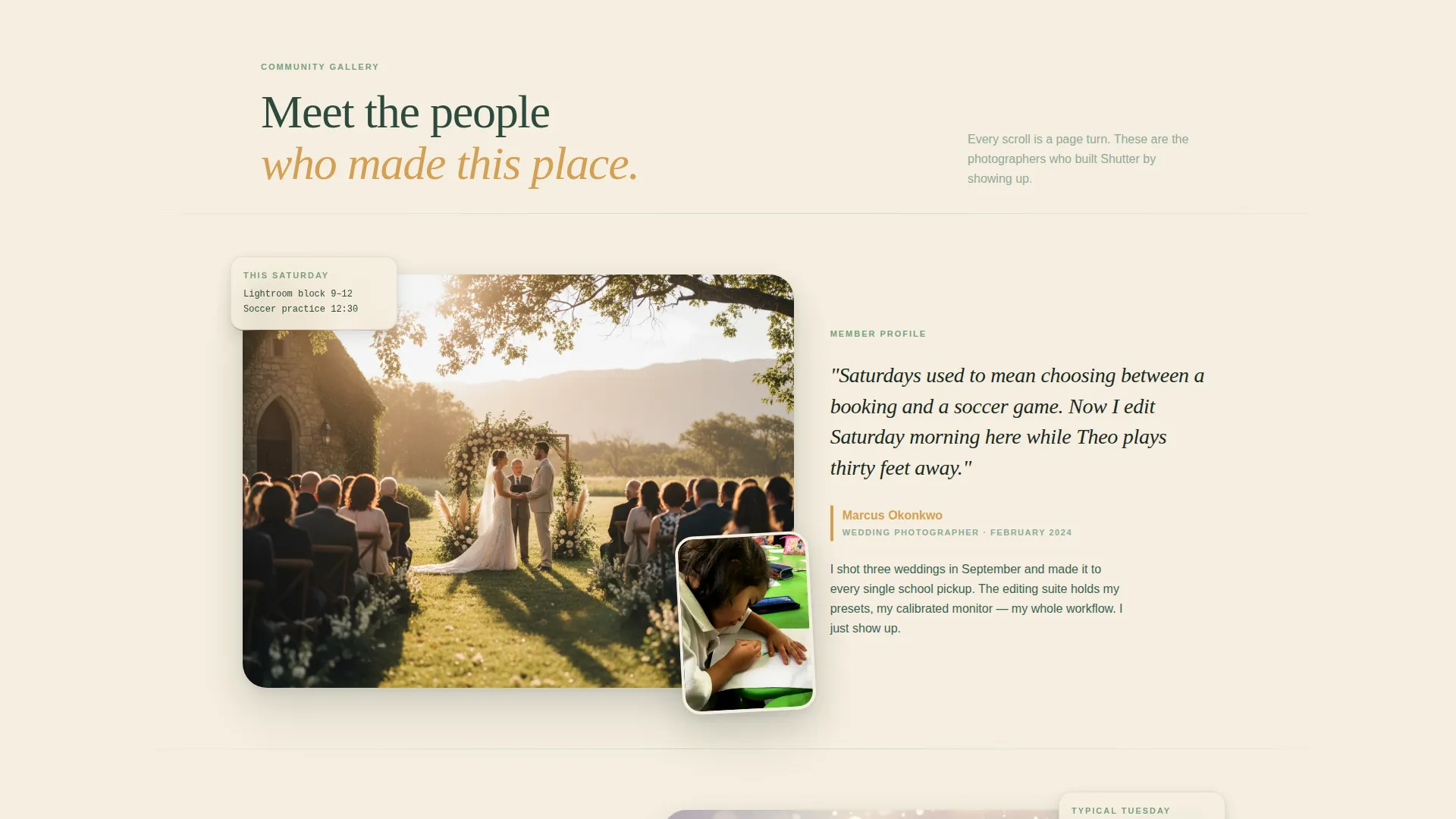
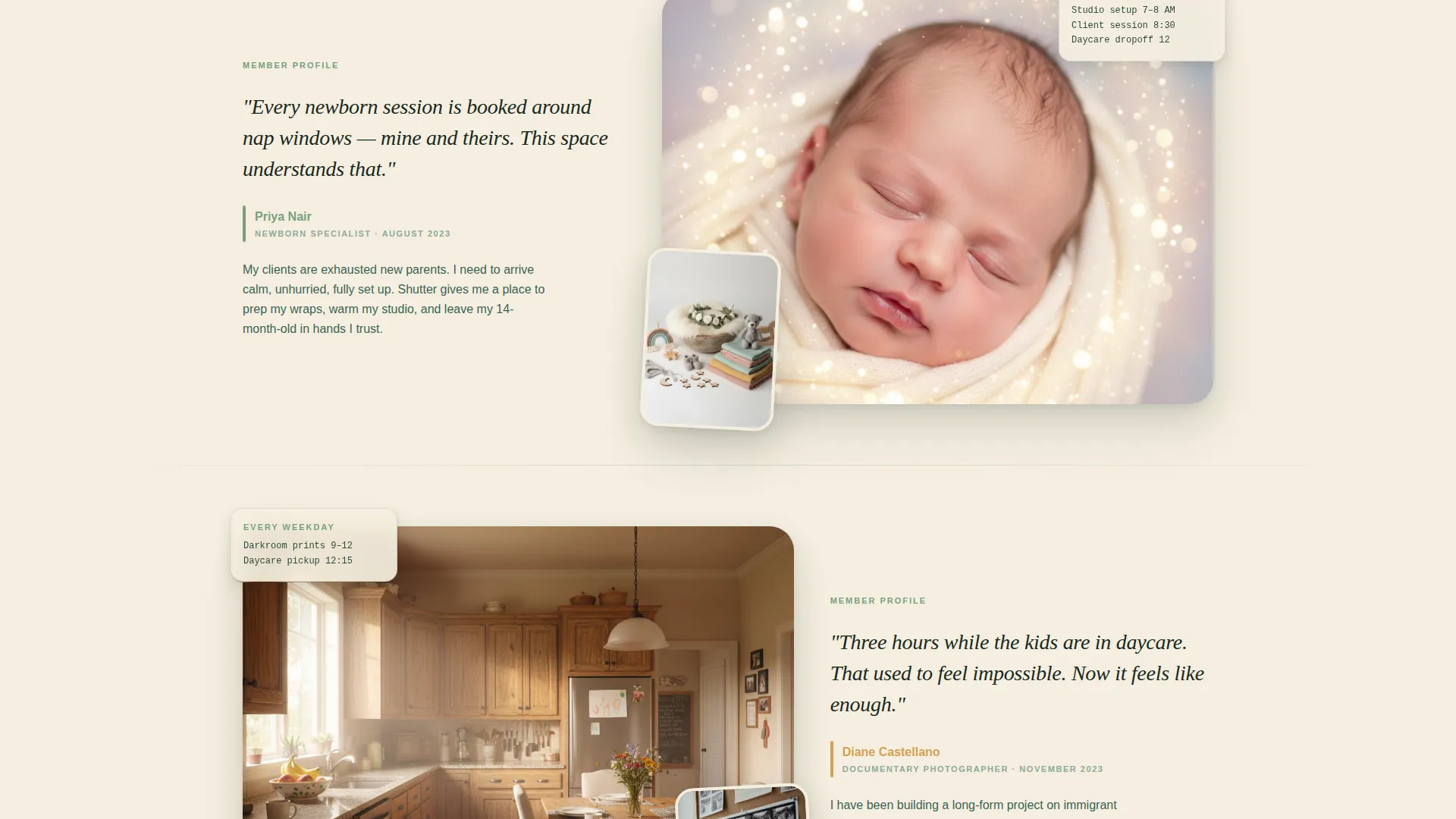
- A community gallery with three alternating full-bleed member profiles, each showing personal photographs, first-person captions, and family-life scheduling details
- An Open Studio Day registration form with fields for first name, photography genre, number and ages of children, and preferred Saturday date from a dropdown
Feature list
A paragraph of context: each feature below maps directly to a section or interaction defined in the source brief. Nothing here is speculative. These are the actual built-in capabilities of the Shutter template.
Testimonial Card Hero
The page opens with a single oversized testimonial card floating on a birch cream background. It shows a black-and-white member portrait alongside a handwritten-style pull quote. Name, photography genre, and membership tenure are typeset like a magazine contributor credit beneath the image.
Community Gallery Layout
Three member profiles scroll in a full-bleed alternating layout. Each profile pairs the member's own photographs with a short first-person caption and a detail about how the studio fits their family schedule. Editorial asides appear between profiles, showing items like a child's crayon drawing pinned beside a contact sheet.
Open Studio Day Registration Form
The primary conversion element is a focused registration form with five fields: first name, photography genre, number of children with ages, and preferred Saturday date from a short dropdown. The form appears after the third member profile, timed to when emotional investment is highest.
Sticky Footer Call to Action
A persistent "Join Our Open Studio Day" button stays visible in a sticky footer as visitors scroll. This ensures the registration path is always one click away without interrupting the editorial reading experience.
Secondary Video Modal Path
A "Peek Inside the Space" link triggers a sixty-second walkthrough video for visitors who are not yet ready to register. This secondary path respects hesitation and keeps undecided visitors engaged rather than losing them.
Member Stats and Extended Profiles
Below the registration form, two additional member profiles continue the community story alongside community-wide statistics. This section reinforces social proof for visitors who scroll past the form without converting on the first pass.
Page sections overview
| Section | Purpose |
|---|---|
| Hero Testimonial Card | Opens with a named member portrait and pull quote to immediately establish emotional credibility |
| Member Photo Bento | A bento-style grid of member images beside the hero card to signal community size and warmth |
| Community Gallery Profiles | Three alternating full-bleed member stories that build progressive trust through personal photos and captions |
| Editorial Asides | Intimate zine-style inserts showing real scheduling details and personal objects between member profiles |
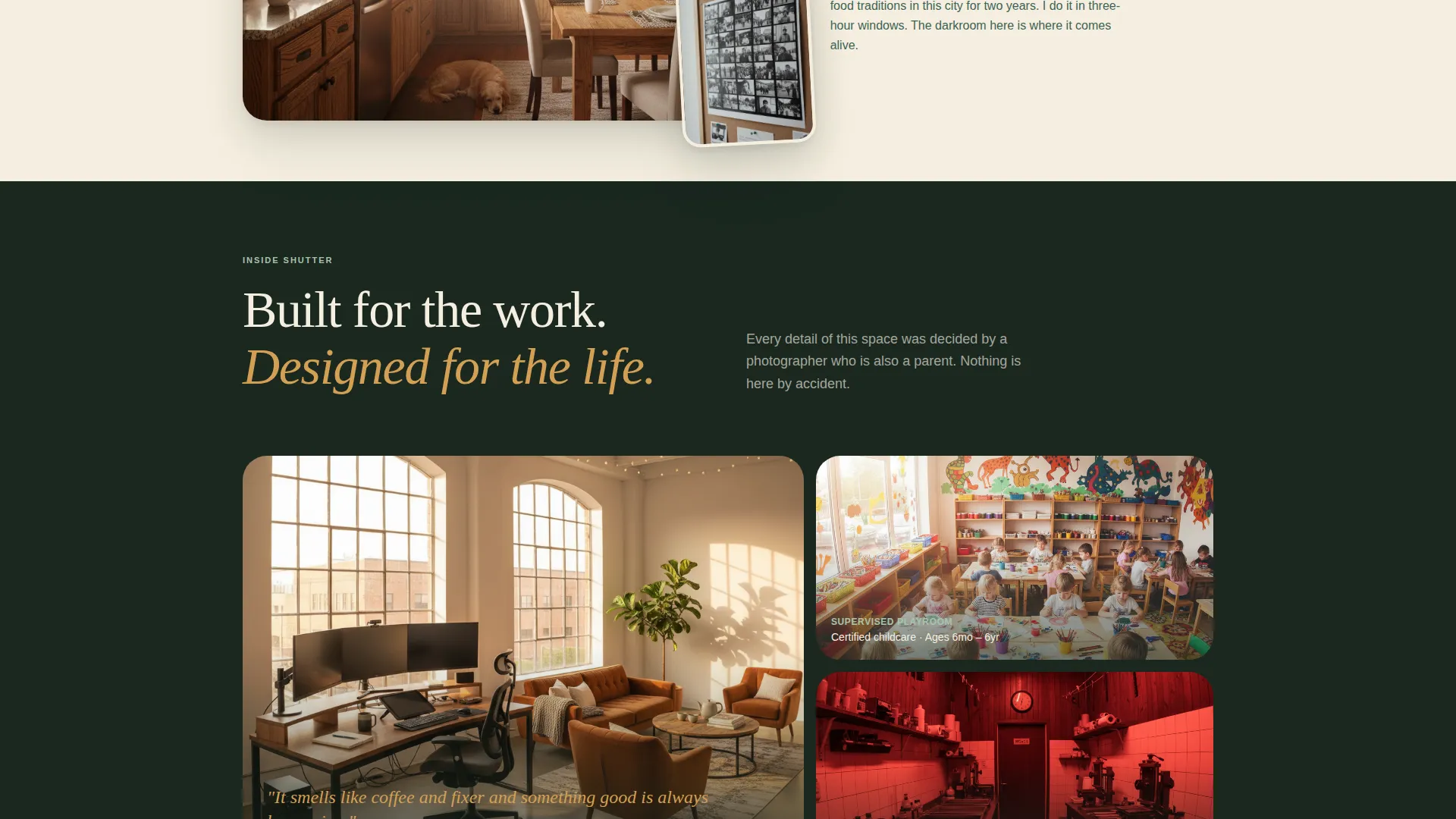
| The Space Details | Describes the darkroom, playroom, and communal editing suites in an editorial aside format |
| Open Studio Day Form | Primary conversion section with the registration form and amber-accented call to action |
| More Members and Stats | Two additional profiles with community numbers to reinforce proof after the form |
| Footer | Horizontal flow footer pattern completing the page structure |
Design & branding system
The visual identity follows a Family First theme anchored by the Forest Trust color palette. Every color choice has an assigned role, and the typography pairing reinforces the editorial magazine feel throughout the scroll.
- Evergreen (#2D4A3E) anchors headers and navigation; birch cream (#F5EFE0) breathes across long-scroll backgrounds; soft fern (#7A9E7E) marks section dividers and icon strokes; amber (#D4A054) highlights buttons, pull quotes, and member names
- Typography pairs DM Sans for body copy and interface elements with Fraunces for editorial headlines and pull quotes, creating a clear visual hierarchy between reading and scanning
- Animations use GSAP ScrollTrigger for section reveals, staggered member card entries, and parallax image layers to create a sense of physical page-turning as visitors scroll
Mobile & speed optimization
The template is designed desktop-first to match how photographers typically browse when evaluating a studio space. Full mobile support is included so the experience holds across every device a visitor might use.
- Desktop layout prioritizes the full editorial magazine spread with parallax layers and full-bleed alternating profiles intact
- Mobile layout adapts the bento grid, alternating profiles, and sticky footer button to smaller screens without losing the warm editorial tone
- Server Components handle static content sections while client-side rendering is scoped to animations and the interactive registration form
How this template helps you convert
The page is engineered so that visitors have already met five real members before they ever see a form. Conversion is earned through accumulated emotional investment, not pushed through early pressure.
- The testimonial card hero builds immediate personal trust by showing a specific, named member with a real earned quote rather than generic stock imagery or feature lists
- Three sequential member profiles, each grounded in family-life detail, create the feeling that the visitor already belongs in the community before the registration form appears
- The sticky footer call to action and secondary video modal work together to catch both ready-to-register visitors and those who need one more reason before committing
Other information about this template
This template is a strong fit for community and nonprofit photography organizations that want a high-craft, editorial presentation without building a custom site from scratch. It is also well-suited for photography studio co-working spaces considering an event-led membership funnel.
- The page uses English copy, United States date formatting (MM/DD/YYYY), and USD-aligned context throughout
- The amber accent color is used with intention: it appears only on buttons, pull quotes, and highlighted member names to guide the eye toward trust moments
- The template style is Editorial/Magazine, making it distinct from typical directory or portfolio templates in the photographers community category
- Animation intensity is set to high, with GSAP ScrollTrigger reveals and staggered card entries designed to feel expressive without slowing the reading rhythm
- The "Peek Inside the Space" video modal path gives space organizers a way to feature a sixty-second walkthrough video directly inside the page without redirecting visitors away
Theme
Family First
Creative direction
Community Gallery
Color system
Forest Trust
Style
Editorial/Magazine
Direction
Event Registration
Page Sections
Testimonial Card Hero Section
Alternating Full-bleed Community Gallery
Open Studio Day Registration Form
Sticky Footer Call to Action
Secondary Video Modal Pathway
Extended Member Profiles with Community Stats
Related questions
Who is this template designed for?
Can I use this template without existing member testimonials?
What information does the registration form collect?
Is the video modal pathway included in the template?
How does the sticky footer button work alongside the main form?



