Babysitter Booking Website Template
Sitter is a babysitter booking landing page template built for childcare platforms that match vetted caregivers to families fast. It leads with a testimonial card hero, a three-tier caregiver comparison table, a three-step inline booking flow, and a sticky call-to-action bar, giving anxious parents both the emotional trust and rational clarity they need to book with confidence.
by Rocket studio
Quick summary
Sitter is a single-page booking template for childcare platforms. It opens with a floating testimonial card and a live sits-completed counter, then guides parents through a caregiver comparison table across three credential tiers, a three-step booking flow, and a trust section built around verified certifications, all designed to convert a worried parent into a confirmed booking.
Who this template is for
This template is built for founders and product teams running a babysitter booking service or childcare marketplace. It is equally useful for operators who want a high-trust, conversion-focused landing page without building from scratch.
- Childcare platform teams launching or relaunching a parent-facing booking page
- Service operators offering tiered caregivers such as date-night sitters, early-childhood-education specialists, and overnight newborn nurses
- Marketers managing bookings for dual-income urban and suburban families or corporate childcare benefit programs
What problem this template solves
Booking a babysitter involves real emotional stakes. Parents need proof of credentials, clarity on availability, and confidence that the process is fast. Most booking pages fail because they mix stock imagery with vague claims and give parents no rational framework for choosing a caregiver tier.
- Parents feel anxious without visible credentials, background check status, and real parent ratings before committing
- Platforms lose bookings when the path from "browsing" to "confirmed" has too many unclear steps
- A generic list of sitters does not help parents evaluate expertise the way they need to before handing over their children
What you get with this template
The Sitter template delivers a complete, section-led landing page with every component already wired for a babysitter booking platform. Each section has a defined purpose and a clear conversion role.
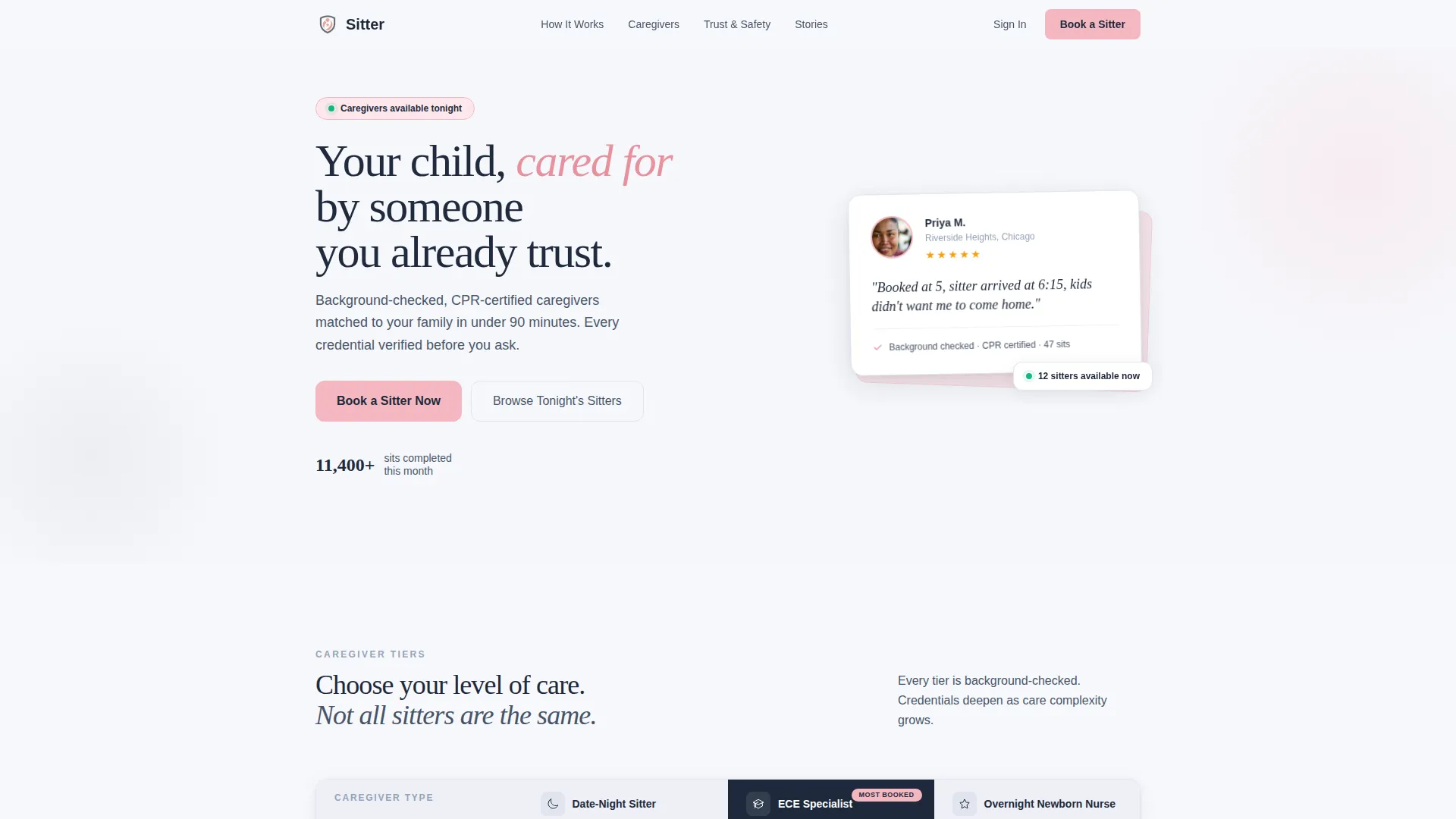
- A hero section with a floating testimonial card, a five-star parent quote, and a live sits-completed counter (11,400+ sits this month)
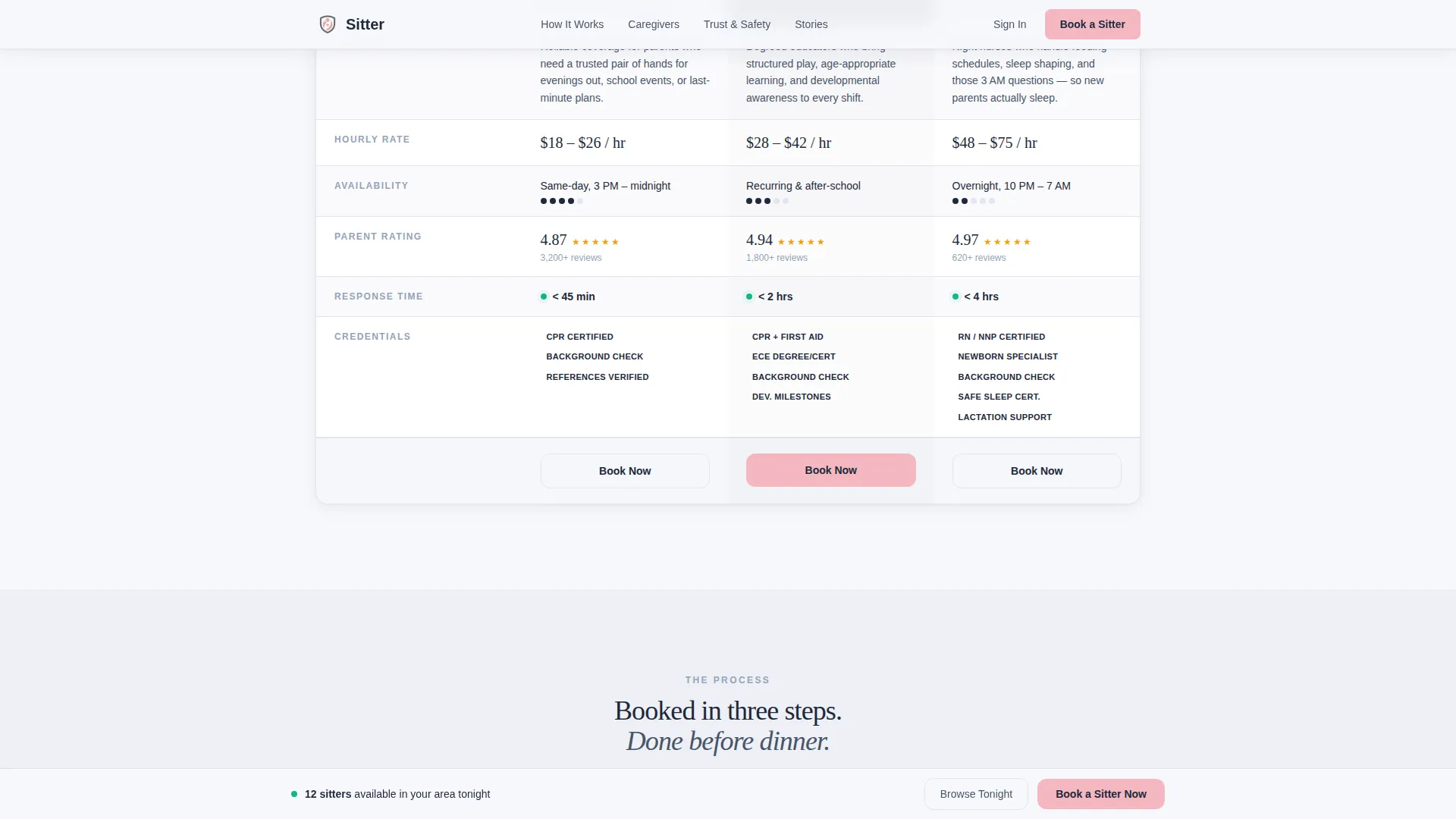
- A three-tier caregiver comparison table with credentials, hourly rate ranges, availability density, and parent rating averages per tier
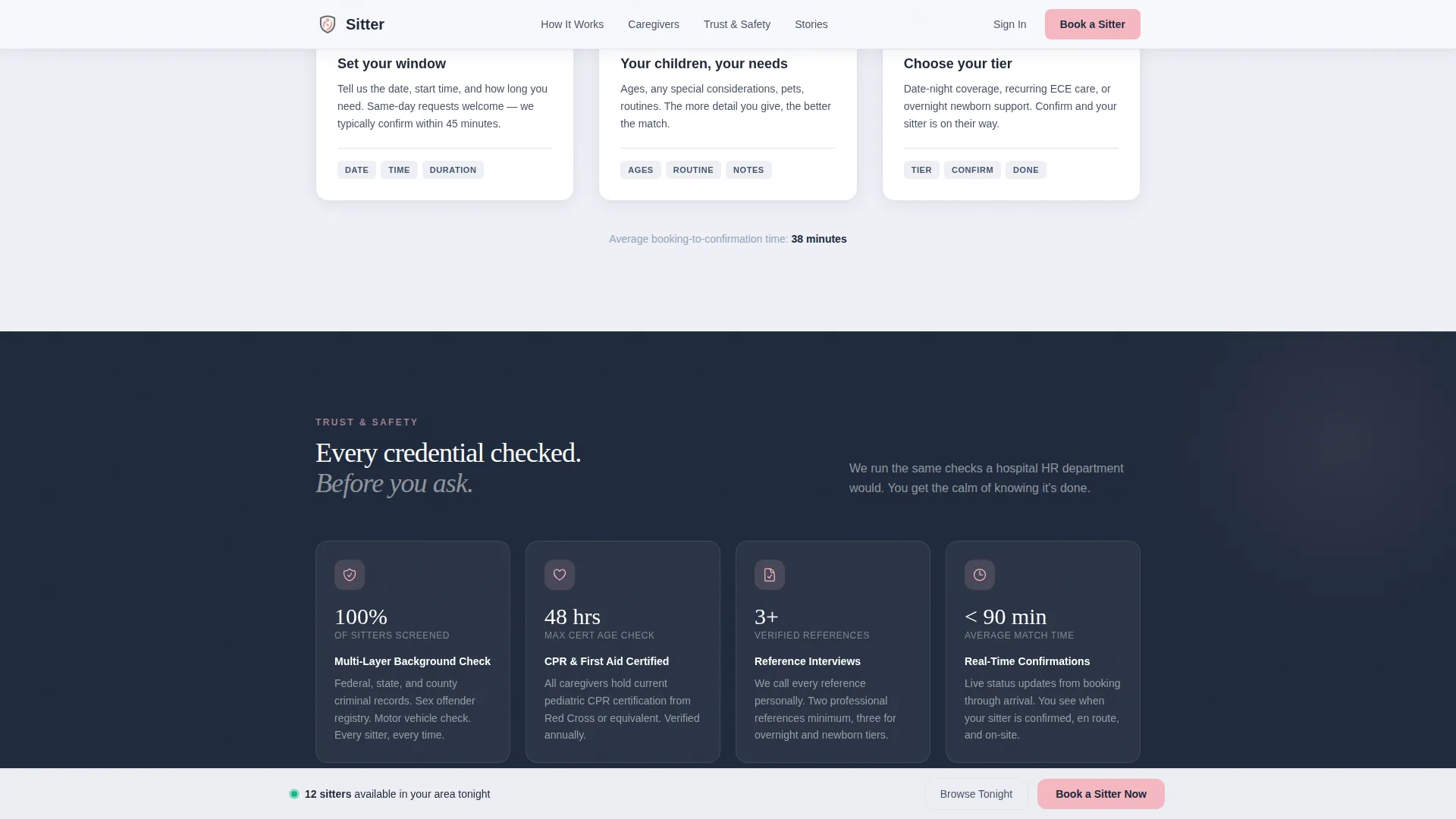
- A three-step inline booking flow covering date and time window, number and ages of children, and caregiver tier preference
Feature list
This template is built around a focused set of components that earn trust and drive bookings in sequence.
Testimonial Card Hero
The header opens with a single oversized testimonial card floating on a cloud-white background. It shows a real parent photo, first name, neighborhood, a five-star row, and a two-line quote. A scroll-triggered counter beneath it displays the number of sits completed this month, giving visitors immediate social proof before they read a single feature.
Three-Tier Comparison Table
The core of the page is an Expert Panel comparison table with three distinct caregiver tiers: date-night sitters, early-childhood-education specialists, and overnight newborn nurses. Each row shows credentials, hourly rate range, availability density, and parent rating average. The table is designed so the right tier feels obvious rather than chosen.
Three-Step Inline Booking Flow
The primary call-to-action button, "Book a Sitter Now," opens a three-step inline modal. Parents select a date and time window, enter the number and ages of their children, and choose a caregiver tier preference. A secondary path, "Browse Available Sitters Tonight," lets parents see real profiles and open slots before committing.
Sticky Call-to-Action Bar
A sticky bar pinned to the bottom of the viewport keeps the "Book a Sitter Now" action visible at all times. This removes the need to scroll back to find a booking button, which is especially useful for parents booking on a mobile phone under time pressure.
Trust and Credentials Section
A dedicated section displays certification badges, background check process details, and response time proof. This section gives parents the rational confidence they need after the emotional trust earned by the testimonial hero.
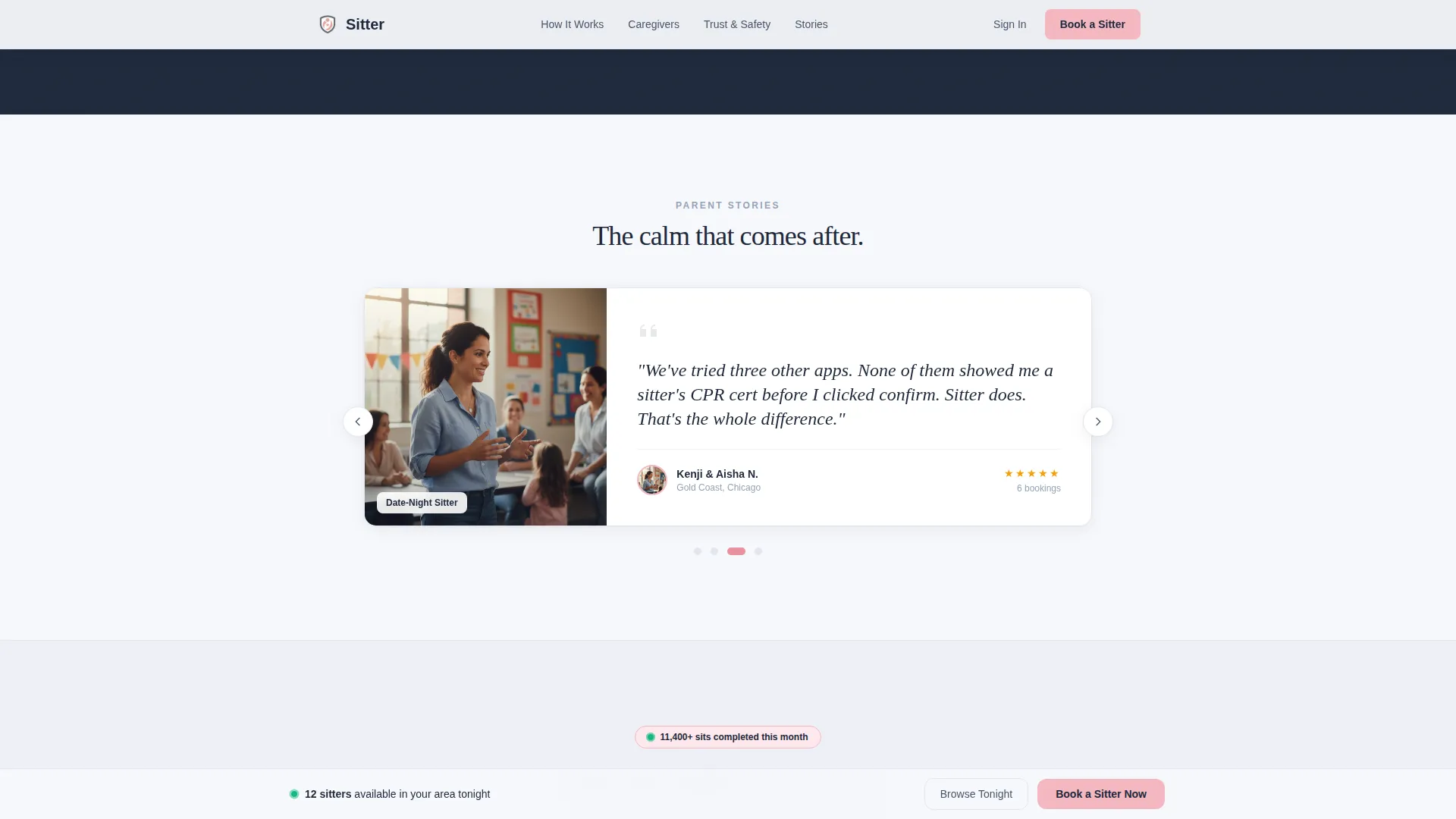
Guest Stories Carousel
A rotating testimonial carousel features named parent stories with photos and neighborhoods. This section reinforces trust throughout the scroll journey and supports the platform's social proof strategy beyond the hero card.
Page sections overview
| Section | Purpose |
|---|---|
| Hero Testimonial Card | Open with a named parent quote, five-star rating, and sits-completed counter |
| Caregiver Comparison Table | Display three credential tiers side by side with rates and ratings |
| How It Works | Show the three-step booking flow in an editorial card layout |
| Trust and Credentials | Present certification badges, background check details, and response time proof |
| Guest Stories Carousel | Rotate named parent testimonials with photos and neighborhood labels |
| Footer | Single-row linear footer with essential links |
Design & branding system
The visual identity follows a Corporate Precision theme using the Cloud Canvas color system. The palette is professionally calm and parent-reassuring at the same time, clean enough for a corporate benefits portal, warm enough that a parent's shoulders drop on arrival.
- Colors: cloud white (#F7F8FC) for backgrounds, trustworthy slate (#475569) for body text, warm blush (#F4B8C1) for buttons and highlights, deep charcoal (#1E293B) for headings and key data points
- Typography: DM Sans for headings and interface elements, Fraunces as an editorial serif for quotes and testimonial copy
- Animations: scroll-reveal section entry, a counter animation on the sits-completed number, and staggered row entry on the comparison table
Mobile & speed optimization
The Sitter template is built mobile-first, reflecting the real usage pattern of parents opening a booking page on their phone at 4 PM on a Friday. Every component is sized and sequenced for thumb-friendly interaction.
- The sticky call-to-action bar and inline booking modal are fully functional on small screens, keeping the booking path accessible without zooming or horizontal scrolling
- Static content sections use server-rendered components, while the counter animation, testimonial carousel, and booking flow modal use client-side rendering only where interactivity is required
How this template helps you convert
The Sitter template is engineered around two conversion levers: emotional trust and rational clarity. Every section is placed to reduce hesitation and move a parent toward booking.
- The testimonial card hero earns emotional trust immediately. A named parent, a real neighborhood, and a specific quote ("Booked at 5, sitter arrived at 6:15") make the platform feel proven before a visitor reads any feature copy.
- The comparison table converts browser intent into booking intent. When parents can evaluate credentials, rates, and ratings side by side across three tiers, the right choice becomes clear. The table earns the click that the testimonial earned the trust for.
Other information about this template
This template is part of a broader Professional Services collection designed for service marketplaces with high-stakes booking decisions. It is purpose-built for the babysitter booking page niche within the Babysitter Online Presence subcategory.
- Template style: Comparison Table with a Booking/Scheduling landing-page direction
- Header concept: Testimonial Card with a floating card layout against cloud white
- Creative direction: Expert Panel, presenting caregivers as distinct professional profiles
- Color system: Cloud Canvas with warm blush (#F4B8C1) accent, slate body, and charcoal headings
- The footer follows a Pattern 1 Linear Single-Row layout for a clean, minimal close
- Localization: English language, United States date format, USD currency display
Theme
Corporate Precision
Creative direction
Expert Panel
Color system
Cloud Canvas
Style
Comparison Table
Direction
Booking/Scheduling
Page Sections
Testimonial Card Hero with Live Counter
Three-tier Caregiver Comparison Table
Three-step Inline Booking Modal
Sticky Call-to-action Bar
Trust and Credentials Section
Guest Stories Carousel
Related questions
What types of caregivers does this template support showcasing?
Can a visitor book directly from the landing page?
Who is the intended audience for this landing page template?
Does the template include social proof beyond the hero section?
Is this template designed for mobile booking use?



