Pool Area Renovation Specialist Booking Website Template
Skim is a single-column landing page template built for pool area cleaning specialists. It guides visitors through a Problem-to-Solution scroll, moving from honest before shots of grimy decks and stained tile to calm, restored spaces. The design uses a Forest Trust color palette and a click-through structure that ends with one clear action: booking an open date.
by Rocket studio
Quick summary
Skim is a landing page template for pool area cleaning professionals. It uses a Problem-to-Solution Arc to take visitors from recognizing their neglected outdoor space to trusting a crew that can fix it. A Forest Trust color system and warm serif typography create a calm, credible first impression. One button drives everything: "See Open Dates."
Who this template is for
This template is built for pool area cleaning specialists who serve residential and rental markets. It speaks directly to clients who need fast, visible results and have little patience for complicated booking flows.
- Property managers preparing a pool area before lease turnover
- Homeowners who uncovered a neglected or swampy pool after winter
- Airbnb and short-term rental hosts who need the outdoor area photo-ready by a specific checkout date
What problem this template solves
Many pool cleaning businesses lose potential clients because their online presence does not reflect the quality of their work. Visitors land on a page, see no clear evidence of results, and leave without booking. This template closes that gap.
- It shows the before-and-after contrast that builds immediate trust
- It removes friction by eliminating forms and sending visitors straight to a calendar
- It frames the cleaning process as physical, sequential, and real rather than vague
What you get with this template
You get a ready-to-use, single-column landing page with a clear visual story from problem to resolution. Every section has a defined purpose, and the layout guides visitors toward a single booking action without distraction.
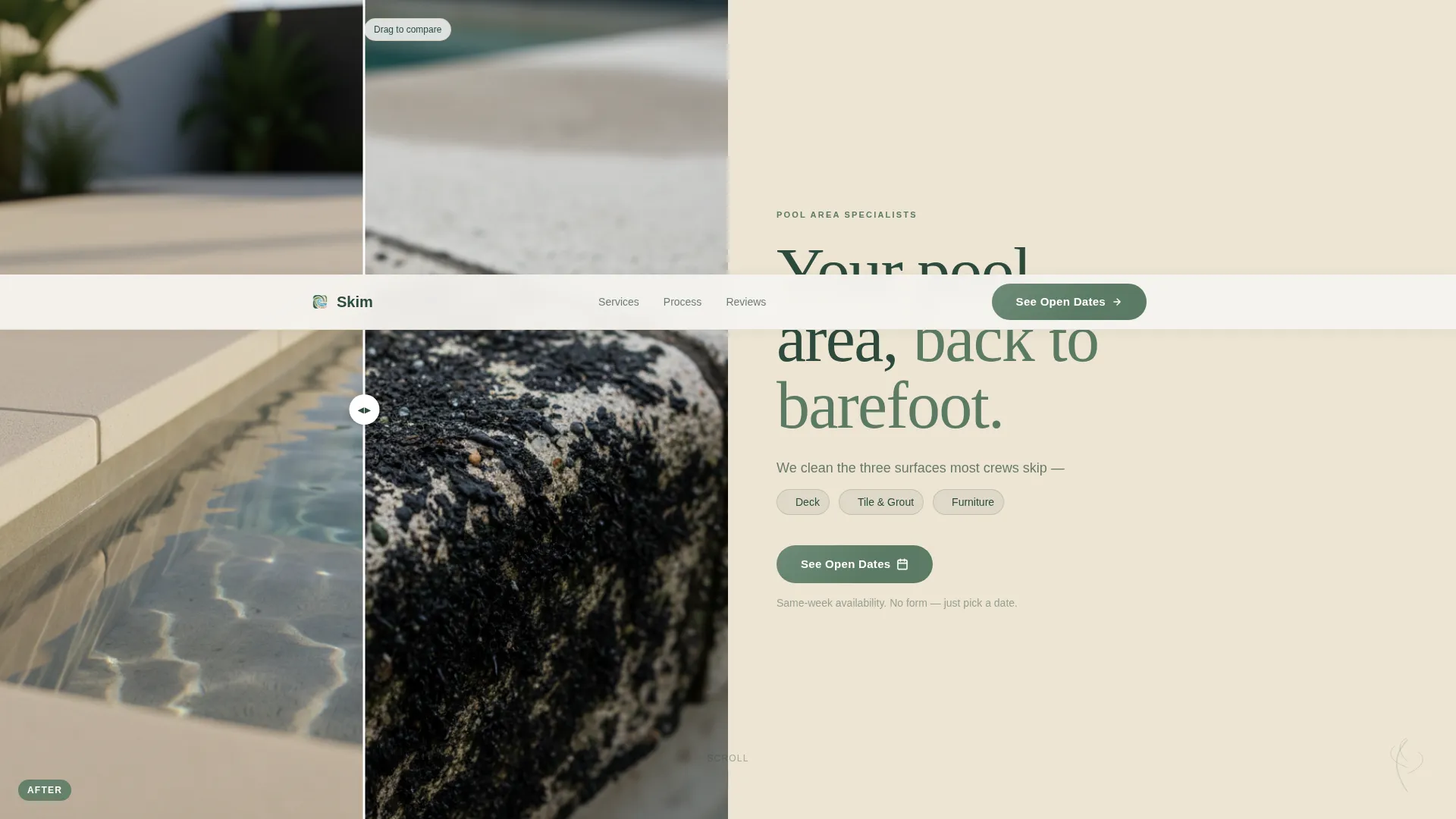
- A half-page header with a photo and headline split designed to stop the scroll
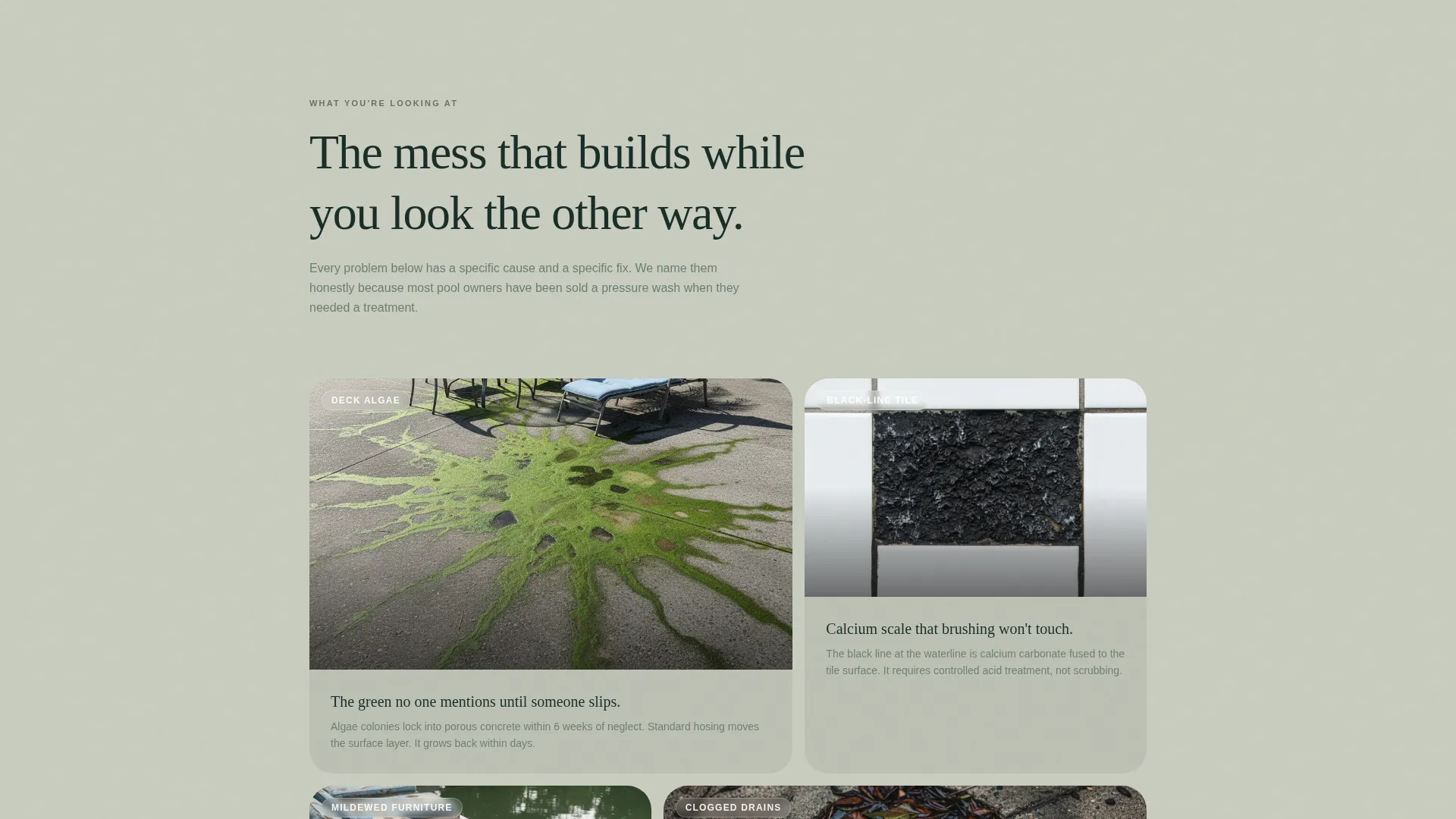
- A before-and-after gallery section with captioned problem images followed by clean resolution shots
- Three strategically placed "See Open Dates" call-to-action buttons that carry visitors to a scheduling page
Feature list
This template includes purpose-built sections and design choices grounded in the needs of a pool area cleaning specialist. Every feature below comes directly from the brief.
Half-Page Photo and Text Header
The header splits the viewport into a left-side overhead photo and a right-side text block. The image shows one coping stone half-blackened with grime and half restored to pale cream, with morning light and no people. The headline reads "Your pool area, back to barefoot" in a warm serif over sandstone white, with a subline naming the three surfaces cleaned: deck, tile, and furniture.
Problem-to-Solution Scroll Arc
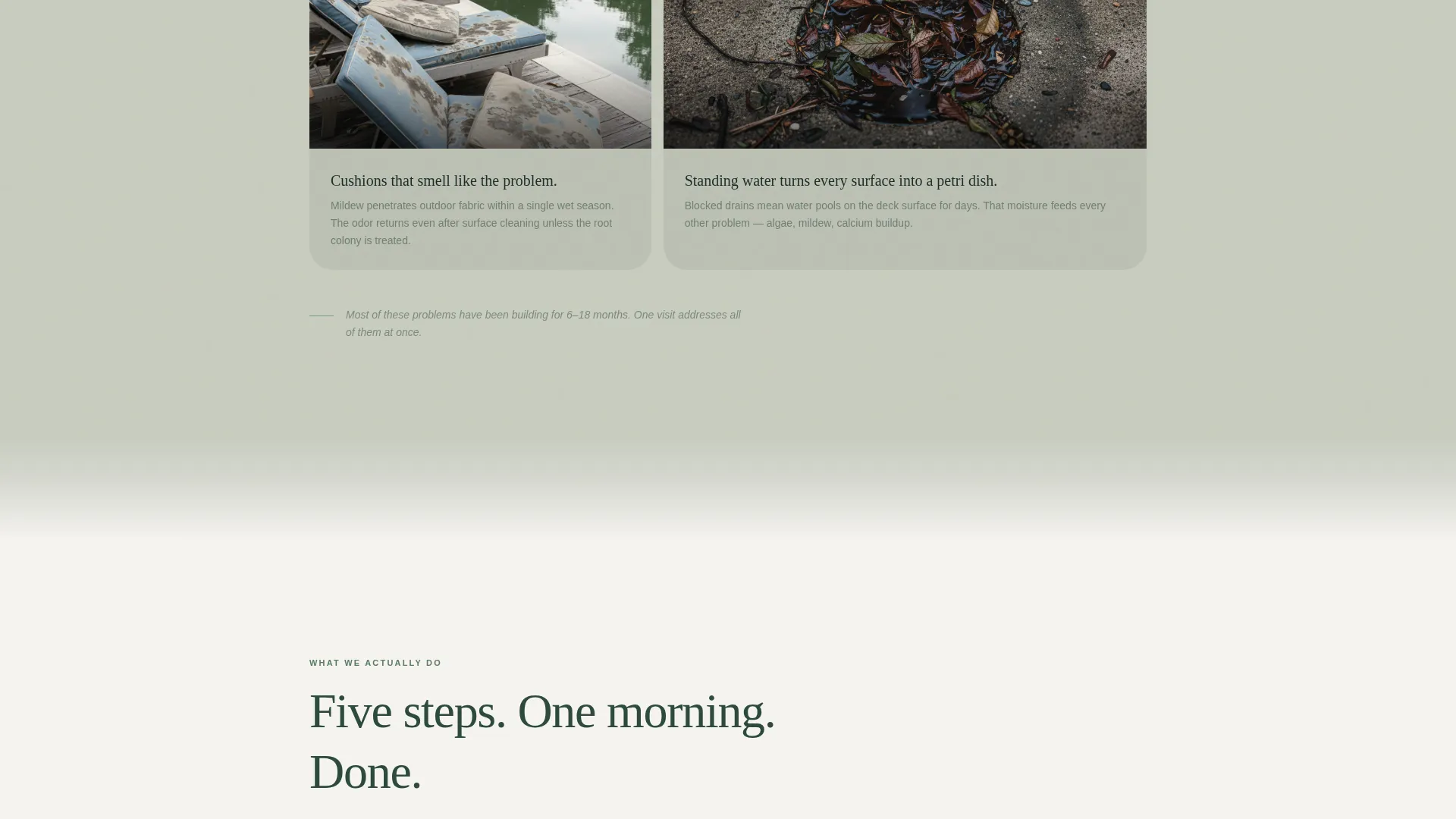
The page opens with an honest gallery of the mess, including stained grout, mildewed cushions, and leaf-clogged drains, each captioned with the specific problem visitors recognize. A visual threshold then shifts the background from muted gray-green to clean deck white, and every section below shows the resolved version.
Sequential Process Section
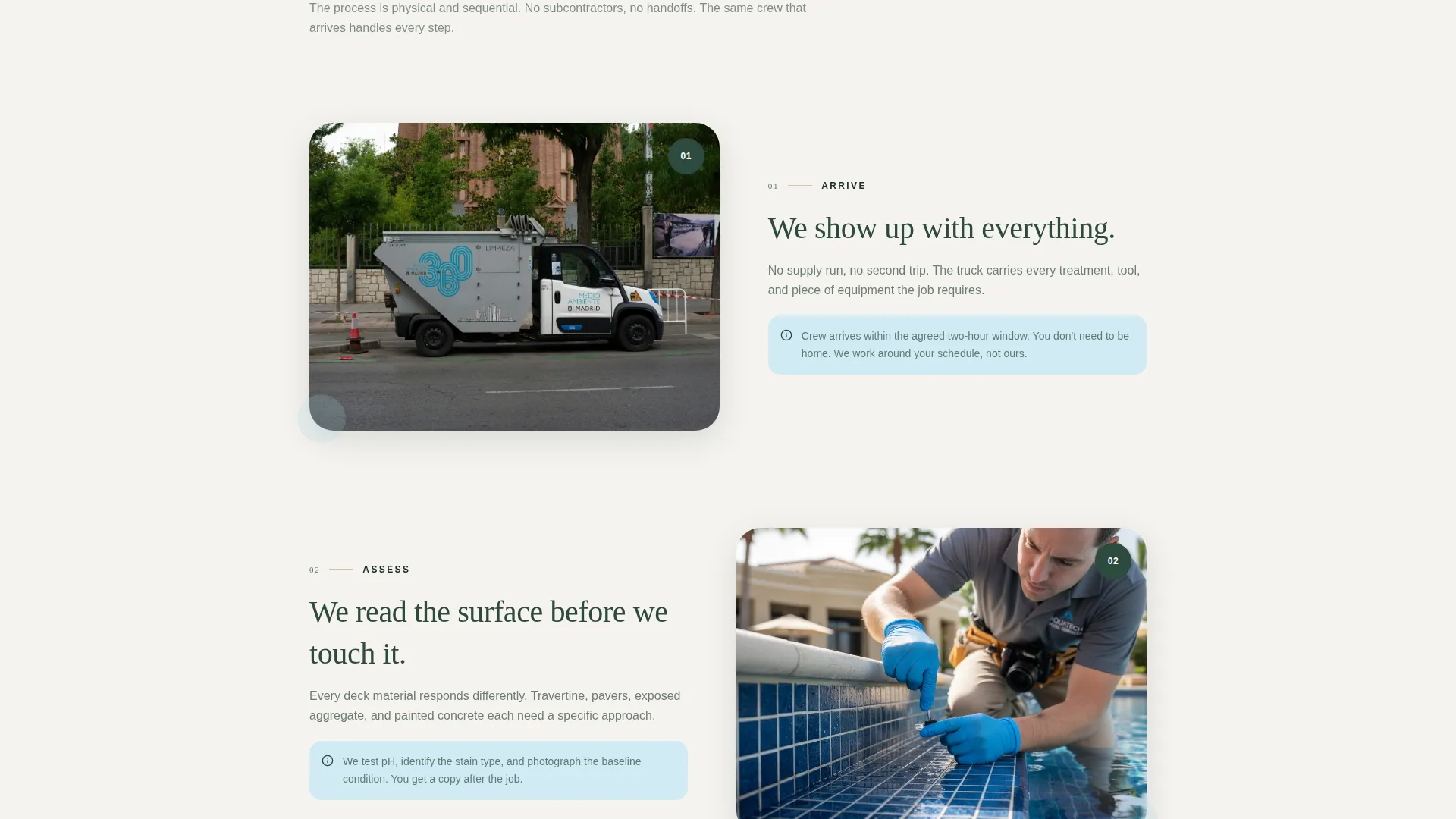
Five physical steps, arrive, assess, treat, rinse, and inspect, each paired with a single photo. This section helps visitors picture the crew working on their own patio. The sequential layout reinforces professionalism without overexplaining.
Named-Neighborhood Testimonial Strip
Reviews use first names and neighborhoods rather than company logos or anonymous ratings. This keeps the social proof grounded and personal, which matches the way pool cleaning clients talk to neighbors about service recommendations.
Repeated Click-Through Call to Action
The primary button, "See Open Dates," appears three times: beneath the header, after the process section, and after the final beauty shot. No form is included. Each button carries the visitor to a separate scheduling or calendar page.
Final Beauty Shot Closing Section
The page ends with a still, sparkling pool area with no one in it. This image functions as a visual payoff, giving visitors a clear picture of the outcome they are paying for before they click to book.
Page sections overview
| Section | Purpose |
|---|---|
| Header split | Introduce the service and headline |
| Problem gallery | Show neglected pool conditions honestly |
| Visual threshold | Signal the shift from mess to resolution |
| Process steps | Walk visitors through the crew's physical method |
| Testimonial strip | Build trust with first-name neighborhood reviews |
| Final beauty shot | Deliver the visual outcome as a closing argument |
| Closing call to action | Push visitors to select a service date |
Design & branding system
The Forest Trust color system gives the page a calm, outdoor-grounded feel. It draws on the visual language of a mature backyard on a quiet morning: dappled shade, wet flagstone, and cool air. Typography and spacing support the unhurried, trustworthy tone the brief calls for.
- Deep shade green (#2D4A3E), sun-warmed sandstone (#D4C5A9), clean chlorine blue (#A8D5E2), and soft white deck (#F5F3EF) form the primary palette
- Steady moss (#5B7B65) is used for accent actions and interactive elements
- A warm serif typeface carries the headline to create emotional contrast against the before-and-after photography
Mobile & speed optimization
The single-column flow of this template adapts naturally to narrower screens. Visitors on phones and tablets experience the same top-to-bottom scroll arc without layout shifts or broken section logic.
- Single-column structure means no complex grid reflow on smaller viewports
- Large photo sections are framed for vertical cropping, keeping the key visual detail visible on mobile
- The click-through model keeps the page lean by removing form fields and multi-step interactions
How this template helps you convert
The entire page is built to reduce hesitation before the booking click. Every section earns a small amount of trust, so that by the time visitors reach the button, the decision already feels made.
- The before-and-after evidence answers the visitor's first question: "Can this crew actually fix my pool area?" before any words do.
- The named-neighborhood reviews answer the second question: "Have they done this for someone like me?" using specific, personal social proof rather than generic ratings.
- The repeated "See Open Dates" button removes decision fatigue by offering one clear next step, with no form fields standing between the visitor and a confirmed appointment.
Other information about this template
This template is categorized under Construction and Home, specifically within the Pool Area Renovation subcategory. It is designed for the Pool Area Cleaning Specialist niche and follows a Pastoral Calm visual theme.
- The template style is a Single Column Flow landing page, making it straightforward to customize section by section
- The creative direction follows a Problem-to-Solution Arc, a format well suited to before-and-after service businesses
- The click-through landing page direction keeps the conversion path simple: one page, one button, one destination
- The header concept is a Half-Page Photo and Text split, grounding the first impression in photographic evidence rather than copy alone
- This template can support any pool area cleaning business that uses a third-party scheduling or calendar tool for bookings, since the call-to-action buttons link out rather than hosting a form
Theme
Pastoral Calm
Creative direction
Problem→Solution Arc
Color system
Forest Trust
Style
Single Column Flow
Direction
Click-Through
Page Sections
Half-page Photo and Text Header
Problem-to-solution Scroll Arc
Sequential Five-step Process Section
Named-neighborhood Testimonial Strip
Repeated Click-through Call to Action
Final Beauty Shot Closing Section
Related questions
Does this template include a booking form?
Who is this landing page best suited for?
Can I replace the placeholder photos with my own before-and-after images?
Can I use this template if I clean tile and outdoor furniture in addition to the pool deck?
Is the Forest Trust color palette locked, or can I change it?



