Plastering & Stucco Landing Page Template
Skim is a single-page lead generation landing page built for plastering and stucco professionals. It combines a bold photo-split header, logo-wall credibility band, and side-by-side comparison tables to help visitors self-qualify before they fill out the form. The layout uses a clean Ink and Paper color system to keep the focus on trust and conversion.
by Rocket studio
Quick summary
Skim is a comparison-table landing page for plasterers and stucco workers. It leads with a jobsite-real photo header, builds authority with a contractor logo wall, and walks visitors through clear service comparisons. By the time someone reaches the quote form, they already know what they need and roughly what it costs.
Who this template is for
This template is designed for plastering and stucco businesses that handle everything from skim coating to full three-coat stucco systems. It works equally well for sole operators and small crews serving a defined local market.
- Plasterers and stucco contractors looking to generate qualified leads online
- Business owners who serve general contractors, property managers, and homeowners
- Trades professionals who want a clean, no-fluff web presence that builds trust fast
What problem this template solves
Most plastering businesses lose leads because their online presence does not explain the difference between services clearly. Visitors arrive unsure whether they need a skim coat, a full replaster, or a stucco resurface, and they leave without calling.
- Visitors cannot self-qualify, so they call unprepared or not at all
- No clear pricing context makes the quote feel like a gamble
- Generic layouts fail to communicate the precision and skill the trade demands
What you get with this template
You get a fully structured, single-page layout built specifically for plastering and stucco lead generation. Every section serves a purpose and moves the visitor closer to submitting the quote form.
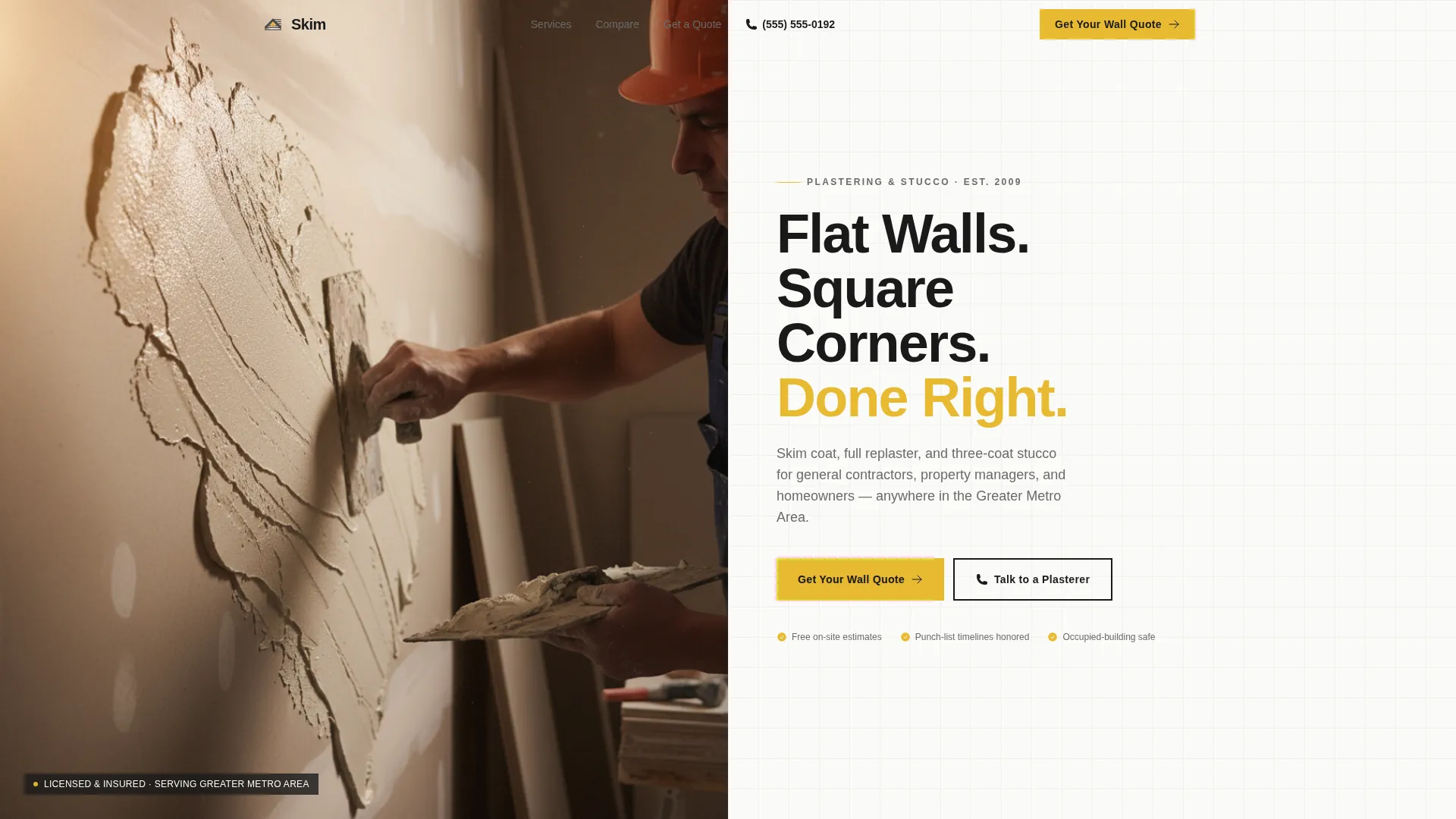
- A half-page photo and text split header with a bold headline and yellow call-to-action button
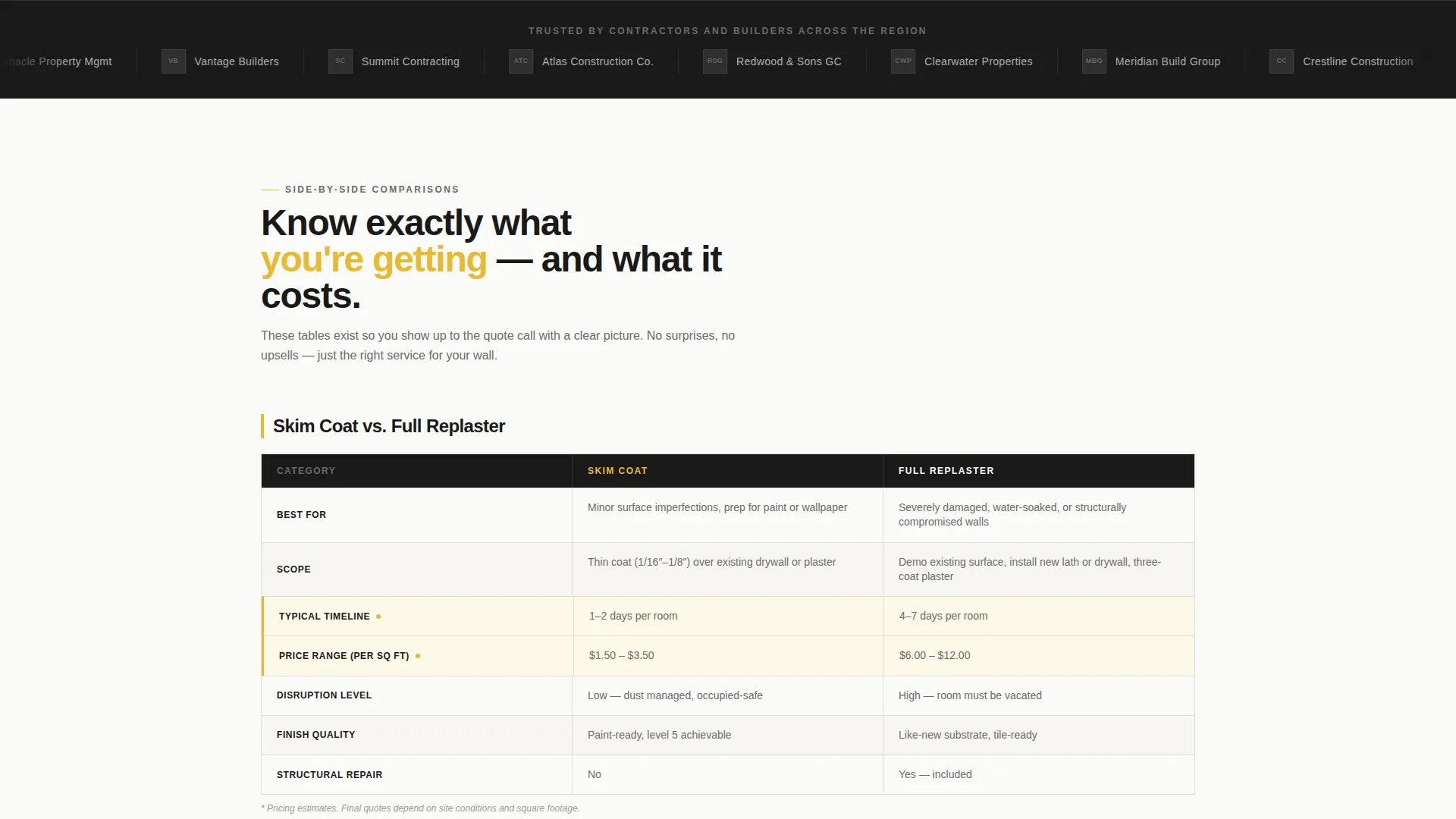
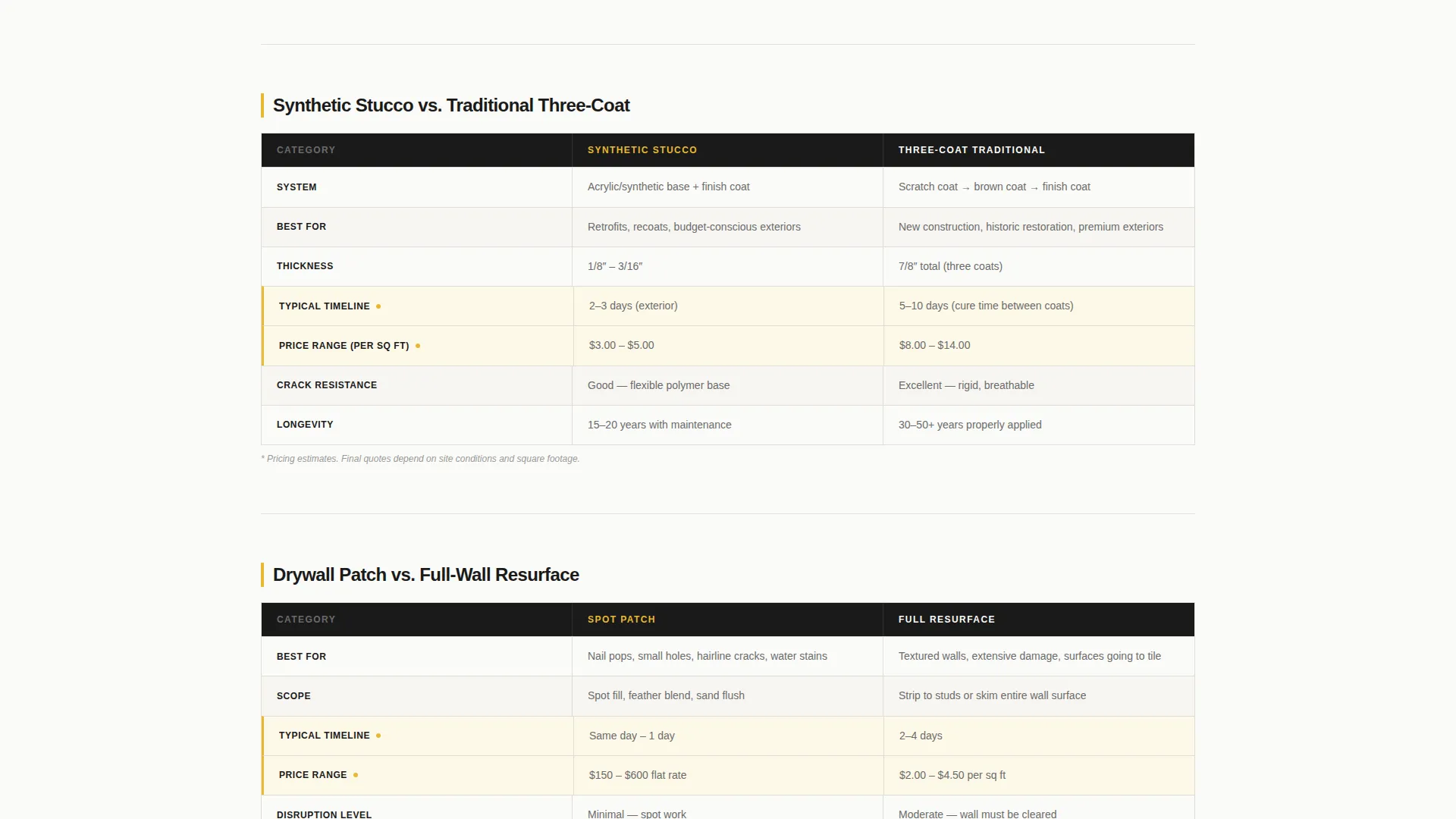
- Three side-by-side comparison tables covering skim coat versus. full replaster, synthetic stucco versus. traditional three-coat, and drywall patch versus. full-wall resurface
- A lead capture form asking for property type, service needed, square footage estimate, and preferred start week
Feature list
This template is built around a set of purposeful components that do the selling before the visitor ever reaches the form.
Half-Page Photo and Text Header
The header splits into two halves. The left side holds a tight, well-lit jobsite photograph of a plasterer mid-hawk-and-trowel, with wet plaster catching light across raw drywall. The right side delivers a bold stacked headline, a two-line service area subhead, and a prominent yellow call-to-action button.
Contractor Logo Wall
Immediately below the fold, a horizontal band of contractor and builder logos establishes credibility at a glance. Visitors recognize names from local job sites, and that recognition builds trust before they read a single testimonial.
Side-by-Side Comparison Tables
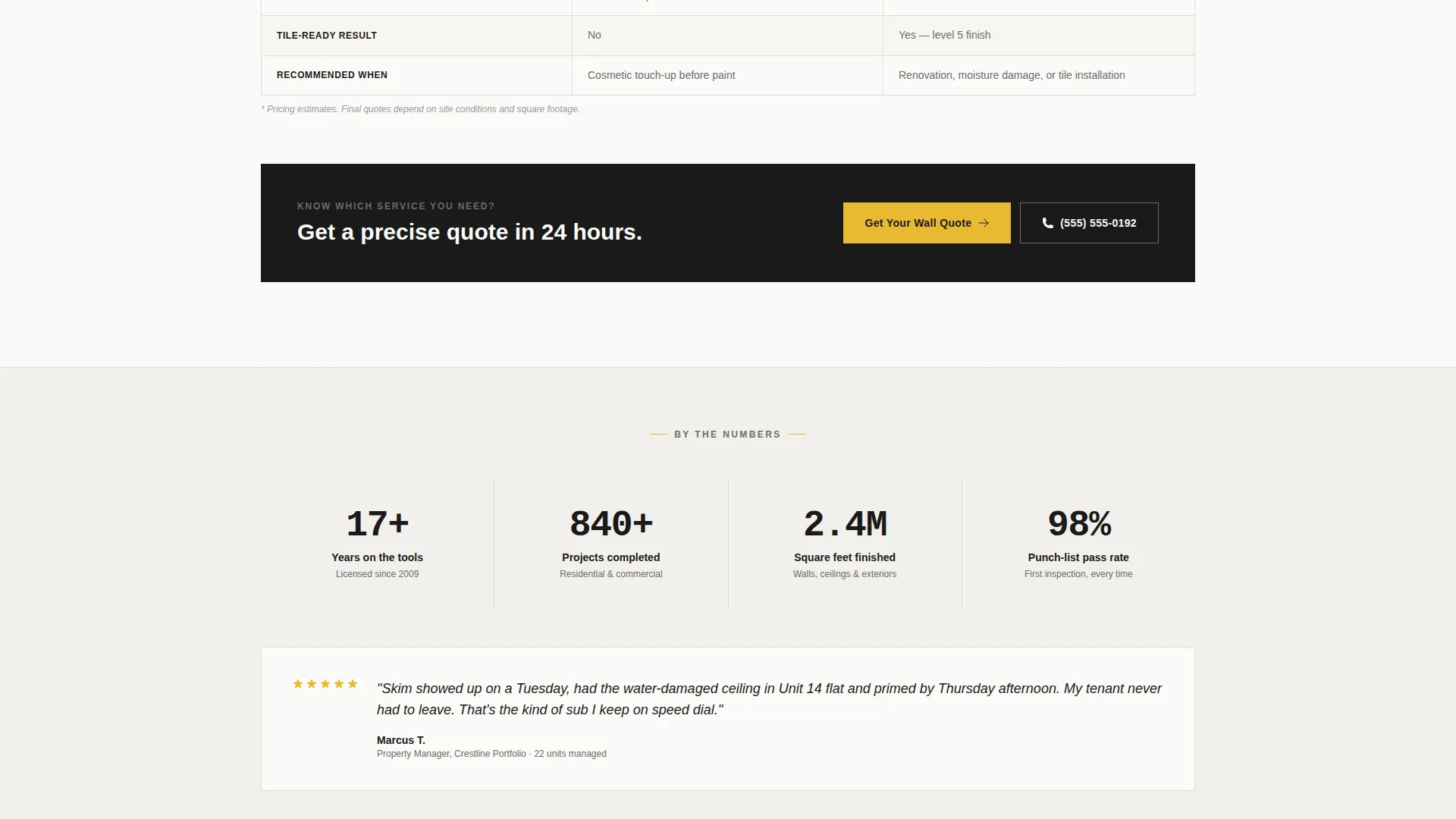
Three comparison tables let visitors self-qualify by service type. Each table covers scope, timeline, and price range across paired options, so the visitor arrives at the form with a clear sense of what they need.
Lead Capture Quote Form
The quote form collects property type, service needed via dropdown, square footage estimate, and preferred start week. A secondary click-to-call button gives contractors a faster path to talk scope directly.
Sticky Mobile Call-to-Action Bar
On mobile, a sticky bottom bar keeps the primary call-to-action visible as visitors scroll. The button reads "Get Your Wall Quote" and stays anchored throughout the page experience.
Alternating Section Backgrounds
Sections alternate between white and a faint warm gray. This keeps the eye moving down the page without adding visual clutter or decorative noise.
Page sections overview
| Section | Purpose |
|---|---|
| Photo Split Header | Establishes credibility and drives first click |
| Contractor Logo Wall | Builds authority below the fold |
| Skim Coat Comparison | Helps visitors choose between skim coat and full replaster |
| Stucco System Comparison | Contrasts synthetic stucco with traditional three-coat |
| Patch versus. Resurface | Clarifies drywall patch versus full-wall resurface scope |
| Lead Capture Form | Collects quote request details from qualified visitors |
| Click-to-Call Button | Gives contractors an immediate phone contact path |
| Sticky Mobile Bar | Keeps the quote call to action visible throughout mobile scroll |
Design & branding system
The visual identity follows a Service Utility theme built on an Ink and Paper color system. The palette feels like a contractor's estimate printed on fresh paper: no decoration, no distraction, just organized information that builds trust before a word is read.
- Heavy graphite black (#1A1A1A) for headings, clean bond-white (#FAFAF7) for backgrounds, and mid-pencil gray (#6B6B6B) for body text
- Construction-tape yellow (#E8B931) used exclusively on call-to-action buttons and comparison table highlights
- Alternating white and faint warm-gray section backgrounds to guide the eye without visual fatigue
Mobile & speed optimization
The template is structured for mobile visitors, who are often contractors or property managers checking options between jobs. The layout adapts cleanly from desktop to phone without losing clarity or function.
- Sticky bottom call-to-action bar keeps "Get Your Wall Quote" reachable at all times on mobile
- Comparison tables and the lead form are designed to remain usable and legible at small screen sizes
- Section spacing and typography scale appropriately so content stays skimmable on any device
How this template helps you convert
The page is engineered so that every scroll brings the visitor one step closer to submitting a quote. Nothing on the page is decorative without purpose.
- The comparison tables do the qualification work upfront, so visitors arrive at the form already knowing which service they need and roughly what it costs, removing hesitation before the click.
- The logo wall and jobsite-real header photograph establish credibility immediately, so the visitor trusts the business before reading a single paragraph of copy.
- The sticky mobile bar and three placed call-to-action instances across the page ensure that the quote button is never more than a thumb-tap away, regardless of where the visitor is in their scroll.
Other information about this template
This template sits at the intersection of a plastering and stucco worker business and a lead generation landing page. It is designed to serve the Professional Services category, specifically businesses that need to communicate technical service differences clearly to a non-technical audience.
- The template style follows an Editorial and Magazine approach within a Corporate Precision theme, keeping the layout structured and information-dense without feeling cold
- The Creative Direction uses an Expert Panel arrangement, positioning the business as a knowledgeable authority through organized comparison content rather than promotional copy
- The header concept is a Giant Headline Left variation adapted to a half-page photo-and-text split, keeping the visual weight balanced while the headline commands immediate attention
- The color system is drawn from an Ink and Paper palette, distinct from a standard Monochrome Steel approach, and adds the construction-tape yellow accent to signal action points clearly
Theme
Corporate Precision
Creative direction
Expert Panel
Color system
Monochrome Steel
Style
Editorial/Magazine
Direction
Lead Generation
Page Sections
Half-page Photo and Text Header
Contractor Logo Wall Band
Side-by-side Comparison Tables
Structured Lead Capture Form
Sticky Mobile Call-to-action Bar
Alternating Section Backgrounds
Related questions
Can I use this template for both residential and commercial plastering businesses?
Do I need to replace the placeholder photograph in the header?
Can the comparison tables be edited to reflect my own pricing and service names?
Is the click-to-call button separate from the quote form?
How many call-to-action placements does this template include?



