Granite Installer Landing Page Template
Slab is a hero-dominant landing page template built for granite installation companies. It leads with a full-screen video header, walks visitors through before-and-after project reveals, and drives estimate requests through a sticky call-to-action bar and a three-step slide-up form. The Navy Authority color system gives every section the weight and authority the craft deserves.
by Rocket studio
Quick summary
Slab is a single-page lead generation template designed for granite and natural stone installers. It opens with a full-screen looping video, then guides visitors through real project before-and-after sliders before asking for a single thing: a free estimate. The layout earns trust visually before it ever makes a request.
Who this template is for
This template is built for stone installation businesses that close jobs by showing their work, not describing it. If your crew handles the full process from templating to final seal, this page speaks your language.
- Granite and natural stone installation companies serving residential kitchens
- Kitchen designers and general contractors who need a credible installer referral page
- Property investors and renovation flippers who need fast, professional lead capture
What problem this template solves
Most home service pages lead with a form before they show a single finished job. Visitors bounce because nothing on screen has earned the ask yet. This template reverses that order entirely.
- Visitors see completed, photographic project evidence before any contact information is requested
- The before-and-after reveal structure builds confidence progressively, project by project
- The slide-up estimate form appears only after the first reveal, so the click feels earned rather than forced
What you get with this template
You get a fully structured landing page built around visual proof and a clear lead funnel. Every section has a defined role, and nothing is decorative without purpose.
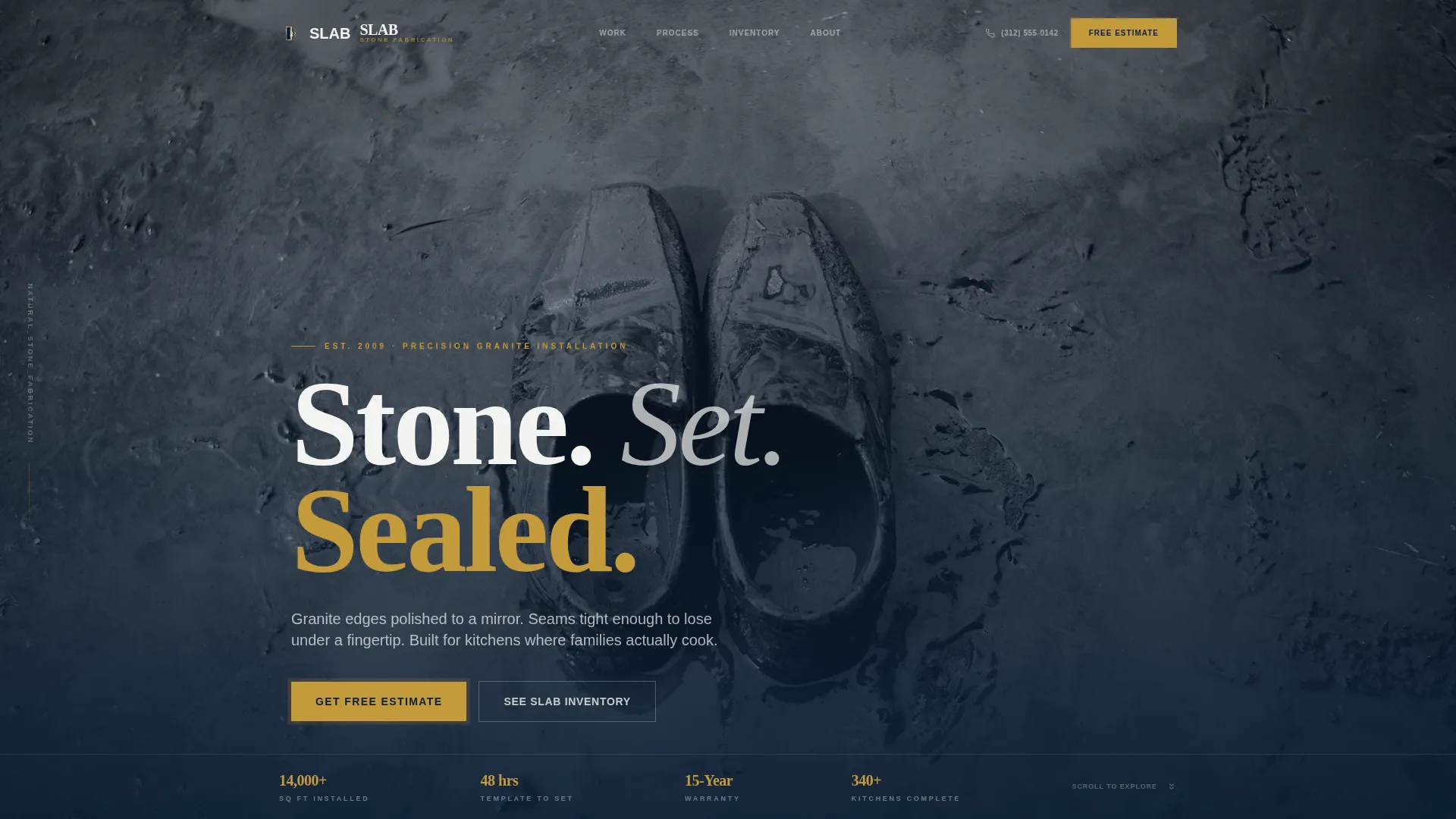
- A full-screen looping video header with a cinematic countertop fabrication sequence and a fade-in headline
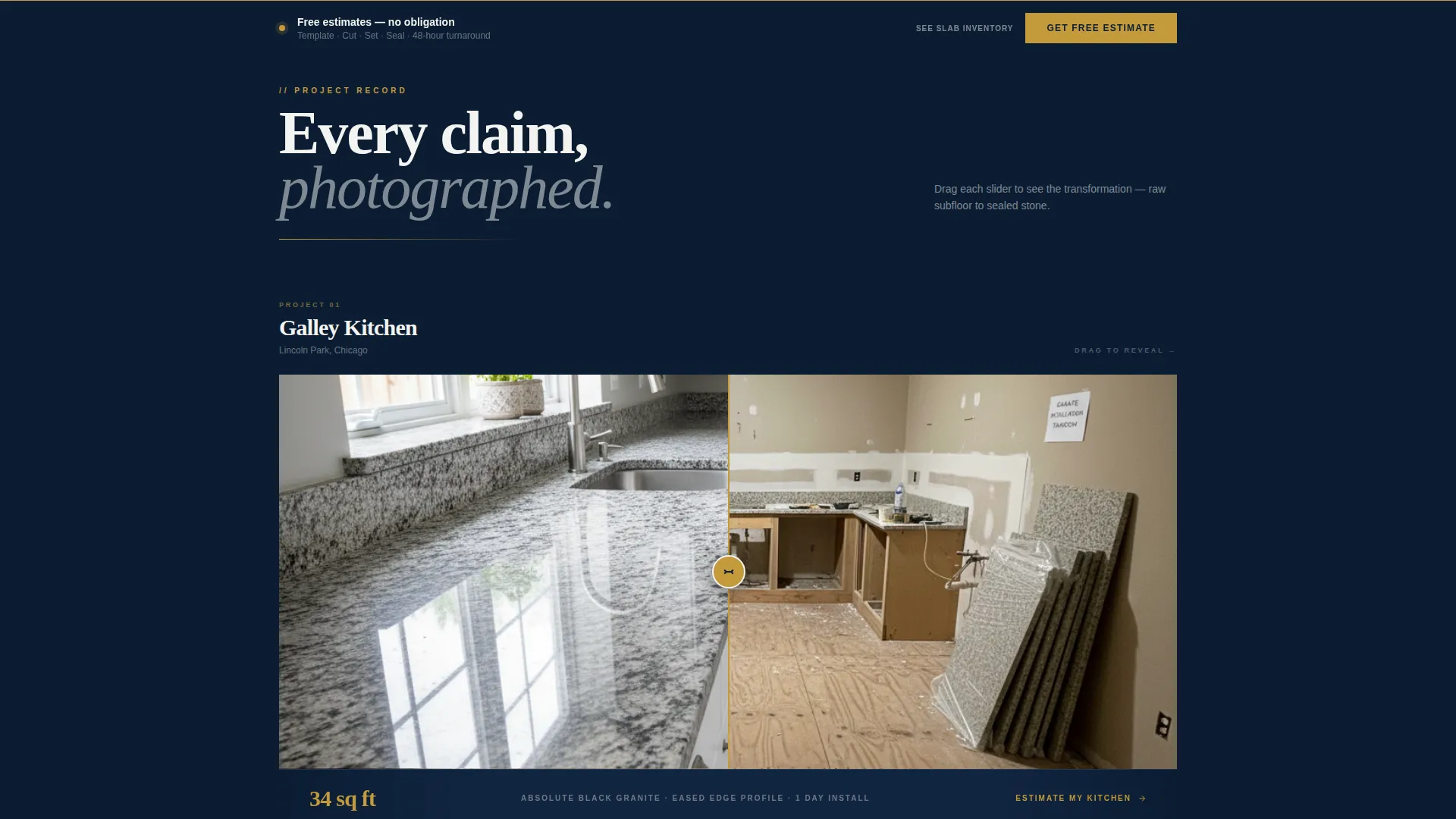
- Three horizontal before-and-after project sliders escalating in job complexity, each paired with a single-line proof stat
- A sticky call-to-action bar, a three-step slide-up estimate form, and a secondary slab inventory browsing path
Feature list
This template ships with purpose-built components drawn directly from the brief. Each one does a specific job in the conversion flow.
Full-Screen Video Header
The header plays a looping, muted fabrication video shot at counter height. It shows a fabricator guiding a wet saw through Blue Pearl granite, then cuts to the finished countertop in a real kitchen. The headline "Stone. Set. Sealed." fades in over the final frame.
Before-and-After Project Sliders
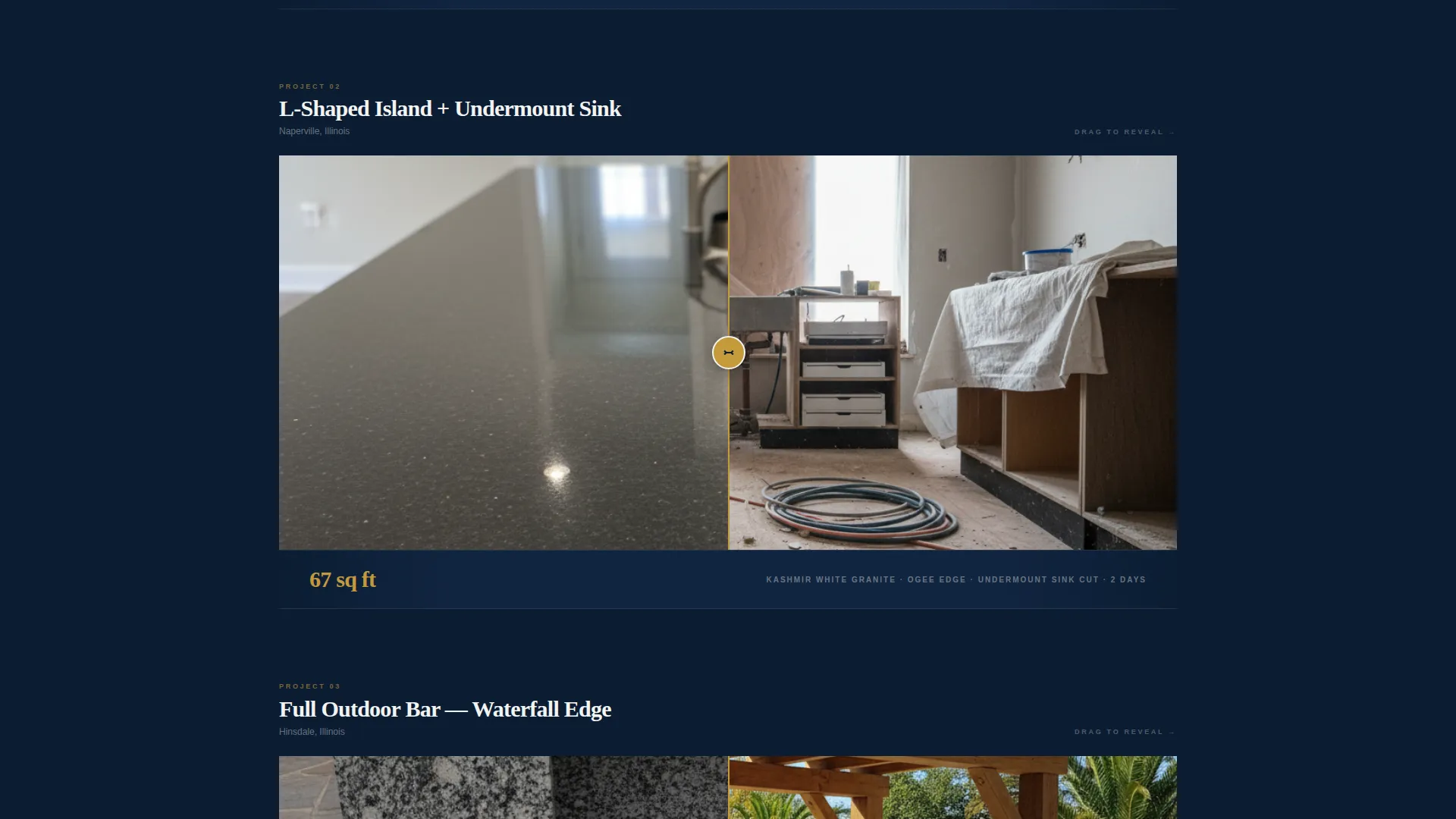
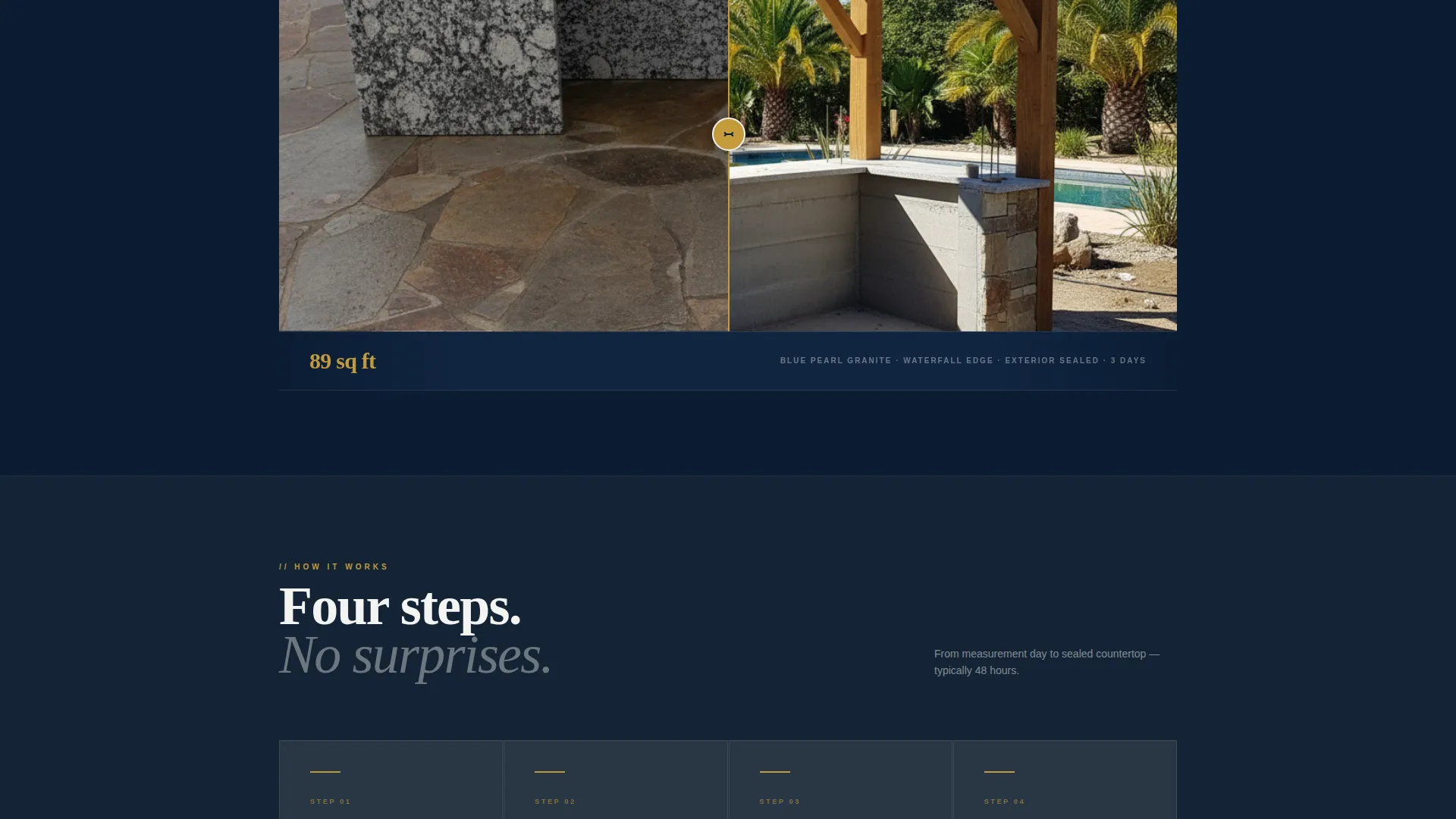
Three horizontal drag sliders each reveal one completed kitchen project. They escalate from a simple galley kitchen to an L-shaped island with an undermount sink cutout to a full outdoor bar with a waterfall edge. Every slider pairs directly with a single-line stat below it.
Inline Proof Stats
Between each before-and-after reveal, one stat appears on its own line: square footage installed, hours from template to completion, or warranty years covered. No claim appears without photographic evidence placed directly underneath it.
Sticky Estimate Call-to-Action Bar
After the first before-and-after reveal, a sticky bar locks to the bottom of the viewport. It carries a single action: "Get Your Free Estimate." The bar stays visible as visitors continue scrolling through the project evidence.
Three-Step Slide-Up Estimate Form
Tapping the sticky bar opens a slide-up panel. It asks three sequential questions: countertop material preference, approximate linear footage via a slider, and zip code. Name, phone, and preferred callback time follow as the final step.
Secondary Slab Inventory Path
A secondary link lets visitors browse available stone colors before committing to the form. This path warms cold leads who are still choosing their material and keeps them engaged inside the page rather than sending them elsewhere.
Page sections overview
| Section | Purpose |
|---|---|
| Full-Screen Video Header | Opens with fabrication footage and fade-in headline |
| Hero Headline Block | Delivers the brand positioning statement |
| Before-and-After Reveal 1 | Shows galley kitchen project with proof stat |
| Before-and-After Reveal 2 | Shows L-shaped island with sink cutout and stat |
| Before-and-After Reveal 3 | Shows outdoor bar with waterfall edge and stat |
| Sticky call to action Bar | Persists after first reveal to capture estimate intent |
| Slide-Up Estimate Form | Collects project details in three guided steps |
| Slab Inventory Path | Lets visitors browse stone colors before committing |
Design & branding system
The Navy Authority color system is built around materials that feel heavy and authoritative. Every color choice connects to the physical experience of working with natural stone.
- Deep command navy (#0B1D33) anchors backgrounds and primary surfaces, giving the page a grounded, serious foundation
- Polished granite charcoal (#3A3A3C) handles section dividers and secondary surfaces, maintaining tonal contrast without competing with content
- Clean grout white (#F4F4F2) carries all body text and open space, keeping the page readable against dark backgrounds
- Measured gold (#C49A3C) appears exclusively on calls to action, badges, and trust signals, drawing the eye exactly where action is needed
Mobile & speed optimization
The hero-dominant layout is structured to translate cleanly to smaller screens. The 90/10 split keeps most visual weight in the header, reducing layout complexity on mobile viewports.
- The slide-up estimate form is designed as a sequential three-step panel, keeping each screen uncluttered on phones
- The sticky call-to-action bar adapts to mobile scroll behavior, remaining accessible without blocking project slider interaction
- Before-and-after sliders are built for touch-drag interaction, matching how mobile users naturally explore comparison content
How this template helps you convert
The conversion strategy is built around a simple rule: show the work before you ask for anything. The page sequences evidence and intent in a deliberate order.
- The full-screen video header creates immediate visual authority and sets quality expectations before a single word of copy is read
- The escalating before-and-after sliders with proof stats build layered trust across three projects, each one more complex than the last
- The sticky estimate bar and slide-up form appear only after the visitor has already seen finished work, so the request feels natural rather than premature
Other information about this template
This template is categorized under Construction and Home, specifically within the Granite Products and Services subcategory. It is built to serve the granite installer niche, where visual proof is the primary sales tool.
- The Service Utility theme keeps the layout functional and clean, avoiding decorative excess that would distract from project photography
- The Before-and-After Reveal creative direction is the structural spine of the page, making it well suited for any installer who has strong project photography
- The template style is Hero-Dominant at a 90/10 ratio, meaning the header carries the majority of the visual and emotional weight
- The header concept is a Full-Screen Video background, which requires a fabrication or installation video asset to work as designed
- This template suits businesses offering granite countertop installation, natural stone countertop services, or related stone fabrication and setting work
Theme
Service Utility
Creative direction
Before/After Reveal
Color system
Navy Authority
Style
Hero-Dominant (90/10)
Direction
Lead Generation
Page Sections
Full-screen Looping Video Header
Before-and-after Project Sliders
Inline Single-line Proof Stats
Sticky Estimate Call-to-action Bar
Three-step Slide-up Estimate Form
Secondary Slab Inventory Browsing Path
Related questions
What kind of business is this template designed for?
Do I need a video asset to use this template?
How does the three-step estimate form work?
Can visitors browse stone options before filling out the form?
Is this template suitable for property investors as well as homeowners?



