Wholesale Laptop Sleeves & Tech Accessories Landing Page
Sleeve is a gallery and detail landing page template built for laptop sleeve and tech accessory wholesalers. It guides bulk buyers through an unboxing-style scroll experience, from logistics details to material specs to an expandable product gallery, and pushes them toward a sample kit order or catalog download with two clear, well-placed calls to action.
by Rocket studio
Quick summary
Sleeve is a single-page wholesale template designed for laptop sleeve and tech accessory suppliers. It walks buyers through an unboxing-style scroll journey, revealing fulfillment details, material specs, and product photography in layered sequence. The primary goal is to move serious buyers into a sample request, while a secondary path captures emails from buyers still comparing options.
Who this template is for
This template is built for suppliers who sell in bulk and need to earn buyer trust before a first order is placed. It speaks directly to the people making purchasing decisions at volume.
- Amazon private-label sellers sourcing a 500-unit run of branded laptop sleeves
- Corporate procurement managers ordering tech accessory kits for onboarding seasons
- Boutique accessory retailers looking for a reliable, responsive wholesale supplier
What problem this template solves
Wholesale buyers cannot touch the product before committing to a bulk order. Generic supplier pages leave too many questions unanswered, and buyers stall. This template removes that friction by layering product truth at every scroll depth.
- Buyers lack confidence in material quality and customization options before placing a large order
- Suppliers lose leads from buyers still in the comparison phase who need a catalog before deciding
- Product detail is buried or missing, making it hard to justify a purchase to procurement stakeholders
What you get with this template
The template delivers a complete click-through landing page structured as a wholesale showroom. Every section is designed to build confidence and reduce the distance between curiosity and commitment.
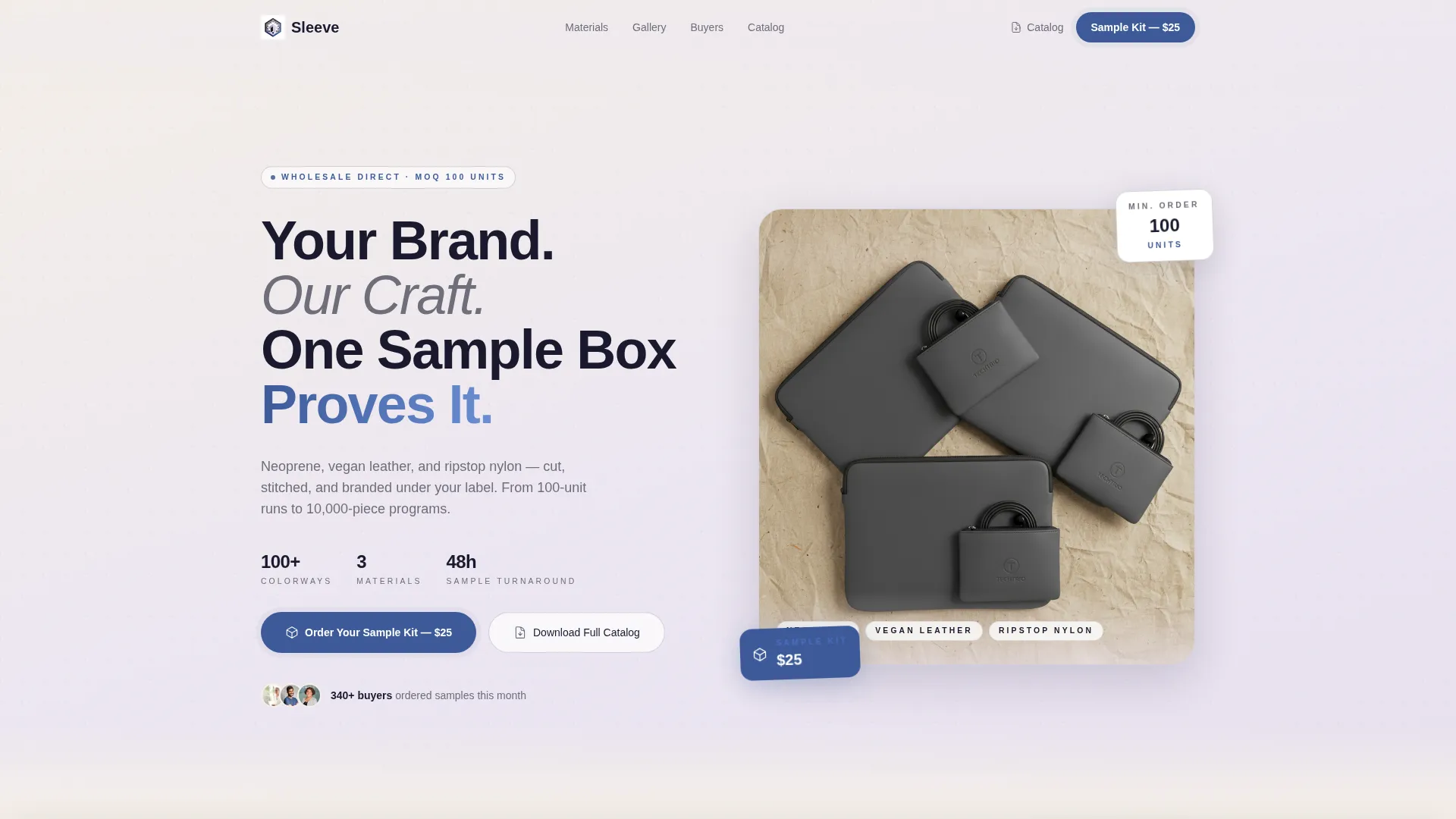
- A header bundle section with a styled flat-lay photo, headline, and a primary sample kit call-to-action button
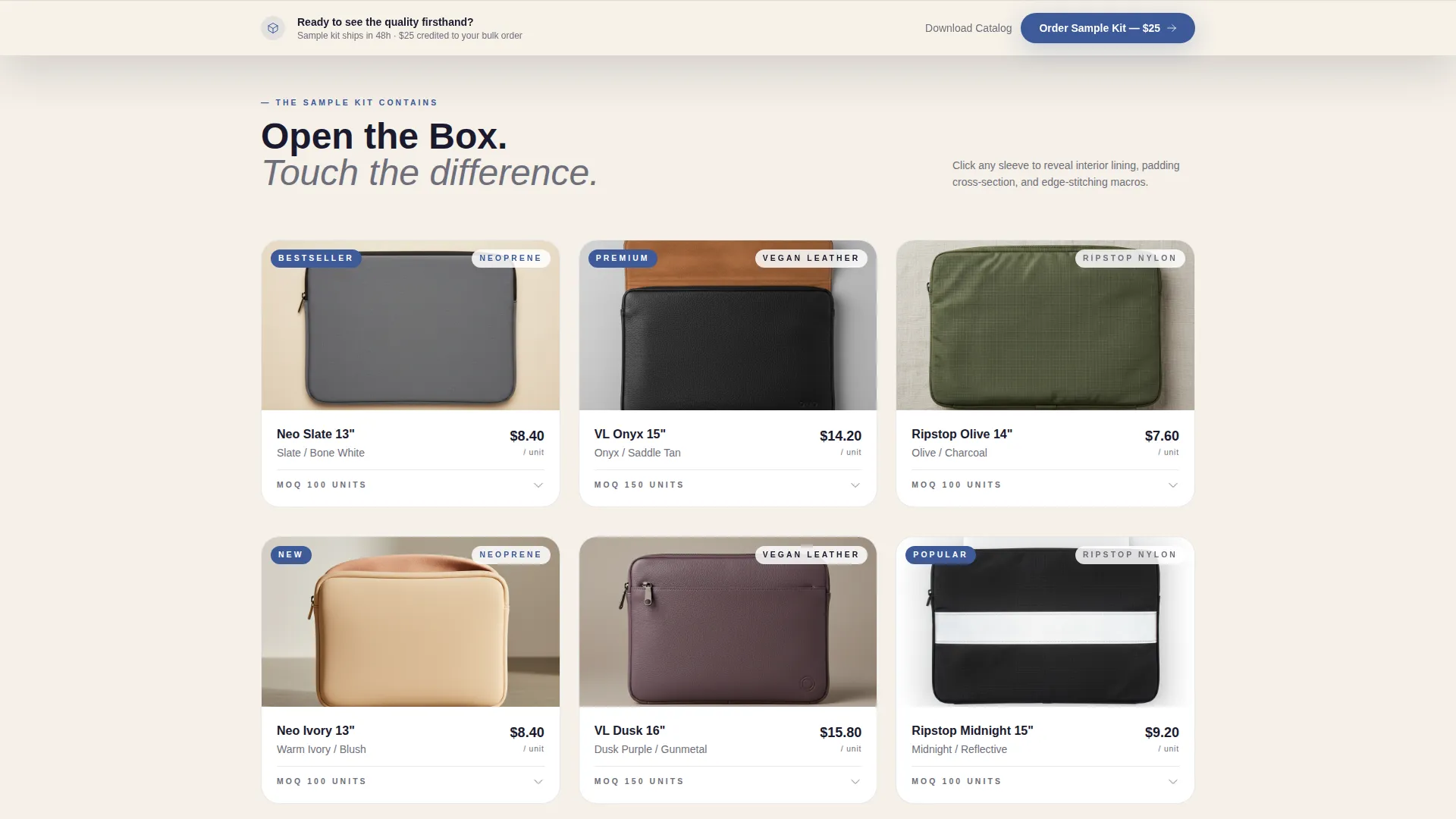
- An expandable gallery grid where each sleeve opens into a detail panel showing interior lining, padding cross-sections, and edge-stitching macro photography
- A sticky call-to-action bar that reappears after the third gallery row to keep the sample request within reach
- A secondary catalog download path that captures a work email and monthly unit volume for buyers still comparing
Feature list
This template includes purpose-built sections and layout components that match the real decision-making flow of wholesale buyers.
Header Bundle with Sample Kit Call to Action
The header opens with a styled flat-lay photograph of three bestselling sleeves fanned across a parchment surface, alongside matching cable pouches, charger wraps, and a branded shipping box. A small "MOQ 100 Units" tag anchors the trade-show feel. The headline sits beneath a soft gradient wash that transitions the image into the first content section without a hard edge.
Unboxing Scroll Experience
Scrolling mimics the act of opening a wholesale sample kit. The page reveals the outer shipping box layer first, then material specs and Pantone-matching options, then individual sleeves one at a time. Each scroll depth adds a richer layer of product detail, building the buyer's confidence progressively.
Expandable Gallery Grid
The product gallery displays sleeves individually and expands on click into a full detail panel. The panel shows interior lining, padding cross-sections, and edge-stitching macro shots, giving buyers the visual equivalent of a hands-on inspection.
Sticky Call-to-Action Bar
After the third gallery row, a persistent sticky bar keeps the "Order Your Sample Kit" button visible without interrupting the browsing flow. This ensures the primary conversion path is always accessible as buyers scroll deeper into product details.
Catalog Download Lead Capture
A secondary call-to-action invites buyers still in the comparison phase to download the full product catalog. The gate requires only a work email address and monthly unit volume, keeping the barrier low while qualifying the lead.
Material and Customization Spec Section
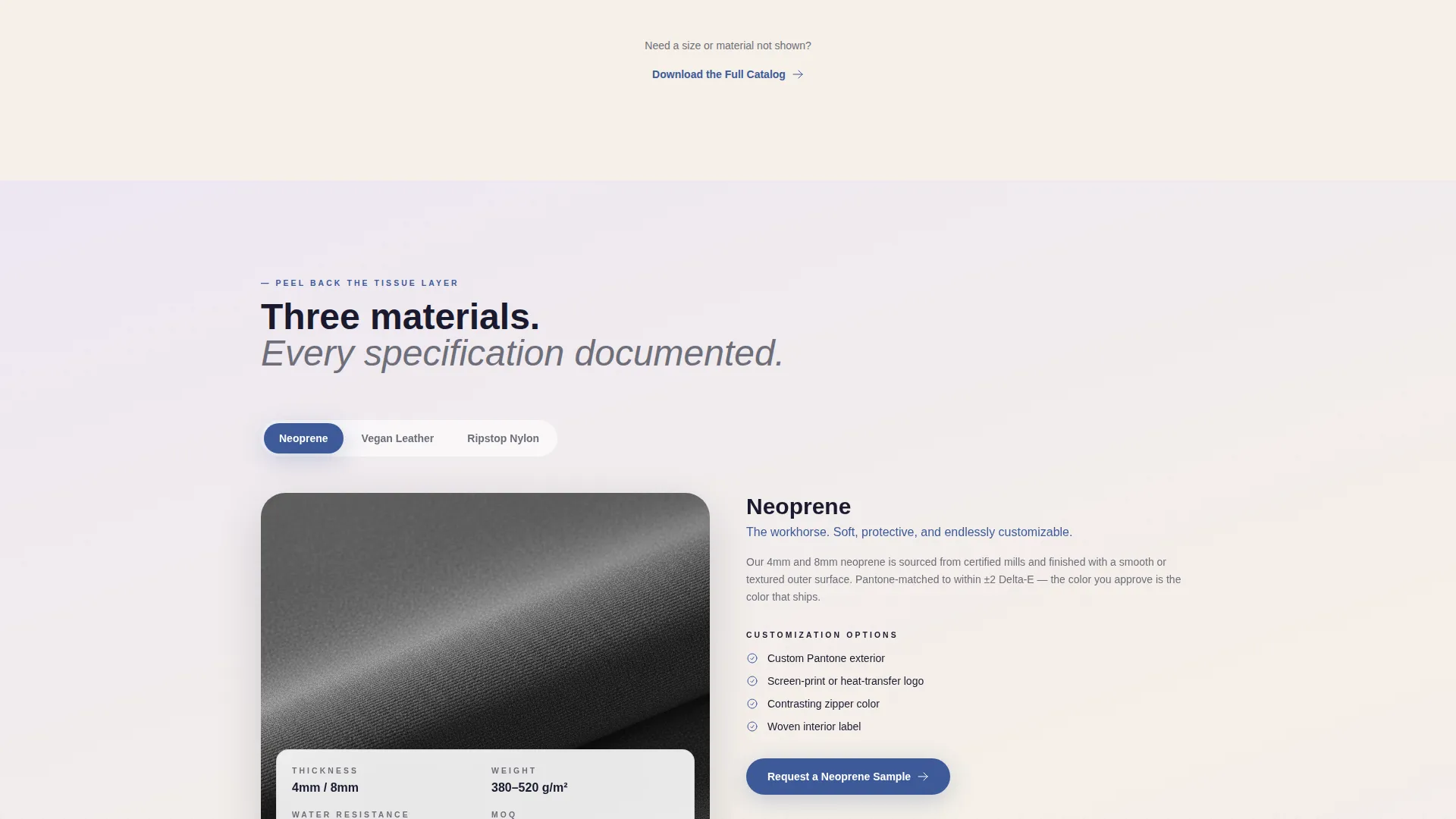
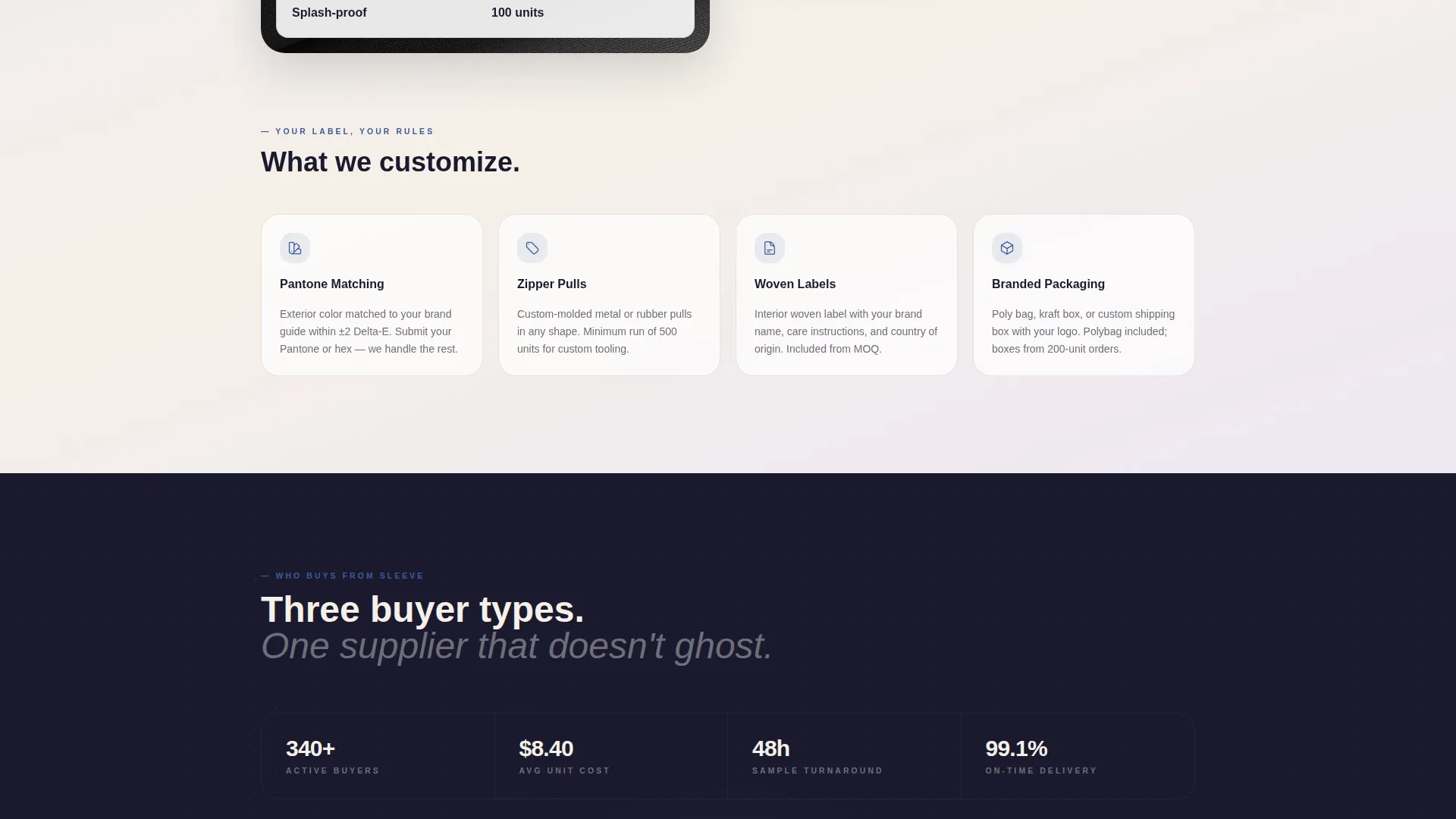
A dedicated section covers the material lineup, including neoprene, vegan leather, and ripstop nylon, alongside Pantone-matching options and custom zipper pull details. This gives procurement managers the specification depth they need to build an internal case for the order.
Page sections overview
| Section | Purpose |
|---|---|
| Header Bundle | Introduce the product range, set the wholesale tone, and place the first sample kit call to action |
| Logistics Layer | Cover shipping box details, fulfillment context, and minimum order quantity information |
| Material Spec Layer | Display fabric options, Pantone-matching capabilities, and custom zipper pull details |
| Gallery Grid | Showcase individual sleeve styles in an expandable click-to-detail layout |
| Detail Panels | Reveal interior lining, padding cross-sections, and edge-stitching macro photography per product |
| Sticky call to action Bar | Keep the sample kit order button accessible after the third gallery row |
| Catalog Download | Capture work email and monthly volume from buyers still in the comparison phase |
Design & branding system
The visual identity follows a Soft Gradient theme built around an Ink and Paper color system. The palette feels like a freshly printed lookbook laid flat on a linen desk: matte, tactile, and restrained so product photography carries the visual weight.
- Core colors include deep manuscript black (#1A1A2E), warm parchment (#F5F0E8), and pencil-graphite gray (#6E6E7A), with signing-pen blue (#3D5A99) reserved for calls to action and hover states
- Section backgrounds use a soft gradient moving from parchment to a barely-there lavender (#EDE7F3), gentle enough to guide the eye without competing with fabric textures in the product grid
- Typography and spacing choices reinforce a printed lookbook feel, keeping the design matte and intentionally restrained throughout
Mobile & speed optimization
The template layout is structured for clean viewing across screen sizes, keeping the unboxing scroll experience intact on smaller devices. The gallery grid and detail panels adapt to touch-based interactions without losing the layered reveal sequence.
- Expandable gallery panels are built to work on tap as well as click, so mobile buyers get the same product detail as desktop visitors
- The sticky call-to-action bar is designed to remain visible and accessible on mobile without covering critical product content
- The catalog download path stays functional and low-friction on mobile, requiring only two fields before the buyer can access the PDF
How this template helps you convert
The template is structured as a click-through funnel that moves buyers toward two specific actions without placing a form on the landing page itself.
- The primary conversion path pushes buyers to a sample kit checkout page, where they choose sleeve sizes, colorways, and quantity tiers after clicking the $25 sample order button.
- The secondary conversion path captures email addresses and monthly volume data from buyers not yet ready to order, turning comparison-phase visitors into qualified catalog leads.
Other information about this template
This template is built under the Gallery and Detail style, meaning the product grid and its expandable detail panels are the structural centerpiece of the page. The Unboxing Experience creative direction makes it distinct from standard product landing pages: scroll depth is intentional and each layer of content earns the next.
- The template sits within the Retail and E-Commerce category, specifically aligned with the laptop sleeves and tech accessories wholesale niche
- The Soft Gradient theme and Ink and Paper color system are pre-configured, making it straightforward to swap in brand-specific product photography without redesigning the layout
- The minimum order quantity callout and trade-show price-card styling are baked into the header design, signaling the wholesale context immediately to the right buyer
- No form appears on the landing page itself; both conversion paths route buyers off-page to reduce friction and keep the browsing experience clean
Theme
Soft Gradient
Creative direction
Unboxing Experience
Color system
Sunset Gradient
Style
Gallery + Detail
Direction
Click-Through
Page Sections
Header Bundle with Flat-lay Photography
Unboxing Scroll Experience
Expandable Gallery Grid
Sticky Sample Kit Call to Action Bar
Catalog Download Lead Capture
Material and Customization Spec Section
Related questions
Does this template include a contact form or order form?
Can I update the product photography without changing the layout?
What conversion paths does this template support?
Who is the MOQ callout in the header designed for?
Is the sticky call-to-action bar always visible on the page?



