Small Business Owner Insurance FAQ Website Template
Shield is a sidebar companion landing page template built for small business owner renters insurance. It uses a FAQ-driven scroll narrative to dismantle coverage anxiety before pushing visitors into a quoting engine. The fintech dashboard design, live sidebar coverage estimator, and trust badge header make it purpose-built for time-pressed first-time business owners facing a lease deadline.
by Rocket studio
Quick summary
Shield is a single-page, click-through insurance landing page template designed for small business owners who need commercial renters coverage fast. It pairs a sticky sidebar coverage estimator with a scroll-based FAQ layout that answers real objections in order, ending every section with a clear path to the quoting engine.
Who this template is for
This template is built for insurtech brands and insurance agencies targeting first-time small business owners who face an urgent proof-of-insurance requirement. It speaks directly to people who have never bought a commercial policy before and need reassurance before they click anything.
- First-time salon owners, Etsy sellers renting warehouse space, and food truck operators signing commercial leases
- Insurance providers who want a conversion-focused landing page that earns the click before asking for information
- Startup-stage fintech and insurtech teams who need a polished, credible page without a heavy build
What problem this template solves
Most small business owners hit a wall when their lease requires liability coverage by a specific date. Generic insurance pages dump form fields on confused first-timers before answering a single question. This template flips that dynamic entirely.
- It addresses the most common coverage objections upfront, so visitors feel informed rather than pressured
- It removes form friction from the landing page itself, keeping the page focused on trust-building before the quote click
- It gives time-sensitive buyers a clear, immediate path to proof of insurance without forcing them to wade through jargon
What you get with this template
You get a fully structured, desktop-first landing page with a sidebar companion layout that stacks cleanly on mobile. Every section is built around a specific conversion job, from the trust badge header down to the full-width call-to-action closer.
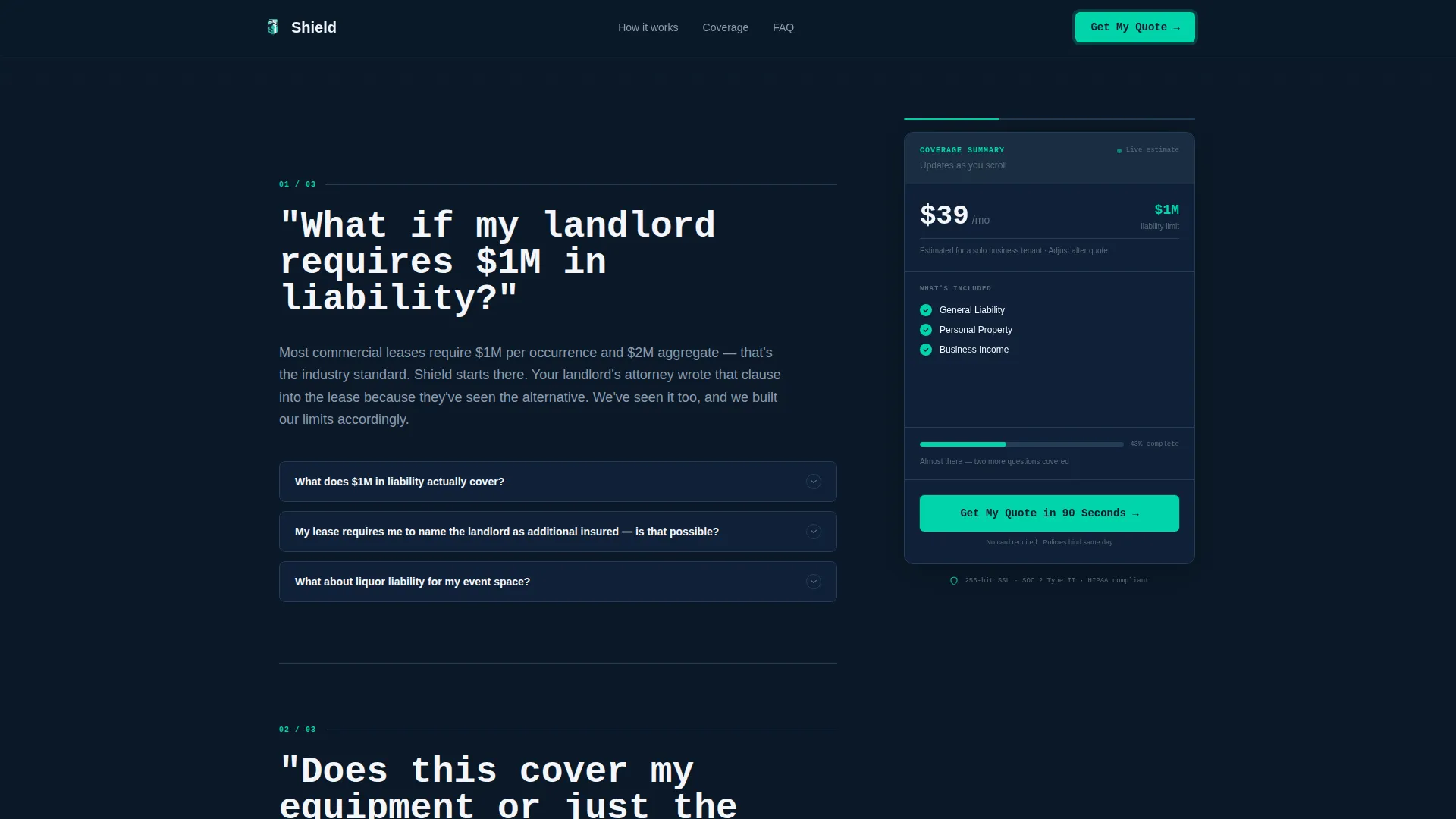
- A sticky sidebar with a live coverage estimate display, estimated monthly premium, coverage amount, and a running checklist of included coverages
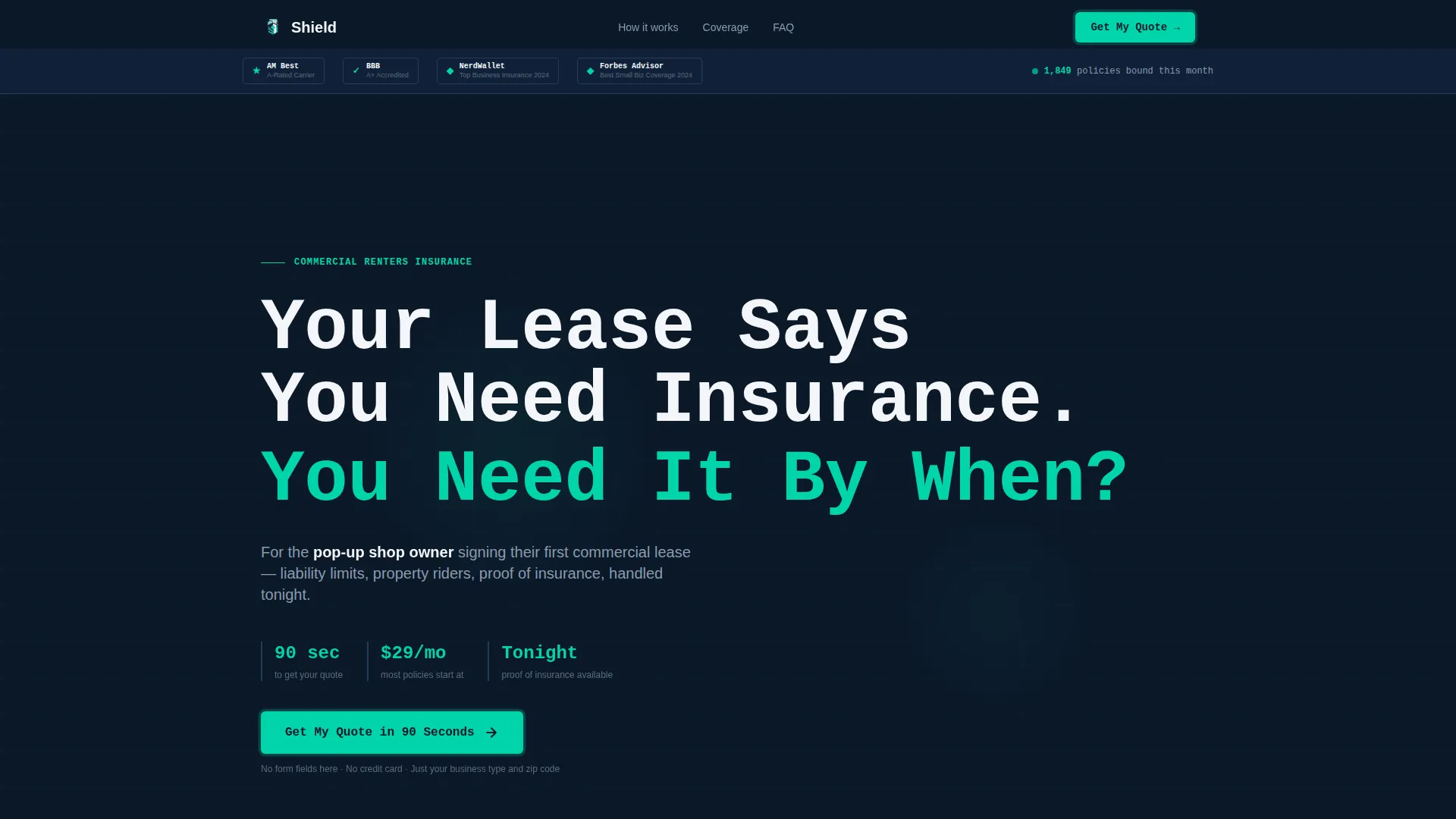
- A trust badge header featuring award badge slots for carrier ratings, accreditation marks, third-party recognition badges, and a live policies-bound counter
- Three FAQ sections with expandable detail drawers, each opened by a real buyer question in large confrontational type
Feature list
This template ships with six purpose-built features that work together to move an anxious first-time buyer from scroll to click.
Trust Badge Header with Award Badges
The header is a dense, horizontal trust band. It holds carrier rating badges, accreditation marks, third-party recognition slots, and a counter showing policies bound this month. No stock photography. Just verifiable proof arranged like credentials above a single oversized headline.
Sticky Sidebar Coverage Estimator
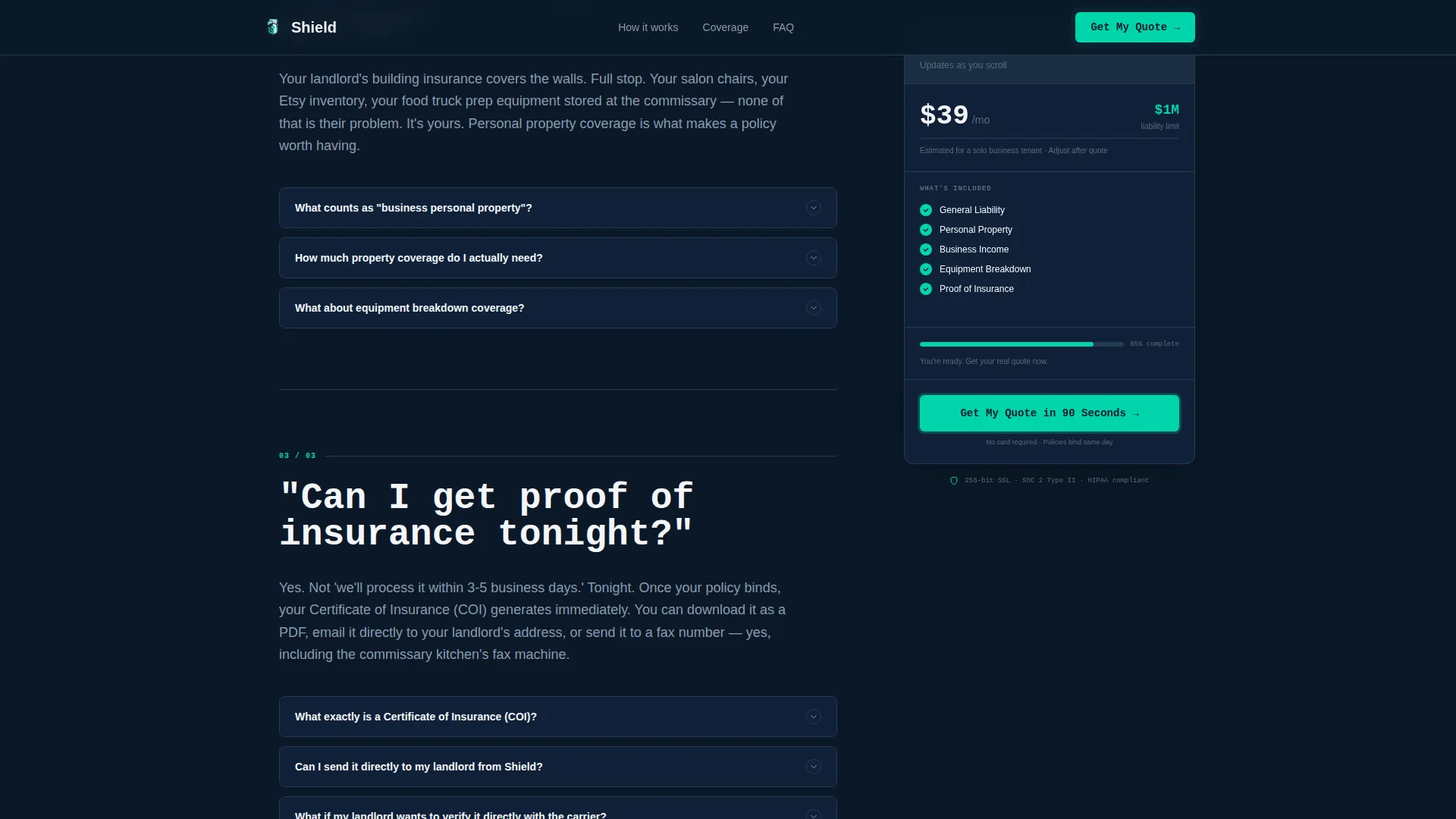
The sidebar follows the visitor down the entire page. It displays an estimated monthly premium, a coverage amount, and a growing green checkmark list of what is included. By the time a visitor reaches the halfway point, the sidebar has already built a soft sense of ownership over their coverage.
FAQ-Driven Scroll Narrative
Each content section opens with a real buyer question in large, prominent type. The answer unfolds in short paragraphs with inline cost comparisons and expandable detail drawers. The scroll does not build suspense; it removes anxiety one question at a time.
Triple-Placed Primary Call to Action
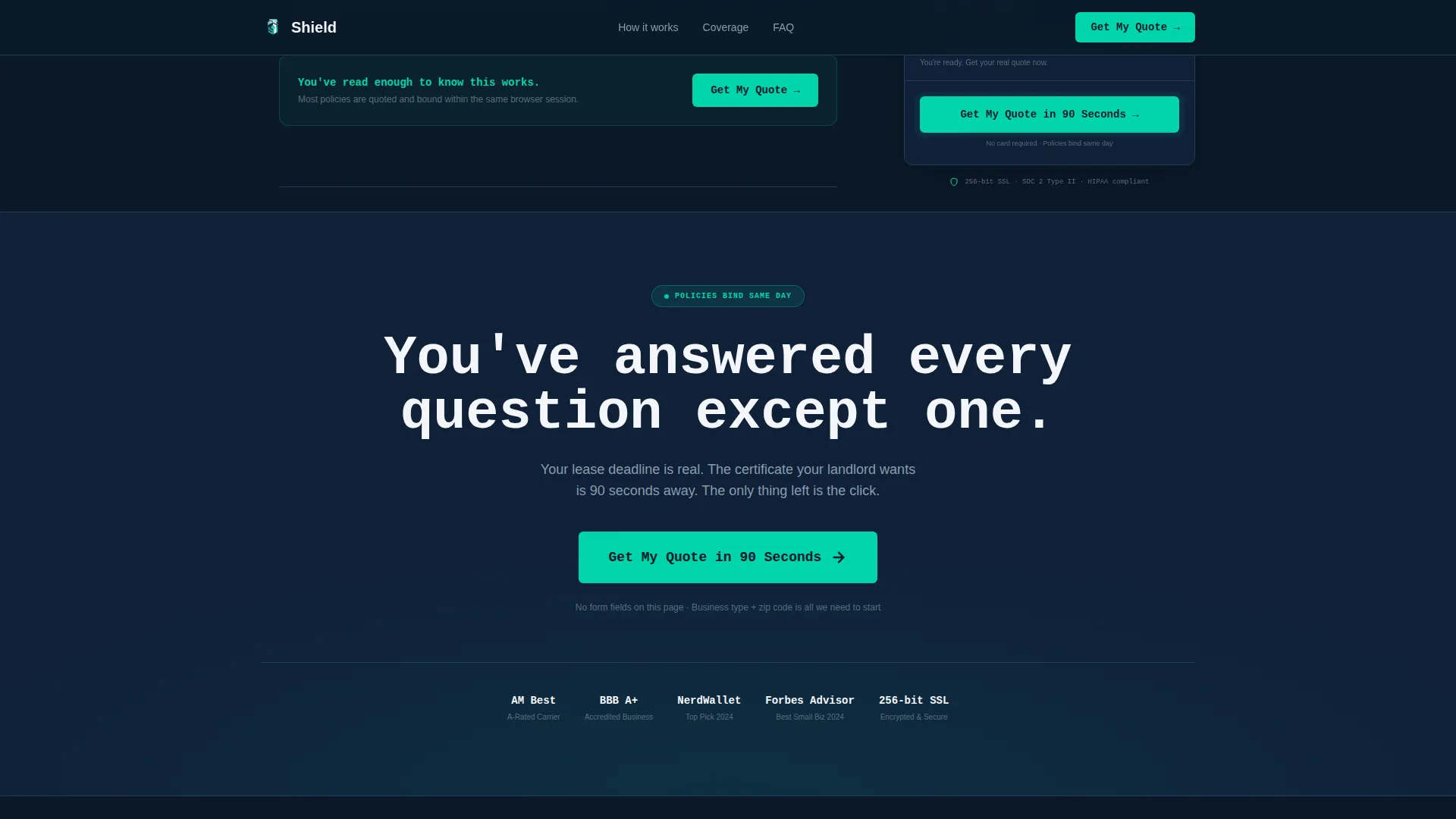
The primary call to action, "Get My Quote in 90 Seconds," appears in three precise locations: pinned at the bottom of the sidebar, after the third FAQ answer, and as a full-width page closer. Each placement catches visitors at a different stage of readiness.
Expandable FAQ Detail Drawers
Every FAQ section includes interactive expandable drawers for deeper detail. Visitors who want more context can open additional information inline without leaving the page or breaking their reading flow.
GitHub Developer Minimal Footer
The footer follows a single-row minimal layout. It keeps the page's information density high without adding visual noise at the bottom, consistent with the fintech dashboard aesthetic throughout.
Page sections overview
| Section | Purpose |
|---|---|
| Trust Badge Header | Display carrier ratings, accreditation marks, recognition badges, and policies-bound counter |
| Hero with Sidebar | Present the oversized mono headline alongside the sticky live coverage estimator |
| FAQ Section One | Answer "What if my landlord requires $1M in liability?" with short paragraphs and drawers |
| FAQ Section Two | Answer "Does this cover my equipment or just the walls?" with inline cost comparisons |
| FAQ Section Three | Answer "Can I get proof of insurance tonight?" with direct, reassuring detail |
| Full-Width call to action Closer | Deliver the final "Get My Quote in 90 Seconds" call to action at full page width |
| Minimal Footer | Close the page with a single-row, low-noise footer row |
Design & branding system
The visual identity follows a Startup Velocity theme built around a Midnight Blue color system. The palette reads like a fintech dashboard running at 2 a.m., purposeful, focused, and glowing with quiet confidence.
- Deep terminal navy (#0B1929) dominates the sidebar and footer; policy-paper white (#F4F6FA) opens up the main content panels; electric teal (#00D4AA) pulses only on calls to action and progress indicators
- JetBrains Mono handles headlines and badge labels for that clean monospaced terminal feel; DM Sans carries all body copy for comfortable reading
- Muted steel (#5C6B7A) handles secondary text and sidebar borders, keeping the hierarchy clear without visual clutter
Mobile & speed optimization
The template is built desktop-first around its two-column sidebar layout, and it stacks responsively into a single-column mobile view without losing the sidebar's coverage summary content.
- The sticky sidebar converts to an inline coverage summary panel on smaller screens so mobile visitors never lose sight of the estimated premium
- Scroll-linked FAQ reveals use Intersection Observer for efficient triggering, and all animations rely on CSS rather than heavy JavaScript libraries
- The static-first build approach keeps the page lightweight by default, with interactivity layered on top rather than baked into a heavy framework
How this template helps you convert
Shield is engineered around a single idea: earn the click by answering every objection before asking for anything. The page structure makes that logic visible at every scroll depth.
- The trust badge header and live policies-bound counter establish credibility within the first two seconds, so skeptical first-time buyers do not bounce before reading a word of copy
- The FAQ scroll narrative mirrors the internal monologue of a nervous business owner, making each answered question feel like a personal conversation rather than a sales pitch
- The sticky sidebar creates a soft commitment effect. Visitors who see a coverage estimate and a growing checkmark list begin to feel like they already hold the policy, lowering the psychological barrier to clicking through to the quoting engine
Other information about this template
This template is a strong fit for any insurtech or small business financial services brand that serves the commercial renters insurance market in the United States. A few additional details worth noting:
- The quoting engine link target opens with business type and zip code, so no form fields live on this landing page itself
- The page is localized for the US market: English language, USD pricing display, and MM/DD/YYYY date formatting throughout
- Animation is set to a medium intensity level with a teal pulse effect on calls to action, scroll-linked FAQ reveals, and a sticky sidebar that tracks user position down the full page length
- The template supports the interactivity level described in the brief: expandable FAQ drawers and a live sidebar coverage estimate updater are both included in the build
- This template is categorized under Finance and Insurance, specifically the Small Business Owner Insurance subcategory and the Small Business Owner Renters Insurance niche
Theme
Startup Velocity
Creative direction
FAQ-Driven
Color system
Midnight Blue
Style
Sidebar Companion
Direction
Click-Through
Page Sections
Trust Badge Header with Award Badges
Sticky Sidebar Coverage Estimator
Faq-driven Scroll Narrative
Triple-placed Primary Call to Action
Expandable FAQ Detail Drawers
Minimal Single-row Footer
Related questions
Does this template include a quote form on the landing page?
Can I update the FAQ questions to match my own coverage products?
How does the sticky sidebar display on mobile screens?
What types of trust signals does the header section support?
Is this template suitable for time-sensitive insurance campaigns with a deadline?



