Palliative Care Landing Page Template for Clinics
Solace is a compassionate palliative care landing page template built for clinics that guide families through life's hardest medical season. It combines a warm Alpine Fresh color system with a three-step orientation form, side-by-side FAQ comparison tables, and a downloadable Family Guide offer, earning trust by answering real questions before asking for anything in return.
by Rocket studio
Quick summary
Solace is a single-page palliative care template designed for clinics that serve families navigating end-of-life decisions. It leads with a gentle multi-step form, moves through three FAQ-driven comparison tables that address midnight fears, and closes with a simple guide download. Every section is built to soften dread, not escalate it.
Who this template is for
This template is for palliative care clinics and centers that need a patient-centered online presence. It speaks directly to the people who arrive at a clinic's page overwhelmed, uncertain, and searching for reassurance at unusual hours.
- Adult children making care decisions for aging parents who are new to palliative medicine
- Spouses encountering terms like "comfort measures" and "advance directive" for the first time
- Oncologists and hospital social workers referring patients who have exhausted curative treatment options
What problem this template solves
Families searching for palliative care information online often land on pages that feel cold, confusing, or too clinical. The gap between what they fear and what palliative care actually offers goes unaddressed, and they leave without answers or trust.
- Misconceptions about palliative care versus hospice go uncorrected, creating hesitation before a referral is made
- Families feel pressured to act before they understand their options, which erodes confidence in the clinic
- No clear, low-barrier path exists for families who need information first and human contact second
What you get with this template
The Solace template delivers a fully structured, single-page layout built around content and resource conversion. Every section is designed to guide a visitor from fear to clarity to a confident next step.
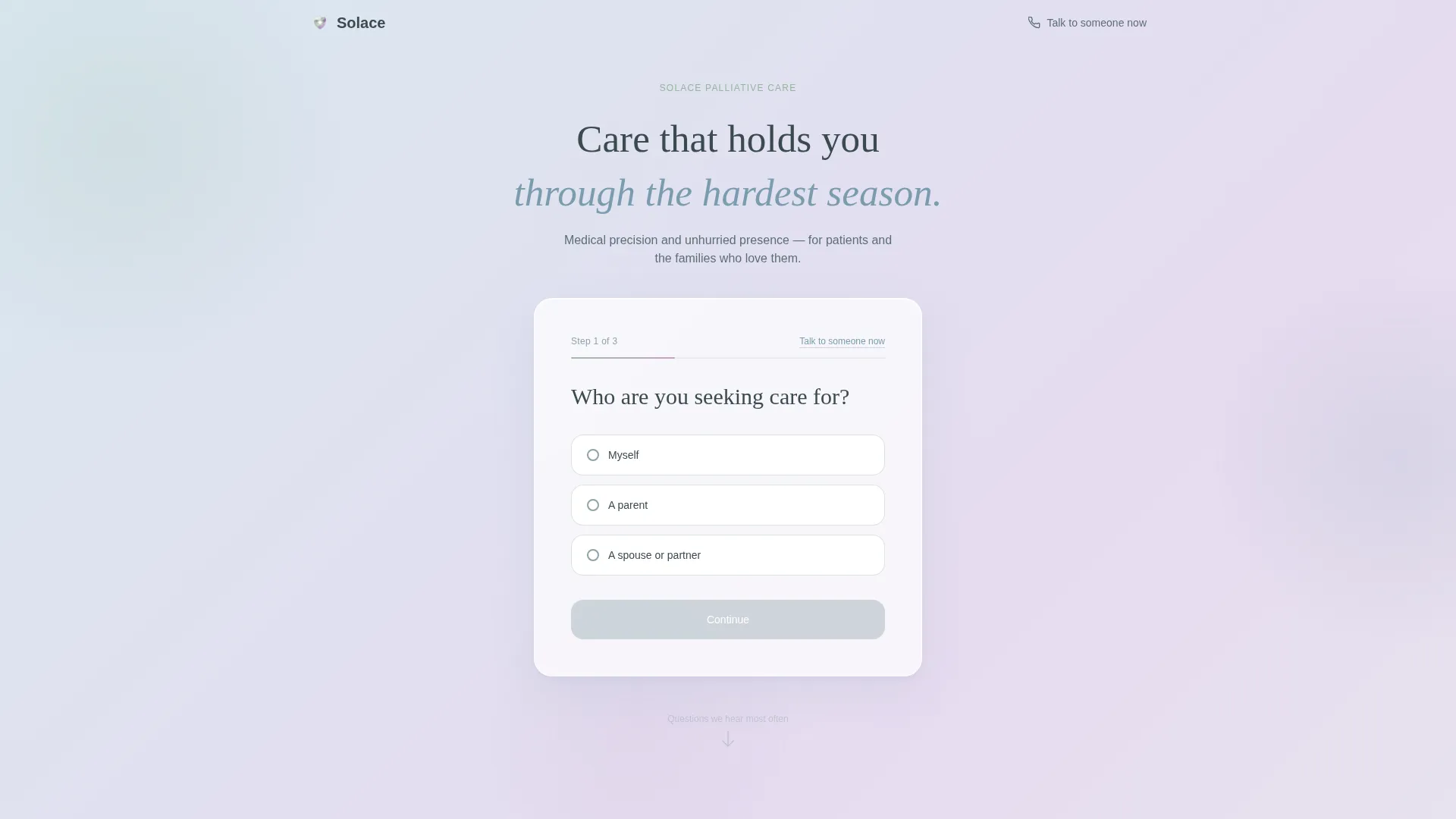
- A three-step orientation form in the hero section that feels like a conversation, not a clinical intake
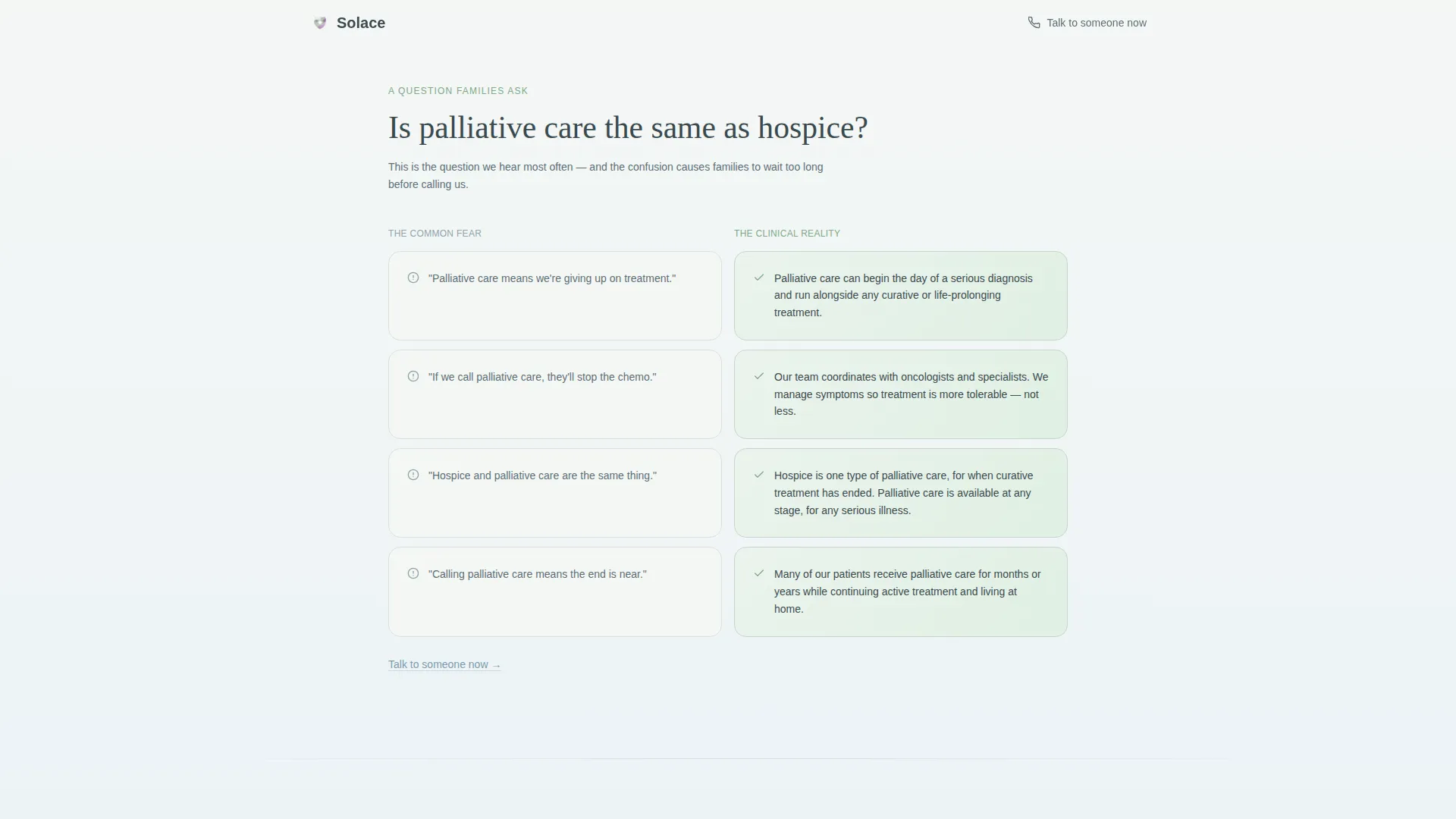
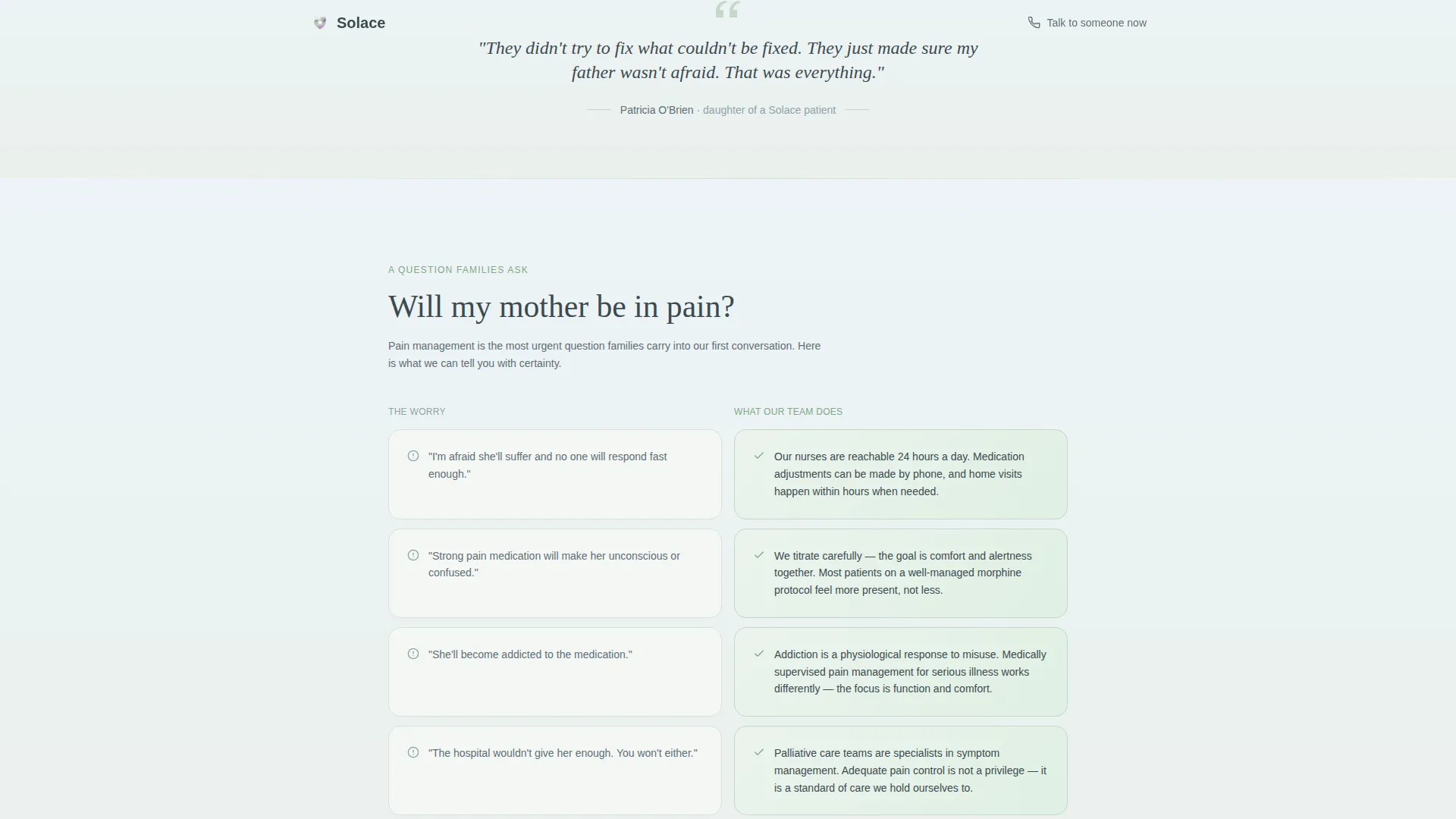
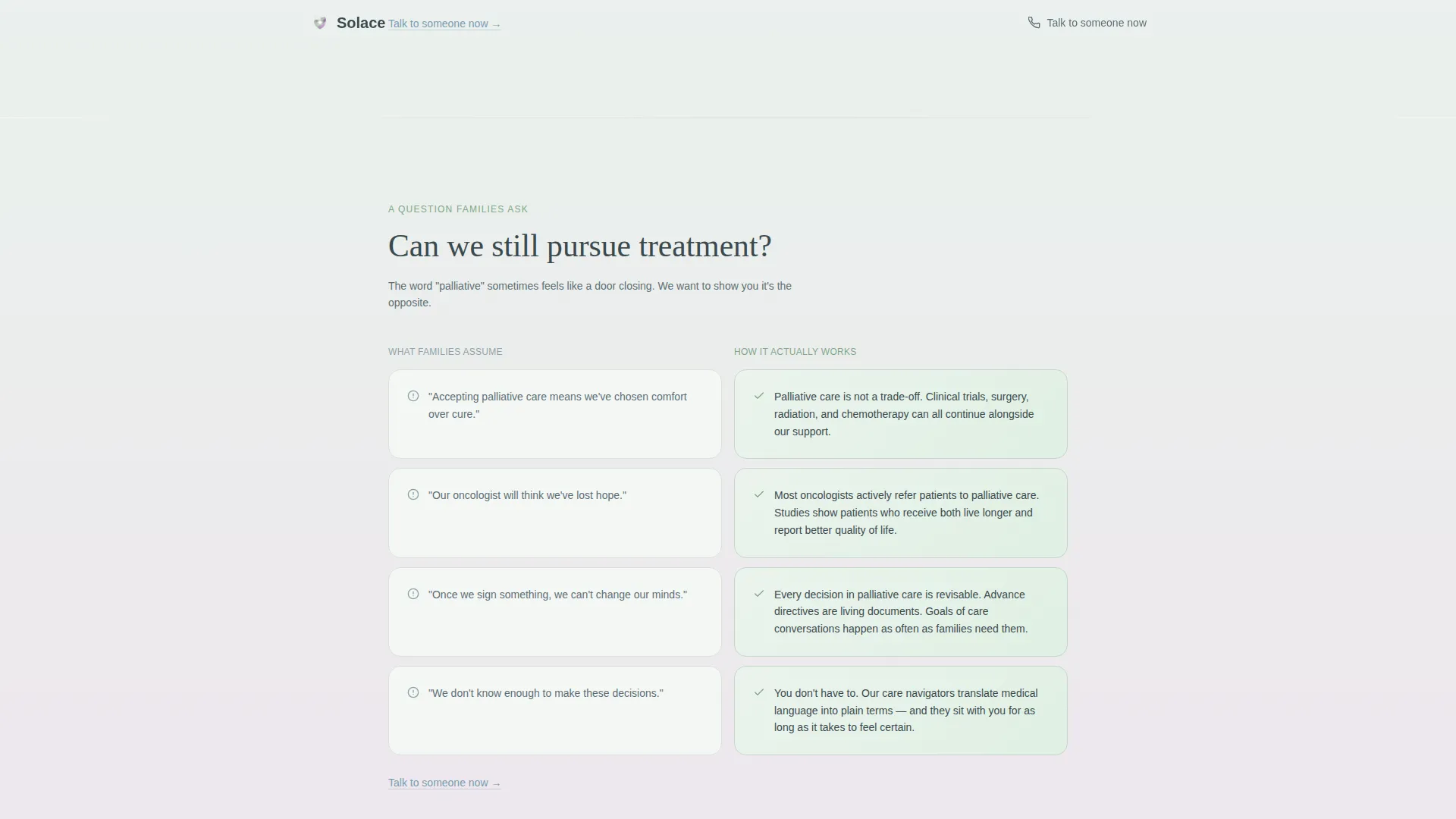
- Three side-by-side FAQ comparison tables contrasting common fears against clinical realities
- A Family Guide download section with a minimal form and an optional care navigator call checkbox
Feature list
This template includes purpose-built components that work together as a quiet, trustworthy journey from the first scroll to the final form submission.
Three-Step Orientation Form
The hero section opens with a large-type guided form that asks one question per step. Visitors choose who they are seeking care for, where that person is currently located, and what would help most today. Each step fades in with a soft gradient transition, and a thin progress line in heather tracks the path forward without pressure.
FAQ Comparison Tables
Three scroll-reveal comparison tables each address one question families commonly search at night. The left column presents the common fear or misconception against a mist white background; the right column presents the clinical reality against meadow sage. The contrast is visual and emotional, designed to remove one layer of dread per table.
Family Guide Download Form
After the third FAQ comparison, a focused call-to-action section offers a downloadable PDF covering medication management, conversation frameworks, and what to expect week by week. The form asks only for a first name and email, with an optional checkbox to request a call from a care navigator.
Quiet Secondary Conversion Path
A text link reading "Talk to someone now" threads through each FAQ section. It connects visitors to a staffed phone line without interrupting the page's unhurried pace. This gives families a human escape route at any moment without being pushed.
Soft Gradient Visual Progression
The page background shifts in barely perceptible gradients as the visitor scrolls deeper. Cool ridge blue tones near the top gradually warm toward heather as questions are answered. The visual progression mirrors the emotional arc the template is designed to create.
Woven Testimonial Block
A quiet family-voice testimonial is placed within the FAQ section. It does not use metrics or star ratings. It uses a real-feeling human statement that reinforces trust through lived experience rather than numbers.
Page sections overview
| Section | Purpose |
|---|---|
| Hero Orientation Form | Welcomes visitors with a three-step guided form that identifies who they are and what they need |
| FAQ Comparison One | Addresses the palliative care versus hospice misconception with a side-by-side table |
| FAQ Comparison Two | Answers the fear about pain management with a misconception-versus-reality table |
| FAQ Comparison Three | Clarifies whether treatment can continue alongside palliative care |
| Family Guide Download | Captures first name and email to deliver a printable PDF resource |
| Footer Row | Single-row linear footer with essential clinic links |
Design & branding system
The Solace template uses the Alpine Fresh color system, which draws its palette from a mountain valley at early morning. Backgrounds feel like first light, not a hospital corridor.
- Colors: morning mist white (#F4F7F5) for backgrounds, meadow sage (#A3BFA8) for positive-reality table columns, distant ridge blue (#7A9BAE) for structural depth, and soft heather (#C8A2C8) reserved for interactive highlights and active form states
- Typography: Fraunces serif for headings, giving the page an unhurried, editorial warmth; DM Sans for body text, keeping paragraphs clean and easy to read on any screen
- Visual motion: medium-intensity gradient mesh background animation, step fade transitions in the orientation form, and scroll-reveal entrance effects on the comparison tables
Mobile & speed optimization
The template is built with a mobile-first approach, recognizing that most visitors arrive on a phone from a hospital waiting room or a kitchen table in the middle of the night.
- Layout stacks cleanly on small screens, with the comparison tables shifting to a vertical reading format that remains clear and scannable
- The hero form is designed for fast first paint so the orientation question appears immediately without waiting for heavy assets to load
- Progressive enhancement ensures the core content and form remain fully functional even before animation layers complete
How this template helps you convert
The Solace template earns conversion by demonstrating understanding before making any request. Visitors are led through a structured emotional journey that builds confidence step by step.
- The three-step orientation form opens the visit with empathy, positioning the clinic as a guide rather than a gatekeeper, which lowers the barrier to continuing the page
- Each FAQ comparison table resolves a specific fear and ends with a quiet "Talk to someone now" link, creating a low-pressure human touchpoint at the exact moment a visitor's trust is highest
- The Family Guide download appears only after three answered questions, so the request feels earned rather than transactional, and the optional navigator checkbox creates a path toward a higher-intent conversation
Other information about this template
Solace was designed specifically for the palliative care medicine niche within health and medical services. It reflects the intersection of clinical authority and human warmth that families need when researching comfort-focused care.
- Template style is Comparison Table, making it particularly effective for clinics that need to correct widespread misconceptions before a family will consider reaching out
- The creative direction is FAQ-Driven, which aligns naturally with how families research palliative care: by typing specific, fearful questions into a search bar late at night
- The landing page direction is Content and Resource conversion, meaning the primary goal is guide downloads and care navigator connections, not direct appointment booking
- The header concept is a Multi-Step Form that doubles as a triage moment, helping the clinic understand visitor intent from the first interaction
- The Alpine Fresh color system and Soft Gradient theme set this template apart from typical health and medical designs, which tend toward sterile whites and institutional blues
Theme
Soft Gradient
Creative direction
FAQ-Driven
Color system
Alpine Fresh
Style
Comparison Table
Direction
Content/Resource
Page Sections
Three-step Orientation Form
FAQ Comparison Tables
Family Guide Download Section
Quiet Secondary Conversion Path
Soft Gradient Visual Progression
Woven Family Testimonial
Related questions
Can I customize the FAQ comparison table content for my clinic?
Does the Family Guide download form connect to an email delivery system?
Is the three-step orientation form functional out of the box?
Can this template support both palliative care and hospice service pages?
Who is the optional care navigator checkbox intended for?



