Residential Solar Installation Landing Page Template
Solarroof is a gallery-and-detail residential solar landing page built for local installation crews. It leads with a Before/After roof slider, walks visitors through a neighborhood-organized project gallery, and converts them with a five-step savings assessment. The Engineering Blueprint visual theme and Forest Trust color system make every section feel grounded, trustworthy, and specific to a real community.
by Rocket studio
Quick summary
Solarroof is a single-page residential solar landing page designed around neighborhood trust and local proof. It opens with a street-view Before/After slider, flows into a gallery of real installations organized by neighborhood name, and closes the loop with an interactive five-step quiz that delivers an instant savings estimate before asking for any contact details.
Who this template is for
This template is built for residential solar installation companies that do their work locally and want their website to feel like a recommendation from a neighbor, not a corporate brochure.
- Local and regional solar installation crews serving specific zip codes
- Solar contractors targeting homeowners, new-build couples, and retirees on fixed incomes
- Companies that have real rooftop photos and homeowner stories ready to show
What problem this template solves
Most solar landing pages feel generic. They show stock images of gleaming panels on perfect rooftops and bury the real value beneath layers of technical jargon. Homeowners with a $300-plus monthly utility bill need to see their own street reflected back at them, not a rendering.
- Visitors leave because they cannot find proof that the company works in their area
- Generic quote forms ask for contact details before giving any value in return
- Installation galleries organized by project number mean nothing to a homeowner scanning for their neighborhood
What you get with this template
You get a fully structured, single-page layout with every section pre-built and ready to populate with your own rooftop photos, homeowner quotes, and local project data. Nothing is abstract or placeholder-generic.
- A Before/After roof slider header with a pulsing surveyor's orange handle
- A neighborhood-organized installation gallery with detail panels showing system specs and homeowner quotes
- A five-step interactive savings assessment that delivers a ballpark estimate before unlocking the booking call to action
Feature list
This template is packed with purpose-built components that move a visitor from curiosity to confidence without a single unnecessary click.
Before/After Roof Slider Header
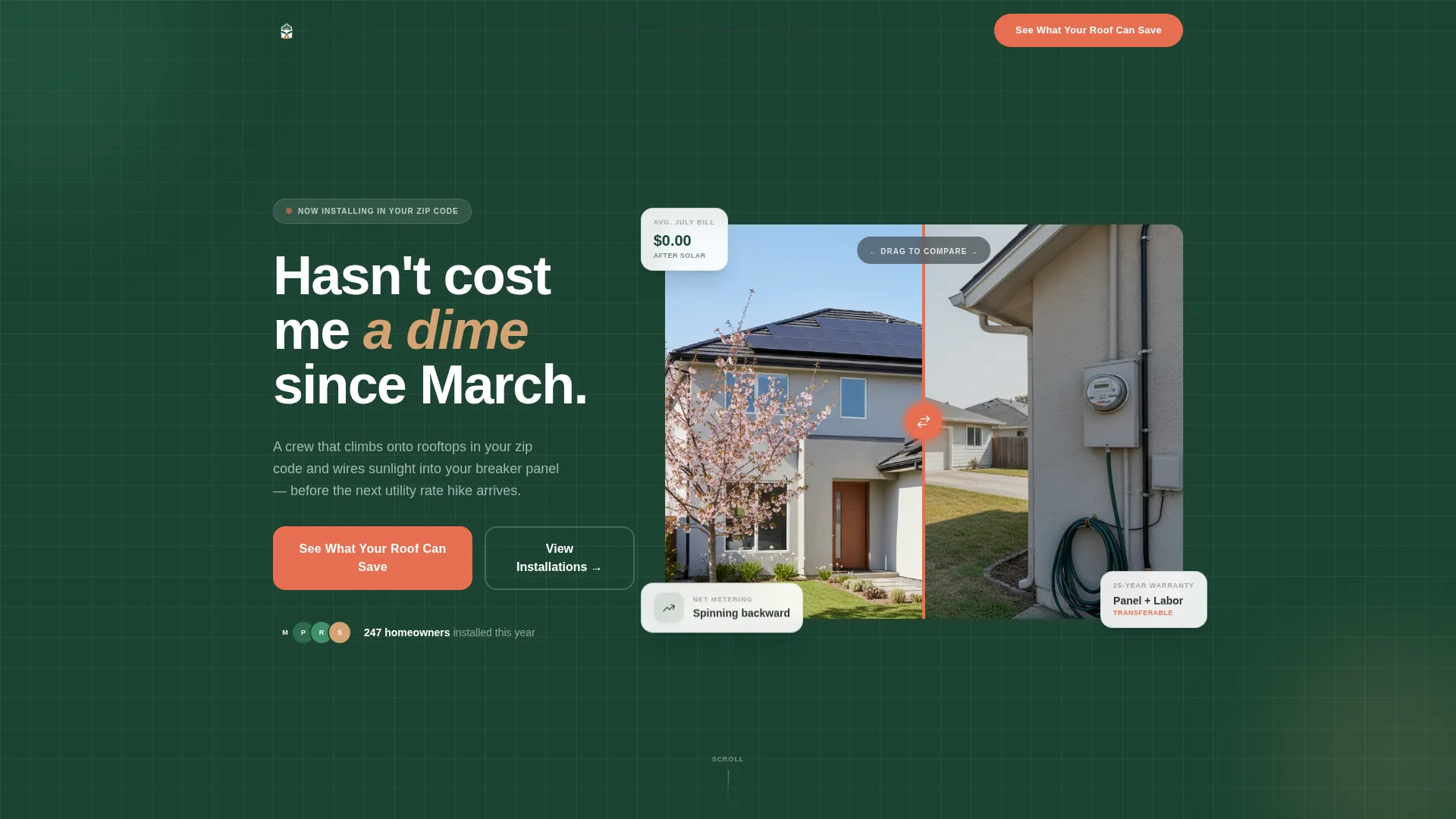
The header places a real street-view photograph of a neighborhood home center stage. The left side shows a bare roof with a visible electric meter. The right side reveals the same home fitted with flush-mounted black-on-black panels and a net-zero meter reading. A surveyor's orange slider handle carries a subtle pulse animation that invites interaction the moment the page loads.
Neighborhood Installation Gallery
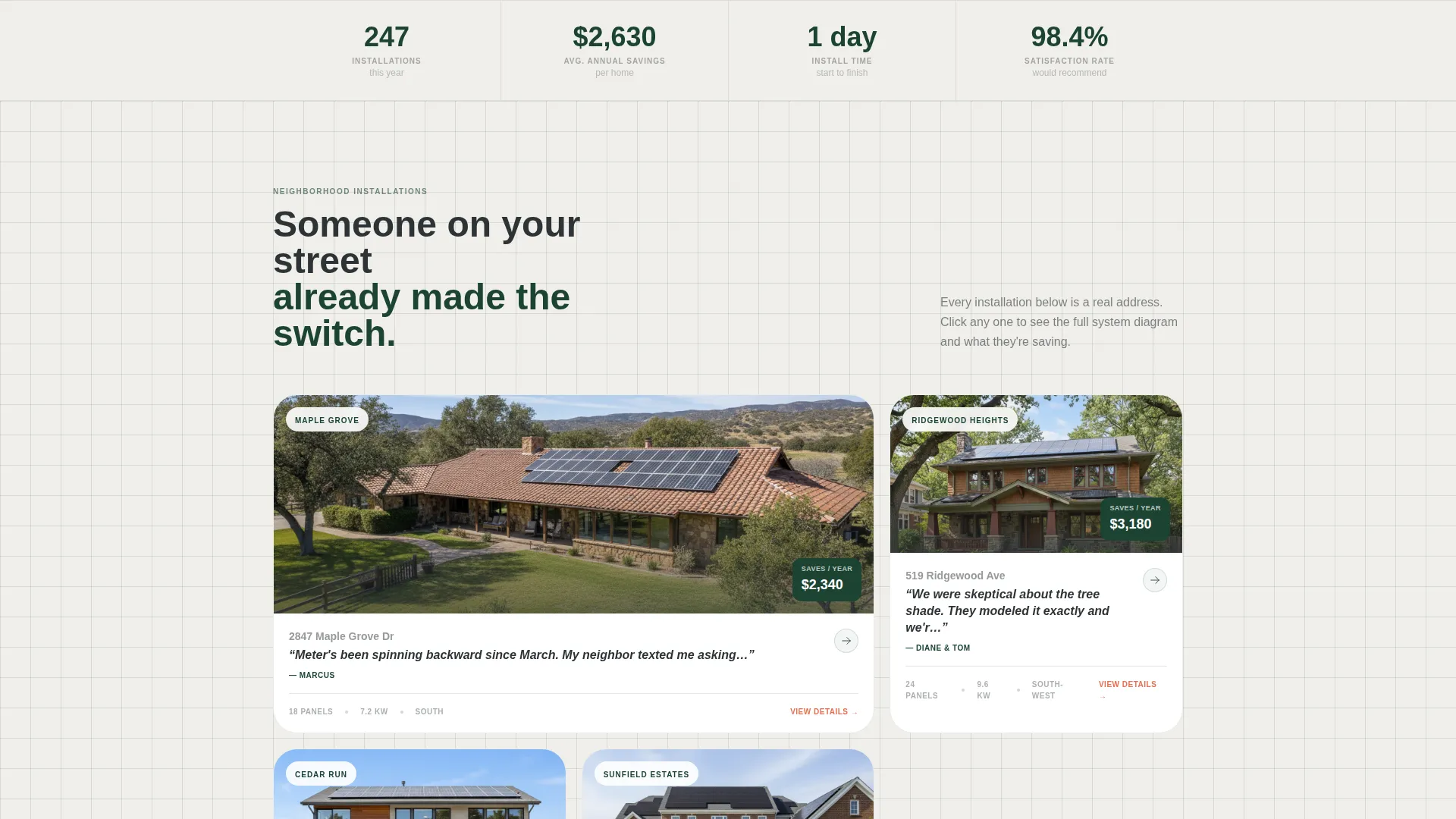
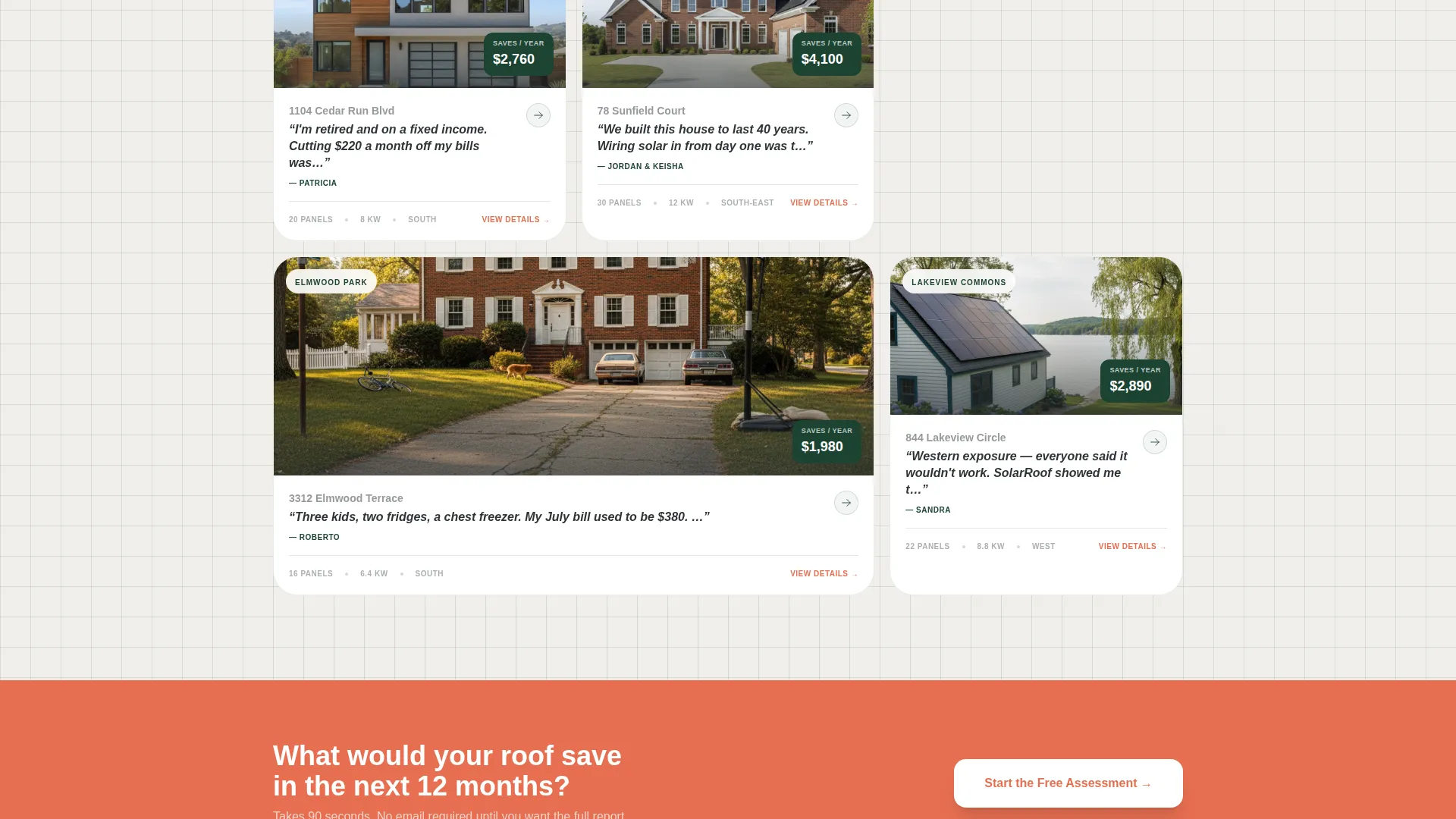
The project gallery is organized by neighborhood name, not project number. Each thumbnail shows a rooftop from the street. Clicking any thumbnail opens a detail panel with a blueprint-style system diagram, panel count, annual savings figure, and a first-name homeowner quote. The layout builds social proof block by block, mapping trust across the community as the visitor scrolls.
Five-Step Savings Assessment
The primary call to action, "See What Your Roof Can Save," launches a guided five-step quiz covering zip code, average monthly bill via a slider from $80 to $500, roof direction via a visual compass selector, shade level via illustrated options, and homeownership confirmation. Each step fills one screen. A surveyor's orange progress bar tracks completion. Finishing the quiz delivers an instant ballpark savings estimate.
Post-Quiz Booking Flow
Completing the assessment unlocks a secondary call to action: "Book Your Free Roof Survey." A calendar picker for a site visit appears immediately after the estimate is shown. The sequence is designed to earn the click by delivering real value before asking for any personal contact information.
Engineering Blueprint Visual Theme
Section backgrounds alternate between technical white and canopy green. Thin ruled lines separate content blocks like schematic gridwork on a permit drawing. The layout uses precise linework and structured spacing to communicate professionalism and technical credibility without feeling cold or corporate.
Page sections overview
| Section | Purpose |
|---|---|
| Before/After Slider | Opens with visual roof transformation proof |
| Neighborhood Gallery Grid | Shows local installations organized by area name |
| Installation Detail Panel | Displays system specs, savings, and homeowner quote |
| Savings Assessment Quiz | Guides visitors through a five-step estimate tool |
| Instant Estimate Result | Delivers ballpark savings before requesting contact |
| Free Survey Booking | Unlocks calendar picker after quiz completion |
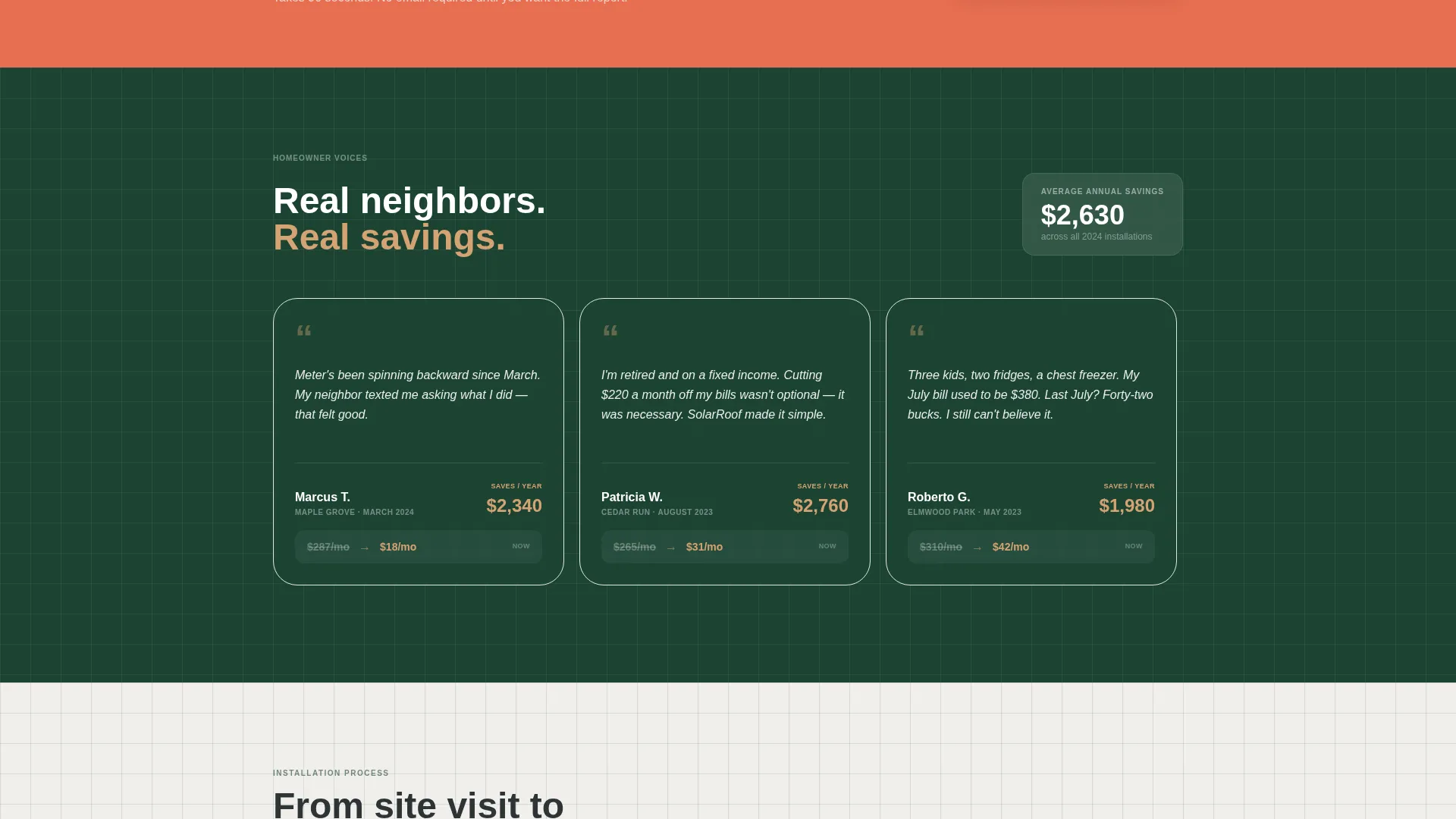
| Social Proof Strip | Reinforces community trust with first-name stories |
Design & branding system
The Forest Trust color system anchors every design decision in the feeling of a job-site clipboard surrounded by mature oaks. Colors are purposeful, not decorative.
- Deep canopy green (#1B4332) and sun-bleached timber (#D4A373) define the primary palette, with technical white (#F0EFEB) for backgrounds and warm charcoal (#2D3436) for body text
- Surveyor's orange (#E76F51) is reserved exclusively for calls to action, the quiz progress bar, and the slider handle to draw the eye without competing with the content
- Thin ruled lines act as schematic gridlines between sections, reinforcing the Engineering Blueprint theme throughout the scroll
Mobile & speed optimization
The layout is built to work cleanly on the devices homeowners actually use when they check their electric bill and start searching for options.
- The Before/After slider, gallery grid, and five-step quiz are each designed to fit and function on a single phone screen without horizontal scrolling
- Each quiz step occupies one full screen at a time, keeping the mobile experience focused and reducing drop-off during the assessment flow
- The neighborhood gallery uses thumbnail-first loading so the page feels responsive even before full detail panels are opened
How this template helps you convert
Conversion is built into the structure of the page, not bolted on at the end. Every section moves the visitor one step closer to booking without pressure.
- The Before/After slider creates an immediate emotional connection by showing a real home transformation, which makes the visitor picture their own roof before they have read a single line of copy.
- The neighborhood gallery replaces abstract credibility claims with street-level proof, and the first-name homeowner quotes make the social proof feel personal rather than corporate.
- The five-step assessment trades value for attention, delivering a real savings estimate before asking for contact details, so the "Book Your Free Roof Survey" call to action feels earned rather than demanded.
Other information about this template
This template is part of the Construction and Home category, specifically designed for the Solar and Energy Installation subcategory. It is a strong fit for residential solar installation companies looking to build local authority online.
- The template style is Gallery plus Detail, meaning it combines a browsable project showcase with individual installation deep-dives in a single continuous scroll
- The creative direction is Local and Neighborhood, so the entire page is structured to reflect the community the installer actually serves rather than a generic solar market
- The header concept is a Before/After Slider, a proven format for home improvement and construction niches where visual transformation is the core sales argument
- The landing page direction is Quiz and Assessment, which is particularly effective for residential solar because the savings potential varies by home and the quiz makes that calculation feel personal
Theme
Engineering Blueprint
Creative direction
Local & Neighborhood
Color system
Forest Trust
Style
Gallery + Detail
Direction
Quiz/Assessment
Page Sections
Before/after Roof Slider Header
Neighborhood-organized Project Gallery
Five-step Savings Assessment
Post-quiz Booking Flow
Engineering Blueprint Visual Theme
Related questions
Can I use my own rooftop photos in this template?
How does the five-step savings quiz work for visitors?
What happens after a visitor completes the savings assessment?
Who is this landing page template best suited for?
Is the neighborhood gallery easy to update with new installations?



