Electronics Manufacturing Reviews Website Template
Solder is a hub-and-spoke landing page template built for electronics assembly service providers. It guides visitors through every production stage, from design review to final shipment, using a timeline-driven anchor navigation, quantified comparison panels, and an exploded-view PCB header. The result is a page that earns technical trust before a single form field is filled.
by Rocket studio
Quick summary
Solder is a precision-engineered landing page template for electronics contract manufacturers. It uses a timeline anchor navigation to walk visitors through each assembly stage, surfaces quantified "Us versus. Typical CM" comparison panels at every step, and closes with a streamlined quoting form. The Engineering Blueprint visual identity makes competence visible before a word of copy is read.
Who this template is for
This template is designed for electronics assembly service providers who need to earn technical trust quickly. It speaks directly to buyers who already understand the stakes of a cold joint or a failed inspection.
- Hardware startups placing their first prototype run and evaluating contract manufacturers (CMs) for the first time
- Defense and industrial suppliers who need to communicate mil-spec capability and process control to procurement teams
- IoT product companies scaling from development kits to high-volume production lots who need a page that answers every objection upfront
What problem this template solves
Generic manufacturing websites look the same to an experienced hardware engineer. They bury capability data, skip process detail, and offer no real basis for comparison. Buyers end up sending the same RFQ to five shops because no single page gave them a reason to commit.
- Vague service pages that fail to differentiate a quality facility from a low-cost broker forwarding Gerber files overseas
- No visible process documentation, leaving procurement teams to chase answers by email before they will approve a vendor
- Missing comparison data that forces buyers to build their own spreadsheet before they can justify a decision internally
What you get with this template
You get a fully structured, single-page layout that covers the entire assembly lifecycle in one scroll. Every section is purposeful, every design choice is tied to the Engineering Blueprint theme, and every interactive element is built to advance a buyer toward submitting a quote.
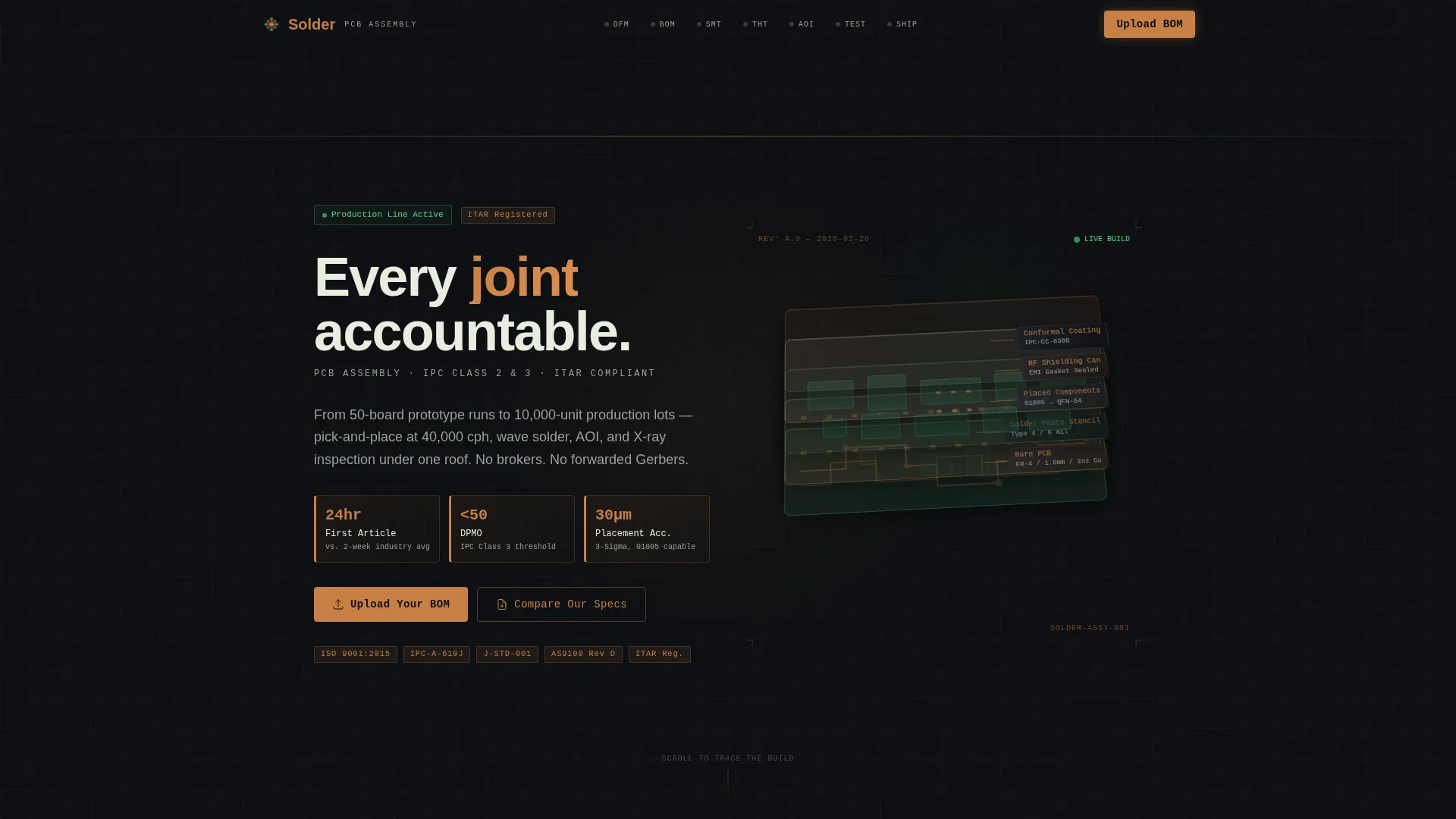
- A full-viewport isometric exploded-view header that breaks a finished printed circuit board assembly into its constituent layers with parallax depth and silkscreen-white leader-line annotations
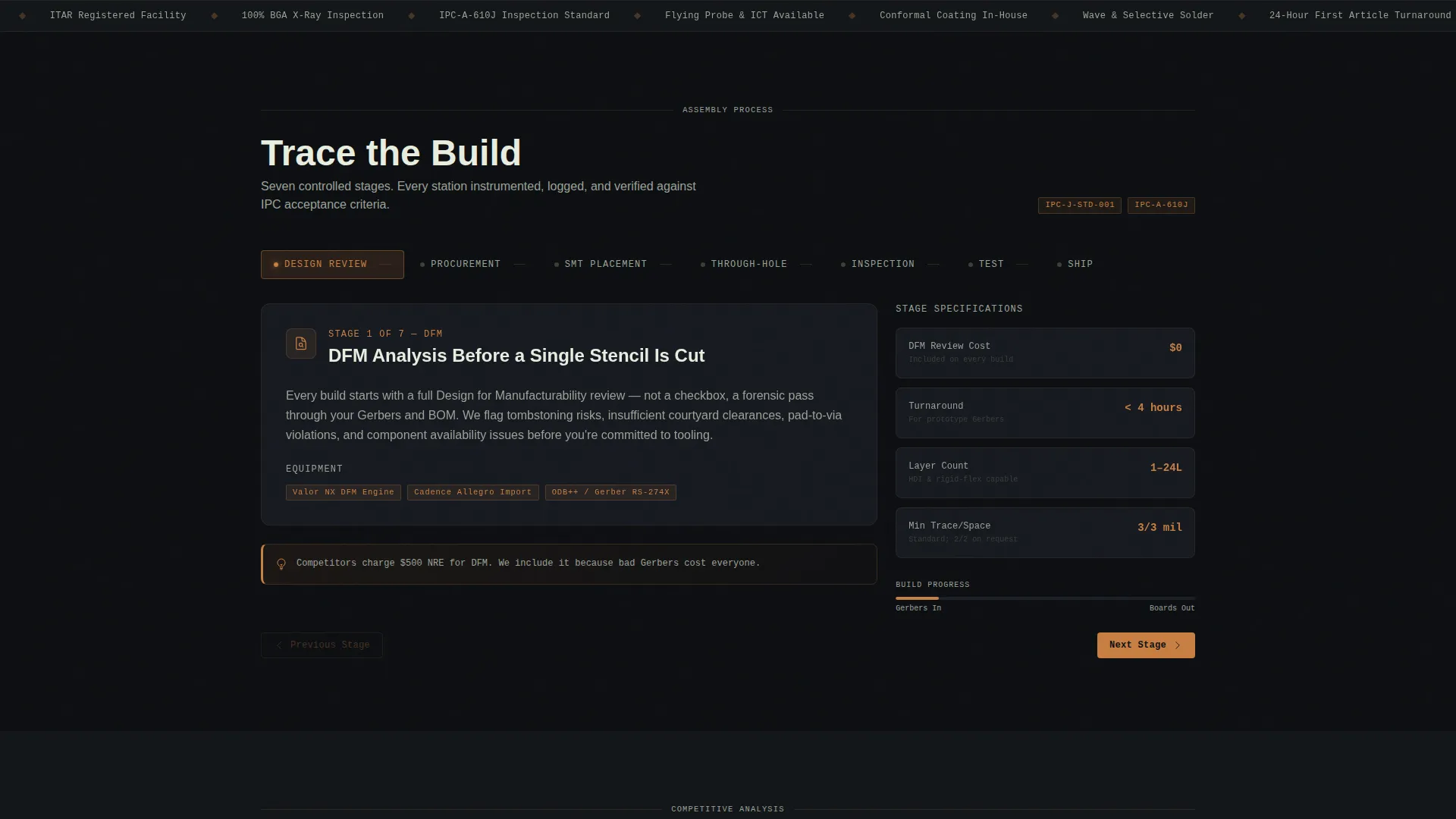
- A seven-node anchor navigation bar representing each production stage, with a sticky "Upload Your BOM" call-to-action button present throughout the scroll
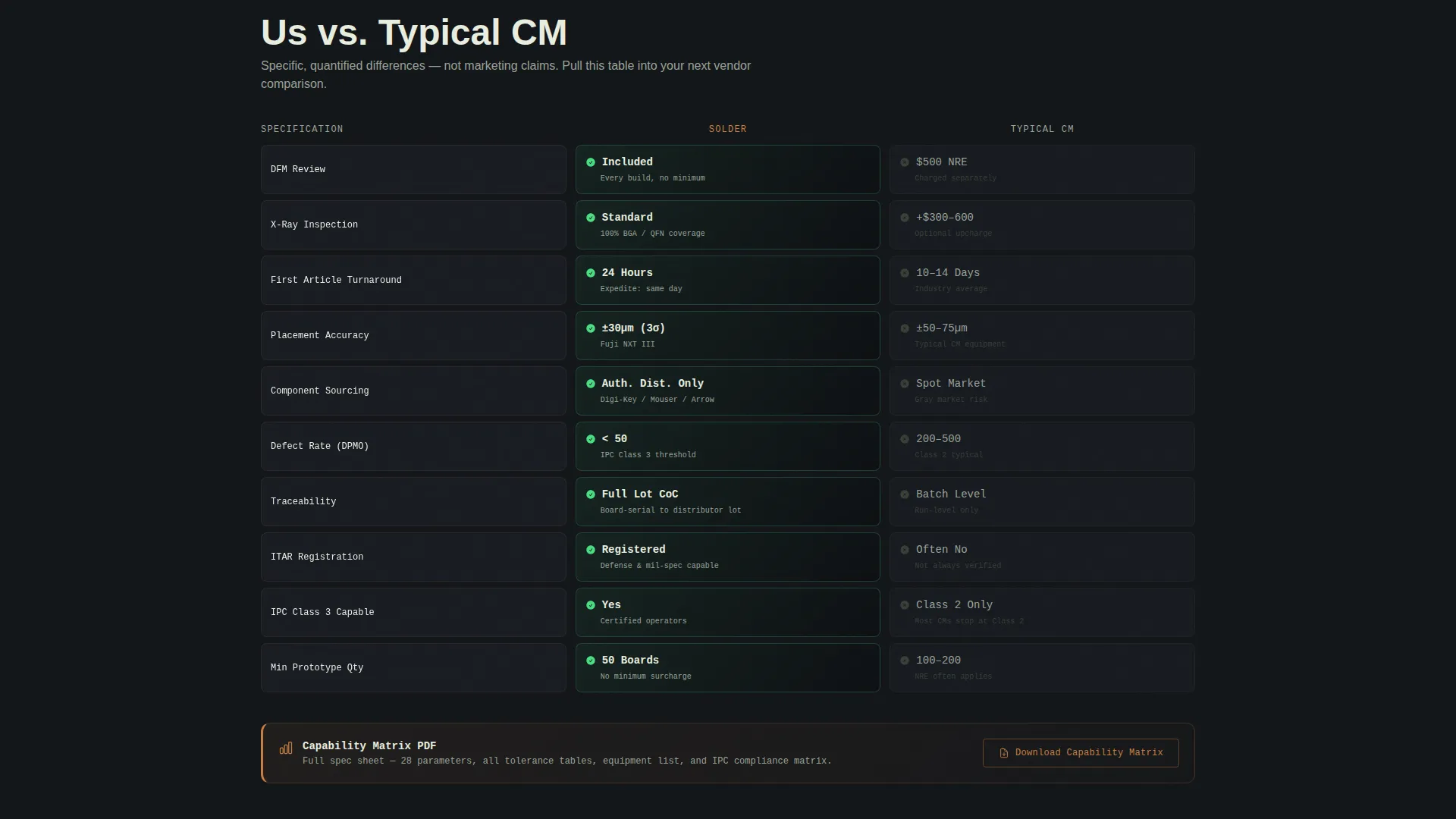
- Two-column "Us versus. Typical CM" contrast panels in every spoke section, populated with specific, quantified differences in turnaround time, inspection standards, and non-recurring engineering fees
Feature list
This section covers the core structural and functional components built into the Solder template.
Exploded-View Isometric Header
The header fills the full viewport with an isometric breakdown of a finished printed circuit board assembly. The board separates into its layers, bare board, solder paste stencil, placed components, shielding cans, and conformal coating, each labeled with thin leader lines and silkscreen-white annotations. Subtle parallax depth shifts as the visitor scrolls, communicating process knowledge without a single photograph.
Timeline Anchor Navigation
Seven navigation nodes map directly to the production lifecycle: Design Review, Procurement, SMT Placement, Through-Hole, Inspection, Test, and Ship. Clicking any node jumps the visitor to that assembly stage. Scrolling advances through the same sequence, building an implicit argument that every station in the facility is controlled and purposeful.
Quantified Comparison Panels
Each spoke section contains a two-column contrast layout comparing this facility's specifications against a typical contract manufacturer. Differences are stated with specific numbers: X-ray inspection listed as standard versus an optional upcharge, design for manufacturability review included versus a $500 non-recurring engineering fee, and 24-hour first-article turnaround versus a two-week competitor wait.
Sticky "Upload Your BOM" Call-to-Action
The primary call-to-action button stays visible in the anchor navigation throughout the entire scroll. It opens a focused quoting form that accepts bill of materials files in CSV or XLSX format, Gerber or ODB++ layout files, quantity tier selection (prototype, low-volume, or production), and a single assembly-class dropdown (IPC Class 2 or Class 3).
Capability Matrix Lead Capture
A secondary conversion path labeled "Compare Our Specs" links to a downloadable capability matrix PDF. The download is gated behind a simple email capture form, giving the facility a qualified lead while giving the buyer a document they can share internally with their procurement and engineering teams.
Carbon Fiber Color System
The palette is built from four precise values: deep substrate black (#0D0F12) for backgrounds, solder-mask green (#1B4332) for section dividers and navigation highlights, bare-copper trace (#C77F42) for all interactive elements and hover states, and silkscreen white (#E8EDDF) for body text and line work. Every color choice references a real PCB material, reinforcing the Engineering Blueprint theme at a visual level.
Page sections overview
| Section | Purpose |
|---|---|
| Exploded View Header | Establishes process credibility with a parallax PCB layer breakdown |
| Anchor Navigation Bar | Lets visitors jump to any assembly stage and access the quote form |
| Design Review Stage | Covers design for manufacturability review and NRE fee comparison |
| Procurement Stage | Details component sourcing, lead times, and supply chain transparency |
| SMT Placement Stage | Highlights pick-and-place speed, paste printing, and reflow control |
| Through-Hole Stage | Covers wave solder, selective solder, and hand-solder capability |
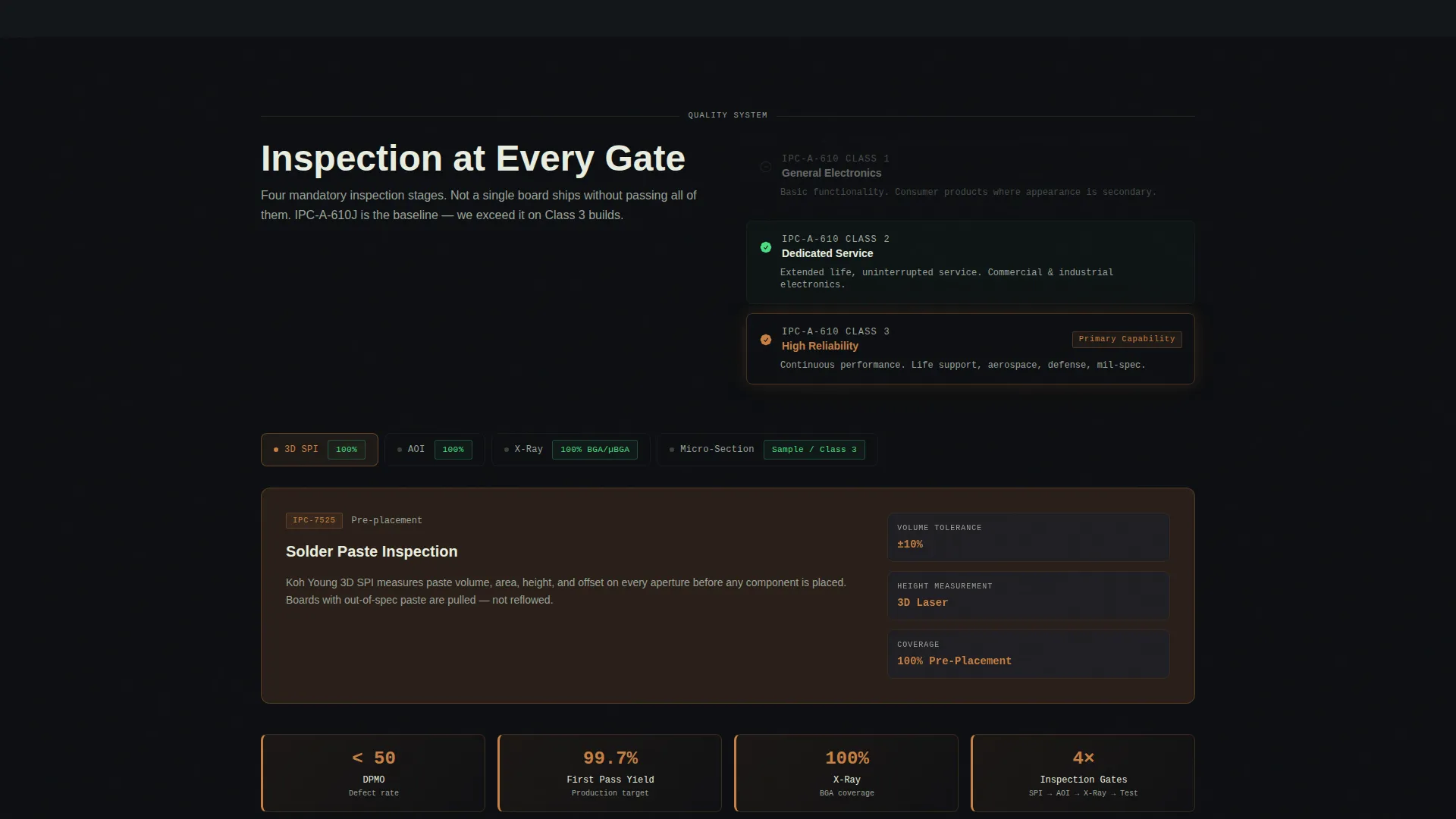
| Inspection Stage | Presents automated optical inspection, X-ray, and IPC Class standards |
| Test Stage | Outlines in-circuit test, functional test, and acceptance criteria |
| Ship Stage | Communicates packaging, labeling, and final delivery details |
| Quote Upload Form | Captures BOM, Gerber files, quantity tier, and assembly class |
| Capability Matrix Gate | Collects email in exchange for a downloadable specification PDF |
Design & branding system
The visual identity follows an Engineering Blueprint theme built on the Carbon Fiber color system. Every color, type choice, and layout decision references a real PCB material or manufacturing process, so the design itself communicates domain expertise before the copy does.
- Four-value palette: substrate black (#0D0F12) for backgrounds, solder-mask green (#1B4332) for nav and dividers, copper (#C77F42) for all interactive and hover states, and silkscreen white (#E8EDDF) for all typography and line work
- Typography and annotation style mirrors component callouts from an assembly drawing, with thin leader lines and reference-designator-style labels used throughout the header and section transitions
- No stock photography anywhere in the template; all visual communication is done through the exploded PCB illustration, comparison data panels, and process-stage iconography
Mobile & speed optimization
The Solder template is structured to remain legible and functional across screen sizes. The anchor navigation and sticky call-to-action are especially important on mobile, where buyers may be reviewing vendor options away from their desk.
- The hub-and-spoke anchor navigation collapses cleanly on smaller screens, keeping the sticky "Upload Your BOM" button accessible without crowding the viewport
- Comparison panels reflow from a two-column desktop layout to a stacked single-column format on mobile, preserving all quantified data without horizontal scrolling
- The parallax exploded-view header uses CSS-layer depth rather than heavy video assets, keeping the visual impact high while reducing the load burden on mobile connections
How this template helps you convert
The page is structured as an objection-handling sequence. By the time a visitor reaches the quoting form, the comparison data has already answered every question a procurement team is likely to raise.
- The timeline progression builds trust incrementally, each assembly stage reveals tighter tolerances and more specialized equipment than the last, making the case for a controlled facility rather than a forwarding broker before any claim is stated directly.
- The quantified comparison panels give buyers a ready-made internal justification. Specific numbers on turnaround time, inspection standards, and fee structures turn a vendor evaluation into a straightforward decision rather than a leap of faith.
- The dual conversion path, a direct BOM upload for buyers ready to quote and a gated capability matrix PDF for buyers still in the research phase, captures demand at both ends of the decision cycle without forcing premature commitment.
Other information about this template
The Solder template was designed specifically for the electronics assembly service niche within the broader Manufacturing and Industrial category. It is built as a hub-and-spoke single-page layout with anchor navigation, placing it at the intersection of technical credibility and direct-response conversion.
- The template style is classified as Hub and Spoke with Anchor Navigation, making it well suited for services where a linear process narrative drives buyer confidence
- The creative direction follows a Timeline Progression pattern, meaning each scroll position corresponds to a measurable production milestone rather than a generic feature list
- The landing page direction is Comparison and Versus, a structure that is especially effective for contract manufacturing buyers who arrive with a shortlist and need a reason to remove competitors from it
- The header concept is an Exploded View, a format borrowed from technical illustration and assembly drawings that signals manufacturing fluency to an engineering audience without relying on photography
Theme
Engineering Blueprint
Creative direction
Timeline Progression
Color system
Carbon Fiber
Style
Hub & Spoke (Anchor Nav)
Direction
Comparison/Versus
Page Sections
Exploded-view Isometric Header
Timeline Anchor Navigation
Quantified Comparison Panels
Sticky BOM Upload Call-to-action
Capability Matrix Lead Capture
Carbon Fiber Color System
Related questions
Who is this template designed for?
Can I customize the comparison data in the contrast panels?
What file types does the quoting form support?
Does the template include the capability matrix PDF?
Do I need to use all seven assembly-stage sections?



