Labor & Employment Government Careers Website Template
Sovereign is a modular card grid landing page designed for tribal labor and employment authorities. It presents real workforce data up front, walks users through every step of the employment journey, and makes key resources easy to access without friction. The warm Community Hearth visual identity builds immediate trust with enrolled members at every stage of their career path.
by Rocket studio
Quick summary
Sovereign is a landing page template built for tribal employment offices that need to earn trust fast and guide community members toward real action. It opens with live workforce metrics, unfolds each stage of the employment journey through modular flip cards, and closes with clear download and scheduling links. The design feels grounded, warm, and honest from the first scroll to the last.
Who this template is for
This template is ideal for tribal workforce programs that serve a wide range of community members. The page is designed to speak to people who may be navigating official employment systems for the very first time, as well as those returning after years away. It is equally useful for staff who need a clear, organized tool to share with clients during walk-in sessions.
- Enrolled tribal members seeking jobs, training programs, or career transitions
- Returning urban relocators, seasonal workers, elders, and first-time job seekers
- Tribal workforce teams that want a site reflecting their community's culture and goals
What problem this template solves
Many government and community workforce websites create confusion before they create confidence. Users land on a page and cannot tell what services exist, what documents they need, or what happens after they submit a request. That uncertainty drives people away before they ever walk through the door.
- Community members cannot find clear eligibility requirements or process timelines
- Employees managing intake waste time answering the same questions repeatedly
- The organization loses trust with the audience it most needs to reach
What you get with this template
This template gives your team a complete, ready-to-build landing page structure focused on transparency and action. Every section is designed to reduce friction and help users feel prepared before they arrive. The layout is modular, so your team can manage and update content without restructuring the entire page.
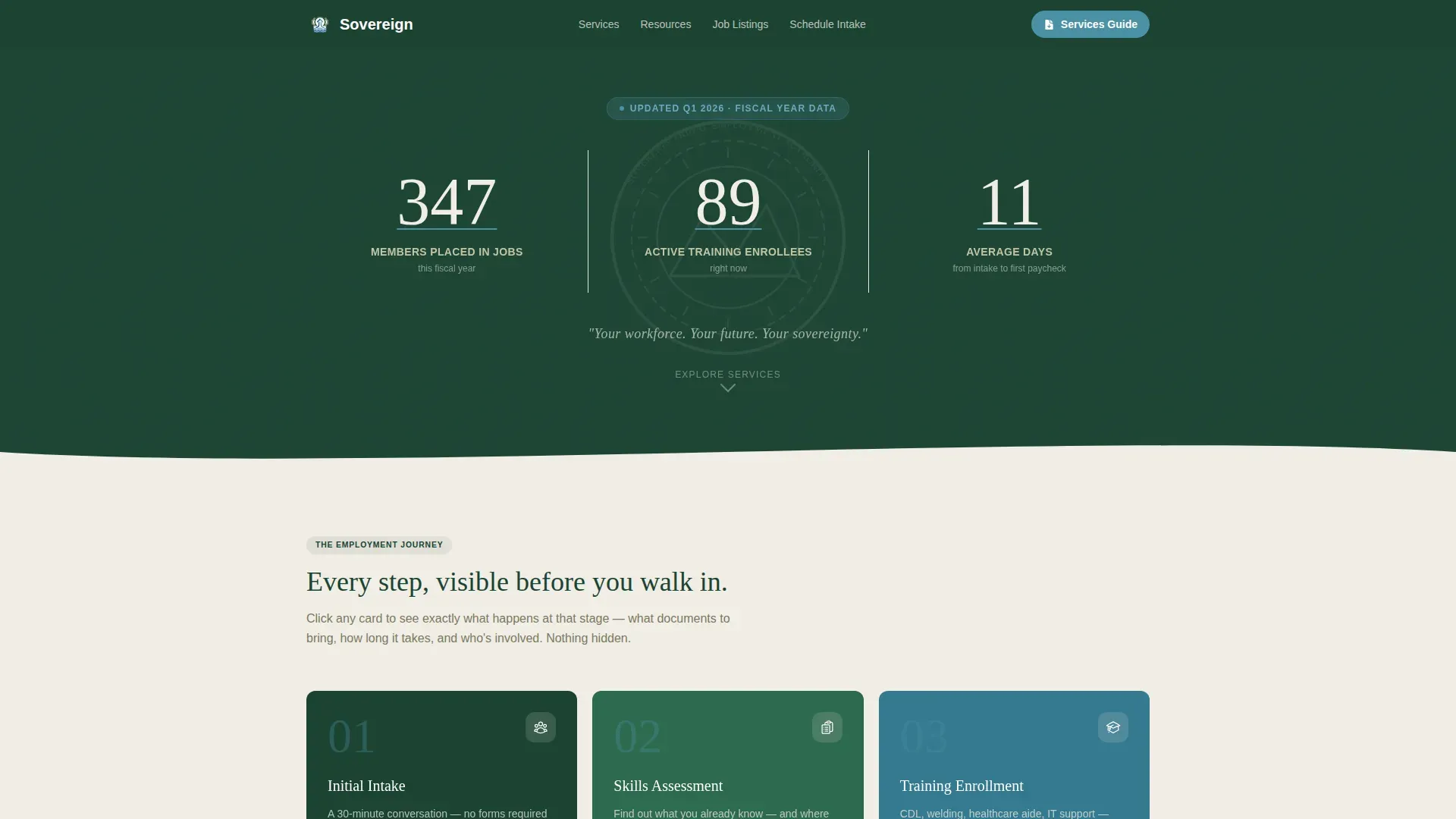
- A stats-led hero section with three live workforce metrics and a tribal seal watermark
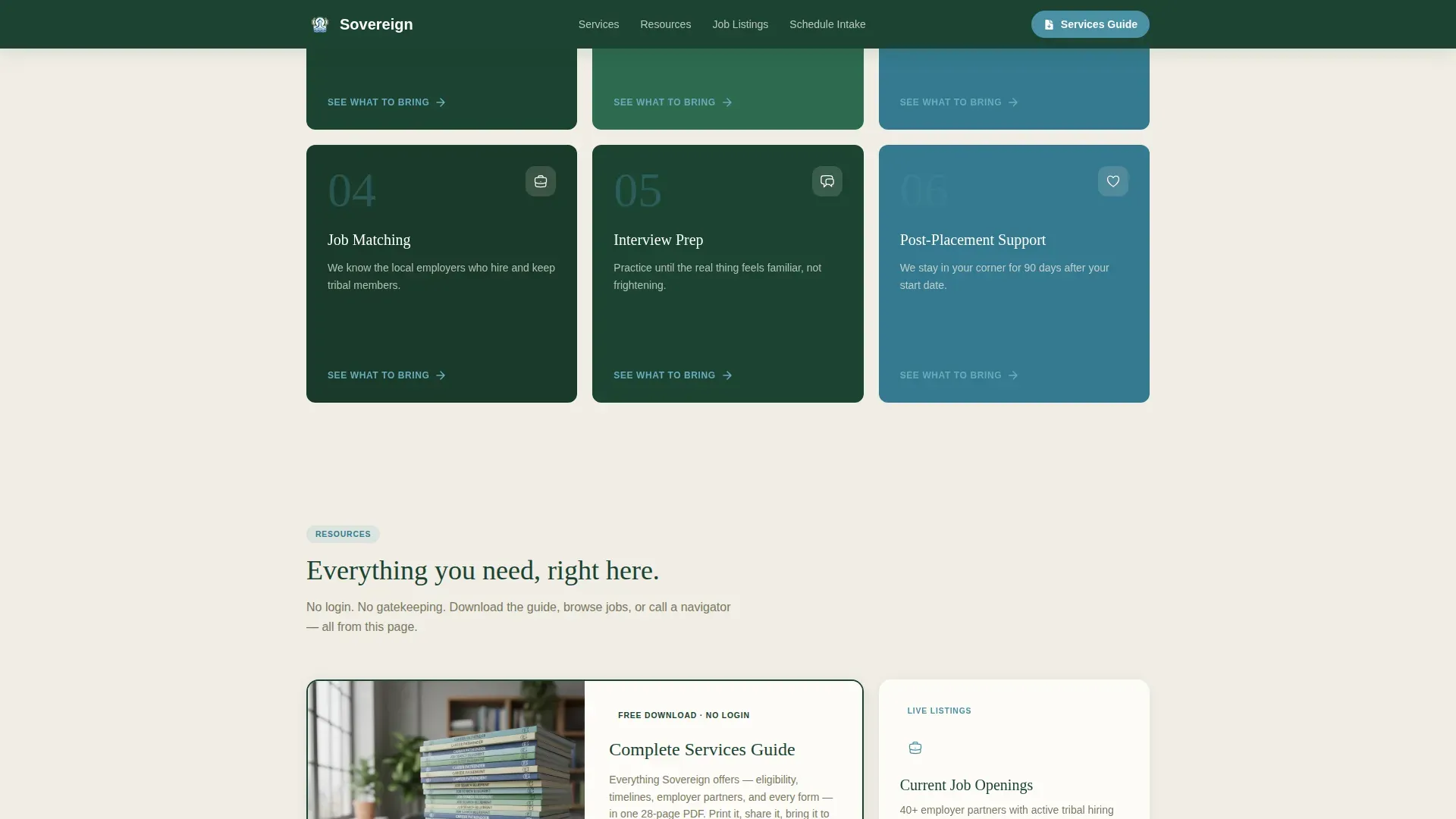
- A modular flip card grid revealing each step of the employment journey on click
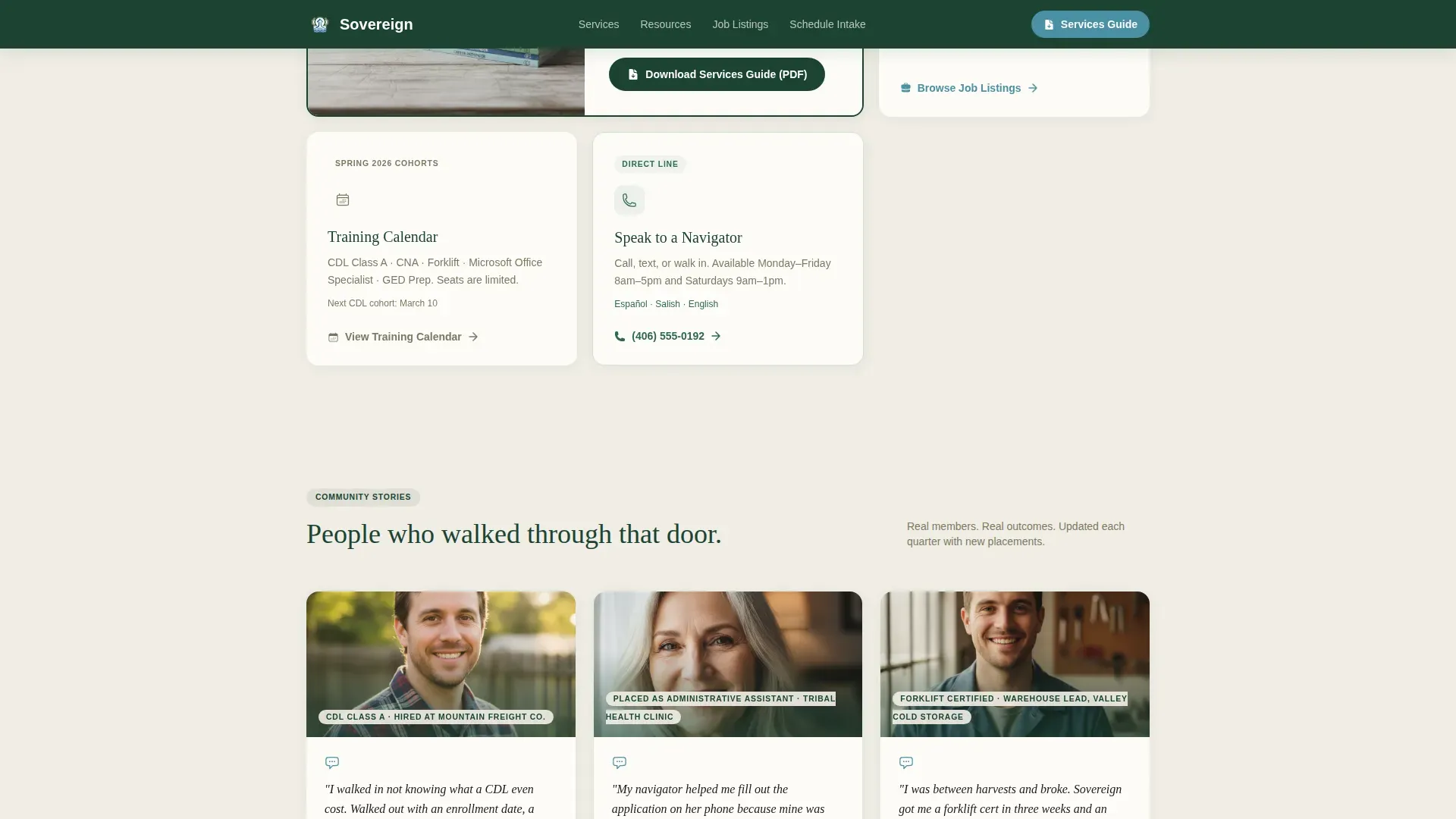
- A resource hub with job listing cards, a training calendar card, and an intake appointment scheduler
Feature list
This template is built around one principle: show everything first. Each feature exists to support that goal, creating a landing page that feels like a trusted guide rather than a gatekeeper.
Stats-Led Hero Section
The hero opens against a deep evergreen background with three large, hand-set numbers displayed in snow-melt white. These metrics, members placed this fiscal year, active training enrollees, and average days from intake to first paycheck, are updated quarterly. A tribal seal watermark at forty percent opacity and a single tagline anchor the space without clutter.
Modular Flip Card Employment Journey
The core of the page is a card grid that reveals each stage of the employment process as its own card. Cards flip or expand on click to show what happens at that step, what documents to bring, and how long the process typically takes. This transparent approach helps users feel informed and engaged before they ever submit a request.
No-Login PDF Download call to action
The primary call to action is a downloadable Services Guide in PDF format. It requires no login and appears at the top of the card grid and again after the final process card. Users can share files and access the full resource guide without creating an account or providing personal data upfront.
Intake Appointment Scheduler Card
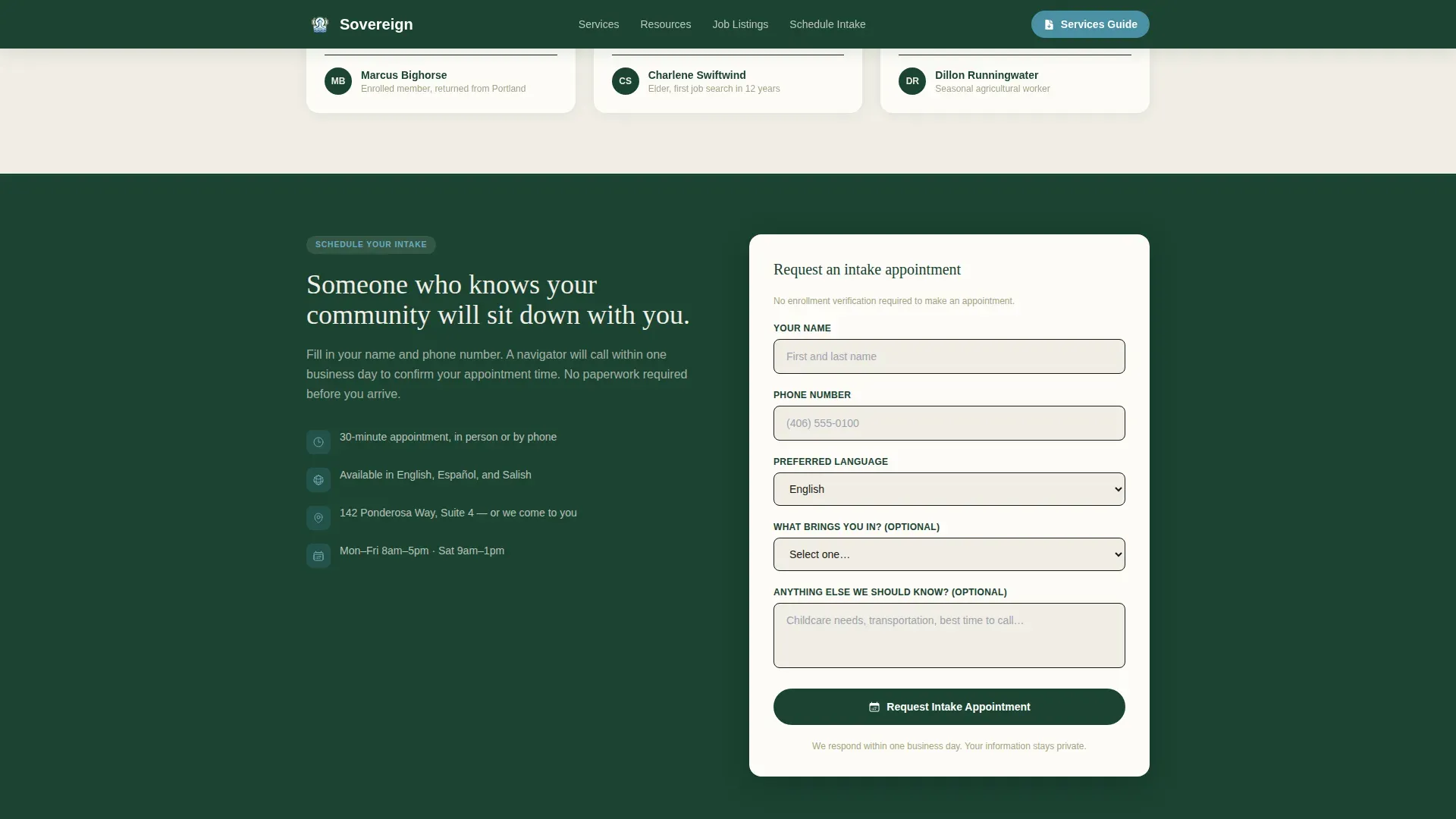
A dedicated resource card lets users schedule an intake appointment directly from the page. The form collects a name, phone number, and preferred language. This low-barrier entry path supports communication with users across language backgrounds and removes the need to call the office to get started.
Community Testimonials with Asymmetric Layout
A testimonials section displays real community member stories in an asymmetric card layout. Authentic feedback from real users provides social proof of participation and helps new visitors build confidence in the program. These stories create a human connection that data alone cannot provide.
Alpine Fresh Color System and Typography
The entire page uses the Alpine Fresh palette: deep evergreen for the header and footer, snow-melt white for card backgrounds, hearthstone warm gray for body text, and river-blue for interactive links and card borders. Fraunces serif handles headlines while DM Sans carries body content, keeping the tone warm and readable throughout.
Page sections overview
| Section | Purpose |
|---|---|
| Header and Nav | Evergreen background, logo, language selector, primary call to action |
| Hero Stats Display | Three live workforce metrics, tagline, tribal seal watermark |
| Employment Journey Cards | Flip card grid showing each process step with documents and timelines |
| Resource Hub Cards | Job listings, training calendar, and intake scheduler in card format |
| Community Testimonials | Asymmetric layout showcasing real community member stories |
| Footer | Single-row linear layout on evergreen background with essential links |
Design & branding system
The visual identity follows a Community Hearth theme. The palette is grounded in nature, familiar to the communities this page serves, and purposefully free of stock photography. Every color choice carries meaning, and the typography reinforces a tone that is warm, official, and approachable at once.
- Deep evergreen anchors the header, footer, and hero; snow-melt white opens the card grid with breathing room
- River-blue draws attention to all clickable elements including resource links, download buttons, and card borders
- Fraunces serif headlines set a confident, community-rooted tone; DM Sans body text keeps content efficient and easy to scan
Mobile & speed optimization
This template is designed with a mobile-first approach, recognizing that many community members access services from a phone, and some elders prefer tablets. The layout prioritizes readable type, tappable card interactions, and a scroll flow that works naturally on smaller screens.
- Card flip and expand interactions are built for touch, not just mouse clicks
- The intake form fields are large and clearly labeled for users less familiar with digital applications
- Scroll reveal and stagger animations are set to a medium level, keeping the page feeling alive without slowing the experience
How this template helps you convert
A landing page for a sovereign community workforce must balance trust, autonomy, and action. This template earns the click by showing the entire process before asking for anything. When users feel informed, downloading the guide and scheduling an intake appointment feel like natural next steps, not leaps of faith.
- The stats hero builds immediate credibility by showing real, updated data rather than vague claims, giving new users a reason to keep reading
- The flip card journey removes the fear of the unknown by making every form, timeline, and eligibility requirement visible before anyone walks through the door
- The no-login PDF download and the simple intake scheduler create two clear, low-friction paths to action so users can move at their own pace
Other information about this template
This template supports the broader concept of digital sovereignty in public-sector service delivery. Organizations are increasingly aware of the importance of data ownership, and this page is designed to reflect that value visually and structurally. The layout makes it easy to showcase what your organization controls and how it operates openly.
- The transparent process design aligns with principles seen in open source software movements, where full visibility over operations builds trust with users and communities
- Teams can build on this template to add video conferencing links for virtual intake sessions or to share files like training calendars and official eligibility guides
- The page architecture supports organizations that want to improve access to services without requiring complex software setups or third-party data tools
- Projects that involve collaboration across departments, for example linking job matching teams with training coordinators, benefit from a clear, modular page structure like this one
- Companies and government agencies exploring sovereign solutions for public communication will find this template a practical starting point for their own projects
- Microsoft and other mainstream productivity platforms often require users to have accounts and log in to access content; this template takes the opposite approach by keeping all primary resources freely accessible
- The template can also support presentations to council members or program directors by serving as a live showcase of the organization's workforce solutions
- Tips for customization include updating the three hero metrics quarterly, replacing the logo with your tribal seal, and keeping all resource links current so the page remains a trusted, secure source of information
- The importance of keeping content current cannot be overstated; users who find outdated data or broken links will lose confidence quickly, so the modular structure makes it easy to manage updates section by section
- For organizations curious about how tools like openDesk or the Sovereign Workplace initiative in Europe approach digital independence, this template reflects similar values: transparency, community ownership, and efficient self-service design
Theme
Community Hearth
Creative direction
Transparent Process
Color system
Alpine Fresh
Style
Card Grid (Modular)
Direction
Content/Resource
Page Sections
Stats-led Hero with Live Metrics
Modular Flip Card Journey Grid
No-login PDF Services Guide Download
Intake Appointment Scheduler
Community Testimonials Section
Alpine Fresh Visual Identity System
Related questions
Who can use the Sovereign template?
Does the PDF download require users to create an account?
Can the template be customized to match our tribal brand?
How does the flip card grid work?
Is the intake form suitable for users with limited digital experience?



