Beginner Robotics Coding Landing Page Template
Circuit is a warm, modular landing page template built for kids robotics online class programs. It greets browsing parents with a drag-and-drop circuit builder in the hero, then guides them through a five-question quiz to match their child with the right class tier. Soft lavender, cloud white, and marigold accents create a nurturing, unhurried experience that earns trust before asking for a commitment.
by Rocket studio
Quick summary
Circuit is a single-page, card-grid landing page template designed for virtual robotics class programs serving children ages 6 to 12. The template opens with an interactive circuit builder demo in the hero, flows through modular discovery cards, and closes with a five-question quiz that recommends the right class tier for every child. Every interaction is opt-in, gentle, and structured to build parent confidence step by step.
Who this template is for
This template is built for EdTech founders, independent robotics instructors, and enrichment program operators who run virtual robotics workshops for kids. It speaks directly to the parents who are scrolling late at night looking for something genuinely enriching, not just another screen activity.
- Robotics program operators launching or relaunching a kids online class
- Independent instructors who teach coding, electronics, and science to young students
- EdTech brands offering structured curriculum with take-home kits and live sessions
What problem this template solves
Parents who search for a kids robotics class online often land on pages that feel cluttered, generic, or hard to trust. They need to quickly understand what their child will actually do, whether the program fits their child's age and ability, and whether the teaching quality justifies the price. Most template options fail to answer those questions in a way that feels personal and warm.
- Generic templates do not match the nurturing tone that parents of young kids expect
- Flat, text-heavy pages make it hard for busy parents to scan and decide quickly
- No built-in quiz funnel means visitors leave without finding the right class fit
What you get with this template
Circuit delivers a complete, ready-to-customize landing page layout with six named sections, a five-screen inline quiz, and a Lavender Dream visual system. Every card, button, and interaction point is pre-built and purposefully placed to move a browsing parent toward reserving a spot.
- A hero section with an interactive drag-and-drop circuit builder and a looping video thumbnail
- A modular card grid covering the kit box reveal, lesson explorer, testimonials, and the class-finder quiz
- A five-question quiz funnel with a result page, a "Reserve Their Spot" call to action, and a secondary email-capture path via a free activity sheet download
Feature list
This section covers the core interactive and structural components included in the Circuit template.
Interactive Hero Circuit Builder
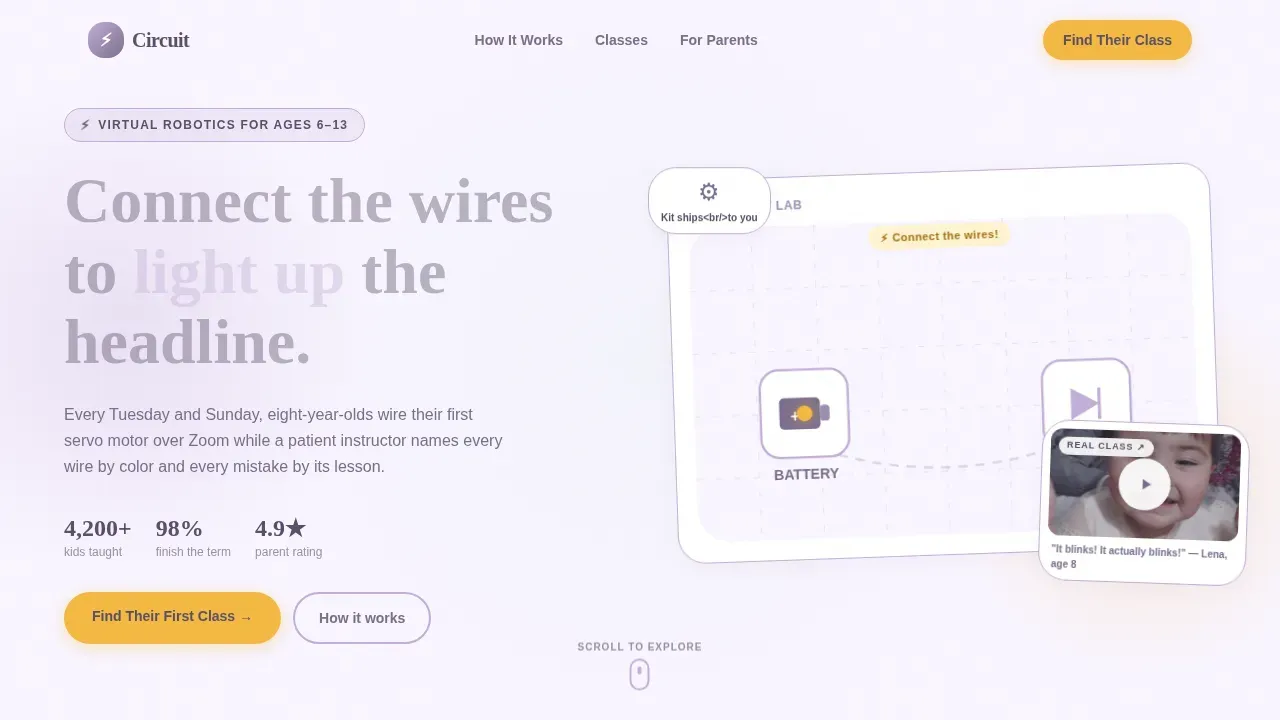
The hero embeds a miniature drag-and-drop circuit builder where visitors connect a battery icon to an LED icon. When the connection is made, the LED glows with a soft marigold pulse. The headline "They'll build things that move, blink, and make them proud" fades in after that first successful connection. A looping video thumbnail sits beside the builder, showing a real child on a live video call holding up a blinking robot.
Modular Discovery Card Grid
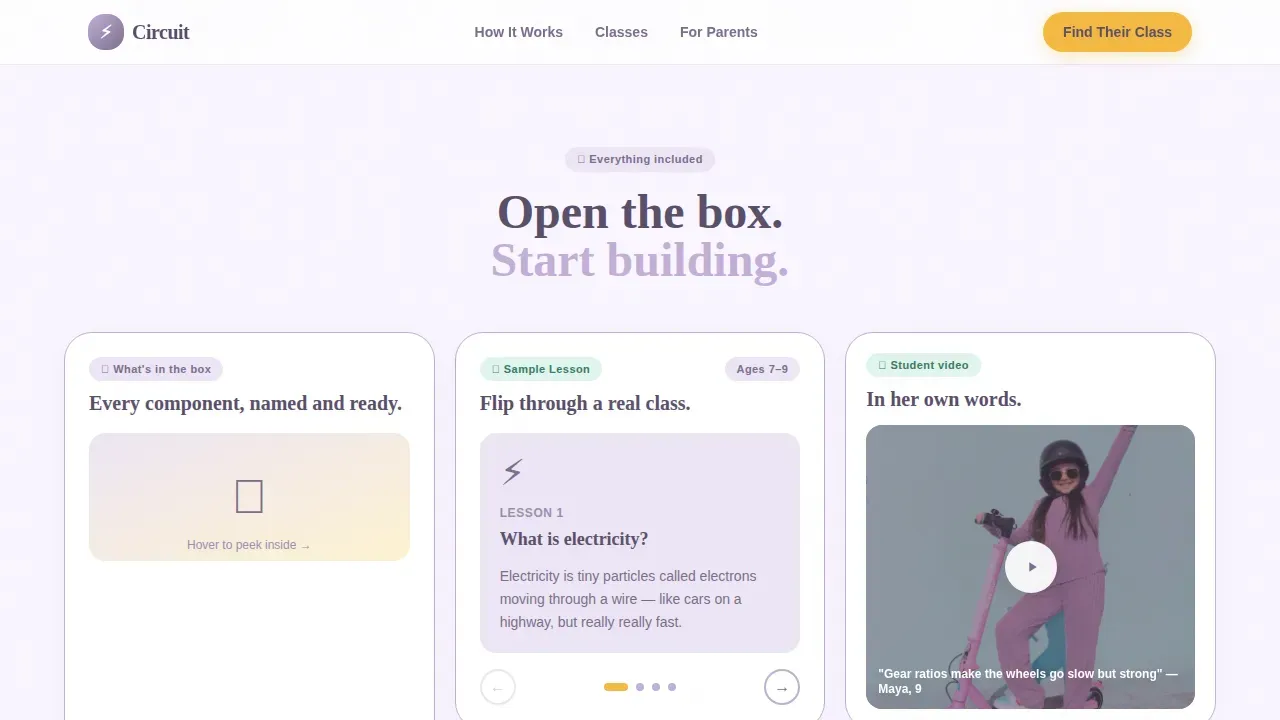
The scroll unfolds as an interactive explorer. Each card in the grid is a self-contained discovery unit. One card lets visitors flip through a sample lesson slideshow. Another plays a short clip of a child explaining gear ratios in her own words. A third reveals the inside of a kit box, component by component, on hover. Nothing auto-plays, and every interaction is fully opt-in, mirroring the teaching philosophy of the program itself.
Five-Screen Class-Finder Quiz
The primary call to action launches a friendly five-question quiz. Each question occupies its own screen. The child's age is selected via a slider, not a dropdown. Prior experience with building toys is shown through illustrated icons covering options from no experience to electronics background. Learning style is presented as visual, hands-on, or social, each with a small animation. A scheduling preference question and an open-ended field asking for the parent's biggest hope complete the flow. A lavender progress bar and marigold "Next" button guide each step.
Quiz Result and Conversion Path
The result screen recommends a specific class tier matched to the child's responses. It presents a "Reserve Their Spot" primary button and a secondary path that offers a free downloadable activity sheet in exchange for an email address. This two-path approach captures families who are ready to commit tonight and those who need a little more time.
Social Proof Testimonials Section
The template includes a dedicated testimonials card block designed for parent reviews. Each testimonial displays the child's project name, a star rating, and a class tier badge alongside the parent's words. This format gives social proof specific, credible detail rather than generic praise.
Lavender Dream Branding System
The full Lavender Dream color system is baked into every element. Soft lavender (#C3AED6), warm cloud white (#F9F5FF), gentle plum (#7B6D8D) for body text, and cheerful marigold (#F4B942) for buttons and progress indicators are applied consistently. Typography uses Plus Jakarta Sans for body copy and Fraunces for display headlines, giving the page a hand-crafted, warm serif quality that feels considered rather than templated.
Page sections overview
| Section | Purpose |
|---|---|
| Hero Interactive Preview | Engages visitors with a drag-connect circuit demo and video thumbnail before revealing the headline |
| Kit Box Reveal | Hover-to-discover card grid that shows every physical component included in the take-home kit |
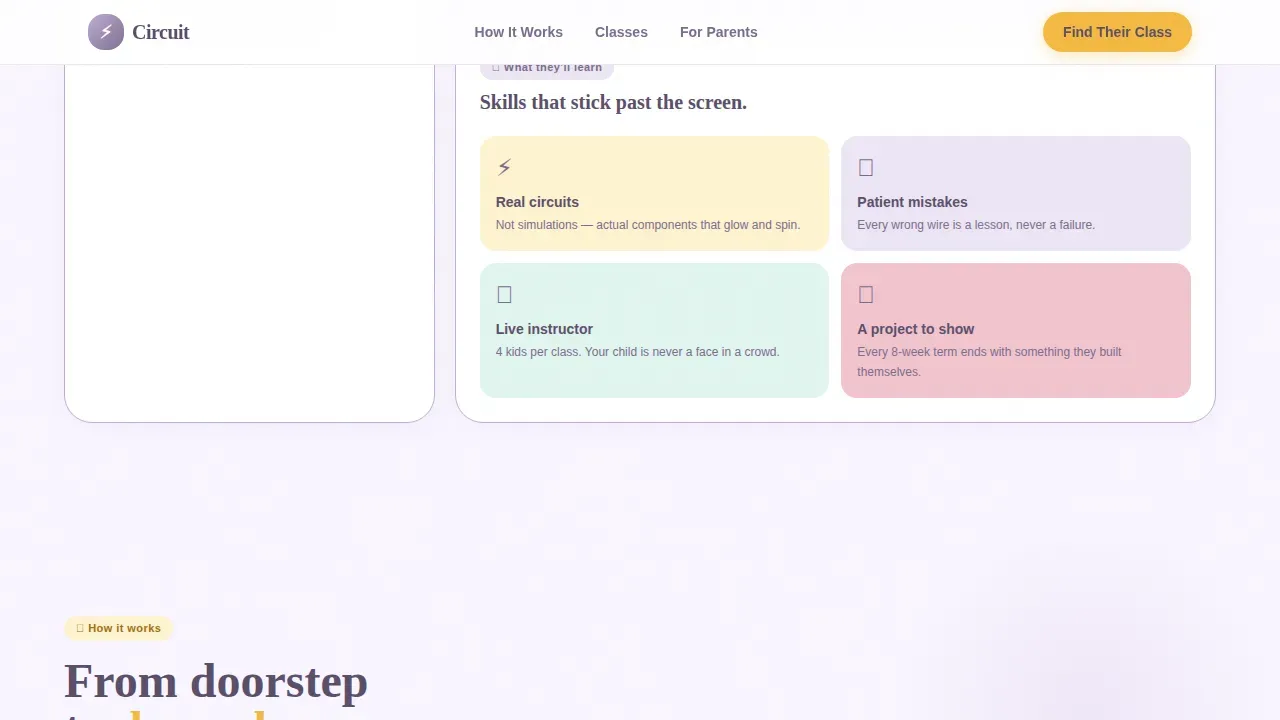
| Lesson Explorer | Flipbook card, child explainer video, and learning-outcomes bento grid showing curriculum depth |
| Social Proof | Parent testimonials with child project names, star ratings, and class tier badges |
| Class-Finder Quiz | Five-screen inline quiz that recommends a specific class tier and captures email via a free activity sheet |
| Footer | Linear single-row footer with navigation, branding, and secondary links |
Design & branding system
The Circuit template follows a Nurture and Care theme. Every visual decision prioritizes softness, warmth, and approachability. The palette feels like a child's watercolor painting left to dry on a windowsill: nothing harsh, nothing loud.
- Colors: cloud white (#F9F5FF) background, lavender (#C3AED6) card accents and section breaks, plum (#7B6D8D) for all body text, marigold (#F4B942) exclusively for buttons and progress indicators
- Typography: Plus Jakarta Sans for body and user interface copy, Fraunces for display headlines and section titles to add serif warmth
- Aesthetic details: rounded everything, plum card borders so thin they feel hand-drawn, GSAP ScrollTrigger reveals, CSS float animations, and interactive elements built with canvas or SVG
Mobile & speed optimization
This template is designed with mobile-first layout principles, reflecting the reality that most parents browsing kids enrichment programs are scrolling on a phone late in the evening. The layout, card grid, and quiz screens adapt cleanly to small screens without losing any interactive functionality.
- Static hero section with client-side components isolated to interactive zones for faster initial load
- Images are lazy-loaded throughout the card grid and testimonial sections to reduce early payload
- Quiz screens use lightweight CSS transitions rather than heavy libraries for smooth, fast screen-to-screen movement
How this template helps you convert
Circuit is structured to move a curious browser into a confident buyer without pressure or friction. The quiz funnel is the engine; the modular card grid is the trust-builder that fuels it.
- The hero circuit builder creates an immediate moment of delight and curiosity, drawing visitors into the page before they have read a single word of copy, making the learning experience tangible from the first second
- The card grid builds layered trust in digestible steps, moving from "What's in the box" to "What they'll learn" to "What parents say" to "Which class fits your child," so that by the time the visitor reaches the quiz, they already feel informed and ready
- The two-path result page captures both high-intent families who are ready to reserve a spot tonight and lower-intent families who prefer to start with a free activity sheet, ensuring no lead is lost simply because the timing was not right
Other information about this template
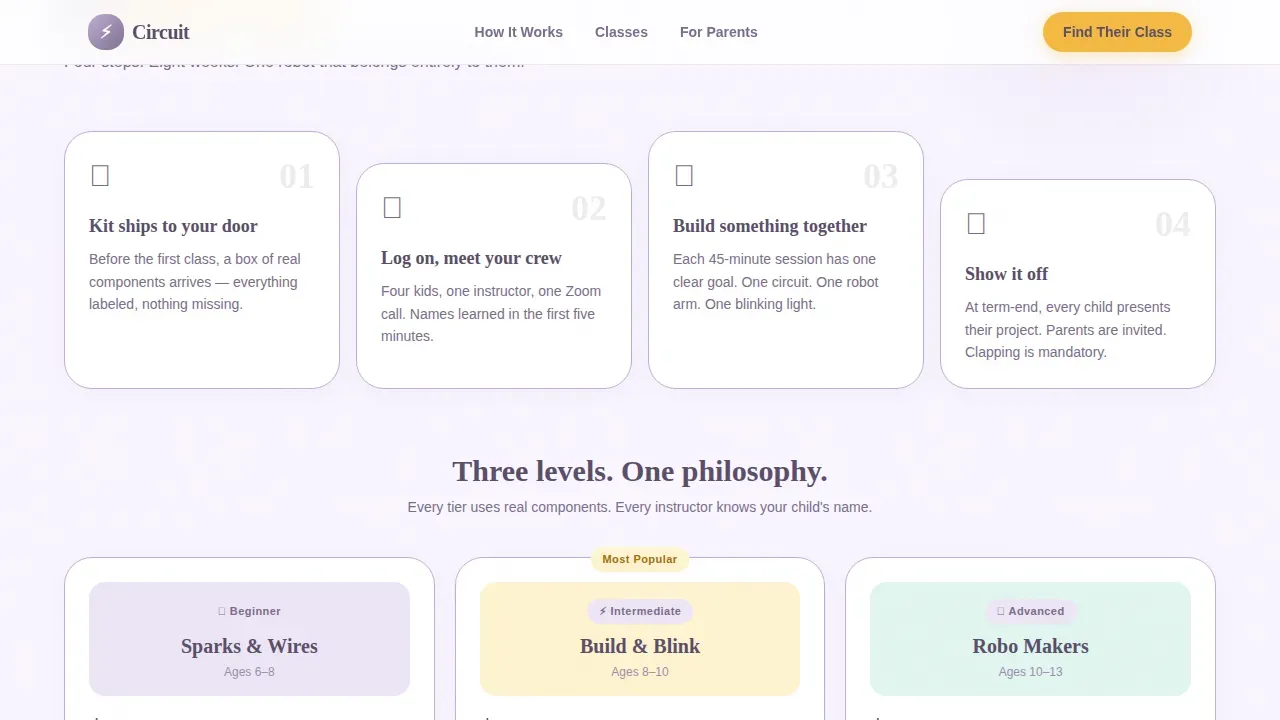
The Circuit template draws its design philosophy from the four pillars of effective kids robotics programs: classes, kits, curriculum, and teachers. Each section of the page speaks to one or more of those pillars in a way that builds layered confidence for parents evaluating the program.
- The circuit find your child's first robotics class landing page template is optimized for USA-based programs using USD pricing, MM/DD date formats, and 12-hour time notation
- The quiz supports questions about child's age, prior knowledge, and learning style, making it suitable for programs that serve both younger kids starting from the very beginning and older kids who have worked through lego robotics kits or similar building toys
- The lesson explorer section is structured such a way that it naturally communicates curriculum depth, covering science, math, text based coding, electronics, and hands-on building across progressive sessions
- Students who are actively engaged through opt-in interactions retain more than those pushed through passive content, which is why nothing in this template auto-plays or interrupts the visitor's own pace
- The template supports teaching kids in a way that mirrors project-based learning principles, where each card mirrors the curiosity-then-reward rhythm that keeps young learners motivated through longer robotics projects
- Programs that include raspberry pi boards, servo motors, LED components, and circuit-building tools can use the kit box reveal card to highlight those specific components with hover-to-discover interactions
- The mentor feedback loop is built into the social proof section, where testimonials reference specific projects and class tiers, giving prospective parents a concrete sense of the instructor's involvement with each child
- School programs and after-school enrichment coordinators can adapt the quiz questions and result tiers to reflect their own curriculum scope, including beginner-level sessions and advanced text based coding tracks
- The template is designed to support programs where instructor introductions, transparent pricing, urgency indicators, and satisfaction guarantees can be placed within the existing card grid without custom layout work
- Robotics summer camps that run online can use the same quiz funnel and card grid to present a structured curriculum with hands-on projects and mentor feedback, replacing the standard class-tier result with a camp-session recommendation
- The page's self confidence-building narrative, from the first successful circuit connection in the hero to the personalized class recommendation on the result screen, is designed to reflect the same emotional arc a child experiences in the first real session of a robotics program
Theme
Nurture & Care
Creative direction
Interactive Explorer
Color system
Lavender Dream
Direction
Quiz/Assessment
Page Sections
Drag-and-drop Hero Circuit Builder
Modular Discovery Card Grid
Five-screen Class-finder Quiz Funnel
Dual-path Result and Lead Capture
Social Proof Testimonials Block
Lavender Dream Visual and Motion System
Related questions
Does this template require any coding knowledge to customize?
Is this template suitable for programs serving different age groups?
Can I use this template for a robotics summer camp instead of a weekly class?
How does the free activity sheet secondary path work?
What does the visitor see after completing the five-question quiz?



