STEM Toy Store Landing Page Template
Spark is a masonry-style landing page template built for STEM toy stores. It combines a live countdown timer, flipping Before/After product tiles, and a five-question illustrated quiz that guides parents to the right kit. The Dopamine Pop color system and discovery-tag filtering make browsing feel as exciting as opening a brand-new box.
by Rocket studio
Quick summary
Spark is a single-page STEM toy store template designed around curiosity and conversion. It opens with a countdown timer, cascades into a masonry grid of hover-flip product cards, and closes the sale through a personalized quiz. The result is a page that feels like an adventure from the first scroll to the final add-to-cart click.
Who this template is for
This template is built for anyone selling hands-on learning products to families. It suits independent toy store owners and direct-to-consumer STEM kit brands equally well.
- Toy store owners who want a browsing experience that matches the excitement of their products
- STEM kit brands launching seasonal discovery boxes or curated gift collections
- Homeschool retailers and educational product shops targeting parents who shop with intention
What problem this template solves
Parents standing in a toy aisle face a wall of plastic noise with no clear signal about what is actually worth buying. Online, that same overwhelm translates into bounced sessions and abandoned carts. This template replaces guesswork with guided discovery.
- Unclear product fit sends gift-buyers away before they ever add something to their cart
- Generic grid layouts fail to communicate the excitement and educational value behind each kit
- Shoppers have no fast path to a product that matches a specific child's age, interests, and budget
What you get with this template
You get a complete, section-led landing page that moves a visitor from first impression to confident purchase without friction. Every section is designed to build trust while escalating curiosity.
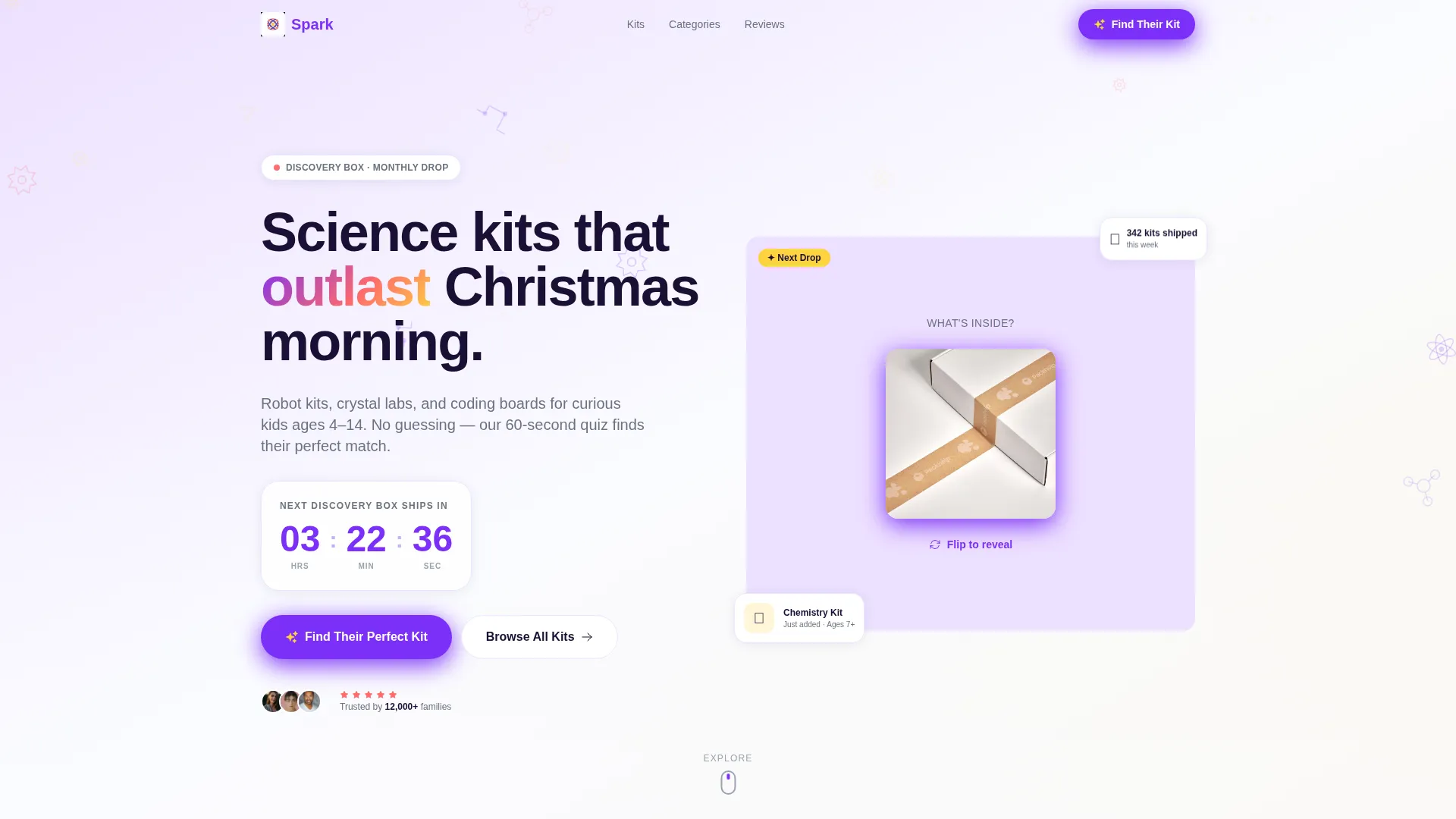
- A countdown timer header that creates seasonal urgency around new discovery box drops
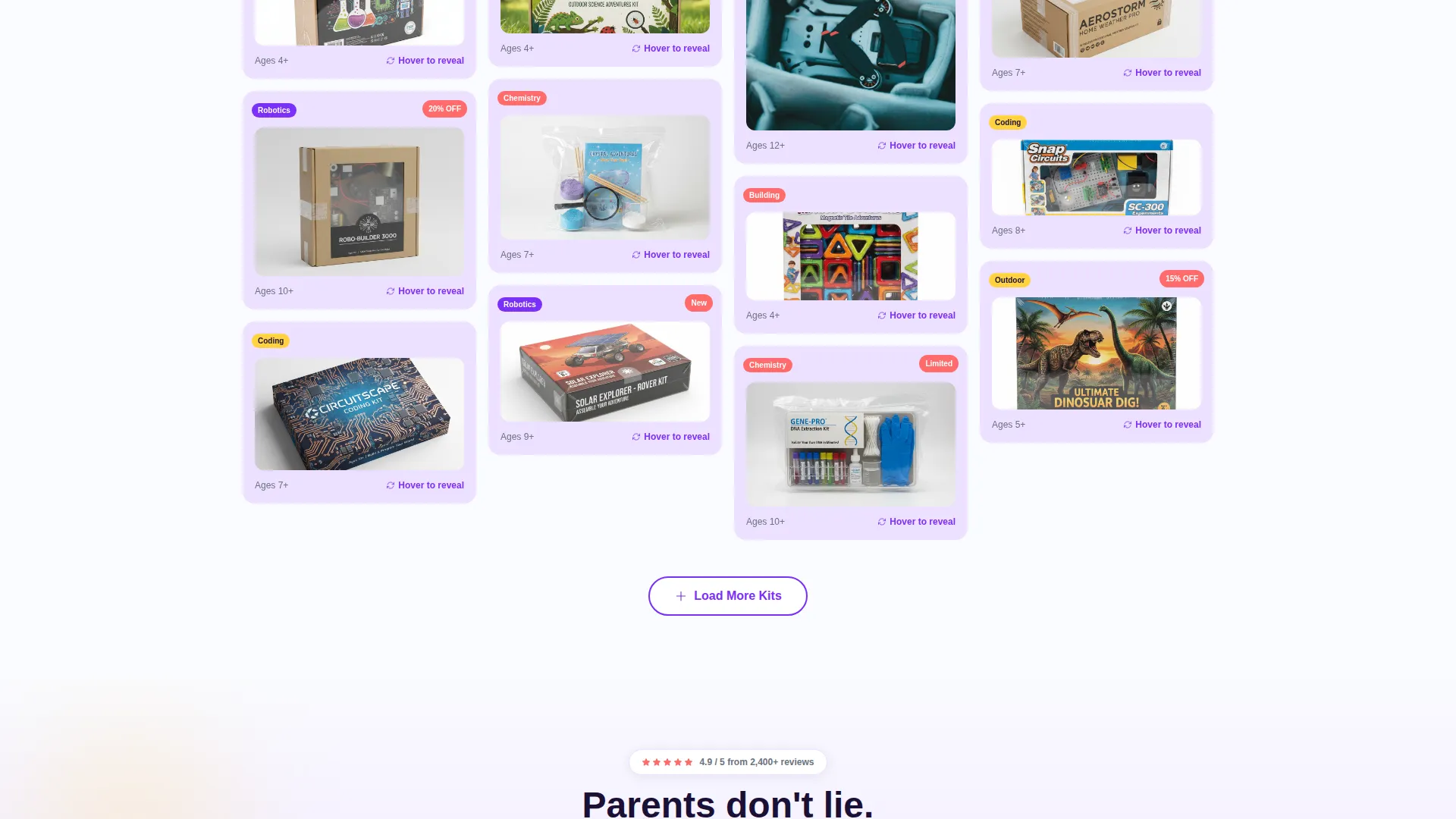
- A full masonry grid with hover-flip Before/After product tiles organized under filterable discovery tags
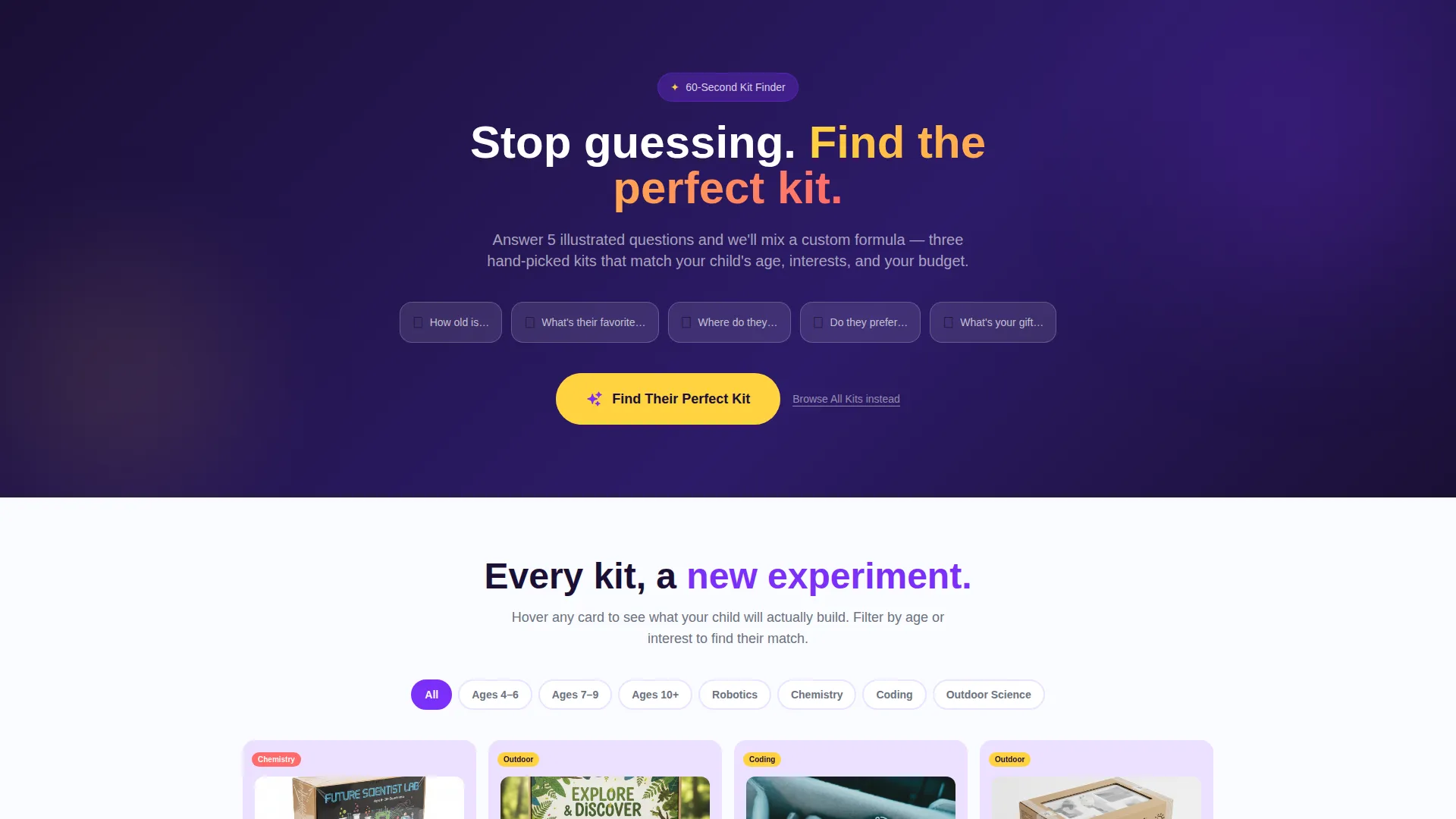
- A five-question illustrated quiz that resolves into three personalized product recommendations with add-to-cart buttons
Feature list
This template packs several conversion-focused components into one cohesive page layout. Each feature works together to build excitement and reduce the hesitation that costs toy store owners sales.
Countdown Timer Header
A live countdown clock sits at the top of the page, ticking toward the next seasonal discovery box shipment. The header background features illustrated molecules, gears, and circuit paths falling like confetti behind the clock. This immediately communicates scarcity and seasonal relevance without a single word of hard sell.
Hero Before/After Reveal Tile
Directly below the timer, a single hero tile flips in real time between a sealed mystery box and the fully assembled project inside. Visitors see a solar rover, a hydraulic arm, or a DNA extraction kit reveal itself before they even begin scrolling. The flip happens live, so curiosity is activated from the very first second on the page.
Masonry Grid with Hover-Flip Cards
The product grid uses a Pinterest-style masonry layout where every tile is a mini Before/After card. The front face shows the shrink-wrapped kit; the back reveals a child's finished build. As visitors scroll deeper, projects escalate in complexity, moving from baking-soda volcanoes to programmable drones.
Discovery Tag Filtering
Category tags including Ages 4-6, Robotics, Chemistry, and Outdoor Science let visitors filter the masonry wall in real time. Clicking a tag instantly reorganizes the grid, helping parents find age-appropriate or subject-specific kits without hunting through unrelated products.
Illustrated Personalization Quiz
The primary call to action launches a five-question illustrated quiz. Each answer animates a beaker filling with colored liquid, building a visual "formula" that resolves into three tailored product recommendations. The quiz covers age, favorite school subject, indoor-or-outdoor preference, solo-or-group play style, and gift budget.
Secondary Browse Path
A "Browse All Kits" text link sits beneath the quiz call to action for returning visitors who already know what they want. This keeps the page useful for repeat shoppers without weakening the quiz as the primary conversion path.
Page sections overview
| Section | Purpose |
|---|---|
| Countdown Timer Header | Build urgency around seasonal discovery box drops |
| Hero Reveal Tile | Hook visitors with a live Before/After product flip |
| Masonry Product Grid | Showcase kits through escalating hover-flip cards |
| Discovery Tag Bar | Filter the grid by age group or subject category |
| Quiz Call to Action | Guide parents to a personalized kit recommendation |
| Browse All Kits Link | Offer a fast path for returning or confident shoppers |
Design & branding system
The visual identity follows a Dopamine Pop color system that feels like a bag of candy spilled across a lab bench. Every color has a specific role so the page stays organized while still vibrating with energy.
- Electric violet (#7B2FF7) anchors headers and category discovery tags; serotonin yellow (#FFD23F) fires on hover states and product badges
- Reactor-core coral (#FF6B6B) marks sale callouts and star ratings to draw the eye exactly where action is needed
- A clean lab-white (#FAFBFF) background gives every masonry tile room to breathe, letting product colors pop without visual fatigue
Mobile & speed optimization
The masonry layout is built to reflow cleanly across screen sizes, keeping the browsing experience intact whether a parent is shopping from a phone in a toy aisle or from a tablet at the kitchen table.
- Tiles stack responsively so the hover-flip interaction remains clear and tappable on touch screens
- The countdown timer and hero reveal section maintain their visual impact at every viewport width
How this template helps you convert
The page is structured so every scroll deepens engagement and every interaction nudges the visitor closer to a decision. Conversion is built into the layout, not bolted on afterward.
- The countdown timer creates immediate seasonal urgency, giving first-time visitors a reason to act now rather than return later
- The five-question quiz replaces guesswork with a personalized recommendation, removing the biggest barrier between a curious parent and a completed purchase
Other information about this template
Spark is designed specifically for the STEM toy and educational kit niche, where product value is hard to communicate through a static image alone. The template's escalating scroll and quiz-driven conversion path make it well suited to seasonal campaigns, gift-season promotions, and new product launch moments.
- The template is delivered as a ready-to-customize landing page with all illustrated assets and color tokens included
- The quiz flow and masonry grid are both designed to support a range of catalog sizes, from a focused collection of ten kits to a broader store assortment
- The Dopamine Pop palette and illustrated header assets give the page a distinctive visual identity that stands apart from generic e-commerce grid layouts
Theme
Neo-Retro
Creative direction
Seasonal/Moment
Color system
Citrus Burst
Style
Overlap/Layered
Direction
Direct Sales
Page Sections
Countdown Timer with Illustrated Header
Live Hero Before/after Reveal
Masonry Hover-flip Product Grid
Real-time Discovery Tag Filtering
Five-question Illustrated Personalization Quiz
Secondary Browse All Kits Path
Related questions
Can I use this template for a single product launch rather than a full store?
How does the Before/After flip card work on mobile devices?
Can I customize the quiz questions to match my own product catalog?
Is the countdown timer tied to a fixed date or can I update it?
Do I need advanced design skills to change the colors and layout?



