Hospital Landing Page Template | Hub & Spoke Layout
A hub-and-spoke specialty hospital landing page built for lead generation. It opens with an interactive symptom-to-specialty calculator, then walks visitors through expert-led department sections anchored by a fixed navigation bar. The Forest Trust color system and warm clinical tone make every scroll feel reassuring. Built for referring physicians, complex-case patients, and corporate wellness managers.
by Rocket studio
Quick summary
This is a single-page specialty hospital landing page designed to turn uncertain visitors into qualified leads. An anatomical symptom matcher greets every arrival, directing them to the right department before they read a single paragraph. Expert physician panels, anonymized patient journeys, and a persistent "Find My Specialist" call to action close the loop with confidence.
Who this template is for
This template is designed for specialty hospitals that handle cases most local facilities cannot. It speaks to three very different people who all need the same assurance: this is the right place.
- Patients who have been told "we don't handle that here" and need a clear escalation path to the right specialist
- Referring general practitioners who need a trusted, credible partner for their most complex cases
- Corporate wellness managers evaluating provider networks for executive health plans
What problem this template solves
General hospital pages try to serve everyone and end up reassuring no one. A specialty facility has a narrower, higher-stakes audience. Each visitor arrives with specific urgency, and a generic layout loses them before the value lands.
- Visitors cannot quickly identify which department handles their condition, so they leave before converting
- Referring physicians need credential-level proof of capability, not marketing language
- Corporate buyers need structured trust signals before they will recommend a provider to their leadership teams
What you get with this template
You get a fully structured, single-page layout designed around a hub-and-spoke navigation model. The anchor nav stays fixed at the top of the screen, letting visitors jump directly to any specialty department without losing their place on the page.
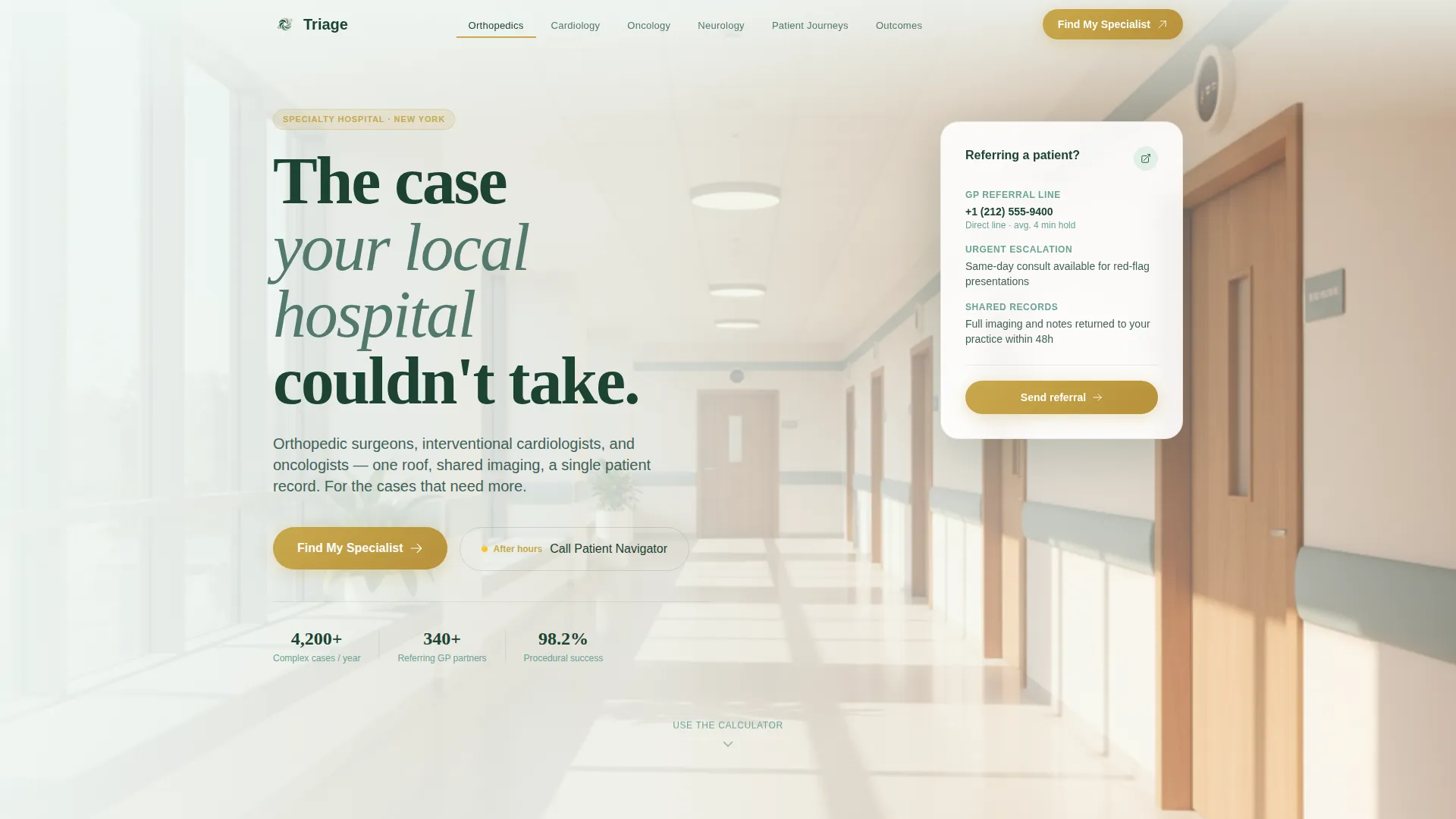
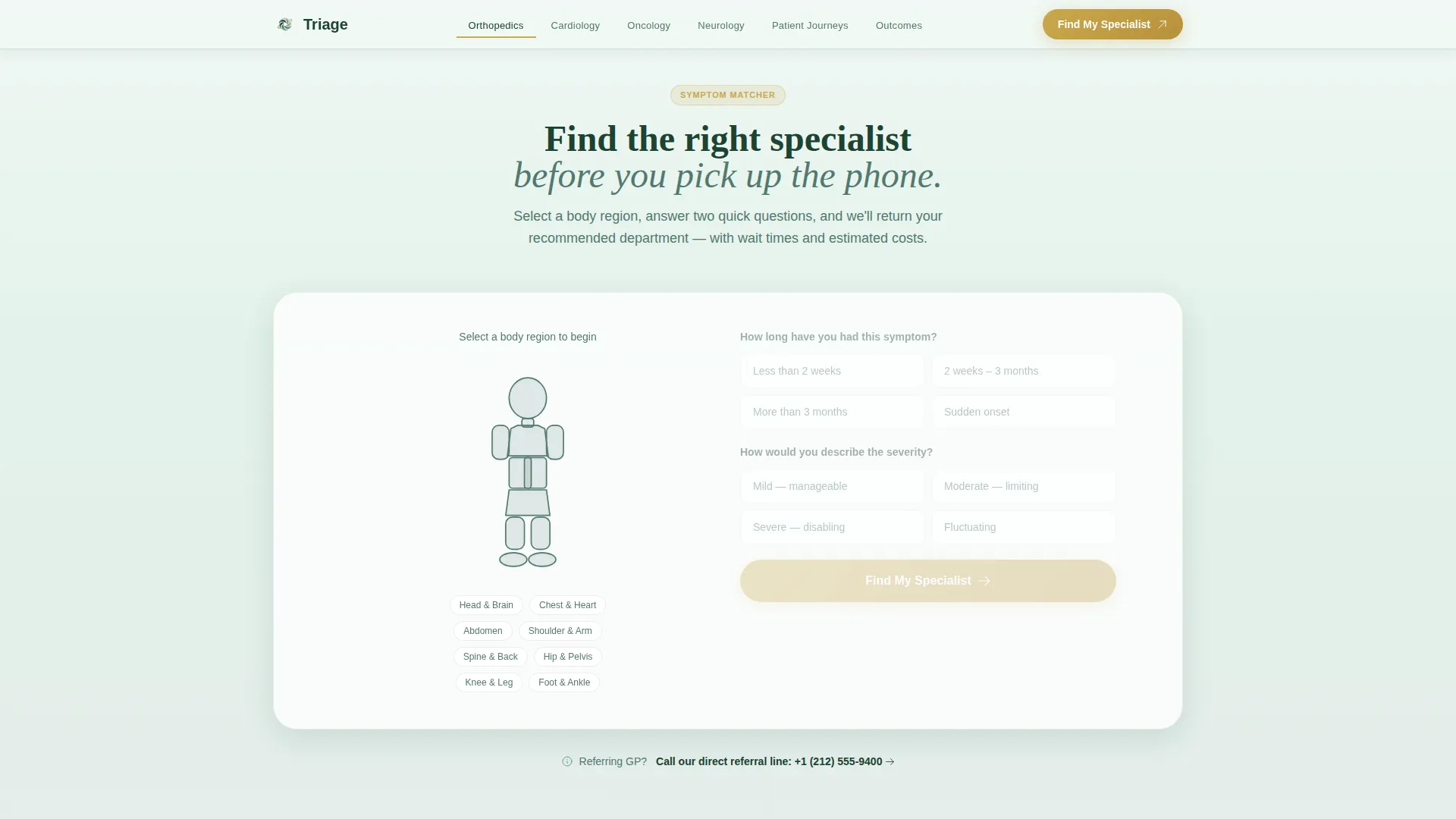
- A hero section with a floating, interactive symptom-to-specialty calculator built on an anatomical silhouette
- Five core content sections covering expert panels, patient journeys, outcomes, a lead form, and a footer
- A lead generation form that pre-fills the specialty field from the calculator result, plus a secondary patient navigator call to action
Feature list
This template is built around a specific set of interactive and visual components. Each one is described exactly as designed in the source brief.
Symptom-to-Specialty Calculator
Visitors select a body region from a minimal sage line-art anatomical silhouette. Two qualifying questions follow: duration and severity. The tool returns the recommended department, average first-appointment wait time, and an estimated out-of-pocket cost range based on common insurance tiers. The selected region blooms with an evergreen-to-canopy gradient on interaction.
Fixed Anchor Navigation Bar
The anchor nav stays pinned at the top of the viewport at all times. Department names are rendered in deep evergreen. The active spoke is underlined in muted gold, giving visitors a clear sense of where they are on the page as they scroll through each specialty section.
Expert Panel Department Spokes
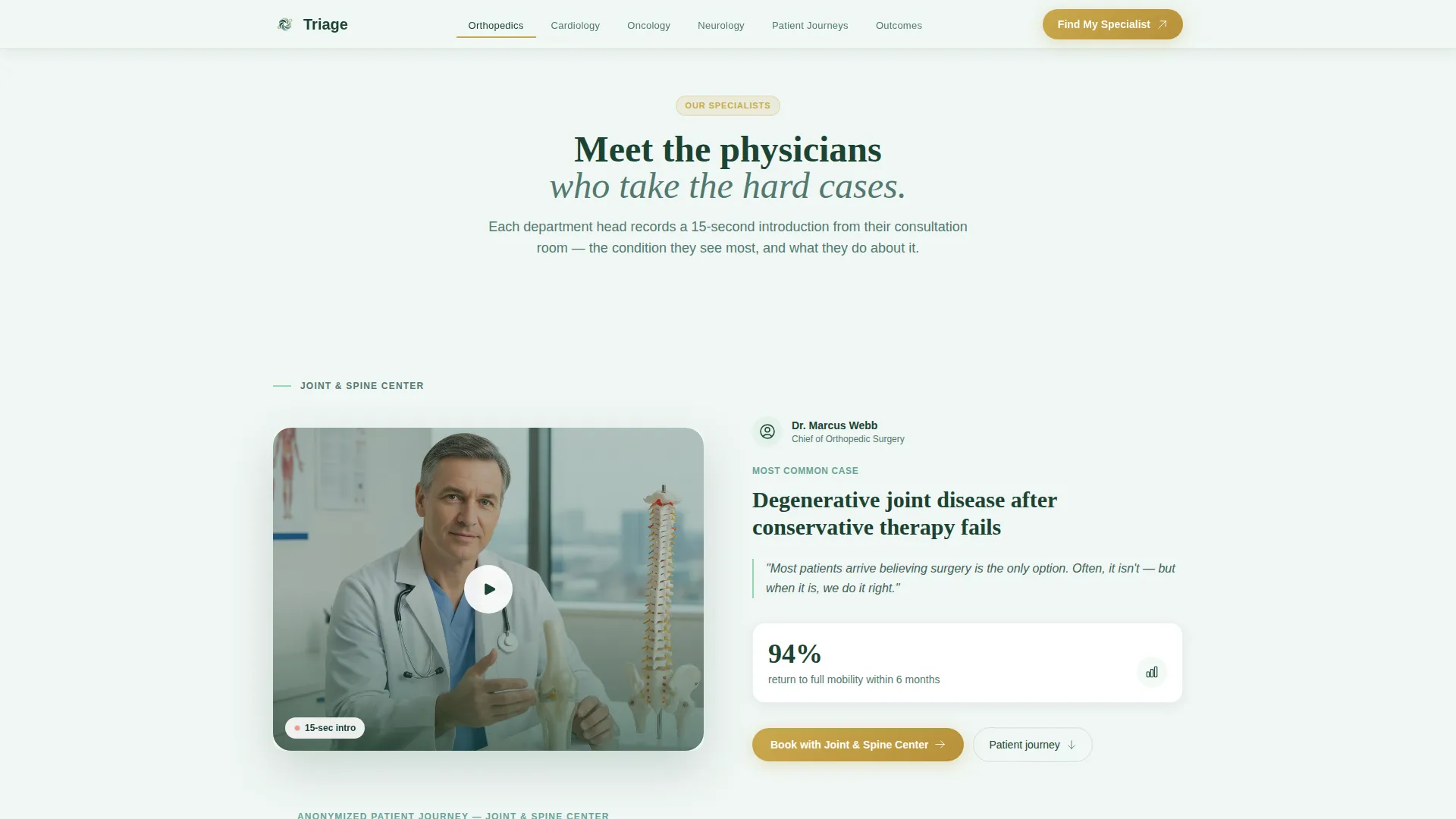
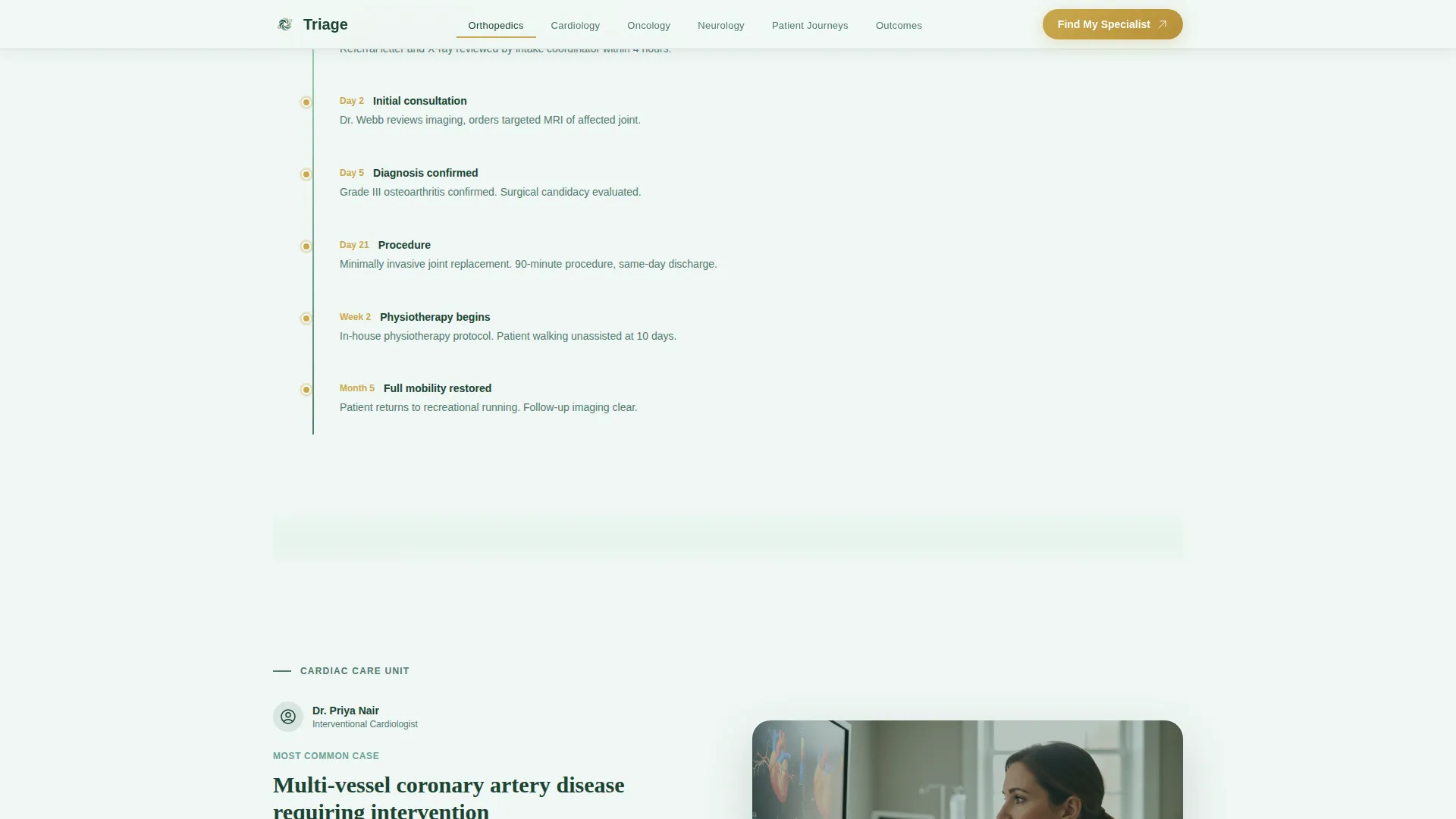
Each specialty department is introduced by its lead physician. A fifteen-second video thumbnail shows the physician in their actual consultation room. It is paired with a post-procedure outcome statistic and one anonymized patient journey timeline card.
Floating "Find My Specialist" Bar
After the visitor scrolls past the second department spoke, a floating call-to-action bar emerges from the bottom of the screen. It carries the primary "Find My Specialist" action, keeping the conversion path visible without interrupting the browsing experience.
Lead Generation Form with File Upload
The form captures name, phone number, the pre-filled specialty from the calculator, preferred appointment window (morning, afternoon, or earliest available), and an optional file upload field for existing scans or referral letters. A "Call Our Patient Navigator" secondary path displays a direct phone line with a live-hours indicator in muted gold.
Scroll-Linked Reveal Animations
Section content reveals as the visitor scrolls, driven by scroll-linked animation logic. The calculator bloom effect, floating bar emergence, and section divider dissolves are all part of the high-animation build specified in the design brief.
Page sections overview
| Section | Purpose |
|---|---|
| Hero with Calculator | Opens the page; symptom matcher directs visitors to the right department instantly |
| Anchor Navigation Bar | Fixed hub nav; keeps all specialty spokes reachable at any scroll depth |
| Expert Panel Spokes | Introduces each lead physician with video, outcome stat, and patient journey |
| Patient Journey Cards | Anonymized timeline cards illustrating real case progression from referral to outcome |
| Outcomes and Trust | Stats bento grid and corporate wellness trust badges for B2B credibility |
| Lead Generation Form | "Find My Specialist" form with pre-filled specialty and file upload option |
| Patient Navigator call to action | Secondary call to action with direct phone line and live-hours indicator |
| Footer | Horizontal flow footer pattern with standard hospital navigation links |
Design & branding system
The visual identity uses the Forest Trust color system, a palette that feels grounded and oxygenated without ever feeling clinical in the cold sense. Gradients move vertically from birch white into sage, so scrolling always feels like breathing deeper rather than descending.
- Typography pairs DM Sans for body text with Fraunces for display headings, balancing warm readability with editorial authority
- The primary background is birch white (#F0F7F4); deep evergreen (#1B4332) carries all body text; muted gold (#C9A84C) is reserved for calls to action and trust badges
- Section dividers dissolve through morning canopy (#95D5B2) like tree line fog, maintaining visual continuity between departments
Mobile & speed optimization
The template is built desktop-first to serve the primary audience of general practitioners and corporate wellness managers who typically work on larger screens. Full mobile support is included so patients on any device can use the calculator and complete the form.
- Server Components handle all static content sections for lighter initial loads; Client Components are scoped to the calculator and lead form
- The anatomical silhouette selector and qualifying question flow are designed to remain fully usable on touch screens
- The floating "Find My Specialist" bar and patient navigator phone link are both accessible from any screen size
How this template helps you convert
The conversion architecture is built so that visitors self-qualify before they ever see a form field. By the time the lead form appears, the visitor already knows their recommended department, wait time, and cost range.
- The calculator does the qualifying work upfront, so the form arrives pre-filled and the friction of choosing a specialty is already removed
- The floating bar emerges after the second department spoke, timed to appear once the visitor has seen enough to trust the facility
- The "Call Our Patient Navigator" secondary path with a live-hours indicator gives hesitant visitors a human option, capturing leads who will not complete an online form
Other information about this template
This template is categorized under Health and Medical, specifically the Hospital and Health System subcategory, with a niche focus on specialty hospital use cases. It is localized for English-language, USD-denominated, and United States date format usage out of the box.
- The template style is Hub and Spoke with Anchor Navigation, meaning the single page functions like a structured site with jumpable sections rather than a linear scroll
- Animation intensity is high throughout: scroll-linked reveals, the calculator bloom effect, floating bar emergence, and canopy-green section dissolves are all included in the build
- The design intersection score for this template's category, subcategory, and niche alignment is 13, reflecting a highly specific and purposeful configuration for specialty healthcare lead generation
Theme
Soft Gradient
Creative direction
Expert Panel
Color system
Forest Trust
Style
Hub & Spoke (Anchor Nav)
Direction
Lead Generation
Page Sections
Symptom-to-specialty Calculator
Fixed Anchor Navigation Bar
Expert Physician Panel Spokes
Floating Lead Generation Bar
Pre-filled Specialist Form with File Upload
Scroll-linked Reveal Animations
Related questions
Who is this specialty hospital landing page template built for?
Can the calculator result pre-fill the lead generation form?
Does the template include a file upload field for scans or referral letters?
How many specialty department spokes can the anchor navigation support?
Is this template appropriate for a B2B audience like corporate wellness managers?



