Parking Reservation Landing Page Template
Spot is a full-width immersive landing page template built for a parking reservation platform. It features a live map configurator hero, tactile Before/After reveal sections, and a persistent reserve call to action. The Tech Glass visual identity uses Midnight Blue tones, frosted panels, and electric blue accents to create a smart, night-drive aesthetic that converts visitors into paying parkers.
by Rocket studio
Quick summary
Spot is a single-page parking platform template designed to turn casual visitors into confirmed reservations. The hero acts as a working product demo, the scroll tells a before-and-after story, and every call to action flows toward one outcome: a reserved space. The layout communicates urgency, ease, and trust before the visitor ever reaches the bottom.
Who this template is for
This template suits founders, product teams, and marketers who are launching or promoting a parking reservation platform. It is built for anyone who needs to turn a high-friction, everyday problem into a seamless digital transaction.
- Downtown commuter apps that sell guaranteed daily spaces to drivers who currently circle blocks
- Event and venue parking services that need pre-reservation flows for concert nights and game days
- Airport parking operators offering covered, long-term holds without shuttle-lot trade-offs
What problem this template solves
Finding a parking space feels like luck. Drivers waste time, fuel, and patience on a problem that a two-tap reservation can eliminate. This template makes that case visually before a single word is read.
- Visitors arrive skeptical; the interactive hero demo lets them experience the product value immediately
- The Before/After scroll sections make the contrast between old frustration and new ease impossible to ignore
- A persistent bottom call to action removes the need to scroll back up, keeping conversion intent alive throughout the page
What you get with this template
The template delivers a complete, section-led landing page built around direct sales. Every layout decision prioritizes one conversion path: see a real price, reserve a real spot.
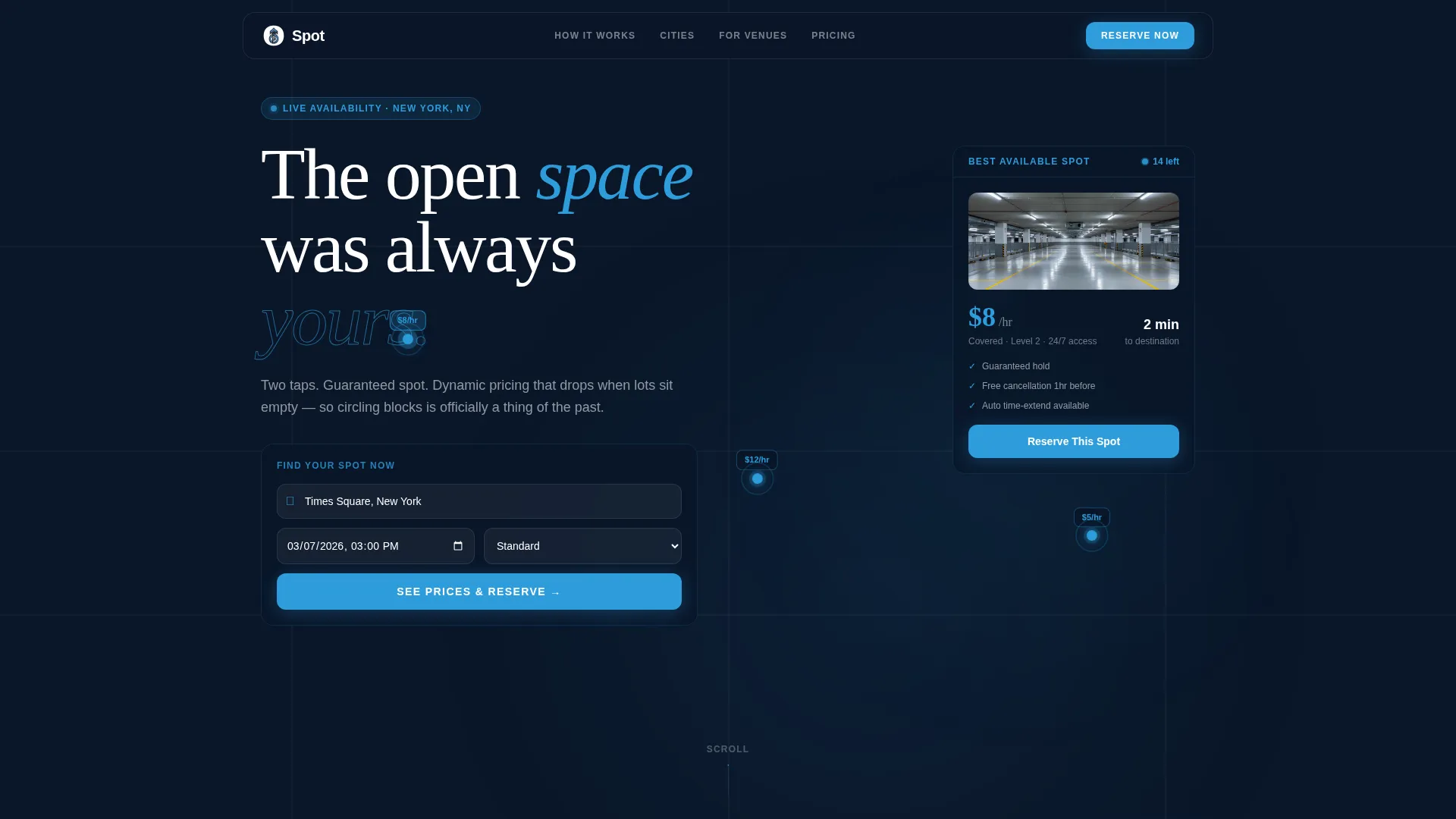
- A full-viewport glass map configurator header with destination input, date picker, glowing pin results, and a sliding price card
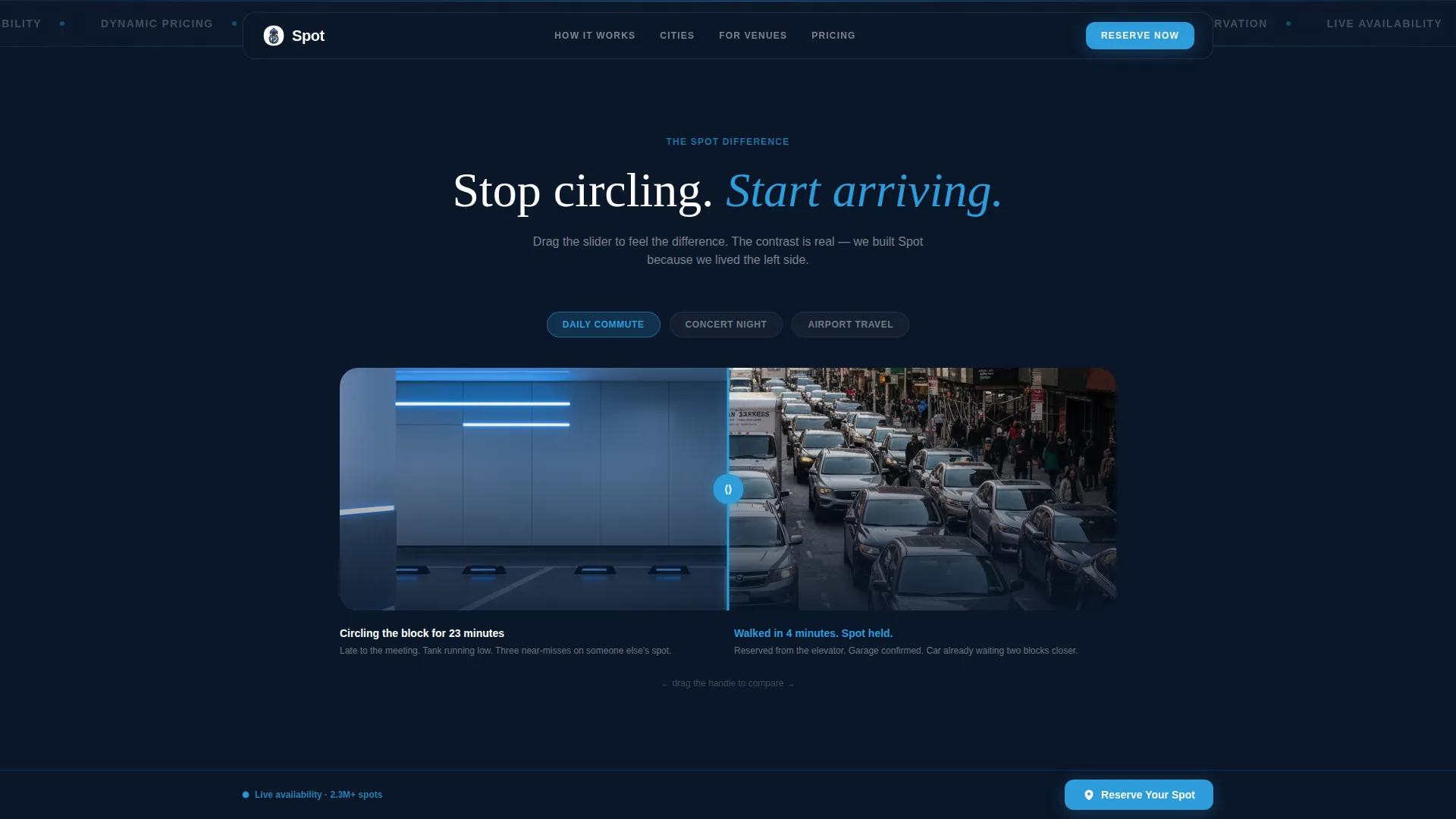
- Paired Before/After reveal sections with interactive drag sliders covering commuter, event, and travel scenarios
- An inline three-field reservation form with location, date and time, and vehicle size inputs, plus a persistent fixed call to action bar
Feature list
This template is built around interactive, conversion-focused sections. Each component below is drawn directly from the template brief.
Live Map Configurator Header
The hero renders a full-viewport glass-paneled map pre-loaded with the visitor's detected city. They type a destination or event name, choose a date, and watch available lots appear as glowing blue pins with live price tags and walk-time radii. A frosted-glass price card slides in from the right showing the cheapest guaranteed spot and a direct reserve button.
Interactive Before/After Drag Sliders
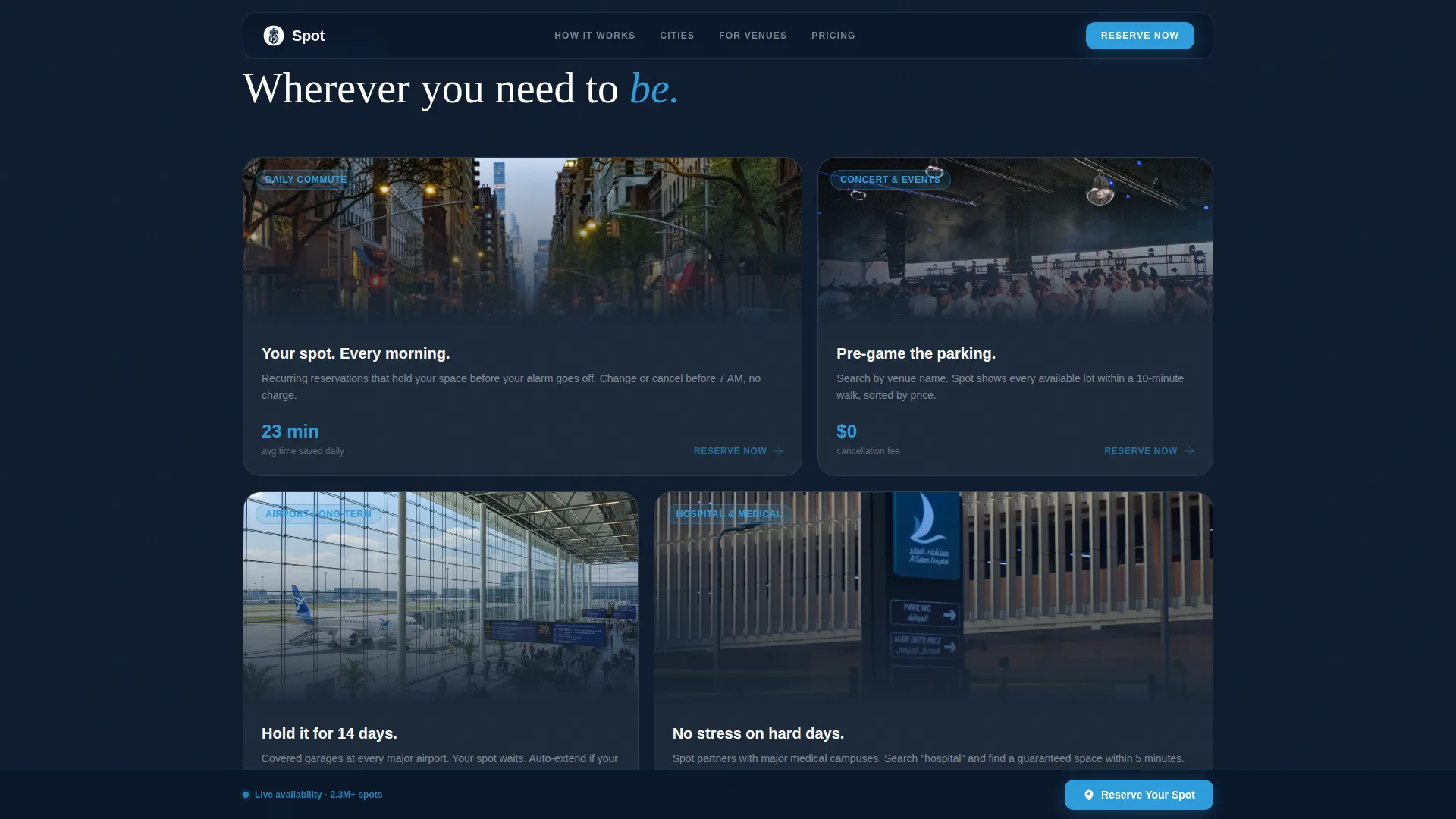
Each scroll section splits the screen between the old parking reality and the Spot reality. An interactive drag slider lets visitors pull the reveal themselves, making the contrast tactile. Scenarios progress from everyday commutes to concert nights, holiday airport travel, and hospital visits.
Persistent Fixed Reserve call to action
The "Reserve Your Spot" button appears first inside the configurator header and then locks to the bottom of the viewport as the visitor scrolls. It stays visible throughout the entire page, removing friction at the moment a visitor decides to act.
Inline Three-Field Booking Form
The reservation flow uses just three inline fields: location, date and time, and vehicle size. One tap surfaces prices and initiates payment. The form is embedded inside the page rather than behind a redirect, keeping the experience seamless.
App Download Secondary Path
A secondary conversion path offers "Get the App" with platform store badges for visitors who prefer ongoing mobile access. This path sits alongside the primary reserve flow without competing with it.
Tech Glass Visual System
The layout uses deep navy backgrounds, charcoal card surfaces, frosted glass text panels, and electric blue interactive accents. Every element is backlit just enough to feel futuristic without feeling cold, matching the smart-garage aesthetic described in the brief.
Page sections overview
| Section | Purpose |
|---|---|
| Map Configurator Hero | Full-viewport interactive map with destination input, date picker, glowing parking pins, and sliding price card |
| Before/After Commute | Drag-slider reveal contrasting block-circling frustration with a pre-reserved nearby space |
| Before/After Event Night | Drag-slider reveal contrasting post-concert lot crawl with a guaranteed spot two blocks closer |
| Before/After Airport | Drag-slider reveal contrasting shuttle-lot queue with a QR-scanned gate lift in a covered garage |
| Before/After Hospital | Drag-slider reveal showing a high-stakes visit scenario resolved by a pre-reserved space |
| Inline Booking Form | Three-field reservation flow with location, date and time, and vehicle size inputs |
| Fixed Bottom call to action Bar | Persistent "Reserve Your Spot" electric blue bar anchored to the viewport bottom |
| App Download Section | Secondary path with platform store badges for mobile app access |
Design & branding system
The template uses a Tech Glass theme built on a Midnight Blue color system. The palette evokes driving into a smart garage at night, with dark surfaces lit by clean wayfinding accents.
- Core colors: deep terminal navy (#0A1628) for backgrounds, polished asphalt charcoal (#1B2838) for card surfaces, frosted glass panel (#E8EDF2) for text overlays, and electric guidance blue (#2D9CDB) for calls to action, availability dots, and map pins
- Frosted glass panels and backlit card surfaces create depth without visual clutter, keeping data-dense sections legible
- Electric blue pulses on every interactive element including call to action buttons, live availability dots, map pins, and the sliding price card
Mobile & speed optimization
The full-width immersive layout is structured to translate clearly to smaller viewports. The configurator, drag sliders, and booking form are each designed with mobile interaction in mind.
- The fixed bottom call to action bar is especially effective on mobile, keeping the reserve action reachable with a thumb at all times
- The inline booking form uses three fields only, reducing tap count and keeping the checkout path short on any device
- Drag-slider sections use touch-friendly interaction patterns so the Before/After reveal works naturally on a phone screen
How this template helps you convert
Every design and layout decision on this template moves toward one goal: a confirmed reservation before the visitor leaves the page.
- The hero configurator lets visitors price a real spot before a card is requested, turning the landing page itself into the product's first transaction and eliminating the "I'll think about it" exit
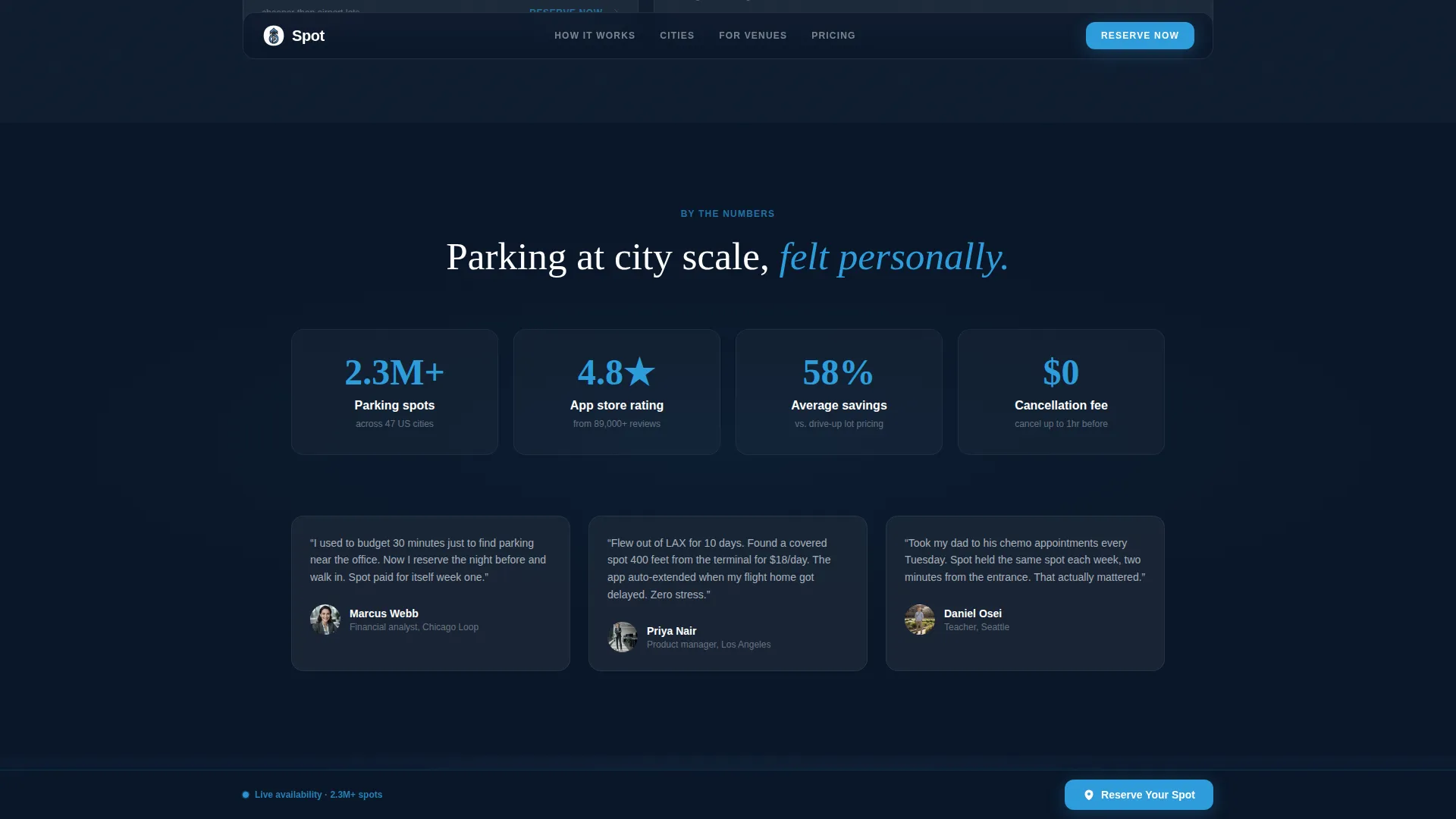
- The Before/After scroll sequence builds emotional momentum from everyday commutes to high-stakes scenarios, making the friction of not having the app feel increasingly absurd by the final section
- The persistent fixed call to action bar and the inline booking form together ensure a conversion path is always one tap away, regardless of where on the page the visitor decides to act
Other information about this template
This template sits in the Automotive and Transport category under the Parking and Traffic subcategory. It is purpose-built for the parking app and platform niche.
- Template style: Full-Width Immersive, designed for maximum visual impact and scroll-driven storytelling
- Creative direction: Before/After Reveal, a proven contrast-based narrative structure that makes product value self-evident
- Header concept: Configurator, which transforms the hero into an interactive product demo rather than a passive banner
- Landing page direction: Direct Sales, with every section hierarchy and call to action placement serving the reservation conversion path
- The template can support a secondary "Get the App" path with platform store badges alongside the primary reserve flow
- Ideal for parking platforms targeting downtown commuters, event-goers, and airport travelers seeking covered long-term holds
Theme
Tech Glass
Creative direction
Before/After Reveal
Color system
Midnight Blue
Style
Full-Width Immersive
Direction
Direct Sales
Page Sections
Live Map Configurator Hero
Interactive Before/after Drag Sliders
Persistent Fixed Reserve Call to Action
Inline Three-field Booking Form
App Download Secondary Path
Tech Glass Visual System
Related questions
What makes the header different from a standard hero section?
Can I use this template for a single venue or event location?
How does the booking flow work inside this template?
Is the reserve call to action always visible while scrolling?
Who is this template best suited for?



