Squeegee - Highimpact Commercialcleaning Landing Page Template
Squeegee is a single-page, Stats-First landing page built for Bangalore commercial window cleaning services. It leads with a massive headline stat, a press mentions banner, and a three-tier partnership comparison table. The layout targets facility managers and property teams, guiding them toward a facility audit request or an SLA comparison download.
by Rocket studio
Quick summary
Squeegee is a high-impact B2B landing page for a Bangalore commercial window cleaning service. It opens with a dominant headline stat and press logos, then walks visitors through a tiered service comparison table, a building-count corridor map, and a sticky audit request form. Every scroll reveals hard numbers before any explanation follows.
Who this template is for
This template suits businesses that need to communicate operational scale and credibility fast. It is built for client acquisition in the commercial property and facility management space.
- Rope-access window cleaning companies serving Bangalore commercial properties
- Facility managers sourcing vendors for IT parks, office towers, and co-working spaces
- Property management firms maintaining multi-building commercial portfolios
What problem this template solves
Commercial cleaning vendors often struggle to convert B2B prospects who are comparing multiple vendors at once. A generic brochure page does not answer the specific questions facility managers have before they sign a contract.
- Visitors leave without understanding service tiers, response times, or cost structures
- No clear path exists for prospects who are comparing vendors but not yet ready to call
- The page fails to establish credibility with decision-makers who need proof, not persuasion
What you get with this template
You get a fully structured, single-page layout that leads with evidence and closes with two conversion paths. Every section is designed to answer a procurement-stage question before the visitor thinks to ask it.
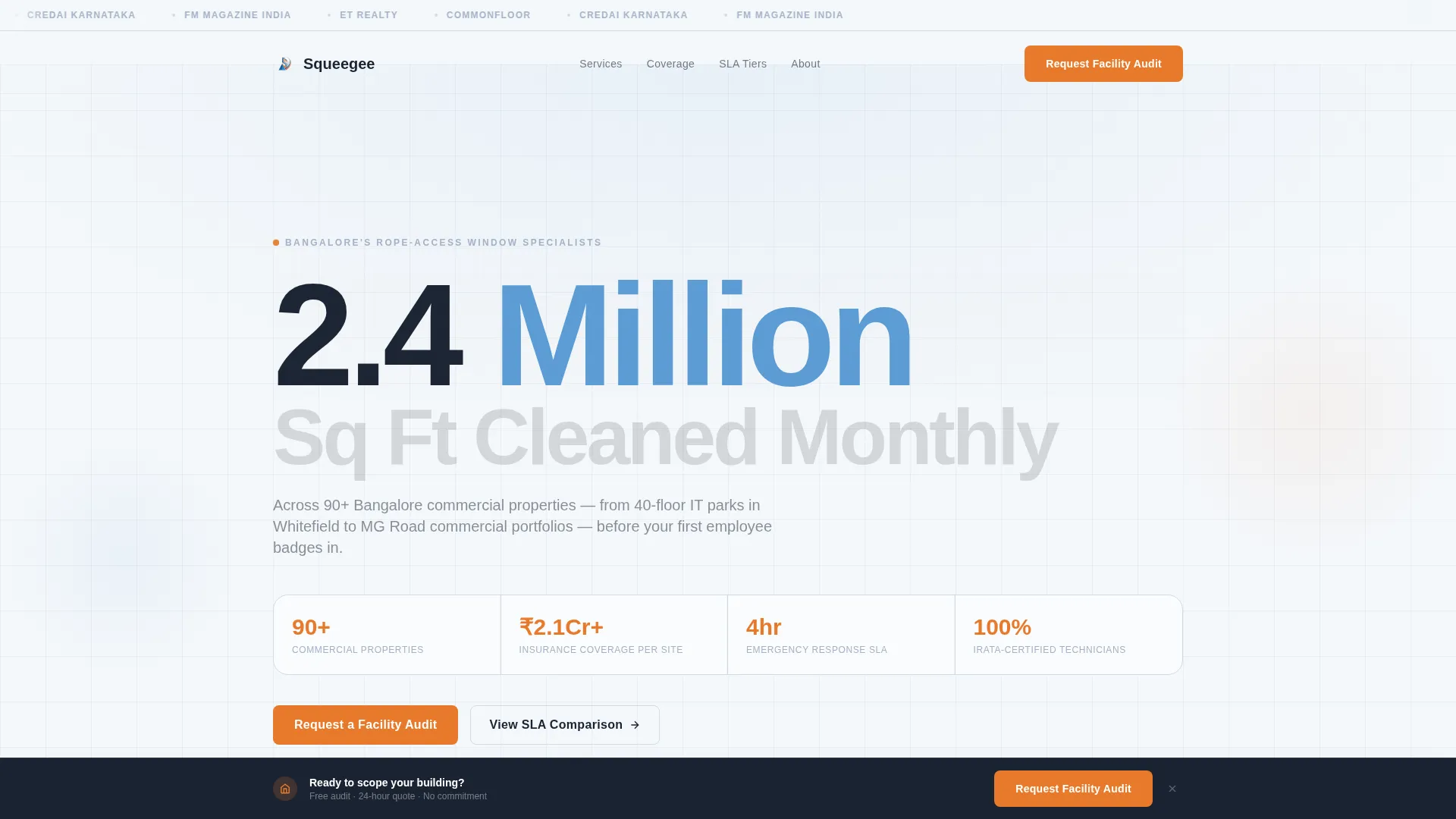
- A press mentions banner with oversized stat headline to anchor credibility above the fold
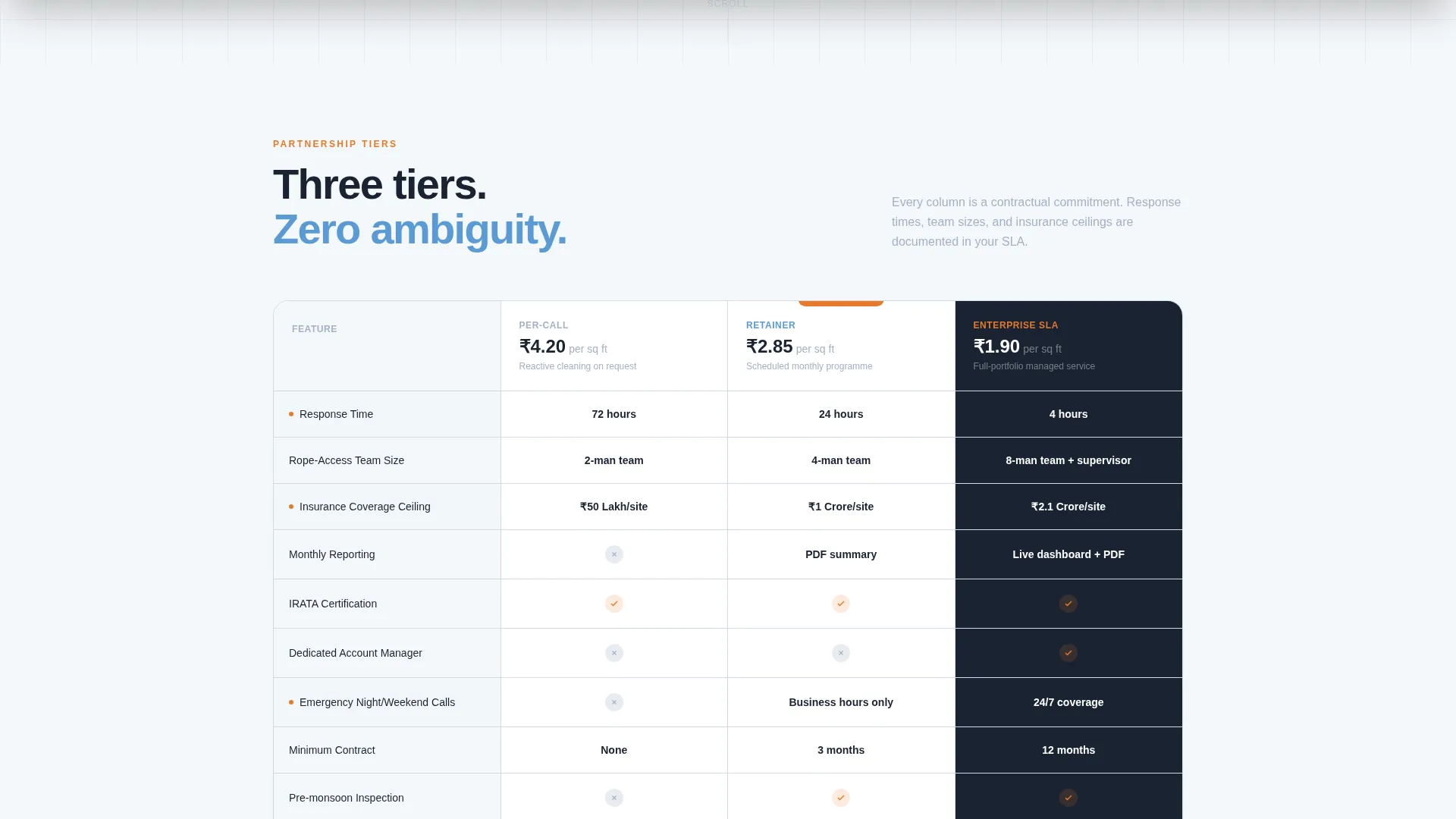
- A three-column service tier comparison table covering response time, team size, insurance ceiling, reporting format, and cost per square foot
- A sticky audit request form bar and a secondary gated PDF download path for early-stage leads
Feature list
This template is built around a Stats-First creative direction. Each section below is a purpose-built component that moves a facility manager one step closer to a decision.
Oversized Stat Header with Press Banner
The viewport opens with a single dominant number: "2.4 Million Sq Ft Cleaned Monthly Across 90+ Bangalore Commercial Properties." Below it, a horizontal scrolling banner displays monochrome press and industry logos. The number replaces a hero image entirely, making the claim unavoidable.
Three-Tier Comparison Table
A structured table compares Per-Call, Retainer, and Enterprise SLA partnership tiers. Columns cover response time, rope-access team size, insurance coverage ceiling, monthly reporting format, and cost per square foot at scale. Facility managers can evaluate all tiers side by side without a sales call.
Corridor Building Counter
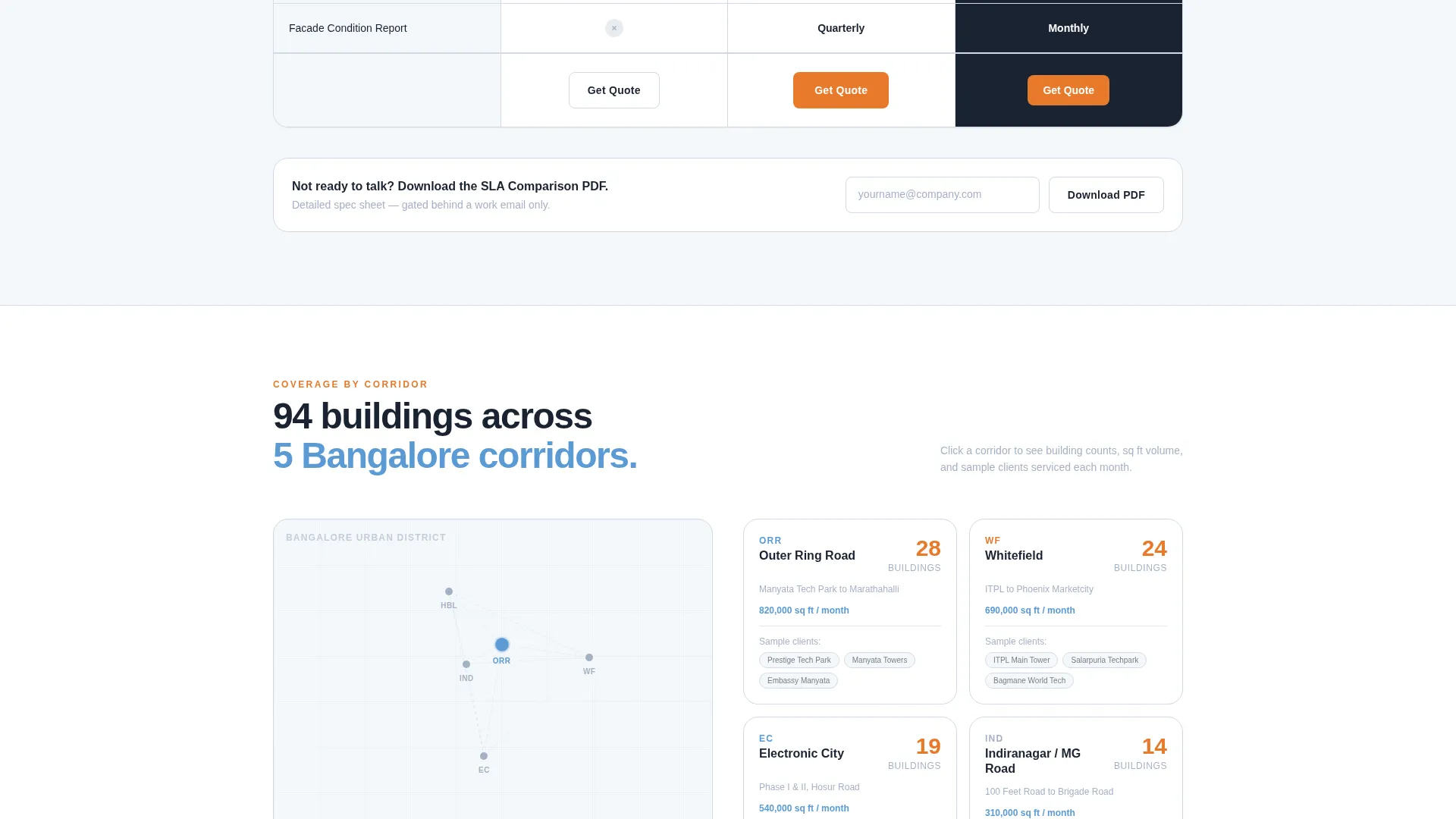
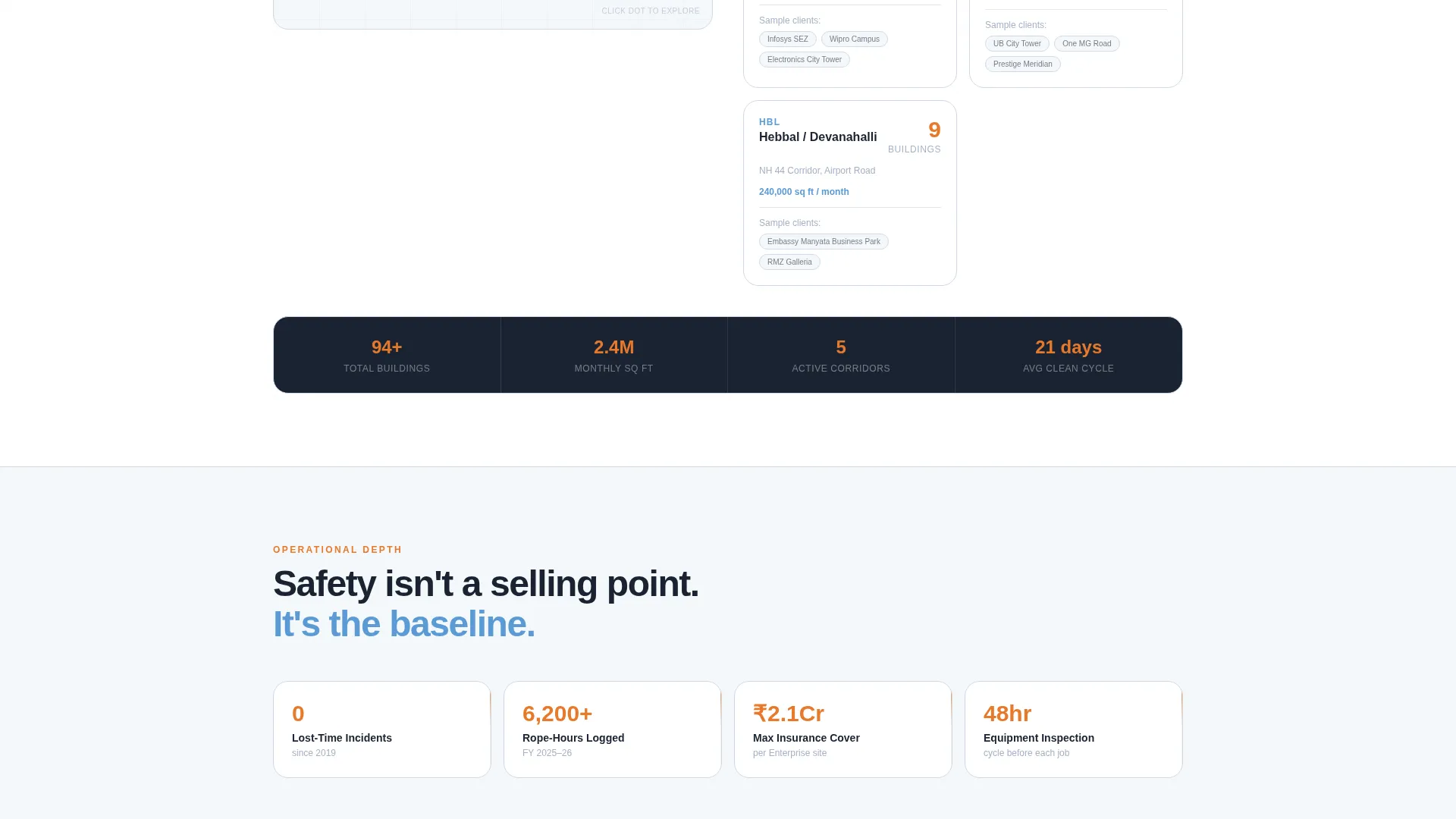
Below the comparison table, a rolling counter displays buildings serviced by Bangalore corridor: Outer Ring Road, Electronic City, and Indiranagar. Each count is pinned to a minimal map dot. The section adds geographic depth and signals operational coverage across the city.
Sticky Facility Audit call to action Bar
After the comparison table scrolls into view, a sticky bar locks to the bottom of the screen with the primary call to action: "Request a Facility Audit." It stays visible throughout the rest of the page, keeping the conversion path accessible at every scroll depth.
Detailed Audit Request Form
The form collects property name, total glass facade area (with a "Not Sure, Estimate for Me" toggle), number of floors, current cleaning frequency, and a direct-dial facility manager number. Every field is designed for a procurement context, not a general inquiry.
Gated SLA Comparison PDF Download
A secondary conversion path offers a downloadable SLA comparison document, gated behind a work email address. This captures leads who are still in the vendor comparison stage but are not yet ready to speak with the team directly.
Page sections overview
| Section | Purpose |
|---|---|
| Press Mentions Banner | Establish credibility with industry logos and a dominant stat |
| Service Tier Table | Compare three partnership tiers side by side |
| Corridor Building Counter | Show geographic coverage across Bangalore corridors |
| Sticky Audit Bar | Keep the primary call to action visible after the comparison table |
| Facility Audit Form | Collect structured lead data from facility managers |
| PDF Download Gate | Capture early-stage leads via a work email form |
Design & branding system
The Cloud Canvas color system keeps the page neutral and functional, with every accent color earning its place. The palette feels like a freshly cleaned glass pane on an overcast Bangalore morning.
- Base tones use rain-washed white (#F4F7FA) and scaffold aluminum (#A3B1C6) for backgrounds and secondary text
- Bangalore sky blue (#5B9BD5) anchors headings, table headers, and section dividers
- High-visibility safety orange (#E8792B) is reserved strictly for call-to-action buttons and key data callouts
Mobile & speed optimization
The layout is built for readability across screen sizes, which matters when facility managers review vendor options on a phone between site visits.
- The comparison table is horizontally scrollable on smaller screens so no column data is hidden
- The sticky audit bar adapts to mobile viewport height without covering the active reading area
- The corridor counter and map dots scale cleanly to smaller displays without losing legibility
How this template helps you convert
Every design and copy decision in this template serves one goal: turning a skeptical facility manager into a qualified lead before they open a competitor's tab.
- The stat-first header removes the first objection immediately. A visitor sees operational scale before reading a single marketing sentence, which builds trust faster than any headline copy could.
- The comparison table answers procurement questions without a discovery call. Response times, team sizes, and cost structures are visible at a glance, removing the main reason B2B prospects delay contact.
- Two conversion paths serve two readiness levels. The sticky audit form captures ready buyers, while the gated PDF download captures comparison-stage prospects, so neither lead type is lost.
Other information about this template
This template is designed specifically for the Bangalore commercial window cleaning market, where rope-access facade cleaning is a specialized and competitive service category.
- The Service Utility theme keeps the visual language professional and operationally credible, avoiding the lifestyle aesthetics common in consumer cleaning templates
- The Stats-First creative direction is particularly effective for B2B procurement audiences who distrust vague claims and respond to verifiable numbers
- The template style is a Comparison Table layout, which suits any professional services vendor offering tiered service agreements to corporate clients
- The Partnership and B2B conversion direction means every element, from the form fields to the gated PDF, is built for multi-stakeholder commercial decisions rather than impulse purchases
- The Press Mentions header concept can be adapted to display any relevant industry bodies, trade publications, or client logos appropriate to the vendor's market presence
Theme
Service Utility
Creative direction
Stats-First Impact
Color system
Cloud Canvas
Style
Comparison Table
Direction
Partnership/B2B
Page Sections
Stat-first Header with Press Banner
Three-tier Service Comparison Table
Corridor Building Counter with Map
Sticky Facility Audit Call to Action Bar
Structured Audit Request Form
Gated SLA Comparison PDF Download
Related questions
Who is this landing page template designed for?
Can I adapt the comparison table to show my own service tiers?
What are the two conversion paths included in this template?
Does the audit form include a self-estimate option for facade area?
Is this template suitable for commercial cleaning services outside Bangalore?



