Tribal Authority Public Library Landing Page Template
The Stacks Tribal Sovereignty Public Library landing page template gives tribal library authorities a warm, civic-grade digital presence. Built as a split-screen layout, it displays branch locations, budget transparency, governance records, and a library card sign-up form. The Alpine Fresh color palette and slab serif typography bring community identity to every scroll.
by Rocket studio
Quick summary
This template is a focused, single-page landing experience for a tribal authority public library. It uses a 50/50 split-screen structure to display branch locations on a topographic map, surface budget data, and guide community members to request a library card. Every section earns trust before it asks for anything.
Who this template is for
This landing page serves tribal library staff, library administrators, and tribal government communications teams who need a community-facing digital presence that is honest, warm, and practical.
- Tribal library directors and branch administrators launching or refreshing a public-facing page
- Tribal department staff and grant writers who need to display governance records and funding details
- Library staff without deep technical skills who want to add and change content without writing code
What problem this template solves
Many tribal public library pages bury the most useful information deep in a menu or spread it across a confusing site structure. People arriving with specific needs, finding branch locations, checking hours, or requesting a library card, struggle to navigate and often leave.
- Branch locations, hours, and services are hard to find on generic library page templates
- No clear single call to action means patrons click aimlessly and miss key services
- Budget and governance content is absent, leaving community members and funders without context
What you get with this template
You get a complete, ready-to-configure landing page structured around real community needs. The layout is built on a customizable Panel framework where you can drag and drop content blocks into place, select from pre-built modules, and save your changes directly from a visual dashboard.
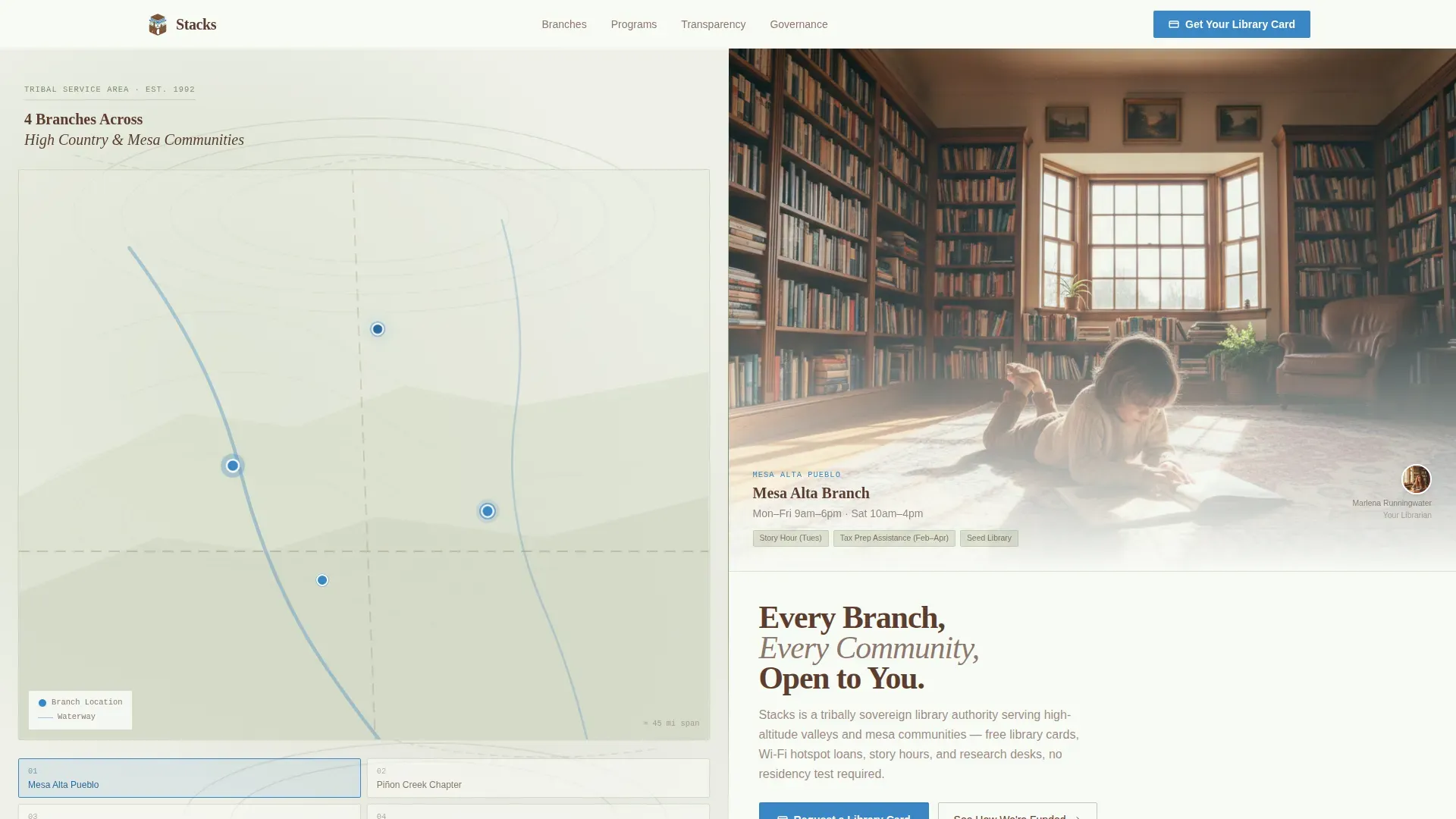
- A split-screen hero with an interactive topographic map displaying branch locations and a swappable branch photo panel
- A budget transparency section, a governance section, an interlibrary loan tracker, and a fixed library card sign-up form
- A footer in a clean, linear single-row pattern with navigation links and contact details
Feature list
The template includes purpose-built sections and interaction patterns drawn directly from the project brief. Each feature below reflects a delivered design or structural capability.
Interactive Branch Map with Location Display
The left panel of the hero displays a topographic illustration of the tribal service area. Each branch is marked with a cerulean pin. Hovering a pin swaps the right panel to display that branch's photo, hours, and program details. The Locations block can be added to any landing page to display location and hours of operation, and a location modal can be enabled as a drop-down option in the top menu.
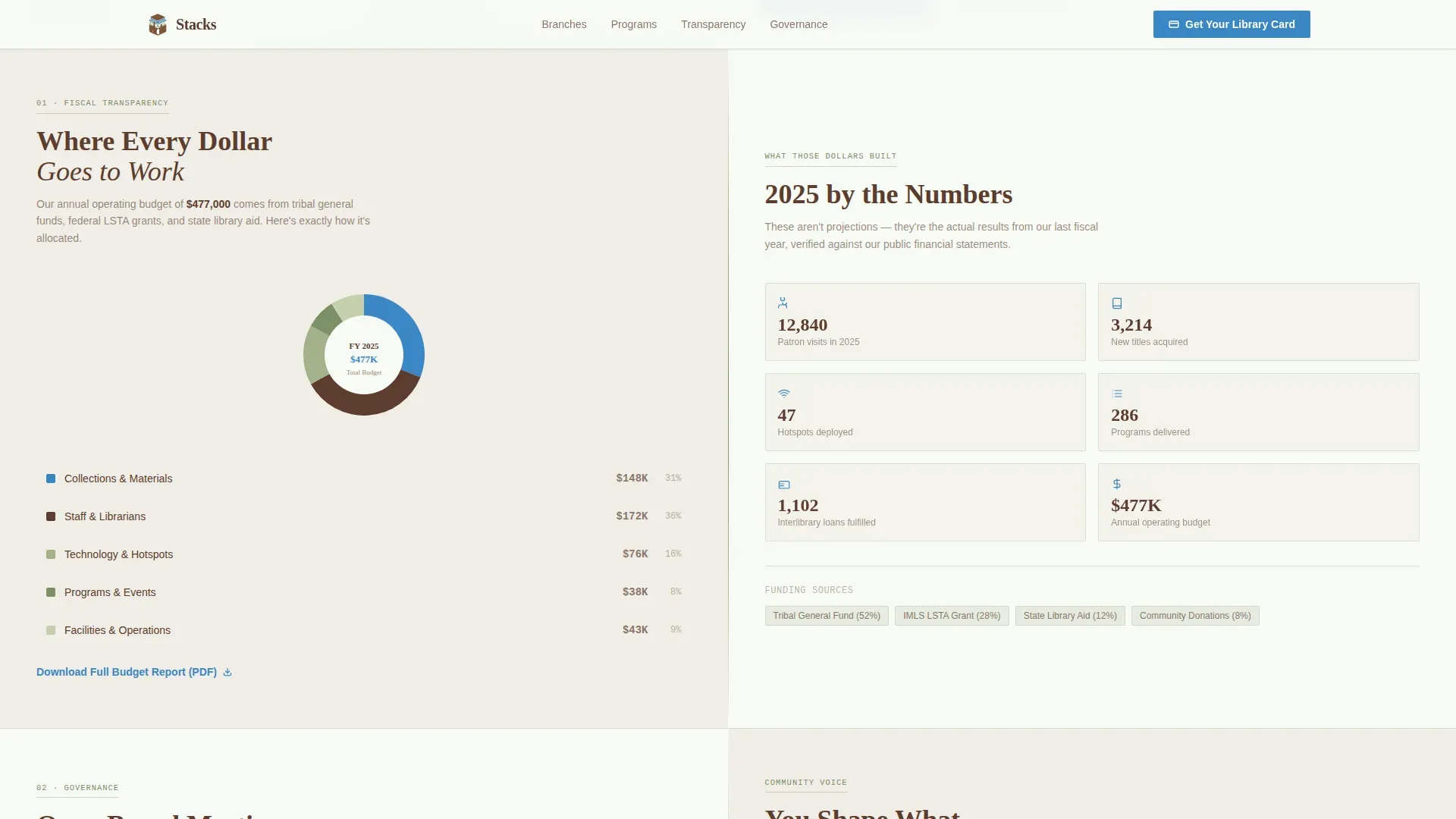
Budget Transparency Split Section
A dedicated split section places an annual budget pie chart on the left and a corresponding impact summary on the right. Patrons can see exactly where funding goes before they are ever asked to engage. This builds the community trust that converts passive visitors into active cardholders.
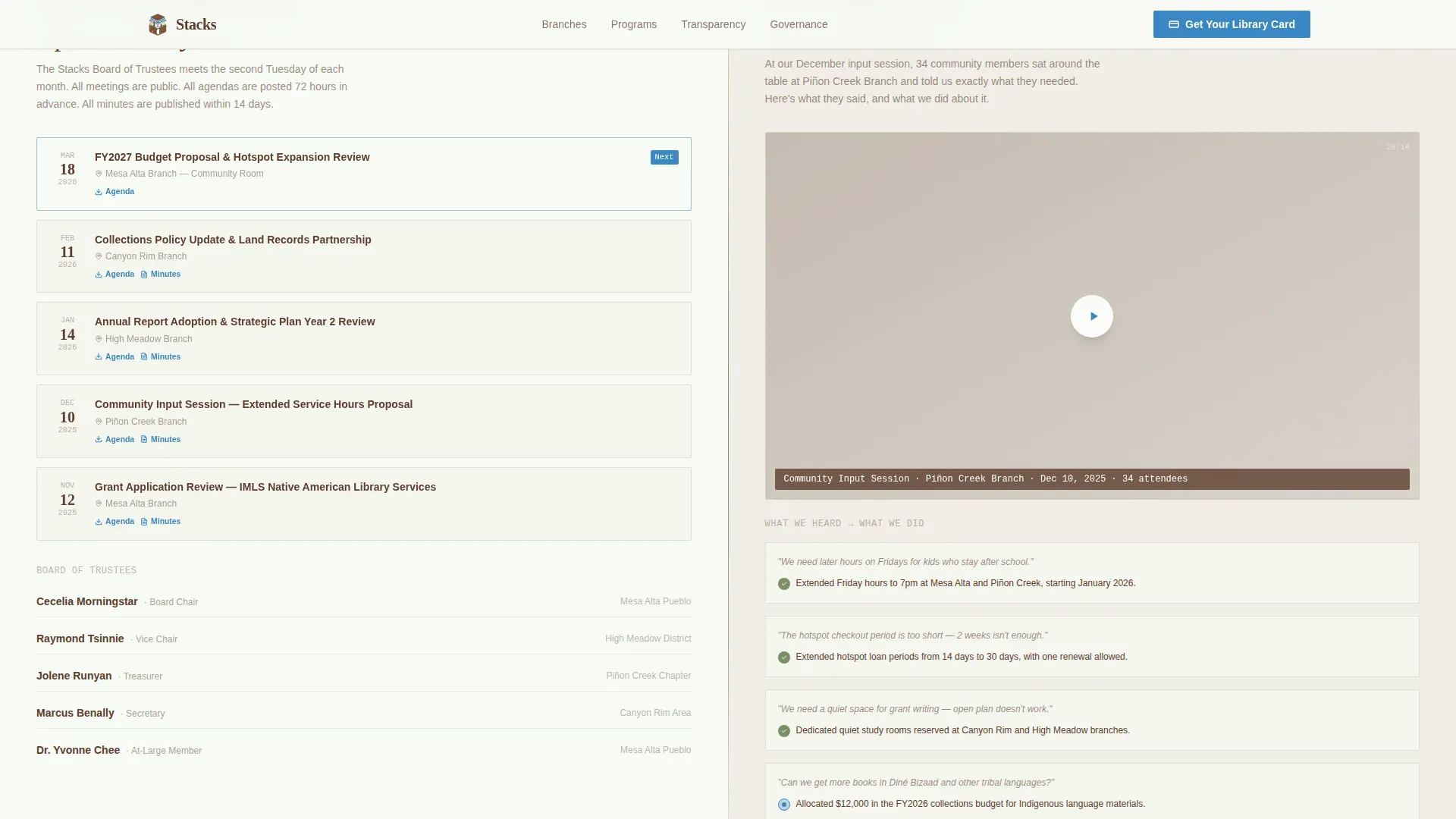
Governance and Community Input Section
This section displays the board meeting calendar with downloadable agendas on the left panel. The right side embeds a short video from a community input session. Administrators can add new meeting entries, remove outdated agendas, and change the video embed without rebuilding the page.
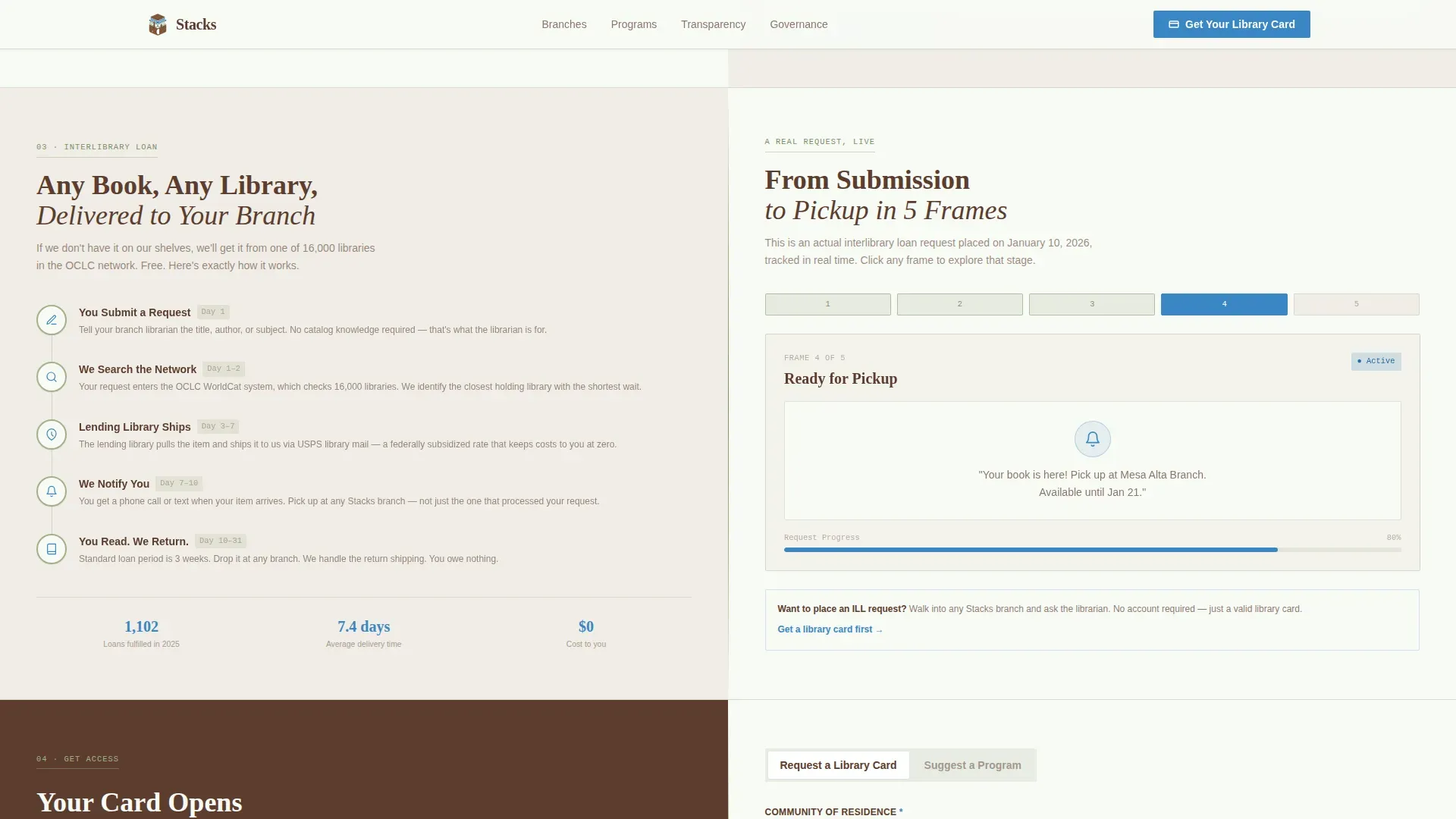
Illustrated Interlibrary Loan Tracker
The interlibrary loan section maps each step of the request journey. The left panel shows a step-by-step process guide. The right panel tracks a real request across five illustrated frames, from submission through pickup. This helps people understand exactly what happens after they click "submit."
Fixed Library Card Sign-Up Form
A primary call-to-action form sits fixed in the right panel after the first scroll. Visitors select their community of residence from a dropdown, enter their full name and mailing address, and check a box to add a mobile hotspot loan application. A secondary path lets community members suggest a program via a lightweight textarea.
Alpine Fresh Civic Color System
The visual identity uses ponderosa bark brown for body text and navigation, high-meadow sage for section dividers, snowfield white for page backgrounds, and clear-sky cerulean for every interactive element. Tribal logos, local photography, and culturally significant art can be incorporated into the Media Block to reflect community identity across the page.
Page sections overview
| Section | Purpose |
|---|---|
| Hero Map Split | Display branch locations and swap branch details on pin hover |
| Budget Transparency Split | Show annual spend and community impact side by side |
| Governance Calendar Split | Present board meeting calendar and community input video |
| Interlibrary Loan Tracker | Walk patrons through the loan request steps visually |
| Library Card Form | Capture card requests with community, name, address, and hotspot fields |
| Footer Row | Provide navigation links and contact information in a single row |
Design & branding system
The template follows a Civic Service theme with an Alpine Fresh palette. Typography pairs Fraunces slab serif headings with Manrope body and interface text, giving the page editorial weight without feeling bureaucratic.
- Bark brown (#5C3D2E) grounds all body text and the top navigation menu
- Sage (#A3B18A) marks section dividers and secondary content containers; snowfield white (#F8FAF5) anchors page backgrounds
- Cerulean (#3A86C4) colors every clickable surface, link, and interactive icon so visitors always know where to click
Mobile & speed optimization
The split-screen layout is built desktop-first and stacks into a single-column view on smaller screens. Static sections use server-side rendering while the interactive map and form components load as client elements, keeping the page responsive across device widths.
- On mobile, left and right columns stack vertically so content remains visible and easy to navigate without horizontal scrolling
- The fixed card sign-up form adjusts to full width on narrow screen sizes, keeping the primary call to action reachable
- Branch location display and the menu remain accessible at all widths, preserving core utility on every device
How this template helps you convert
Trust is the conversion engine here. The page shows exactly where money goes and what each branch offers before it asks a visitor for anything. That sequence is intentional.
- The topographic hero lets people find their nearest branch locations and see real branch photos immediately, so they feel recognized before they scroll
- The budget and governance sections display specific figures and records, giving community members and funders the confidence to engage
- The fixed library card form stays visible throughout the scroll, so when a visitor is ready to click "Request a Library Card," the form is always within reach
Other information about this template
The Stacks tribal authority public library landing page template is designed around the Stacks content management platform, a modern, mobile-friendly system built specifically for public library use. Stacks allows for easy customization using drag-and-drop tools, making it ideal for library staff without extensive technical skills.
- To start, enter a name and a file path for the page, then click "CUSTOMIZE THIS PAGE" from the dashboard to begin configuring your layout
- You can change the number of columns on any landing page and drag and drop content blocks into place; select from existing Callouts, Sliders, Events, and News items to add to your panels
- To remove a content block, click the garbage can icon next to it; elements in draft form are only visible to administrators until you save and publish
- Landing pages in Stacks are built on Panel frameworks; panels may contain no content, one content node, or multiple nodes, giving administrators full control over page width and layout depth
- A link to the pre-built locations list can be added to the main menu or call-to-action buttons; settings can be configured to control how users see location details in Listing View or Detail View
- Pagination can be enabled for event listings and news items; this template supports two themes out of the box and can be adjusted to match additional tribal branding requirements
- Public libraries can engage communities through themed events and activities for all ages; this landing page can display upcoming events and programs that allow participants to earn rewards, and milestone celebrations can be featured as prominent content on the page
Theme
Civic Service
Creative direction
Transparent Process
Color system
Alpine Fresh
Style
Split Screen (50/50)
Direction
Lead Generation
Page Sections
Interactive Branch Map with Location Display
Budget Transparency Split Section
Governance and Community Input Section
Illustrated Interlibrary Loan Tracker
Fixed Library Card Sign-up Form
Alpine Fresh Civic Color and Typography System
Related questions
Can library staff update branch locations and hours without a developer?
How does the library card form work on this landing page?
Can administrators manage content like agendas and videos without rebuilding the page?
What happens when a visitor hovers a map pin?
Is this template limited to one call to action?



