Smart Library Navigation Landing Page Template
The Stacks Federal Library Agency Sidebar Companion Landing Page template is a pre-formatted, single-page layout built for the federal agency that funds and connects the nation's 17,000 public libraries. It leads with an animated metrics wall, moves through mission and grant program sections, and routes visitors toward the grant application portal through a fixed sidebar with scroll-aware navigation.
by Rocket studio
Quick summary
This landing page template is purpose-built for a federal library funding agency. Four animated counters open the page with raw institutional authority. A fixed sidebar holds the table of contents while the main content columns walk visitors from legislative mandate through grant programs, strategic plan priorities, and impact research. The design communicates scale, trust, and forward direction without a single stock photo.
Who this template is for
This template serves the professional audience that relies on a federal library agency landing page for real work. It is designed for users who need clear access to funding data, policy documents, and program information fast.
- State librarians and grant coordinators researching LSTA funding deadlines
- Tribal library directors seeking technical assistance and program guidance
- Congressional staffers and policy researchers confirming appropriations data
What problem this template solves
Federal agency pages often bury the most important materials under menus and generic copy. Visitors land on an unfocused page, cannot navigate quickly to the section they need, and leave before they find the grant program details they came for. This template solves that directly.
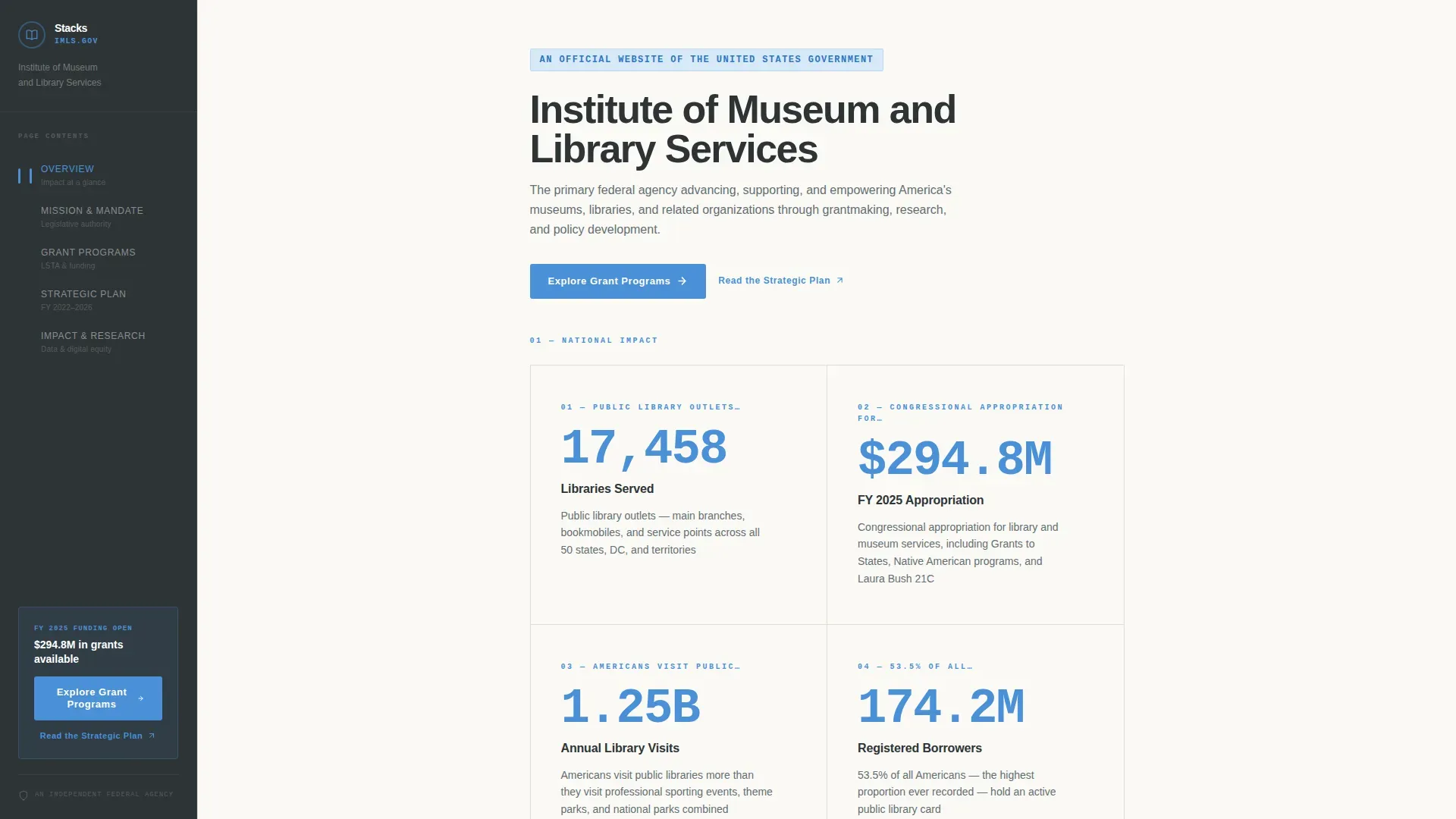
- The metrics wall replaces a hero image and lets data present institutional credibility at a glance
- The fixed sidebar lets visitors navigate without losing their place in the content
- The click-through structure routes grant-seekers forward to the application portal without requiring a form on this page
What you get with this template
You get a complete, ready-to-adapt landing page framework that covers everything from the opening statistics section to the footer. Each section is added to the page in a logical editorial sequence. All items follow a Vision and Mission creative direction that deepens commitment as visitors scroll.
- An animated four-counter metrics wall, fixed sidebar navigation with scroll spy, mission inscription block, grant programs overview, strategic plan priorities section, and impact research section
- A two-column layout using a sidebar rail in federal charcoal and a main content area in archive cream, with sky blue on every actionable element
- A primary "Explore Grant Programs" call to action placed both inline and at the sidebar base, plus a secondary "Read the Strategic Plan" text link for the policy audience
Feature list
This landing page template packages several well-defined capabilities that work together to serve a demanding institutional audience.
Animated Metrics Wall Header
Four oversized counters tick upward against the archive cream field, displaying library service numbers, grant totals, annual visit figures, and state reach. The numbers are set in a condensed typeface in sky blue, large enough to view from across the screen. Below the counters, the agency's statutory mission appears as a single inscribed line in institutional slate. No imagery is used; the data items are the authority.
Fixed Sidebar with Scroll-Spy Navigation
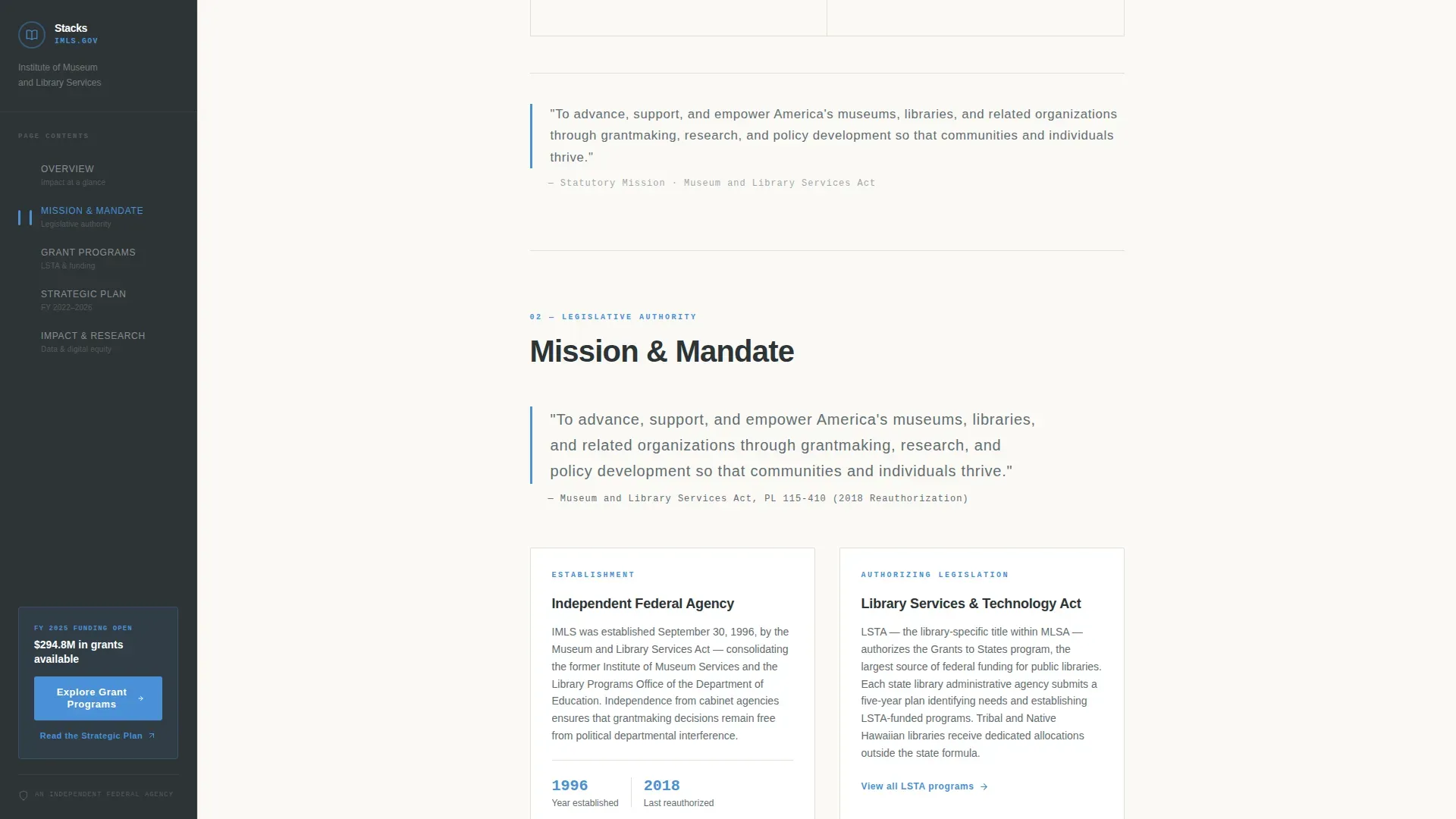
The sidebar holds a persistent rail in federal charcoal that stays visible as visitors scroll through every section. Each sidebar link doubles as an anchor, so users can click directly to any part of the page. Section titles highlight in the sidebar as the visitor moves through the main content columns, giving a clear sense of position within the document. Descriptive labels in the sidebar help prevent confusion and support smooth browsing.
Grant Programs Section
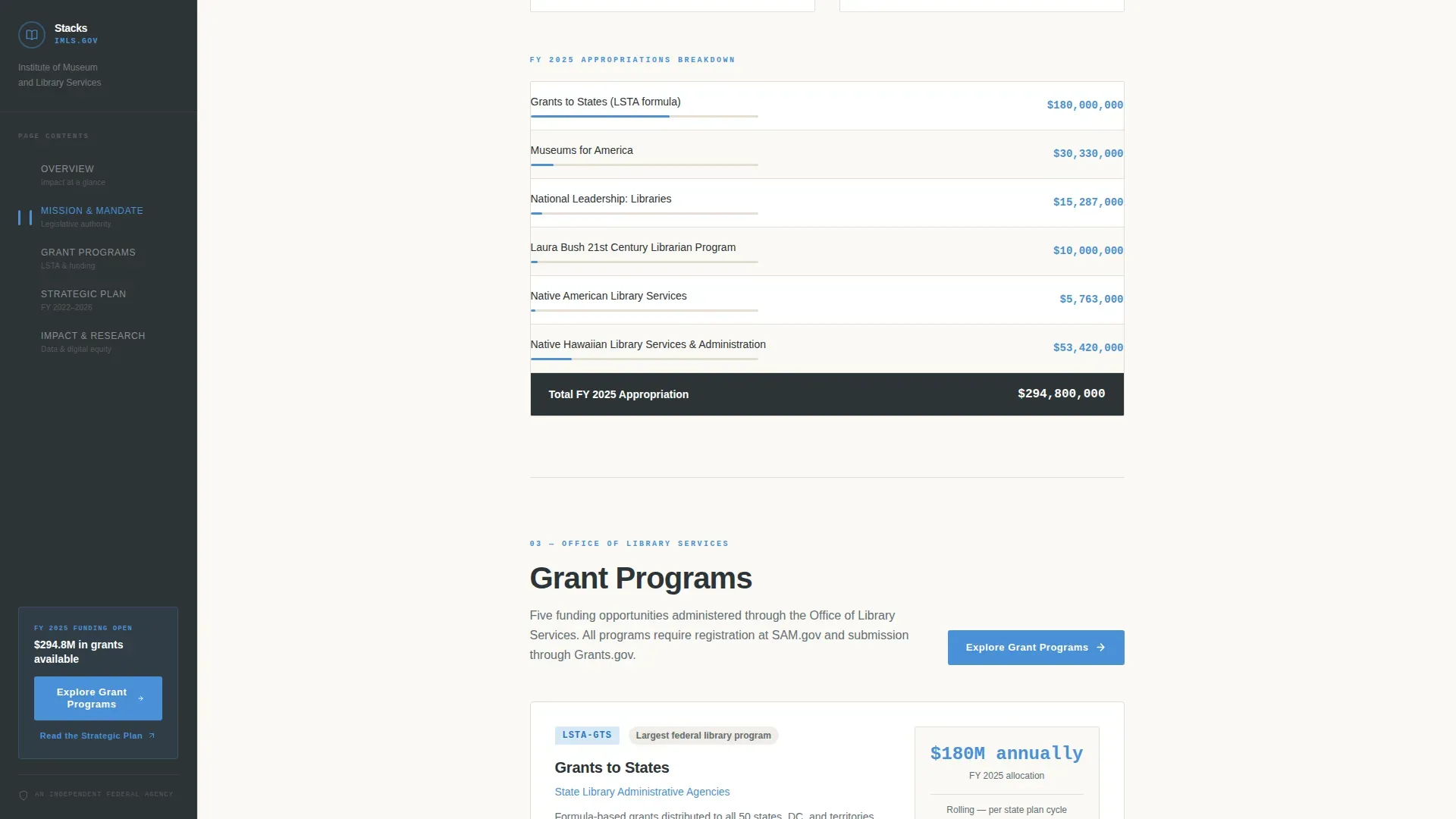
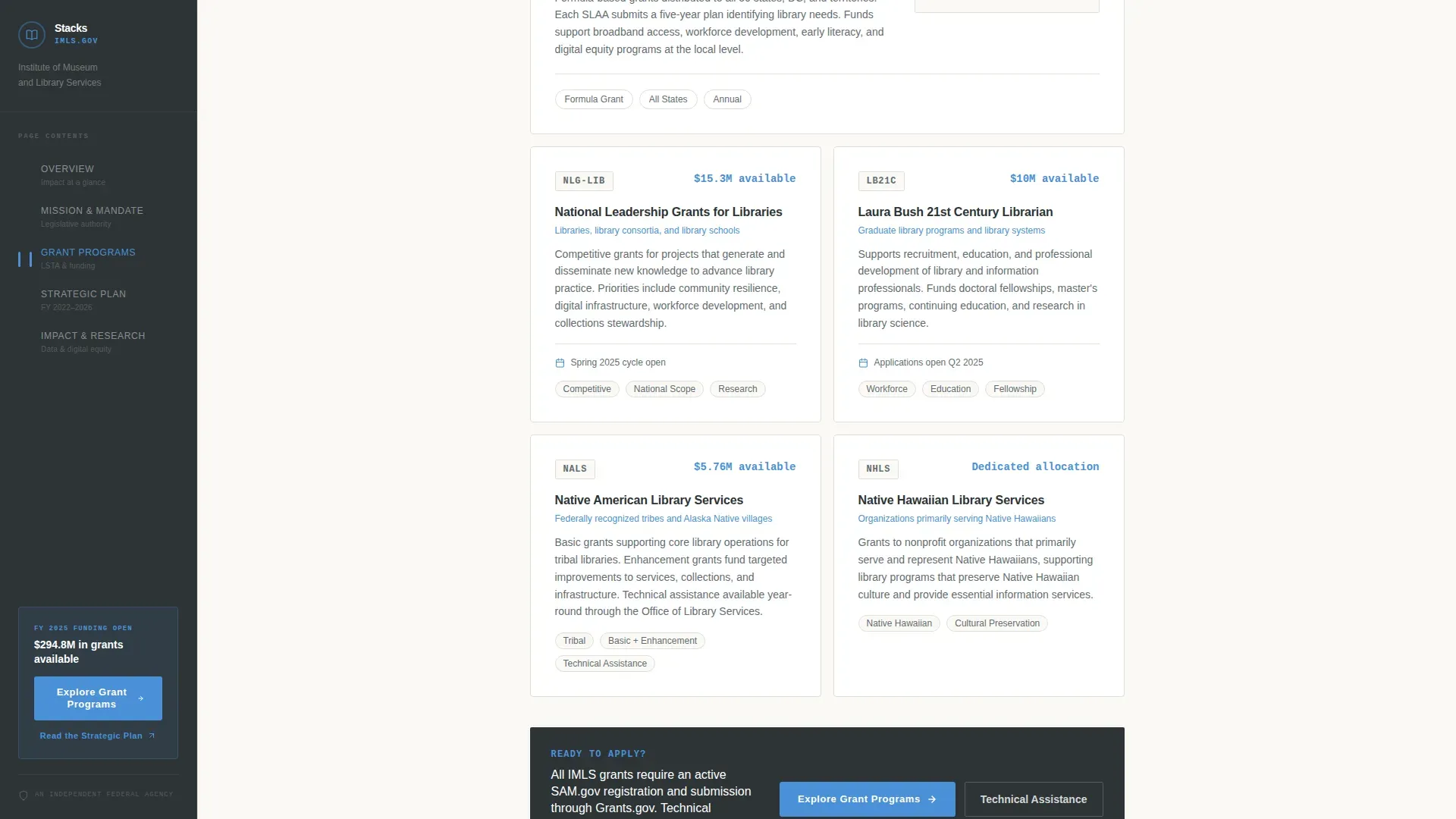
This section presents the agency's core funding programs in a clear, skimmable layout. Administrators can view and adjust the program titles and descriptions to keep materials current. The section closes with an inline "Explore Grant Programs" button so grant coordinators can click forward to the application portal without searching for it.
Strategic Plan Priorities Section
The strategic plan section maps the agency's active four-goal framework. It gives policy researchers and state-level administrators a structured view of institutional direction. The content is organized so that new content updates can be published and added to the page without disrupting the surrounding layout.
Impact and Research Section
This section holds digital inclusion data and field reports that confirm the agency's reach. Researchers and congressional staffers can check the numbers and follow links to published source materials. Interactive components like data widgets can be integrated into this section to keep content fresh and engaging for repeat visitors.
Footer with Linear Single-Row Pattern
The footer uses a clean single-row layout that holds essential navigation items and statutory information. It keeps the page complete without adding visual weight at the bottom. The footer pattern is consistent with federal design standards for single-page layouts.
Page sections overview
| Section | Purpose |
|---|---|
| Metrics Wall Header | Opens with four animated counters and the statutory mission inscription |
| Mission and Mandate | Presents legislative authority and the agency's strategic framework |
| Grant Programs Overview | Lists core funding programs with an inline click-through call to action |
| Strategic Plan Priorities | Maps the active four-goal plan for the current fiscal period |
| Impact and Research | Displays digital inclusion data and links to published field reports |
| Single-Row Footer | Closes the page with navigation items and institutional details |
Design & branding system
The visual identity follows a Corporate Precision theme built on the Slate and Sky color system. The palette holds federal gravitas while staying legible and open. Every color choice has a defined role across the page columns and sidebar sections.
- Federal charcoal (#2D3436) for the persistent sidebar rail and primary text; institutional slate (#636E72) for secondary typography and divider lines; open-sky blue (#4A90D9) for every actionable element, metric, and link; archive cream (#FAF9F6) for main content backgrounds
- DM Sans for headings and body copy, giving a condensed federal feel; IBM Plex Mono for statistics and counter numbers to reinforce data precision
- No stock photography anywhere on the page; all visual weight comes from typography, color, and data
Mobile & speed optimization
The template is built desktop-first to serve the sidebar companion layout at full width. On smaller screens, the sidebar collapses to a top navigation bar so users on tablets and smartphones can still navigate to each section without losing access to key links.
- The sidebar collapses gracefully to a top navigation window on mobile, preserving section-level navigation
- Counter animations and scroll-spy behavior are handled client-side while static content sections remain server-rendered for faster initial load
- Column width and layout proportions adjust automatically across screen sizes, using a 25%/75% or 33%/67% column split depending on the viewport
How this template helps you convert
The click-through structure is designed for a professional audience that needs to trust an institution before taking any action. The page earns that trust through data density and mission clarity, then routes visitors to the grant portal.
- The metrics wall opens the page with four data points that confirm scale and authority, so visitors confirm the agency's legitimacy before reading a single paragraph
- The fixed sidebar keeps the "Explore Grant Programs" call to action visible at the sidebar base throughout the entire scroll, meaning users can click it at any point after they have seen enough to act
- The inline call-to-action placement after the grant programs section catches grant coordinators at the exact moment they are ready to move forward, converting browsing intent into a purposeful click to the application portal
Other information about this template
This template is one example of how the Stacks CMS is used by government and academic libraries to build credible, functional digital spaces. The Stacks Federal Library Agency Sidebar Companion Landing Page template is a web-based, pre-formatted page layout designed specifically for library websites that need to hold complex content without overwhelming visitors.
- No-code tools allow administrators to build and update this landing page without traditional programming skills; no coding knowledge is required to add sections, enter new content, or save layout changes
- The layout builder lets administrators choose from different section configurations, change column arrangements, and select content blocks from a dashboard view; once all items are added, click Save Layout to confirm and apply changes
- The landing pages tile in the site dashboard is where administrators navigate to find published landing pages, open a page for editing, and view the full list of available templates; logging into the dashboard also gives access to the member profile, icon library, and article management tools
- The design follows U.S. Web Design System (USWDS) guidance for federal digital properties, with plain language, visible section titles, and a clean register of content that is easy to review at any level
- Sidebar labels should be kept descriptive and tailored to the specific subject of each page to hold user attention and bring visitors to the right section without confusion; copies of sidebar link labels can be adjusted at any time without affecting the main content
- Interactive components and data widgets can be integrated to keep the digital collection of impact materials and field reports fresh; the template provides open spaces for new content as the agency's research record grows
Theme
Corporate Precision
Creative direction
Vision & Mission
Color system
Slate & Sky
Style
Sidebar Companion
Direction
Click-Through
Page Sections
Animated Four-counter Metrics Wall
Fixed Sidebar with Scroll-spy
Grant Programs Overview Section
Strategic Plan Priorities Section
Impact and Research Section
Single-row Footer Pattern
Related questions
Can I update grant program details and add new content without a developer?
How does the sidebar navigation work on this landing page?
Does the template support a two-column layout with a defined sidebar width?
Is this landing page template appropriate for a federal agency site?
How is this template different from a general library landing page?



