Mixed-Use Building Real Estate Booking Website Template
Stagecraft is a full-width immersive landing page template built for commercial mixed-use building stagers. It combines a cinematic full-screen video header, an interactive floor explorer with before-and-after sliders, a live cost calculator, and a three-step inline booking form to move commercial developers, leasing agents, and property fund managers from first impression to confirmed staging appointment.
by Rocket studio
Quick summary
Stagecraft is designed for one purpose: turning an empty building tour into a signed staging contract. The template opens with a steadicam-style video header, guides visitors through immersive per-floor case studies, and delivers a transparent cost estimate before asking for commitment. Every section is built to match the pace and expectations of commercial real estate decision-makers.
Who this template is for
This template serves firms that stage mixed-use commercial buildings for developer clients with real vacancy pressure. The audience is experienced, time-sensitive, and focused on numbers.
- Commercial developers and leasing agents managing vacancy timelines and pre-lease schedules
- Property fund managers tracking per-floor revenue loss from unoccupied space
- Mixed-use building stagers who handle retail, office, residential, and hospitality floors under one firm
What problem this template solves
Empty commercial floors cost money every day they sit unstaged. Prospective tenants struggle to visualize leased space from a bare concrete shell. A generic firm website does not communicate scale, speed, or full-building capability.
- Developers need proof that one firm can handle every floor type, not just offices
- Leasing agents need a way to show staged environments before drywall is finished
- Fund managers need transparent per-square-foot pricing before they approve a staging budget
What you get with this template
This is a single-page, section-led layout that escalates in scale from a ground-floor café to a furnished penthouse suite. Every built-in section earns the next conversion step before asking for it.
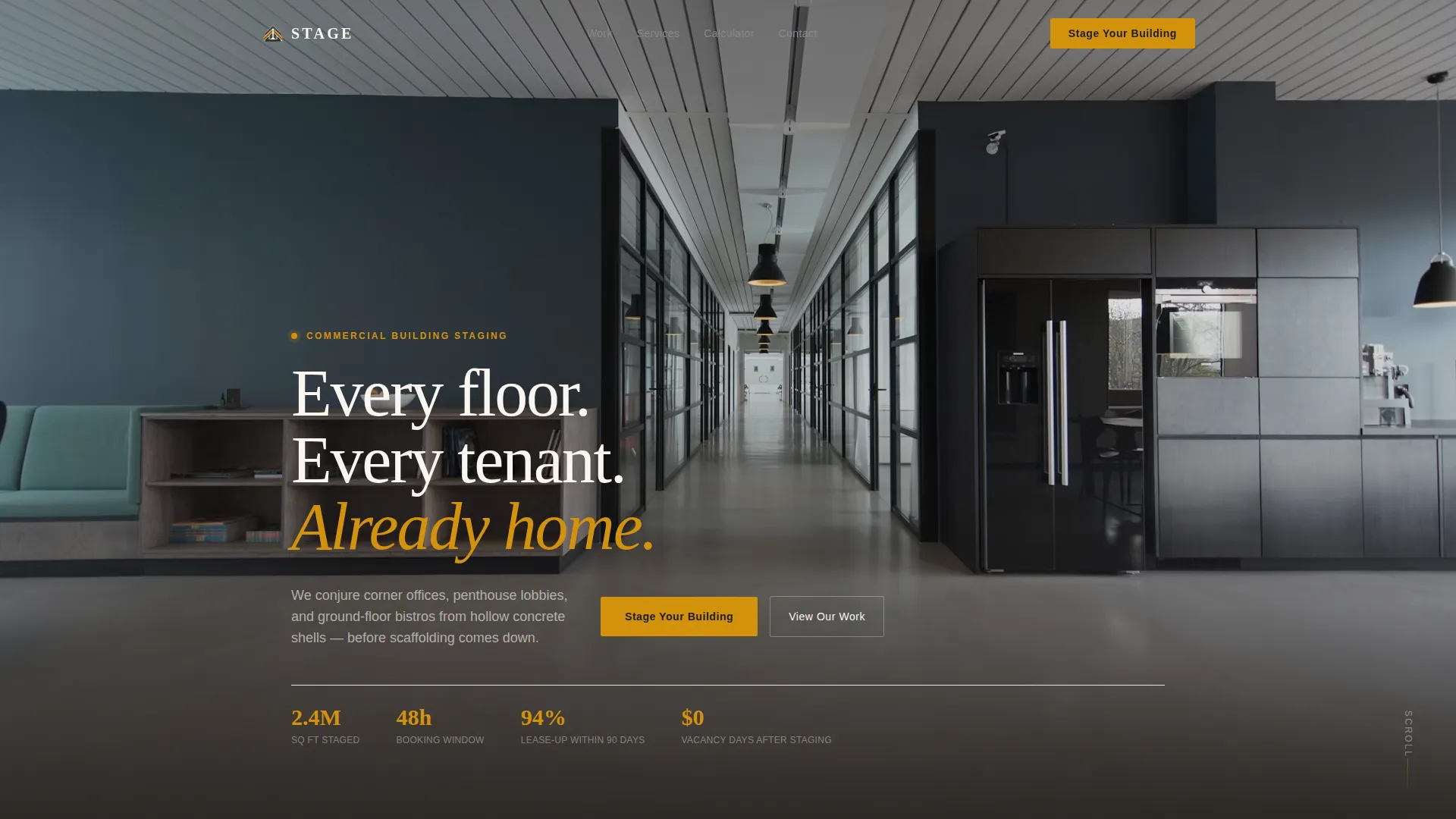
- A full-screen video header with an ambient-sound steadicam concept and a headline overlay
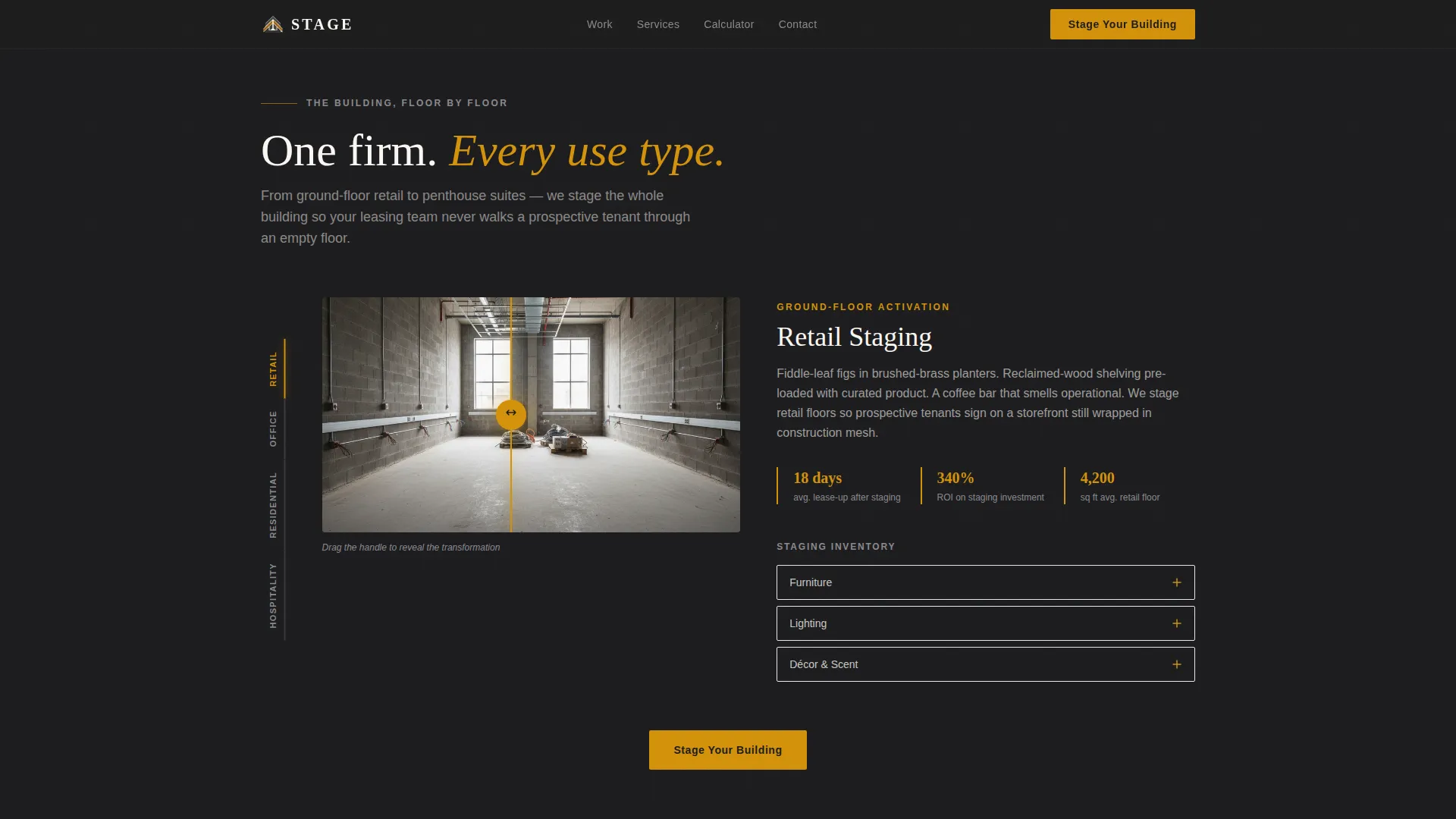
- An interactive floor explorer with vertical sidebar navigation, before-and-after sliders, 360-degree room pans, and expandable staging inventories
- A live cost calculator, a three-step inline booking form with tiered packages, and a gated portfolio download for visitors not yet ready to commit
Feature list
This template includes a focused set of interactive and visual components. Each one is built for the commercial real estate staging context and the decision-makers who need to act on what they see.
Full-Screen Video Header
The hero section uses a continuous steadicam-style video background that moves from a sunlit retail atrium through a co-working floor and into a top-floor executive suite. An ambient soundtrack concept accompanies the footage. The headline "Every floor. Every tenant. Already home." materializes over the final skyline frame, and the primary call to action appears in the lower third.
Interactive Floor Explorer
A persistent vertical sidebar lets visitors click between floor types: Retail, Office, Residential, and Hospitality. Each selection smooth-scrolls to a dedicated immersive case study. Before-and-after sliders, draggable 360-degree room pans, and expandable itemized staging inventories are built into each floor section.
Live Cost Calculator
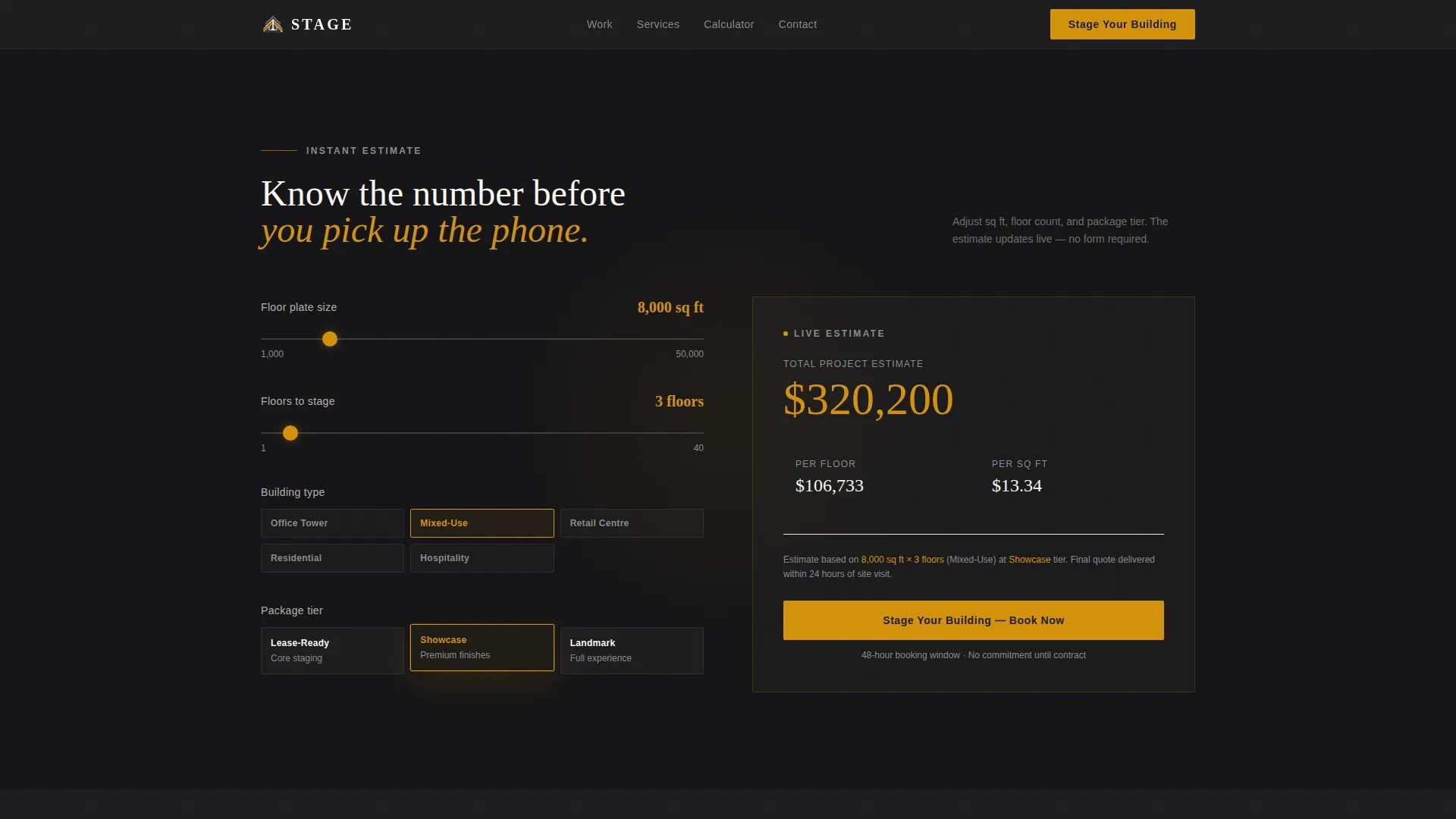
Midway through the page, visitors enter their building's square footage and select a building type to receive an instant per-floor staging estimate. The calculator converts passive browsers into active planners before any form is shown, so visitors already know their number when the call to action appears.
Three-Step Inline Booking Form
The booking form opens inline after the visitor clicks "Stage Your Building." Step one captures building address and total square footage. Step two collects floor count and use-type selection from a visual grid. Step three presents three tiered packages, Lease-Ready, Showcase, and Landmark, each with transparent per-square-foot pricing and a 48-hour booking window.
Gated Portfolio Download
A secondary conversion path offers a high-resolution portfolio PDF behind a simple email capture. This path serves visitors who are not ready to book but are willing to exchange contact details for a tangible proof piece, keeping them in the pipeline.
Social Proof with Staging Metrics
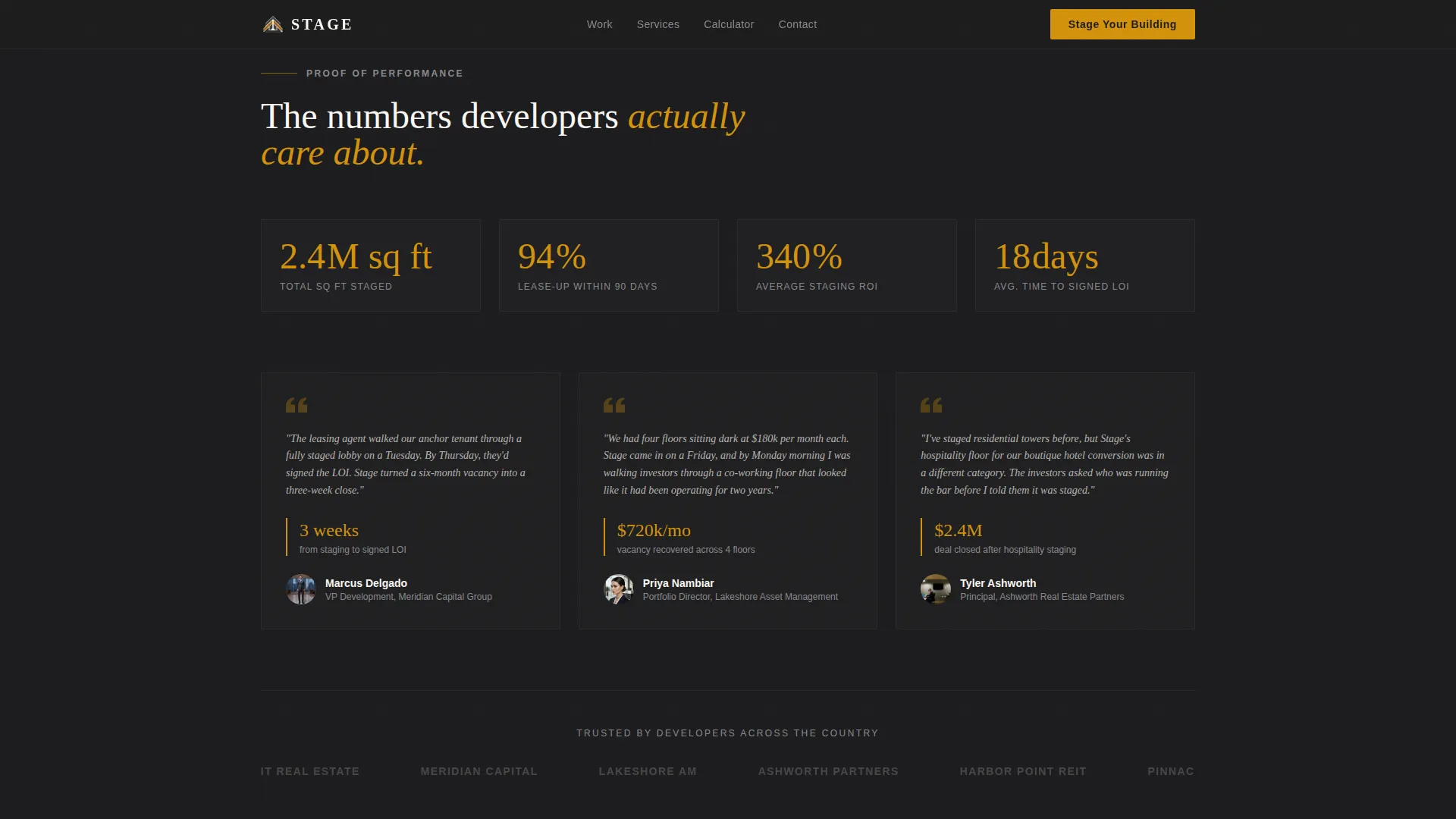
The portfolio and proof section includes named developer testimonials alongside specific staging metrics: square footage figures, vacancy days saved, and lease-up timelines. Concrete numbers build credibility with an audience that reads financials every day.
Page sections overview
| Section | Purpose |
|---|---|
| Video Hero Header | Open with cinematic staging reveal and primary call to action |
| Interactive Floor Explorer | Navigate retail, office, residential, hospitality case studies |
| Before and After Sliders | Show empty-to-staged transformation per floor type |
| 360-Degree Room Pans | Let visitors drag through staged environments interactively |
| Live Cost Calculator | Deliver instant per-floor estimate by square footage and type |
| Staging Proof Block | Display named testimonials with lease-up metrics |
| Three-Step Booking Form | Capture building details and confirm tiered package selection |
| Portfolio Download Gate | Convert undecided visitors via email-gated PDF offer |
| Arc Browser Split Footer | Anchor page with logo, tagline, and navigation links |
Design & branding system
The visual identity follows an Executive Suite theme built on a Charcoal and Amber color system. The palette feels like a private boardroom at dusk, heavy and polished, with a single warm light source pulling focus toward the next decision.
- Background and typography use deep boardroom charcoal (#1C1C1E) and brushed graphite (#3A3A3C) to anchor the page in authority
- Warm amber (#D4920B) activates all calls to action, hover states, and interactive elements, while ivory linen (#FAF7F2) opens up feature cards and testimonial blocks
- Display headlines use Fraunces, a high-contrast serif that carries the weight of a mahogany boardroom, and DM Sans handles all body copy and interface elements for clean readability
Mobile & speed optimization
The template is built desktop-first, reflecting the working environment of its primary audience: property fund managers and developers at their desks. Full mobile support is included so leasing agents on-site can still access the page comfortably.
- The video background uses a lazy-load approach to avoid blocking initial page render on slower connections
- CSS smooth scroll and IntersectionObserver power the scroll-linked reveals, floor selector transitions, and count-up number animations without heavy JavaScript libraries
- Scroll-linked animation, tab switching, the form stepper, and the before-and-after slider are all optimized to maintain a fluid experience across device sizes
How this template helps you convert
Every section is sequenced to reduce friction and build confidence before asking for a commitment. The page earns the sale by the time the form appears.
- The cost calculator delivers a transparent per-floor estimate midway through the page, so visitors arrive at the booking form already knowing their number and feeling in control of the decision.
- The three-step inline form breaks commitment into small steps, building address first, then floor details, then package selection, reducing drop-off at each stage while the 48-hour booking window creates urgency without pressure.
Other information about this template
Stagecraft is part of the Full-Width Immersive template style category and sits within the Real Estate and Property vertical, specifically the Mixed-Use Building Real Estate subcategory. A few additional details worth knowing before you customize or deploy the template:
- The footer follows an Arc Browser Split pattern (Pattern 7): logo and tagline on the left, navigation links on the right, providing a clean, professional close to a long-form page
- Typography pairing uses Fraunces for display-weight headlines and DM Sans for all body and interface text, a combination chosen for cinematic weight balanced with functional clarity
- The Interactive Explorer creative direction is the structural backbone of the page, turning the scroll journey into a navigable building experience that mirrors what a physical site tour feels like
- Animation intensity is set to high throughout: scroll-linked reveals, count-up numbers, tab switching, and the form stepper all work together to maintain engagement across a long single-page layout
- The Direct Sales landing-page direction means every design decision, from the amber call to action color to the calculator placement, serves one goal: a confirmed staging booking
Theme
Executive Suite
Creative direction
Interactive Explorer
Color system
Charcoal & Amber
Style
Full-Width Immersive
Direction
Direct Sales
Page Sections
Full-screen Steadicam Video Header
Interactive Floor Explorer with Sidebar
Live Per-floor Cost Calculator
Three-step Inline Booking Form
Gated Portfolio PDF Download
Metric-backed Social Proof Section
Related questions
Who is this landing page template designed for?
What floor types does the interactive explorer cover?
How does the live cost calculator work?
What are the three staging packages shown in the booking form?
Is there a way for visitors to engage without booking right away?



