Student Housing Real Estate Pricing Website Template
The Staged ROI-Driven Student Housing Staging landing page template is a split-screen, conversion-focused page built for property managers, independent landlords, and university housing offices. It leads with a full-screen video morphing empty apartments into fully staged showpieces, then immediately presents an interactive ROI calculator that shows landlords exactly how much vacancy costs them versus the price of staging.
by Rocket studio
Quick summary
This landing page template is purpose-built for a student housing staging service. It opens with a cinematic video transition from empty rooms to styled, move-in-ready units, then drops visitors straight into a live ROI calculator. Every section is designed to show landlords the real cost of vacancy and the clear financial case for staging, before asking them to book.
Who this template is for
Property managers, independent landlords, and university housing teams are the core audiences for this template. If your business transforms bare student apartments into appealing, rent-ready spaces before orientation week, this landing page gives your pitch the structure and visual weight it deserves.
- Property managers overseeing multi-unit complexes near campus who need to fill listings fast
- Independent landlords with a small portfolio who photograph units themselves and want to sell the space better online
- University housing offices preparing model units for admitted-student tours and needing a polished digital showcase
What problem this template solves
Empty rooms are a revenue problem. Every day a unit sits unstaged and unphotographed, landlords lose money. Yet most staging businesses rely on generic websites or PDF brochures that never make the financial case clearly enough. Potential clients leave without committing because they cannot see the numbers for their own property.
- Visitors arrive curious but leave unconvinced because no calculator connects staging cost to real vacancy loss
- Before-and-after photos exist on dozens of pages, but none pin a running savings figure to the scroll so buyers feel the urgency at every section
- The booking step feels disconnected from the value argument, so follow up is slow and conversion rates stay low
What you get with this template
This template is a complete, ready-to-customize landing page designed around one conversion goal: getting landlords to book a staging consultation. Every section serves that single purpose, from the opening video to the final call-to-action panel.
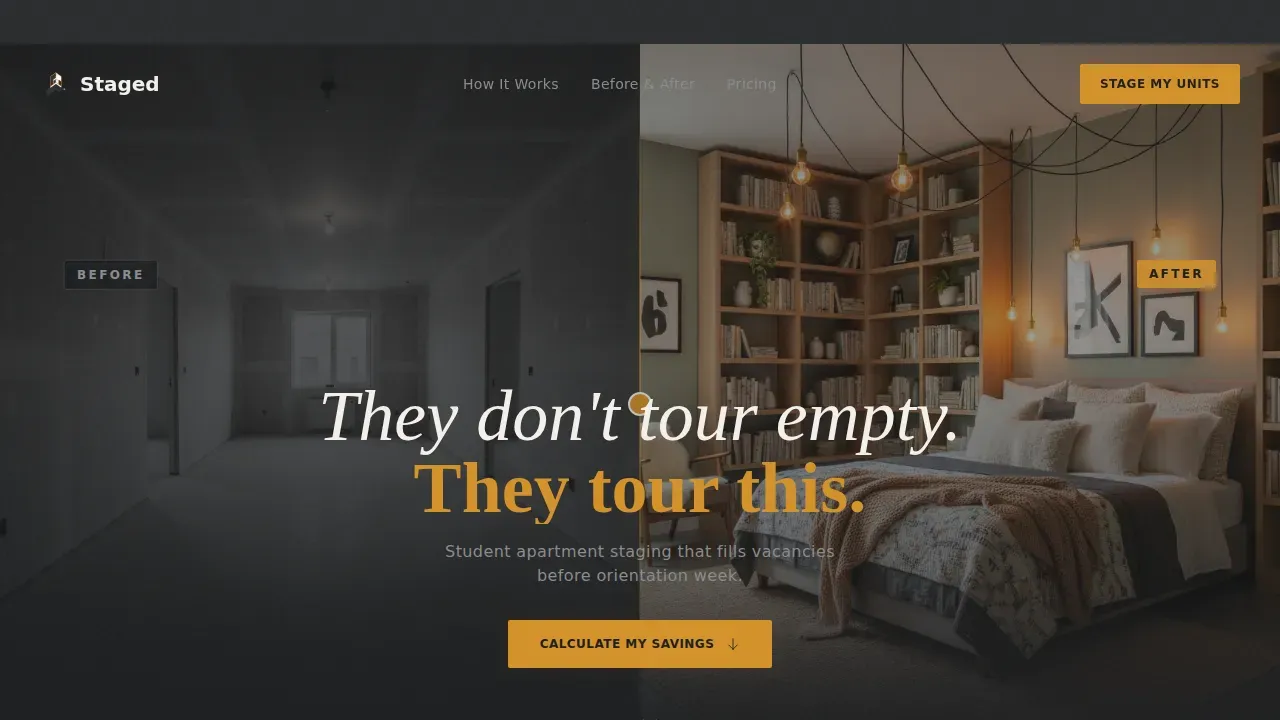
- A full-screen video header with a seamless empty-to-staged morphing transition and a single reveal headline
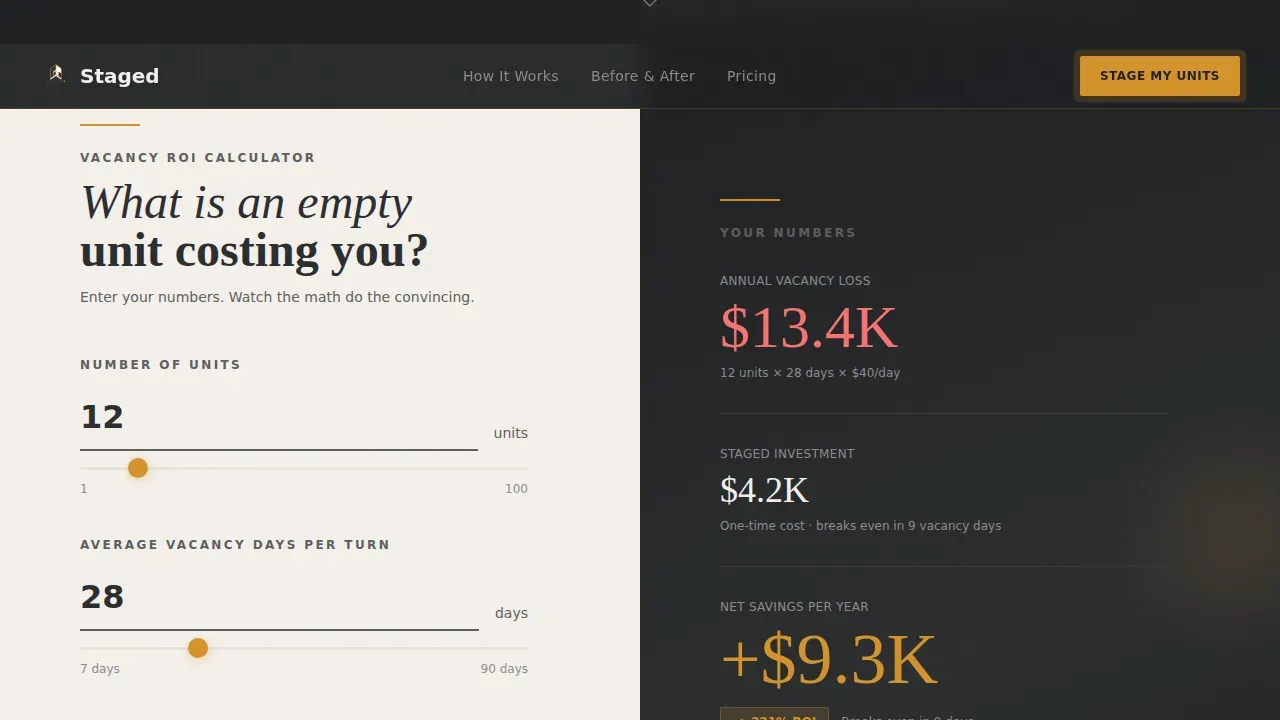
- An interactive split-screen ROI calculator where visitors enter their own unit count, vacancy days, and monthly rent, and watch live savings data animate in real time
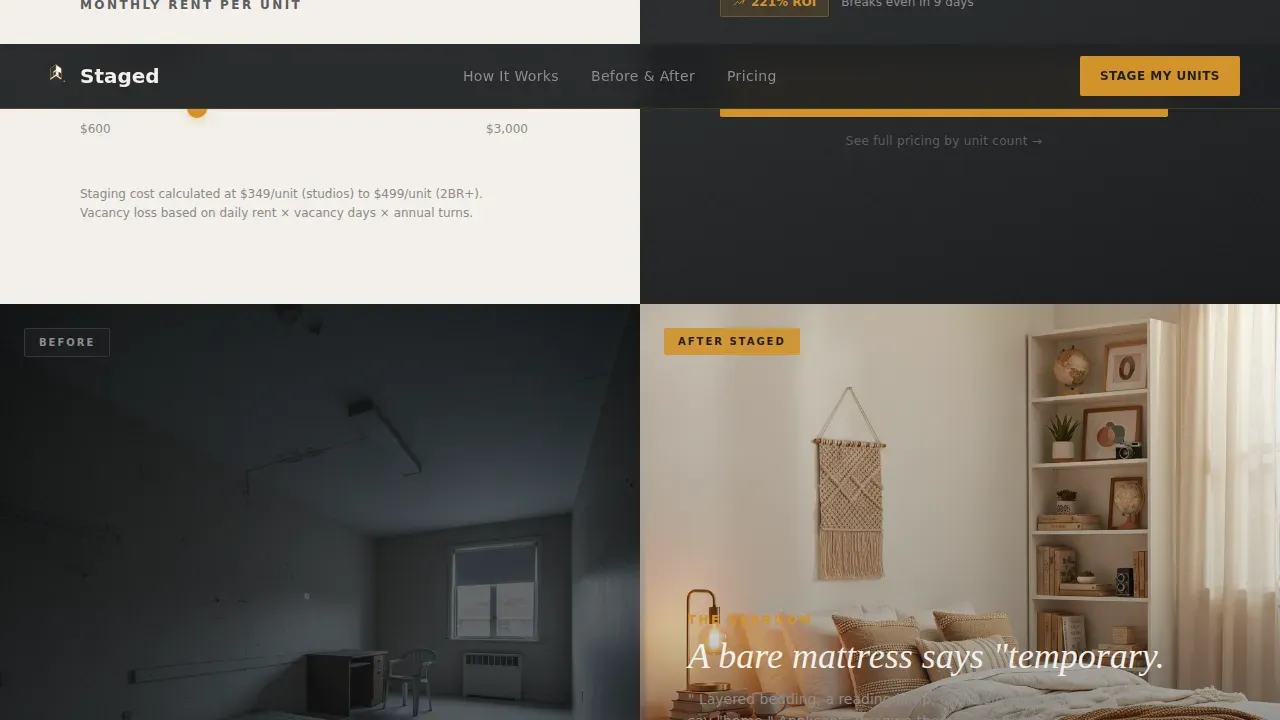
- Alternating before-and-after split panels with a scroll-pinned savings bar keeping the financial argument visible throughout every room reveal
Feature list
This template includes a focused set of built-in components. Each one is designed to move a landlord from curiosity to commitment.
Full-Screen Video Header with Staged Reveal
The hero section opens with a slow Steadicam walk-through. The camera glides from harsh overhead lighting and bare mattresses into warm Edison bulb lighting, layered bedding, and styled bookshelves. The transition is seamless, and a single line of text appears mid-shot: "They don't tour empty. They tour this." The staging reveal sets the emotional tone before any copy is read.
Live ROI Calculator Panel
Immediately below the header, the left panel of the split screen holds an interactive staging ROI calculator. Visitors enter their number of units, average vacancy days, and monthly rent. The right panel updates in real time, showing dollars lost to vacancy versus the projected cost of staging. A bold amber number displays net savings. The calculator does the persuading so the call-to-action feels inevitable. This is one of the most effective tools for driving conversions in the real estate market because it uses the visitor's own data.
Scroll-Pinned Savings Bar
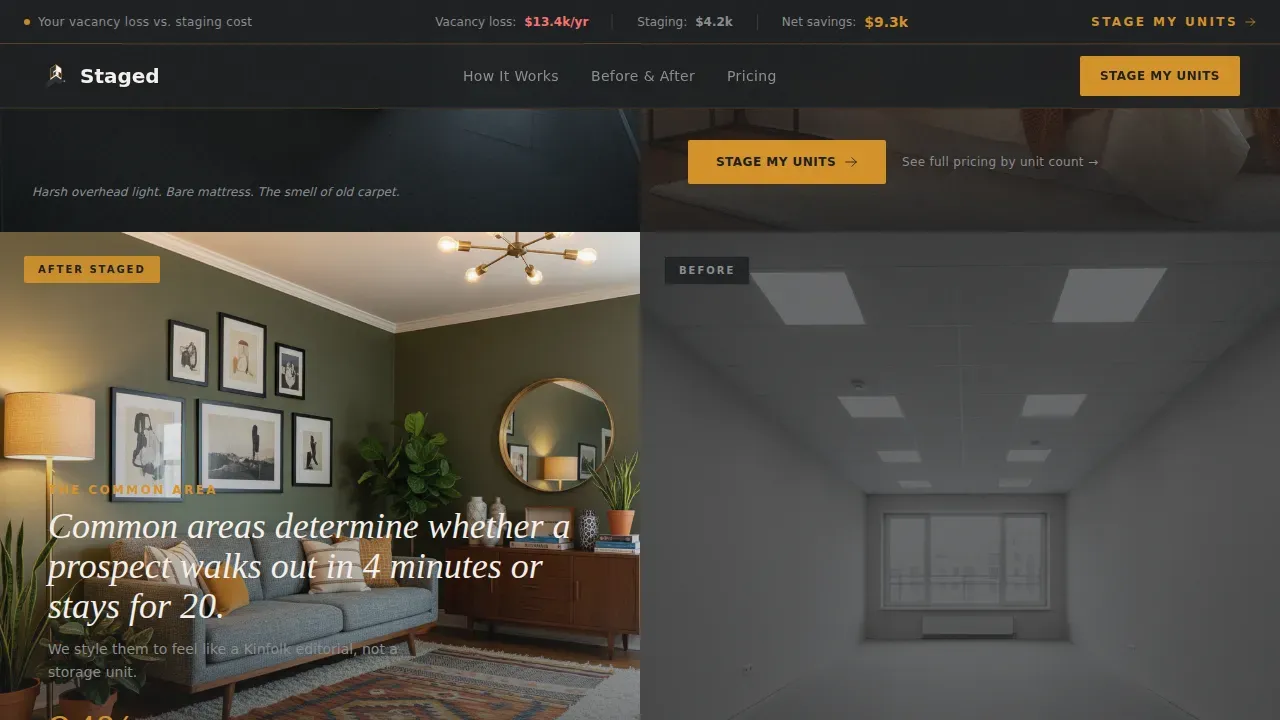
As visitors scroll past the calculator, a slim top bar stays fixed showing their running savings figure. This persistent data point keeps the financial argument alive through every before-and-after section. The idea is simple: the math follows them everywhere so the perceived value of staging stays front of mind.
Before-and-After Split Panels
Each subsequent scroll section pairs a raw, unstaged photo on the left with the fully staged result on the right. Harsh overhead lighting and scuffed floors on one side; warm lighting, thoughtful furniture placement, and styled details on the other. These panels make a visual argument that professional photos alone cannot achieve, because they show the transformation in direct comparison.
Primary and Secondary Call-to-Action Structure
The primary call-to-action, "Stage My Units," appears first inside the calculator results panel. It repeats after every before-and-after pair. Clicking routes to a dedicated scheduling page with package selection. A secondary text link beneath each primary call-to-action reads "See full pricing by unit count" for visitors who need cost details before committing. This structure supports a clean follow up path without cluttering the page.
Social Proof Section
A dedicated section showcases testimonials from property managers with specific vacancy reduction metrics and days-to-lease data. Including genuine social proof is one of the most reliable ways to increase conversion rates on a real estate landing page. Authentic reviews that address real results build trust with potential clients in a way that generic copy never can.
Page sections overview
| Section | Purpose |
|---|---|
| Full-Screen Video Hero | Emotional staging reveal with single headline |
| ROI Calculator Split | Live vacancy-cost versus staging-cost data |
| Scroll-Pinned Savings Bar | Persistent financial argument across scroll |
| Before-and-After Panels | Visual proof of staging transformation |
| Social Proof Testimonials | Vacancy metrics and property manager reviews |
| Booking Call-to-Action | Final push to scheduling with package preview |
| Linear Single-Row Footer | Brand details and secondary navigation links |
Design & branding system
The visual style follows an Executive Suite theme. The palette feels like a leather portfolio on a mahogany desk: serious enough to signal return on investment, warm enough to promise transformation.
- Deep charcoal (#2B2D2F) forms the primary background across all panels, giving the page a professional, high-contrast foundation
- Warm amber (#D4922A) is used on buttons, accent lines, and the bold savings number in the calculator, drawing the eye to every key action
- Soft linen (#F4F0EB) fills text panels and form fields for readability, while muted graphite (#5C5E60) handles secondary type
- Fraunces serif display handles headlines and the staged reveal text; DM Sans body handles all supporting copy, calculator labels, and call-to-action text
Mobile & speed optimization
The template is designed desktop-first to match the work habits of property managers, with a solid mobile fallback for landlords who explore the page on a phone. Mobile-first design is critical for broader real estate audiences since a significant share of users browse property listings on phones, and pages that load slowly lose visitors before a single section is seen.
- The ROI calculator layout adapts from a 50/50 split on desktop to a stacked single-column view on smaller screens, keeping inputs and results accessible
- The scroll-pinned savings bar condenses gracefully on mobile so it does not obscure content while still keeping the data visible
- Static sections use server-side rendering for fast initial loads; the calculator and animation components load as client-side elements to keep the overall experience responsive
How this template helps you convert
Real estate landing pages built around a single conversion goal consistently outperform multi-purpose pages. This template is engineered around one action: booking a staging consultation. Every design and copy decision supports that goal.
- The ROI calculator makes the financial case with the visitor's own numbers before any sales language appears, so by the time they reach the "Stage My Units" button, clicking feels like picking up money off the ground rather than making a purchase decision.
- The scroll-pinned savings bar and repeating call-to-action after every before-and-after panel create a consistent, low-pressure reminder that keeps potential clients moving toward the booking step without feeling overwhelmed by aggressive sales tactics.
- Genuine social proof with specific vacancy reduction metrics and named property managers addresses the skepticism that typically stalls real estate decisions, building enough trust for visitors to commit to a scheduled conversation.
Other information about this template
This template sits at the intersection of real estate staging, student housing marketing, and conversion-focused landing page design. It is worth understanding a few additional details about staging, the broader market context, and how this page fits into a larger lead generation picture.
Home staging has proven results across the real estate market. Staging a home can increase the dollar value offered by buyers by 1% to 5% compared to similar unstaged homes, and professional home staging can lead to quicker leases, with some units renting in as little as two days after staging is complete. Investing in home staging can yield a return on investment that exceeds the cost of a price reduction, which is exactly the argument this template's calculator makes with the landlord's own figures.
Virtual staging is a growing alternative in the real estate space. Virtual staging allows users to instantly transform bare spaces into warm, inviting interiors using digital tools. However, virtual staging can be less effective than professional staging when potential buyers or renters visit the property in person, because the physical space may not match the digitally enhanced picture they saw online. This template is built for a professional, physical staging service, not a virtual staging tool, and the before-and-after panels reflect real, tangible transformations.
Curb appeal matters even for student housing. First impressions are crucial, and buyers and renters often make decisions within the first 15 seconds of entering a space or viewing a listing online. Strong curb appeal combined with well-staged interior photos creates a cohesive market presence that makes listings more appealing across every city and neighborhood a landlord operates in.
This staging landing page template works well alongside broader marketing efforts. Property managers who run ad campaigns through paid digital advertising, or who drive traffic through Google Ads, can route that traffic to this dedicated page to improve conversion rates and generate new leads. Because this is a dedicated landing page rather than a general website page, it keeps visitors focused on one action. Data from virtual tours can also inform which amenities to highlight in staging choices, a practice known as data-driven customization. Listings with a virtual tour component receive significantly more saves from renters, according to Zillow data, so pairing professional staging with virtual tours strengthens the overall market position.
The template also supports broader real estate agent and property manager use cases. Real estate agents who manage student housing listings, or agents who want to offer staging as a value-added service to landlord clients, can adapt this page to their own brand. The page is built to showcase the home stager's work through specific before-and-after examples, making it easy for a home stager to demonstrate their portfolio and skill across different property types in any neighborhood or city.
Additional context for using this template effectively:
- This is a staged roi driven student housing staging landing page template built for a single conversion action, not a multi-page website
- Over a decade of home staging research confirms that de-cluttering, neutral wall colors, proper lighting, and careful furniture placement consistently improve how renters perceive a space
- Curb appeal improvements combined with clean, professional photos of staged interiors help listings stand out in competitive student housing markets
- Frictionless lead forms limited to three or four essential fields reduce drop-off rates at the booking step
- Retargeted visitors who have already seen the calculator section are more likely to return and complete a booking, making this page a strong foundation for follow up ad campaigns
- Scarcity and urgency messaging, such as highlighting limited staging slots before orientation week, encourage immediate action from potential clients
- A blog post or secondary resource page linked from the footer can help build and grow an email list over time, generating new leads beyond direct traffic
- Social proof in the form of specific days-to-lease metrics and named property managers is more persuasive than generic testimonials for a business selling ROI
- The page is localized for the United States market with USD pricing and MM/DD/YYYY date formatting throughout the booking flow
Theme
Executive Suite
Creative direction
Calculator/Tool First
Color system
Charcoal & Amber
Style
Split Screen (50/50)
Direction
Click-Through
Page Sections
Full-screen Video Staging Reveal
Live Interactive ROI Calculator
Scroll-pinned Vacancy Savings Bar
Split-screen Before and After Panels
Repeating Call-to-action with Pricing Link
Social Proof Testimonial Section
Related questions
Who is this landing page template designed for?
Does this template include the ROI calculator logic?
Can this template work for a landlord with only one or two units?
How does the before-and-after section work visually?
Is this a single landing page or a full website?



