Industrial Warehouse Staging Landing Page Template
Staged is a gallery-and-detail landing page built for industrial warehouse staging professionals. It showcases raw-to-finished space transformations through an immersive before-and-after scroll experience, a nine-tile photo grid header, and a lead-capture form designed to convert commercial real estate brokers, developers, and investment groups into booked site visits.
by Rocket studio
Quick summary
Staged is a single-page template for warehouse staging services that need to visually prove their value before a prospect ever picks up the phone. It combines an asymmetric photo mosaic, a scroll-pinned before-and-after reveal for multiple projects, floating market statistics, and a structured lead form. The result is a page that feels as deliberate as the spaces it sells.
Who this template is for
This template is built for staging professionals who work in the industrial and commercial property sector. It speaks directly to the people trying to close deals on spaces that most buyers cannot yet imagine as finished.
- Commercial real estate brokers with aging industrial listings that need visual repositioning
- Property developers converting decommissioned plants into loft, office, or mixed-use spaces
- Investment groups needing a photographer-ready staged space to support a seven-figure transaction
What problem this template solves
Vacant warehouses are hard to sell on floor plans alone. Raw concrete, exposed rafter steel, and empty square footage rarely communicate the potential a space holds. This template gives staging teams a visual argument that is more persuasive than any written description.
- Buyers struggle to visualize a finished space inside a raw industrial shell
- Brokers have no single page that links market proof (days on market) directly to visual transformation
- Staging businesses often lose qualified leads to browsers who leave before booking a consultation
What you get with this template
You get a fully structured, single-page layout that moves a visitor from first impression to booking request without friction. Every section is built from the source brief and designed to carry a specific persuasive weight.
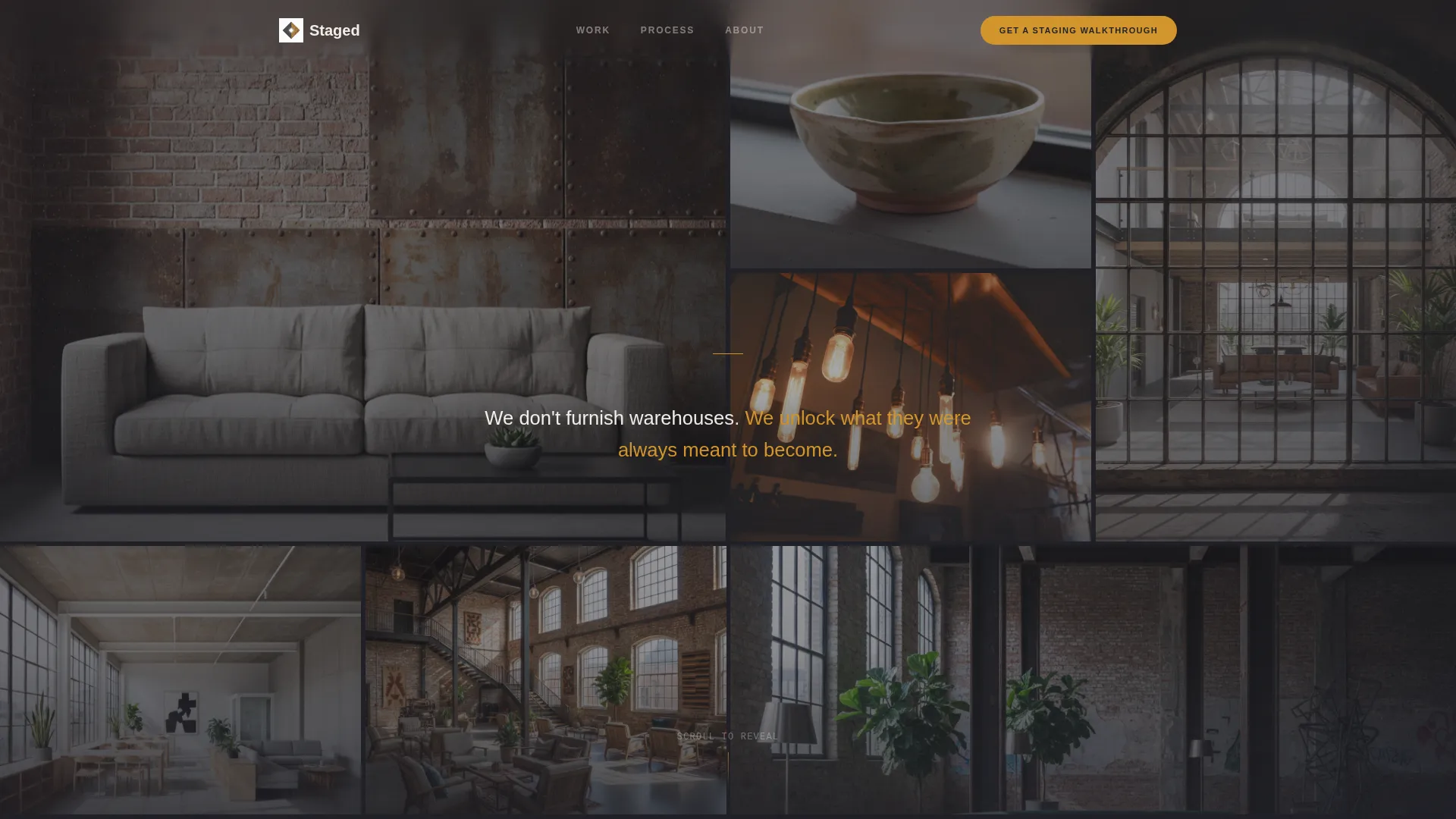
- A nine-image asymmetric Photo Grid Mosaic header with a staggered tile fade and a centered brand statement in kiln-white type
- A scroll-pinned before-and-after cross-dissolve reveal for three progressively larger warehouse projects, each separated by a floating charcoal statistic card showing days on market before and after staging
- A full-width lead-capture block with a property address field, square footage slider, listing status selector, and a date picker for scheduling a site visit, plus a secondary gated PDF lookbook path for email capture
Feature list
This template packages several distinct components, each serving a specific role in the visitor journey.
Asymmetric Photo Grid Mosaic Header
Nine tightly composed warehouse detail images load in a staggered left-to-right fade, tile by tile. No two images share the same color temperature or angle, giving the grid the feel of a curated editorial spread rather than a generic photo wall. A single line of kiln-white type is centered over the completed mosaic.
Scroll-Pinned Before and After Reveal
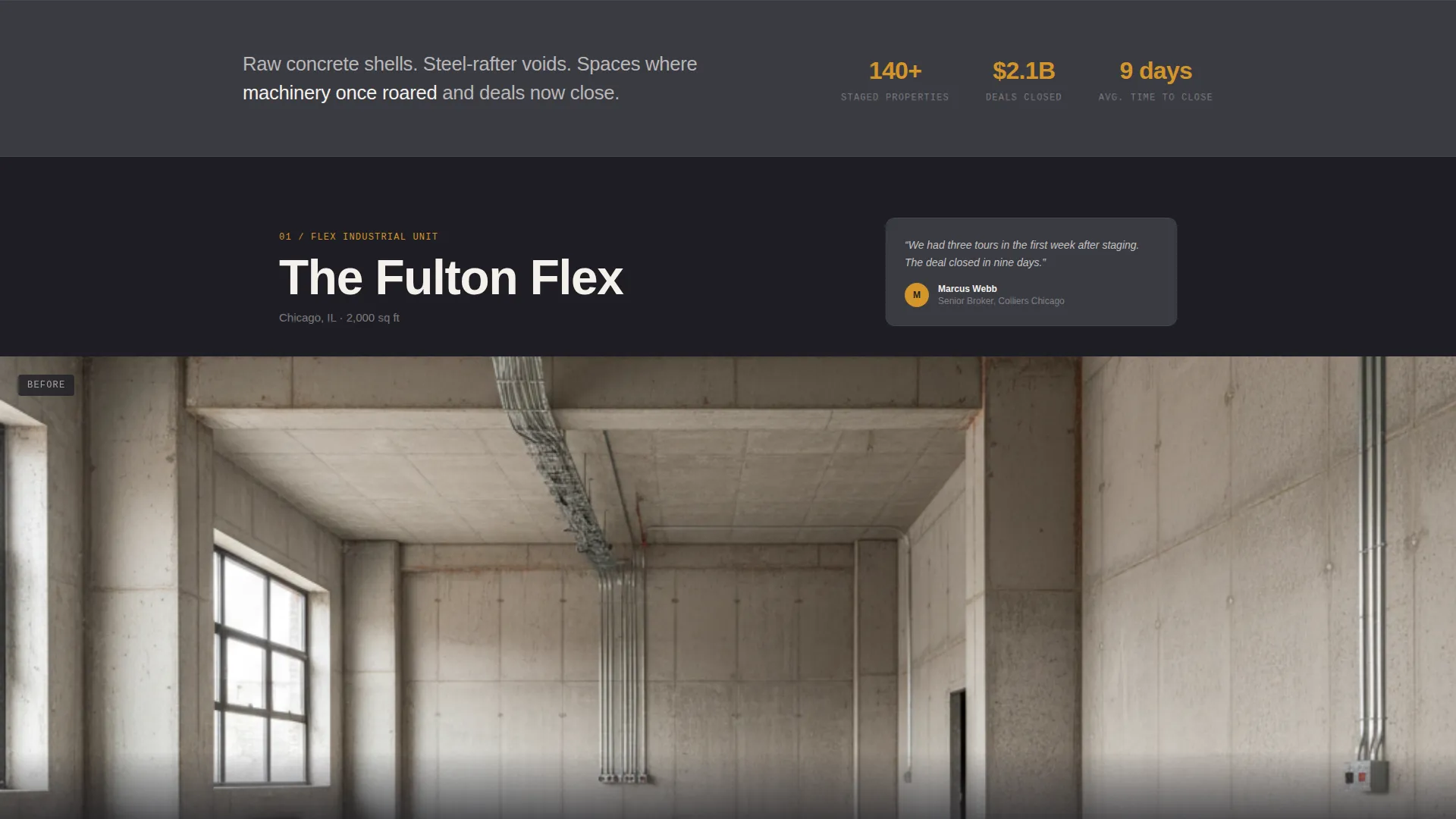
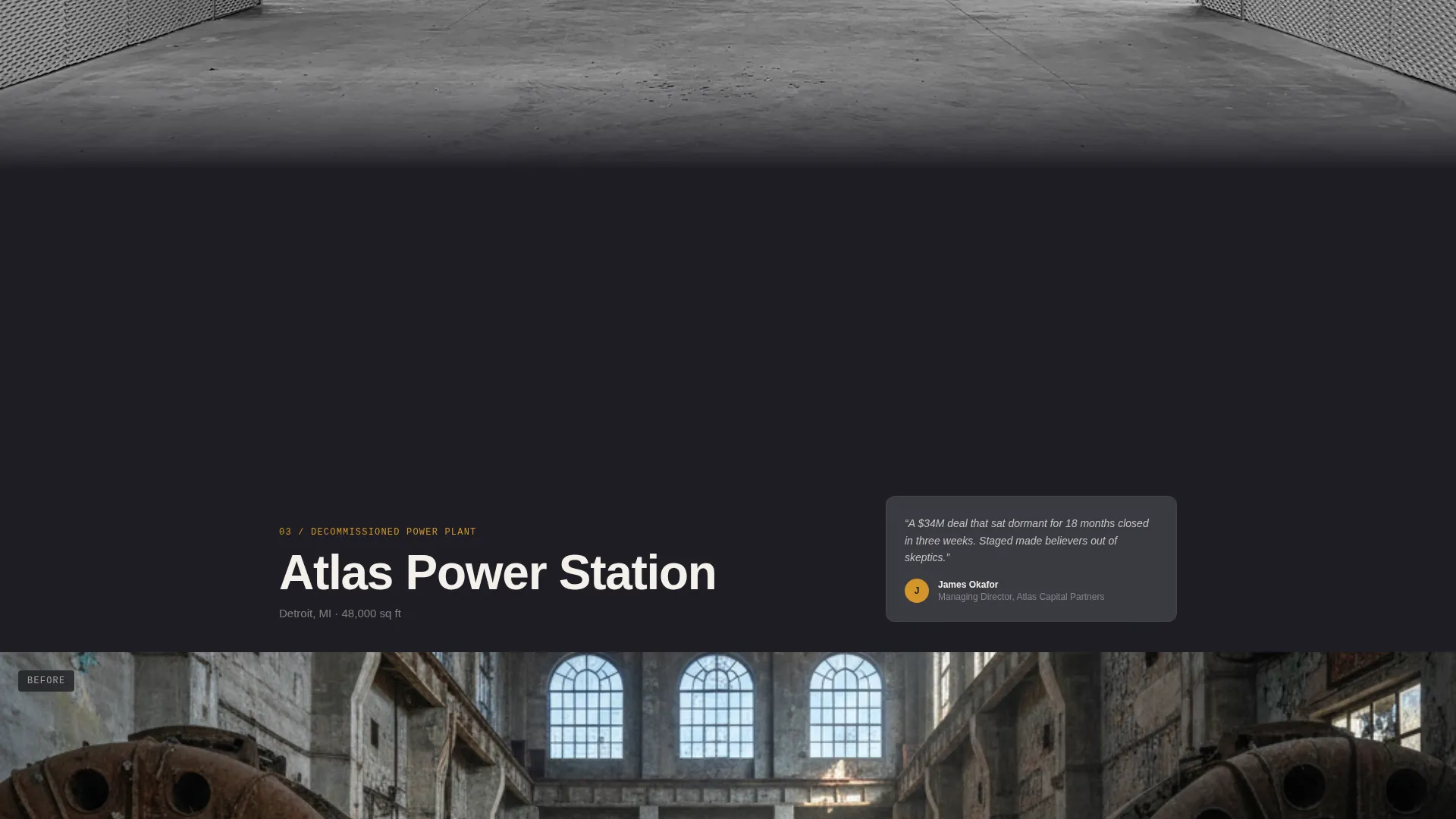
Each project section opens with a full-bleed photograph of a raw, empty warehouse interior. As the visitor scrolls, the image cross-dissolves into the staged result, with the transition pinned so the user physically controls the reveal. The mechanic makes the transformation feel earned rather than simply shown.
Floating Market Statistics Cards
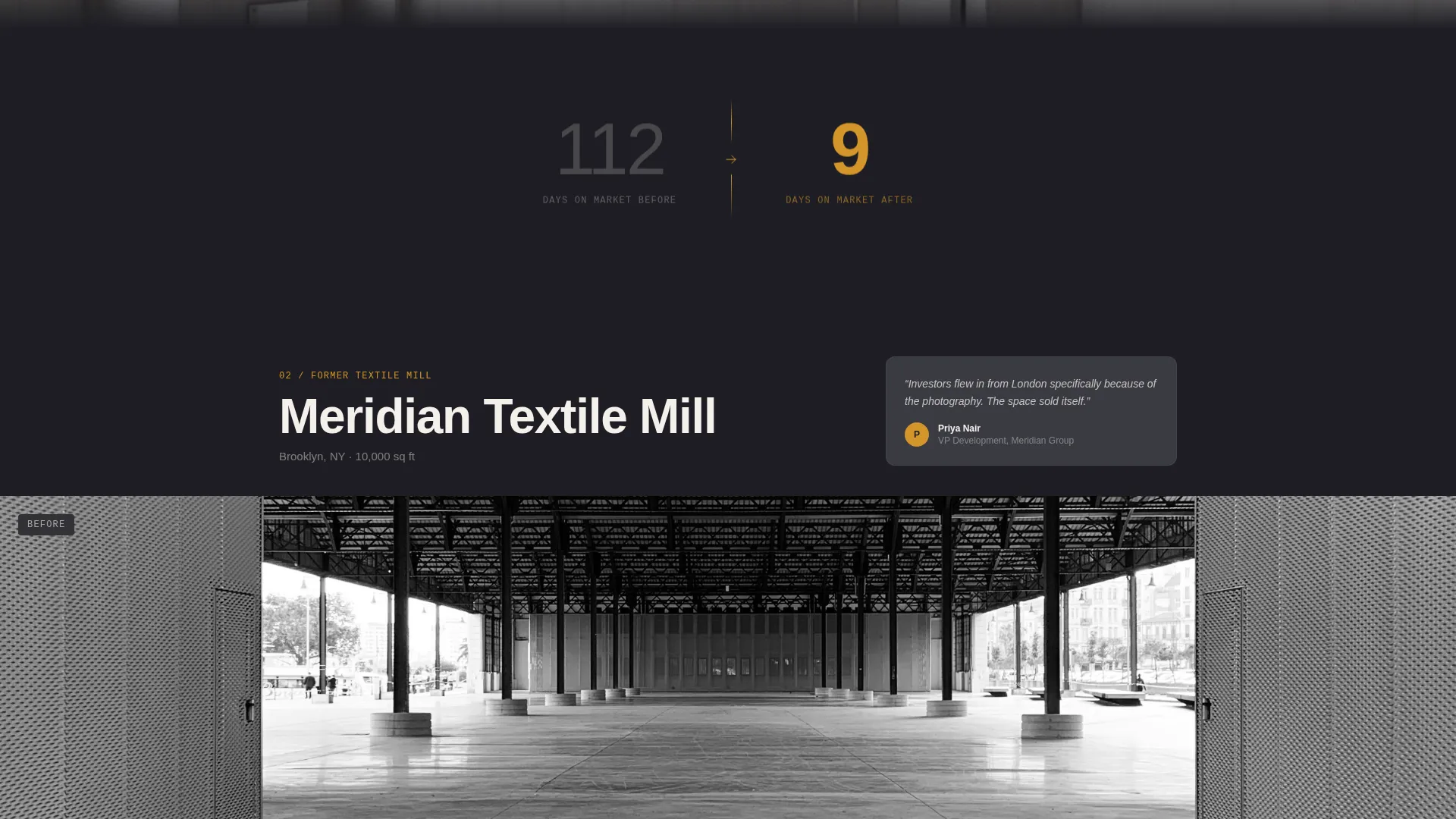
Between each project reveal, a single data point floats on a deep charcoal background: days on market before staging versus days on market after. The statistic is minimal by design so the number carries full visual weight without competing with the project images.
Persistent Amber Call-to-Action Pill
The primary call to action, "Get a Staging Walkthrough," appears as an amber pill in the top navigation and stays visible as the visitor scrolls. It then reappears as a full-width block after the third project reveal, giving two natural moments to convert.
Structured Lead Capture Form
The booking form collects four data points: property address, approximate square footage via a slider, listing status chosen from pre-market, active, or stale, and a preferred date for a site visit. This structure qualifies the lead before any conversation begins.
Gated PDF Lookbook Path
A secondary conversion option, "See the Full Portfolio," sits alongside the primary call to action. It gates a downloadable PDF lookbook behind a simple email capture, converting browsers who are not ready to book but want to share the work with their team.
Page sections overview
| Section | Purpose |
|---|---|
| Photo Grid Mosaic | Opens the page with nine composed warehouse details in a staggered fade |
| Brand Statement Line | Centers a single kiln-white headline over the completed grid |
| Project Reveal One | Before-and-after scroll dissolve for a 2,000-square-foot flex unit |
| Market Stat Card | Floats days-on-market comparison between first and second project |
| Project Reveal Two | Before-and-after scroll dissolve for a 10,000-square-foot former textile mill |
| Market Stat Card | Floats days-on-market comparison between second and third project |
| Project Reveal Three | Before-and-after scroll dissolve for a full city-block power station |
| Primary call to action Block | Full-width "Get a Staging Walkthrough" section after the third reveal |
| Lead Capture Form | Collects address, square footage, listing status, and site visit date |
| Lookbook Gate | Email capture for the downloadable PDF portfolio |
Design & branding system
The visual identity follows a Luxe Minimal direction built on an industrial palette that feels unexpectedly warm. Every color decision is intentional: charcoal grounds the page while amber guides the eye only to moments that matter.
- Primary backgrounds use deep forge charcoal (#1E1E24) and card surfaces use brushed graphite (#3A3A42), creating dimensional depth without noise
- Warm amber (#D4952A) appears exclusively on hover states, accent lines, and the call-to-action pill, so it reads as a signal rather than decoration
- Kiln white (#F4F0EB) handles all body type and negative space, keeping text warm and easy to read against the dark field
Mobile & speed optimization
The template is designed so that its most demanding visual mechanics remain usable on smaller screens. The scroll-pinned reveal and staggered grid are both core to the experience and have been considered at the layout stage.
- The Photo Grid Mosaic adapts its asymmetric arrangement to narrower viewports so the staggered fade sequence remains intact
- The scroll-pinned before-and-after dissolve is thumb-friendly by design, as the brief specifies that visitors control the reveal with their thumb
- The lead capture form uses a slider for square footage input rather than a free-text field, making mobile data entry faster and less error-prone
How this template helps you convert
The page is engineered around two conversion paths and one trust-building loop. Each element earns the next step rather than demanding it.
- The scroll-pinned before-and-after reveal, paired with floating days-on-market statistics, builds a credible business case visually before any form appears, reducing resistance at the booking step.
- The persistent amber call-to-action pill keeps "Get a Staging Walkthrough" reachable at every scroll depth, and the full-width repeat after the third project catch visitors at the moment their conviction peaks.
- The gated lookbook offers a low-commitment second path, capturing email addresses from researchers and team sharers who are not ready to book a walkthrough but are still qualified future leads.
Other information about this template
This template sits at the intersection of commercial real estate marketing and high-end spatial storytelling. A few additional points are worth knowing before you put it to use.
- The page type is a single landing page, not a multi-page site, so all navigation links scroll to sections rather than opening new pages
- The three featured project scales (2,000 square feet, 10,000 square feet, and a full city-block power station) are placeholder examples from the brief; your own project photography replaces them
- The PDF lookbook is a downloadable asset you supply; the template provides the gate and email capture mechanism around it
- The amber accent color is used sparingly by design; avoid adding it to decorative elements or it loses its signal value across the page
Theme
Executive Suite
Creative direction
Before/After Reveal
Color system
Dark Emerald
Style
Full-Width Immersive
Direction
Booking/Scheduling
Page Sections
Scroll-pinned Before and After Reveal
Nine-tile Asymmetric Photo Grid
Floating Market Statistics Cards
Persistent Amber Call to Action Pill
Structured Booking Lead Form
Gated PDF Lookbook Capture
Related questions
Who is this landing page template designed for?
Can I replace the example warehouse projects with my own work?
What does the lead capture form collect from visitors?
What is the gated lookbook feature?
Does the before-and-after scroll reveal work on mobile devices?



