Mountain Property Real Estate Booking Website Template
Staged is a single-page landing page template built for mountain property staging services. It uses a full-screen video hero, a scroll-driven asymmetric 60/40 grid of before-and-after project reveals, and a frictionless booking flow. The design is rooted in an Atelier Studio aesthetic with deep navy, hearthstone charcoal, snowfield white, and hammered brass accents.
by Rocket studio
Quick summary
Staged is a landing page template designed for alpine property staging services. It opens with slow drone-to-interior video footage and moves through progressive before-and-after project reveals in an asymmetric 60/40 grid. The booking section offers two clear paths: a full walkthrough form with a visual calendar, and a quick-quote upload flow for pressed-for-time agents.
Who this template is for
This template is built for staging professionals serving the luxury mountain real estate market. It speaks directly to the people who need a polished, evidence-led page to convert high-value clients.
- Mountain-town realtors listing second homes at or above one million dollars
- Vacation rental owners who want stronger reviews and better listing photography
- Developers holding spec chalets or alpine properties that need staged interiors before going to market
What problem this template solves
Empty alpine properties are hard to sell. Bare floors and cold light make it difficult for buyers to picture themselves inside. A staging service needs a page that proves its value quickly and moves serious clients toward a booking without friction.
- Realtors and developers need evidence, not just atmosphere, before committing to a staging engagement
- Without a focused booking flow, qualified leads leave the page before scheduling a consultation
- Generic real estate templates cannot carry the tonal weight or visual credibility a luxury staging brand requires
What you get with this template
You get a complete, single-page layout that handles atmosphere, proof, and conversion in one continuous scroll. Every section is purposefully sequenced to build confidence before asking for a commitment.
- A full-screen video hero with a headline fade-in and a primary call-to-action button
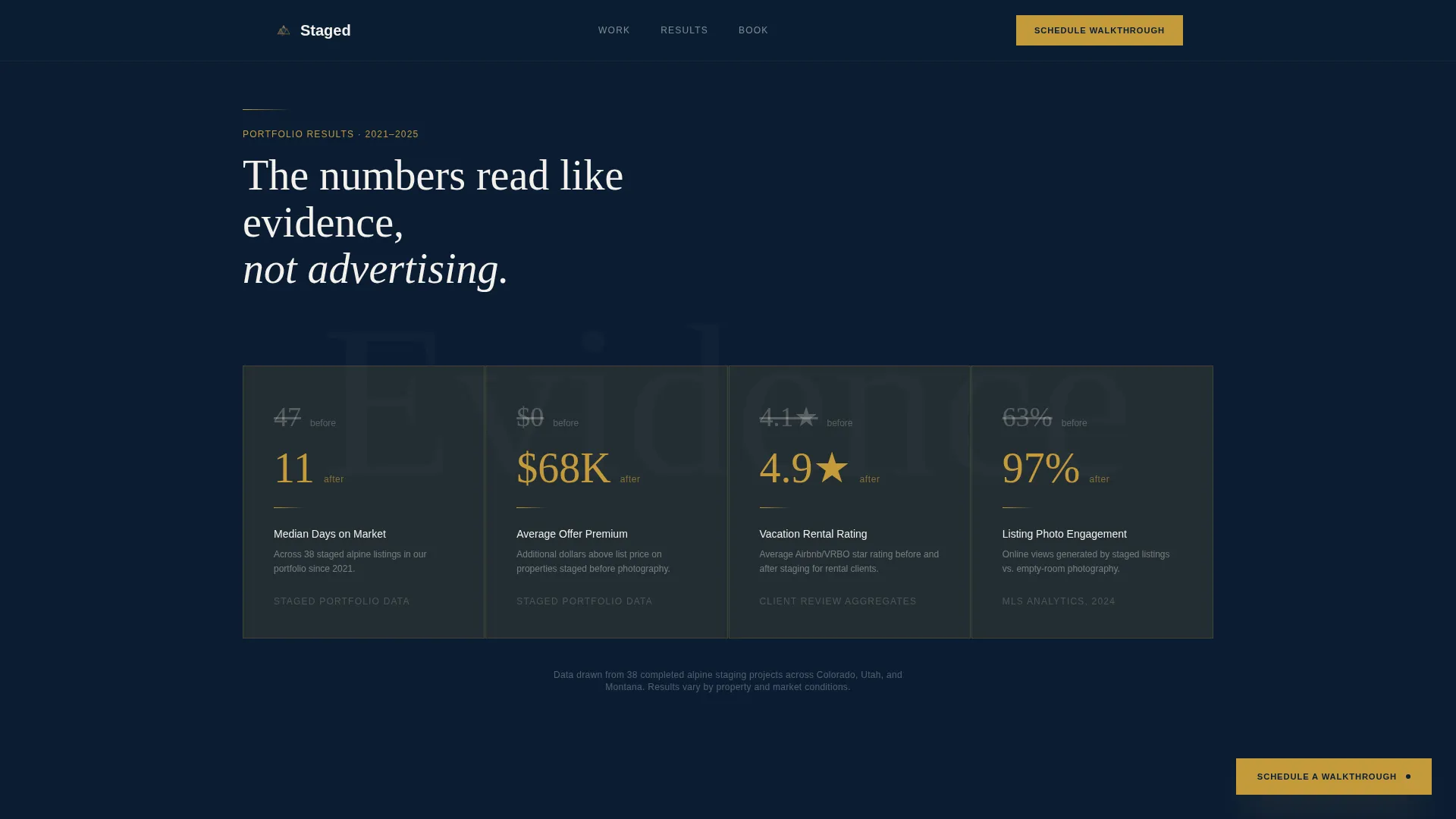
- A results section displaying days-on-market comparisons and dollar-uplift data from a staging portfolio
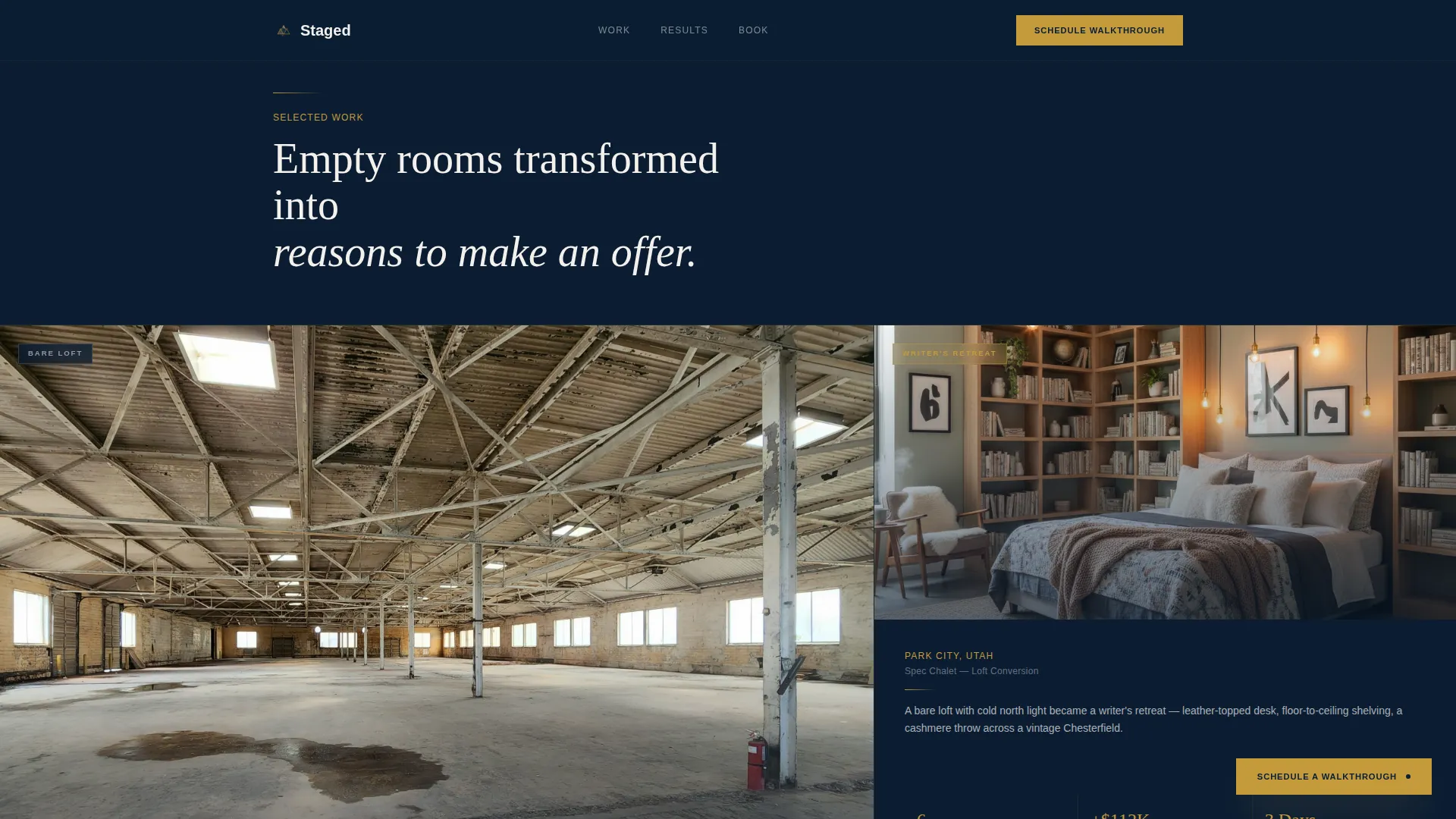
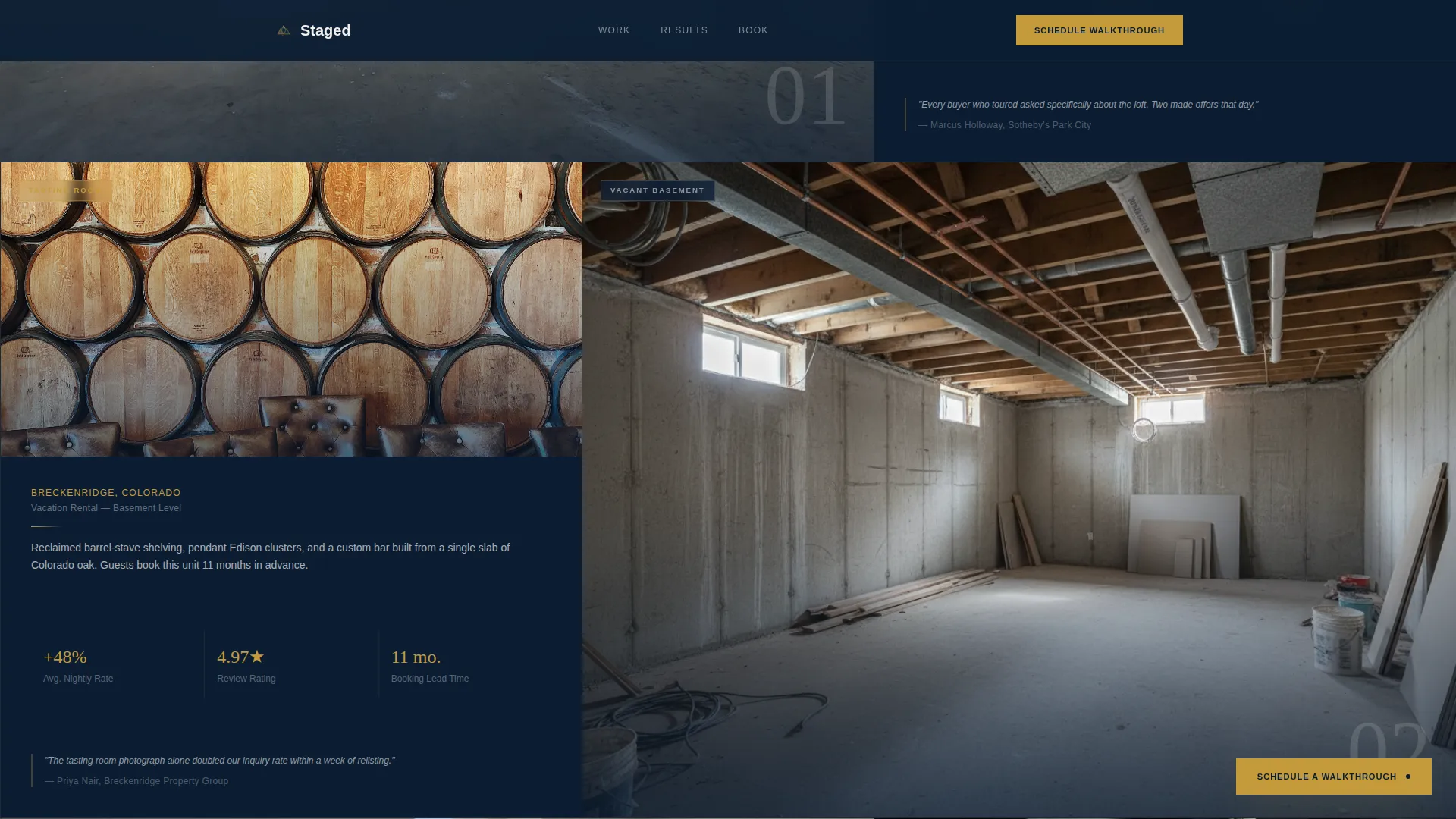
- A progressive before-and-after project grid, a dual-path booking section, and a fixed brass call-to-action button that appears after the third project reveal
Feature list
This template is built around a small set of focused, high-impact components. Each one earns its place in the page flow.
Full-Screen Video Hero
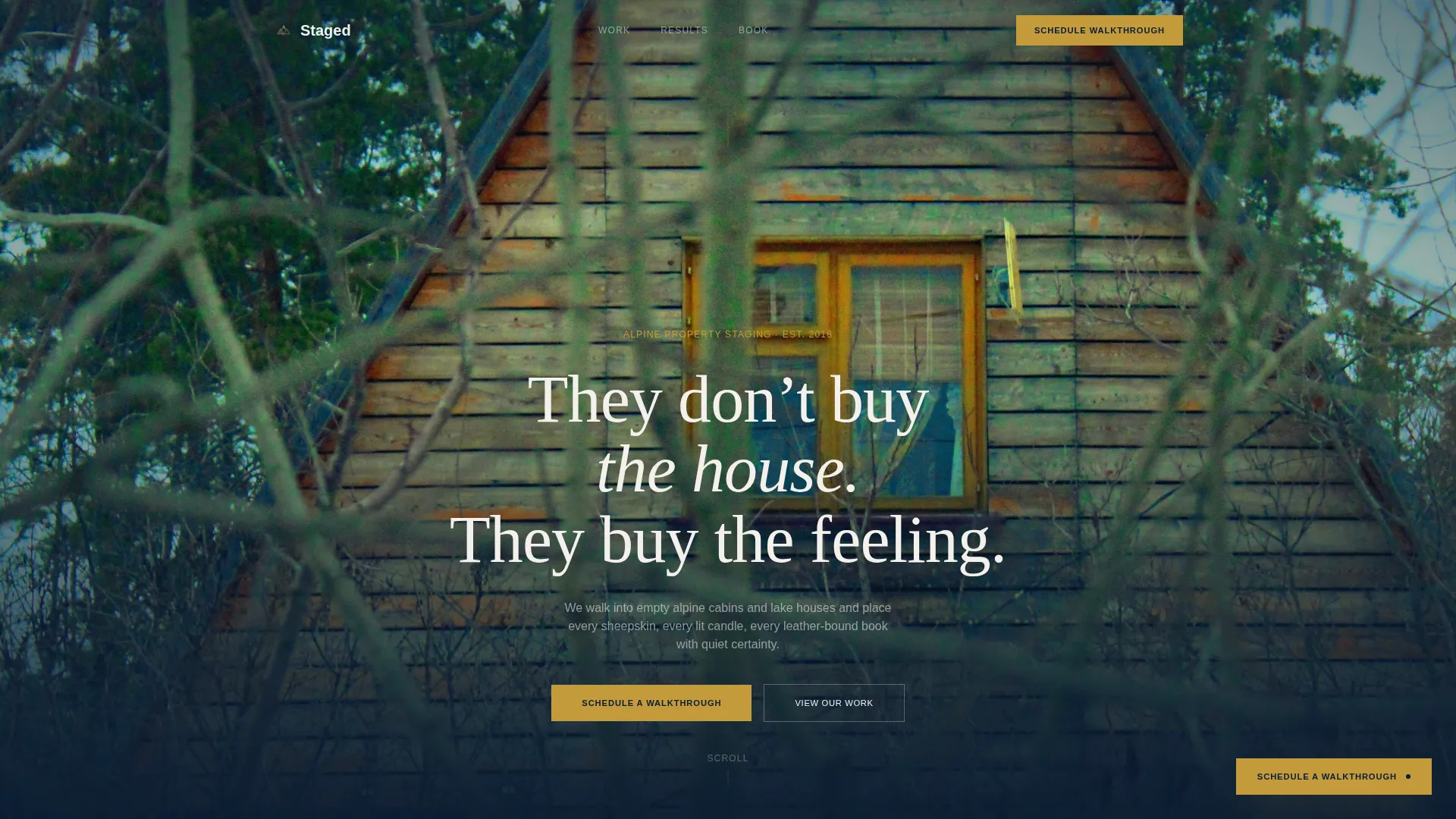
A slow, steady drone-to-interior video sequence opens the page. The footage moves from a wall of pines to a timber-and-glass A-frame interior before the headline fades in over the final frame. A video poster fallback is included for load reliability.
Asymmetric 60/40 Project Grid
Before-and-after project pairs are laid out in a 60/40 column grid. The larger panel holds the before image of the empty room. The narrower panel stacks the after image with project detail copy. Reveals become progressively more dramatic as the visitor scrolls, building a cumulative case for staging.
Scroll-Linked Animation System
GSAP scroll triggers drive staggered fade-ins and the before-and-after reveal sequence. Each section breathes at its own pace, keeping the scroll hypnotic without feeling busy or rushed.
Dual-Path Booking Section
The primary booking path presents a form asking for property address, square footage range, listing date, and a preferred walkthrough window chosen from a visual calendar. The secondary path lets agents upload listing photos and receive a staging scope within 24 hours.
Portfolio Evidence Display
Days-on-market data before and after staging is presented in clean navy type alongside dollar-value uplift figures drawn from the firm's own portfolio. The numbers are formatted to read like evidence, not marketing copy.
Fixed Brass Call-to-Action Button
After the third project reveal, a fixed brass-colored button appears and remains visible during continued scroll. It keeps the primary booking action accessible at every point in the lower page without interrupting the reading experience.
Page sections overview
| Section | Purpose |
|---|---|
| Video Hero | Open with cinematic drone-to-interior footage and headline |
| Results Evidence | Display portfolio days-on-market and dollar uplift data |
| Before/After Grid | Reveal progressive project transformations in 60/40 layout |
| Booking Form | Collect walkthrough details via form and visual calendar |
| Quick Quote Path | Let agents upload photos for a 24-hour staging scope |
| Fixed call to action Button | Keep booking action visible after third project reveal |
| Footer | Anchor with logo, tagline, and navigation links |
Design & branding system
The visual identity follows an Atelier Studio direction. The palette feels like a private design studio set above a ski village, with dark wool walls, brass task lamps, and linen mood boards.
- Deep alpine navy (#0B1D33) dominates backgrounds and section breaks; hearthstone charcoal (#2C3038) carries body text; snowfield white (#F4F1EC) opens breathing room in the wider 60% content panels
- Hammered brass (#C49A3C) appears only on buttons, divider lines, and hover states, keeping every flash of it intentional
- Typography pairs Fraunces serif headlines with DM Sans for body copy and interface elements, balancing warmth with precision
Mobile & speed optimization
The template is designed desktop-first, reflecting the primary audience of realtors and developers reviewing properties on larger screens. It remains fully responsive for mobile viewports.
- Lazy-loaded images keep the project grid from slowing the initial page load
- The video hero includes a poster image fallback so the page opens cleanly even before the video file loads
- Server Components handle static sections to reduce unnecessary client-side work during render
How this template helps you convert
Every design and copy decision in this template is sequenced to move a skeptical buyer toward a confirmed booking.
- The video hero establishes emotional credibility in the first few seconds, before a single word of service copy appears, anchoring the visitor in the feeling of a staged space rather than a sales pitch.
- The portfolio evidence section presents days-on-market comparisons and dollar-uplift figures in a format that reads like data, not decoration, giving realtors and developers the financial justification they need to move forward.
- The dual-path booking section removes the single biggest friction point for busy agents by offering both a full scheduling form and a fast photo-upload quote path, so no qualified lead leaves without a next step.
Other information about this template
This template is part of a broader set of intersection-matched designs built for the mountain real estate market. A few additional details are worth noting before you build.
- The footer follows an Arc Browser Split pattern: logo and tagline sit on the left, navigation links align to the right, maintaining the asymmetric rhythm of the full page layout
- The fixed brass call-to-action button is timed to appear after the third project reveal, giving the visitor enough visual evidence before the persistent booking prompt becomes visible
- The western United States mountain-town context (think Aspen, Tahoe, and Park City aesthetics) informed the copy tone, color warmth, and material references throughout the template
- The intersection match score for this template in the mountain property staging service niche is 13, indicating a tightly scoped fit between the visual system and the target use case
Theme
Atelier Studio
Creative direction
Immersive Visual
Color system
Navy Authority
Style
Asymmetric Grid (60/40)
Direction
Booking/Scheduling
Page Sections
Full-screen Video Hero with Fallback
Asymmetric 60/40 Before-and-after Grid
Scroll-linked GSAP Animation System
Dual-path Booking Section
Portfolio Evidence Display
Fixed Brass Call-to-action Button
Related questions
Who is this landing page template designed for?
What booking functionality is included in this template?
Can I use this template without drone or interior video footage?
How does the before-and-after grid work in this template?
Is this template suitable for a single staging project or a full portfolio?



