Expert Manufacturing Processes Professional Website Template
Stamp is a hub-and-spoke landing page template built for deep drawing service providers. It guides procurement engineers, project managers, and quality directors through a transparent process journey, from tooling design to finished shell, using a charcoal-and-amber visual identity, a before-and-after header, anchor navigation, and gated resource calls to action designed to earn qualified leads.
by Rocket studio
Quick summary
Stamp is a single-page, anchor-navigated landing page template for deep drawing manufacturers. It combines a case study before-and-after header, a process-education spine, and a content gating strategy that converts engineers into leads. The design feels like a well-lit metrology lab, serious, precise, and built for buyers who already know what they need.
Who this template is for
This template is designed for manufacturers who run hydraulic deep drawing operations and need to win trust with technically demanding buyers. It speaks directly to industrial audiences who make specification-level decisions.
- Procurement engineers sourcing battery enclosures for electric vehicle production lines
- Project managers at HVAC manufacturers working to a twelve-week deadline for compressor housings
- Quality directors at aerospace sub-tiers who require production part approval documentation before booking a call
What problem this template solves
Most manufacturing service pages describe capabilities in vague, brochure-style language. They tell buyers what the shop does without showing how it works. That gap kills trust with engineers who evaluate suppliers on process transparency.
- Engineers arrive with specific questions about tolerances, material formability, and draw stages but find no useful answers
- Procurement teams need to justify supplier selection internally, which requires documented process detail, not just a phone number
- Quality-focused buyers will not engage with a supplier who cannot demonstrate rigor before the first conversation
What you get with this template
You get a fully structured, single-page layout that turns a deep drawing service into an educational experience buyers want to complete. Every section is designed to show exactly what happens inside the die, so qualified leads arrive already informed.
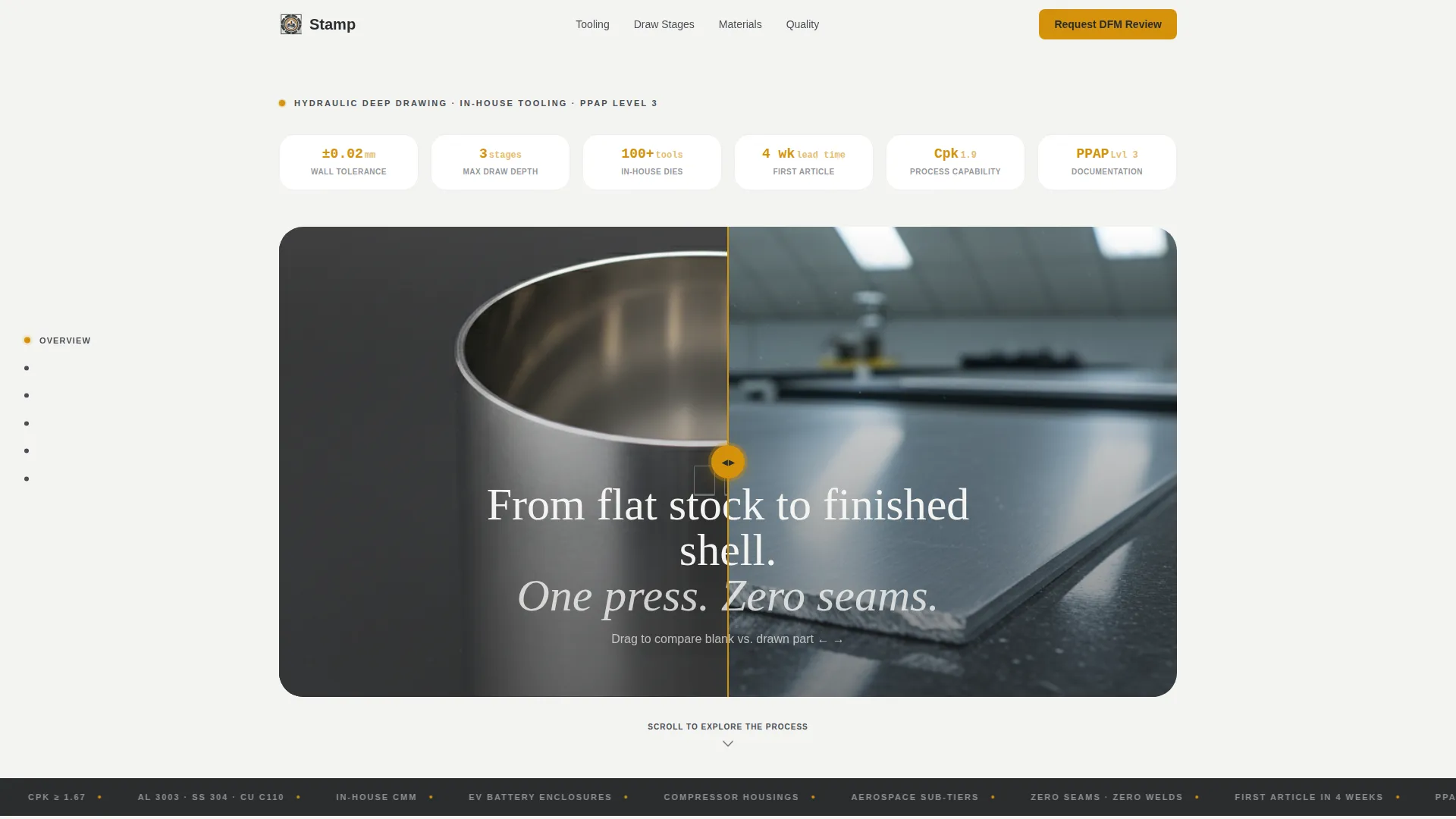
- A before-and-after header with a drag slider comparing a flat aluminum blank to the finished drawn part
- A locked anchor navigation rail covering Tooling, Draw Stages, Materials, and Quality process chapters
- Two conversion paths: a gated Deep Draw Design Guide download and an Upload Your Part Print for DFM Review file dropzone
Feature list
This template is built around one principle: show the process, earn the lead. Every feature below serves that goal directly.
Before-and-After Header Slider
The header presents a split-frame comparison between a raw-sheared aluminum blank and the finished cylindrical shell. A subtle drag slider lets visitors move between the two states. The headline fades in over the transition: "From flat stock to finished shell. One press. Zero seams." The lighting mimics a real quality-control photograph, overhead fluorescent with a warm key light, not stock imagery.
Anchor Navigation Rail
A hub-and-spoke navigation bar locks to the left rail as the visitor scrolls. Spoke labels, Tooling, Draw Stages, Materials, and Quality, act as chapter anchors. This structure lets engineers jump directly to the section most relevant to their evaluation stage without losing their place in the overall process flow.
Transparent Process Chapters
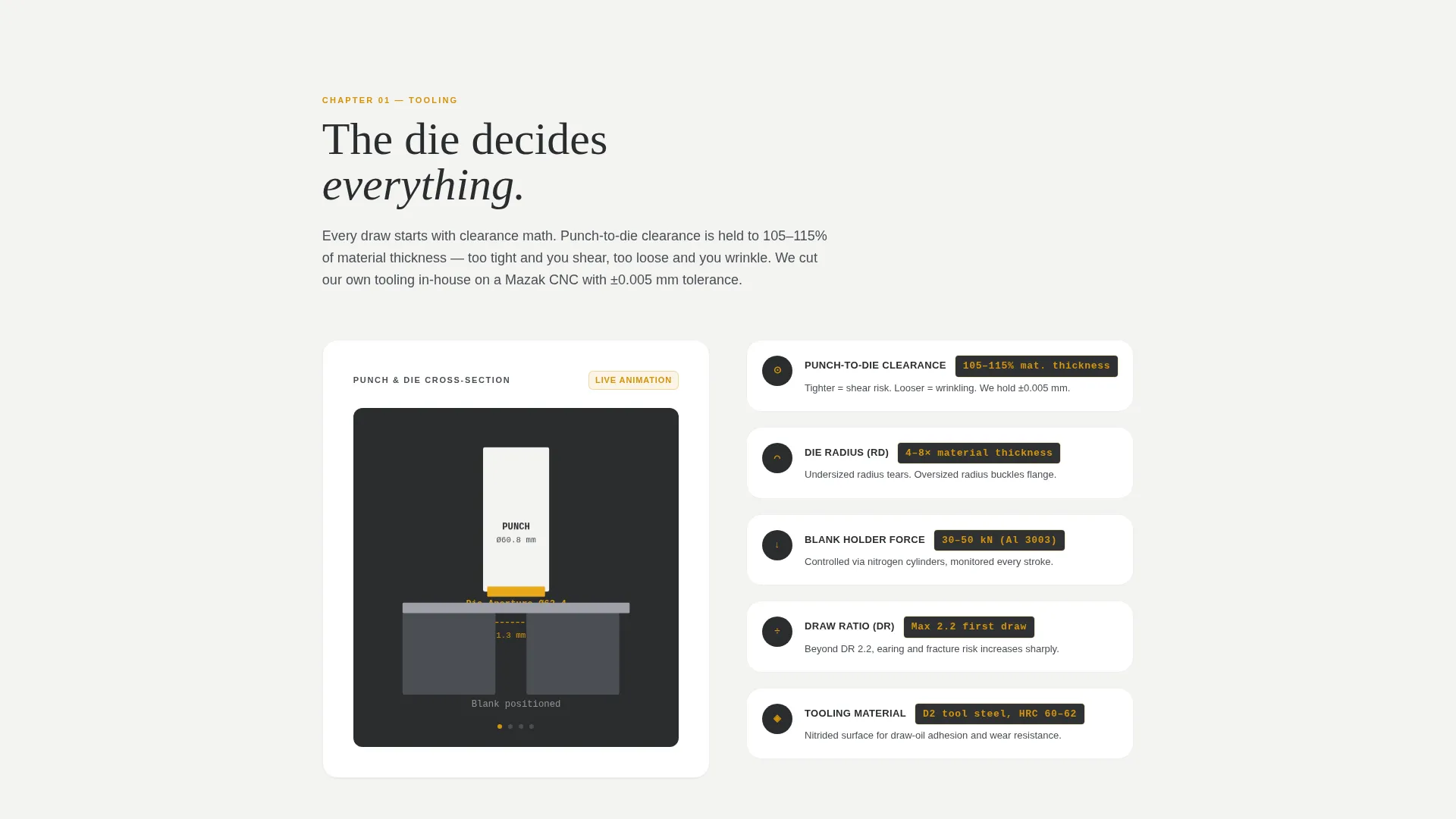
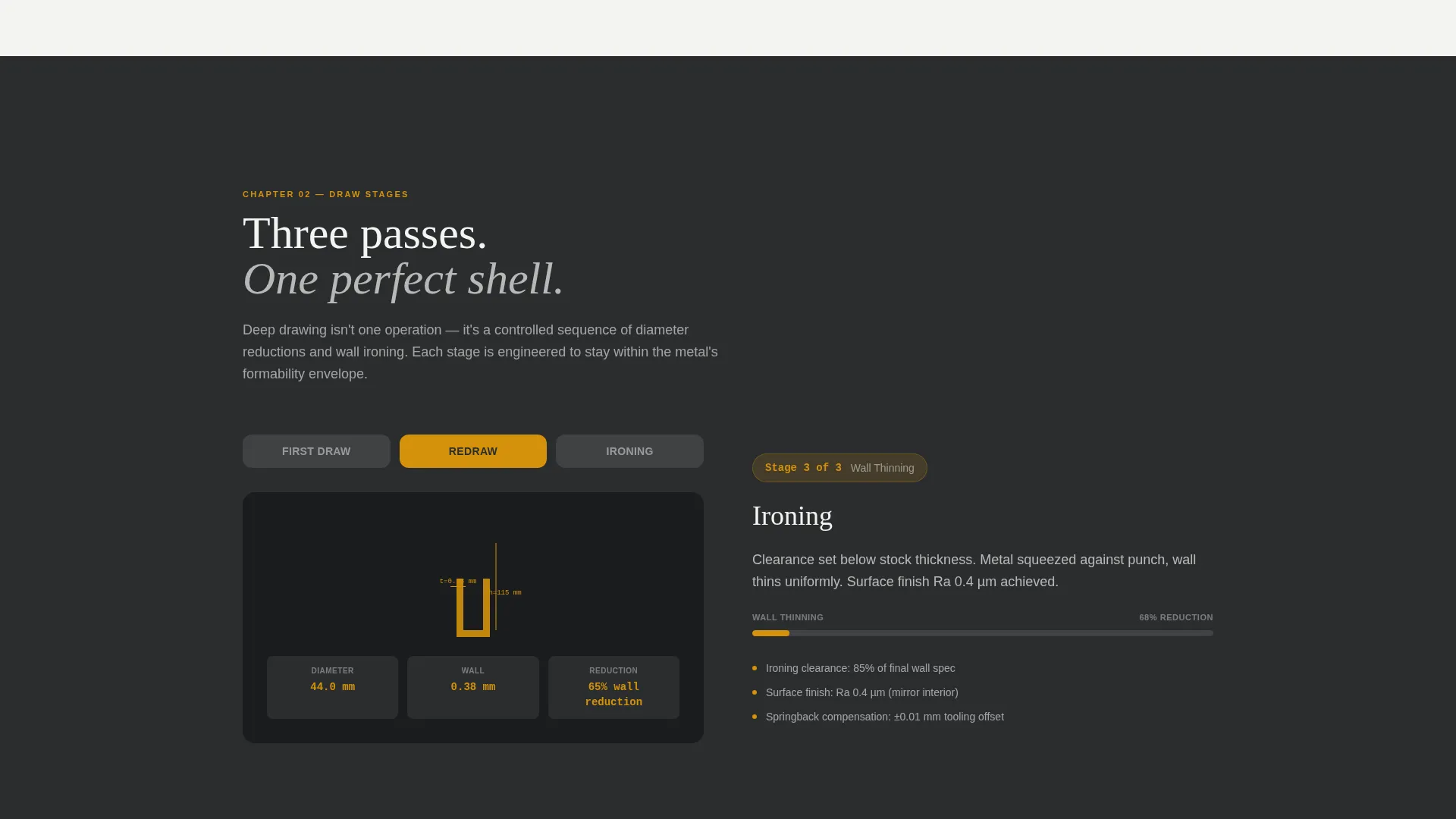
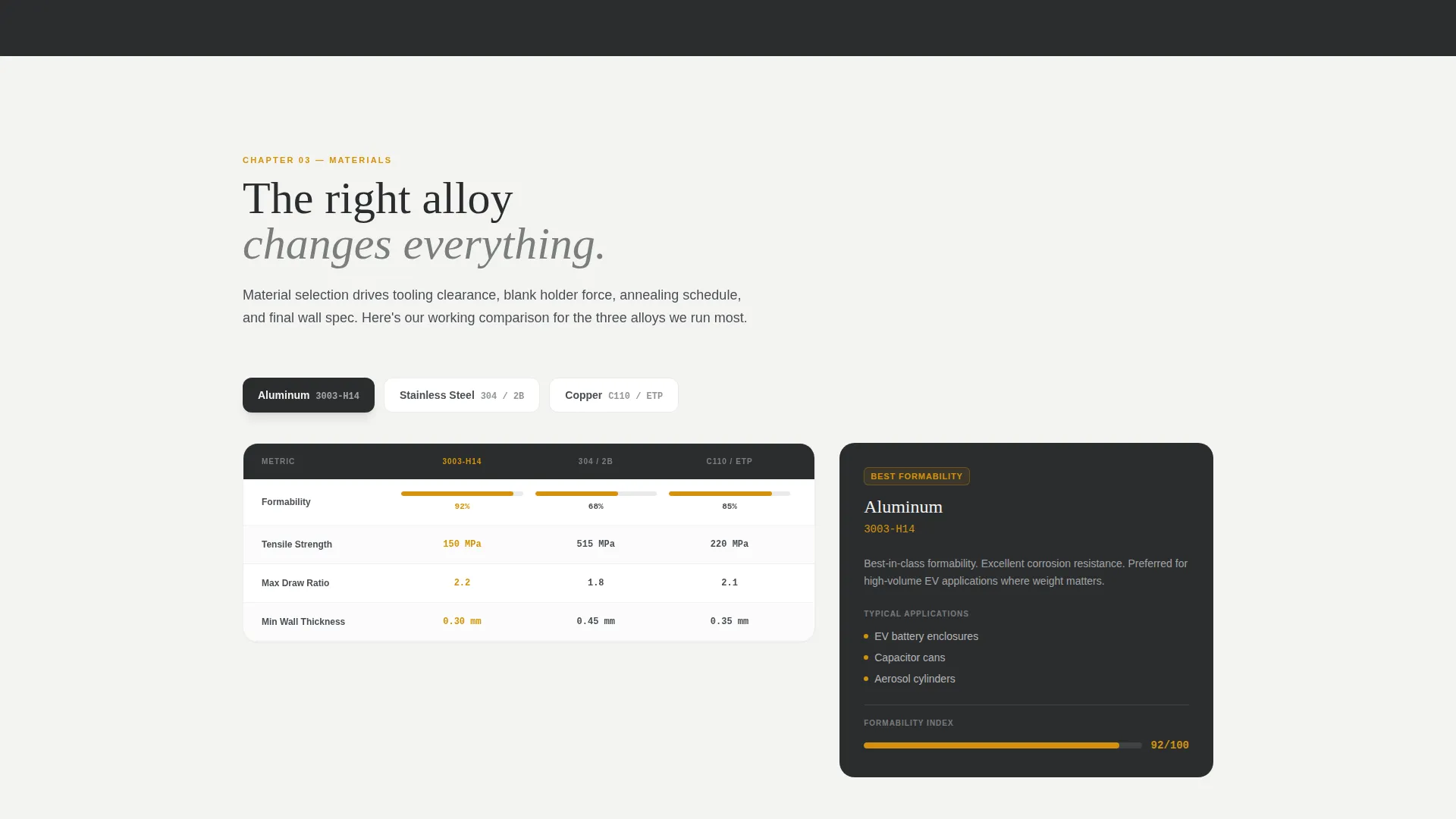
Each navigation spoke opens into a dedicated process chapter. Tooling shows a cross-section animation of punch-and-die clearance. Draw Stages walks through first draw, redraw, and ironing with annotated wall-thinning diagrams. Materials presents a comparison table of aluminum 3003 versus stainless 304 versus copper C110, with formability ratings and typical applications listed for each.
Gated Design Guide with Blurred Preview
The primary conversion point offers a downloadable Deep Draw Design Guide behind a two-field form: work email and a part category dropdown covering cylindrical, rectangular, and irregular parts. Specific guide content, a wall-thickness-to-diameter ratio chart and a material selection flowchart, is visible but blurred below the form, so engineers can see the value before committing their email address.
DFM Review File Dropzone
A secondary conversion path lets visitors upload a part print directly for a design-for-manufacturability review. The dropzone accepts STEP, DXF, and PDF file formats. This path captures buyers who are further along in their evaluation and want a direct technical response rather than a downloadable resource.
Charcoal-and-Amber Visual System
The color palette uses shop-floor charcoal, tool-steel gunmetal, and clean-room white as the base, with draw-oil amber reserved for anchor navigation highlights, call-to-action buttons, and tolerance callouts. The result is a matte, serious visual tone that feels appropriate to a precision manufacturing environment, with amber used sparingly to guide the eye toward action.
Page sections overview
| Section | Purpose |
|---|---|
| Before/After Header | Drag slider comparing flat blank to finished drawn shell, with headline overlay |
| Anchor Nav Rail | Locked left-rail hub linking to Tooling, Draw Stages, Materials, Quality chapters |
| Tooling Chapter | Cross-section animation of punch and die clearance with process explanation |
| Draw Stages Chapter | Annotated diagrams of first draw, redraw, and ironing with wall-thinning callouts |
| Materials Comparison | Table comparing aluminum 3003, stainless 304, and copper C110 on formability |
| Quality Chapter | Process documentation context for inspection and approval requirements |
| Design Guide Gate | Two-field form with blurred preview of ratio chart and material flowchart |
| DFM Upload Dropzone | File upload path for STEP, DXF, and PDF part prints for review |
Design & branding system
The visual identity follows a Service Utility theme built for a precision manufacturing context. Every color choice and layout decision reinforces the feeling of a well-run production environment where nothing is improvised.
- Base palette: shop-floor charcoal (#2B2D2F), tool-steel gunmetal (#4A4E54), and clean-room white (#F4F4F2) for all structural elements
- Accent palette: draw-oil amber (#D4920B) used exclusively on anchor navigation highlights, call-to-action buttons, and tolerance callouts
- Photography direction: overhead fluorescent lighting with a single warm key light, modeled on real quality-control documentation photography, with no stock imagery
Mobile & speed optimization
The template layout is structured to remain functional and legible across screen sizes. The anchor navigation and process chapters are the most layout-sensitive components, and both are designed with responsive behavior in mind.
- The anchor navigation rail adapts from a fixed left-rail layout on desktop to a scrollable top-bar treatment on smaller screens
- The before-and-after slider interaction is touch-compatible, allowing mobile visitors to drag between the blank and the finished part
- Process chapter diagrams and the materials comparison table are designed to reflow cleanly at narrower viewport widths
How this template helps you convert
This template is built around a content-first conversion strategy. It earns engagement before asking for anything, which is the correct approach for a technically demanding B2B audience.
- The before-and-after header and process chapter sequence establish credibility immediately. Engineers who scroll through the full process tour arrive at the conversion point already convinced the supplier understands precision manufacturing.
- The blurred guide preview creates genuine curiosity without being manipulative. Buyers can see a wall-thickness-to-diameter ratio chart and a material selection flowchart are waiting for them. That preview makes the two-field form feel like a fair trade.
- The DFM review dropzone captures a second buyer segment. Visitors who have a part print ready and want a direct technical response are not forced through a resource-download flow they do not need.
Other information about this template
This template is categorized under Manufacturing and Industrial, specifically within the Manufacturing Processes subcategory. It is built for the deep drawing service provider niche, where the sales cycle is long and the buyer is technically sophisticated.
- The intersection match between the hub-and-spoke template style, the Transparent Process creative direction, the Content/Resource landing-page direction, and the Case Study Before/After header concept produces a cohesive experience that serves both early-stage researchers and late-stage evaluators
- The template style is Hub and Spoke with Anchor Navigation, which means every process chapter is reachable from a persistent navigation element without requiring a page reload or a separate URL
- The Charcoal and Amber color system is the designated palette for this matched intersection, chosen specifically to reflect the visual language of precision stamping and metrology environments
Theme
Service Utility
Creative direction
Transparent Process
Color system
Charcoal & Amber
Style
Hub & Spoke (Anchor Nav)
Direction
Content/Resource
Page Sections
Before-and-after Header Slider
Locked Anchor Navigation Rail
Transparent Process Chapter Sequence
Gated Design Guide with Blurred Preview
DFM Review File Dropzone
Charcoal-and-amber Color System
Related questions
Who is this template designed for?
What are the two conversion paths included in this template?
What does the blurred guide preview show visitors?
How does the anchor navigation work on this page?
Can the materials comparison table be updated for different alloys?



