Tool & Die Making Advanced Professional Website Template
Stamped is a single-column landing page template built for progressive die manufacturers targeting automotive tier-one suppliers, appliance OEMs, and contract manufacturers. It leads with a credential logo bar, drives home a direct lead-time challenge, and moves visitors through a row-by-row competitor comparison before closing with a print-submission form and a gated capabilities deck download.
by Rocket studio
Quick summary
Stamped is a precision-focused landing page template for progressive die manufacturers. It opens with a certification and client logo bar, delivers an immediate lead-time challenge in knockout type, and walks visitors through a structured competitor comparison. Three "Send Us the Print" calls to action and an annotated die strip diagram prove engineering depth at every scroll stage.
Who this template is for
This template is built for die makers who win business by proving capability, not just listing it. It speaks directly to manufacturers who serve demanding industrial buyers and need a page that earns trust before asking for a quote.
- Progressive die manufacturers targeting automotive tier-one suppliers under tight Production Part Approval Process (PPAP) deadlines
- Die shops selling to appliance OEMs looking to replace vendors that miss print specifications
- Contract manufacturers who build tooling and also run production, offering a single-source solution
What problem this template solves
Most die shop websites look identical. They list the same services, show the same stock imagery, and give buyers no reason to choose one over another. This template fixes that by turning real capability differences into a visible, scrollable argument.
- Buyers cannot tell a capable die shop from an average one based on typical service-listing pages
- There is no structured way to contrast lead times, in-house equipment, and PPAP support against a competitor
- Visitors who are not ready to quote have nowhere to go, so qualified leads leave without engaging
What you get with this template
The template delivers a complete single-column landing page flow designed around comparison-led conversion. Every section has a defined job, and the layout guides the visitor from credential check to quote submission without a wasted scroll.
- A full Logo Bar header with client and certification marks, a competitor-versus comparison table with eight contrast rows, and three placed calls to action
- Atmospheric tool-room photography sections, an annotated progressive die strip layout diagram, and a dual conversion path combining a quote form and a gated capabilities deck download
- A Warm Stone color system, an Industrial Raw visual theme, and a Spatial and Architectural scroll structure that deepens with each section
Feature list
This template packs a focused set of conversion-ready components, each grounded in what a precision die manufacturer actually needs to close a qualified buyer.
Logo Bar Credential Header
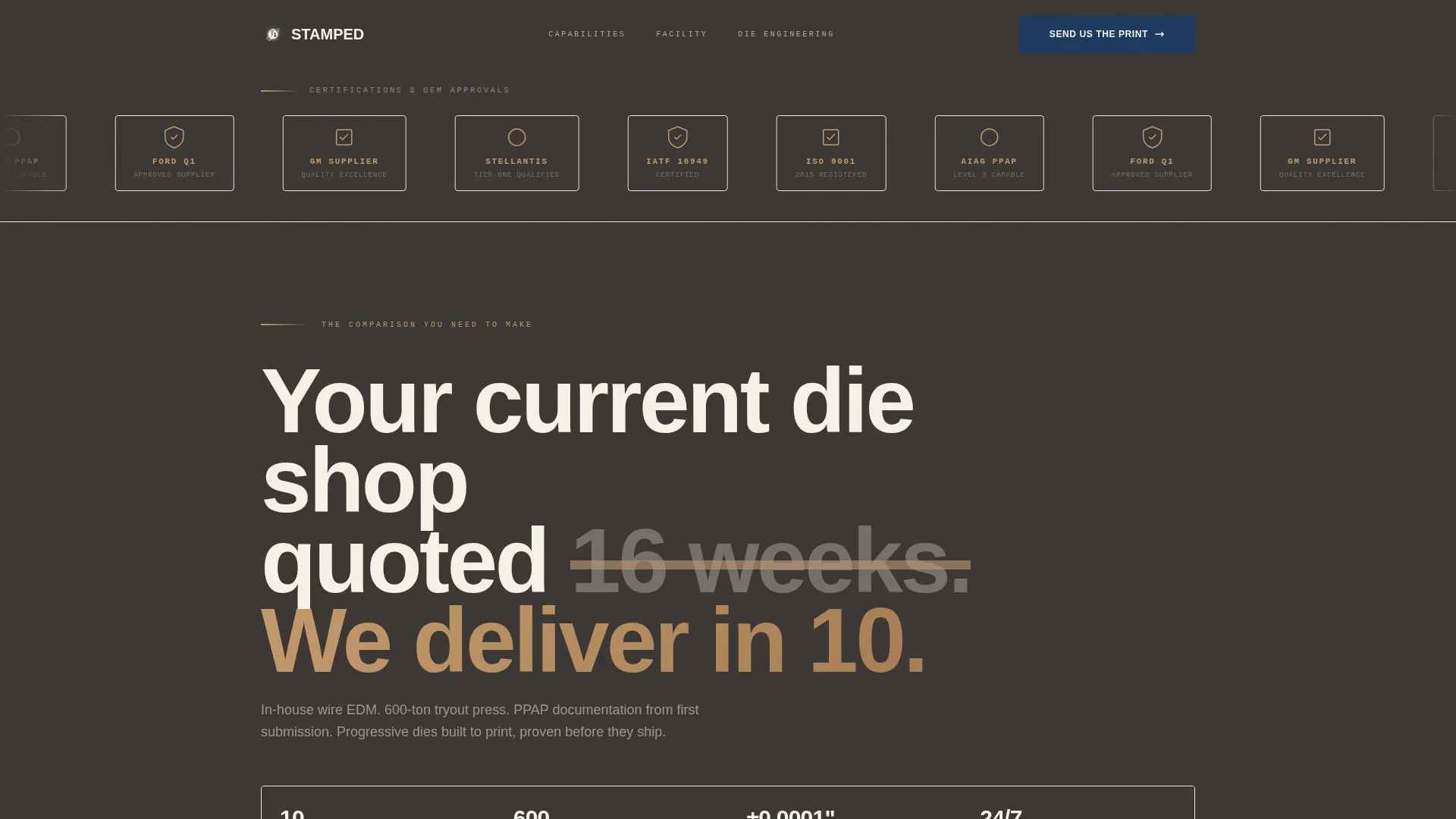
The page opens with a horizontal ribbon of client and certification logos, including IATF 16949 and ISO 9001 marks, rendered in monochrome mill scale amber on forged graphite. No hero image competes. The logos carry the credibility on their own.
Eight-Row Competitor Comparison Table
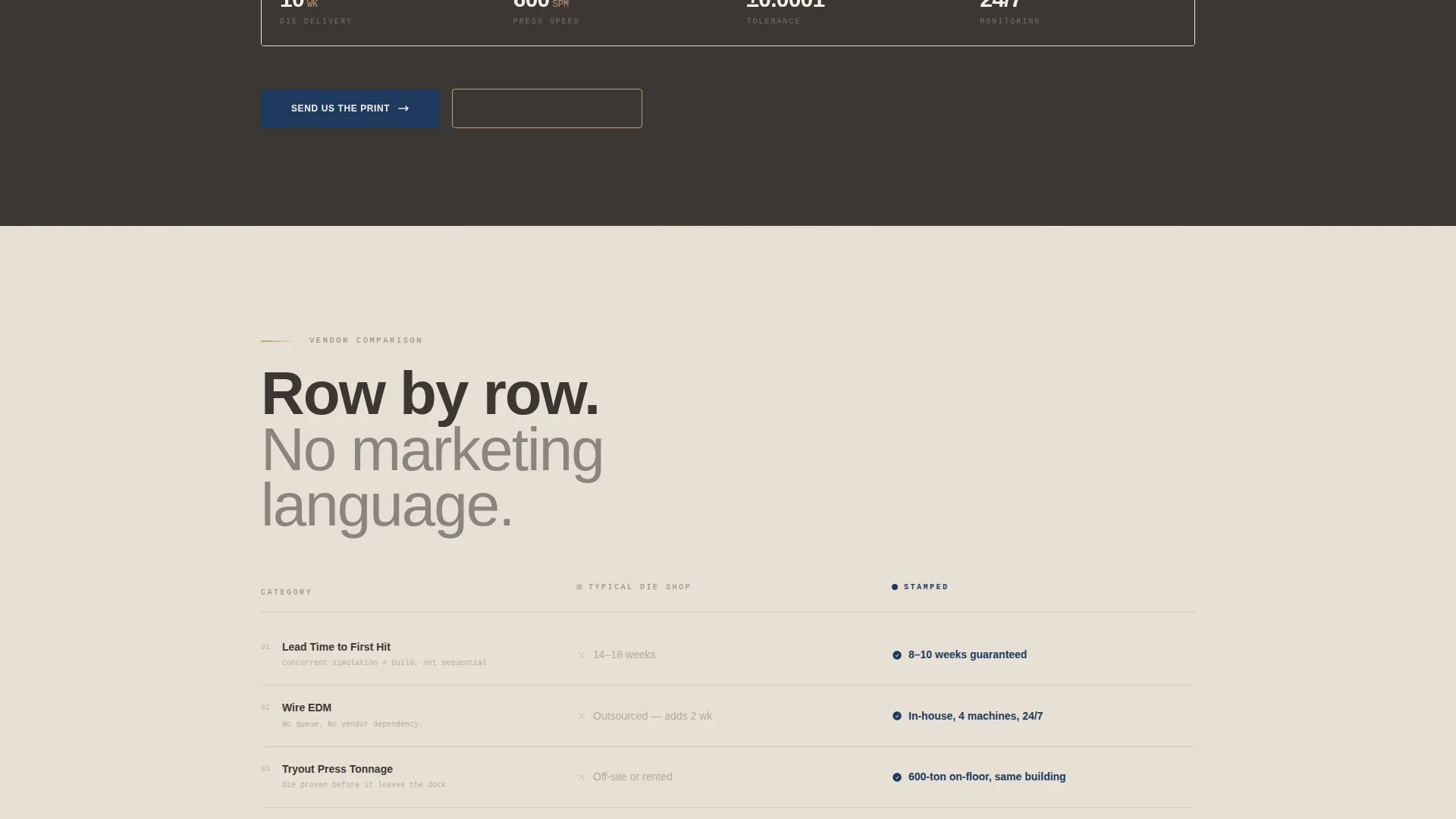
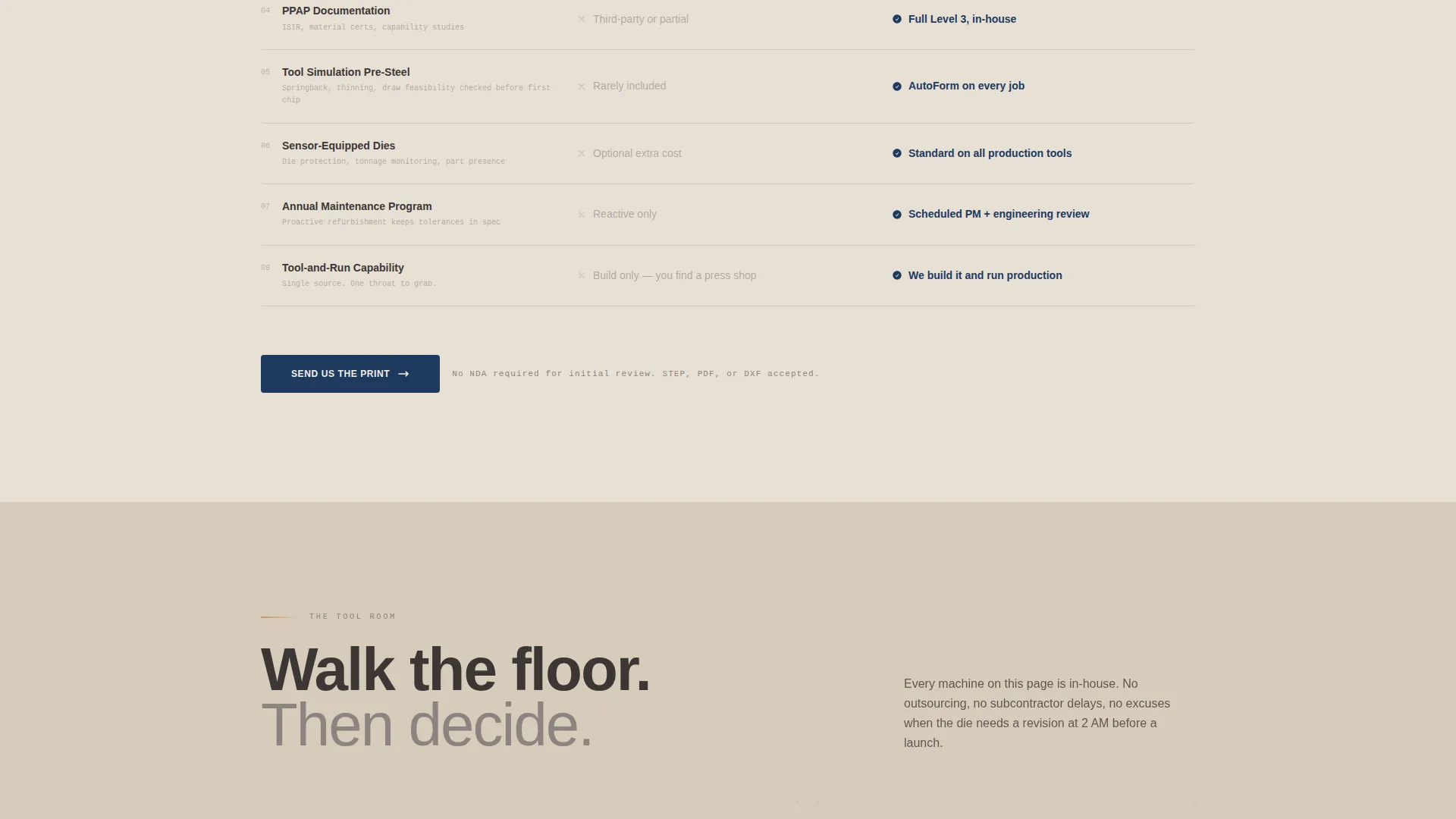
A side-by-side column layout contrasts a typical die shop against this manufacturer across eight rows: lead time, in-house wire EDM, tryout press tonnage, PPAP documentation, tool simulation before steel is cut, sensor-equipped dies, annual maintenance programs, and single-source capability. The "Us" column reveals specifics in torch blue while the competitor column stays muted.
Annotated Die Strip Diagram
The terminal section features a progressive die strip layout diagram annotated station by station. It shows the sequence of forming operations in a way that communicates engineering precision without requiring a word of explanation.
Dual Conversion Path Design
Visitors ready to quote see the "Send Us the Print" call to action three times throughout the page. Visitors not yet ready to quote can download a capabilities deck gated behind email only, capturing qualified leads at every scroll depth.
Quote Request Form with File Upload
The terminal call-to-action section includes a short form collecting name, company, part description, estimated annual volume, and a file upload field for drawings in STEP, PDF, or DXF formats. The form removes friction for buyers who are ready to move.
Scroll-Activated Section Animations
Each row of the comparison table animates in as the visitor scrolls, keeping attention focused and building a sense of progressive reveal that mirrors the manufacturing process itself.
Page sections overview
| Section | Purpose |
|---|---|
| Logo Bar Header | Establish credentials and certifications before any copy |
| Lead Time Challenge | Deliver the direct versus statement in knockout type |
| Competitor Comparison Table | Contrast capabilities row by row against typical shops |
| Tool Room Photography | Show the facility with atmospheric shallow-depth imagery |
| Die Strip Diagram | Prove engineering depth through annotated station layout |
| Quote Request Form | Capture ready-to-quote leads with file upload capability |
| Capabilities Deck Download | Convert research-stage visitors with gated email capture |
Design & branding system
The template follows an Industrial Raw visual theme anchored in the Warm Stone color system. Every color choice has a functional role, and the palette feels grounded rather than decorative.
- Quarry beige (#D6CBBA) and sandstone (#E8E0D5) alternate as section backgrounds, forged graphite (#3B3735) anchors all body text and dividers, mill scale amber (#C49A6C) activates on hover states and accent lines, and torch blue (#1E3A5F) is reserved strictly for calls to action and data callouts
- Typography uses graphite weight to evoke the authority of a machinist's reference manual, while the Spatial and Architectural creative direction structures each scroll section like a walk deeper into the facility
Mobile & speed optimization
The single-column flow adapts cleanly to smaller screens without restructuring the argument. The comparison table and die strip diagram are laid out to remain legible on mobile viewports.
- The single-column layout eliminates complex grid reflows on narrow screens, keeping the comparison rows and form fields stacked and readable
- Photography sections use shallow depth-of-field imagery that compresses well, and the overall layout avoids decorative elements that add visual noise without adding buyer confidence
How this template helps you convert
The page is engineered around one goal: turning a skeptical industrial buyer into a qualified lead. It does this by proving capability before asking for commitment.
- The competitor comparison table surfaces eight specific capability gaps row by row, giving buyers a concrete reason to prefer this manufacturer over their current vendor before they reach any call to action.
- The annotated die strip diagram and tool-room photography sections build credibility through visible evidence, so by the time the visitor reaches the quote form, the trust work is already done.
Other information about this template
This template is purpose-built for the progressive die manufacturing niche and reflects the buying behavior of industrial procurement teams. A few additional details are worth noting before you deploy it.
- The template is categorized under Manufacturing and Industrial, subcategory Tool and Die Making, and is optimized for the Progressive Die Manufacturer niche
- The Intersection Match Score for this template is 13, reflecting a strong alignment between the Industrial Raw theme, Warm Stone color system, Spatial and Architectural creative direction, Comparison/Versus landing page direction, Single Column Flow layout, and Logo Bar header concept
- The file upload field on the quote form accepts STEP, PDF, and DXF drawing formats, which are standard in precision stamping procurement
- The gated capabilities deck section is designed to capture email addresses from visitors who are researching but not yet ready to submit a print
Theme
Industrial Raw
Creative direction
Spatial & Architectural
Color system
Warm Stone
Style
Single Column Flow
Direction
Comparison/Versus
Page Sections
Logo Bar Credential Header
Eight-row Competitor Comparison Table
Annotated Die Strip Diagram
Dual Conversion Path Design
Quote Form with File Upload
Scroll-activated Comparison Rows
Related questions
Who is this landing page template designed for?
What makes the competitor comparison table effective?
Can visitors submit drawing files through the quote form?
What is the secondary conversion path on this page?
Does the page support manufacturers with different certification sets?



