Authoritative Environmental Oversight Landing Page Template
This compliance institutional authority environmental quality landing page template is built for city and municipal environmental offices. It puts a full-width search bar front and center, organizes services by resident need, and uses a clean Slate & Sky color system to guide every visitor toward the right permit form, complaint intake, or air quality data without friction.
by Rocket studio
Quick summary
This landing page is designed for a municipal environmental quality office serving hundreds of thousands of residents. The page opens with utility and earns trust through clarity. Visitors find permits, file complaints, and access environmental data without navigating a bureaucratic org chart. The Slate & Sky color system keeps every call-to-action visible and every section logically placed.
Who this template is for
This template is built for government teams, public-sector web managers, and civic design agencies responsible for publishing environmental compliance information to a broad public audience. It works especially well when the office needs to serve very different visitor types from one single landing page without overwhelming anyone.
- Homeowners researching permit requirements before breaking ground on a project
- Restaurant owners and operators who need to file grease-trap inspections or similar business compliance forms
- Developers and contractors looking for stormwater management sign-offs under time pressure
What problem this template solves
Municipal environmental offices often publish landing pages organized around internal department structure rather than resident need. That structure forces people to already know which division owns their subject before they can find the right forms. The result is frustration, repeated contact requests, and low trust in the website. This template solves that by reorganizing the page entirely around what the visitor is trying to do, not which agency unit handles it.
- Visitors cannot determine which section of a government website answers their question
- Related documents, forms, and guidance links are scattered across multiple pages with no clear entry point
- Residents lose trust when a government site makes them work to find standard information they are legally required to follow
What you get with this template
You get a fully structured sidebar companion landing page with every section pre-built and logically ordered. The layout places the most important tools and resources at the top of the page and follows a proven scroll sequence that converts skepticism into confidence. All text areas, forms, and card components are editable, so your team can update content without starting from scratch.
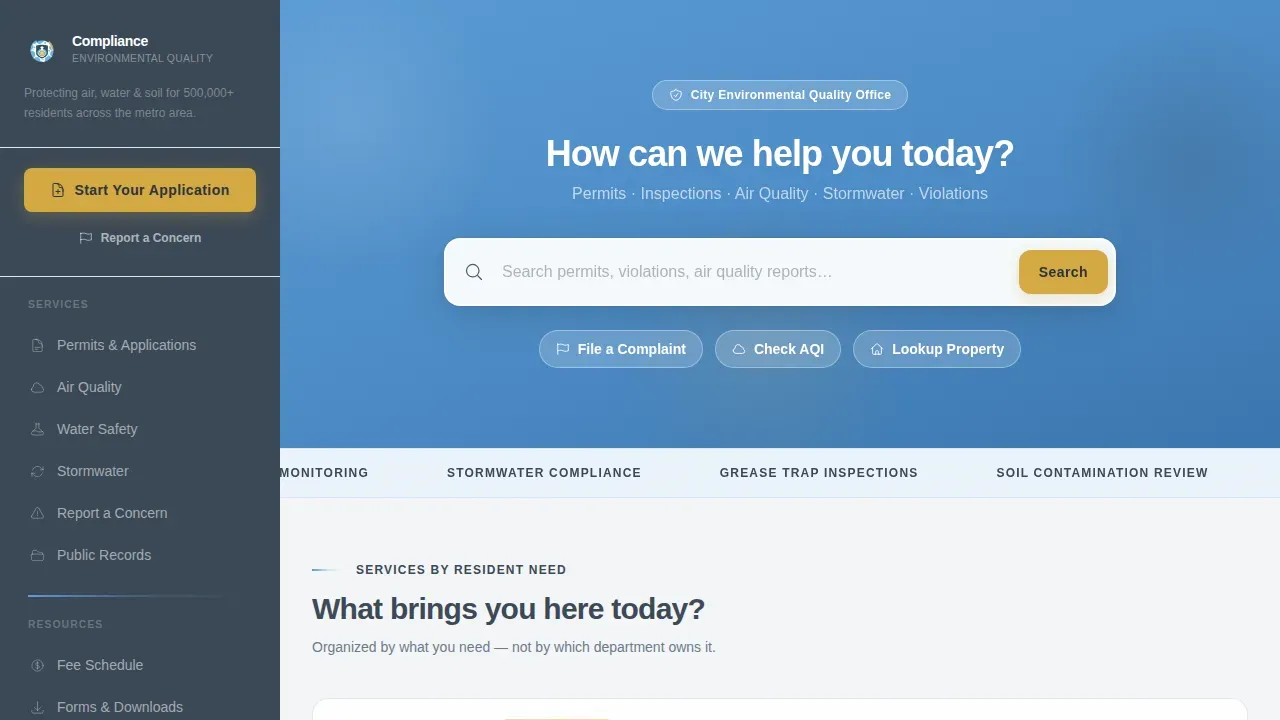
- An oversized search bar displayed on a sky-blue hero field, with three shortcut chips for instant navigation
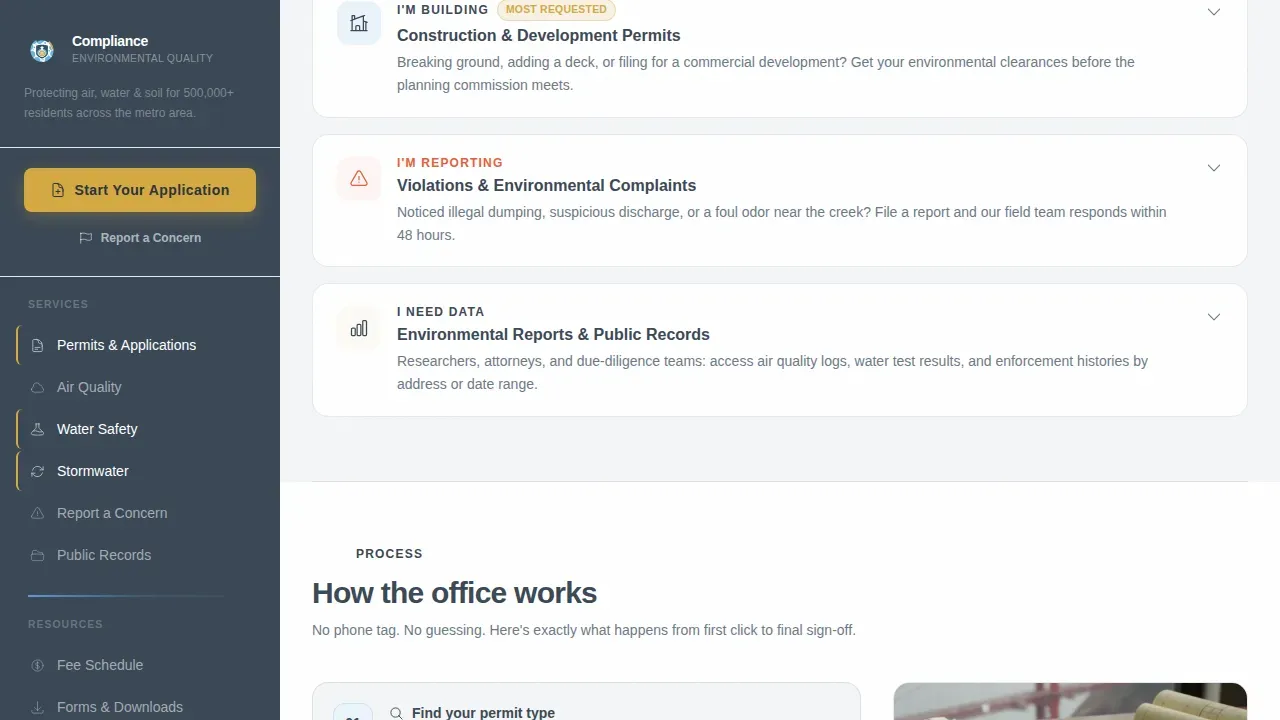
- A bento-grid service card section organized by visitor intent: building, reporting, and data access
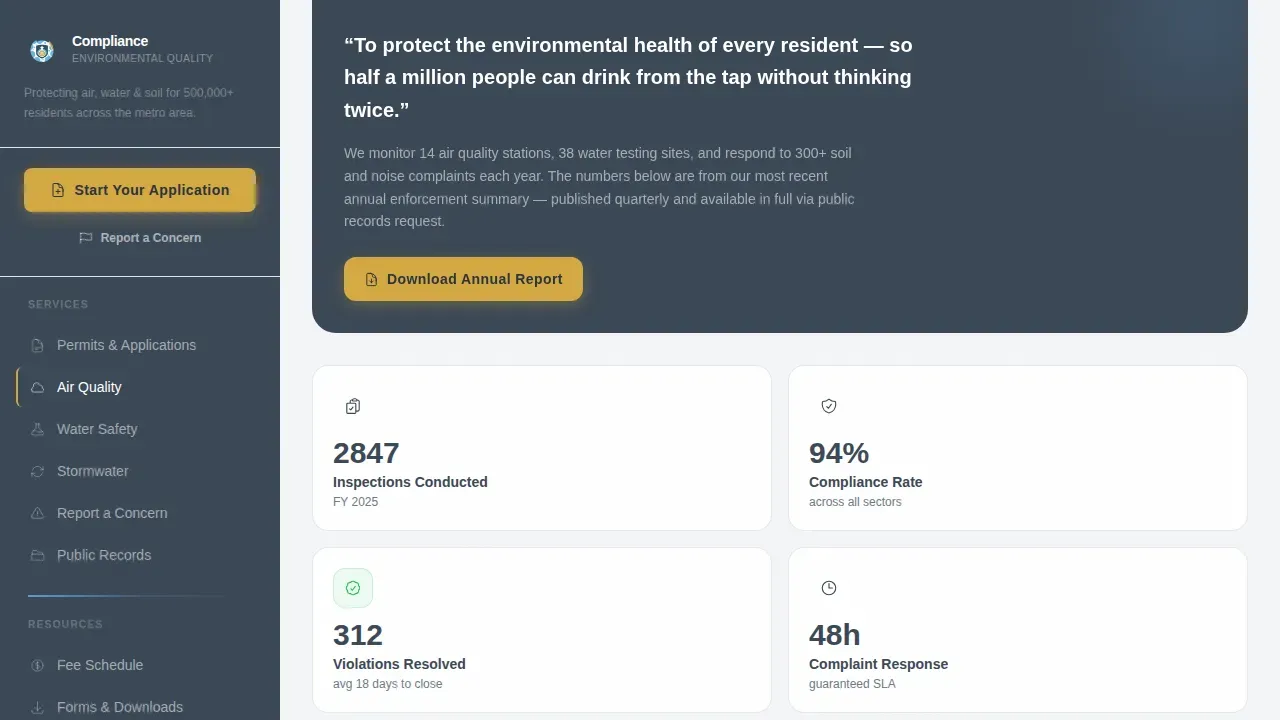
- A mission and air quality index widget section that provides live environmental performance context alongside annual enforcement results
Feature list
This landing page template includes a carefully selected set of interactive and visual components. Each feature is grounded in the source brief and built to help the page perform its core function: getting the right resident to the right form or resource as quickly as possible.
Oversized Search Hero with Shortcut Chips
The header places a full-width search field dead-center on a civic sky-blue background. Ghost text reading "Search permits, violations, air quality reports..." sets clear expectations before the visitor types a single character. Three shortcut chips displayed directly below the search bar provide one-click access to the most requested actions: filing a complaint, checking the air quality index, and looking up a property. This section is the functional hero because it answers the question the visitor already has.
Intent-Based Service Card Grid
The bento-grid section organizes services by what the visitor needs to do, not by which department owns the subject. Three primary cards are displayed: "I'm building," "I'm reporting," and "I need data." Each card expands inline to show next steps, required documents, and processing timelines. This structure helps every type of visitor, from a homeowner to a licensed developer, find the right action without reading through unrelated content.
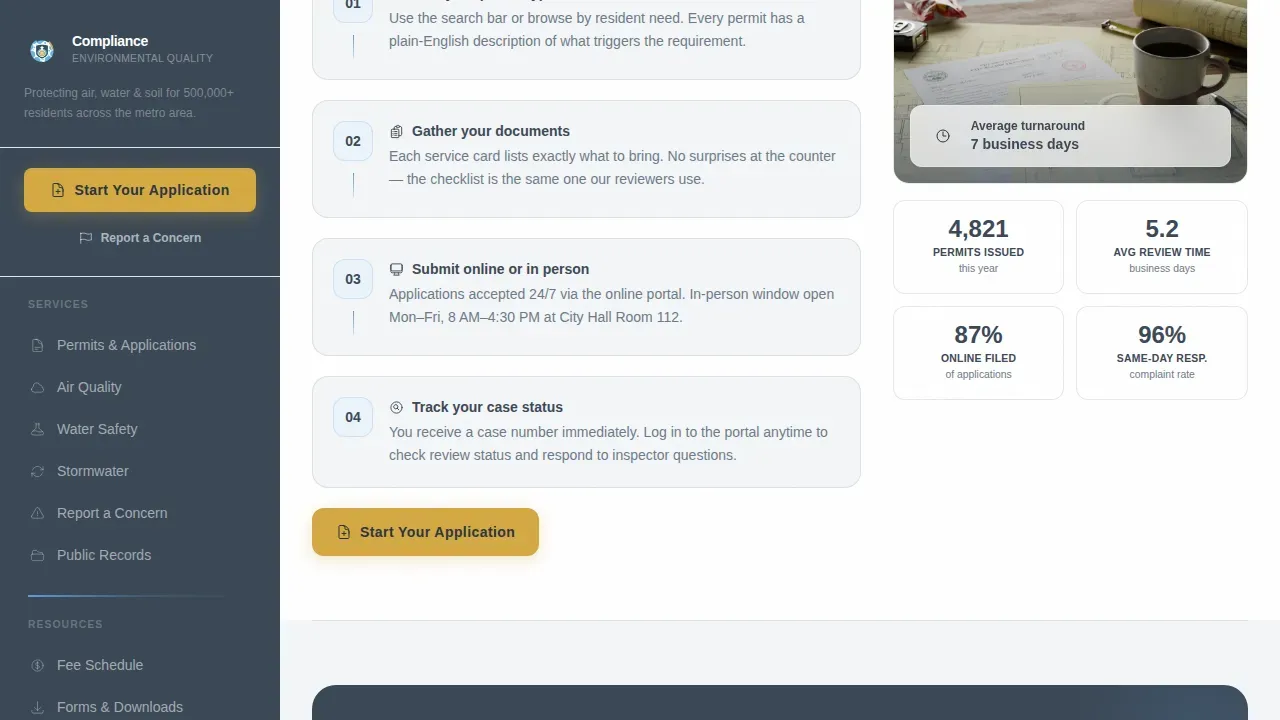
How It Works Section with Processing Timelines
An asymmetric 60/40 split layout walks visitors through the standard compliance process step by step. This section displays required documents alongside realistic processing timelines so applicants can prepare in advance. Presenting this information visually helps reduce inbound contact requests from people who simply need to understand what to expect. It also reinforces that the office operates transparently and to a consistent standard.
Mission and Live Air Quality Widget
After the visitor has seen how the office works, the page introduces its mission statement and annual enforcement summary. A real-time air quality index widget is displayed in this section as a live proof point. The widget provides current environmental performance data and serves as a trust signal that the office's stated goals are actively being pursued. This is where the page earns the right to talk about purpose rather than leading with it.
Report a Concern Intake Form
A lightweight intake form lets residents report environmental concerns directly from the page. The form collects location, issue type (air, water, soil, or noise), and an optional photo upload. Keeping the form simple and focused reduces abandonment. The form is positioned after the visitor has already seen how the office handles requests, making the action feel safe and straightforward rather than bureaucratic.
Gold-on-Slate Primary Call to Action
The "Start Your Application" call-to-action button is styled in regulation-highlight gold on deep government slate. It is placed both at the top of the persistent sidebar and repeated after each service card. This ensures the primary action is always visible regardless of how far the visitor has scrolled. The gold color is reserved exclusively for actionable elements across the entire page, so the eye is never confused about where to click next.
Page sections overview
| Section | Purpose |
|---|---|
| Search Hero | Primary search entry point with shortcut chips |
| Service Card Grid | Intent-organized permit and compliance services |
| How It Works | Processing timelines and required document checklist |
| Mission and AQI | Office mission statement with live air quality index widget |
| Report a Concern | Lightweight intake form for environmental issue reporting |
| Persistent Sidebar | Navigation links, primary call to action, and mission summary always displayed |
| Footer Row | Single-row linear footer with contact links and legal text |
Design & branding system
The visual identity follows an Institutional Authority theme built on the Slate & Sky color system. The palette is designed to feel like a pressed uniform hanging next to an open window: structured and trustworthy, but not cold or inaccessible. Every color has an assigned role and does not appear outside that role anywhere on the page.
- Deep government slate (#3B4856) anchors the persistent sidebar and all body text across the page
- Civic sky blue (#5B9BD5) marks navigation links, section dividers, and the hero background so the page has a clear visual hierarchy
- Clean permit white (#F4F6F8) stretches across content panels to give forms and documents room to breathe
- Regulation-highlight gold (#D4A843) appears only on actionable elements such as buttons, status indicators, and alert banners so every clickable item is immediately recognizable
Typography follows a two-family system. Plus Jakarta Sans is used for headings and body text to provide a modern yet official tone. DM Sans handles user interface labels, button text, and form field captions with clean legibility at small sizes.
Mobile & speed optimization
The sidebar companion layout is designed desktop-first, with full responsive behavior across all devices. On smaller screens, the persistent sidebar collapses to a top navigation bar so mobile visitors retain access to the primary call-to-action and key navigation links without losing screen space. The page is structured so that each section provides standalone value whether the visitor arrives at the top or lands mid-page from a search result.
- The sidebar collapses to a top nav on mobile so the primary call-to-action remains displayed at all times across devices
- Interactive components including expandable service cards and the intake form are built to work cleanly on touch-screen devices
- GSAP ScrollTrigger animations reveal sections progressively to keep performance smooth while maintaining a polished visual experience
How this template helps you convert
This landing page is built around one core conversion principle: answer first, ask second. Every section resolves a question before presenting the next action. That sequence builds the trust that government landing pages often fail to establish. Conversion rate optimization on public-sector pages starts with learning what visitors actually need and structuring the page to meet that need before requesting anything in return.
- The search hero with shortcut chips ensures that the most common visitor actions are displayed immediately, reducing the time between arrival and the first meaningful click
- Service cards expand inline to provide the exact documents, steps, and timelines a visitor needs before they click "Start Your Application," which means the application portal receives better-prepared submissions
- The mission and live air quality widget section provides third-party-style proof that the office is actively performing against its stated goals, which increases confidence in the overall website and reduces form abandonment
Other information about this template
This template is tailored for municipal and state environmental offices, regional agencies, and public-sector teams that need to consolidate multiple compliance services into one organized landing page. It is also well suited for civic design agencies that build government websites on behalf of local authorities.
- The template follows the standard structure required for government landing pages, where links connect only to pages within the same web area and all content is updated from a single location
- Building separate landing pages for different audience types with different interests can be resource-intensive; this template is designed to consolidate those audiences into one page organized by intent rather than by department
- The page is built to support the content standard expected of environmental agencies, including a dedicated section for reports, contact information, and compliance resources
- The sidebar and service card layout can be customized to reflect the specific subject areas and forms relevant to your office, whether those cover water quality monitoring, stormwater management, soil testing, or air quality reporting
- Teams can choose to update text, swap shortcut chip labels, and revise card content without rebuilding the page structure from scratch
- The template is relevant to any state or regional authority that needs to provide public access to compliance guidance in a clear, non-technical format
- The Environmental Compliance Assistance Platform provides access to compliance resources for various environmental regulations; this template is structured to present those kinds of resources in a way that is simple and approachable for the general public
- The Code of Federal Regulations (CFR) codifies the general and permanent rules published in the Federal Register by executive departments and agencies; government teams can use this template to link to the relevant CFR portions or state-level equivalents from within the service card section
- Tribes and other sovereign entities with environmental monitoring responsibilities can also adapt this template structure to fit their specific regulatory context
- The EPA Audit Policy encourages voluntary self-policing while preserving fair and effective enforcement; this template includes a "Report a Concern" intake path that supports that kind of transparency by giving the public a direct, simple channel to flag potential issues
- The EPA's Civil Enforcement at Federal Facilities website provides compliance policy and guidance for federal facilities; teams building similar guidance portals will find this template's structure directly applicable
- For teams working on a tight calendar, note that the template is built to allow rapid content updates so new guidance published in november or december of any given year can be reflected on the page quickly without a full redesign
- Over the past decade, government web standards have moved toward utility-first design; this template reflects that shift by leading with search and service access rather than agency biography
- Instapage and similar no-code platforms allow government and public-sector teams to get landing pages up and running and deploy updates using global content blocks, making it easier to keep the page updated across thousands of active users without requiring developer involvement each time
Theme
Institutional Authority
Creative direction
Vision & Mission
Color system
Slate & Sky
Style
Sidebar Companion
Direction
Click-Through
Page Sections
Oversized Search Hero with Shortcut Chips
Intent-based Service Card Grid
Processing Timeline and Document Display
Mission Statement and Live Air Quality Widget
Lightweight Concern Reporting Form
Gold-on-slate Persistent Call to Action
Related questions
Can this template be used for a county or regional environmental agency, not just a city office?
Does the service card section support more than three visitor categories?
How does the intake form in the Report a Concern section work?
Can the Start Your Application button link to an existing permitting portal?
Is the air quality index widget connected to a live data source out of the box?



