Basement Renovation Advanced Booking Website Template
Stash is an industrial-style basement storage landing page built for local contractors. It uses a split-screen layout, a neighborhood map header, and a scroll-driven before-and-after flow to turn visitors into booked consultations. The page prioritizes locality, showing real project photos captioned by neighborhood before asking for any contact information.
by Rocket studio
Quick summary
Stash is a single-page booking template for basement storage installation businesses. It opens with a 50/50 split-screen hero, moves through a neighborhood map, real project transformations, and a three-step process, then closes with a zip-code-first booking form. The industrial raw design system keeps the experience grounded and credible throughout.
Who this template is for
This template is built for local home service contractors who install basement storage systems. It speaks directly to the people who need that work done and the businesses doing it.
- Basement storage and shelving installers targeting suburban homeowners
- Small landlords and property managers prepping rental units for turnover
- Hobby woodworkers and garage organizers reclaiming basement square footage
What problem this template solves
Most home service pages ask for contact information before earning any trust. Visitors leave without booking because nothing on the page feels relevant to their neighborhood or their specific situation.
- Generic templates fail to create the local, neighbor-to-neighbor credibility that converts homeowners into booked appointments
- Cluttered basement photos without visible transformations do not motivate action
- Booking forms that start with personal details feel invasive before value is established
What you get with this template
You get a fully structured, single-page booking flow designed around neighborhood trust and industrial visual identity. Every section is built to move a visitor from curiosity to a confirmed walk-through appointment.
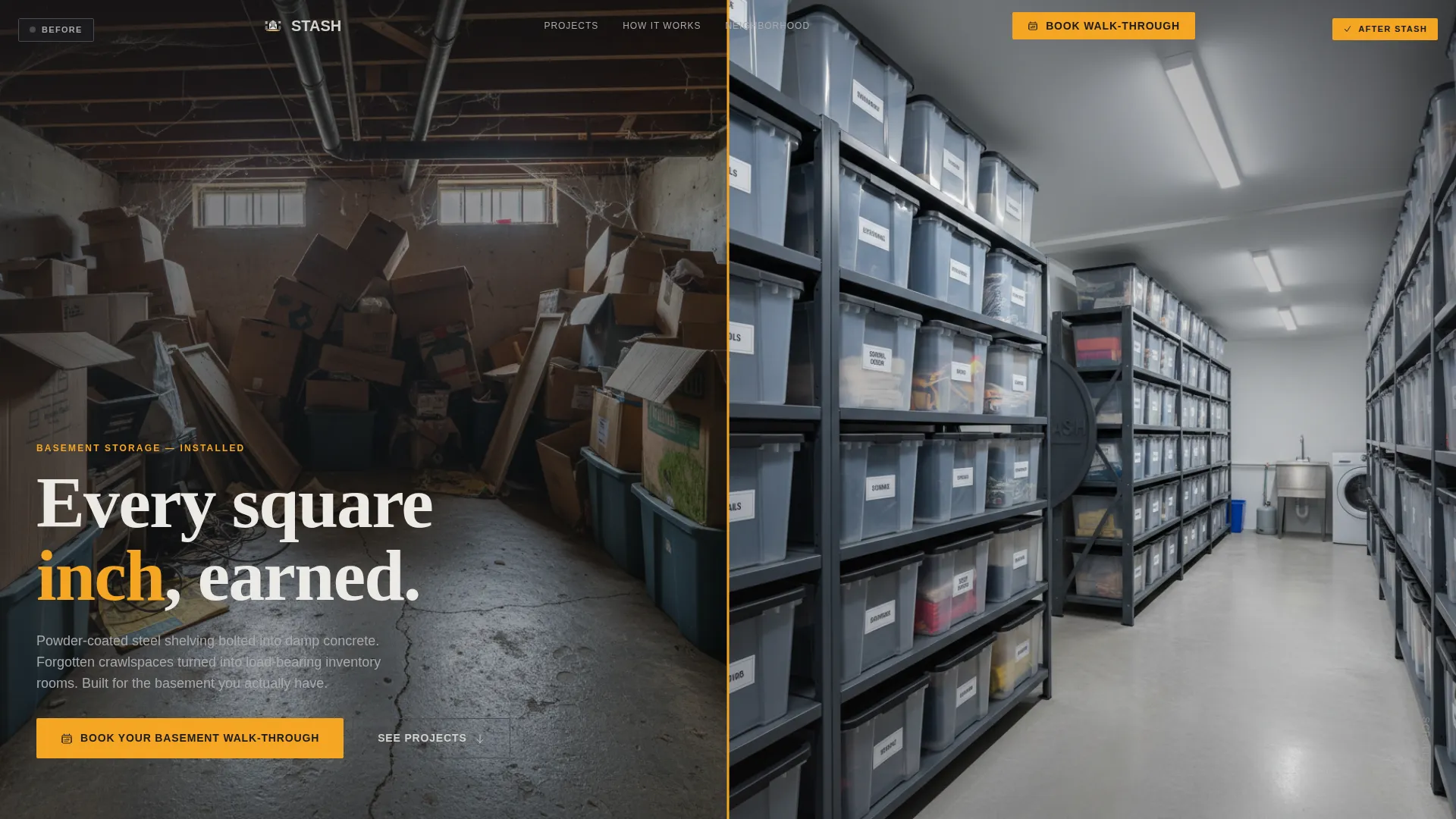
- A split-screen hero with a pinned "Book Your Basement Walk-Through" call to action
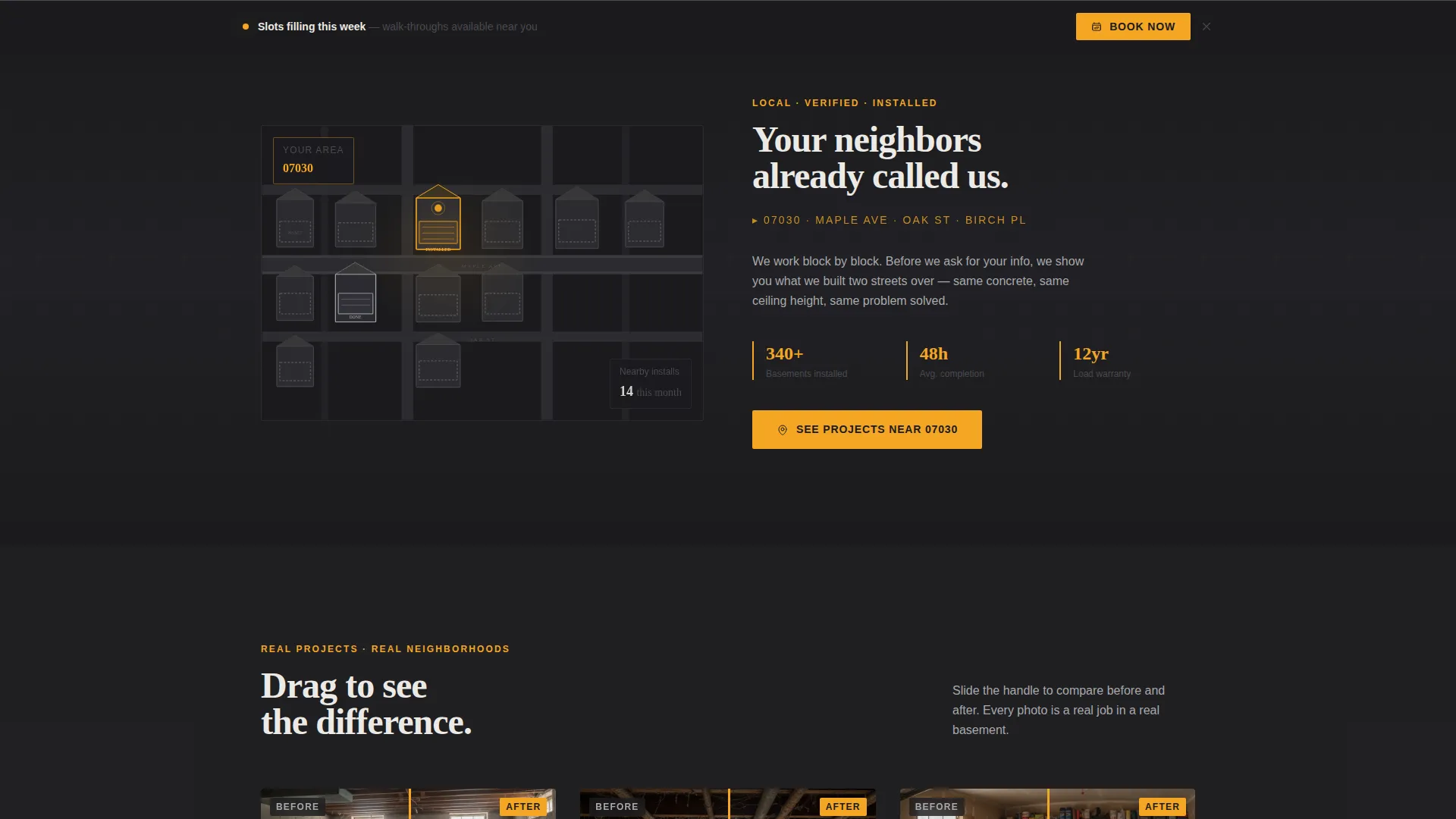
- A neighborhood map header with geolocation zip code auto-population and local social proof
- A zip-code-first booking form with basement type selection and a calendar picker showing available slots
Feature list
This template includes purpose-built components that support the full booking journey, from the first scroll to the confirmed appointment.
Split-Screen 50/50 Hero Layout
The hero divides the screen evenly between a before photo on the left and the finished installation on the right. A pinned call-to-action button stays visible after the first scroll, keeping the booking prompt accessible throughout the page.
Neighborhood Map Header
An illustrated overhead map renders three to four residential blocks in steel grays. Basement outlines glow faintly beneath each house. One home pulses with the amber accent and reveals a labeled cross-section of the installed shelving system. The visitor's zip code auto-populates from geolocation, and a tagline fades in to reinforce local presence.
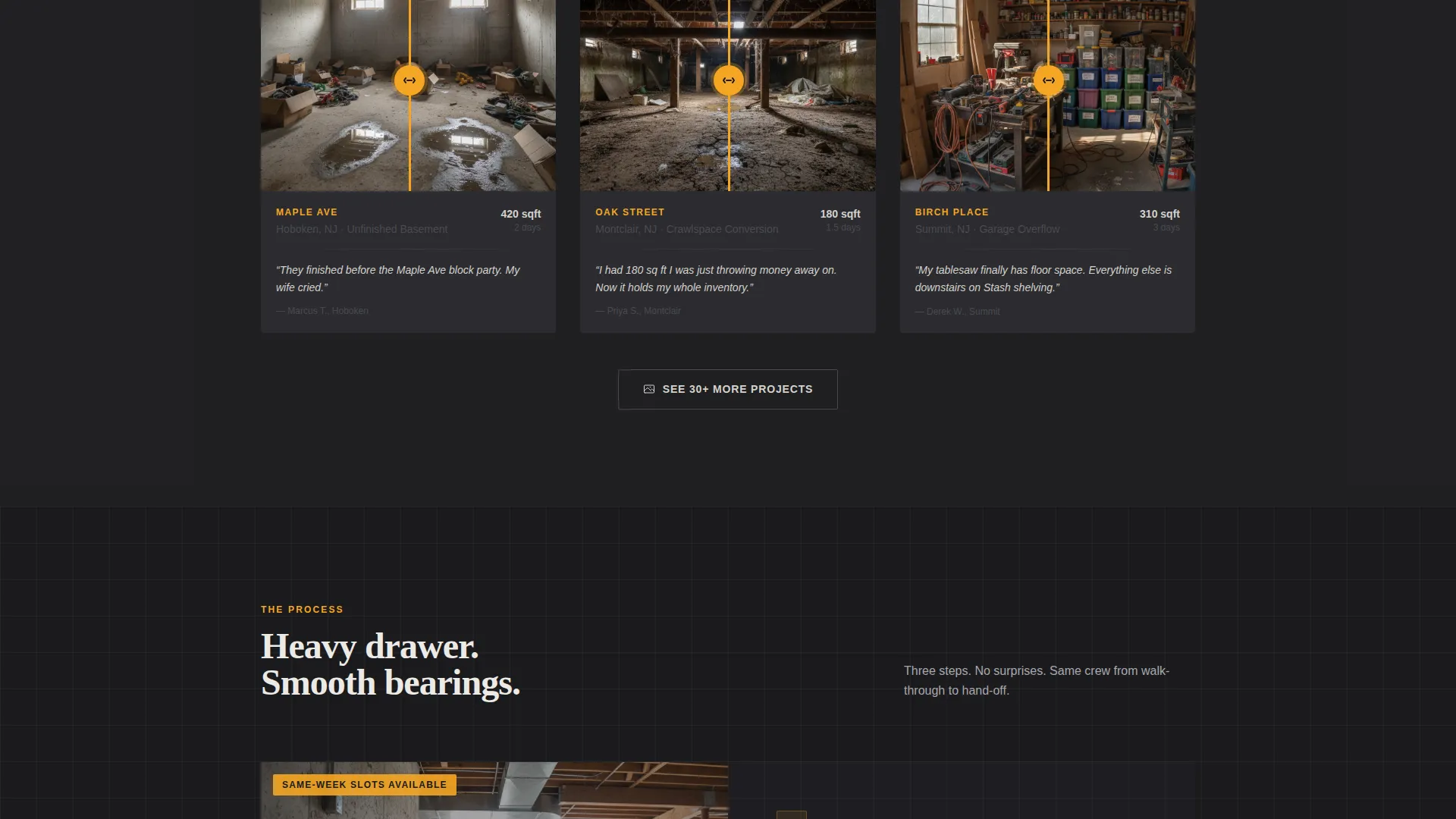
Before and After Project Gallery
Each project pair places a cluttered, dimly lit basement on the left against the organized, gridded installation on the right. Photos are captioned with real neighborhood names rather than generic stock locations. Testimonials reference local landmarks to build street-level credibility.
Scroll-Driven Zoom Animation
The scroll experience moves from the macro neighborhood map down to a single street, then through the basement door. GSAP scroll triggers handle split-screen parallax and counter animations, keeping the visual story tight and directional without feeling overwhelming.
Zip-Code-First Booking Form
The form opens with zip code entry to reinforce locality before asking for anything personal. It then collects basement type (finished, unfinished, or crawlspace) and a calendar picker showing real available slots for the current week. A secondary mobile path lets visitors text a photo of their basement directly from their phone.
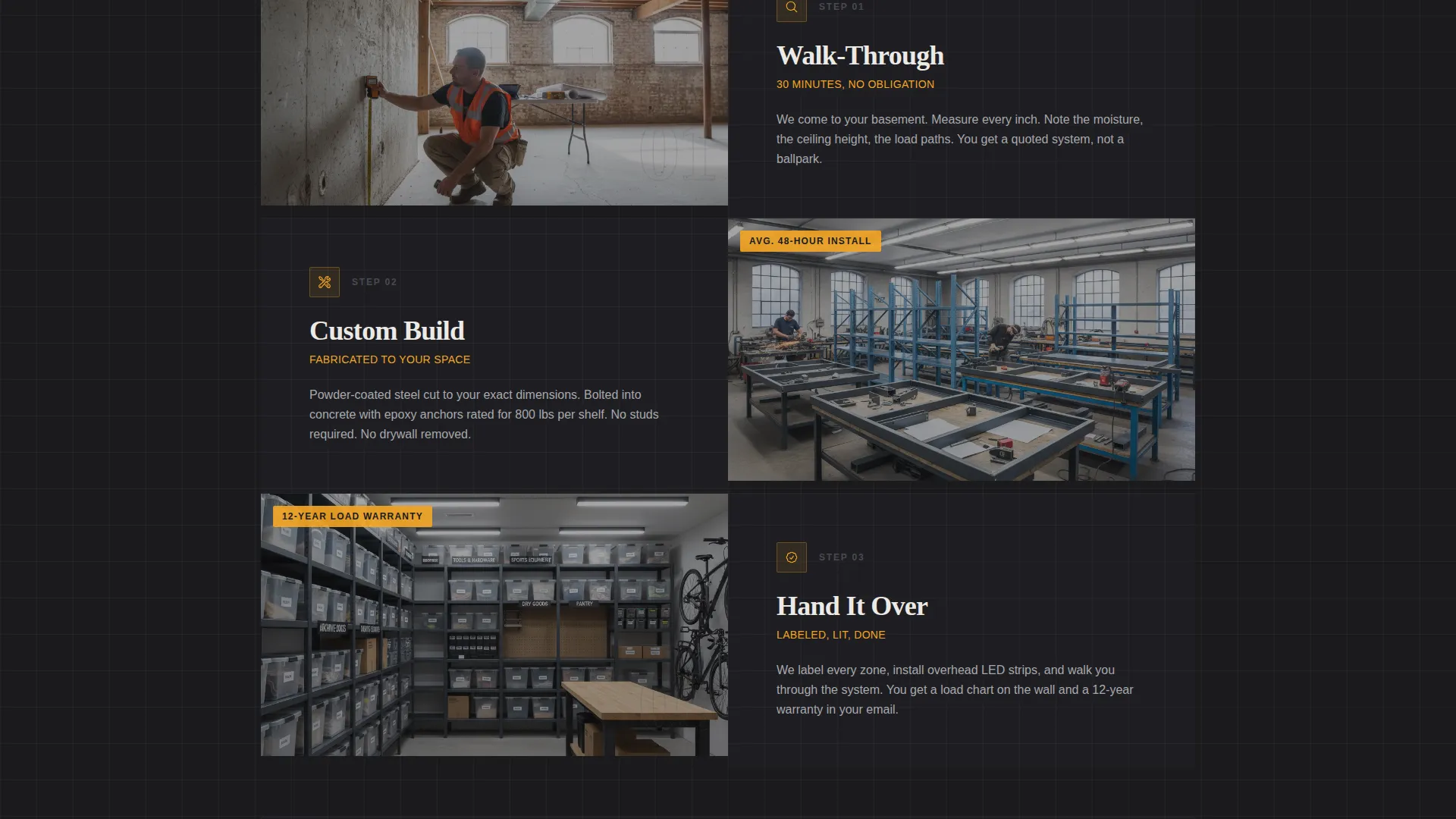
Three-Step How It Works Section
An asymmetric three-step layout explains the process in plain language using the industrial aesthetic. Each step is visually distinct and quick to scan, reducing friction before the visitor reaches the booking form.
Page sections overview
| Section | Purpose |
|---|---|
| Hero Split Screen | Anchor the before/after contrast and pin the primary booking call to action |
| Neighborhood Map | Establish local presence and auto-populate the visitor's zip code |
| Before/After Projects | Show real neighborhood transformations with captioned social proof |
| How It Works | Walk visitors through the three-step installation process |
| Booking Form | Collect zip code, basement type, and preferred appointment slot |
| Footer Single Row | Close the page with a clean, minimal linear footer |
Design & branding system
The visual identity follows an Industrial Raw theme. The palette feels like a factory floor after hours, with fluorescent light bouncing off unpainted metal and a single warm accent cutting through the gray.
- Color system: mill-finish aluminum (#A8A9AD), forge-black (#1B1B1E), concrete dust (#D4D2CC), and safety-stripe amber (#F5A623) reserved for calls to action and interactive hotspots
- Typography: Fraunces for display headlines and DM Sans for body text, pairing editorial weight with clean industrial legibility
- Visual style: cold metal surfaces, chalked measurements, overhead lighting, and raw concrete textures throughout
Mobile & speed optimization
The template is built mobile-first, reflecting how suburban homeowners typically browse from a couch or phone. Desktop receives equal visual treatment without sacrificing the mobile experience.
- Images are lazy-loaded so only visible content loads on entry, keeping the initial experience fast
- GSAP animations fire only for sections currently in the viewport, avoiding unnecessary background processing
- The secondary mobile call to action lets visitors text a basement photo directly, removing friction for users who prefer messaging over forms
How this template helps you convert
The page is structured to earn trust before asking for anything. Every section is a deliberate step toward the booking form.
- The neighborhood map and local testimonials create immediate credibility by showing work done near the visitor's own home, making the service feel familiar rather than cold.
- The before-and-after scroll flow builds desire by making the transformation concrete and visual before any form fields appear.
- The zip-code-first booking form lowers the psychological barrier to entry, asking for location context rather than personal details, and the calendar picker makes scheduling feel immediate and real.
Other information about this template
This template is designed for the basement renovation and basement storage solution market in suburban United States geography. It is particularly well suited for contractors positioning their service as a local, trusted option rather than a national chain.
- The template style is Split Screen (50/50), making it easy to adapt the before-and-after visual format to any project portfolio
- The Monochrome Steel color system and Industrial Raw theme are distinct enough to stand out in a category dominated by bright, generic home service pages
- Pricing, service packages, and neighborhood coverage areas can all be edited within the template to reflect your actual business details
- The footer follows a linear single-row pattern, keeping the page close cleanly without adding unnecessary navigation
Theme
Industrial Raw
Creative direction
Local & Neighborhood
Color system
Monochrome Steel
Style
Split Screen (50/50)
Direction
Booking/Scheduling
Page Sections
Split-screen Hero with Pinned Call to Action
Geolocation Neighborhood Map Header
Before and After Project Gallery
Scroll-driven GSAP Animation Flow
Zip-code-first Booking Form
Three-step Process Section
Related questions
Who is this landing page template built for?
Can I edit the neighborhood map and project photos?
How does the booking form collect visitor information?
Do I need extra tools to run the scroll animations?
Can this template be adapted for other home service businesses?



