Property Management Landing Page Template
Steward is a dark, immersive property management landing page built for residential landlords and rental portfolio investors. It opens with an animated metrics dashboard, leads into an interactive property-type gallery with expandable detail panels, and closes a personalized Portfolio Health Score quiz that earns the contact before asking for it.
by Rocket studio
Quick summary
Steward is a high-conviction landing page for a residential property management firm. It combines a live-feel metrics header, a clickable property gallery with inline detail panels, and a five-question quiz that delivers a personalized Portfolio Health Score. The design runs on deep navy and amber, projecting authority before a single word is read.
Who this template is for
This template is built for property management companies that serve real investors, not first-time homeowners browsing. It suits firms that want their page to qualify leads, not just collect them.
- Residential property managers serving accidental landlords and mid-tier investors
- Firms handling eight to forty rental doors across multiple zip codes
- Management companies with out-of-state owner clients who need visible proof of competence
What problem this template solves
Most property management pages list services and ask visitors to call. That approach forces the prospect to do the work. Steward reverses the dynamic: the page reads the visitor's situation before asking for anything.
- Landlords arrive without knowing which services they actually need
- Generic contact forms fail to differentiate a serious investor from a casual inquiry
- No standard template communicates trust through data at the speed an investor demands
What you get with this template
You get a complete, single-page layout structured around investor psychology. Every section is designed to move a skeptical landlord from curiosity to commitment through proof, personalization, and a clear next step.
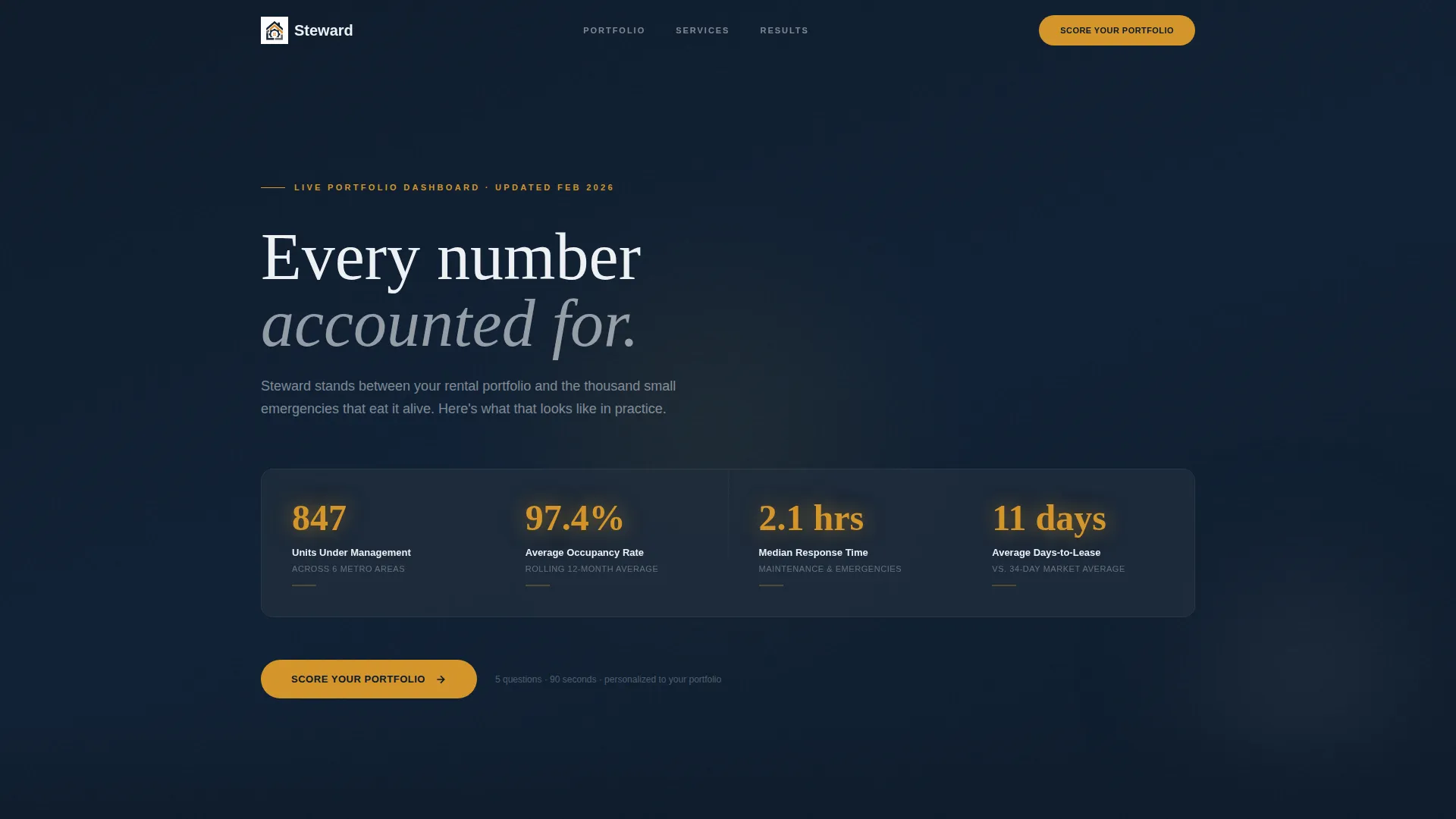
- An animated stats dashboard with four live-feel counters including occupancy rate and maintenance response time
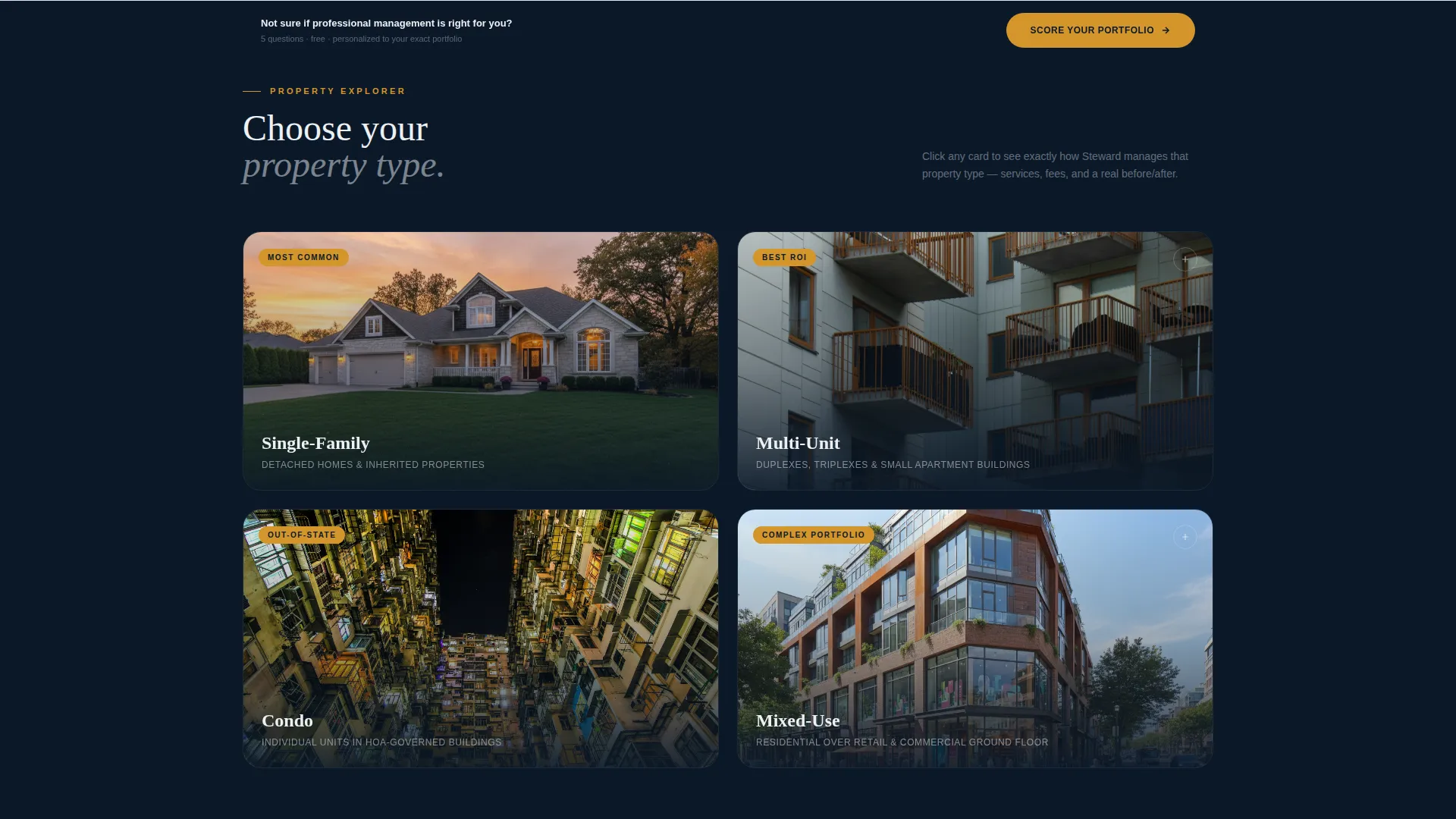
- An interactive property-type gallery with expandable panels showing services, fees, and before/after financials per property category
- A five-question Portfolio Health Score quiz with a results overlay and a single-field phone capture
Feature list
This section breaks down the core interactive and structural components built into the Steward template.
Animated Metrics Dashboard Header
The header displays four key performance counters: units under management, average occupancy rate at 97.4 percent, median maintenance response time at 2.1 hours, and average days to lease. Each number pulses faintly in amber against the deep navy background, giving the page an instrument-panel feel that communicates credibility in seconds.
Interactive Property Gallery Grid
Below the header, a grid of property type cards covers single-family homes, multi-unit buildings, condos, and mixed-use properties. Each card uses a dark photograph with a subtle hover parallax effect. Clicking a card expands an inline detail panel without navigating away from the page.
Expandable Property Detail Panels
Each expanded panel presents management services specific to that property type, a transparent fee structure, and a mini case study showing before-and-after financials. Visitors self-select their path, so the information they see mirrors their actual situation rather than a generic overview.
Portfolio Health Score Quiz
A five-question overlay assessment opens from the primary amber call-to-action button. Questions cover unit count, property types, current vacancy rate, biggest management frustration, and whether the visitor self-manages or is switching firms. Results produce a named Portfolio Health Score and a service recommendation summary.
Persistent Bottom-Bar Call to Action
After the visitor scrolls past the second section, a persistent bottom bar keeps the "Score Your Portfolio" button in view. This ensures the primary conversion point stays accessible throughout the entire scroll journey without interrupting the content flow.
Dark Immersive Visual System
The full-bleed navy background, gunmetal slate card surfaces, ledger white body text, and decisive amber accents work together as a unified visual identity. The palette is designed to feel like a well-run back office rather than a residential real estate brochure, which signals competence to investor audiences immediately.
Page sections overview
| Section | Purpose |
|---|---|
| Metrics Dashboard Header | Establish instant credibility with animated performance counters |
| Score Your Portfolio call to action | First conversion prompt placed directly after the metrics header |
| Property Gallery Grid | Let visitors self-select their property type context |
| Property Detail Panels | Deliver specific services, fees, and case study data inline |
| Persistent Bottom Bar | Keep primary call to action visible throughout the full scroll |
| Quiz Assessment Overlay | Qualify leads with five sequential questions |
| Portfolio Health Results | Deliver a personalized score and service recommendations |
| Phone Capture and Final call to action | Collect one contact field before sending the custom plan |
Design & branding system
The Steward template uses a Navy Authority color system that reads as serious and data-driven rather than decorative. Every color choice serves a functional role in directing attention and reinforcing trust.
- Deep command navy (#0B1929) covers full-bleed section backgrounds to anchor the dark immersive theme
- Gunmetal slate (#1E2A3A) surfaces card containers and section dividers for depth without distraction
- Ledger white (#EDF0F4) carries all body text and data labels for clean legibility against dark fields
- Decisive amber (#D4952A) is reserved exclusively for interactive elements, metric highlights, and call-to-action buttons
Mobile & speed optimization
The Steward layout is structured to translate its desktop command-center aesthetic into a focused, tap-friendly mobile experience. Interactive elements are sized and spaced for touch navigation without losing the dark immersive tone.
- The gallery grid collapses to a single-column scroll on smaller screens, keeping property cards legible and tappable
- The quiz overlay is designed to fit a mobile viewport with sequential single-question display for frictionless completion
- The persistent bottom-bar call to action remains visible on mobile scroll, anchoring the conversion point across all screen sizes
How this template helps you convert
Steward is engineered around a principle that separates it from standard service pages: it earns the lead by diagnosing before prescribing. Every conversion element is placed where visitor intent is highest.
- The animated metrics header builds credibility in the first three seconds, so visitors arrive at the call to action already convinced the firm is competent rather than still deciding whether to read on.
- The interactive gallery and expandable detail panels create investment in the page by letting visitors navigate their own property scenario, which increases time on page and personal relevance before any form appears.
- The Portfolio Health Score quiz delivers a named result and a tailored recommendation before asking for a phone number, making the single-field capture feel like a fair exchange rather than a cold ask.
Other information about this template
Steward was designed for firms operating in the residential property management space where investor trust is the primary purchase decision. The template's interactive and diagnostic structure sets it apart from static service pages in the same category.
- The template follows an asymmetric grid layout with a 60/40 column split for content-to-visual balance in expanded panel sections
- No stock photography of smiling faces is used; the visual language relies on dark property photography and data-driven proof elements
- The quiz conversion model is built on a diagnose-first philosophy, which is especially effective for prospects evaluating multiple management firms
- This template is suited to firms managing residential portfolios ranging from a single inherited duplex up to forty-plus doors across multiple locations

Theme
Luxe Minimal
Creative direction
Calculator/Tool First
Color system
Cloud Canvas
Style
Asymmetric Grid (60/40)
Direction
Click-Through
Page Sections
Animated Metrics Dashboard
Interactive Property Gallery
Expandable Inline Detail Panels
Portfolio Health Score Quiz
Persistent Conversion Bottom Bar
Navy Authority Visual Identity
Related questions
Can I customize the metrics shown in the dashboard header?
Does the portfolio quiz calculate a real score or show a static result?
Is this template suitable for a small landlord or only large portfolio investors?
Can I edit or replace the property type cards in the gallery grid?
What makes this landing page different from a standard property management service page?



