Costume Designer Portfolio Pre-Launch Website Template
Stitch is a cinematic costume designer landing page built for portfolio professionals working in film, theater, and editorial. It features a horizontal scroll layout, a Before/After Slider header, and a Waitlist form with a secondary Lookbook download. The deep obsidian and burnished gold palette makes craft feel as dramatic as the productions it dresses.
by Rocket studio
Quick summary
Stitch is a single-page horizontal scroll landing page for costume designers. It guides visitors through a cinematic portfolio journey, from sketch to finished costume, before inviting them to reserve a fitting or download a lookbook. The obsidian and gold palette gives the page the weight and atmosphere of a professional production.
Who this template is for
This template is built for experienced costume designers who work across demanding production environments. It suits professionals who want to present range and process before asking anything of a prospective client.
- Costume designers targeting indie film directors and pre-production teams
- Theater companies and showrunners looking to evaluate craft before booking
- Editorial and commercial costume professionals building a waitlist ahead of a full portfolio launch
What problem this template solves
Most portfolio pages display finished images in a grid and stop there. That approach does not communicate process, range, or the transformation a skilled costume designer delivers. Prospective clients need to feel the work before they commit.
- Clients cannot assess range from static thumbnails alone
- A coming-soon page with no narrative gives visitors no reason to stay or sign up
- Without a structured call to action, early interest turns into lost leads
What you get with this template
You get a fully structured one-page layout that doubles as both a portfolio showcase and a waitlist capture tool. Every design decision serves the goal of turning curious visitors into confirmed leads before the full site launches.
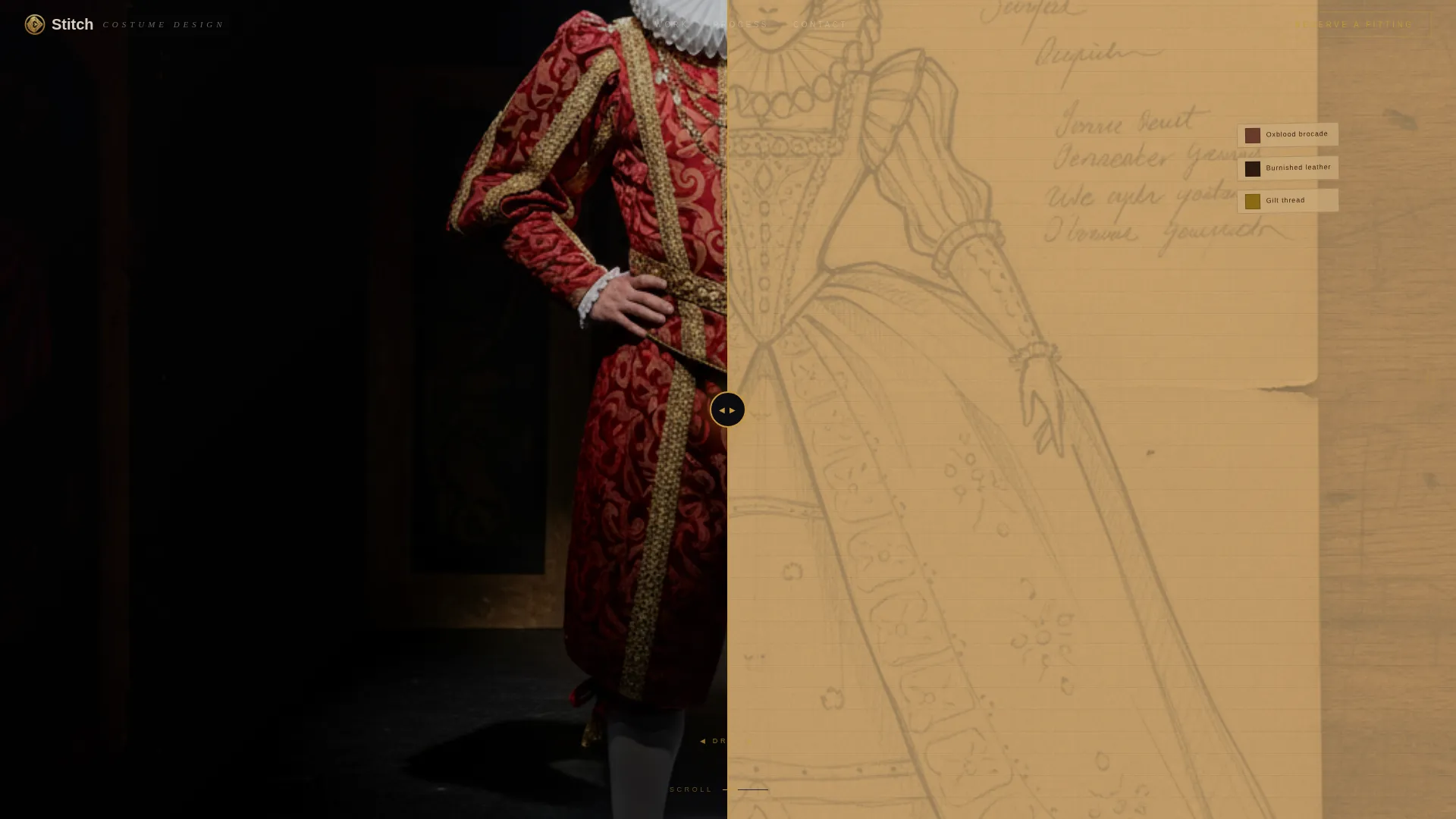
- A Before/After Slider header that shows sketch-to-finished-costume transformation
- A horizontal scroll portfolio with parallax depth across multiple production panels
- A dual call-to-action system: a fitting reservation form and a lookbook download offer
Feature list
This template is built around a small set of high-impact components, each designed to support the costume designer's specific workflow and client base.
Before/After Slider Header
The header splits the viewport between a pencil sketch on kraft paper and the finished costume on a live actor under cinematic lighting. A gold-handled slider lets visitors drag between the two states. The headline "She builds who they become" appears in thin tracked-out serif only after the slider crosses center, making the reveal feel earned.
Horizontal Scroll Portfolio Panels
Each lateral panel represents one distinct production, from Jacobean brocade to sci-fi thermoplastic to hand-painted ballet silk. Panels layer the sketch, the toile mockup, and the final stage photograph at different parallax depths. Scrolling through them feels like moving through the design process rather than browsing a static gallery.
Parallax Depth Layering
Within each production panel, three visual layers sit at different scroll depths: concept sketch, fabric mockup, and finished photograph. This layering communicates process without requiring written explanation, letting the work speak for itself.
Waitlist Reservation Form
The "Reserve a Fitting" call to action collects name, production type (film, theater, editorial, or commercial), and email address. It sits at the end of the horizontal journey, after the portfolio has already made the case for the designer's range and capability.
Lookbook Download Micro-call to action
A secondary call to action offers a PDF teaser of six key costumes in exchange for an email address alone. This gives visitors a lower-commitment entry point and allows the designer to build a contact list from people who are not yet ready to book.
Mood-Board Texture System
Linen grain, chalk marks, and thread-tangle textures bleed between production panels, creating visual continuity across the horizontal scroll. The page reads as one unbroken bolt of work rather than a sequence of disconnected projects.
Page sections overview
| Section | Purpose |
|---|---|
| Before/After Slider | Opens the page with a dramatic sketch-to-costume reveal |
| Headline Reveal | Shows the brand statement after the slider crosses center |
| Jacobean Production Panel | Showcases oxblood brocade costuming with parallax layers |
| Sci-Fi Production Panel | Presents vacuum-formed thermoplastic work under neon light |
| Ballet Production Panel | Displays hand-painted silk children's ballet costumes |
| Mood-Board Texture Bleed | Stitches panels together with craft-texture continuity |
| Reserve a Fitting Form | Collects name, production type, and email for the waitlist |
| Download the Lookbook | Captures email in exchange for a six-costume PDF teaser |
Design & branding system
The visual identity uses a Lens and Frame theme, building atmosphere through deep shadow and precise gilded accents. Every color choice reinforces the feeling of a darkened theater at the moment before the curtain rises.
- Deep obsidian black (#0B0B0F) as the primary background, warm projection-white (#EDE5D5) for body text
- Burnished gold (#C5983E) on accent lines, hover states, the slider handle, and the primary call-to-action button
- Faint charcoal (#1E1E26) for section dividers, keeping transitions subtle and atmospheric
Mobile & speed optimization
The horizontal scroll layout is designed to adapt across screen sizes without losing its immersive visual quality. Touch-based swiping replaces cursor dragging on smaller devices.
- The Before/After Slider responds to touch input, allowing mobile visitors to swipe between sketch and finished costume
- Production panels reflow to maintain readability and visual depth on narrower viewports
- The dual call-to-action forms remain fully accessible and functional on mobile screen sizes
How this template helps you convert
The page is structured so that every section builds confidence before the visitor reaches either call to action. By the time the form appears, the designer's range has already been demonstrated across multiple productions and mediums.
- The Before/After Slider creates immediate emotional engagement and communicates transformation at the very first interaction, before a single word of copy is read.
- The horizontal scroll journey builds credibility panel by panel, showing range across period drama, science fiction, and dance productions, so the waitlist form feels like a logical next step rather than a cold ask.
Other information about this template
This template is categorized under Portfolio and Agency use cases, with a specific focus on the costume designer one-page portfolio niche. It is designed for a coming-soon or pre-launch phase, making it especially useful for designers building anticipation before a full site goes live.
- Template style is horizontal scroll with an immersive visual creative direction
- The Lens and Frame theme and Obsidian and Gold color system are built into the base layout
- The page is structured as a single-page landing page, not a multi-page website
- It suits designers working across film, theater, editorial, and commercial production types
- The lookbook micro-call to action makes it practical for list-building even before the designer is ready to take on new work



Theme
Lens & Frame
Creative direction
Immersive Visual
Color system
Obsidian & Gold
Style
Horizontal Scroll
Direction
Waitlist/Coming Soon
Page Sections
Before/after Slider Header
Horizontal Scroll Portfolio
Dual Call-to-action System
Mood-board Texture Continuity
Obsidian and Gold Visual Identity
Related questions
Who is this landing page template designed for?
What does the Before/After Slider actually show?
Can I use this template to collect leads before my full site is ready?
What production types does the form collect from visitors?
Do I need to replace all the production panels with my own work?



