Aquaculture Equipment Supplier Website Template
Stockline is a dashboard-style landing page built for aquaculture equipment suppliers. It combines a technical infographic header with scrollable equipment audit grids, single-stat callout cards, and a dual-path download system. The charcoal and amber design speaks directly to farm managers, hatchery operators, and aquaculture consultants who need organized, actionable equipment information fast.
by Rocket studio
Quick summary
Stockline is a precision-built landing page for aquaculture equipment suppliers. It opens with a cross-section infographic of a full farm operation and leads visitors through expandable equipment audit grids. Every section is designed to feel like a structured pre-season audit, building the case for a single high-value download before visitors reach the bottom of the page.
Who this template is for
This template is built for businesses that supply operational equipment to working fish farms. It speaks the language of people who manage livestock daily, not hobbyists or researchers browsing for ideas.
- Fish farm equipment suppliers serving pond, cage, recirculating aquaculture system (RAS), and hatchery operations
- Aquaculture consultants and procurement managers sourcing aerators, feeders, net cages, and water quality monitors
- Distributors and wholesalers targeting farm managers and hatchery operators across Southeast Asia and similar markets
What problem this template solves
Aquaculture buyers are practical people running tight cycles. They do not trust vague supplier pages with lifestyle photography and no technical depth. They need to quickly verify that a supplier understands their specific setup and stocks what they need.
- Generic supplier pages fail to communicate technical credibility to experienced farm operators
- Buyers waste time hunting for spec compatibility, replacement cycles, and product details across disconnected pages
- Without a structured resource like an equipment audit checklist, potential customers leave before converting
What you get with this template
This template delivers a complete, single-page layout organized around the equipment audit concept. Every component is purposeful and grounded in operational context.
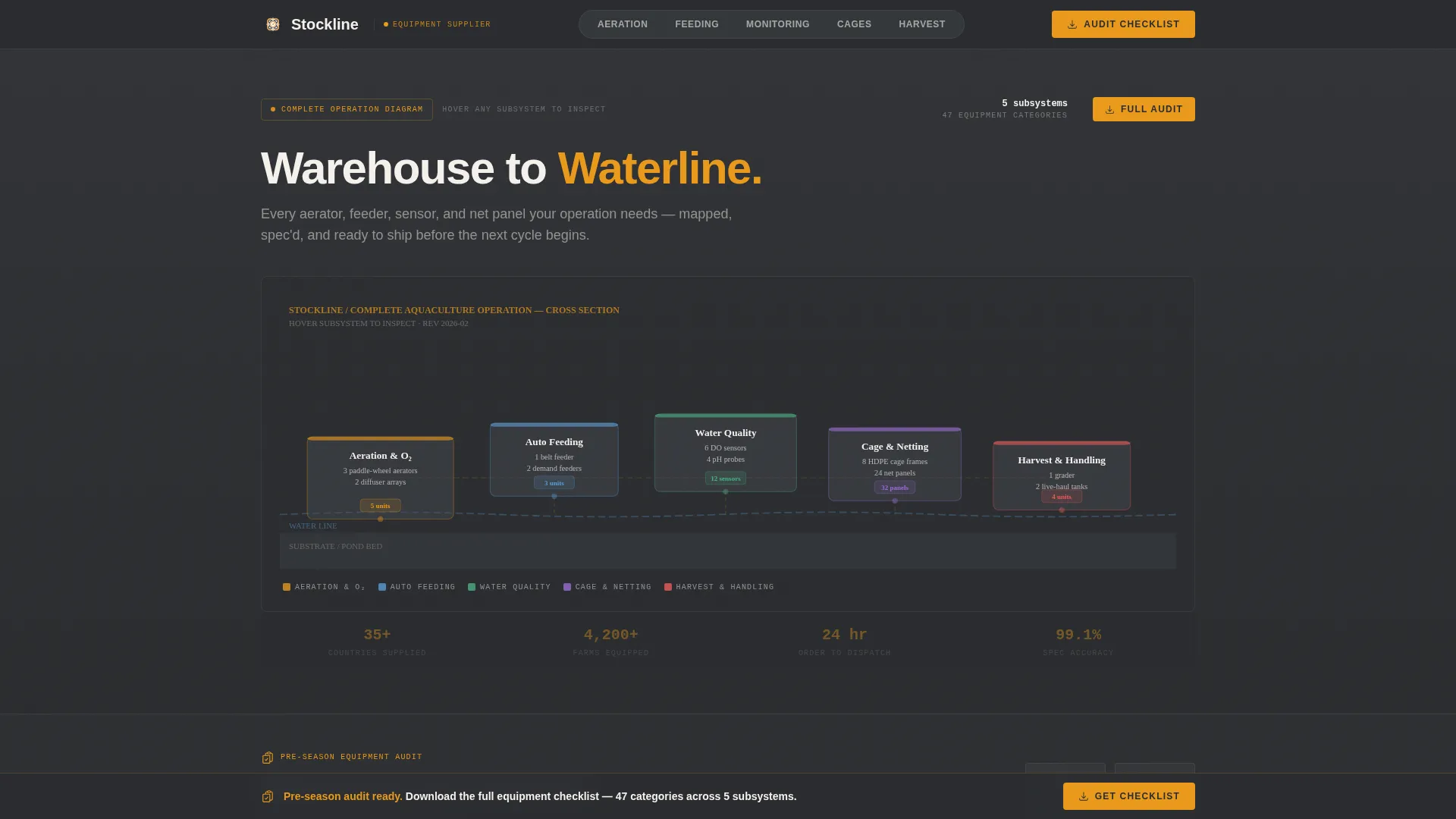
- A full-width interactive infographic header showing pond, cage, and RAS setups with hover tooltips and labeled equipment counts
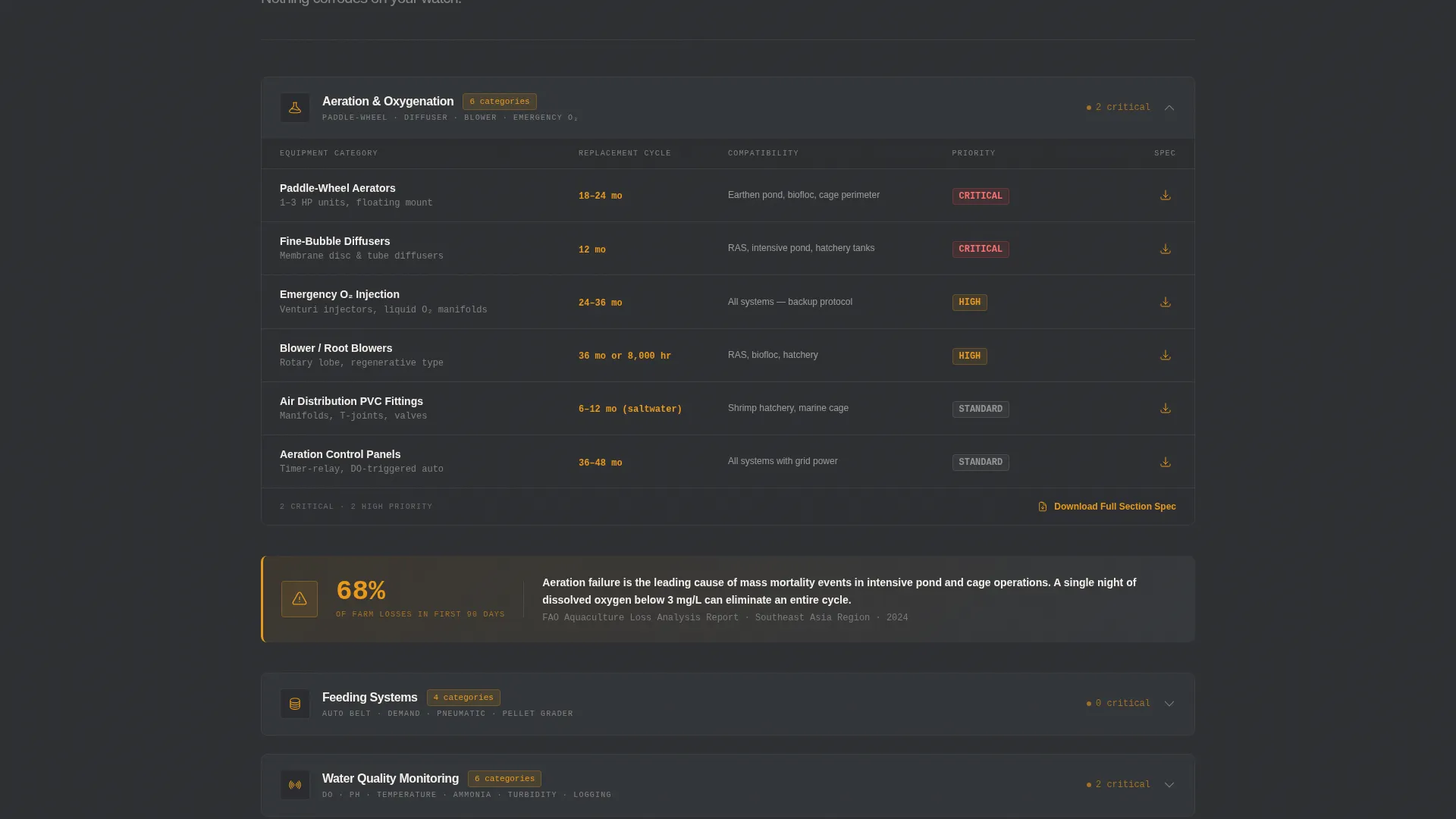
- Five expandable equipment audit grid modules covering aeration, feeding, water quality monitoring, cage infrastructure, and harvest handling
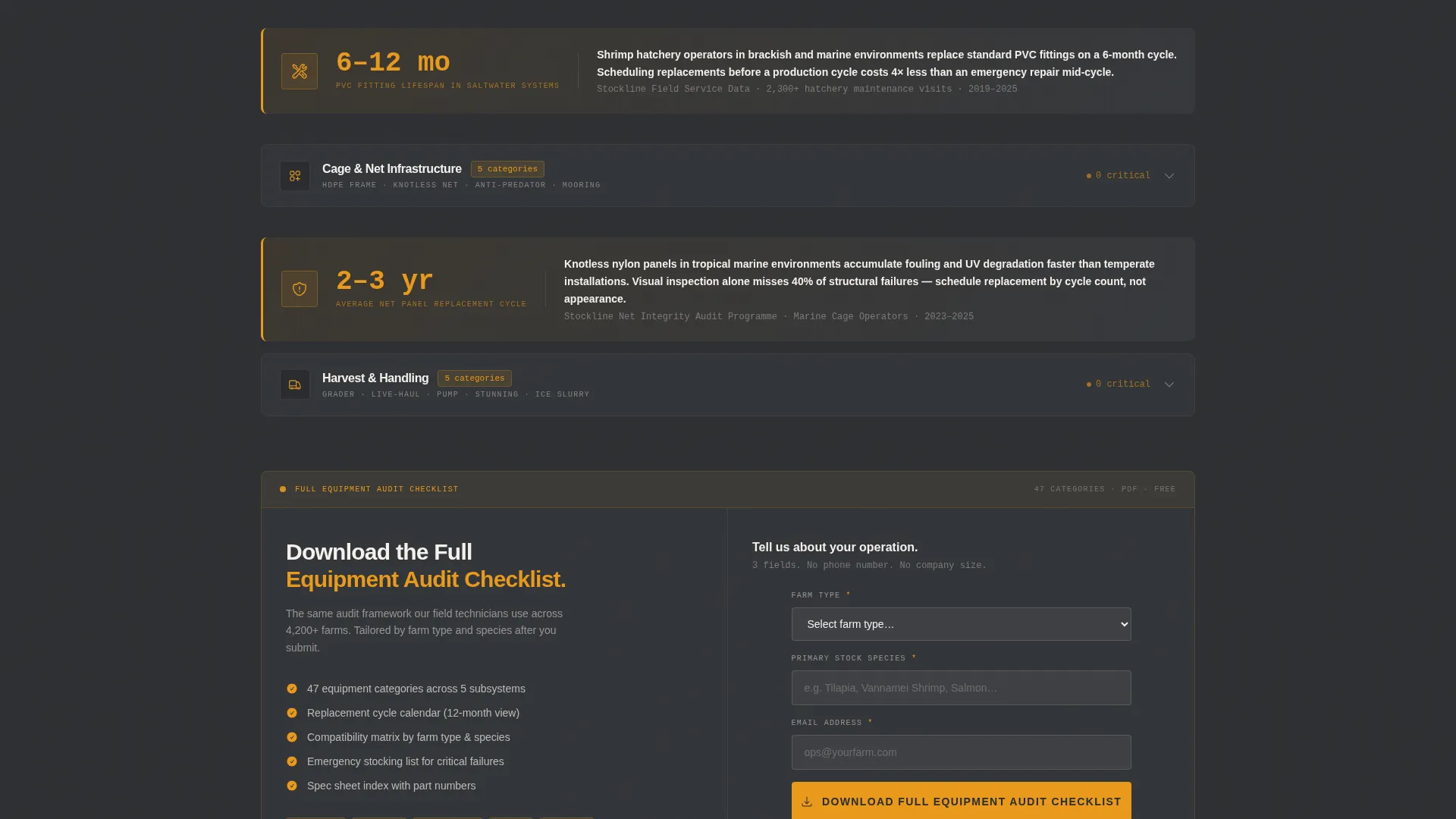
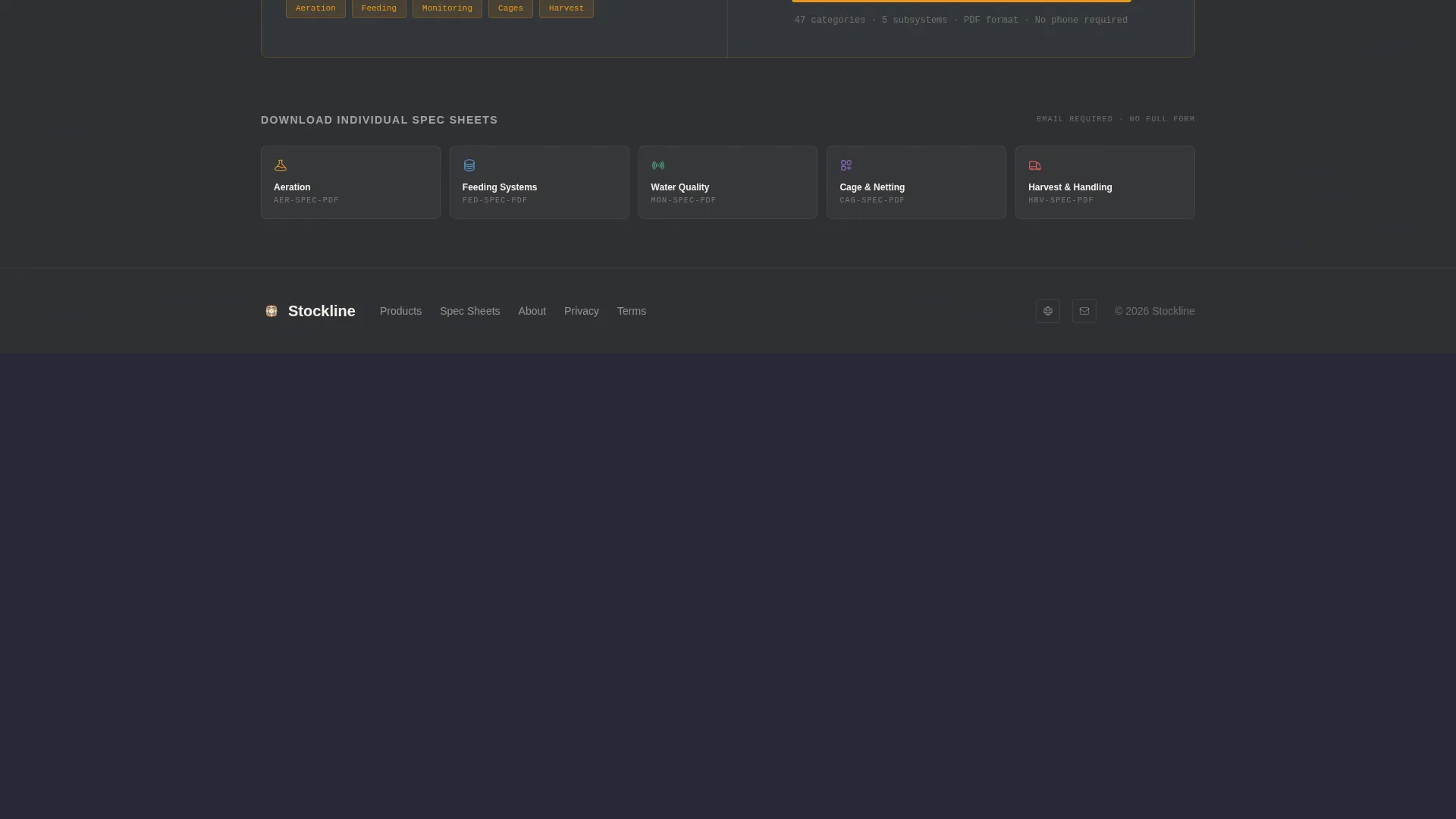
- A dual-path content delivery system: a master checklist form with three fields plus individual spec sheet downloads requiring email only
Feature list
This template includes a focused set of purpose-built components. Each one earns its place by serving a specific stage of the buyer's decision process.
Interactive Cross-Section Infographic Header
The header renders a flat technical illustration of a complete aquaculture operation. Pond, cage, and RAS setups appear side by side. Hovering any subsystem highlights it and reveals a tooltip with a one-line spec summary. Equipment counts such as "3 paddle-wheel aerators" and "6 DO sensors" appear as labels directly on the diagram.
Expandable Equipment Audit Grid Modules
Five grid modules organize the page like a structured pre-season audit. Each module covers a farm subsystem: aeration and oxygenation, feeding systems, water quality monitoring, cage and net infrastructure, and harvest and handling. Grid rows list individual equipment categories with columns for recommended replacement cycle, compatibility notes, and a downloadable spec sheet icon.
Single-Stat Callout Cards
Between audit grids, full-width callout cards interrupt the scroll with high-impact operational facts. A card reading "68% of farm losses trace to aeration failure in the first 90 days" anchors the checklist in real consequences. These cards reinforce why each audit section matters before the visitor moves to the next grid.
Dual-Path Content Download System
The primary conversion path is a "Download the Full Equipment Audit Checklist" call to action in amber. It appears as a sticky bar after the second grid and again as a full-width module at page bottom. A secondary path lets visitors download individual subsystem spec sheets by submitting email only, with no additional form fields required.
Service Utility Dashboard Layout
The overall layout follows a dashboard and data grid structure. Sections feel like panels in an equipment management interface rather than a marketing brochure. The scrolling rhythm alternates between dense grid data and sparse callout moments, keeping the experience methodical and easy to navigate.
Three-Field Master Checklist Form
The master download form asks for farm type, current stock species, and email address. No phone number or company size field is included. This keeps the barrier to conversion low while collecting the segmentation data a supplier needs to follow up with relevant offers.
Page sections overview
| Section | Purpose |
|---|---|
| Infographic Header | Establishes supplier authority with a labeled, interactive cross-section farm diagram |
| Aeration Grid Module | Lists aerator categories with replacement cycles, compatibility notes, and spec sheet links |
| Stat Callout Card | Interrupts scroll with an operational loss statistic tied to aeration failure |
| Feeding Systems Grid | Covers automatic feeder types, feed rate compatibility, and downloadable specs |
| Water Quality Grid | Organizes dissolved oxygen, pH, and temperature monitoring equipment by category |
| Sticky Download Bar | Presents the master checklist call to action after the second audit grid |
| Cage and Net Grid | Details net cage sizes, materials, and infrastructure replacement guidance |
| Harvest Handling Grid | Covers harvest and post-harvest equipment categories and spec downloads |
| Stat Callout Card | Reinforces urgency before the final conversion module |
| Full-Width Download Module | Delivers the three-field master form and secondary spec sheet download path |
Design & branding system
The visual identity follows a Service Utility theme built around a charcoal and amber color system. Every color decision has an operational rationale, like a laminated maintenance chart zip-tied to a cage rail.
- Core palette: deep equipment charcoal (#2B2D30) for headers and navigation, wet-steel gunmetal (#4A4E54) for secondary surfaces, high-visibility amber (#E8991C) reserved for buttons, status flags, and download icons, and aeration-foam white (#F4F0EB) for data cell backgrounds
- Amber appears sparingly and always signals an action: every amber element on the page means "act on this"
- The flat technical illustration style, grid-based layout, and zero decorative elements create a tone that communicates industrial credibility and operational precision
Mobile & speed optimization
The dashboard and data grid layout is designed to translate cleanly to smaller screens. Grid modules stack logically, and the sticky download bar remains accessible throughout the mobile scroll.
- Expandable grid modules collapse neatly on mobile, keeping the audit structure intact without overwhelming smaller viewports
- The sticky call-to-action bar persists on mobile scroll so the primary conversion point is never out of reach
How this template helps you convert
This template builds trust before asking for anything. By the time a visitor reaches the call to action, the checklist has already been half-demonstrated in front of them through the audit grid experience.
- The interactive infographic immediately positions the supplier as a technical authority, earning attention before a single product is named
- The sequential audit grid structure mirrors how buyers actually evaluate equipment needs, making the full checklist download feel like a natural next step rather than a cold ask
Other information about this template
This template is a strong fit for aquaculture equipment landing pages where the buyer is educated and technically minded. A few additional details are worth noting for teams evaluating it.
- The template is categorized under Marine and Maritime, specifically within the Maritime Services subcategory, with a niche focus on aquaculture equipment supply
- The Checklist and Audit creative direction and Dashboard and Data Grid template style make it versatile for similar industrial supply niches beyond aquaculture
- The content and resource landing page direction means the primary goal is lead generation through a high-value downloadable asset, not a direct product purchase flow
- The Service Utility theme and charcoal and amber palette can be adapted with brand colors while preserving the industrial, utilitarian visual tone
Theme
Service Utility
Creative direction
Checklist & Audit
Color system
Charcoal & Amber
Style
Dashboard/Data Grid
Direction
Content/Resource
Page Sections
Interactive Cross-section Infographic Header
Expandable Equipment Audit Grid Modules
Single-stat Callout Cards
Dual-path Content Download System
Sticky Amber Download Bar
Three-field Master Checklist Form
Related questions
Who is the ideal visitor for this landing page?
Can I customize the equipment categories in the audit grids?
How does the dual-path download system work?
Does the template include the infographic diagram as a ready-made asset?
Is this template suitable for suppliers outside Southeast Asia?