Stonemason Business Booking Website Template
Chisel is a stonemason customer review landing page template built around an interactive comparison table of real project testimonials. It organises client feedback by project type, stone material, and timeline accuracy, then pairs each row with project photography and before-and-after detail. A pinned booking call to action and a secondary photo-upload path turn accumulated trust into confirmed site survey appointments.
by Rocket studio
Quick summary
Chisel is a specialist testimonial page template for heritage stonemasons. It presents dozens of customer testimonials inside an expandable comparison table, grouped by restoration, new build, landscaping, and ecclesiastical work. A deep plum and parchment cream visual system, brass star accents, and Fraunces serif typography give the page the quiet authority of a conservation architect's portfolio. The page closes with a direct booking form.
Who this template is for
This template is built for skilled stonemasons who work across conservation, heritage, and landscape projects. It speaks directly to the craftspeople whose testimonials carry weight with architects and planning officers, not just homeowners.
Your target audience reading this page includes:
- Heritage homeowners managing listed buildings with crumbling lintels, failing mortar, or deteriorating hearth surrounds
- Landscape architects specifying natural stone for estate entrances and boundary features
- Project managers running church restoration contracts where work must satisfy conservation officer inspection
What problem this template solves
Stonemasons face a specific trust problem. Their product or service involves expensive, irreversible work on buildings that matter culturally and legally. A generic testimonials page with a few floating quote testimonials does not carry enough evidence. Prospective customers need proof that is organised, visual, and specific.
This template solves that by replacing scattered customer testimonials with a structured evidence ledger:
- Potential customers can scan by project type and find testimonials that match their exact situation
- Each row of the comparison table expands to reveal the full client story, project photographs, and before-and-after detail
- The page builds credibility row by row, so the booking call to action arrives only after trust is already earned
What you get with this template
The template delivers a complete, ready-to-customise single-page layout. Every section is designed to carry real project evidence rather than generic marketing copy.
Included layout sections and components:
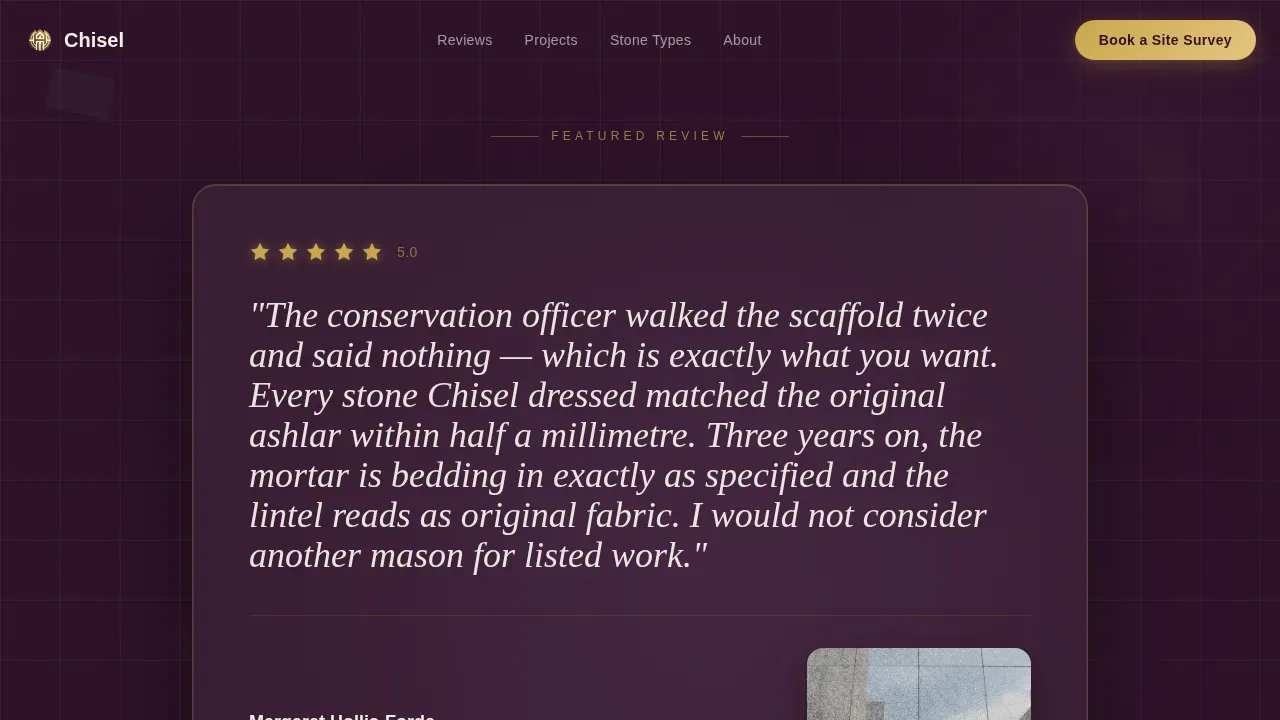
- A full-width hero featuring one oversized testimonial card set against deep plum, five brass star ratings above the quote, and a photograph of the finished stonework below
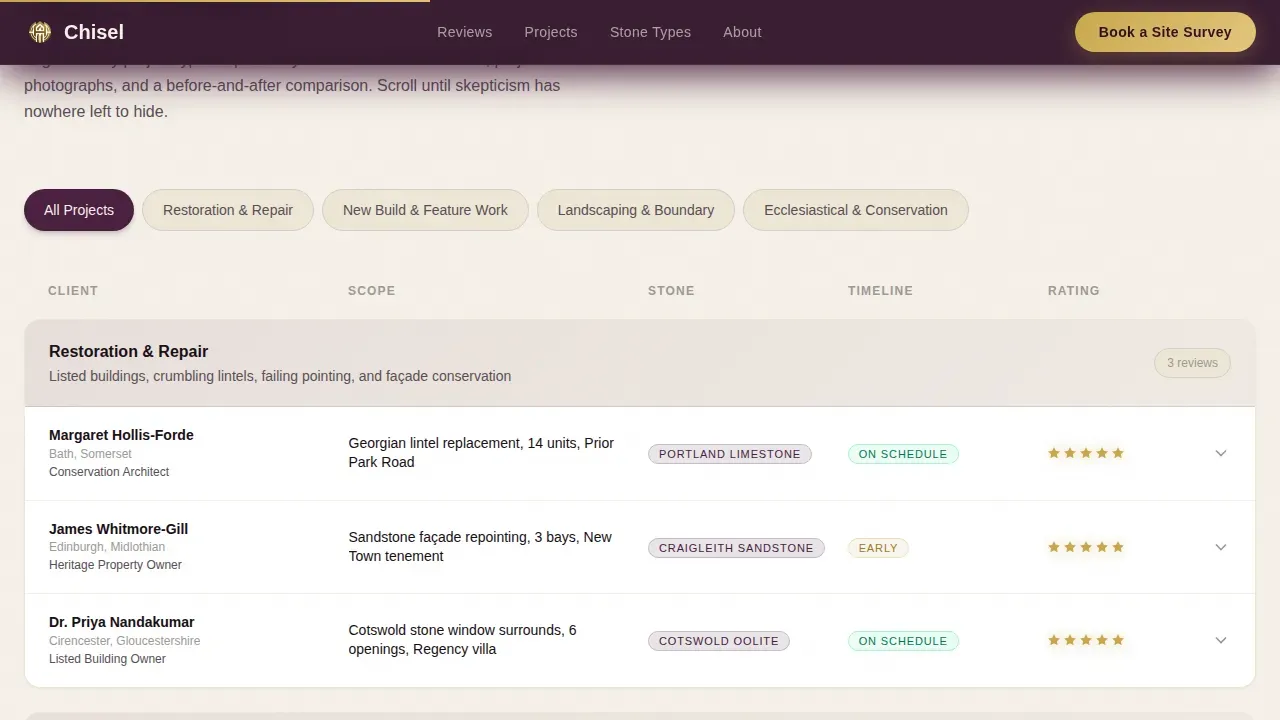
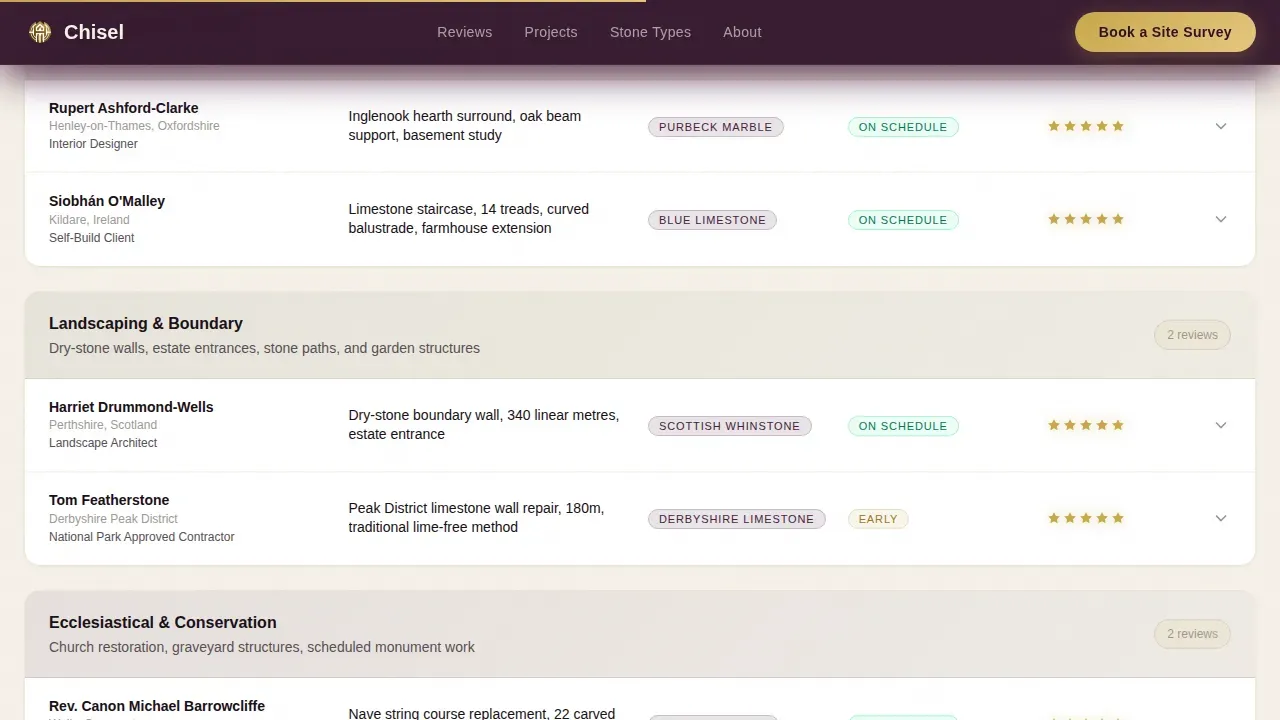
- An interactive comparison table organised by project type, with columns for scope, stone type, timeline accuracy, and client rating
- Expandable table rows that reveal the full testimonial text, project photography, and before-and-after imagery on click
- A pinned "Book a Site Survey" call to action that appears after the first table section, with a booking form collecting property type, project description, and preferred survey date
- A secondary low-commitment path, "Send Us Photos for a Quick Assessment," offering a photo-upload option for early-stage enquiries
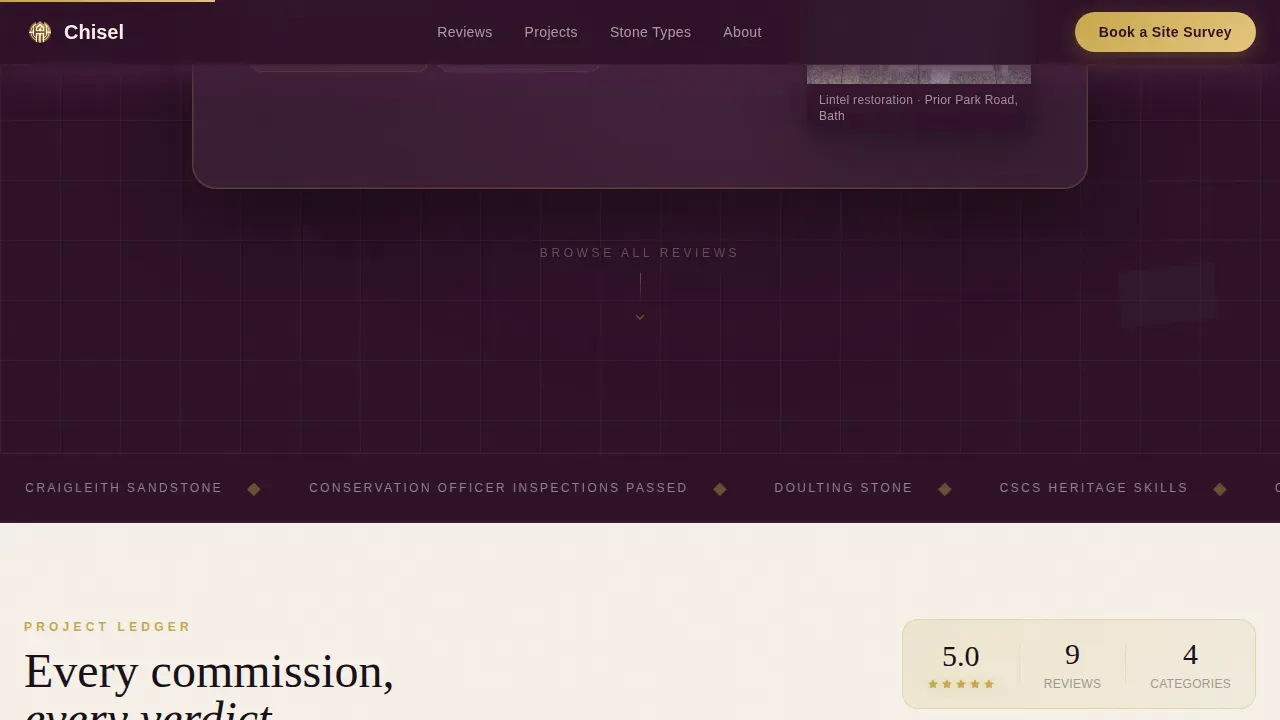
- A trust indicators section covering conservation credentials and stone types worked
- A linear single-row footer
Feature list
This section covers the core product features built into the Chisel template.
Testimonial Mosaic Comparison Table
The centrepiece of the page is an interactive table that organises customer testimonials by project type: restoration, new build, landscaping, and ecclesiastical. Each row shows scope, stone material, timeline accuracy, and star rating at a glance. Clicking any row expands it to display the full written testimonial, supporting project photographs, and before-and-after imagery. This structure means potential buyers can immediately find testimonials relevant to their own project, rather than reading through unrelated client quotes.
Oversized Hero Testimonial Card
The header opens with a single client quote displayed at display scale in Fraunces serif against a deep plum background. Five polished brass star ratings sit above the quote. Below the text, a photograph shows the actual completed stonework referenced in the review. The effect prioritises physical evidence over personality, letting the craftsmanship speak before any copy does. This approach to testimonial design gives the page instant credibility from the first scroll position.
Pinned Booking Form with Survey Scheduling
After the first table section, a "Book a Site Survey" call to action pins to the viewport. The accompanying form collects property type from a structured selector, a free-text project description field, and a calendar picker for preferred survey date. Placing a star rating next to this call to action reduces last-minute hesitation for potential clients who are still weighing their decision.
Secondary Photo Assessment Path
A lower-commitment second path, "Send Us Photos for a Quick Assessment," provides a photo-upload option for prospective clients who are not yet ready to commit to a survey date. This path lowers the barrier to first contact, capturing early-stage enquiries that might otherwise leave the page without converting.
GSAP ScrollTrigger Animation System
The template uses medium-intensity GSAP ScrollTrigger animations to reveal table rows, testimonial cards, and trust-indicator blocks as the visitor scrolls. A marquee animation runs across the trust indicators section. Table row expansion uses a smooth client-side transition. These motion choices keep the scroll experience deliberate and measured, matching the weight and precision of the craft being presented.
Plum Executive Visual Identity
The full colour system, Fraunces serif display type paired with DM Sans body text, and conservative layout geometry combine to create a testimonial page design that reads like a conservation architect's office. Deep plum structures the hero and key sections. Parchment cream backgrounds body content. Polished brass is reserved strictly for star ratings and interactive highlights, keeping it meaningful every time it appears.
Page sections overview
| Section | Purpose |
|---|---|
| Hero Testimonial Card | Opens with an oversized single client quote, brass star ratings, and a photograph of the finished stonework |
| Comparison Table | Interactive rows grouped by project type, expandable to reveal full testimonials, photographs, and before-and-after detail |
| Pinned Booking call to action | "Book a Site Survey" form collecting property type, project description, and preferred survey date |
| Photo Assessment Path | Secondary low-commitment upload option for early-stage enquiries |
| Trust Indicators | Conservation credentials, stone types worked, and supporting validation markers |
| Page Footer | Linear single-row footer closing the page |
Design & branding system
The visual system is built around the Plum Executive colour palette. Every design choice reinforces the idea that this is a craftsman whose work is measured in decades, not weeks.
Key design and branding elements included:
- Deep plum (#4A2040) structures the hero, comparison table headers, and section dividers, anchoring the page with authority
- Weathered ashlar gray (#9E9A96) and parchment cream (#F5F0E8) provide the body background and secondary text tones, keeping long table content readable
- Polished brass (#C9A84C) appears only on star ratings and interactive hover states, making each instance feel considered rather than decorative
- Fraunces serif handles all display headings and large quote testimonials; DM Sans handles all body and form text for clear legibility at small sizes
Mobile & speed optimization
The template is designed desktop-first, which reflects the working habits of conservation architects and project managers who typically specify stonework at a desk. Mobile support is included as a secondary priority.
Mobile and performance considerations built into the template:
- The comparison table reflows to a stacked card layout on narrower viewports, keeping expandable testimonial rows accessible on touch screens
- Server Components handle all static content, including the hero testimonial card, trust indicators, and footer, while Client Components manage the interactive table and booking form
- GSAP animations are scoped to scroll events to avoid layout thrash on lower-power devices
How this template helps you convert
A well-crafted testimonial page can increase conversions by up to 270% when it presents real, specific evidence in an organised format. This template is built around that principle.
- The comparison table organises customer testimonials so prospective customers can self-select the most relevant success stories before they reach the booking form, arriving at the call to action already persuaded
- The pinned "Book a Site Survey" button keeps the primary conversion path visible throughout the scroll without interrupting the evidence-gathering experience, and the star rating placed beside it reduces hesitation at the moment of decision
- The secondary "Send Us Photos" path captures prospective clients who need one more nudge, converting visitors who would otherwise leave without making contact
Other information about this template
This section covers additional context about the thinking behind this template's testimonial design, the types of evidence it supports, and how it compares to broader testimonial page examples across industries.
Testimonials are not all created equal. Not all testimonials carry the same persuasive weight. A vague statement like "great service" does nothing for a conservation officer reviewing a heritage application. Specific details, such as stone type, project scope, and timeline accuracy, are what make customer testimonials credible in a trade context. This template is structured to surface those specific details prominently in every row of the comparison table.
This template supports a full range of testimonial formats. Quote testimonials occupy the hero and populate each table row. Written testimonials in expanded rows provide full narrative depth. The template layout can also accommodate video testimonials and testimonial videos within expanded table rows, giving potential buyers the option to consume evidence in the format that suits them best. Video testimonials are engaging, dynamic, and incredibly persuasive. More than 69% of customers trust video testimonials on a company's website. Including video testimonials on a website can significantly enhance customer engagement. Video testimonials can increase bottom-of-funnel site conversions by more than 34%, making them a valuable addition alongside written testimonials.
Video testimonials provide third-party validation from real people who have used a product or service. Video testimonials can help reduce buyer hesitation and increase conversions. They can be more effective than text testimonials in conveying authenticity and emotional connection. Video testimonials can showcase customer stories in a compelling way, making them relatable to potential customers. Using video and text testimonials together caters to different audience preferences and broadens engagement across different customer segments.
The template's structure draws from proven testimonial page examples across a range of industries. Platforms like Zendesk organise customer testimonials into categories such as location, industry, and company size for easy navigation. Xero separates testimonials by industry, allowing prospects to find relevant customer stories easily. Basecamp's testimonial page focuses on transformation stories. HubSpot's testimonial page includes comparison reviews where customers explain why they switched from competitors. The Chisel comparison table applies the same logic: category-first organisation so that different customer segments can find the most relevant proof immediately.
Displaying customer logos on a testimonial page provides instant credibility and recognition for potential clients. Customer logos alongside real names and project photographs make testimonials feel more authentic and trustworthy. This template is designed to support customer logos and project-specific imagery within each expanded table row. Displaying this kind of user generated content alongside star ratings from Google reviews or other review platforms adds a further layer of third-party validation.
The testimonial section structure draws on well-established principles from great testimonial pages across professional services. Effective testimonials include specific details and quantifiable results. Powerful testimonials from real customers, paired with before-and-after photography, build the kind of trust that generic marketing copy cannot replicate. The key takeaway from the best testimonial examples is that evidence must be organised, visual, and matched to the reader's situation.
Key additional facts and context:
- The template supports user generated content in the form of project photographs, before-and-after imagery, and client-submitted testimonials within each table row
- Google reviews and other review platforms can be referenced or embedded in the trust indicators section to provide real-time social proof signals alongside the comparison table
- Social media channels can be referenced in the footer or trust indicators, allowing the page to direct satisfied customers toward leaving new reviews on public platforms
- The booking form uses UK localisation throughout: GBP currency references, DD/MM/YYYY date format in the calendar picker, and British English copy throughout the interface
- This template is a single landing page, not a multi-page website, and is intended to function as a standalone conversion asset for a stonemason's online presence
- The Chisel trusted stonemason customer review landing page template is suited to stonemasons at any scale, from sole traders to small studios handling heritage contracts alongside residential commissions
- A software company building a testimonial page for professional services clients could study this template as one of the more rigorous testimonial page examples available, because the comparison table format transfers well across any service where project-by-project evidence matters
Theme
Educational Guide
Creative direction
Testimonial Mosaic
Color system
Plum Executive
Style
Comparison Table
Direction
Booking/Scheduling
Page Sections
Interactive Testimonial Comparison Table
Oversized Hero Testimonial Card
Pinned Site Survey Booking Form
Low-commitment Photo Assessment Path
GSAP Scrolltrigger Animation System
Plum Executive Colour and Typography System
Related questions
Can I add video testimonials to the Chisel template?
How does the comparison table handle different project types?
What does the booking form collect from prospective clients?
Is the page designed for desktop or mobile users?
Can I display reviews from Google or other review platforms on this page?



