Templates
Mining & Natural Resources
Mining Equipment & Services
Stratum - Know What Lies Beneath Geological Survey Landing Page Template
Stratum - Know What Lies Beneath Geological Survey Landing Page Template
The Stratum know what lies beneath geological survey landing page template is a split-screen, blueprint-styled single-page layout built for geotechnical drilling firms. It walks civil engineers, property developers, and environmental consultants through every phase of a site investigation, from desk study to interpreted report, using an interactive topographic map hero, data-driven process sections, and a dual-path lead generation form.
by Rocket studio
Quick summary
Stratum is a single-page, 50/50 split-screen landing page template designed for geotechnical survey firms. It leads with an interactive topographic map hero, then walks visitors through three documented process phases before presenting a dual-path lead generation form. The engineering blueprint visual style uses monospaced type and a dark slate palette to signal precision, data, and professional trust from the first scroll.
Who this template is for
This template is built for businesses that operate at the intersection of earth science and civil decision-making. It suits firms that drill, sample, log, and report on subsurface conditions for paying clients who cannot break ground without that information.
- Geotechnical drilling and site investigation firms serving civil engineering projects
- Geological survey contractors working on brownfield, infrastructure, and residential development sites
- Environmental consultants who need a credible lead-capture front end for contamination risk assessments
What problem this template solves
Most geotechnical firms present their services as a list of deliverables. That approach leaves potential clients unsure of what they are actually buying. Engineers and developers who commission a geological survey want to understand the process, not just the output. They need confidence that the firm reads strata, interprets rock layers, and produces defensible data before they hand over a site address.
- Visitors arrive without context and leave before trusting the service enough to inquire
- The form-first approach most service pages use fails with technical buyers who need process proof first
- No clear secondary conversion path exists for earlier-stage leads who are still scoping their project
What you get with this template
This template delivers a fully structured, single-page layout with every section configured for a geotechnical survey service context. The design system, copy placeholders, component structure, and interaction concepts are all scoped to the brief described in the source design prompt.
- An interactive topographic map hero section with borehole pin hover states that reveal core log thumbnails
- Three sequential process split-screen sections walking visitors from desk study through drilled data to final interpreted report
- A dual-path lead generation section combining a detailed site assessment form with a gated PDF download for earlier-stage prospects
Feature list
This template includes the following purpose-built features, each derived directly from the source design brief.
Interactive Topographic Map Hero
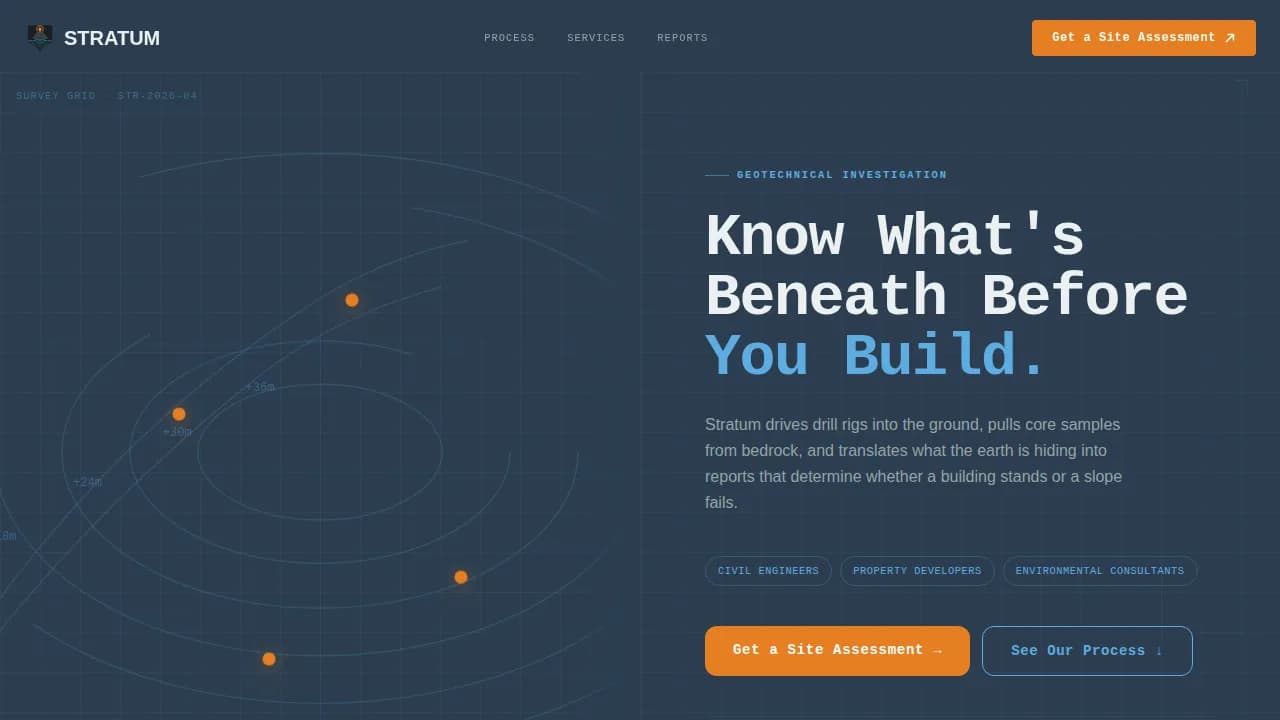
The hero splits the viewport 50/50. The left panel fills with an interactive topographic map rendered in fine sky blue contour lines on a deep slate ground. Borehole locations pulse as clickable pins across the map surface. Hovering any pin reveals a thumbnail of the actual core log from that location, so a visiting engineer sees real subsurface data within the first three seconds of landing on the page. The right panel holds a bold monospaced headline and a primary call-to-action button in survey-stake orange.
Three-Phase Process Walkthrough
The scroll reveals three sequential split-screen sections, each representing a real phase of a geological survey engagement. Phase one contrasts a desk study and historical map review on the left with the site-specific scope document it produces on the right. Phase two places a drill rig photographed mid-bore on the left against a labeled core sample tray on the right. Phase three shows raw lab data on the left and the interpreted geotechnical report with bearing capacity values and foundation recommendations on the right. Each section uses a horizontal wipe transition, like a blueprint being unrolled.
Dual-Path Lead Generation Form
The lead generation section provides two distinct conversion paths. The primary path is a site assessment form that asks for a site address first using an embedded map pin-drop, then a project type selector covering residential, commercial, infrastructure, and environmental categories, followed by an optional file upload for existing site plans or planning documents. The secondary path offers a downloadable portable document format guide titled "Free Borehole Spacing Guide," gated behind name and email only, capturing prospects who are still scoping rather than actively commissioning.
Engineering Blueprint Design System
The template applies a consistent engineering blueprint visual identity across every section. JetBrains Mono handles all headlines and data callouts, creating the monospaced precision of a technical document. DM Sans handles body copy for readability. The palette of deep borehole slate, exposed-rock gray, open-sky blue, and survey-stake orange is applied with strict hierarchy: slate dominates backgrounds, sky blue marks interactive elements and data visualizations, and orange appears only on calls to action and key data callouts.
Animated Scroll Transitions
The template uses medium-weight animation throughout the scroll experience. Contour lines in the hero draw on load via SVG animation. Borehole pins pulse to indicate interactivity. Each process section enters with a horizontal wipe transition that mimics a blueprint being unrolled across the screen. Data fields and callout figures reveal with a staggered entrance, so visitors feel the information building as they scroll rather than all appearing at once.
Developer-Minimal Footer
The footer follows a clean, minimal pattern suited to a technical audience. It avoids decorative clutter and presents contact references and any supplementary links in a structured, low-noise layout consistent with the engineering blueprint theme carried throughout the rest of the page.
Page sections overview
| Section | Purpose |
|---|---|
| Topographic Map Hero | Establishes the interactive data-first introduction with borehole pin hover states and primary call to action |
| Phase One Split | Shows desk study and historical map review alongside the scope document it produces |
| Phase Two Split | Pairs an on-site drill rig photograph with a labeled core sample tray |
| Phase Three Split | Contrasts raw lab data with the interpreted geotechnical report and bearing capacity values |
| Lead Generation Form | Captures qualified project inquiries via site assessment form with map pin-drop input |
| PDF Gated Download | Converts earlier-stage prospects via a free borehole spacing guide behind a minimal email gate |
| Developer-Minimal Footer | Closes the page with clean contact references in a low-noise layout |
Design & branding system
The design system is built around an engineering blueprint theme that treats the page like a technical drawing made legible. Every visual decision references the physical world of subsurface investigation: the darkness of deep bedrock, the open clarity of a site survey day, and the single fluorescent stake that marks where the rig goes in.
- Color palette: deep borehole slate (#2C3E50) for backgrounds and primary type, exposed-rock gray (#7F8C8D) for secondary elements, open-sky blue (#5DADE2) for interactive components and data highlights, survey-stake orange (#E67E22) reserved for calls to action and data callouts
- Typography: JetBrains Mono for headlines and all technical data fields to reinforce precision; DM Sans for body copy to maintain readability at paragraph length
- Visual texture: fine contour-line SVG patterns, animated borehole pin markers, horizontal wipe scroll transitions, and staggered data reveals all contribute to the feeling that information is being uncovered layer by layer
Mobile & speed optimization
The template is desktop-first by design, matching the primary audience of civil engineers and geotechnical professionals working at workstations. However, the layout includes a mobile fallback that maintains usability across smaller screens without losing the key conversion paths.
- The primary call-to-action button persists as a fixed bottom bar on mobile, keeping "Get a Site Assessment" visible throughout the entire scroll
- Static sections use server-rendered components to keep initial load efficient, while the interactive map and lead generation form are scoped to client-side components to isolate interactivity where it is needed
How this template helps you convert
The page is structured around a transparent process philosophy. It earns the inquiry by showing the complete geological survey workflow before asking for any contact details. By the time a visitor reaches the form, they already understand what they are commissioning.
- The interactive map hero grounds the visitor in real data immediately, demonstrating competence before a single word of body copy is read, and the primary call to action appears in this first panel so early-decision visitors can convert without scrolling
- The three-phase process walkthrough removes uncertainty for technical buyers by showing exactly how raw subsurface data becomes an actionable foundation report, building the trust that justifies filling in a form with a real site address
- The secondary PDF download path captures earlier-stage prospects who are not yet ready to submit a site, so no traffic is wasted and the lead pool covers the full buyer journey from early scoping to active project commissioning
Other information about this template
This section covers additional context about the discipline of geological survey and subsurface mapping that informs why this template is scoped and designed the way it is. Understanding the knowledge domain helps buyers appreciate what the template communicates to its intended professional audience.
Geological surveys are conducted to collect data about the earth's surface and subsurface geology. The foundation of any such survey is the study of strata, which are the fundamental building blocks used to map, understand, and interpret the history and composition of the earth's subsurface. Strata are unique records of meaningful events in the history of earth and its people. The principle of superposition tells us that in undisturbed strata, the oldest layers sit at the bottom and the youngest at the top, a fact that geologists rely on when constructing cross sections and building subsurface models.
Geological maps show the types and ages of rocks and younger deposits found at or near the earth's surface. They classify rocks and deposits into map units, displayed as colored or patterned areas based on unique rock type, age, or depositional setting. Geological maps can be produced at various scales, and map scale directly determines the level of detail captured and the area a single map can represent. At a regional scale, one inch on the map might represent several miles of terrain. At a site investigation scale, the base map zooms in to capture individual borehole locations, soil boundaries, and subsurface layer contacts.
Geological maps are essential tools for practical applications including zoning, civil engineering, and hazard assessment. Planners and engineers use geologic maps to identify geologic hazards such as landslides and faults and to manage growth in urban areas. Geologic maps are also vital in finding and developing geological resources, including water, gravel, oil, and groundwater. Specific strata can act as reservoirs for natural resources such as water, oil, natural gas, or coal. Cross sections are used in geological mapping to show how rock units or deposits are arranged below the surface, and geologists create both two-dimensional and three-dimensional diagrams showing how different layers tilt, fold, or fault at depth.
Geologic features visible at the earth's surface, such as outcrops at cliff faces, allow geologists to read rock type, composition, color, grain size, and even trace fossils. Each stratum has unique properties that distinguish it from surrounding layers. Sedimentary strata, for example, are formed from the accumulation and compaction of mineral and organic particles, often layered over time. Sedimentary rocks are formed when grains and fragments of existing rocks are eroded away and redeposited as sediment. Changes in sea level can affect sediment deposition and the characteristics of strata in a basin, and sedimentary basins accumulate layers of sediment that record the history of an area including climate fluctuations. A thin layer of rock or sediment is called a lamina, while thicker ones are called beds.
Geological formations are classified into three main types based on their origin: igneous, metamorphic, and sedimentary. Igneous rocks are formed from molten magma, classified as either extrusive or intrusive based on their formation process. Metamorphic rocks are formed from existing rocks transformed by heat, pressure, or chemically active fluids. Formations are the basic units of lithostratigraphy and must be mappable across an area with distinct boundaries and characteristics. A key bed is a specific, easily identifiable stratum used to correlate rock layers across distances and match them to strata at other locations.
The study of stratigraphy helps scientists understand the geologic history of earth, including climate changes and natural disasters. Strata can be tilted or folded due to past tectonic activity, and plate tectonics remains a driving force behind the geologic structures that geologists map and interpret. The fold axis of a deformed sequence, for example, can help geologists determine the direction and intensity of past compressional forces. Geologic time is the framework within which all of these events are placed, and even layers deposited millions of years ago can be read and dated when the right mappable units are preserved.
Geological maps are often overlaid on topographic maps to give a complete understanding of how surface landforms relate to the underlying rocks below. This combination of topography and geology is especially important when assessing slope stability or foundation bearing capacity. Many geologists also use digital versions of geologic maps overlaid in tools such as Google Earth to correlate surface features with known formations at other locations. A state geological survey typically maintains an archive of regional base map layers, borehole logs, and formation data that practitioners reference during desk study phases of a site investigation.
Well-known geological sites such as Yellowstone National Park and the Grand Canyon demonstrate the practical value of reading exposed rock layers. At the Grand Canyon, cross sections through the canyon walls reveal millions of years of stacked sediment, volcanic activity, and erosion in a single visual. The national park service uses geological map resources to manage those sites and communicate geologic history to the public. Yellowstone National Park, with its visible volcanic activity and thermal features, is another example where geologic maps and the understanding of depositional setting are essential for both scientific research and land management. William Smith, often called the father of English geology, was among the first to demonstrate that rock layers containing similar characteristics of fossils could be traced and correlated across a region, laying the foundation for modern geological survey practice.
The geological sequence of rocks preserved in strata varies from place to place but can be recognized over considerable distances using stratigraphic correlation. Stratotypes are reference layers in geology that serve as valuable sites for studying rock layers and their historical significance. They are often named after their geographic locations and help geologists compare strata in one region to strata at other locations. The preservation of stratotypes is important because they can be threatened by human activities such as urban development and natural events like volcanic eruptions. Stratotypes serve as a fundamental building block for understanding geological evolution and geoheritage.
Geologic maps show the earth's crust in plan view, while cross sections reveal the geometry of the earth's crust in vertical profile. Together, map and section provide the complete picture that engineers and planners need. The continental shelf, for example, is mapped using marine geological survey techniques adapted from the same principles applied on land. Rock units that appear on a geological map at the land surface often continue offshore, and understanding their continuity is important for infrastructure projects near coastlines. Geological surveys often involve ongoing revisions and updates to reflect new data, and digital versions of geologic maps have made those updates faster and more accessible for practitioners across all project scales.
- This template is categorized under Mining and Natural Resources, subcategory Mining Equipment and Services, with a niche focus on geological survey service delivery
- The template style is split-screen 50/50, and the single-page flow makes it a landing page rather than a multi-page website
- The intersection score of 13 reflects strong alignment between the design brief, the target niche, and the lead generation direction
- The header concept is map-based, the creative direction is transparent process, and the color system is Slate and Sky, all of which are defined in the matched intersection row for this template


Theme
Engineering Blueprint
Creative direction
Transparent Process
Color system
Slate & Sky
Style
Split Screen (50/50)
Direction
Lead Generation
Page Sections
Interactive Topographic Map Hero
Three-phase Process Walkthrough
Dual-path Lead Generation Form
Engineering Blueprint Design System
Animated Scroll Transitions and Data Reveals
Related questions
Who is this template designed for?
What lead generation paths does the template include?
Does this template work on mobile devices?
Can I customize the colors and typography?
What makes this different from a standard services page template?