Immigration Services Landing Page Template
The Petition landing page template turns the complexity of U.S. immigration into a clear, step-by-step experience. Designed for visa petitions, green card filings, and naturalization requests, it uses expandable pathway cards, a sticky workshop registration bar, and a gated checklist download to guide visitors from confusion to confident action.
by Rocket studio
Quick summary
This immigration services landing page template is crafted for organizations that help people navigate the U.S. immigration process. It features a modular card grid layout, expandable pathway cards with step trackers, a workshop registration form, and a gated PDF checklist download. The design follows an Institutional Authority theme built to earn trust and drive measurable conversions.
Who this template is for
This template serves immigration legal aid organizations, nonprofit immigration services providers, and government-adjacent agencies that support applicants through complex visa and citizenship processes. It speaks directly to the individuals who need it most.
- H-1B visa holders tracking priority dates and planning adjustment of status
- Parents and family members filing petitions such as the I-130 for relatives abroad
- DACA recipients and student visa holders evaluating their next immigration step
What problem this template solves
An immigration request is a formal application submitted to U.S. immigration authorities when seeking permission to enter, stay in, or change status in the United States. These requests come in many forms: tourist visa applications, green card petitions, work permit submissions, and citizenship paperwork. Each type of immigration request requires different supporting documents, fees, and processing steps, and most applicants have no clear view of where they stand.
- Visitors arrive overwhelmed by form numbers, country-specific rules, and shifting processing times
- There is no single page that narrows from broad immigration category down to a specific personal situation
- Organizations lose potential clients because their pages request action before earning trust
What you get with this template
This template delivers a complete, ready-to-launch immigration services landing page. Every section is purposefully designed to move a visitor from awareness to registration without confusion.
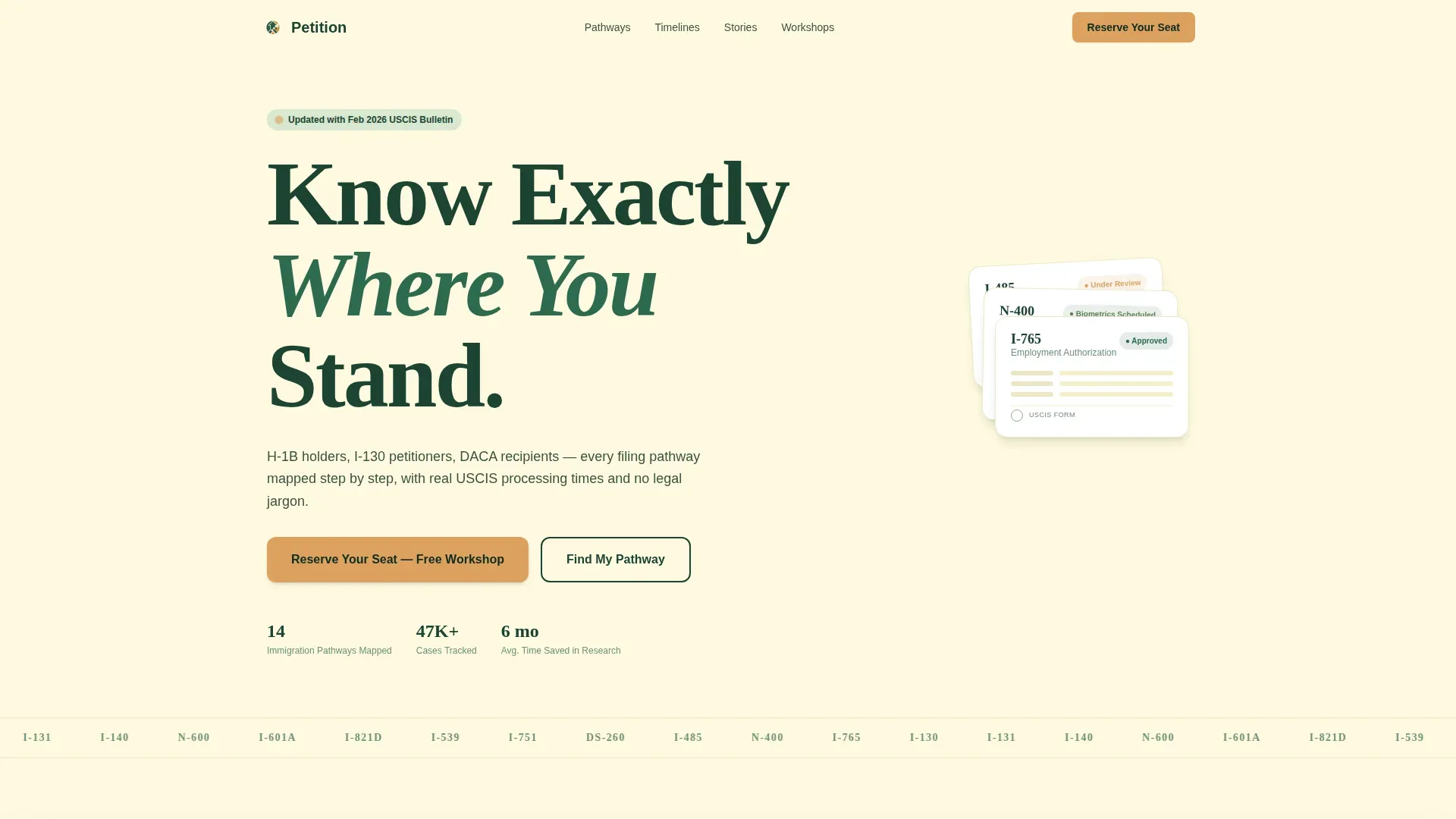
- A hero section with a large left-anchored headline and a stacked illustration of immigration forms (I-485, N-400, I-765) with color-coded status dots
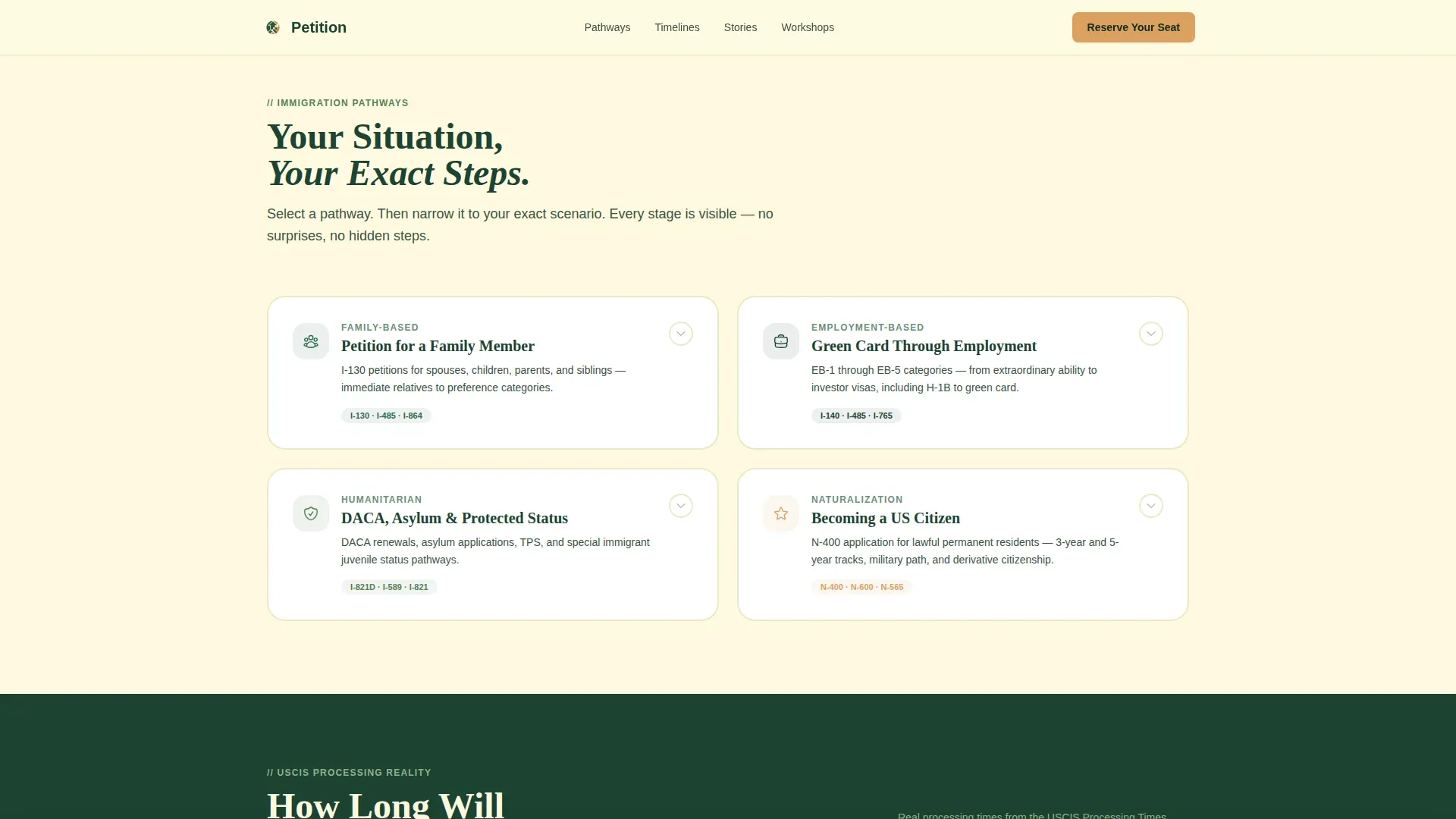
- An expandable modular card grid covering family-based, employment-based, humanitarian, and naturalization pathways, each with an inline step tracker
- A sticky bottom registration bar, a workshop event form with a date picker, and a gated PDF checklist download for lead capture
Feature list
This template is built around one core idea: a transparent process earns more trust than a polished pitch. Every feature below serves that purpose directly.
Expandable Pathway Card Grid
Each immigration category gets its own modular card. Click a card and it expands downward to reveal a horizontal step tracker showing every stage from initial filing to the final oath ceremony. Average processing times drawn from real USCIS data are displayed at each step, so visitors see exactly what to expect.
Sticky Workshop Registration Bar
After a visitor interacts with at least one pathway card, a sticky bottom bar appears. It anchors the primary call to action: reserving a free workshop seat. The registration form captures first name, preferred language (English, Spanish, Mandarin, Hindi, and Tagalog), pathway category, and a date picker showing upcoming virtual and in-person sessions by region.
Gated PDF Checklist Download
A secondary conversion path allows visitors who are not ready to register to download a filing checklist as a PDF. They submit their email address and case type to access the document. This qualifies them for follow-up while giving them something concrete to save and use immediately.
Dynamic Scenario Narrowing
As visitors scroll, the card grid reorganizes from broad immigration categories into specific personal scenarios, such as "My spouse is abroad" versus "My spouse is already in the U.S." This funnel format ensures every visitor sees information relevant to their exact situation before any request for personal data.
USCIS Processing Data Table
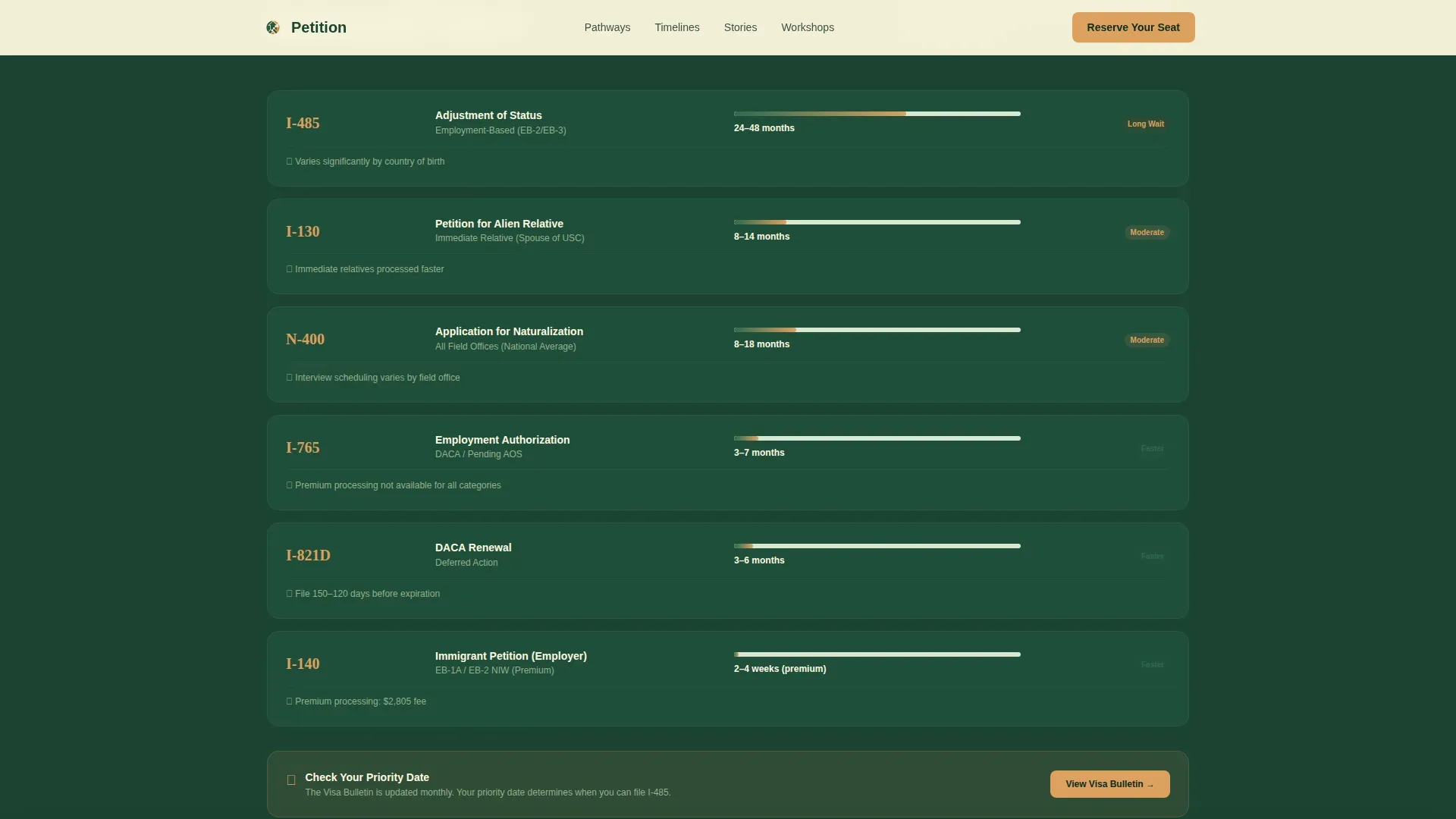
A dedicated section displays real average processing times pulled from USCIS data. Visitors can view timelines by form type and service center, giving them factual context for their case. This data-driven section reinforces the template's transparent process positioning.
Trust and Social Proof Section
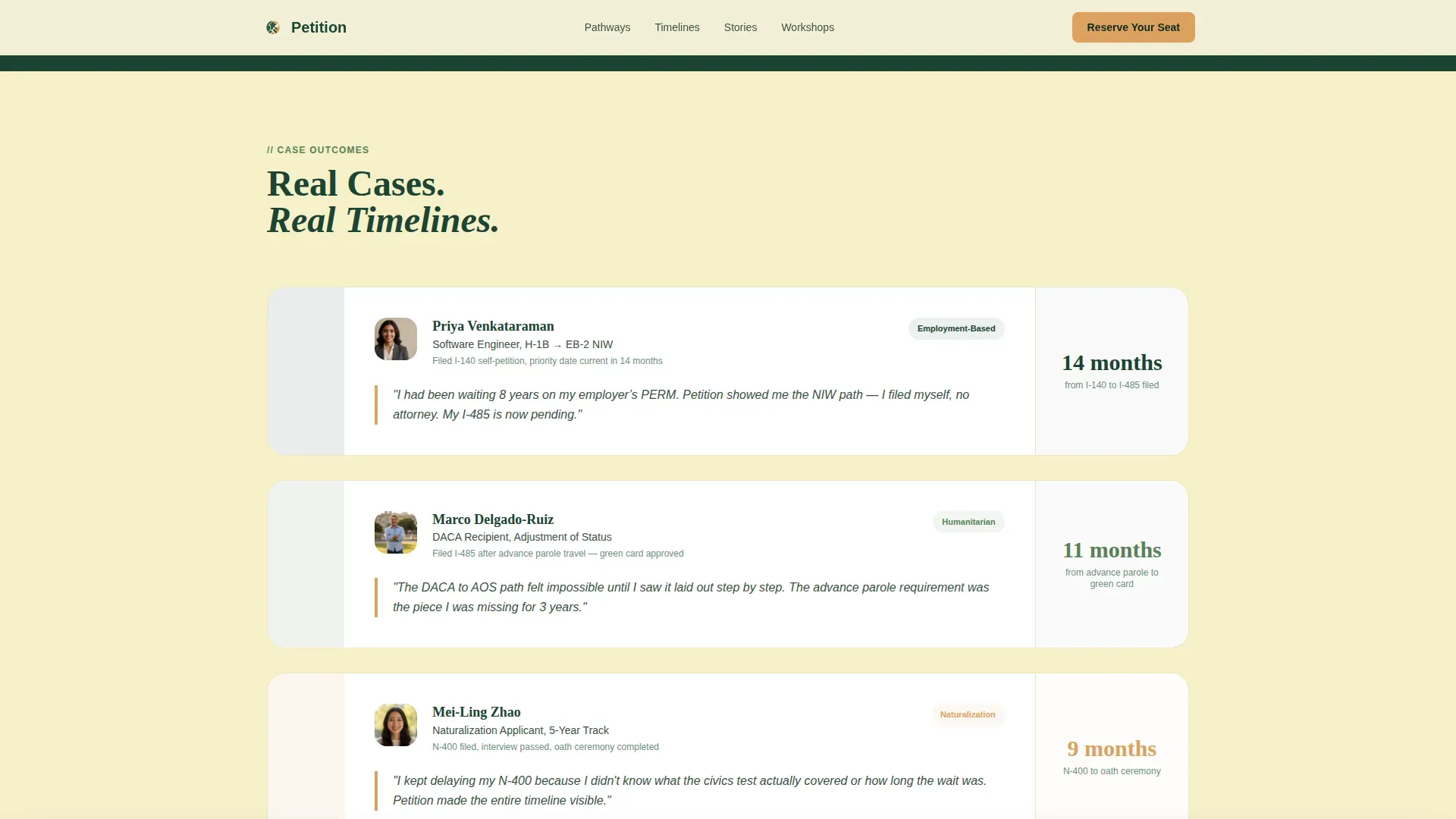
Case-specific testimonials and workshop attendance numbers are displayed in a dedicated section. This is not generic praise but outcome-focused description tied to real immigration scenarios, ensuring the social proof feels earned and credible.
Page sections overview
| Section | Purpose |
|---|---|
| Hero with headline | Anchors attention with a bold left headline and stacked immigration form illustration |
| Pathway card grid | Expandable modular cards covering four immigration categories with inline step trackers |
| Processing reality table | USCIS data table showing average processing times by form and service center |
| Trust stories | Specific case testimonials and workshop attendance figures for social proof |
| Workshop registration | Event form with date picker, language selection, and pathway dropdown |
| Checklist download | Gated PDF lead capture with email and case type fields |
| Footer | Linear single-row format with navigation links and contact information |
Design & branding system
The visual identity follows an Institutional Authority theme. The design evokes the green marble lobby of a federal courthouse: serious, structured, and respectful of the visitor's time. Typography uses Fraunces for heavy serif headlines and DM Sans for clean, readable body text.
- Forest Trust color system: deep evergreen (#1B4332) for navigation and headers, weathered parchment (#FEFAE0) for card backgrounds, muted sage (#588157) for content tier separators, and warm amber (#DDA15E) reserved for active buttons and status indicators
- The hero headline is set at roughly 120px in Fraunces, pinned to the left two-thirds of the viewport, with the form illustration occupying the right third
- Animation uses GSAP scroll reveals for section entry, card expand and collapse transitions, and step tracker progression to create a polished, professional appearance without overwhelming the visitor
Mobile & speed optimization
This template is designed desktop-first, reflecting the reality that immigration form research is typically a desktop behavior. Full mobile support is included so visitors on any device get a consistent, usable experience.
- Cards reflow into a single-column format on smaller screen sizes, with tap-to-expand behavior replacing hover interactions
- The sticky registration bar remains accessible on mobile, ensuring the primary call to action is always within reach
- Server components handle static content sections, while client components manage interactive cards and forms, keeping the page responsive across devices
How this template helps you convert
A transparent process ensures that petitioners understand every stage of their journey, from initial filing to final adjudication. This template is built to convert by proving competence before making any request.
- The pathway card grid earns trust first. Visitors explore their specific immigration situation, view real processing data, and understand the complete step sequence before they see a registration prompt. By the time the sticky bar appears, the visitor already trusts the organization.
- Two conversion paths serve different visitor readiness levels. Those ready to commit can reserve a workshop seat. Those who need more time can download a PDF checklist, sharing their email and case type for follow-up. Both paths create a qualified lead.
Other information about this template
This petition transparent process immigration services landing page template is designed for organizations that want to create a high-trust, high-converting immigration services landing page without starting from scratch. It is crafted to save time and fit a range of professional use cases.
- The template supports multilingual form fields, allowing organizations to select from English, Spanish, Mandarin, Hindi, and Tagalog to match the language needs of their audience
- The mailing address and contact details in the footer follow a linear single-row format that is easy to update for any organization or service region
- The Glide platform features a drag-and-drop builder that allows users to publish their customized immigration services landing page with a single click, with no coding skills required
- Glide apps are optimized for both desktop and mobile devices, ensuring a consistent user experience across screen sizes
- Glide's automated design system provides high-quality themes and layouts that are continually updated, so the app always reflects current design standards
- The template format is fully responsive and can be customized to fit specific needs and presentation structures without changing the core design system
- A visible privacy policy link near the call-to-action button is included in the design, reassuring visitors about how their data is handled upon submit
Theme
Institutional Authority
Creative direction
Transparent Process
Color system
Forest Trust
Style
Card Grid (Modular)
Direction
Event Registration
Page Sections
Expandable Pathway Card Grid
Sticky Workshop Registration Bar
Gated PDF Checklist Download
Dynamic Scenario Narrowing
USCIS Processing Data Table
Case-specific Trust Stories
Related questions
What immigration pathways does this template cover?
Can I customize the registration form fields?
What does the PDF checklist download capture?
Is this template suitable for a student visa or work visa audience?
Do visitors need an account to interact with the template?



