Geriatric Foot Care Booking Landing Page Template
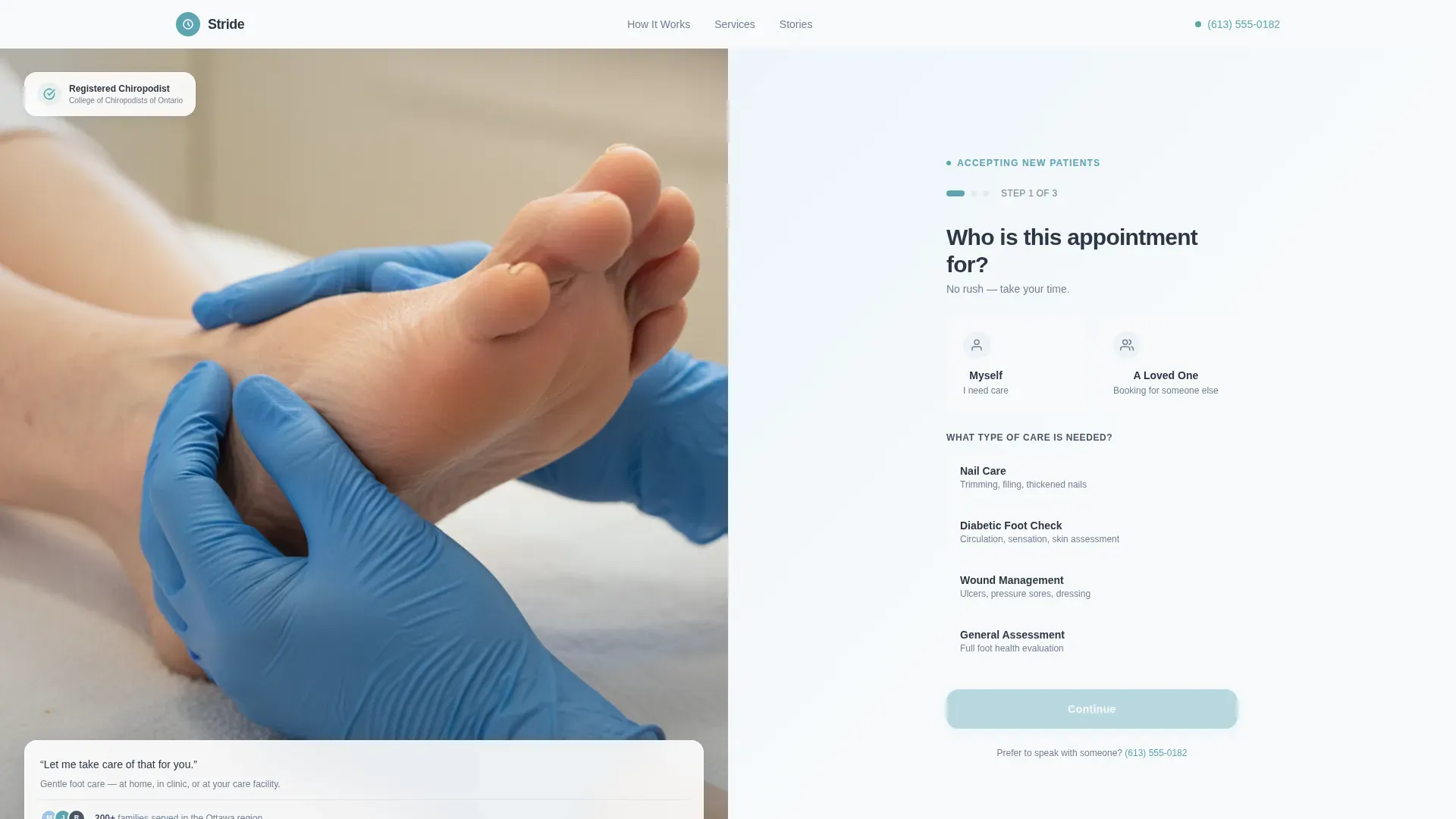
Stride is a split-screen landing page built for geriatric foot care practices. It pairs a warm practitioner photograph with a guided three-step booking form, then walks visitors through each stage of a typical appointment. The result is a page that builds trust slowly and earns the booking before it asks for one.
by Rocket studio
Quick summary
Stride is a single-page booking experience designed for geriatric foot care practices that offer home visits, clinic appointments, and care-facility rotations. A split-screen layout pairs reassuring imagery with a step-by-step form. The page reveals each stage of care as the visitor scrolls, so anxious family members and busy coordinators feel informed before they commit.
Who this template is for
This template is built for foot care practitioners who serve older adults and want a page that speaks to the people doing the searching, not just the patient. It fits solo practitioners, small clinics, and mobile podiatry services equally well.
- Adult children looking for safe, gentle foot care for an aging parent
- Retirement community coordinators scheduling regular practitioner visits
- Home health aides who need a reliable specialist willing to travel to the patient
What problem this template solves
Booking foot care for an elderly parent or facility resident is rarely simple. The person searching is often anxious, short on time, and unsure whether the practice is trustworthy enough to welcome a vulnerable person. A generic contact form does not answer those concerns. Stride addresses them directly.
- Visitors cannot tell whether a practice handles complex conditions like diabetic ulcers or wound management
- Nothing on a standard page explains what actually happens during a visit, which delays the booking decision
- Family members and coordinators need reassurance that the process is gentle, unhurried, and transparent before they hand over someone else's care
What you get with this template
Stride delivers a complete single-page layout with every section, interaction, and visual detail built to a warm clinical standard. The structure moves from introduction to trust to booking in one unbroken scroll.
- A split-screen hero section with a multi-step booking form and a warm practitioner photograph side by side
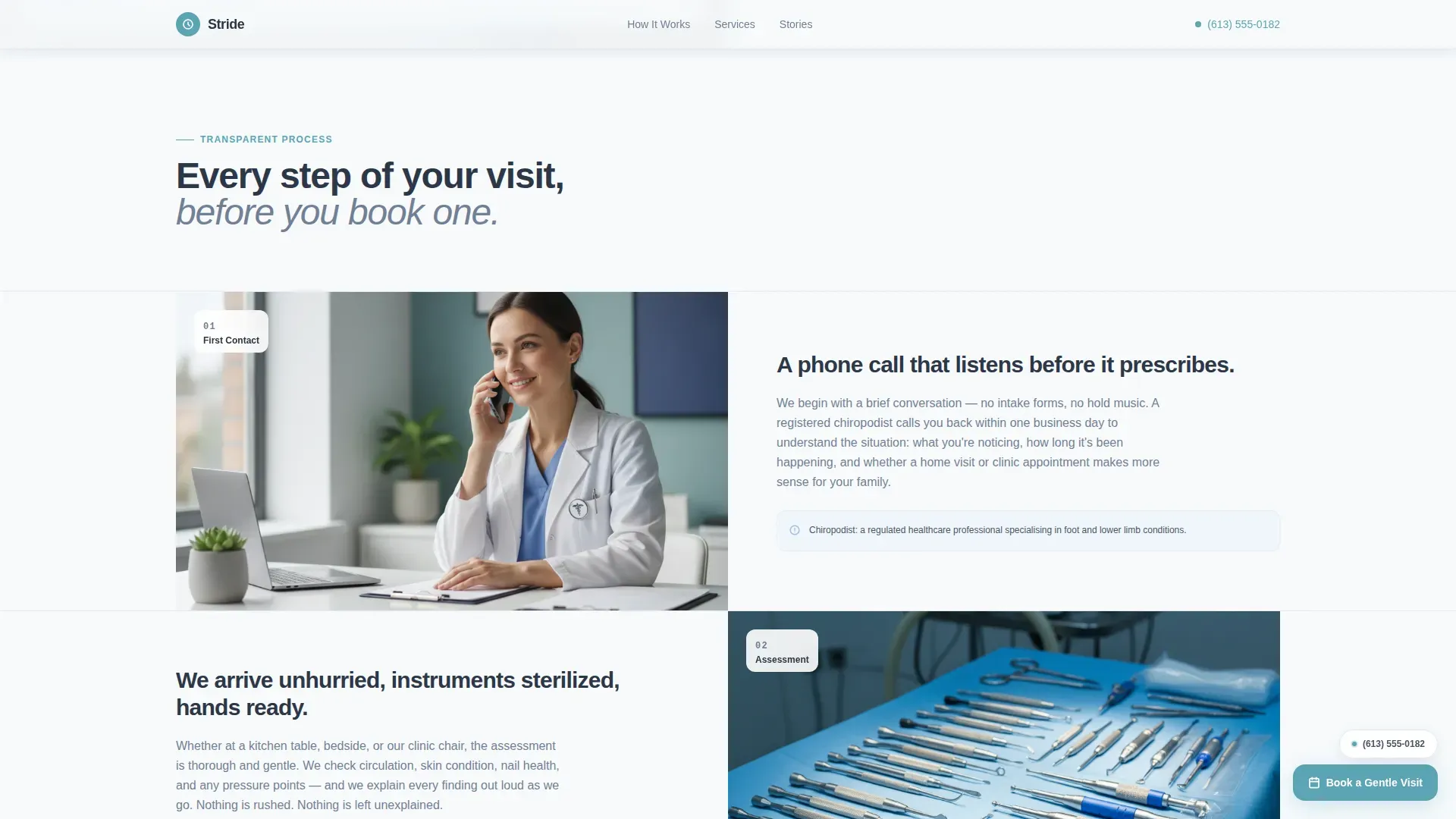
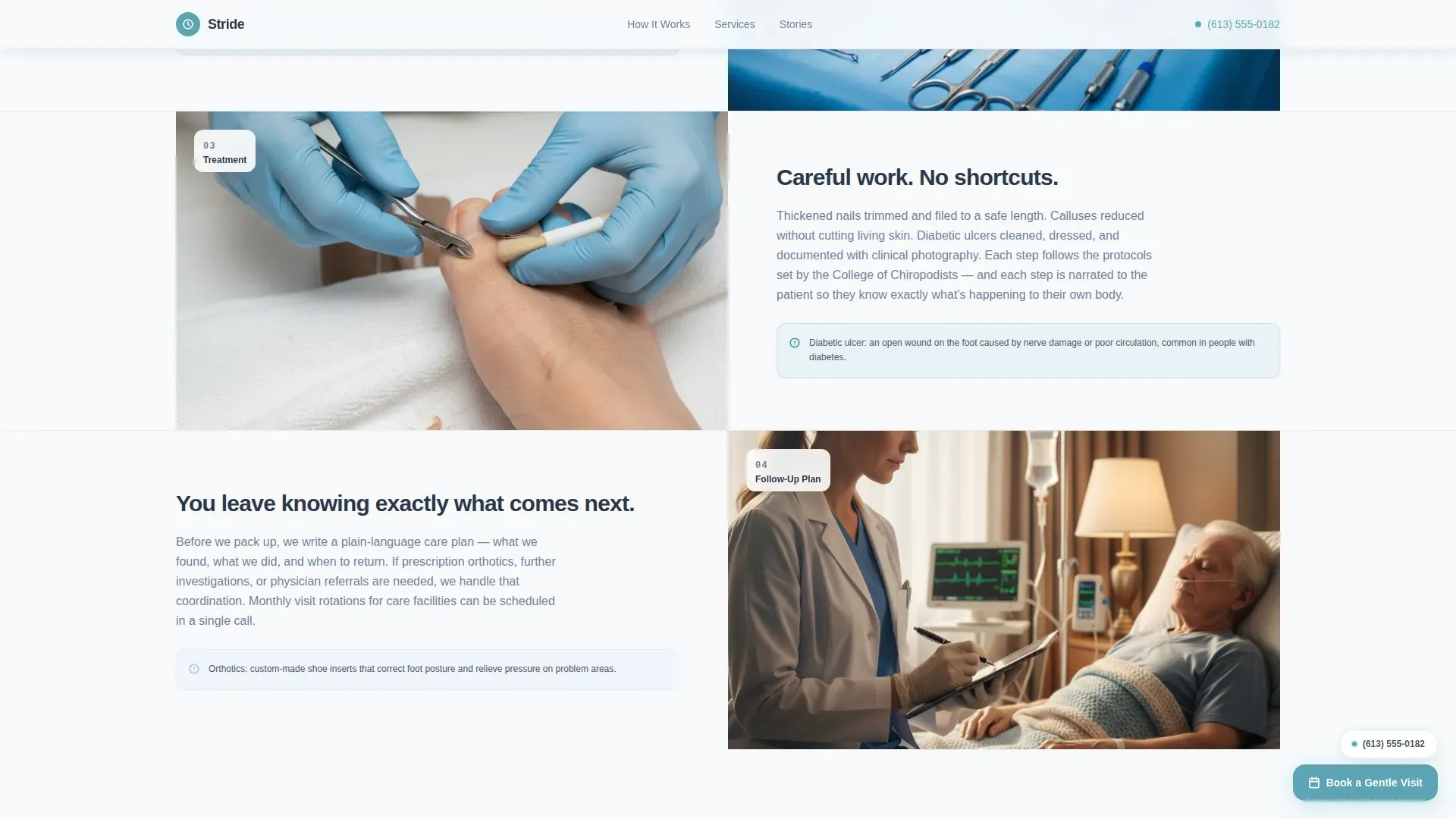
- A scroll-through process section that reveals each appointment stage one at a time
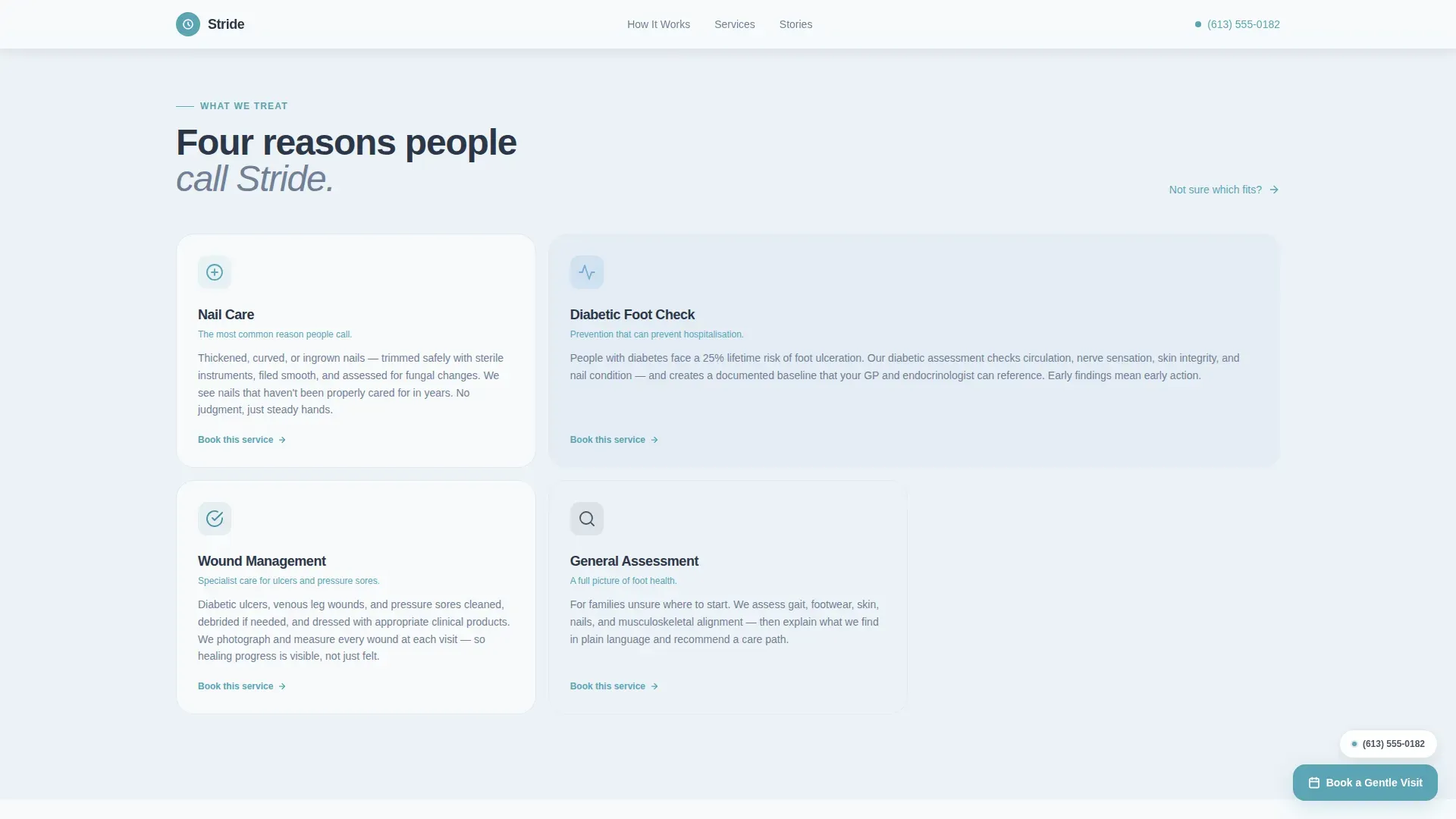
- A services grid, a testimonial section, a prominent call-to-action section, and a clean single-row footer
Feature list
A brief paragraph introduces the feature set. Every capability described below is present in the template as delivered.
Multi-Step Booking Form
The booking form opens with a card selection asking who the appointment is for, then guides the visitor through service type, preferred location, and date and time. A progress indicator shows which step is active. A tap-to-dial secondary link sits beneath every step for visitors who prefer a phone call.
Split-Screen Scroll Sections
Four process sections reveal one appointment stage at a time as the visitor scrolls. Left panels hold photography; right panels carry plainspoken explanations. Each panel transition is designed to feel like a door opening, reinforcing the Transparent Process creative direction.
Services Bento Grid
An asymmetric grid presents the four core services: nail care, diabetic foot check, wound management, and general assessment. Each card is sized to reflect its role in the practice and uses the teal accent color to signal the primary offering.
Social Proof and Trust Badges
Named testimonials from adult children and facility coordinators appear with specific outcomes. Trust badges use the calm teal accent and appear alongside the testimonials to reinforce professional credibility.
Floating Call-to-Action Button
After the process sections end, a floating "Book a Gentle Visit" button persists as the visitor continues scrolling. It keeps the primary conversion action visible without interrupting the reading experience.
Healing Space Visual System
The color palette pairs clinical slate for grounding elements with open-sky blue for right panels, cloud white backgrounds, and teal accents on interactive elements. DM Sans typography is set at generous sizes throughout, keeping text readable for visitors of all ages.
Page sections overview
| Section | Purpose |
|---|---|
| Hero Split Screen | Introduces the practice and opens the multi-step booking form |
| Appointment Process | Reveals each stage of a visit in scroll-triggered left-right panels |
| Services Grid | Presents nail care, diabetic check, wound management, and assessment |
| Testimonials | Builds trust through named outcomes from family members and coordinators |
| Call-to-Action Section | Dark teal block repeating the primary booking action and phone option |
| Footer | Single-row linear footer with essential links |
Design & branding system
The visual identity follows a Healing Space theme. Every color choice is deliberate: slate grounds the page, sky blue opens it up, and teal signals action. The result feels warm and clinical at once, never sterile, never spa.
- Color palette: clinical slate (#4A5568), open-sky blue (#A0C4E8), cloud white (#F7FAFC), and calm teal (#5BA4B5) on buttons, progress indicators, and trust badges
- Typography: DM Sans at large, accessible sizes throughout, prioritizing readability for users browsing on phones or tablets
- Photography style: soft overhead light, gloved hands on a clean towel, relaxed patient posture, no clinical clutter
Mobile & speed optimization
The template is built mobile-first, which reflects how most family members and care aides search for specialist services. The layout adapts cleanly from phone to tablet to desktop without losing the split-screen character on larger screens.
- Card-selection inputs in the booking form are oversized and tappable, designed for thumbs on a phone screen
- Scroll-reveal animations are set to medium intensity, keeping transitions smooth without slowing the initial load
- Images are optimized for fast rendering; the form runs on pure React state with no external dependencies required
How this template helps you convert
Stride earns the booking before it asks for one. The page is structured so that each section answers a concern the visitor is likely carrying before they reach the next step.
- The hero form opens with a low-commitment question, "Who is the appointment for?", which reduces hesitation and invites the visitor to self-identify immediately.
- The process scroll builds transparency by showing every stage of care before the visitor reaches the bottom of the page, so the booking feels like a natural next step rather than a leap of faith.
- The floating button and secondary "Call Us Instead" path give visitors two clear routes to conversion, accommodating those who prefer digital booking and those who need a human voice first.
Other information about this template
This section covers practical details that help coordinators, practice owners, and developers understand the full scope of the template before they begin customizing it.
- The template is designed for English-language markets in the United States and Canada, using a 12-hour time format throughout the date and time selection step
- The multi-step form uses pure React state management, meaning no backend service or external form provider is required out of the box
- Animation intensity is set to medium across scroll reveals and form step transitions, and can be adjusted to suit practice preferences
- The footer follows a Pattern 1 linear single-row layout, keeping the page exit clean and uncluttered
Theme
Healing Space
Creative direction
Transparent Process
Color system
Slate & Sky
Style
Split Screen (50/50)
Direction
Booking/Scheduling
Page Sections
Multi-step Booking Form with Card Selection
Split-screen Scroll Process Reveal
Asymmetric Services Bento Grid
Named Testimonials with Specific Outcomes
Floating Persistent Call to Action Button
Healing Space Color and Type System
Related questions
Can this template be used for a mobile or home-visit foot care service?
Does the booking form require a backend service to work?
Is this template suitable for practices that offer diabetic foot care and wound management?
Who is the intended audience for this landing page template?
How much of the design can be customized?



