Precision Podiatric Surgery Landing Page Template
The Gait landing page template is built for ankle and foot surgery centers that need to convert anxious, pain-aware patients into booked consultations. It pairs a split-screen hero with a five-step symptom quiz, an expert surgeon panel, and a bento-grid conditions display, all wrapped in a calm, clinical visual identity that earns trust before it ever asks for contact details.
by Rocket studio
Quick summary
Gait is a single-page landing page template designed for specialist ankle and foot surgery centers. It opens with a 50/50 split-screen hero, moves through an alternating expert surgeon panel, and anchors conversion around an inline five-step symptom assessment quiz. The layout feels calm and authoritative, the right tone for patients who are finally ready to stop managing pain and start understanding it.
Who this template is for
This template is built for surgical practices that treat the full range of foot and ankle conditions, from chronic tendon degeneration to complex bone deformity. It serves both self-referred patients and physician referral pipelines with equal confidence.
- Ankle and foot surgery centers looking to convert informed, pain-aware patients into booked consultations
- Podiatrists and general practitioners who need a credible destination to refer patients upward for surgical evaluation
- Specialist clinics treating runners, diabetic patients, and adults with long-standing foot deformities who are ready for a clear surgical plan
What problem this template solves
Many surgical specialty pages feel cold, overcrowded, or procedurally generic. Patients searching for ankle or foot surgery care often arrive anxious. They want to feel understood before they commit to a consultation. A page that leads with credentials alone rarely converts this audience effectively.
- Patients delay care because they cannot tell whether their condition is serious enough for surgery, the quiz module addresses this directly by delivering a personalized condition summary before asking for any contact detail
- Referring clinicians need a destination page that reflects surgical authority and inspires referral confidence, not a general wellness homepage
- Generic medical templates fail to communicate the clinical depth that foot and ankle surgery demands, leaving patients unsure whether the center treats their specific condition
What you get with this template
This template delivers a fully structured, single-page layout built around one core conversion goal: moving a pain-aware visitor toward a booked surgical consultation. Every section earns its place by contributing to that journey.
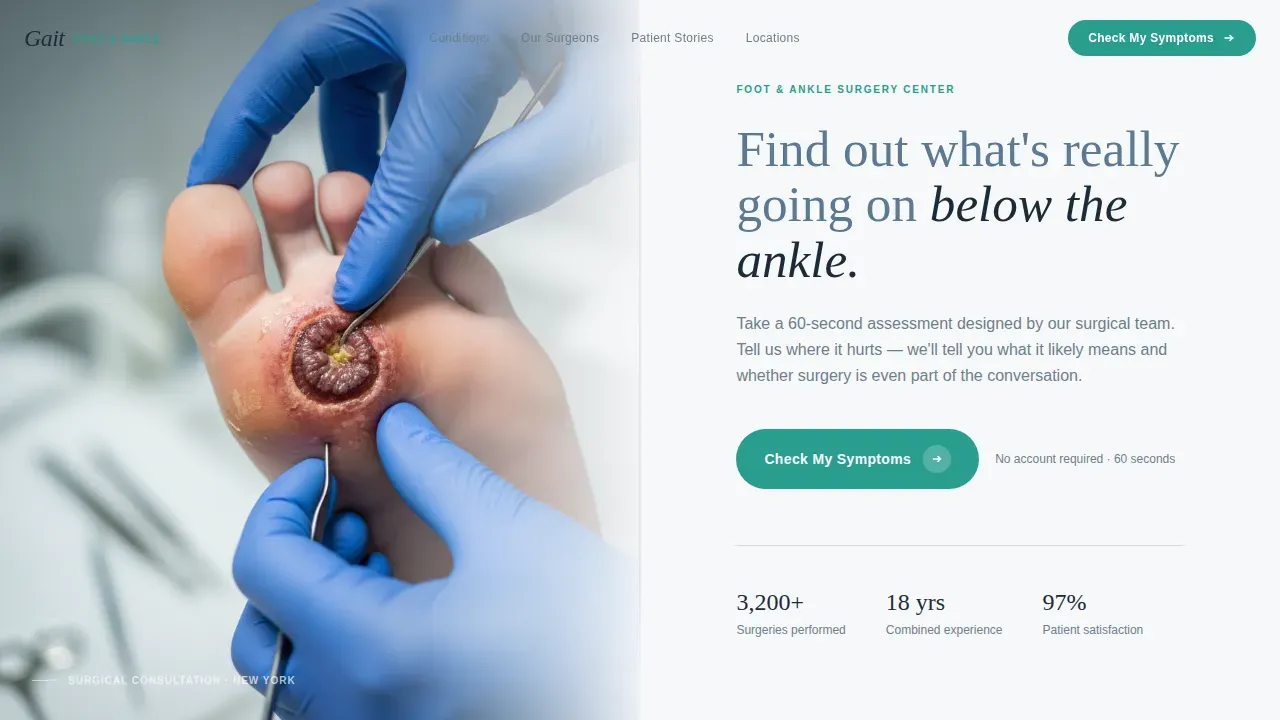
- A 50/50 split-screen hero with a warmly lit surgical photograph on the left and a headline plus quiz call-to-action on the right
- An alternating expert panel featuring three specialist surgeon profiles, each paired with the condition they treat and a jargon-free clinical explanation
- An inline five-step symptom quiz with a clickable foot diagram, progressive questions, and a personalized results summary that leads directly to a calendar-based consultation booking prompt
Feature list
This section details the core built-in components that make the Gait template function as a credibility-first, conversion-focused landing page for ankle and foot surgery centers.
Split-Screen Hero with Surgical Photography Slot
The header uses a strict 50/50 horizontal split. The left panel holds a tightly composed photograph of a surgeon's gloved hands cradling a patient's foot during examination. The right panel carries a single slate-blue headline and a subline directing visitors to the symptom quiz. The composition is unhurried and immediately disarming, designed to signal calm authority at first glance.
Five-Step Inline Symptom Assessment Quiz
The quiz is the template's primary conversion engine. It opens as an inline module rather than a modal, keeping visitors on the page. The five progressive steps cover pain location via a clickable foot diagram, pain duration, activity impact, prior treatment history, and insurance type. Results deliver a personalized condition summary, which gives real value before any contact detail is requested. A secondary call-to-action then prompts visitors to book a surgical consultation using a calendar picker.
Alternating Expert Surgeon Panel
Three specialist surgeon profiles scroll in alternating left-right layout. Each pairing sets a candid portrait on one half and a concise, jargon-free condition explanation on the other. One specialist explains Achilles tendon reconstruction beside an animated cross-section. Another discusses flat-foot correction next to a before-and-after gait analysis clip. The scroll rhythm feels like moving from chair to chair in a surgical symposium, each expert speaks directly to the patient.
Bento-Grid Conditions Treated Display
A bento-style grid organizes the center's full range of treatable conditions. Teal accent elements highlight each condition cell, keeping the layout visually clean while making it easy for a visitor to locate their specific concern, whether that is plantar fasciitis, hallux valgus deformity, Achilles tendon injury, or a lesser toes deformity affecting normal walking mechanics.
Asymmetric Patient Testimonial Layout
Named patient testimonials appear in an asymmetric grid that prioritizes outcome specificity. Each testimonial references a real condition and recovery timeline rather than vague satisfaction statements. This section provides social proof that feels earned, the kind that a runner returning from a bunion correction or a diabetic patient recovering from reconstructive foot surgery would actually write.
Floating Persistent Call-to-Action Button
A teal "Check My Symptoms" button appears first in the hero section and then floats gently at the bottom of the viewport as the visitor scrolls. The floating button uses a scroll-triggered reveal so it appears only after the visitor has moved past the hero. It is always available without being intrusive, a persistent nudge toward the quiz rather than a disruptive overlay.
Page sections overview
| Section | Purpose |
|---|---|
| Hero Split Screen | Introduces the center with a surgical photograph and quiz call-to-action |
| Expert Surgeon Panel | Builds clinical credibility through three specialist profiles and condition explanations |
| Symptom Assessment Quiz | Drives conversion with a five-step inline quiz delivering a personalized result |
| Patient Stories | Provides social proof through named testimonials with specific conditions and outcomes |
| Conditions Treated Grid | Helps visitors locate their specific foot or ankle condition in a visual bento layout |
| Page Footer | Anchors the page with logo, tagline, and navigation links |
Design & branding system
The Gait template uses a Medical Clarity visual theme built on the Cloud Canvas color system. The palette is designed to feel like freshly pressed scrubs against a sunlit recovery room, sterile without being cold, reassuring without being clinical to the point of anxiety. Typography pairs Fraunces serif headlines for authority with DM Sans body text for clarity and ease of reading.
- Core palette: soft clinical white (#F7F8FA) as the background, warm fog gray (#D4D7DD) for dividers and secondary surfaces, calming slate blue (#5B7A94) for headlines and primary text, and precise teal (#2A9D8F) reserved exclusively for buttons, progress indicators, and quiz interactive elements
- Animation style: medium-intensity scroll-triggered reveals keep the page feeling dynamic without overwhelming, quiz step transitions are smooth and intentional, and the floating call-to-action uses a gentle entrance so it never feels jarring
- Typography: Fraunces serif at headline weight communicates authority; DM Sans at body weight keeps paragraphs easy to read at clinical reading pace
Mobile & speed optimization
The Gait template is built desktop-first to serve the consultation-intent audience that researches surgical options on larger screens. Full mobile support is included so that referred patients arriving via a podiatrist's recommendation on a phone receive the same quality experience. All interactive quiz elements, including the clickable foot diagram and calendar picker, are built to function clearly at mobile screen sizes.
- All call-to-action buttons are sized generously so they are easy to tap on touch screens without needing to zoom or adjust
- The quiz module uses client-side interactivity only for the interactive components, keeping the rest of the page static-first for a responsive feel
- Scroll-triggered animations are calibrated to work smoothly on both desktop and mobile viewports without layout shifts
How this template helps you convert
The Gait template is not built around vanity metrics. Every design and layout decision connects back to one outcome: a visitor booking a surgical consultation. The quiz-led structure earns the conversion by giving clinical value first.
- The five-step symptom quiz delivers a personalized condition summary before asking for any contact detail, this value-first sequence builds the trust that moves anxious patients from passive reading to active booking, replacing vague appointment-request forms with a meaningful first exchange
- The floating teal call-to-action button remains visible throughout the entire scroll journey, so the path to booking a consultation is always one tap away regardless of which section the visitor is currently reading
- Named patient testimonials with specific condition outcomes and recovery timelines provide the kind of social proof that converts hesitant self-referred patients, a runner who reads about another runner's bunion correction and six-week return to training is far more likely to click "Book a Surgical Consultation" than one who reads a generic five-star rating
Other information about this template
The Gait landing page template sits at the intersection of clinical precision and patient empathy. Its design choices reflect real knowledge of how foot and ankle surgery patients behave online, they research carefully, hesitate to commit, and respond to calm authority over aggressive sales language. The sections below cover additional context that helps buyers and referring clinicians understand the full scope of what this template communicates.
- Gait analysis is a foundational clinical concept throughout the template. Clinical gait analysis uses advanced motion capture systems to provide information on pathological walking patterns. The template's expert panel and quiz reference these principles in plain language so patients understand why their walking pattern matters to a surgical diagnosis.
- The gait cycle encompasses the stance phase and swing phase of walking. Key events within the gait cycle, including initial contact, the stance phase loading response, terminal stance, toe off, and the swing phase, are referenced in the expert panel content slots to explain how surgeons assess foot and ankle function during movement.
- Gait analysis evaluates foot kinematics across the full gait cycle, including plantar flexion at the ankle joint, forefoot motion in the transverse plane, and load transfer from the heel through the metatarsal head to the great toe and lesser toes during push off. These concepts inform how the conditions treated section is organized.
- The gait cycle reveals how the medial arch behaves under load, how pronation distributes weight across the medial aspect of the foot, and how foot supination affects load on the lateral forefoot and the lateral aspect of the foot during terminal stance.
- Monitoring angles between foot segments during gait provides important data on foot dynamics. Multisegment foot models analyze the relative motion between internal foot segments, and this approach to foot kinematics is referenced in the biomechanics surgeon's expert panel slot.
- Gait analysis can change the surgical plan for patients with foot and ankle disorders. During a surgical assessment, a gait expert performs a comprehensive biomechanical evaluation to identify the root cause of dysfunction. The template's quiz is designed to gather symptom data that mirrors this triage logic before the in-clinic visit.
- Gait abnormalities can be indicative of underlying foot and ankle diseases. Different conditions affect the affected side differently: chronic ankle instability alters plantar pressure distribution, while foot deformities such as cavus foot and flatfoot lead to compensatory gait patterns that place stress on the knee joint and hip joints over time.
- Electromyography, known as EMG, assesses muscle firing patterns to determine whether nerve dysfunction or muscle weakness contributes to gait abnormalities. The template's expert panel content slots can reference these diagnostic tools to build technical credibility with both patients and referring physicians.
- Plantar fasciitis is one of the most commonly treated conditions in foot surgery practice. The conditions grid includes plantar fasciitis alongside hallux valgus deformity, Achilles tendon pathology, and other conditions affecting the forefoot, ankle, and surrounding bones.
- Osteoarthritis of the ankle joint is a progressive condition. The template's conditions grid and expert panel accommodate content explaining how osteoarthritis affects joint motion, deformity progression, and the decision between conservative treatment and surgical intervention.
- Gait analysis provides quantitative data that can be used to create standards and baselines. Pre-surgery gait data, compared against post-operative measurements, helps surgeons verify that rehabilitation is progressing normally. The template's patient stories section is designed to include outcome data of this kind.
- The use of three-dimensional gait analysis technology has become widespread in clinical practice to help guide diagnosis and treatment. Biplane fluoroscopy is a method for measuring three-dimensional joint kinematics with high accuracy. Multimodal sensor fusion methods can further analyze the complexity and variability of gait by integrating data from multiple sensors.
- Gait analysis software helps orthopedic surgeons assess a patient's body movement by measuring data while running, walking, and standing still. It is a noninvasive method of detection that precisely measures walking function. Quantitative gait analysis adds kinematic and kinetic data to the orthopedic surgeon's diagnostic toolkit.
- The template includes a security-conscious build structure. The interactive quiz is built using client components only, keeping the static portions of the page clean. Practices that implement this template alongside a web security service benefit from bot filtering that can distinguish real patient visitors from malicious bots, perform security verification at the edge, and return a verification successful signal that protects the quiz submission endpoint. Systems that use a respond ray ID approach can log each verification event, ensuring that the security service verifies legitimate traffic, protects form data from automated abuse, and provides a clear audit trail. This is especially important for healthcare pages where patient-submitted symptom data needs to reach the clinical team, not be intercepted by bots.
- The template's design reflects established best practices for medical landing pages: accreditation badges and surgeon credential displays are built into the expert panel section to serve as trust signals, clear calls-to-action are visible without scrolling on desktop, and the frequently asked question section addresses common patient concerns about assessments and procedures.
- Children with flat-foot deformities or gait abnormalities are a relevant patient group for pediatric foot specialists. The expert panel slot for the pediatric foot specialist can address conditions affecting children, including flat-foot correction and gait deviations that affect normal limb development.
- The affected limb's skin condition is a relevant clinical data point for diabetic patients with foot complications. The quiz module includes a prior treatment question that captures whether the patient has already received conservative care, helping the surgical team triage referrals efficiently.



Theme
Medical Clarity
Creative direction
Expert Panel
Color system
Cloud Canvas
Style
Split Screen (50/50)
Direction
Quiz/Assessment
Page Sections
Split-screen Hero with Photo and Quiz Call to Action
Five-step Inline Symptom Assessment Quiz
Alternating Expert Surgeon Panel
Bento-grid Conditions Treated Display
Asymmetric Named Patient Testimonials
Floating Persistent Teal Call to Action Button
Related questions
Can I customize the quiz questions for my specific patient intake needs?
Is the expert panel layout flexible enough for more than three surgeons?
How does the floating call-to-action button behave on mobile devices?
Does this template include the calendar booking interface?
Can referring podiatrists use this page as a destination for patient referrals?



