Premier Podiatric Solutions Landing Page Template
The Plantar template is a specialist-authored, comparison-table landing page built for podiatry practices. It maps every common foot and ankle condition to clear symptoms, treatment options, and recovery timelines. An interactive anatomical hero, expandable deep-dive panels, and evidence-badged specialist profiles guide potential patients from self-diagnosis to confident online booking in one focused scroll.
by Rocket studio
Quick summary
The Plantar template transforms a podiatry practice's condition library into an authoritative, interactive landing page. Visitors arrive with a question and leave with an answer, a named specialist, and a clear next step. The page earns the click before it asks for it, making every call to action feel like the obvious move rather than a sales push.
Who this template is for
This template is built for any podiatry practice that wants to turn self-diagnosing visitors into booked appointments. It works equally well for solo foot doctors and multi-specialist clinics that treat a broad range of foot and ankle conditions. Potential patients arrive through search engines every day, and this template gives them a reason to stay.
- Weekend runners researching heel pain, plantar fasciitis, and arch conditions before they book
- Diabetics and parents of young children looking for clear, plain-language guidance on diabetic foot care and pediatric flat feet
- Post-diagnosis patients comparing treatment options before committing to initial consultations
What problem this template solves
Patients search online long before they call a clinic. Over 77% of patients search online for healthcare providers, and 71% choose a provider based entirely on what they read before picking up the phone. Most medical websites give those patients a static services list, a phone number, and a generic photo. That is not enough to build patient trust or convert a curious visitor into a new patient.
- Visitors land on a generic podiatry website and cannot match their symptom to a condition, so they leave for a forum or a competitor
- A medical practice with genuine clinical expertise loses new patients simply because that expertise is buried in PDF downloads or scattered blog posts
- Potential patients cannot tell one foot doctor from another, so they default to whoever ranks first, not whoever treats best
What you get with this template
This template delivers a fully structured, single-page layout designed around the way patients search, read, and decide. Every section is purposeful. Every design decision points the visitor one step closer to booking. The layout is desktop-first, with a responsive mobile accordion fallback so that mobile users and mobile responsive delivery are both handled cleanly.
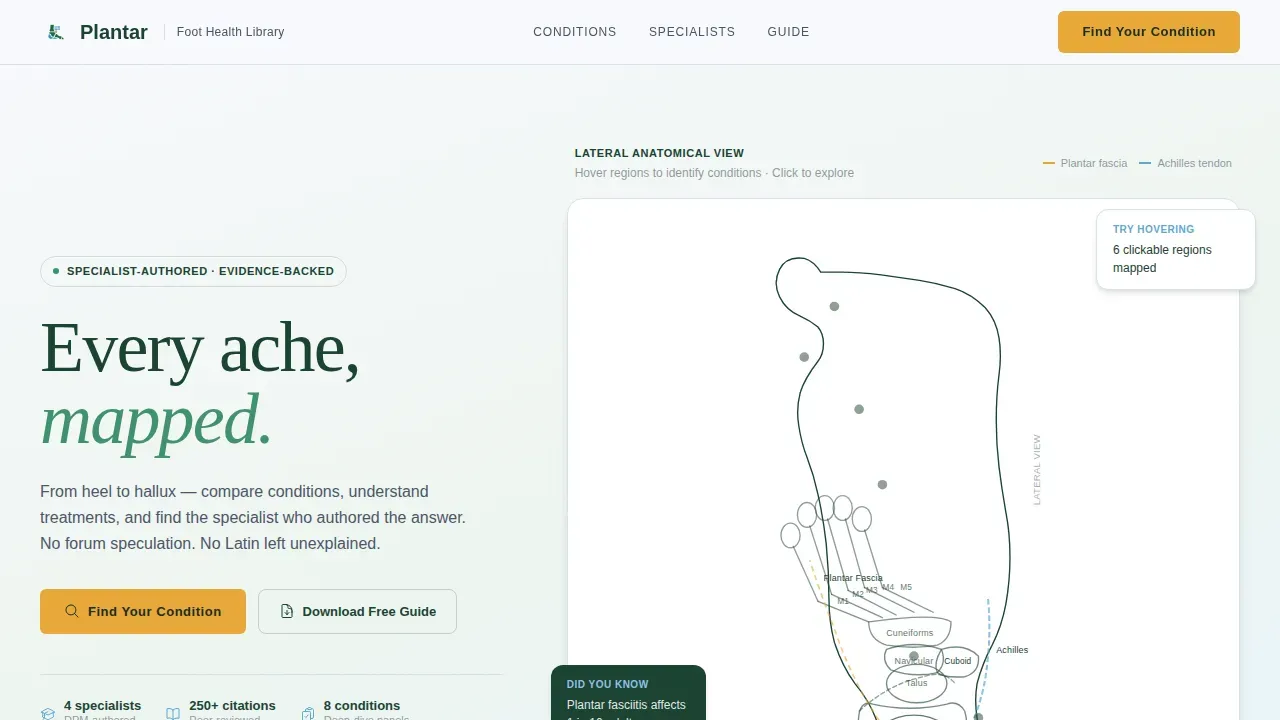
- An interactive SVG anatomical foot map in the hero that highlights conditions on cursor hover, turning the header into a clickable diagnostic tool before any scrolling begins
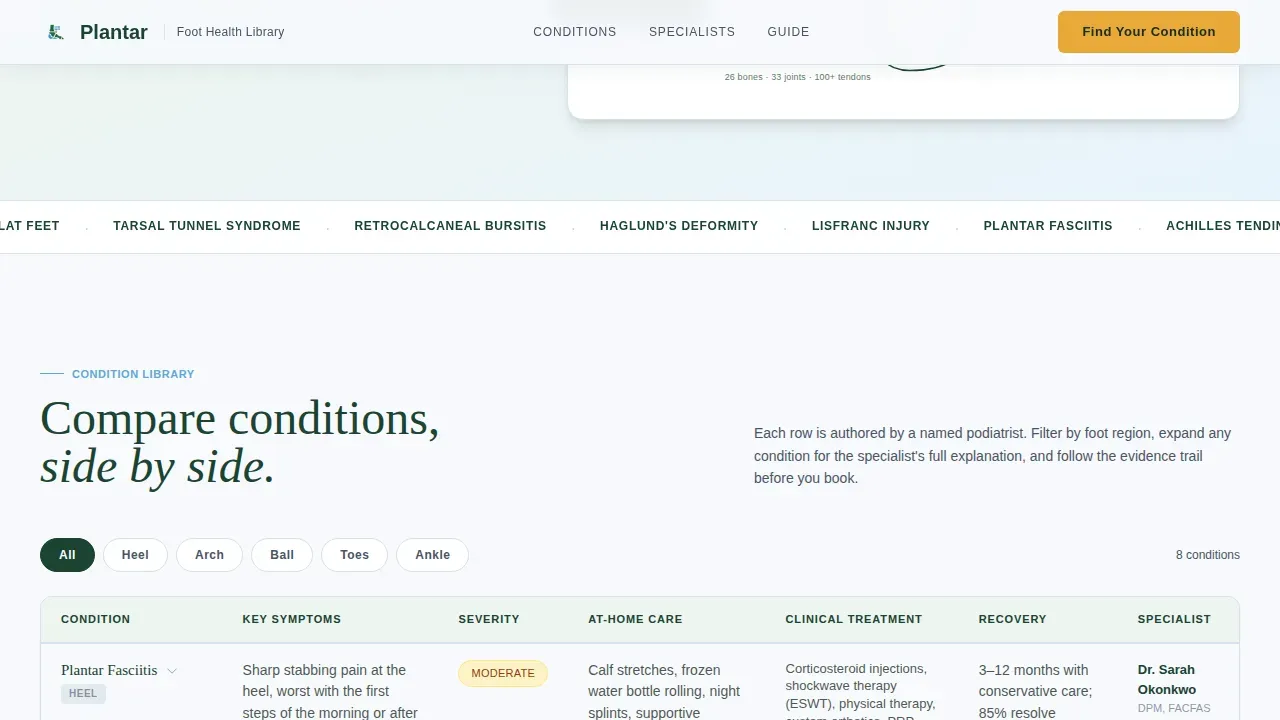
- A sortable condition overview table covering symptoms, severity, at-home care, clinical treatment options, and recovery timelines, organized by foot region
- Expandable deep-dive comparison panels with specialist video placeholders, "commonly confused with" sidebars, evidence badges, and before and after photos tied to each condition
Feature list
This section covers the core built-in capabilities of the template, each grounded in what the source brief specifies.
Interactive Anatomical Hero Map
The hero occupies the full page width as a lateral line-art drawing of the human foot rendered in fine evergreen ink on a snowfield white background. All 26 bones, 33 joints, and 100-plus tendons are drawn in delicate continuous strokes. As the visitor moves their cursor across the illustration, regions illuminate in glacier blue and condition labels appear at anatomically precise locations. Plantar fasciitis appears at the arch, bunions at the first metatarsophalangeal joint, and Morton's neuroma between the third and fourth metatarsals. The hero functions as a clickable diagnostic map before any scrolling begins, immediately improving patient engagement.
Specialist-Authored Condition Comparison Tables
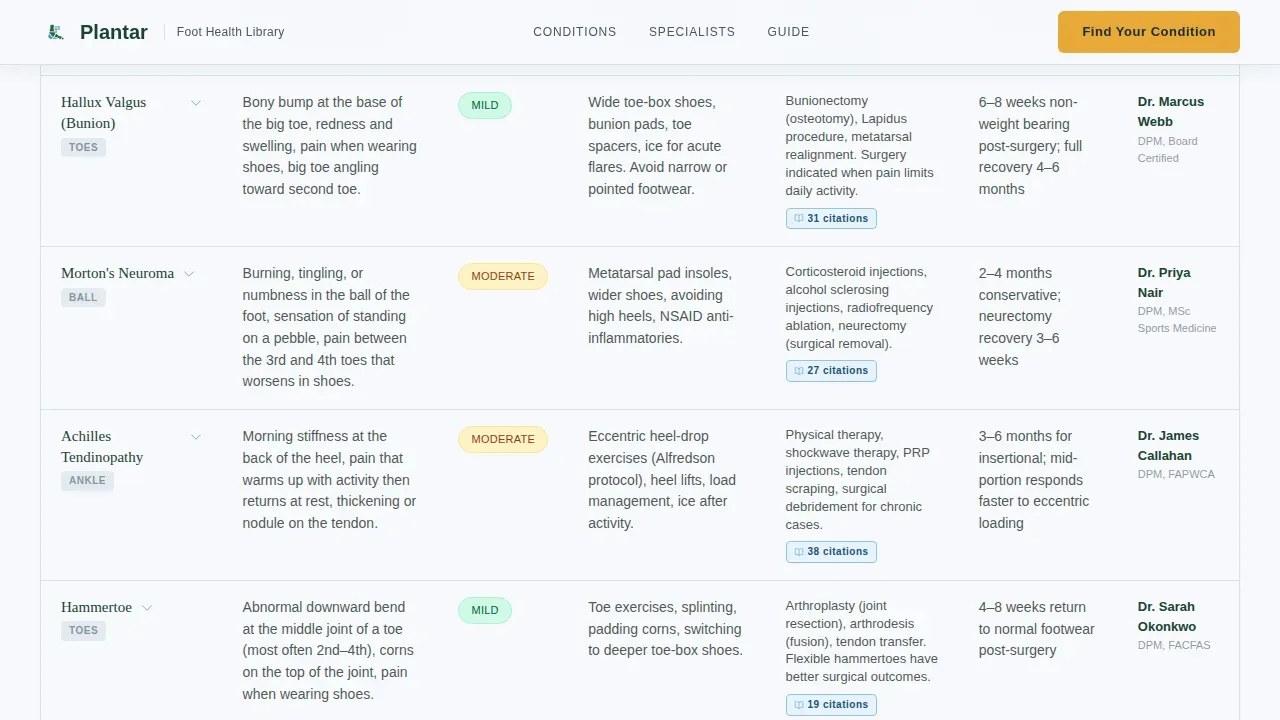
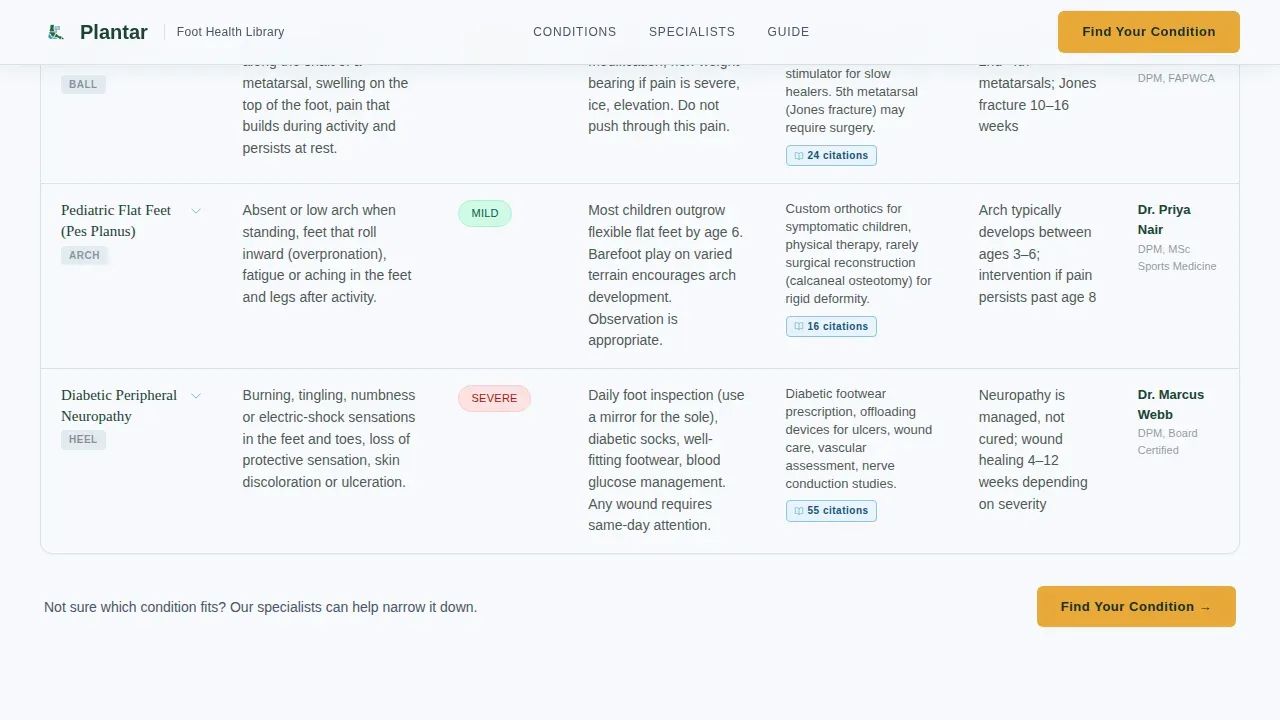
The core of the page is a sortable condition overview table. Rows are organized by foot region, including heel, arch, ball of foot, and toes. Columns cover symptoms, severity scale, at-home care, clinical treatments, and recovery timeline. Each row is attributed to a named podiatrist with credentials and a thumbnail portrait. This specialist-panel structure gives potential patients a credible, human face behind every claim, which is far more persuasive than anonymous copy on standard medical websites.
Expandable Deep-Dive Comparison Panels
Below the overview table, each condition has a dedicated panel that expands on click. Each panel contains a specialist video placeholder, a post-treatment photo progression using before and after photos, and a "commonly confused with" sidebar that cross-links related conditions. Evidence badges display peer-reviewed citation counts and clinical trial links beside every treatment claim. This layered structure keeps the page clean at a glance and detailed on demand.
Evidence-Badged Treatment Claims
Every treatment recommendation in the comparison panels carries a visible evidence badge. These badges display the number of peer-reviewed citations and link to clinical trial references. This approach directly addresses the trust gap that exists when potential patients arrive from forum threads and unreliable sources. Specialists are shown to diagnose root causes, not just list symptoms, reflecting the standard patients should expect from board-certified podiatrists.
Amber-Pinned Call-to-Action System
The primary call to action, "Find Your Condition," is pinned in the amber trail-marker color inside the top navigation bar and repeats at the close of every comparison table. A secondary text-link, "Download the Full Foot Health Guide," captures email through a single input field for visitors not yet ready to book. Automated appointment reminders can be connected downstream through the clinic's booking flow on the following page. Every amber element is reserved exclusively for action, so visitors never confuse a decorative element with a decision point.
Expert Panel with Named Podiatrists
Below the anatomical hero, the template presents a roundtable of specialist voices. Each podiatrist appears with a name, credentials, thumbnail portrait, and a count of conditions they have authored. This panel builds the kind of patient trust that turns new patients into repeat visitors and practice promoters. Patient success stories and patient testimonials can be displayed alongside specialist profiles to reinforce social proof at the moment it matters most.
Page sections overview
| Section | Purpose |
|---|---|
| Hero Anatomical Map | Interactive SVG foot diagram with cursor-reactive glacier blue condition labels and amber call to action pinned in navigation |
| Condition Overview Table | Sortable table organizing foot and ankle conditions by region with symptom, severity, care, treatment, and timeline columns |
| Deep-Dive Panels | Expandable per-condition panels with specialist video placeholder, photo progression, "commonly confused with" sidebar, and evidence badges |
| Expert Panel | Named podiatrist profiles with credentials, thumbnail portraits, and authored condition counts |
| Email Capture | Single-field email form offering the full foot health guide download as a secondary conversion path |
| Footer | Linear single-row footer with essential navigation links |
Design & branding system
The Alpine Fresh color system gives the page a clean, authoritative feel that reads as medical without feeling cold. Snowfield white (#F7F9FC) dominates the reading surface so the eye never fatigues. Evergreen (#1B4332) anchors headers and sidebar navigation. Glacier stream blue (#5FA8D3) traces hover states and interactive cross-references. Trail-marker amber (#E8A838) appears only where action is required.
- Typography uses DM Sans for body copy and Fraunces for display headings, pairing clinical clarity with warm authority across every screen size
- The header line-art illustration is rendered in fine evergreen ink on white, evoking a hand-drafted medical illustration rather than a stock photo, which immediately signals clinical expertise to visiting patients
- Amber is strictly reserved for calls to action and alert callouts, so every button reads like a trail cairn: unmistakable, trustworthy, and purposeful
Mobile & speed optimization
The template is built desktop-first because comparison tables require horizontal space to be readable. That said, the design handles smaller screens thoughtfully so that mobile users receive a coherent, usable experience without losing critical information. Patients search from their phones constantly, and 82% of smartphone users perform a "near me" search, making a mobile responsive fallback non-negotiable for any podiatry practice.
- On smaller screens, the comparison tables collapse into a readable mobile accordion layout, keeping condition data accessible without requiring horizontal scrolling
- Interactive elements including the SVG map and expandable panels are built as client-side components while static content uses server-side rendering, balancing interactivity with fast initial load
How this template helps you convert
The landing page earns the click before it asks for it. By the time a visitor reaches an amber button, they have already identified their condition, read the specialist who would treat them, and seen the evidence behind the recommended care plan. That journey removes friction and replaces hesitation with confidence.
- The interactive anatomical hero immediately answers the first question every patient has: "Is this the right place for my problem?" Cursor-reactive condition labels confirm relevance within seconds, reducing the bounce rate that plagues generic medical websites and improving search results performance through time-on-page signals.
- The comparison tables and deep-dive panels answer the second question: "What will happen if I book?" Seeing symptoms, severity, treatment options, recovery timelines, before and after photos, and named specialists all in one view removes the uncertainty that normally delays patient acquisition and drives visitors back to forum searches.
Other information about this template
This template is designed to serve as the centerpiece of a broader podiatry marketing and digital marketing strategy. It is not an isolated page. It connects naturally to the downstream booking flow, to ongoing reputation management efforts, and to the clinic's wider online presence across social media platforms and medical directories.
- Podiatry web design built around educational content and condition-specific dedicated pages consistently outperforms generic homepage designs in search results, because patients search with symptom-specific queries that match condition-level copy rather than broad service descriptions
- A well-maintained podiatry website with regular content updates supports local SEO and search engine optimization by giving search engines fresh, structured information about the practice's podiatric services, improving local search results visibility and search visibility over time
- The email capture section supports ongoing patient communication through newsletters and downloadable educational articles, helping the podiatry practice move potential patients along the patient journey from first visitor to booked appointment to loyal advocate
- Reputation management is built into the design through patient testimonials, patient success stories, patient reviews, and evidence badges. Nearly 75% of patients turn to online reviews as the first step when searching for a new provider, and 91% of patients trust online reviews as much as personal referrals, making this social proof layer essential
- The template supports patient engagement strategies across social media marketing channels. Clinics can share condition-specific panels and educational content to social media accounts and social media platforms to attract patients who are not yet searching directly but match the target audience for foot and ankle care
- A Google Business Profile paired with this landing page creates a powerful local visibility signal. Approximately 42% of local searchers click a Map Pack result without scrolling further, so aligning the landing page content with the clinic's Google Business profile maximizes local traffic from nearby patients and local patients in the service area
- The amber call-to-action system can support online scheduling and online booking flows, reducing the friction that typically delays patient acquisition between first visit and confirmed appointment. Automated appointment reminders downstream help retain new patients after they book, improving patient satisfaction and long-term patient retention
- The template structure supports virtual consultations as a secondary offering alongside in-person booking, giving prospective patients a lower-commitment first step that still captures them within the clinic's patient base
- For podiatry clinics exploring digital marketing channels, this template pairs naturally with social media marketing campaigns and targeted paid campaigns designed to reach local patients searching for heel pain relief, diabetic foot care support, or pediatric flat foot assessment. These marketing efforts, combined with a mobile responsive, content-rich landing page, form a complete patient acquisition system
- Podiatry marketing professionals and healthcare professionals who manage medical practice websites will find the template's structure reduces the time needed to publish patient education content, build brand awareness, and improve patient engagement across both new and returning visitors. The template's service pages and dedicated pages structure means each condition can eventually become an independent indexed page, multiplying search visibility without requiring a redesign
- Patient portals and patient communication tools integrate naturally downstream, with the email capture field acting as the first touchpoint in a longer patient journey that the template is explicitly designed to initiate
Theme
Educational Guide
Creative direction
Expert Panel
Color system
Alpine Fresh
Style
Comparison Table
Direction
Click-Through
Page Sections
Cursor-reactive Anatomical Hero Map
Sortable Condition Comparison Table
Expandable Deep-dive Condition Panels
Evidence-badged Specialist Author Profiles
Dual Call-to-action Conversion System
Alpine Fresh Visual Design System
Related questions
Who is this landing page template built for?
Does the template include specialist content and condition data?
Can I use this template if my clinic focuses on one or two conditions like plantar fasciitis or heel pain?
Is this template suitable for diabetic foot care content?
How does the dual call-to-action system support different visitor types?



