Swim School Landing Page Template for Lesson Bookings
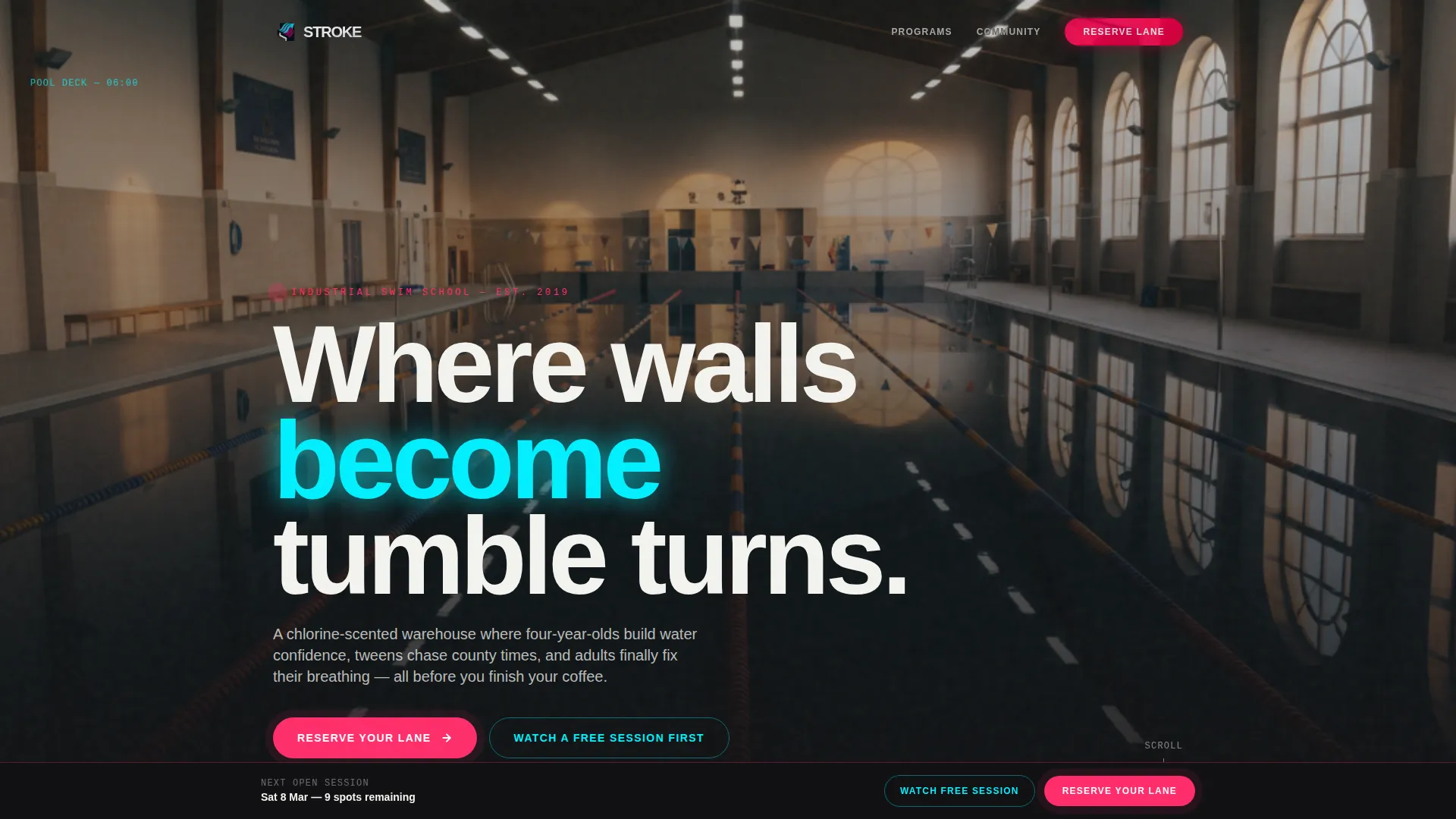
Stroke is a single-column swim school landing page built around an Industrial Raw aesthetic and Neon Shock color palette. It combines a scroll-triggered video header, a raw community photo gallery, and a three-step event registration flow to move hesitant parents and competitive swimmers from first visit to booked session fast.
by Rocket studio
Quick summary
Stroke is a swim school landing page template designed for aquatic centers and lesson programs. It pairs a dramatic scroll-triggered video with a community-first photo gallery and a sticky registration bar. The dark industrial design feels alive the moment a visitor scrolls, making the pool feel real before they ever read a single word.
Who this template is for
This template suits swim schools and aquatic lesson programs that serve a wide range of learners and want a visually striking, conversion-focused single page to drive session bookings.
- Swim school owners running infant, youth, and adult lesson programs who need a booking-ready landing page.
- Competitive swim clubs and squads targeting tweens and teens chasing qualifying times and structured training.
- Community pools and aquatic centers offering open assessment days and mixed-ability adult improver sessions.
What problem this template solves
Most swim school pages feel generic. Stock photos of smiling children, pale blue backgrounds, and buried contact forms do nothing to build trust or urgency. Stroke fixes that by making the pool environment tangible and placing real community stories at the center of the experience.
- Parents landing on the page cannot picture themselves or their child there, so they leave without booking.
- Registration paths are often hidden behind multiple clicks, causing drop-off before intent converts to action.
- The template replaces passive browsing with an immersive, scroll-driven experience that leads directly to a three-step booking form.
What you get with this template
Stroke delivers a complete single-column landing page layout with every section pre-built and ready to populate with your own content, photos, and session details.
- A scroll-triggered video header that plays frame by frame as the visitor scrolls, freezing mid-stroke when scrolling stops.
- A community gallery section where each swimmer's story is told through one photograph and one sentence, building belonging with every image.
- A sticky "Reserve Your Lane" bottom bar with a three-step registration form covering session selection, date picking, and contact details.
Feature list
This template includes six purpose-built features that each serve the core goal of turning a first-time visitor into a registered swimmer.
Scroll-Triggered Video Header
The page opens on a moody still of the empty pool hall. As the visitor scrolls, video playback advances frame by frame through an underwater tracking shot. Scrolling stops, the swimmer freezes mid-pull in cyan-lit water.
Community Photo Gallery
Each scroll section pairs a single poolside photograph with one short sentence. Raw flash-lit shots and underwater stills sit pinned against the dark background, accumulating into a portrait of an entire swim community rather than a polished brochure.
Three-Step Registration Form
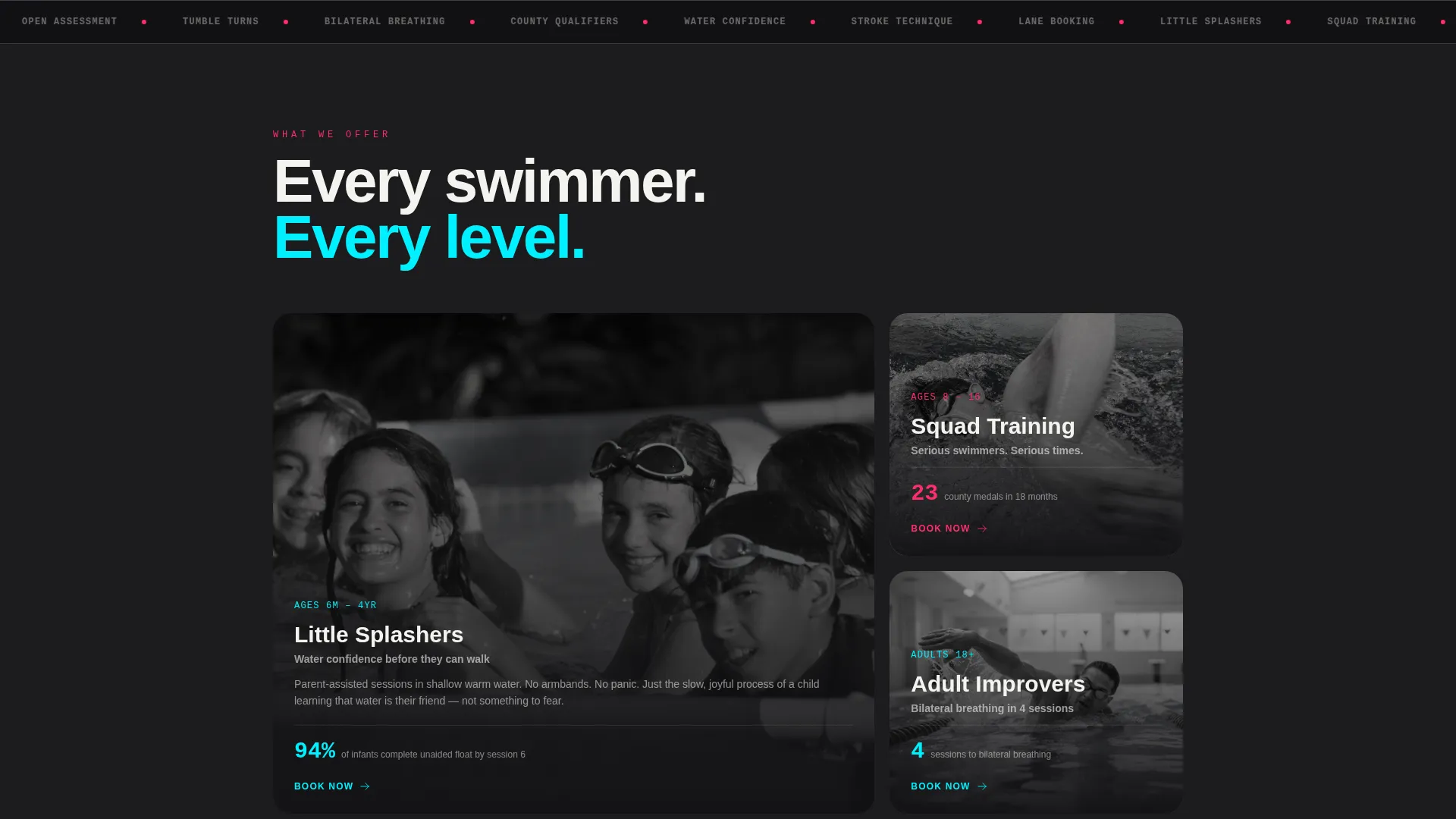
The booking flow keeps friction low. Step one lets the visitor select a session type from four options: Little Splashers, Squad Training, Adult Improvers, or Open Assessment Day. Step two shows a visual calendar with remaining spots marked in cyan. Step three collects only a name and phone number.
Sticky "Reserve Your Lane" Bar
A magenta bottom bar stays anchored as the visitor scrolls. It begins pulsing after the third gallery image passes the viewport, timing its urgency signal to the moment emotional connection with the community peaks.
Secondary Open-Day Path
A "Watch a Free Session First" link offers a lower-commitment entry point for hesitant parents. It connects to a specific upcoming open-day event with a single-tap RSVP, keeping the softer lead from leaving empty-handed.
Neon Shock Color System
The full color palette is built in and applied consistently across every section. Charcoal backgrounds, gunmetal dividers, magenta accents, and cyan highlights are coded to create a unified industrial pool-hall aesthetic throughout the entire page.
Page sections overview
| Section | Purpose |
|---|---|
| Video Header | Opens the page with a scroll-driven underwater tracking shot |
| Gallery Story Feed | Tells each swimmer's story through one photo and one sentence |
| Session Types Block | Presents the four bookable session categories clearly |
| Visual Date Calendar | Displays available dates with remaining spots in cyan |
| Contact Details Step | Captures name and phone number to complete registration |
| Open Day Teaser | Offers a hesitant visitor a low-commitment free session RSVP |
| Sticky call to action Bar | Keeps the "Reserve Your Lane" action visible at all times |
Design & branding system
The design follows an Industrial Raw theme executed through a Neon Shock color system. Every color decision reinforces the raw, competitive feel of a working aquatic facility rather than a leisure spa.
- Background in exposed concrete charcoal (#1C1C1E), section dividers in pool-drain grate gunmetal (#3A3D42), and body text in chlorine-bleached white (#F4F4F0) for maximum contrast.
- Electric lane-rope magenta (#FF2D6B) as the dominant accent on calls to action and the sticky bar, with timing-board cyan (#00F0FF) reserved for calendar highlights and hover states.
- Typography is large and unapologetic, matching the scale of poolside signage and keeping the page readable even at a glance.
Mobile & speed optimization
The single-column layout is inherently mobile-friendly. The full-width scroll sections, large touch targets on the sticky bar, and step-by-step form all translate cleanly to smaller screens without redesign.
- The single-column flow stacks every section vertically, removing the need for complex responsive grid breakpoints.
- The sticky bottom registration bar stays accessible throughout the scroll journey on both phone and tablet viewports.
- The visual calendar and session selector are built as discrete steps, reducing cognitive load on small screens.
How this template helps you convert
The page is structured to move a visitor through three emotional stages: curiosity, belonging, and commitment. Each section hands off to the next with minimal friction.
- The scroll-triggered video creates immediate sensory engagement, pulling the visitor into the pool environment before any text asks them to act.
- The community gallery builds trust and identity by showing real swimmers at every level, making each visitor see themselves or their child in the community.
- The sticky "Reserve Your Lane" bar and three-step form remove every excuse to delay, keeping the booking action visible and simple from the third gallery image onward.
Other information about this template
Stroke is part of a single-column flow template category designed for sports and recreation businesses in the swimming and aquatic center niche. It is built specifically for swim school and lessons programs that need a single focused page to convert traffic into booked sessions.
- The template name "Stroke" reflects the competitive swimming context and the single-direction scroll flow of the page.
- Session types are pre-labelled as Little Splashers, Squad Training, Adult Improvers, and Open Assessment Day, giving swim schools clear starting labels to adapt.
- The Industrial Raw theme and Neon Shock palette make this template visually distinct from typical blue-water swim school designs, helping a program stand out in a crowded local market.
- The Community Gallery creative direction is intentionally non-portfolio in feel, favoring raw phone shots and flash-lit poolside images over professional photography.


Theme
Industrial Raw
Creative direction
Community Gallery
Color system
Neon Shock
Style
Single Column Flow
Direction
Event Registration
Page Sections
Scroll-triggered Video Header
Community Photo Gallery
Three-step Registration Form
Sticky Reserve Your Lane Bar
Secondary Open-day Path
Neon Shock Color System
Related questions
What session types does the registration form support?
Can I use this template if I only offer one type of swim lesson?
Does the gallery section require professional photography?
How does the Watch a Free Session First path work?
Is this template suitable for adult swim programs as well as children's lessons?