High Net Worth Finance Portfolio Website Template
Shelter is a dashboard-style landing page built for high-net-worth earners who need a smarter HSA strategy. A five-step assessment form opens the experience, collecting income and filing data to deliver a personalized tax-shield projection. Data tiles, compound growth charts, a state tax matrix, and a real case study make the case before asking for anything beyond an email.
by Rocket studio
Quick summary
Shelter is a single-page assessment funnel built for seven-figure earners who want to triple-shield wealth through an advanced health savings account strategy. The page opens as a private calculator, walks visitors through five qualifying questions, then reveals a personalized tax-shield projection before presenting the full data architecture beneath.
Who this template is for
This landing page speaks directly to a narrow, high-intent audience. It is built for professionals who have already maxed every conventional retirement vehicle and need one more legal shelter for their income.
- Law firm partners facing six-figure annual tax bills
- Tech founders managing exercised incentive stock option gains
- Dual-income physician households earning between $500,000 and $2 million in adjusted gross income per year
What problem this template solves
Most financial service websites bury complex strategies inside walls of text. Visitors feel overwhelmed and leave before they understand the value. This template solves that by leading with a personalized number instead of a generic pitch.
- The form-as-hero design earns attention immediately by promising a real dollar figure
- Dashboard tiles simplify complex contribution and tax data into digestible sections
- Segment-specific copy addresses the exact fears of high earners, improving relevance and conversion
What you get with this template
You get a fully structured landing page that functions as both a qualification funnel and a data-rich education tool. The page moves visitors from anxiety to security by layering evidence before making any request.
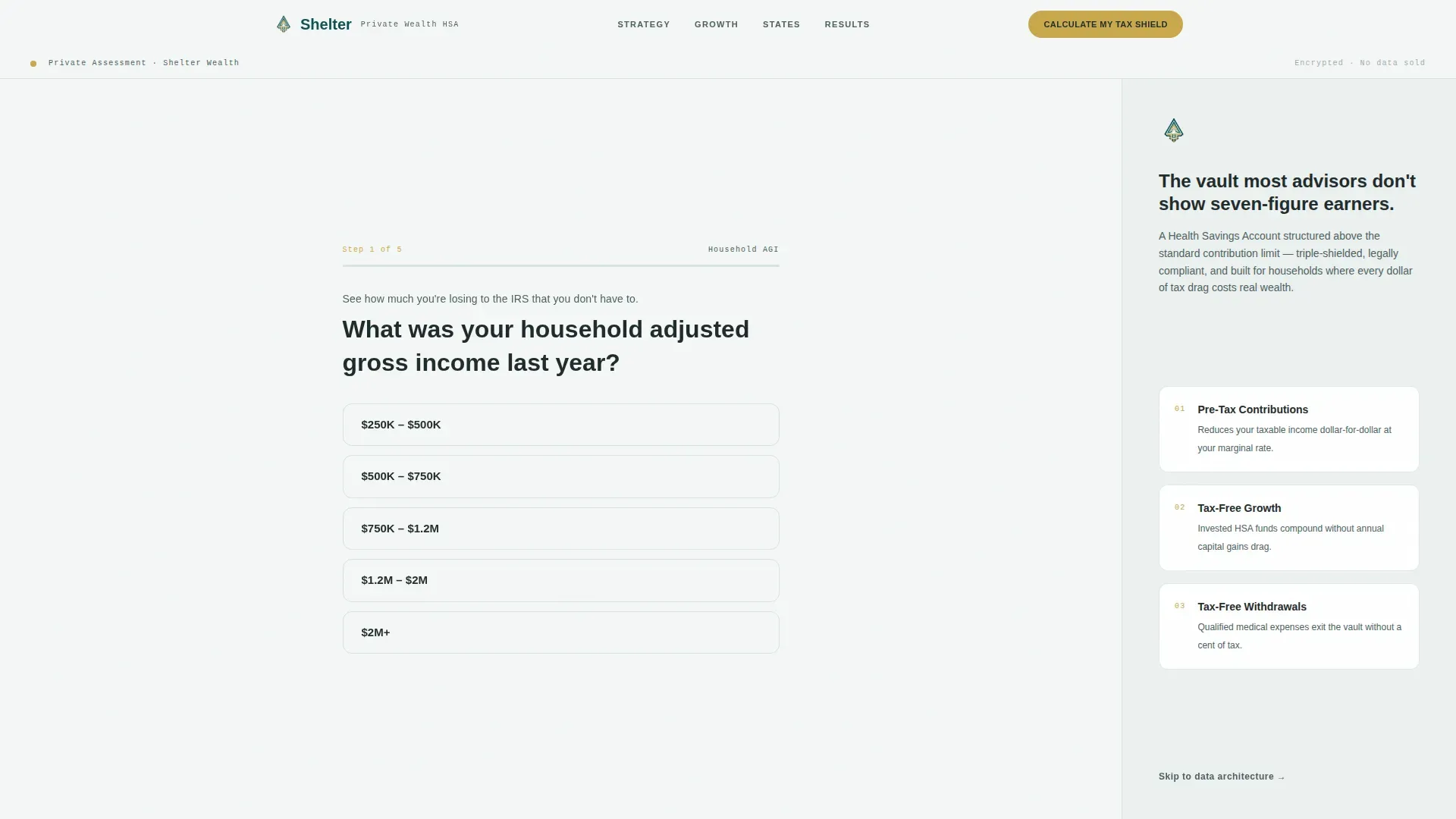
- A five-step multi-step assessment form with a gold progress bar and personalized result screen
- Four animated dashboard tiles covering growth charts, contribution architecture, state tax treatment, and a real case study
- A dual call-to-action flow: "Calculate My Tax Shield" at the top and "Book a Strategy Session" after the data grid
Feature list
This landing page template includes a focused set of interactive and visual components, each tied directly to a specific conversion goal.
Five-Step Assessment Funnel
The page opens with a calculator interface that collects adjusted gross income range, filing status, current health savings account status, employer plan type, and email address. The final screen delivers an estimated annual tax savings figure in catalyst gold, large enough to feel like a reward.
Compound Growth Chart Tile
A 20-year comparison chart shows health savings account growth versus a taxable brokerage account side by side. Built with Recharts and animated on entry, this tile makes the compounding advantage visible before the visitor reads a single word of explanation.
Contribution Architecture Table
A structured comparison table contrasts standard contribution limits against employer-integrated strategy limits. This section addresses the specific gap most advisors never mention, giving the visitor a clear reason to act beyond what they already know.
State Tax Matrix with Filter
A filterable state-by-state tax treatment grid lets visitors locate their home state and see exactly how their local rules interact with the triple-shield strategy. This data layer adds credibility that generic vectors and stock-photo financial pages cannot match.
Real Case Study Tile
A concrete projection tile shows a $380,000 tax savings outcome for a household earning $900,000 annually. Specific dollar figures function as trust signals, replacing vague promises with numbers the visitor can hold in their hands.
Calendar Embed and Secondary Call to Action
After the personalized projection is revealed, a secondary call to action links directly to a calendar embed for booking a strategy session. The page earns the click by giving value first, asking for a meeting only after delivering a real number.
Page sections overview
| Section | Purpose |
|---|---|
| Assessment Form Hero | Qualify visitors and deliver a personalized tax-shield projection |
| Growth Chart Tile | Visualize 20-year HSA versus brokerage compounding |
| Contribution Architecture | Compare standard versus employer-integrated limits |
| State Tax Matrix | Filter state-by-state tax treatment by home location |
| Case Study Tile | Show a $380K projection for a $900K household |
| Footer Row | Single-row linear footer with navigation and closing call to action |
Design & branding system
The visual identity follows a Legal Shield theme built around the Teal Catalyst color system. Every design decision reinforces the feeling of a private wealth office: clinical, precise, and quietly confident.
- Deep vault teal (#0D4F4F) and ledger charcoal (#1E2A2A) form the structural palette, while clean asset white (#F4F7F6) keeps the page readable
- Catalyst gold (#C9A84C) is reserved exclusively for interactive elements, progress indicators, and savings figures, creating a single warm visual pulse
- Typography pairs Plus Jakarta Sans for body and interface copy with JetBrains Mono for data readouts, giving numbers a terminal-screen authority
Mobile & speed optimization
The template is desktop-first by design, built for a high-net-worth audience that engages with complex data grids on larger screens. Responsive design is included so the page remains accessible on all devices, since approximately 50% of web traffic arrives from mobile.
- Server-side rendering handles static sections for faster initial load on desktop
- Interactive tiles, the Recharts compound chart, and the state matrix filter are client-rendered for full interactivity
- GSAP ScrollTrigger powers staggered tile reveals and count-up number animations on entry
How this template helps you convert
The page is engineered as a quiz and assessment funnel. Every section adds another layer of shielded dollars until ignoring the total feels like a decision against your own interests.
- The multi-step form collects data and delivers a personalized projection, providing immediate value before asking for an email address
- High-contrast, outcome-oriented call-to-action buttons appear at the header and again after the full data grid, giving visitors two natural moments to act
Other information about this template
This template can support financial advisors sourcing advanced strategies for high-net-worth clients as a secondary audience alongside the primary earner segment. The landing page design places logo placement and brand identity in the header area, keeping the page professional and instantly recognizable. Visual assets across the page use crisp vectors and icon-level illustrations rather than stock photography, ensuring the aesthetic stays consistent with the private-wealth office tone. Icons representing protection such as shields are woven into the page vectors to reinforce the triple-shield narrative without relying on generic imagery.
The shelter triple shield wealth protection landing page template addresses three conceptual protection layers: a Land Trust Shield focused on confidentiality, a Data Privacy Shield aimed at keeping personal information secure, and a Title Fraud Shield that guards against unauthorized property actions. These layers align the page narrative with established wealth protection strategies including asset diversification, trust structures, and financial planning. Insurance and shelter concepts such as protecting a home and family assets serve as supporting metaphors throughout the copy system.
- Template customization requires no programming skills; pre-filled sample text and vectors make setup straightforward
- Users can receive support for installation and customization from the template provider
- The page includes contact form integration and can support social media link placement in the footer
- Logo placement, color tokens, and typography settings are all editable within the design system
- The page vectors and logo area are sized for high-resolution display on desktop screens


Theme
Legal Shield
Creative direction
Calculator/Tool First
Color system
Teal Catalyst
Style
Dashboard/Data Grid
Direction
Quiz/Assessment
Page Sections
Five-step Assessment Funnel
Compound Growth Chart Tile
Contribution Architecture Table
Filterable State Tax Matrix
Real Case Study Projection Tile
Calendar Embed and Dual Call-to-action Flow
Related questions
Can I customize the color palette and logo without coding?
Does the template include the actual calculator logic?
Who is this landing page best suited for?
What visual assets come with the template?
Can I get support for installation and customization?



