Premium Podcast Studio Landing Page Template
Studio is a premium podcast landing page template built for professional recording spaces. It features a Before/After Slider header, an interactive room-by-room walkthrough with audio hotspots, and a five-step quiz that matches visitors to the right studio package. The Sunset Mesa color system and asymmetric 60/40 grid give the page a warm, authoritative presence that reflects the quality of the space itself.
by Rocket studio
Quick summary
Studio is a single-page template designed for professional podcast recording studios. It uses a 60/40 asymmetric grid, a Before/After Slider header, and an interactive room walkthrough to create a sensory sales experience. The page closes with a five-step quiz that recommends a tailored studio package and captures leads through a 48-hour hold offer.
Who this template is for
This template is built for studio owners and operators who want their booking page to feel as polished as the space itself. It speaks directly to clients who need more than a photo gallery to make a decision.
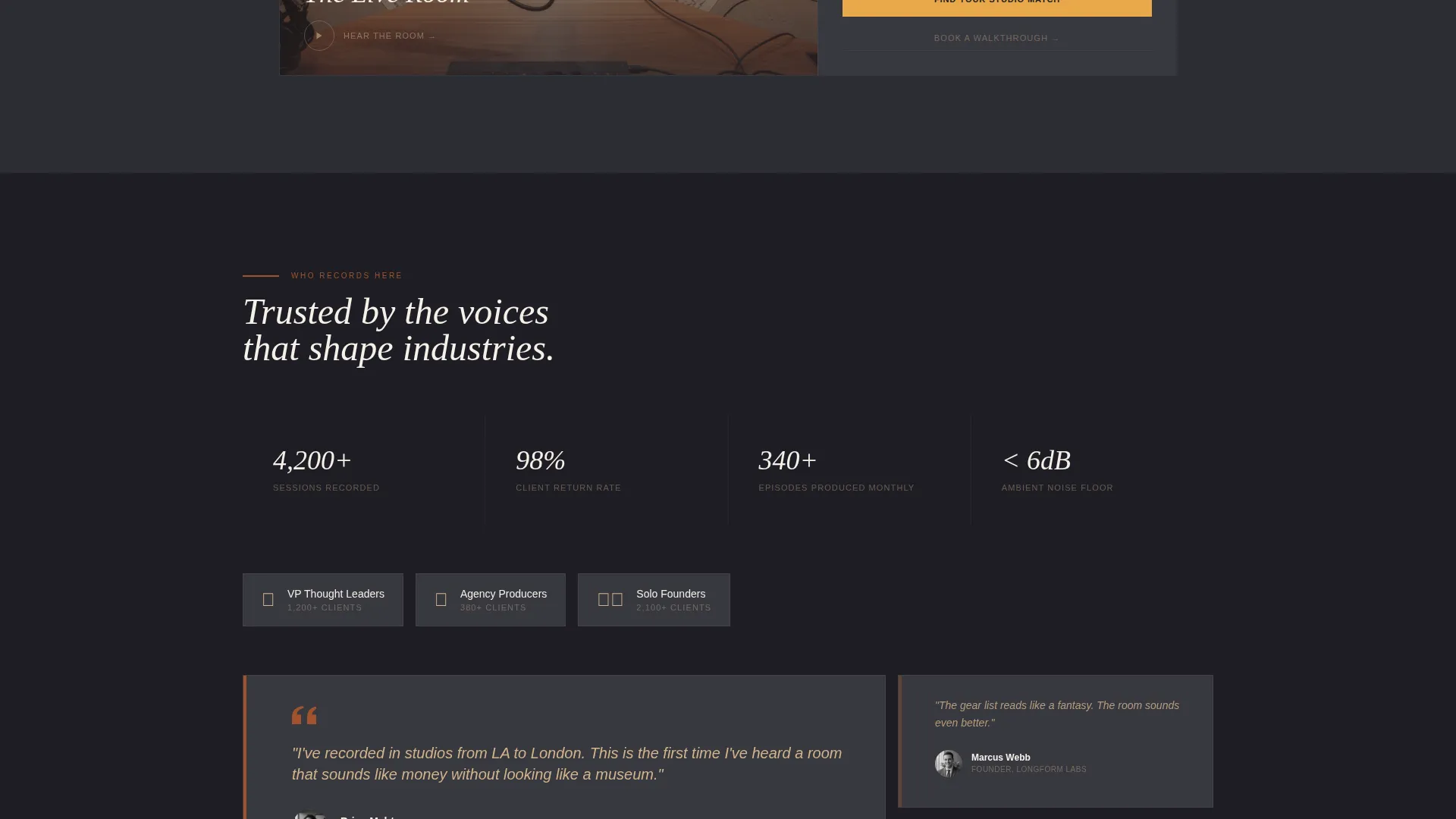
- VP-level professionals and thought leaders recording branded podcast series
- Agency producers scouting locations for client productions
- Solo founders who have outgrown improvised home setups and need a credible studio space
What problem this template solves
Most studio rental pages look flat. Static photos and a contact form do not communicate acoustics, atmosphere, or professionalism. This template closes that gap by letting visitors experience the space before they ever book.
- Visitors cannot hear the difference between rooms from a photo alone
- Generic booking pages fail to qualify leads or match clients to the right package
- Studio operators lose conversions when prospects leave without a clear next step
What you get with this template
This template gives you a complete, section-led landing page built around the specific sales journey of a premium studio rental. Every section is designed to move a visitor from curiosity to commitment.
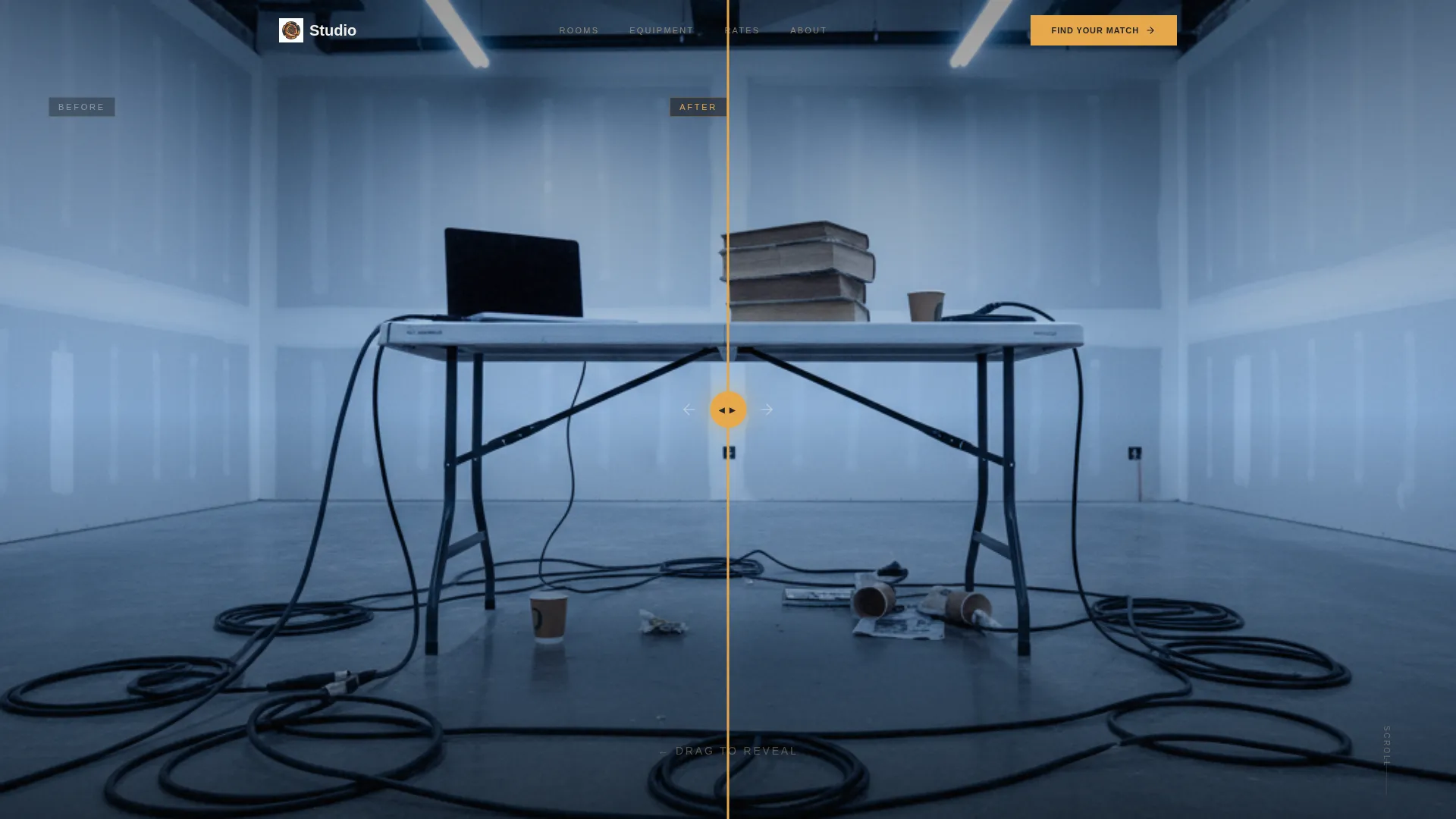
- A draggable Before/After Slider header that transforms a raw conference room into a finished studio
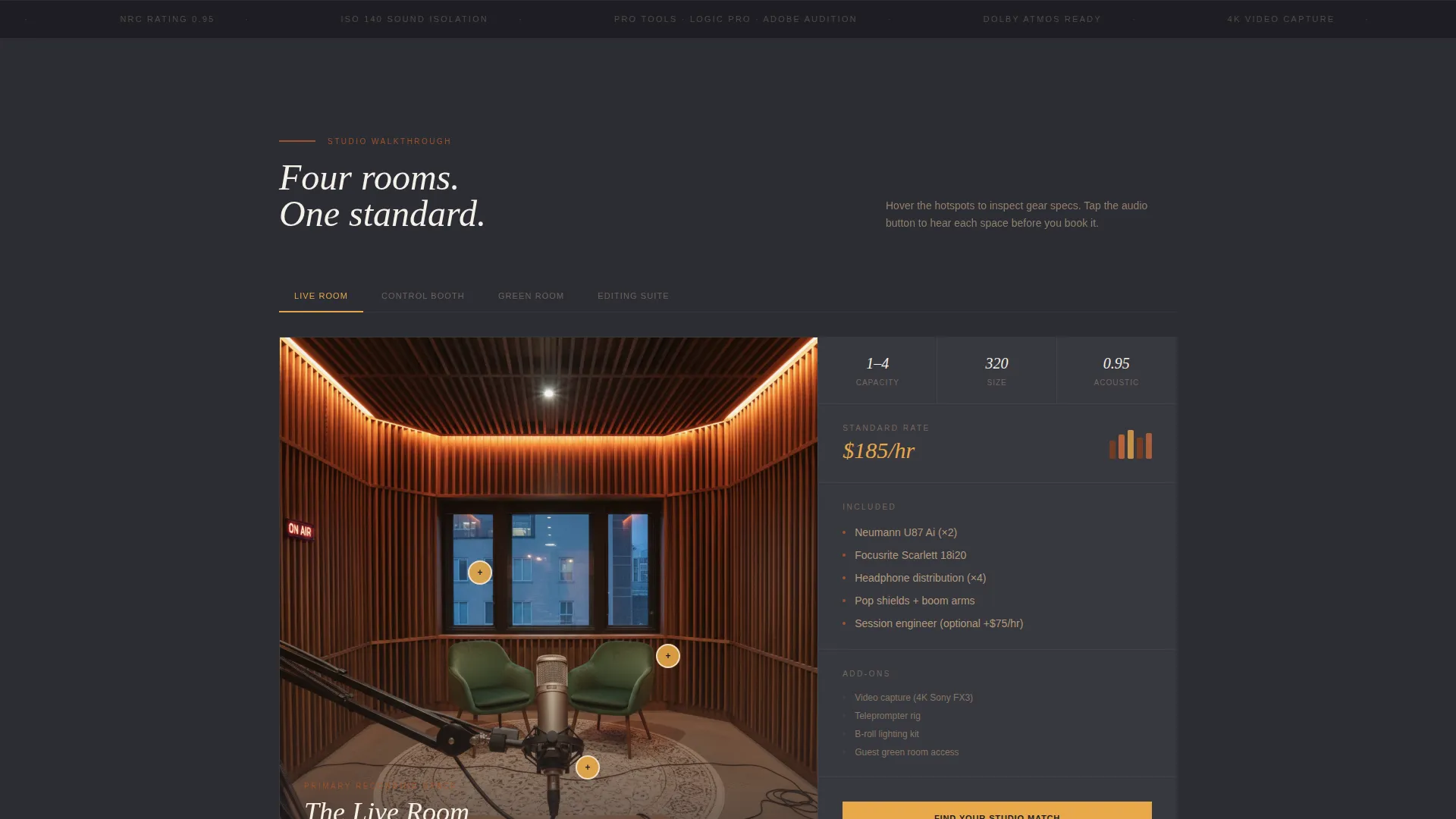
- An interactive walkthrough covering the live room, control booth, green room, and editing suite
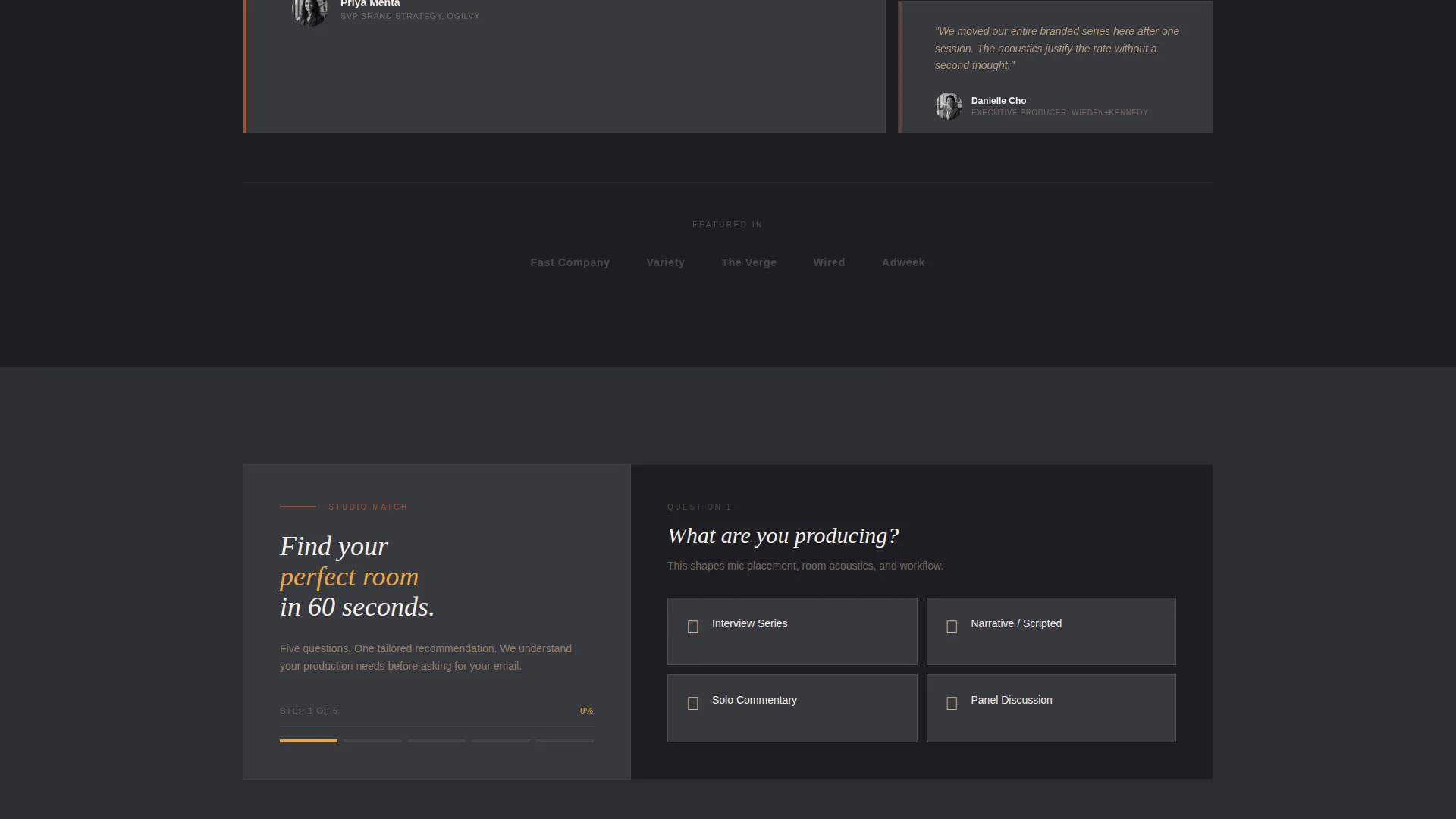
- A five-step quiz that ends with a personalized studio package card showing room, rate, and available dates
Feature list
This template includes purpose-built components that work together to create a sensory, high-converting studio page.
Before/After Slider Header
The 60-column header splits into a fluorescent-lit raw room on the left and a walnut-paneled professional studio on the right. Dragging the slider reveals the transformation inch by inch. The headline "Your voice deserves this room" types itself into view only after the slider crosses center.
Interactive Room Walkthrough
Each scrollable section represents a distinct studio space. Hovering or tapping hotspots within the 60-column image reveals gear specifications, acoustic ratings, and 10-second audio samples recorded in that exact room. The 40-column side updates with capacity, included equipment, and add-on options for each space.
Five-Step Studio Match Quiz
The primary call to action launches a guided diagnostic covering production type, episode frequency, crew size, must-have gear, and budget range. Each answer narrows the recommendation dynamically, ending with a tailored package card. The email capture appears last, framed as a 48-hour package hold.
Asymmetric 60/40 Grid Layout
The page uses a deliberate split between a dominant 60-column visual zone and a 40-column context panel. This structure keeps imagery prominent while giving supporting information its own clear space on every section.
Secondary Booking Path
A "Book a Walkthrough" text link appears beneath every room section. This gives confident visitors a direct route to the studio without requiring them to complete the quiz, keeping both decision styles served.
Page sections overview
| Section | Purpose |
|---|---|
| Before/After Slider | Opens with a dramatic raw-to-finished studio transformation |
| Live Room Hotspots | Showcases gear specs and audio samples for the main recording space |
| Control Booth Panel | Details monitoring setup, capacity, and add-on options |
| Green Room Section | Presents client comfort space with included equipment details |
| Editing Suite Panel | Covers post-production space specs and available add-ons |
| Studio Match Quiz | Guides visitors through a five-step package recommendation flow |
| Package Result Card | Displays tailored room, rate, and available dates after the quiz |
| Lead Capture Frame | Collects email with a 48-hour package hold offer |
Design & branding system
The visual identity follows an Executive Suite theme using the Sunset Mesa color system. The palette feels warm, dry, and expensive, like a whiskey bar carved into red rock. Every color has a structural role on the page.
- Charcoal dusk (#2C2C34) dominates backgrounds, creating an acoustically heavy, focused feel
- Sandstone (#D2B48C) carries body text panels for warmth and readability under low contrast
- Deep terracotta (#A0522D) anchors section dividers and hover states, while pale amber (#E8A849) activates all calls to action and interactive affordances
Mobile & speed optimization
The 60/40 asymmetric grid is designed to reflow cleanly at smaller viewport sizes. Interactive components like the slider and hotspot walkthrough are built to respond to touch as naturally as mouse input.
- The Before/After Slider supports drag on desktop and swipe on touch screens
- Hotspot interactions in the room walkthrough are tappable on mobile devices
- The quiz flow is designed as a step-by-step card sequence that works well on narrow screens
How this template helps you convert
The page is structured as a progressive trust-building journey. Each section adds a layer of evidence before asking for anything in return.
- The Before/After Slider creates an immediate emotional contrast, showing visitors what professional production actually looks like compared to a typical setup.
- The room walkthrough with audio samples builds a sensory case that static photos cannot, giving visitors a genuine reason to stay engaged and keep scrolling.
- The quiz earns the email capture by delivering value first. Visitors receive a personalized recommendation before the page ever asks for contact information.
Other information about this template
This template sits within the Real Estate and Property category, specifically aligned with the Co-Working and Shared Office subcategory. It is well suited for any shared professional production space operating in a hybrid co-working model.
- The template style uses an asymmetric split grid rather than a strict 50/50 layout, giving the visual content more dominance
- The creative direction is Spatial and Architectural, meaning the page treats each studio room as a distinct environment worth exploring
- The landing page direction is Direct Sales, so every design decision points toward a booking or lead capture outcome
- The header concept is a Before/After Slider, which is a specific interactive component rather than a static hero image
- This template can support a co-living and co-working hybrid context where studio access is part of a broader membership or shared-space offering
Theme
Corporate Precision
Creative direction
Spatial & Architectural
Color system
Sunset Mesa
Style
Split Screen (50/50)
Direction
Direct Sales
Page Sections
Before/after Slider Header
Interactive Room Walkthrough
Five-step Studio Match Quiz
Asymmetric 60/40 Grid
Secondary Walkthrough Booking Path
Hour Lead Capture Frame
Related questions
Who is this template designed for?
What does the five-step quiz actually do?
Can visitors book a tour without completing the quiz?
How is the room walkthrough different from a standard photo gallery?
How does the lead capture work on this page?



