ADU (Accessory Dwelling Unit) Real Estate Pricing Website Template
Suite is a single-page landing page template built for accessory dwelling unit (ADU) staging companies. It combines an asymmetric 60/40 grid, a square-footage search tool, and a room-by-room interactive walkthrough to turn curious homeowners into paying staging clients. Transparent tiered pricing, a rental income calculator, and a streamlined checkout make the sale without a discovery call.
by Rocket studio
Quick summary
Suite is a luxe landing page template designed for ADU staging businesses. It greets visitors with a personalized square-footage search, walks them through a fully staged unit room by room, and closes with transparent package pricing and a deposit checkout. The result is a page that feels less like a sales pitch and more like unlocking a unit you already trust.
Who this template is for
This template is built for staging professionals who furnish backyard casitas, garage conversions, and other accessory dwelling units (ADUs) for rental-ready delivery. It works especially well if your clients are homeowners who have already completed construction and need the unit earning income fast.
- ADU staging companies offering tiered furnishing packages
- Independent interior stagers who serve the short-term and long-term rental market
- Renovation-adjacent service providers ready to add a direct-booking sales flow
What problem this template solves
Homeowners who just spent upward of $180,000 building a 450-square-foot casita often stall when it comes to furnishing. They underestimate what a bare unit communicates to prospective tenants and overestimate what a bed from a general retailer can achieve at $2,800 per month. A generic website or a "request a quote" form does not resolve that hesitation.
- Visitors leave without buying because pricing is hidden or vague
- The value of professional staging is unclear without a visual, room-by-room comparison
- No path exists between interest and a confirmed booking date
What you get with this template
Suite delivers a complete, single-page sales environment built around one goal: turning a curious homeowner into a confirmed staging client. Every section is designed to reduce friction and build confidence before the deposit screen appears.
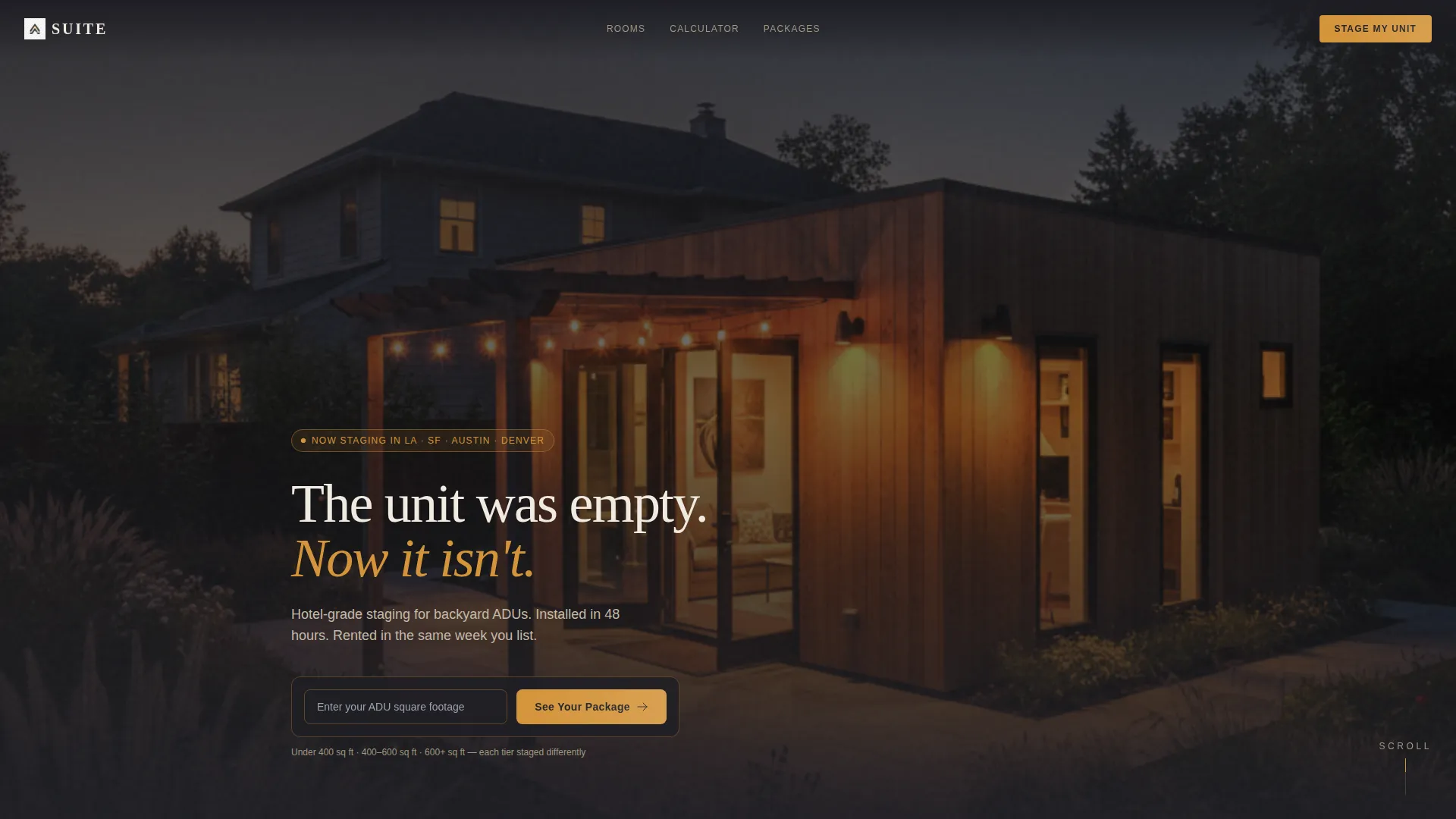
- A square-footage search tool in the header that personalizes page content by unit size tier
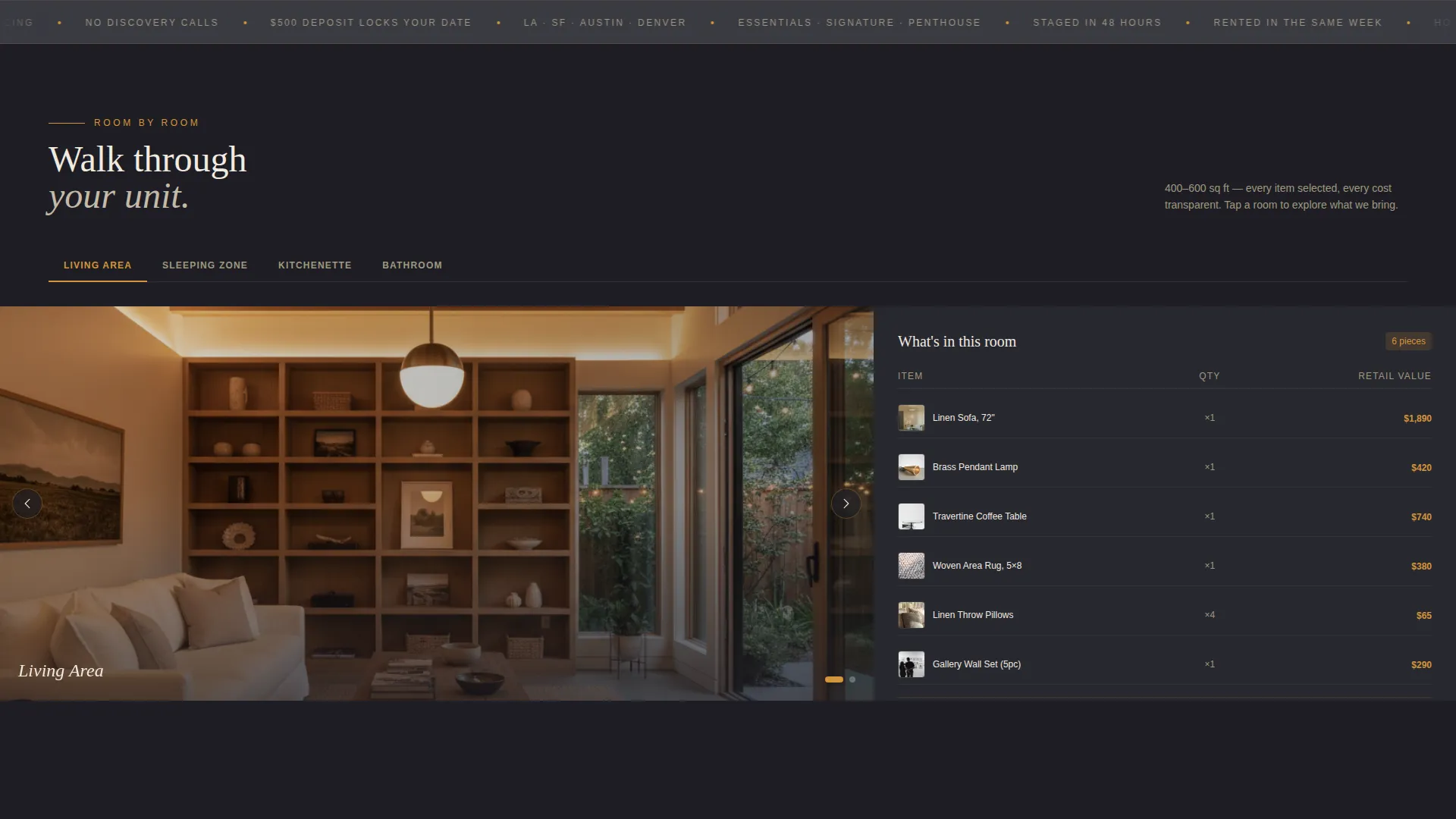
- A room-by-room interactive photo explorer with item lists, quantities, and cost comparisons
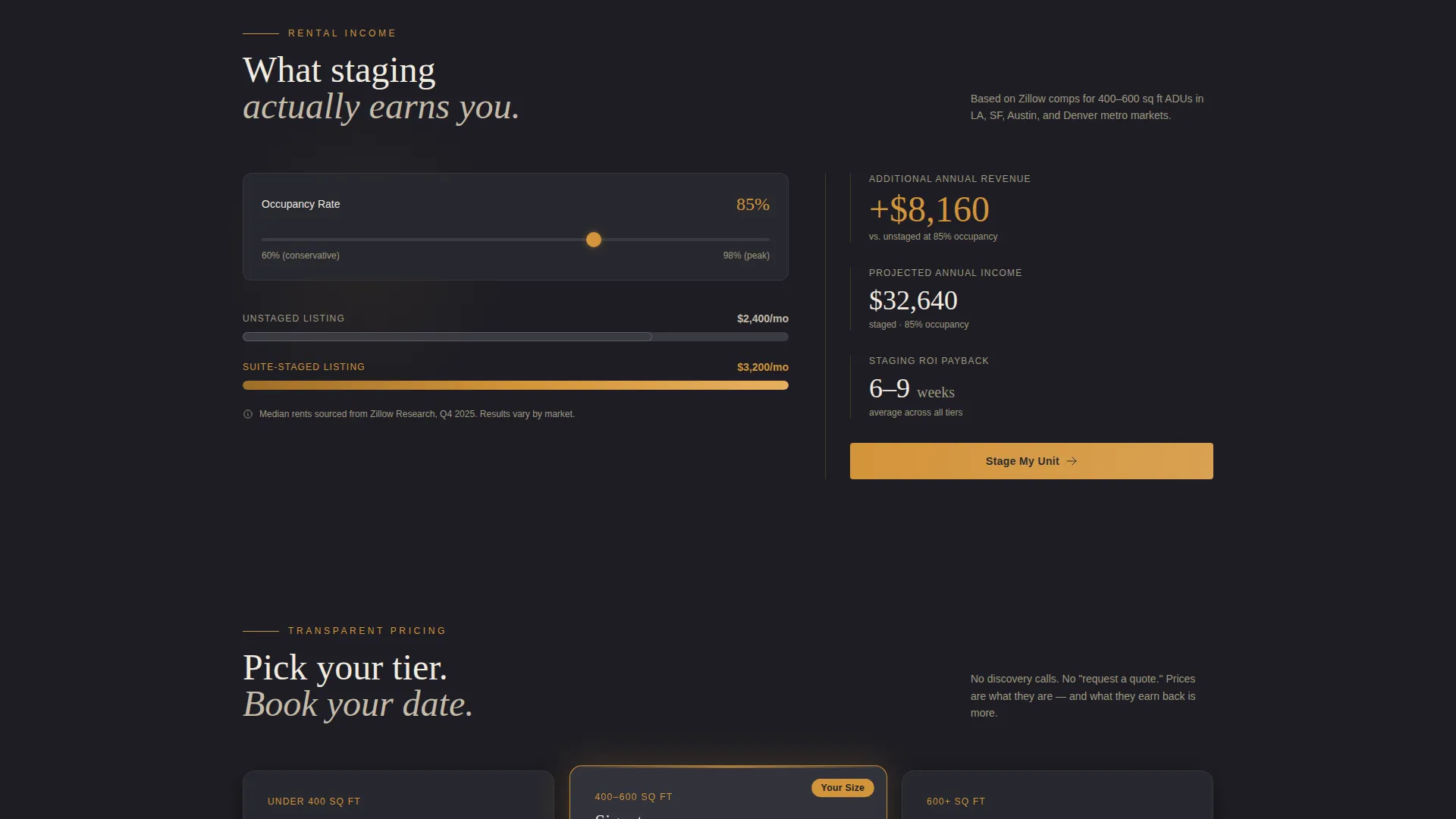
- A mid-page rental income calculator using real market rent comparisons to show staging return
- A three-step checkout flow covering unit size, package selection, and a deposit date picker
- A secondary email capture path via a downloadable lookbook for visitors not yet ready to buy
Feature list
This template packs several carefully designed components into a single, focused landing page. Each one serves a specific role in moving a visitor from curiosity to confirmed booking.
Square Footage Search and Content Personalization
The header contains a functional search field labeled "Enter your ADU square footage." On submission, the page refilters its content to match one of three staging tiers: under 400 square feet, 400 to 600 square feet, or 600 square feet and above. The experience feels immediate and relevant from the first interaction.
Room-by-Room Interactive Photo Explorer
Each major section of the page represents a room: living area, sleeping zone, kitchenette, and bathroom. The 60 percent left column displays a rotatable or swipeable staged photo set. The 40 percent right column lists every item in that room with small thumbnails, quantities, and a side-by-side retail-versus-staging cost comparison.
Rental Income Calculator
A mid-scroll calculator shows the revenue difference between an unstaged and a staged ADU listing. It references real market rent comparisons to make the financial case concrete. The calculator appears at a high-stakes moment in the scroll, just as the visitor has seen the full staged unit.
Three-Step Staging Checkout
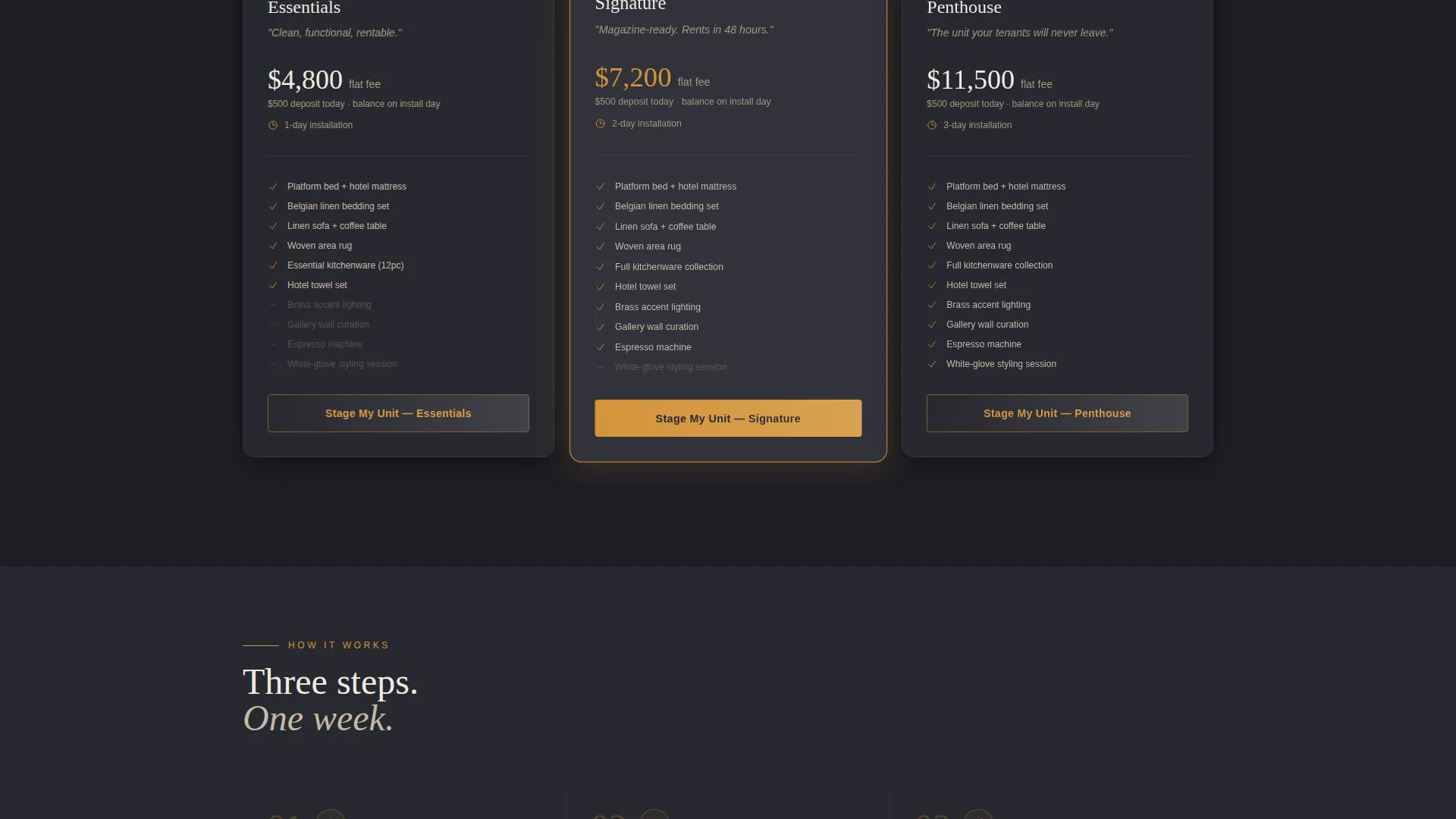
Clicking the primary call-to-action opens a streamlined checkout. Step one confirms unit size and zip code. Step two presents three visible, itemized packages: Essentials, Signature, and Penthouse. Step three offers a date picker for installation scheduling and collects a $500 deposit.
Lookbook Email Capture
A secondary path targets visitors who are not yet ready to purchase. A single-field form gates access to a downloadable lookbook. This keeps softer leads inside the funnel without requiring a discovery call or phone number.
Sticky Call-to-Action Bar
After the rental income calculator, a persistent "Stage My Unit" bar anchors to the bottom of the viewport. It keeps the primary action visible during the final sections of the page without interrupting the reading experience.
Page sections overview
| Section | Purpose |
|---|---|
| Header Search Block | Personalize content by ADU square footage tier |
| Living Area Explorer | Showcase staged living space with itemized furnishings |
| Sleeping Zone Explorer | Display bedroom setup with cost comparison panel |
| Kitchenette Explorer | Present kitchen staging items and quantities |
| Bathroom Explorer | Complete the room walkthrough with bath furnishings |
| Rental Income Calculator | Show financial return of staging versus unstaged listing |
| Package Selection | Present Essentials, Signature, and Penthouse pricing tiers |
| Staging Checkout Flow | Confirm size, select package, pick date, collect deposit |
| Lookbook Capture | Gate downloadable lookbook behind single email field |
Design & branding system
Suite follows an Executive Suite visual theme built on a Charcoal and Amber color system. The palette is intentionally dark and warm, evoking a boutique hotel lobby rather than a bright real estate brochure. The asymmetric 60/40 grid reinforces the editorial quality: imagery commands the left, copy and action elements own the right.
- Deep charcoal (#1E1E24) fills the primary background; warm graphite (#3A3A42) surfaces card elements
- Liquid amber (#D4943A) highlights all interactive components, pricing figures, and call-to-action buttons
- Belgian linen (#F0EAE0) is used for body text and negative space to keep contrast readable and warm
Mobile & speed optimization
The 60/40 asymmetric grid is designed to restack cleanly on smaller screens. The photo explorers translate to swipeable card stacks on touch devices, and the sticky call-to-action bar remains functional throughout the mobile scroll.
- Photo sets in each room section are swipeable on mobile for a natural walkthrough experience
- The three-step checkout is structured to work within a compact viewport without scrolling confusion
- The sticky bar activates after the calculator section on both desktop and mobile viewports
How this template helps you convert
Suite is engineered to reduce every friction point between interest and a paid deposit. The personalization hook at the top filters out indecision early, and the transparent pricing removes the most common reason visitors leave without acting.
- The square-footage search creates an immediate sense of relevance, making the visitor feel the page was built for their specific unit before they read a single headline.
- The room-by-room walkthrough builds visual proof and financial justification in one uninterrupted scroll, so by the time the checkout appears, the decision has already been made mentally.
Other information about this template
Suite is a single-page landing page template built on an asymmetric grid layout and is ready to use as a standalone direct-sales page. It does not require a separate website to function. The design system is fully documented, making it straightforward to swap brand colors or replace placeholder photography with your own staged unit images.
- The lookbook capture path doubles as a lightweight lead-nurture entry point for homeowners still mid-decision
- Pricing tiers are visible and itemized by default, removing the need for a sales call or custom quote process
- The $500 deposit step is integrated into the checkout as a clearly labeled final action, not a hidden fee screen
- This template suits any ADU staging business operating in markets where rental income potential is a strong motivator for homeowners
Theme
Pastoral Calm
Creative direction
Before/After Reveal
Color system
Cloud Canvas
Style
Zigzag/Alternating
Direction
Click-Through
Page Sections
Square Footage Search and Content Filter
Room-by-room Interactive Photo Explorer
Rental Income Calculator
Three-step Staging Checkout
Sticky Call-to-action Bar
Lookbook Email Capture Gate
Related questions
Does this template require a discovery call or contact form to convert visitors?
Can I edit the package names and pricing tiers in the checkout?
How does the square footage search personalize the page?
Is this template suitable for both short-term and long-term rental staging businesses?
What does a visitor see if they are not ready to book a staging date?



