Human Services Government Directory Website Template
Mandate is a card grid landing page built for state-level human services departments hosting high-stakes professional events. It combines a stats-first modular layout with an institutional authority design system, guiding caseworkers, county administrators, foster parents, and nonprofit directors through a four-step registration flow with built-in continuing education documentation and deadline urgency.
by Rocket studio
Quick summary
Mandate is a single-page event registration template designed for state human services departments. It opens with commanding centered typography, moves into a wall of statewide impact statistics displayed as modular cards, and closes with a structured four-step registration form. Every design choice reinforces public trust. Every content block moves the right professional toward clicking "Register Your Seat."
Who this template is for
This template is built for the people who sit at the intersection of government accountability and community need. They are not casual browsers. They arrive with a specific requirement, a deadline, and limited time to find what they need. The template addresses each of these roles directly, reducing friction from the first scroll to the final form submission.
- Caseworkers and licensed practitioners who need continuing education unit (CEU) documentation before a reporting period closes
- Foster parents pursuing annual recertification and county administrators who must satisfy new federal reporting requirements before the fiscal year ends
- Nonprofit directors looking for partnership frameworks and professional development tracks tied to state and local government programs
What problem this template solves
State and local government departments regularly struggle to translate institutional credibility into a registration page that actually converts. A government event page often looks like a document rather than a destination. It buries the deadline, hides the CEU documentation note, and makes session selection feel like filing a form rather than choosing a professional path. The result is low registration turnout and missed compliance windows for the very professionals who most need to attend.
Mandate solves that problem by treating every design decision as a trust signal and every content block as a navigation aid.
- Professionals arrive knowing their role and their deadline; the template surfaces both the correct session track and the registration cutoff before they have to scroll far
- The stats-first card grid replaces generic persuasion with institutional data, giving administrators and caseworkers the evidence they need to justify attendance to a supervisor
- The four-step form removes all ambiguity about what information is required, and the secondary agenda download path captures email from visitors who are not yet ready to commit
What you get with this template
Mandate delivers a fully structured, single-page event registration layout built around modular card components and an institutional design language. Every section has a defined role. Nothing is decorative without purpose. The template is ready to be populated with your department's actual statistics, session details, speaker credentials, and deadlines.
- A sticky registration bar, a six-card impact statistics grid, a role-based session track selector, a speaker credentials section, and a four-step registration form with an email-capture agenda download path
- A complete Arctic White color system with policy blue calls to action and emergency vermillion reserved exclusively for deadline alerts and registration-closing notices
- Fraunces display typography for the headline and Plus Jakarta Sans for body text, together creating a hierarchy that feels like a freshly printed government report
Feature list
This section breaks down the core built-in capabilities of the Mandate template. Each feature is drawn directly from the design and structure brief.
Stats-First Modular Card Grid
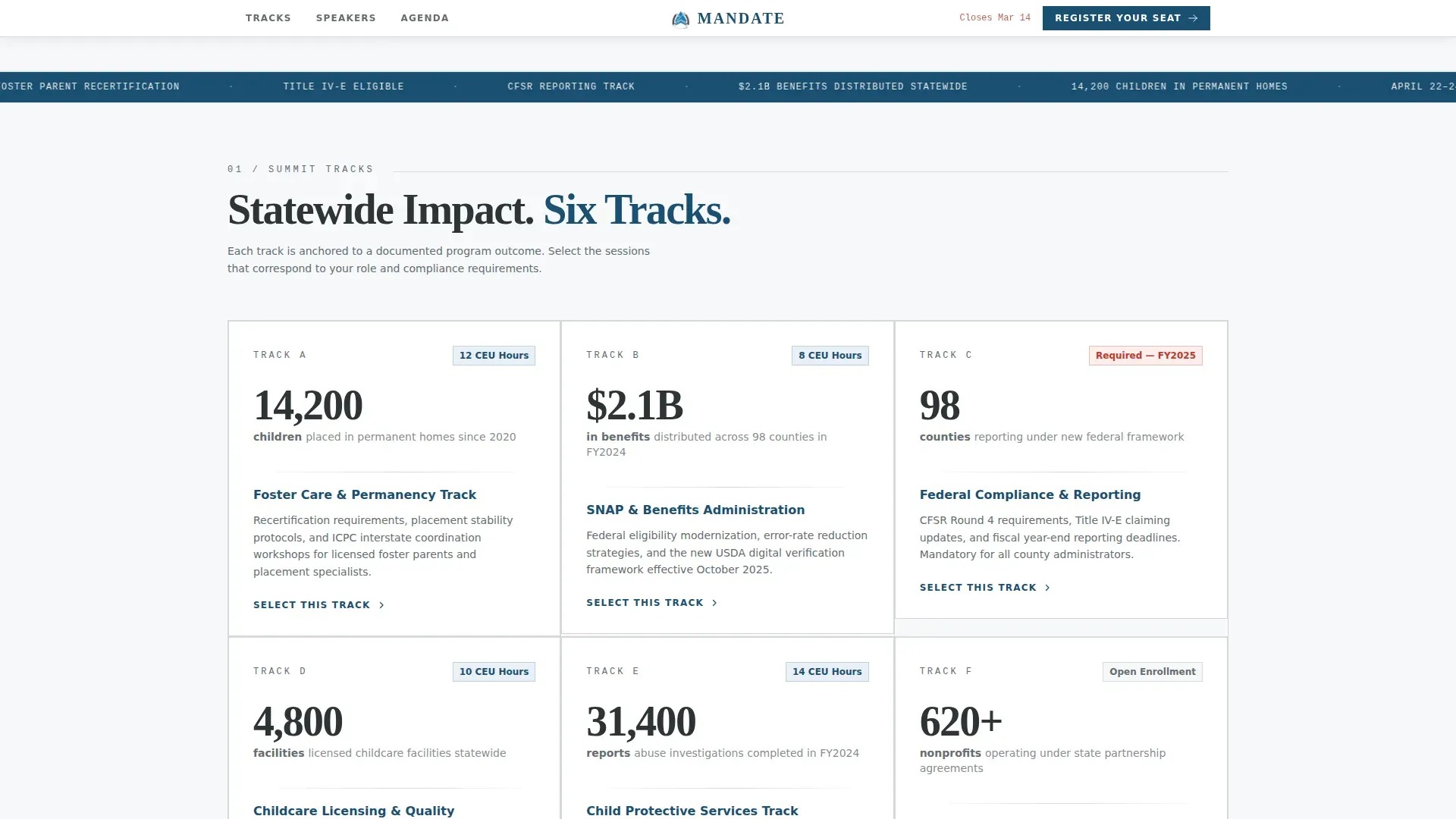
The page opens into six uniform modular cards, each leading with a large bold statistic. Each statistic connects to a summit track or workshop that addresses the underlying data. For example, a card reading "14,200 children placed in permanent homes" links directly to the foster care session track. The grid presents evidence rather than persuasion, which is exactly the register that earns trust from government professionals. Cards use consistent sizing to create a wall of institutional data that is both scannable and authoritative.
Four-Step Registration Form
The registration form moves visitors through four clearly defined steps. Step one asks for professional role, offering options including caseworker, administrator, nonprofit partner, foster parent, and other. Step two collects name and agency affiliation. Step three presents session track selection via a checkbox grid. Step four captures dietary and accessibility accommodations. Each step uses a clean transition so the user always knows where they are in the process. A note confirms that registration satisfies continuing education documentation requirements, which is the practical detail that drives most conversions for this audience.
Emergency Vermillion Deadline Counter
A live countdown display in emergency vermillion (#C0392B) sits near the registration form. It creates urgency without shouting. The color appears nowhere else on the page, so every instance of vermillion carries the same meaning: act now, this window is closing. The deadline counter is a precision instrument. It communicates the same message that a government notice communicates, but it does so within a registration context that still respects the user's time.
Sticky Registration Bar with Primary Call to Action
A slim bar pins to the top of the viewport and follows the scroll. It carries the primary call to action "Register Your Seat" in policy blue (#1B4F72). This ensures that no matter how deep a visitor reads into the statistics grid or the session schedule, the registration action is always one click away. The bar also serves as a persistent orientation anchor in a page that contains significant data density.
Agenda Email Capture Path
A secondary conversion path labeled "Download the Full Agenda" captures an email address before delivering the agenda PDF. This serves visitors who are not yet ready to commit to registration but are actively evaluating attendance. It ensures that the department can follow up with a warm audience that has already demonstrated intent. The path is low-friction and keeps the PDF as a genuine incentive rather than a gated obstacle.
Speaker Credentials and Session Track Sections
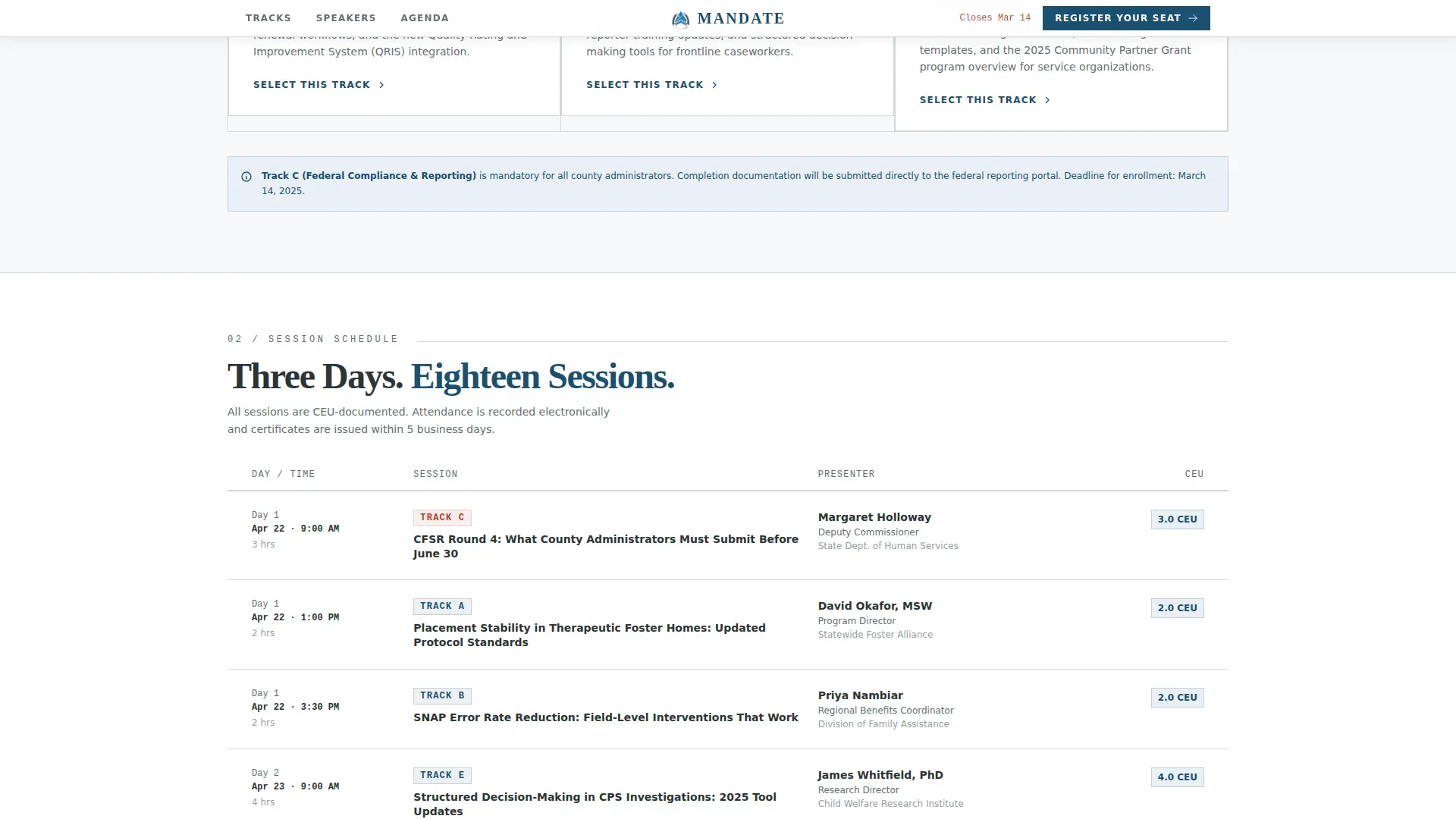
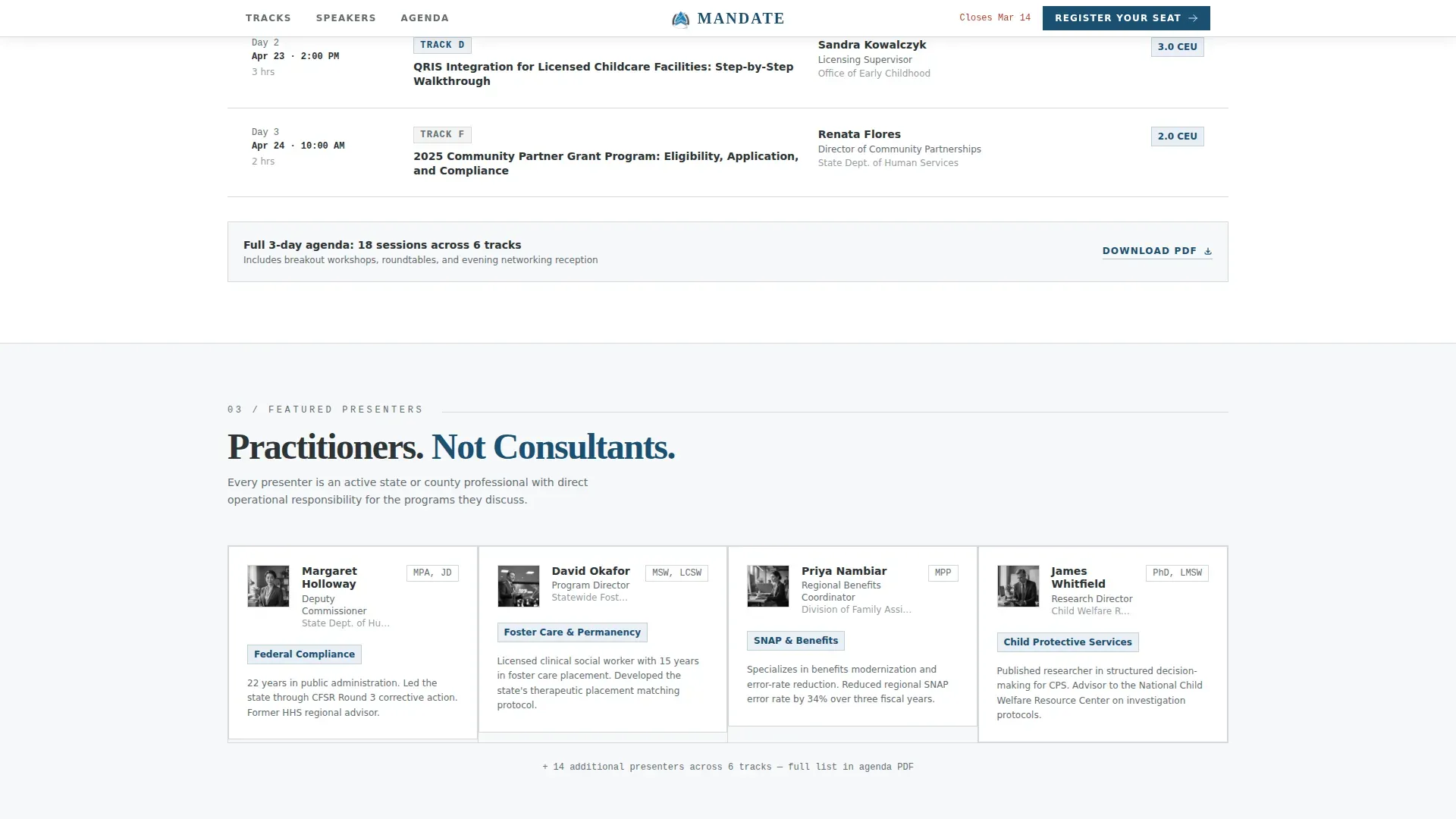
Dedicated sections display speaker cards with professional credentials and agency affiliations. Session tracks are organized into a role-based workshop grid showing schedule, speaker, and track details. This level of structural detail is what county administrators and department heads need before they can approve attendance for their staff. Institutional authority in this context means showing exactly who will be in the room and what knowledge they bring.
Page sections overview
| Section | Purpose |
|---|---|
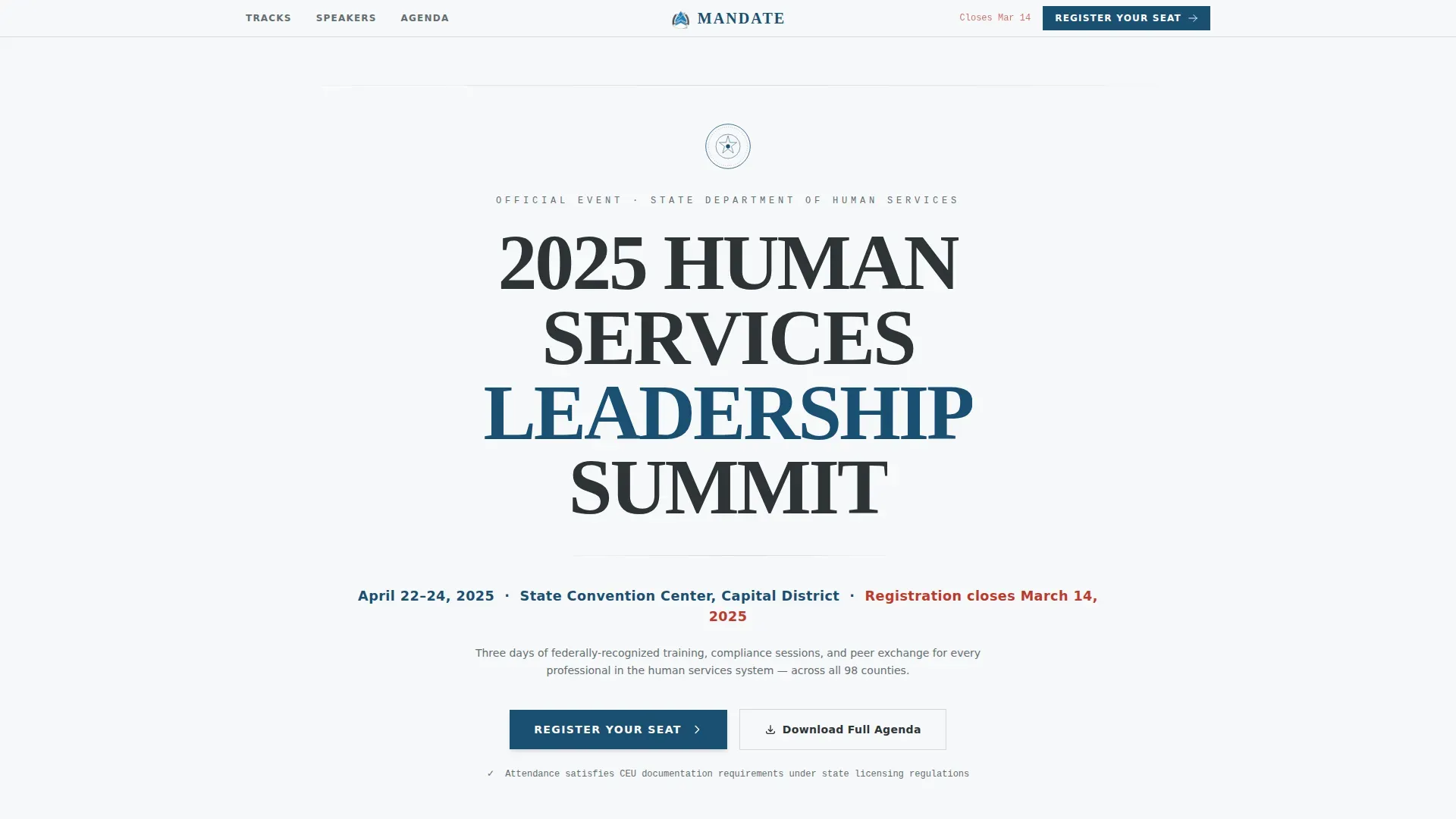
| Hero Header | Centers the event title, department seal, date, venue, and registration deadline |
| Sticky Registration Bar | Keeps the primary registration call to action visible during scroll |
| Stats-First Card Grid | Displays six impact statistics linked to corresponding summit tracks |
| Session Tracks Grid | Lists role-based workshops with schedule, speaker, and track details |
| Speakers and Credentials | Shows professional credential cards with agency affiliations |
| Registration Form | Guides users through four steps: role, info, tracks, accommodations |
| Agenda Download Path | Captures email before delivering the full agenda PDF |
| Page Footer | Provides department contact, legal links, and horizontal footer layout |
Design & branding system
The Mandate template uses the Arctic White color system to communicate institutional authority through restraint. White dominates so completely that every colored element carries the gravity of an official stamp. The palette feels like a freshly printed government document: starched, unambiguous, and heavy with public trust. Typography reinforces this identity. The Fraunces display face at headline weight carries the same authority as large official signage, while Plus Jakarta Sans keeps body text clean and highly readable.
- Arctic White (#F7F8FA) dominates all backgrounds; Slate Charcoal (#2D3436) handles primary text and card borders; Policy Blue (#1B4F72) marks all headers and interactive elements; Emergency Vermillion (#C0392B) appears exclusively on deadline alerts and registration-closing notices
- The header is a giant centered headline in Fraunces at Helvetica-equivalent weight, set in slate charcoal against unbroken arctic white, with the department seal placed small and precise directly above it, and a single line below carrying the date, venue, and deadline in policy blue
- Card components are uniform in size and use slate charcoal borders on arctic white backgrounds, creating a bureaucratic rhythm that is consistent, scannable, and impossible to misread
Mobile & speed optimization
The template is designed desktop-first to serve county administrators and department staff working at workstations. That priority does not reduce mobile quality. Caseworkers in the field need full access to the registration form, the session track grid, and the deadline counter from any device. The card grid reflows cleanly for smaller viewports, and the sticky registration bar adapts without obscuring content.
- The four-step form transitions are client-side only, meaning the page loads as a fast static file with no server-round-trip delays between form steps
- All cards in the modular grid are built to reflow from a desktop multi-column layout to a single-column stack on mobile, preserving readability for users accessing the page from phones in the field
- The sticky registration bar remains functional and properly sized on mobile, ensuring that the primary call to action stays accessible regardless of scroll position or screen width
How this template helps you convert
Mandate converts because it respects the intelligence of its audience. Government professionals, health care administrators, and community organization leaders do not respond to generic marketing language. They respond to clear data, verifiable credentials, and deadlines they cannot ignore. Every structural element of this template is placed to reduce friction and reinforce trust at the exact moment a visitor is deciding whether to register.
- The stats-first card grid immediately establishes departmental scale and legitimacy, giving visitors the institutional evidence they need to feel confident that this summit is worth their time and their agency's travel budget
- The four-step registration form removes uncertainty by giving each visitor a role-based entry point, so a caseworker, a county administrator, and a nonprofit director all feel that the form was built for them specifically, and the continuing education documentation note closes the loop for the largest segment of the audience
Other information about this template
Mandate is purpose-built for the specific operational context of state and local government human services departments. This section covers additional design intent, compliance-relevant context, and broader use-case considerations that inform why the template is structured the way it is.
The template reflects the way health and human services agencies actually communicate internally and externally. A state department of health and human services manages a wide portfolio: foster care placements, SNAP benefit distribution, childcare facility licensing, abuse investigations, and coordination with federal agencies on reporting and funding compliance. Every section of this template exists to serve the professionals navigating that portfolio.
The human services sector in the United States operates under a layered structure of federal and state authority. Federal agencies set policy frameworks; state and local governments implement those frameworks through departments, operating divisions, and contracted organizations. County-level staff often must ensure compliance with new federal requirements before a fiscal year closes. This template is built for that urgency. The deadline counter and the role-based session track selector both reflect the reality that attendance at a professional summit is often a compliance event as much as a development opportunity.
From a governance standpoint, the template structure aligns with how real institutional authority is established and maintained. Verified credentials include displaying official seals from regulatory bodies. A clear mission statement outlines the organization's role and dedication to public service. Contact information must clearly list a physical address, a direct phone number, and official email addresses. These are not design preferences; they are trust requirements for any government-facing digital presence.
The mandate institutional authority human services landing page template draws on established practices for government digital communication. Institutional authority is established through professional design, verified credentials, and social proof. The use of official logos and a professional design helps establish legitimacy. Single-action focus removes unnecessary navigation to prevent distractions and keeps the visitor on the path to registration.
Professionals working in human services frequently interact with programs and requirements tied to the broader public health system. Topics like mental health, disease prevention, primary care coordination, and health promotion are regular parts of the professional development conversation at a summit like the one this template supports. The session track structure is designed to accommodate that breadth, allowing workshop organizers to configure tracks that span everything from mental health services delivery to administrative compliance with federal reporting mandates.
Many states have adopted frameworks that align with a national action plan for health and human services workforce development. A strategic plan for summit content might reference the Affordable Care Act, the Children's Health Insurance Program, population health goals, or public health practice standards. The template's checkbox-based session track selection is flexible enough to support whatever topic grid the organizing department defines.
Accessibility is a foundational requirement for any government digital product. The Americans with Disabilities Act (ADA) mandates that state and local governments must ensure their services are accessible to individuals with disabilities. Web accessibility is a critical component of ensuring that people with disabilities can access information and services online. This template is structured with accessibility considerations in mind: clear color contrast ratios, form fields that support assistive technologies, and a layout hierarchy that works for screen readers. State and local governments must take steps to ensure their communications with people with disabilities are as effective as their communications with others. Accessibility standards include Section 508 compliance and mobile-friendliness, and this template's design system is built to support both.
The four-step registration form includes an accommodations step specifically to capture the needs of people with disabilities attending in person. Effective communication aids and services must be provided to individuals with disabilities to ensure equal access to services. Barriers to accessibility can include poor color contrast, lack of text alternatives for images, and absence of captions for videos, so the template uses high-contrast arctic white and slate charcoal as its primary combination.
The assistant secretary level of government authority is reflected in the template's tone and structure. The department seal placement, the plain-language mission statement hierarchy, and the official form structure all signal that this page comes from a body with real institutional standing. Legal transparency includes links to governing legislation and clear identification of content ownership. Trust symbols include formal statements of content ownership and privacy policies. The page serves as a high-trust entry point balancing user needs with regulatory requirements.
From a technology standpoint, no-code platforms enable non-technical users to create applications without traditional programming skills, and this template is designed to be deployed by a communications or outreach team without engineering support. Integrating technology in human services can improve service delivery and efficiency, and the template's client-side form logic reflects that principle. No-code tools can help human services organizations quickly adapt to changing needs and requirements, which is particularly valuable when a summit date shifts or a new session track needs to be added quickly.
Data-driven results share metrics on the number of people served or key outcomes to demonstrate effectiveness. The stats-first card grid is the clearest example of this principle in action. Each statistic is not just a number; it is a demonstration of departmental accountability. This approach to data collection and public reporting aligns with expectations from the general services administration and from federal program oversight bodies.
High-quality images of actual staff and leadership humanize the institution and highlight expertise. The speaker credential cards in this template are designed for real headshots and real agency affiliations, not generic stock photography. Public engagement is critical for the success of human services programs, and a summit registration page is one of the most visible public engagement surfaces a department operates.
The template is also relevant to organizations working in adjacent spaces:
- Hospitals and participating hospitals that partner with state departments on care coordination and patient safety initiatives
- National association bodies that convene state and local government professionals for training and peer learning
- Community health organizations working on disease control, disease prevention, and health promotion programs at the local level
- Organizations serving young adults in foster care transition programs or children's health insurance program enrollment outreach
Other resources for human services web design and government digital standards can be found through the general services administration and through federal digital services guidance. Lessons learned from previous government web modernization efforts consistently point to the same priorities: clarity, trust, accessibility, and a single clear action on every page.
The template's footer follows a horizontal flow pattern that accommodates department contact information, links to governing legislation, privacy policy statements, and other programs the department operates. This completes the institutional experience from header to footer, ensuring that every section of the page carries the same weight of public accountability.
Effective communication strategies enhance public engagement in human services. Communication strategies in human services should align with institutional mandates. Training and professional development are essential for implementing effective communication strategies in human services. Collaboration among other stakeholders enhances the effectiveness of communication strategies in human services. Utilizing feedback from the community can improve communication strategies in human services, and the session track selection mechanism in this template is one way to surface that feedback before the event itself.
State and local government departments that operate across many states will find the template adaptable to any jurisdiction's branding requirements while preserving the core institutional authority design system. The color system, typography, and layout structure can all be updated to reflect a specific department's official visual identity. The underlying architecture, however, is designed to work across the full range of state-level human services offices in this country.
Theme
Institutional Authority
Creative direction
Stats-First Impact
Color system
Arctic White
Style
Card Grid (Modular)
Direction
Event Registration
Page Sections
Stats-first Modular Impact Card Grid
Four-step Registration Form with CEU Note
Emergency Vermillion Deadline Counter
Sticky Primary Registration Bar
Agenda Email Capture Secondary Path
Speaker Credentials and Role-based Session Grid
Related questions
Who is this template designed for?
What does the four-step registration form include?
How does the deadline urgency feature work?
Can the template support a secondary conversion path for visitors not ready to register?
Is this template suitable for other government or public health practice events?



