Precision Floor Finishing Landing Page Template
Surface is a hub-and-spoke landing page template built for precision floor finishing and surface treatment companies. It guides visitors through a full project lifecycle, assess, prep, treat, cure, protect, using timeline-driven scroll sections, a behind-the-scenes video header, and technical content that builds trust before asking for anything in return.
by Rocket studio
Quick summary
Surface is a single-page, anchor-navigated landing page template for construction surface treatment and finishing companies. It leads with a low-angle jobsite video header, walks visitors through a five-phase project timeline, and earns conversions by delivering genuinely useful technical resources before gating any content. The design is dark, utilitarian, and precise, built to speak the same language as general contractors, facility managers, and specifying architects.
Who this template is for
This template is built for surface treatment and floor finishing businesses that serve sophisticated, specification-driven clients. If your crew handles complex commercial and industrial floors, this page positions your work as engineering-grade, not commodity labor.
- General contractors managing multi-trade punch lists on active slabs
- Facility managers dealing with failing coatings in distribution centers or industrial buildings
- Specifying architects who need a finisher that can read shop drawings and deliver to spec
What problem this template solves
Most flooring and surface treatment websites look identical. They show a gallery, list services, and ask visitors to call. That approach fails the moment a general contractor or architect needs technical confidence before awarding a bid. This template solves that credibility gap head-on.
- Visitors arrive skeptical and leave with spec sheets, moisture-testing references, and case study documentation
- The page positions surface finishing as a measurable, engineered process rather than a trade service
- Ungated technical tools let visitors extract real value before ever seeing a form field
What you get with this template
You get a complete, structured landing page with five anchor-navigated spoke sections, a gated resource download, and multiple ungated conversion paths. Every section is connected to the visual identity and the project lifecycle narrative.
- A slow-pan behind-the-scenes video header with a full-bleed, low-angle jobsite shot and headline overlay
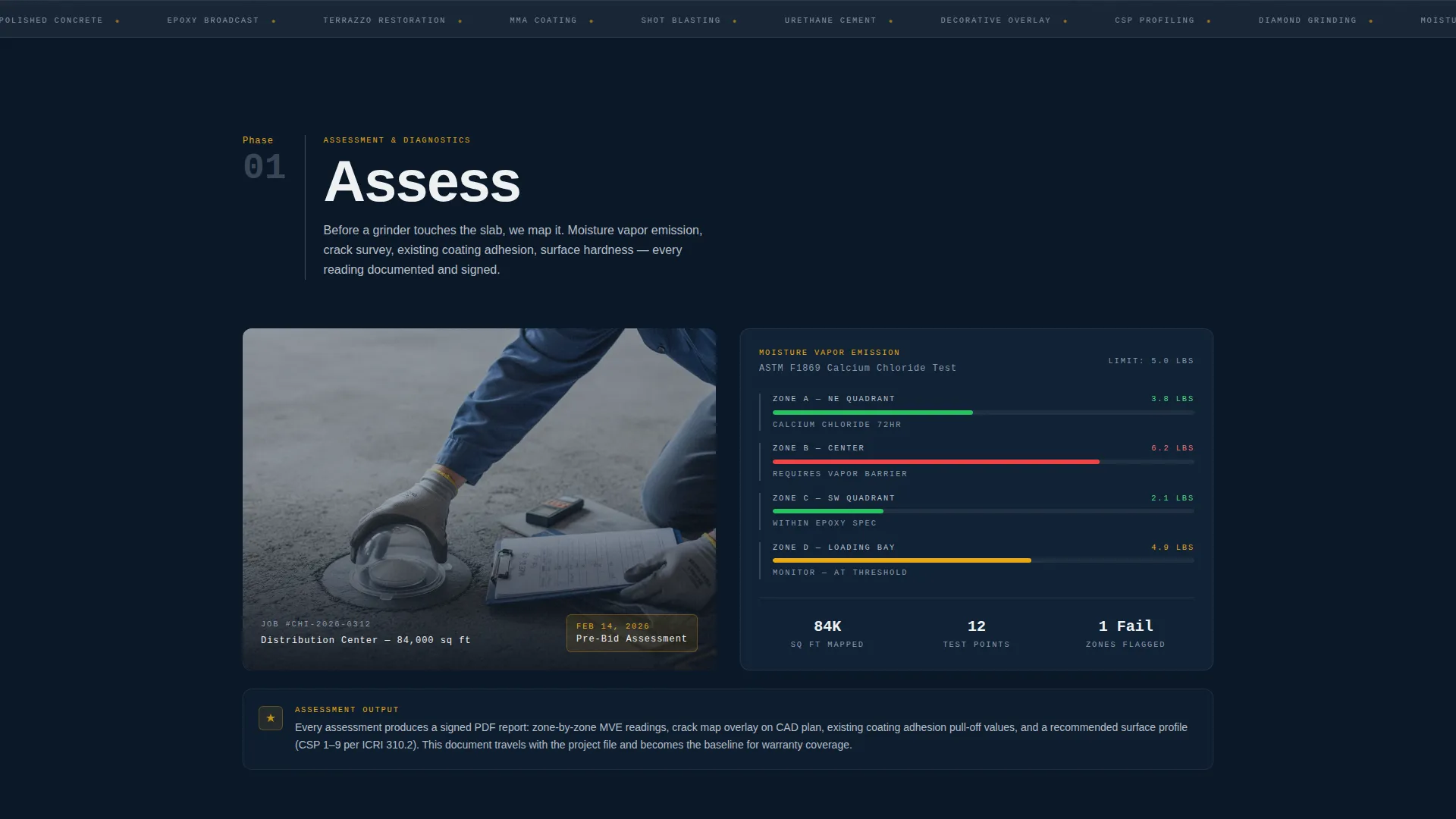
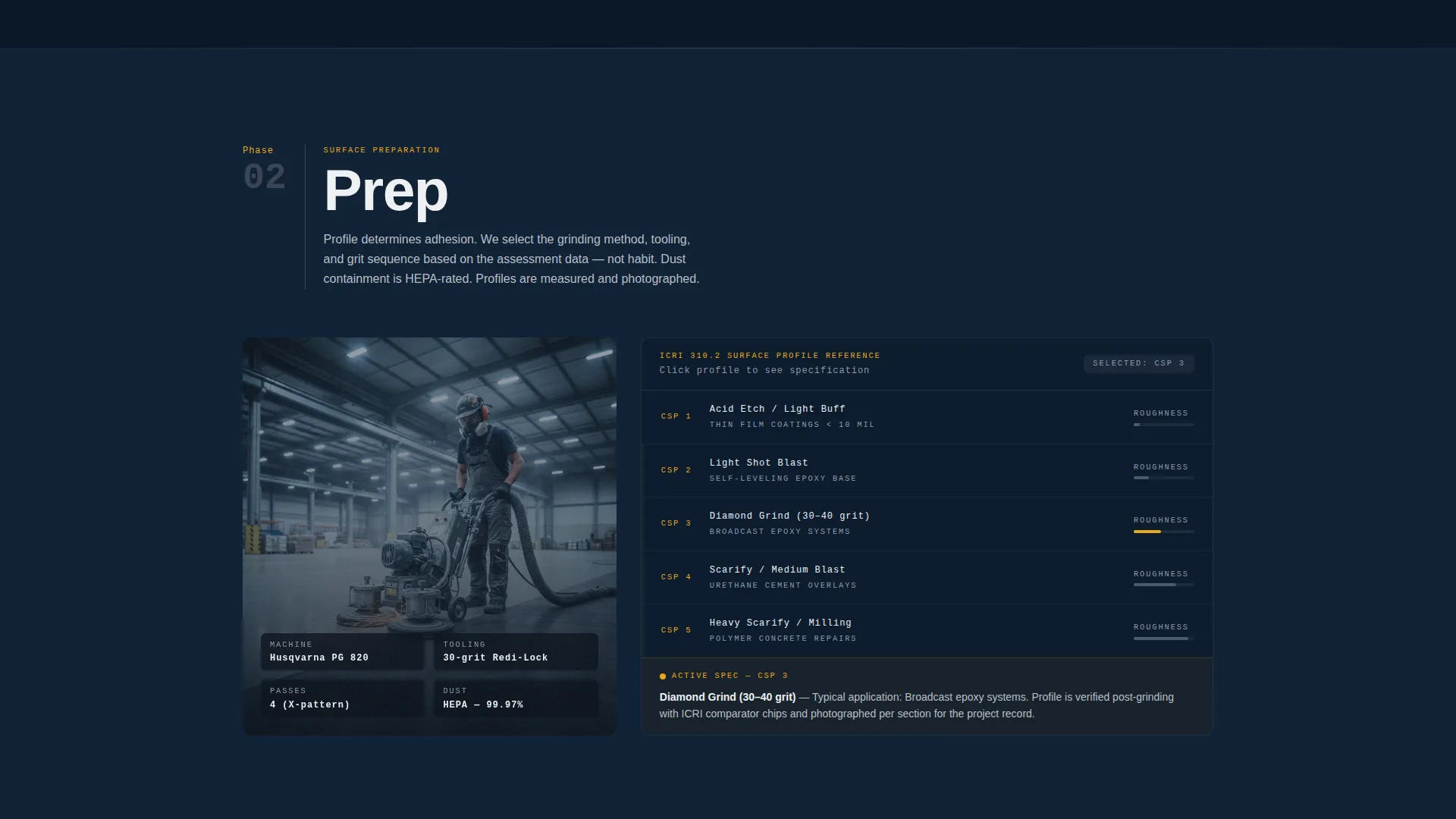
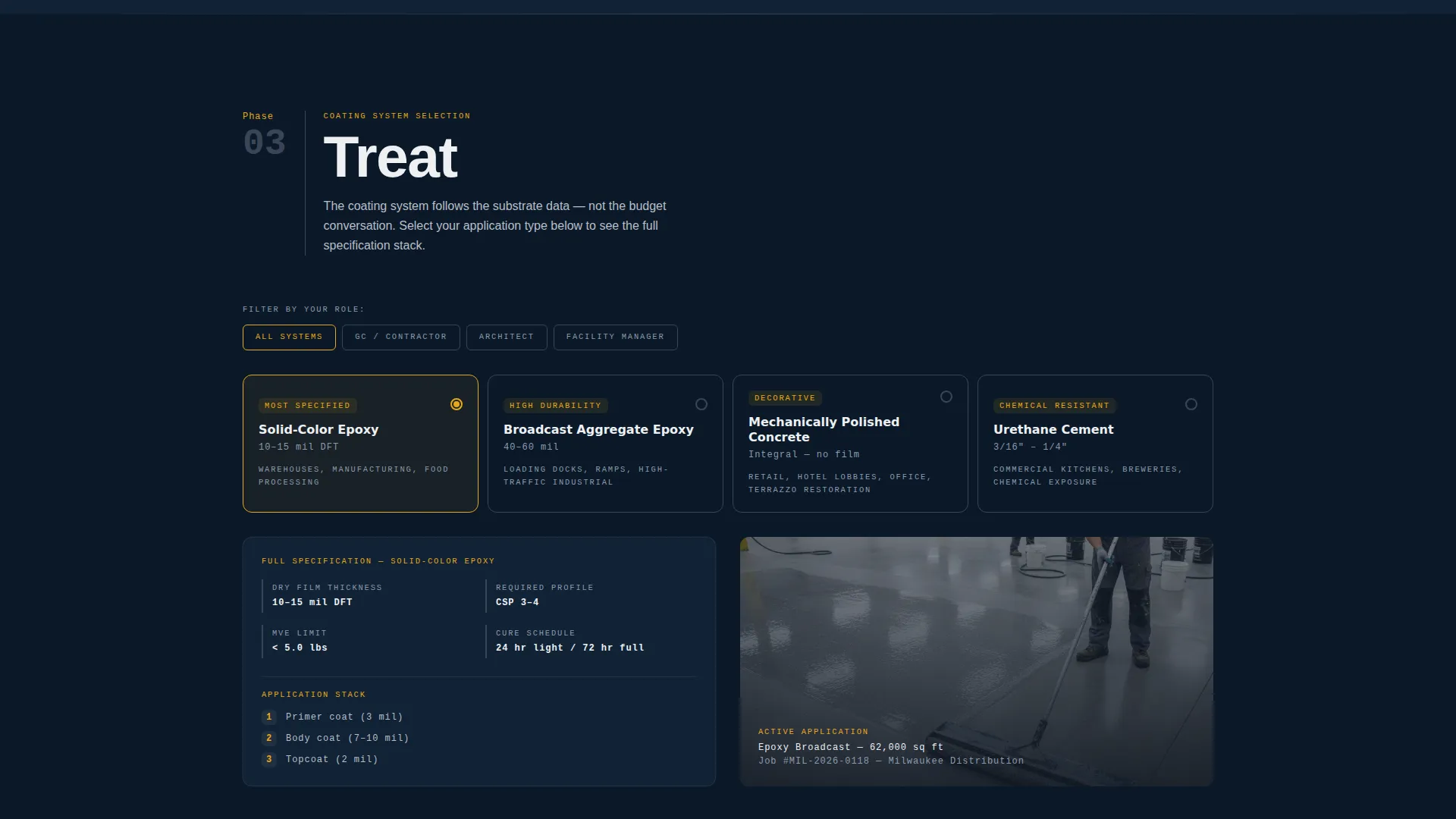
- Five timeline spoke sections (Assess, Prep, Treat, Cure, Protect) each built around jobsite photography and specification data panels
- An embedded coating-system selector tool, a moisture-testing reference chart, and a photo-documented case-study carousel
Feature list
This template is built around a set of purposeful components that serve both the technical buyer and the visual first impression.
Behind-the-Scenes Video Header
The header opens with a slow-pan ground-level video: a planetary grinder working through coating, diamond segments against aggregate, and an operator lit by work lights. The headline "What's Under Your Floor Is Our Entire Business" materializes in concrete white over the footage. No music, just the mechanical audio of the machine at work.
Five-Phase Anchor Navigation Rail
A fixed left-rail navigation pins five project phase labels, Assess, Prep, Treat, Cure, Protect. Visitors can jump directly to any phase or scroll through in sequence. Each spoke section opens with a dated, unretouched jobsite photograph paired with its specification data panel.
Specification Data Panels
Each phase section displays real project metrics: moisture-vapor readings, surface-profile measurements, mil-thickness gauges, and cure-time countdowns. This grounds every claim in measurable data and speaks directly to contractors and architects who evaluate work by the numbers.
Progressive Background Transformation
As visitors scroll through the five phases, the running background image transitions from cracked concrete through grinding, coating, sealing, and a final gleaming surface. The visual progression reinforces the core argument that surface treatment is a disciplined, phased engineering process.
Gated Spec Sheet Download with Role Capture
A single-field email capture expands on click to reveal a role selector (General Contractor, Architect, Facility Manager) and a project stage selector (Pre-Bid, Active, Remediation). The gate sits at the end of the content flow, after the visitor has already received ungated value.
Ungated Technical Resource Suite
Three ungated components serve visitors before any form appears: a coating-system selector tool, a moisture-testing reference chart, and a photo-documented case-study carousel. These tools make the page a genuine reference resource, not just a marketing brochure.
Page sections overview
| Section | Purpose |
|---|---|
| Video Header | Establishes brand authority with a low-angle jobsite video and headline |
| Anchor Nav Rail | Pins five project-phase labels to the left rail for direct section access |
| Assess Phase | Opens with dated jobsite photo and moisture-vapor reading data |
| Prep Phase | Shows surface-profile measurements and pre-treatment documentation |
| Treat Phase | Displays coating system data and mil-thickness specification panels |
| Cure Phase | Presents cure-time countdown data and in-progress jobsite photography |
| Protect Phase | Delivers final sealer documentation and completed surface imagery |
| Coating Selector Tool | Lets visitors match coating systems to their project conditions |
| Moisture Reference Chart | Provides ungated moisture-testing reference data for technical buyers |
| Case Study Carousel | Photo-documented project walkthroughs with before-and-after context |
| Spec Sheet Download | Gated single-field form with role and project-stage qualifier fields |
Design & branding system
The visual identity follows a Dashboard Pro theme built on the Navy Authority color system. Every color decision serves a function: backgrounds recede, dividers organize, and amber commands attention at exactly the right moment.
- Deep command-center navy (#0B1929) as the primary page background, gunmetal toolbar gray (#3A4556) for section dividers and navigation rails, and clean concrete white (#EDF0F2) for content panels and body text
- Safety-stripe amber (#E8A817) used exclusively for active navigation indicators, call-to-action buttons, and hover states, never decorative
- The overall aesthetic reads like the control screen of a floor-grinding machine: dark, utilitarian, and precise, with white space treated as polished concrete and amber as caution tape marking the next action
Mobile & speed optimization
The template is structured with mobile readability in mind. The anchor navigation rail and specification data panels adapt so that technical content remains scannable on smaller screens without losing its structural clarity.
- The fixed left-rail anchor navigation collapses appropriately for mobile viewports, keeping phase labels accessible without consuming screen space
- Specification data panels and the case-study carousel are laid out to reflow cleanly across device widths
How this template helps you convert
This template is built around a content-first conversion model. Visitors receive real technical value before encountering any form, which makes the eventual ask feel earned rather than extracted.
- The ungated resource suite, coating selector, moisture chart, and case-study carousel, builds credibility and keeps technical buyers engaged long enough to see the full lifecycle argument
- The gated spec sheet download uses a progressive form that captures email first, then qualifies the lead by role and project stage, giving your team actionable context for every inquiry
Other information about this template
This template was designed specifically for the construction surface treatment and finishing niche, where buyers are technical, skeptical, and accustomed to evaluating work by measurable outcomes. The Hub and Spoke structure with anchor navigation suits content-rich service pages that need to hold a specialist audience without fragmenting the experience across multiple pages.
- The template style is Hub and Spoke with anchor navigation, structured as a single long-form landing page rather than a multi-page site
- The creative direction is Timeline Progression, meaning the scroll itself tells the story of a project from raw slab to finished surface
- The header concept is Behind the Scenes, prioritizing authentic jobsite documentation over polished lifestyle imagery
- The landing page direction is Content and Resource, meaning the page earns conversion by giving away useful technical content before gating anything

Theme
Dashboard Pro
Creative direction
Timeline Progression
Color system
Navy Authority
Style
Hub & Spoke (Anchor Nav)
Direction
Content/Resource
Page Sections
Behind-the-scenes Video Header
Five-phase Anchor Navigation
Specification Data Panels
Progressive Background Transformation
Gated Spec Sheet with Lead Qualification
Ungated Technical Resource Suite
Related questions
Can I use this template if my company handles multiple flooring types?
Does the spec sheet download require a complex form setup?
Is the coating-system selector tool customizable?
Who is the primary audience this template is designed to attract?
How does the anchor navigation work across the five phases?



