Emergency Electrical Landing Page Template
Surge is a hero-dominant emergency electrical landing page template built for 24/7 electrical service crews. It opens with a location input that estimates arrival time on the spot, guides visitors through Before/After repair evidence, and closes with an inline booking module. The design uses a Sunset Mesa color system to project urgency, warmth, and total reliability.
by Rocket studio
Quick summary
Surge is a single-page template designed for emergency electrical services that operate around the clock. It greets visitors with a zip code input and a real-time estimated arrival display, then builds trust through draggable Before/After repair sliders before asking for a booking. The result is a page that feels as immediate as flipping a breaker back on.
Who this template is for
This template is built for electrical service businesses that respond to urgent residential and commercial calls at any hour. It suits operators who need a direct, no-friction path from visitor arrival to booked job.
- Emergency electricians running 24/7 dispatch operations
- Property managers or electrical contractors serving multi-unit residential clients
- Small business owners offering rapid-response panel and outage repair
What problem this template solves
When the power goes out, visitors are stressed and moving fast. A slow or cluttered landing page loses that visitor before they ever call. Surge removes every obstacle between panic and booking.
- Visitors land and immediately see a response-time estimate tied to their location
- Trust is built through real job evidence before any pricing or payment is mentioned
- The booking path stays short, with issue type and phone number as the only required fields
What you get with this template
Surge delivers a fully structured, single-page layout with every section designed around one outcome: getting a service truck dispatched. The layout is intentional from the first pixel to the final call-to-action button.
- A location-input hero that dominates 90 percent of the viewport on load
- A scrolling Before/After reveal sequence showing escalating electrical repair scenarios
- An inline booking module with pre-filled zip code, issue type selector, and flat-rate pricing display
Feature list
This template ships with purpose-built components that match the way real emergency electrical clients think and act under pressure.
Location-Input Hero Scene
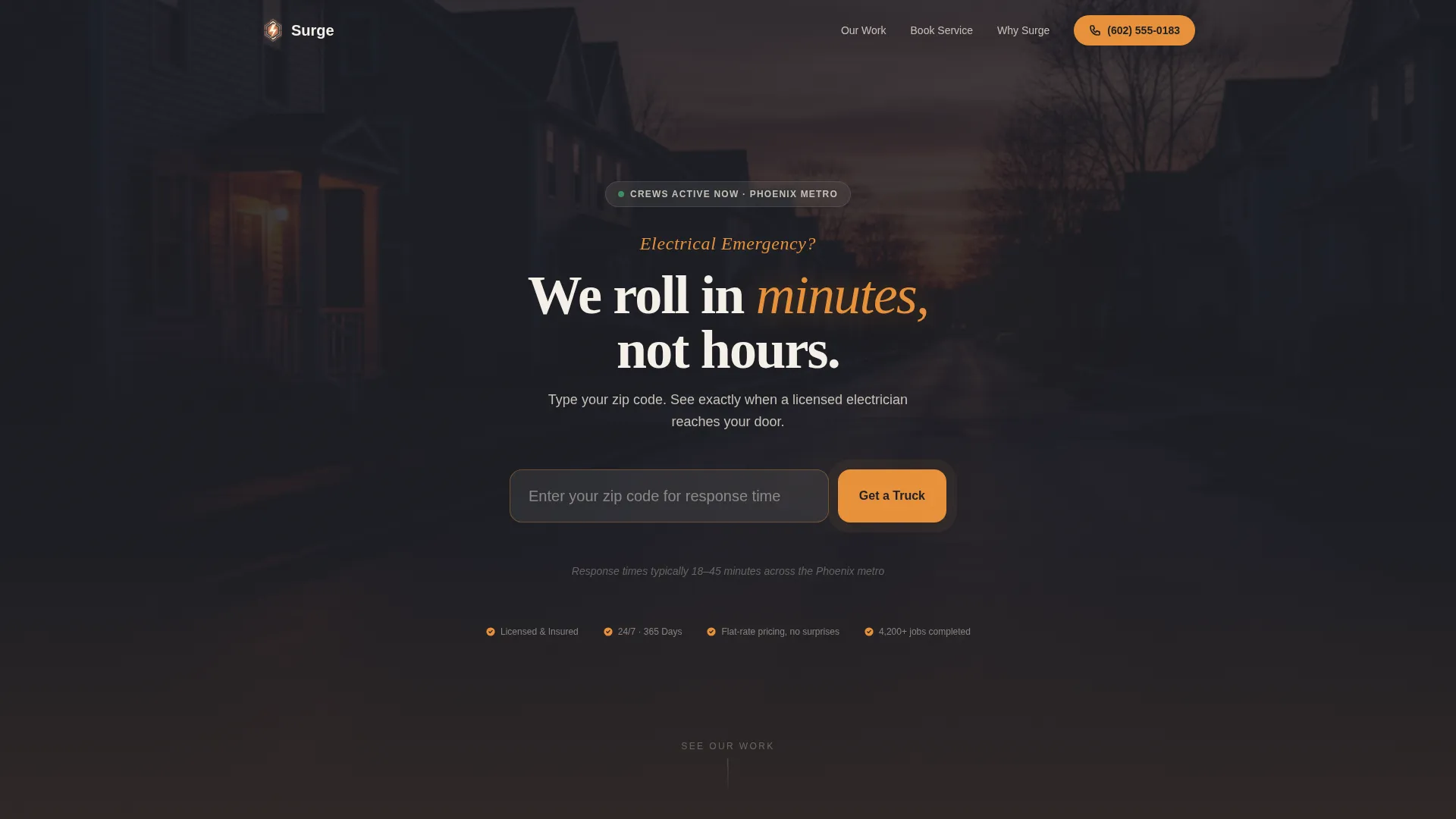
The viewport opens on a dimly lit residential street at dusk. A single porch light flickers while every other window sits dark. An oversized zip code input field sits centered over the scene with a pulsing amber button. When a visitor types their code, an estimated arrival time populates below in large utility-style numerals.
Before/After Repair Sliders
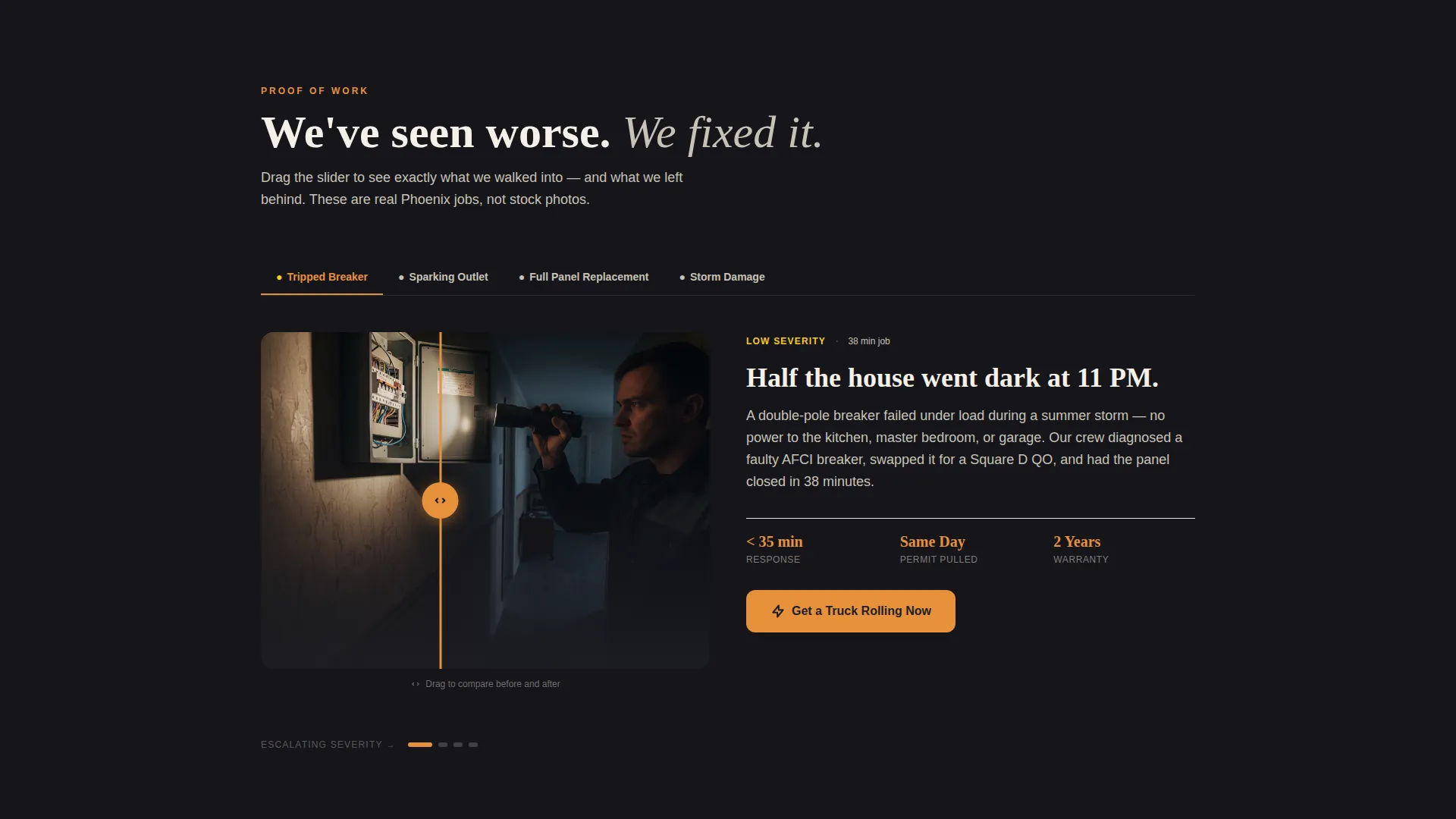
Each scroll section pairs a real emergency scenario on the left with a completed repair on the right, controlled by a draggable slider. Scenarios escalate from a tripped breaker to a flickering fixture, then a full panel replacement, and finally storm damage restoration.
Inline Booking Module
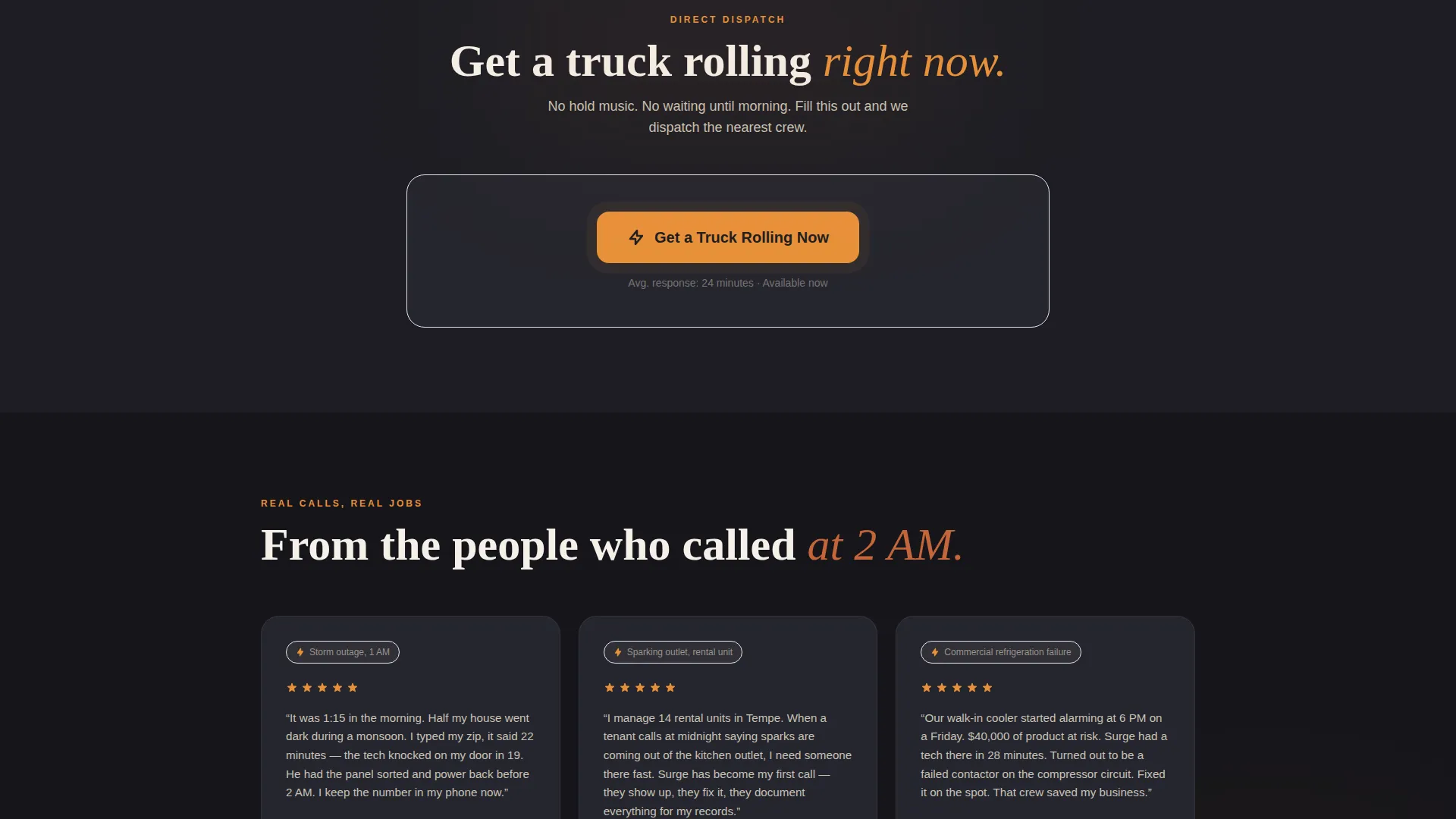
Tapping the primary call-to-action expands a booking form directly on the page. It asks for zip code (pre-filled from the header entry), issue type, and a phone number. No page redirect, no friction.
Flat-Rate Pricing Reveal
Pricing appears only after the visitor selects an issue type. It displays as a transparent flat-rate range so there are no surprises when the crew arrives.
Fixed Mobile Call Button
A click-to-dial "Call Now" button stays anchored to the bottom of the viewport on mobile. Visitors who prefer a phone call never have to scroll to find it.
Escalating Narrative Sections
The page is structured so that each section increases in repair severity and reassurance. The visual and copy rhythm says "we have seen worse and fixed it" at every scroll point.
Page sections overview
| Section | Purpose |
|---|---|
| Location Input Hero | Zip code entry with live arrival time display |
| Before/After Slider 1 | Tripped breaker scenario and repair |
| Before/After Slider 2 | Flickering fixture scenario and repair |
| Before/After Slider 3 | Full panel replacement evidence |
| Before/After Slider 4 | Storm damage restoration proof |
| Inline Booking Module | Issue type, zip, phone, and flat-rate pricing |
| Fixed Call Button | Mobile click-to-dial persistent anchor |
Design & branding system
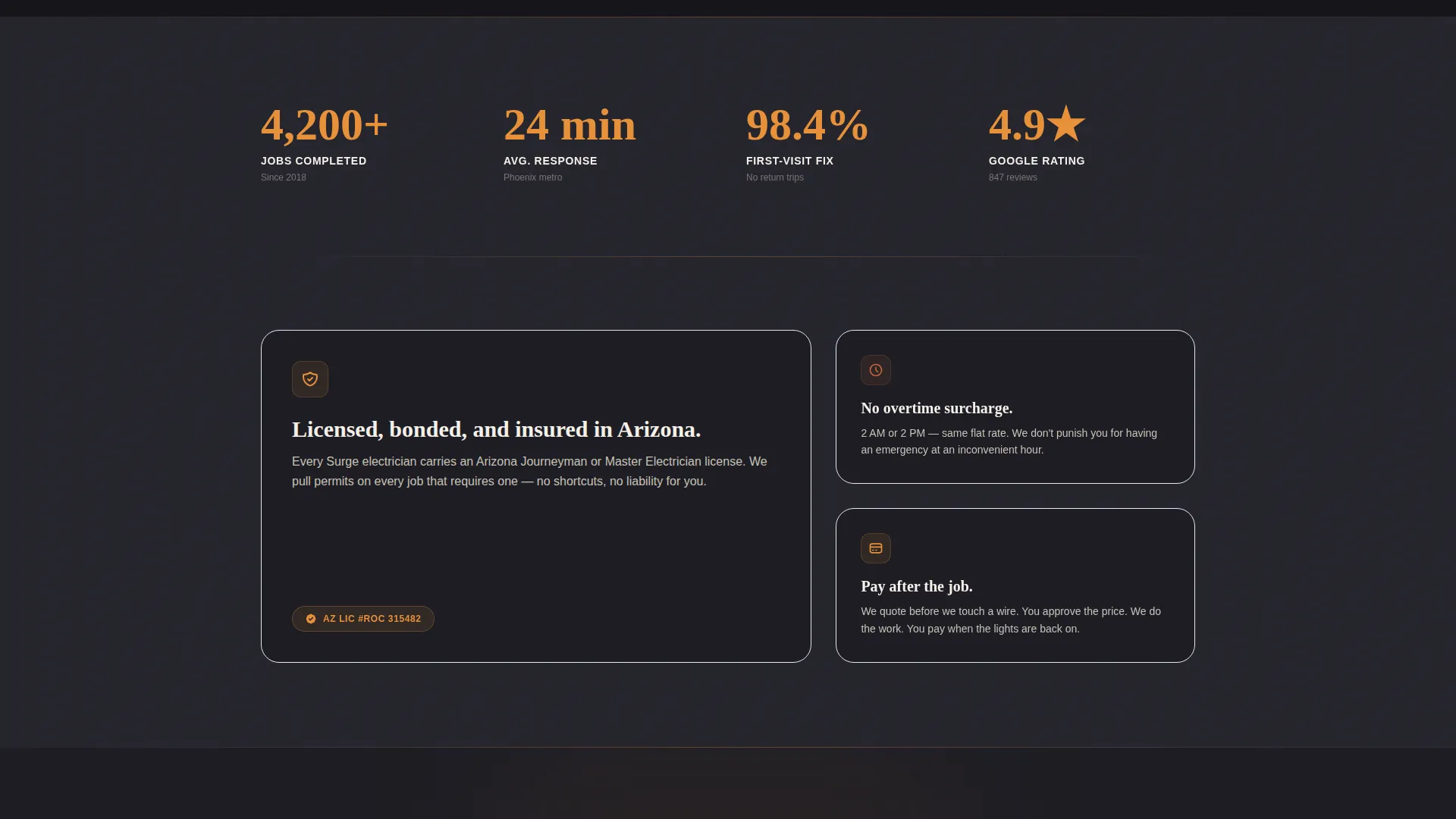
The Sunset Mesa color system gives Surge a visual identity that feels grounded, urgent, and warm without drifting into generic danger-red territory. Every color choice has a functional reason tied to the emergency service context.
- Deep charcoal (#1E1E24) serves as the primary background, reading like a house that has lost power
- Warm amber (#E8913A) drives the accent, echoing a work lamp in a crawlspace or a pulsing call-to-action
- Dusty terracotta (#C4653A) handles secondary elements, suggesting a desert horizon after a storm clears
- Bone white (#F5F0E8) keeps text and form fields sharp and readable against all dark surfaces
Mobile & speed optimization
The template layout is structured to keep the mobile experience fast and frictionless. Emergency visitors on a phone need the most important action within one thumb reach.
- The zip code input and amber dispatch button are the first interactive elements a mobile visitor encounters
- The fixed "Call Now" button stays visible at the bottom of the screen throughout the entire scroll
- The Before/After sliders and booking module are laid out to work cleanly on touch screens without extra steps
How this template helps you convert
Surge earns the booking before it asks for one. The page is sequenced so that trust is established through evidence before any commitment is requested.
- The arrival-time display answers the visitor's first question immediately, reducing anxiety and keeping them on the page long enough to scroll.
- The Before/After slider sequence builds credibility by showing real repair outcomes, so the visitor feels confident in the crew's capability before they fill in a single field.
- Flat-rate pricing tied to issue type removes the fear of hidden costs, which is one of the most common reasons emergency service visitors abandon a booking form.
Other information about this template
Surge is categorized under Construction and Home, specifically within the Electrical Service and Emergency Electrical niches. It follows a Hero-Dominant layout style at a 90/10 ratio, meaning nearly the entire initial viewport is dedicated to one focused action rather than split across competing elements. The Service Utility theme and Before/After Reveal creative direction make it equally suited to electricians, electrical contractors, and utility-adjacent home service operators who need a page that projects calm authority under pressure. The Direct Sales landing page direction means there is no content buffer between the visitor and the booking path. The template can support both homeowner-facing dispatch services and property management companies that need a credible, fast-loading presence for tenant emergency referrals.
- Template style: Hero-Dominant (90/10)
- Theme: Service Utility
- Creative direction: Before/After Reveal
- Header concept: Location Input
- Landing page direction: Direct Sales
- Color system: Sunset Mesa
- Category: Construction and Home, Electrical Service, Emergency Electrical
Theme
Service Utility
Creative direction
Before/After Reveal
Color system
Sunset Mesa
Style
Hero-Dominant (90/10)
Direction
Direct Sales
Page Sections
Location-input Hero with Arrival Time
Draggable Before/after Repair Sliders
Inline Booking Module
Issue-triggered Flat-rate Pricing
Fixed Click-to-dial Mobile Button
Escalating Narrative Page Flow
Related questions
Who is this landing page template built for?
Can I replace the Before/After scenario images with my own job photos?
Does the booking form support different issue types?
How does the zip code arrival time feature work?
Is the mobile call button included in the template?



